A MacBook Air is a lovely little machine until the keyboard starts fighting you. Hunched over the built-in keys on a tray table, or tapping away at a desk where your wrists have nowhere to rest, the romance fades fast. The right external keyboard turns the Air into a real workstation: better posture, a fuller layout, and a typing feel that doesn’t punish long sessions. I pulled together ten solid options that play nicely with macOS, iPadOS, and the rest of the Apple ecosystem, and that fit real desks, real laps, and real budgets.
An Overview Of The Picks

Logitech MX Keys Advanced Wireless Illuminated Keyboard for Mac

Logitech MX Keys S Combo Mac Wireless Keyboard and Mouse

Macally Wired Keyboard for Mac USB C + A Large Print

ProtoArc K90-A Backlit Bluetooth Keyboard for Mac and iPad
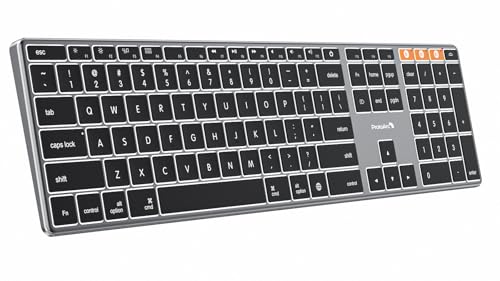
ProtoArc K110-A Backlit Wireless Keyboard for Mac Aluminum

Macally Large Print Mini Backlit Wired Keyboard for Mac
TECKNET Wired Keyboard for MacOS Devices Dual Interface
TECKNET Premium Bluetooth Keyboard for Mac White

Macally Wired Keyboard for Mac with Built-In USB Hub

ProtoArc KM100-A Backlit Bluetooth Keyboard and Mouse Combo
What Each Pick Brings To The Table
I’ve kept an MX Keys on my desk for years, and the Mac-specific layout still sets the bar for premium typing on a MacBook Air. The keys are spherically dished, which sounds like marketing until you actually rest your fingers on them: each fingertip settles into a shallow bowl, and typos drop noticeably during long writing sessions. The body is a single slab of metal with a low profile, so it sits flat under your wrists and doesn’t dominate a slim Apple setup.
Backlit LED keys react to ambient light, so the legends fade up when your coffee shop dims and quiet down again in a sunny window seat. Connection options include Bluetooth and the included USB-C cable for charging, which doubles as a wired fallback during long flights. For anyone living in the Apple ecosystem who wants a no-compromise daily driver, this is the keyboard I’d point to first.
Bright Spots
- Mac-native key layout means Command, Option, and the function row behave the way macOS expects from day one.
- Metal chassis stays planted on the desk, even during fast typing bursts, and it cleans up with a quick wipe.
- Backlight responds to ambient light, so battery holds up better than fixed-brightness boards.
- Bluetooth pairing with up to three devices makes swapping between an iMac, an iPad, and a MacBook Air painless.
Worth Noting
- No numeric keypad, so spreadsheet jockeys may find themselves reaching for arrow keys more than they’d like.
- The low-profile travel isn’t for everyone; touch typists used to mechanical switches may find it too flat at first.
- Owners commonly report that the backlight, while smart, draws battery faster during heavy use.
Who It Suits Best
Daily Mac power users who type for hours, value quiet keystrokes, and want a keyboard that visually disappears into an Apple setup.
Where Another Pick Suits Better
For anyone who needs a dedicated number pad alongside the keyboard, the ProtoArc KM100-A offers a full-size layout with a matching mouse.
The MX Keys S Combo trades the standalone MX Keys for a matched keyboard-and-mouse pair, which matters more than people expect. The MX Master-series mouse in this combo is sculpted for a right-handed grip, with a thumb rest that keeps your hand relaxed through marathon editing sessions. If you’ve ever finished a workday with a sore wrist from a flat, generic mouse, the difference shows up by lunchtime.
The keyboard itself carries the same Mac layout as the standalone MX Keys, so the learning curve from pick 1 is essentially zero. Customizable shortcuts through Logi Options+ let you bind Mission Control, screenshot, or emoji picker to the function row, which saves real keystrokes once you commit them to muscle memory. For a desk where everything else is Space Gray, this combo blends in like it shipped with the iMac.
Useful Highlights
- Mouse and keyboard ship paired and ready, which removes the friction of buying two products that may not match.
- Programmable keys via the Logi app make common macOS shortcuts feel native instead of bolted on.
- Both peripherals pair over Bluetooth and stay connected across MacBook Air, iPad, and iMac with a single switch.
Trade Offs
- The mouse is right-handed only, which leaves left-handed users reaching for an alternative.
- Combo pricing is steeper than the keyboard alone, so budget-first shoppers may prefer the standalone MX Keys.
- Both pieces charge via USB-C, but neither works while plugged in over a long tether if you prefer a wired feel.
Made For
Right-handed professionals who want a full desk refresh with one purchase, and who already rely on Logitech’s software for custom shortcuts.
Consider Something Else When
Left-handed users or anyone who only needs a keyboard should look at the standalone Logitech MX Keys or the ProtoArc K110-A.
This Macally board is the kind of keyboard you don’t notice until you actually use it, and then you wonder how you tolerated tiny legends for so long. The keycap print is roughly four times the size of standard markings, which sounds gimmicky until you try hunting for a semicolon in a dim home office at 10 p.m. Full-size 107-key layout includes a dedicated number pad, so accounting and data work stop feeling like a side quest.
Wired USB-C and USB-A connectivity on a single integrated cable means the keyboard plugs straight into a MacBook Air without dongles or batteries. Backlit keys help in low light, and the scissor-switch mechanism keeps the action quiet enough to share a workspace. Compared to the wireless picks above, the trade-off is obvious: no battery to manage, but also no cable-free desk.
The Upside
- Oversized legends reduce eye strain and speed up the hunt for special characters during long sessions.
- Wired connection means zero pairing headaches, dropped signals, or battery anxiety for traveling between offices.
- Full-size layout with number pad supports serious spreadsheet and data entry work without compromise.
Points To Note
- Wired-only design limits placement to wherever the cable can reach, so cable management matters on a clean desk.
- Plastic body, while light, doesn’t carry the same desk presence as the metal picks above.
Best Suited To
Users with vision sensitivity, anyone working in dim environments, and number-pad-dependent professionals who prefer wired reliability.
Skip It When
Anyone wanting a wireless, premium-feeling board should look at the Logitech MX Keys instead.
The K90-A is for the person whose desk is a converted dining table and whose MacBook Air doubles as a work and travel machine. The compact tenkeyless layout cuts the number pad and squeezes the arrows into the bottom right, which shrinks the footprint without sacrificing the Mac key layout. It feels closer in size to a Magic Keyboard than to a full-size deck, which makes a real difference in a hotel room or coworking nook.
Compatibility is locked to macOS 10.12 or later and iPadOS 13.0 or later, so older hardware is out. In return, you get Bluetooth pairing that hops between a MacBook Air and an iPad with a single key press, and backlit keys for late-night writing. The trade-off versus the Macally board in pick 3 is clear: smaller body, no number pad, but fully wireless.
Points In Its Favor
- Compact body fits in a backpack sleeve and leaves room for a notebook and a coffee cup on a small desk.
- Mac-only tuning means the function row, brightness keys, and media controls line up with macOS expectations.
- Wireless Bluetooth keeps the desk clean and pairs reliably with both laptops and tablets.
Honest Caveats
- Compact layout means no dedicated number pad, which will frustrate anyone working in spreadsheets daily.
- Mac-only support rules out Windows and Linux use, so cross-platform households need a separate board.
Perfect Match For
Hybrid workers and students who want a portable Mac keyboard that doesn’t feel cramped during long writing sessions.
A Better Fit Elsewhere
Number-pad users should consider the ProtoArc KM100-A combo, which keeps the wireless feel but adds a full-size layout.
If you want a keyboard that looks like it shipped in the same box as your MacBook Air, the K110-A is the one I keep recommending to friends who care about the visual side of the setup. The aluminum body matches Apple’s Space Gray finish closely enough that the two pieces look related on a shelf. Bluetooth 5.1 handles pairing, and compatibility is again Mac-only across macOS 10.12 and iPadOS 13.0 and newer.
Backlit keys cut through evening work sessions, and the scissor-switch mechanism keeps the typing action quiet. The layout is full-size without a number pad, which lands it in the middle ground between the compact K90-A and the larger Macally board. For someone upgrading from a Magic Keyboard and wanting the same look but with backlighting, this is a logical step up.
Strong Points
- Aluminum chassis gives the keyboard a satisfying heft and looks at home next to a Space Gray laptop or iMac.
- Bluetooth 5.1 keeps a stable connection that owners report holding up well even at room-distance from the Mac.
- Mac-tuned key layout removes the “Windows key in the wrong place” annoyance that plagues generic boards.
Soft Spots
- Mac-only support means anyone with a Windows machine at home will need a second keyboard for that setup.
- No numeric keypad in this layout, which is worth flagging for anyone running reports or doing accounting work.
Feature Snapshot
Whose Shelf It Belongs On
Style-conscious Mac users who want a wireless keyboard that visually pairs with their laptop and don’t need a number pad.
Look Elsewhere When
Anyone needing dedicated number entry should pick the Macally Wired Keyboard for Mac USB C + A Large Print, which is built for that workflow.
The big-print philosophy of the larger Macally board gets a compact reformat here, which solves a real problem: tiny desks, standing-desk converters, and nightstands that double as offices. The legends are oversized and high-contrast, so the keyboard stays useful in low light and for anyone who simply prefers reading big type. Scissor-switch keys keep the typing quiet, which matters in shared spaces.
The integrated dual USB-C and USB-A plug adapts to whatever port the MacBook Air offers without a separate adapter. Wired only, which some will see as a limitation and others will see as liberation from charging cables. If you’ve been making do with a Magic Keyboard and want something friendlier on the eyes, this is the natural upgrade.
Strengths Worth Knowing
- Compact footprint leaves room on small desks for a notebook, a trackpad, or a coffee mug without crowding.
- Large print legends are easier on the eyes in dim rooms and reduce the need to hunch toward the keyboard.
- Dual USB-C and USB-A plug works with modern and older Mac hardware without an extra adapter.
Practical Considerations
- Compact layout drops the number pad and squeezes the arrows, which may frustrate number-heavy workflows.
- Wired design means the cable dictates placement, so a tidy cable run matters more than on wireless picks.
Right Fit For
Users with limited desk space or vision sensitivity who want a quiet, compact Mac keyboard with readable legends.
Not Your Match When
Anyone needing a number pad or full desk-clearing wireless freedom should look at the ProtoArc KM100-A combo instead.
TECKNET’s wired Mac keyboard is the entry point I’d hand to a student or anyone setting up a first home office without wanting to overthink it. The slim low-profile chassis keeps wrists in a comfortable angle, which matters more than most specs suggest for long study sessions. Plug-and-play 2-in-1 USB-C and USB-A interface means you can move it between a MacBook Air and an older iMac without adapters.
It’s worth being honest: this is a budget board, and the typing feel reflects that. The action is shallower and the chassis lighter than the Logitech and ProtoArc aluminum picks above, so the desk presence isn’t quite the same. For someone who needs a reliable Mac keyboard right now without spending much, that trade-off is often the right call.
The Case For It
- Slim profile and ergonomic typing angle reduce wrist strain during long sessions without taking up desk depth.
- Dual USB-C and USB-A plug works across current and older Apple hardware without extra accessories.
- Wired connection removes pairing fuss and battery anxiety, which is helpful in busy shared workspaces.
Things To Weigh
- Mac-only support means the multi-function keys may not behave on Windows or Linux machines.
- Plastic build and light weight mean it can shift during energetic typing, so a mousepad underneath helps anchor it.
Quick Facts
Who Should Grab It
Students and first-time Mac keyboard shoppers who want a no-fuss wired board that just works with their setup.
Swap It Out When
Anyone wanting wireless freedom and a more premium feel should move up to the Logitech MX Keys for Mac.
The white TECKNET Premium lands a different note from the rest of the list: it pairs with up to three devices and switches between them with a single key press. For anyone bouncing between a MacBook Air, an iPad, and a Windows desktop during the workday, that toggle is the kind of feature that quietly changes how a desk feels. Cross-platform support also widens the appeal beyond pure Mac households.
Scissor-switch keys keep the typing quiet, which is a small thing that becomes a big thing when you’re on calls in the same room as the keyboard. UV-coated caps help the legends resist wear over time, which matters on a board you’ll likely type on every day for years. It’s not as flashy as the Logitech or aluminum ProtoArc options, but the feature set punches above its tier.
Useful Strengths
- Triple-device Bluetooth pairing removes the friction of juggling multiple keyboards at a shared desk.
- Quiet scissor-switch action keeps the keyboard polite on calls and in shared offices.
- UV-coated legends hold up against finger oils and daily typing better than uncoated caps.
Things To Consider
- Plastic chassis feels lighter than the metal picks above, which some users find less reassuring under fast typing.
- Owners commonly note that switching between operating systems sometimes requires a manual reconnect after sleep.
At A Glance
Who Will Love This
Multi-device users who split time between a MacBook Air, an iPad, and a Windows machine and want one board to cover all three.
Reach For A Different Pick When
Anyone who values a metal chassis and pure Mac tuning should pick the ProtoArc K110-A instead.
Modern MacBooks are famously stingy with ports, and this Macally board quietly solves that problem. Built into the chassis are two USB-A ports and one USB-C port, which turns the keyboard into a tiny hub for a mouse, a flash drive, or a phone-charging cable. Auto OS detection across Mac, PC, Android, iPad, and iOS also makes the keyboard flexible enough to move between devices without manual toggling.
Backlit keys help in low light, and the dual USB-C and USB-A plug covers both modern and legacy ports. The silver finish is closer to a classic Apple Magic Keyboard look than the Space Gray picks above, which matters for setups built around older iMacs or Mac minis. For a desk where the hub role is as important as the typing role, this earns its spot.
Where It Excels
- Three-port hub built into the keyboard recovers the connectivity that a modern MacBook Air often lacks.
- Auto OS detection keeps the layout behaving across Apple, PC, and Android devices without manual setup.
- Backlit keys and dual-plug interface make it travel-friendly between home, office, and a client’s desk.
Possible Compromises
- Wired only, so the keyboard still depends on cable placement and a free USB port to function.
- The hub adds cost, which may not pencil out for users who already own a dedicated dock or hub on their desk.
Feature Rundown
Built With In Mind
MacBook Air owners who need back the ports they’ve lost and want one tidy device to handle typing and basic connectivity.
Where A Sibling Pick Shines
Anyone who wants wireless freedom without the hub role should pick the TECKNET Premium Bluetooth Keyboard for Mac.
The KM100-A combo rounds out the list with a full-size wireless keyboard and a matched Bluetooth mouse, both tuned for macOS 10.12 or later and iPadOS 13.0 or newer. The keyboard includes a number pad, which the smaller ProtoArc K90-A and K110-A both skip, so spreadsheet users finally get wireless freedom without losing the layout they need. The mouse is ambidextrous enough for casual use, even if it’s not sculpted like the Logitech combo.
Backlit keys help in late-night work, and Bluetooth 5.1 keeps the connection stable on a busy desk. It hits a different value note than the Logitech MX Keys S Combo: less premium in feel, but broader in layout and a sensible choice for anyone who needs a complete wireless setup without paying flagship prices.
What Earns Its Place
- Full-size layout with number pad covers data entry and creative work without compromise.
- Wireless keyboard and mouse ship paired, removing the hassle of buying and configuring two devices separately.
- Mac-native layout keeps shortcuts and function row behaving the way Apple’s ecosystem expects.
Small Caveats
- Mac-only compatibility rules out Windows or Linux hosts, which limits usefulness in mixed-platform offices.
- The bundled mouse is functional rather than sculpted, so users who type and click all day may want a third-party mouse later.
Quick Technical Notes
The Right Fit
Mac users who want a complete wireless keyboard-and-mouse setup with a number pad and don’t need premium sculpted ergonomics.
Where Another Pick Suits Better
Anyone who wants a more sculpted mouse and tighter Logitech integration should consider the Logitech MX Keys S Combo instead.
Matching The Right Keyboard To Your Mac Setup
Form factor matters more than most specs suggest. A compact tenkeyless board like the ProtoArc K90-A clears desk space but forces arrow keys into tight clusters, while a full-size board with a number pad keeps spreadsheet work natural at the cost of footprint. Match the layout to the work: writers and students usually want compact; analysts and accountants usually want full-size.
Switch type sets the daily feel. Scissor-switch keys, common across most Mac-focused picks here, are quiet, low-profile, and close in feel to a MacBook’s built-in keyboard. Mechanical switches travel further and feel more deliberate, but they tend to be louder and bulkier, which is why they rarely show up in Mac-specific lineups. If quiet shared offices matter, lean toward scissor-switch.
Connectivity shapes your desk. Wired boards remove charging fuss and pair instantly, which is why the Macally trio in this list keeps showing up in serious-work setups. Wireless Bluetooth boards free the desk and pair across Mac, iPad, and iPhone, which suits hybrid work. Look at the OS support line carefully: many Mac-specific boards lock out Windows and Linux, and that’s a deal-breaker for some households.
Backlighting, build material, and hub features round out the decision. Backlit keys help in dim rooms. Aluminum bodies match Apple’s aesthetic and add desk weight, while plastic boards are lighter and easier to toss in a bag. Built-in USB hubs, like the one on the Macally USB Hub board, can replace a dock entirely for simple setups.
Smart Choices Before You Commit
Hidden Buying Traps
The biggest mistake I see is buying a “Mac keyboard” that turns out to be a generic board with Mac stickers. Genuine Mac layouts place Command and Option where your fingers expect them and put the function row in the Apple order. Cheap Windows-layout boards often force you into remapping shortcuts, which gets old by the second week.
Another trap is ignoring OS compatibility lists. Several boards here explicitly support only macOS 10.12 and iPadOS 13.0 or newer, which means older Macs and any Windows or Linux machine won’t pair properly. If your household has any non-Apple gear, double-check that line before clicking.
Why Top Tier Costs More
Premium boards charge more for the things you can’t always see in a spec sheet: tighter key tolerances, metal chassis, smarter backlighting, and longer-lasting key coatings. The Logitech MX Keys and the aluminum ProtoArc K110-A both justify their tier through daily typing comfort and durability over years, not through flashy extras.
The upgrade pays off most for people who type for hours every day. For lighter use, a budget wired board like the TECKNET Dual Interface covers the essentials without the premium feel. Spend up if your hands will spend hours on the keyboard; save if they won’t.
Frequently Asked Questions
Do external keyboards work with all MacBook Air models?
Most modern MacBook Air models ship with USB-C ports, so any keyboard with a USB-C cable or Bluetooth works natively. Older Airs may need a USB-A adapter or a board with a dual plug.
Are wireless Mac keyboards reliable for daily work?
For most desks, yes. Bluetooth 5.1 boards like the ProtoArc K110-A and KM100-A hold stable connections at normal working distances. Owners occasionally report re-pairing needs after long sleep cycles, which is typical of the category.
Should I get a keyboard with a number pad?
A number pad pays off if you enter data, work in spreadsheets, or do accounting tasks regularly. If your work is mostly writing, browsing, and email, a compact tenkeyless board gives you more desk space and a more relaxed mouse position.
Can I use one keyboard across Mac, iPad, and iPhone?
Several picks here support multi-device pairing, with the TECKNET Premium Bluetooth Keyboard being the standout for switching between three devices with a single key press. iPhone use is supported as well on Mac-compatible Bluetooth boards.
Is backlighting worth the extra cost?
Backlighting helps in dim rooms and on planes, but it draws extra battery on wireless boards. If you often work in bright environments, you can save by skipping it; if not, it’s a feature you’ll appreciate daily.
Closing Remarks
The right keyboard turns a MacBook Air from a portable machine into a real workstation, and the ten picks above cover the most common setups: premium typing, full-size layouts, compact travel, budget workhorses, and hub-equipped boards. Start with the layout your hands need, then pick the connectivity and features that match how you actually work. Once the keyboard is right, the rest of the desk tends to follow.