A dedicated numpad saves time in spreadsheets, accounting software, data entry, and gaming macros. I put together this roundup for anyone whose work (or play) leans heavily on number crunching, from finance pros who live in Excel to casual typists who just want a cleaner desk. You’ll find full-size keyboards, compact 75% and 96% boards with a dedicated number column, and standalone numpads that add capability to a laptop without replacing what you already own.
A Closer Look At The Lineup

Apple Magic Keyboard with Numeric Keypad (Wireless, Bluetooth)
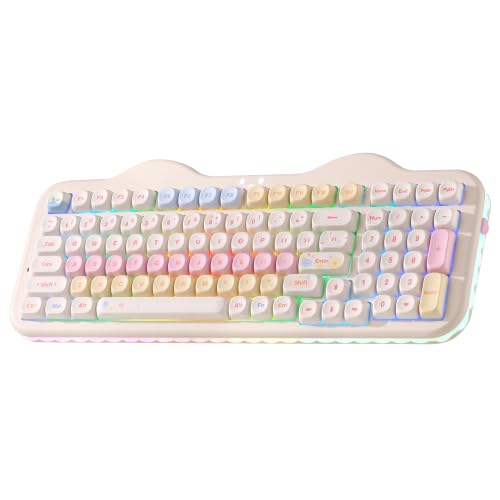
YUNZII C98 Cute Cake Wireless Mechanical Keyboard (Beige)

Keychron V1 75% Wired Mechanical Keyboard (Carbon Black)

LOONASA Wired USB C Number Pad 23 Keys (Black)

LOONASA Wired USB C Number Pad 23 Keys (White)

LOONASA Wireless Number Pad 23 Keys (USB Dongle)

LOONASA Bluetooth Number Pad 23 Keys (Battery Included)

LOONASA Wireless USB and Type-C Number Pad 23 Keys
The Picks, Examined More Closely
If you live inside the Apple ecosystem, the Magic Keyboard with Numeric Keypad is the obvious full-size match. It pairs over Bluetooth with Macs, iPads, and iPhones, and the rechargeable internal cell (battery life varies by use, but Apple claims about a month or more between charges) means no AAA spares rattling around your drawer.
The extended layout adds document navigation keys for quick scrolling plus full-size arrow keys, and the dedicated number column makes spreadsheet work feel natural rather than cramped. System requirements are modest, so it slots into most existing setups.
Reasons It Performs
- Bluetooth pairing keeps the desk cable-free across Mac, iPad, and iPhone
- Rechargeable internal battery removes the cost and waste of replacements
- Document navigation keys and full-size arrows speed up spreadsheet scrolling
- Dedicated number pad feels comfortable for sustained data entry sessions
- Low-profile scissor mechanism keeps wrist position neutral during long days
Honest Caveats
- Lightning cable is included for pairing and charging, which feels dated on newer Apple devices
- No mechanical feel, so heavy typists who prefer tactile feedback may want the Keychron V1 instead
Made For
Apple-first professionals and students who split time between a Mac, an iPad, and an iPhone and want a single tidy keyboard.
Consider Something Else When
Windows-heavy mixed-OS households are better served by the Keychron V1 75% Wired Mechanical Keyboard, which ships with swappable Mac and Windows keycaps.
The YUNZII C98 leans hard into personality without giving up serious keyboard mechanics. The 96% layout crams a proper numpad into a footprint that feels closer to a TKL, so you save desk space without losing the dedicated number column that accountants and Excel marathoners depend on.
Candy switches are a tactile linear-style option aimed at smooth typists, and the dye-sublimated PBT MOA keycaps resist shine over time. The cake-themed aesthetic is polarizing, but for someone who wants a numpad board that looks nothing like a corporate slab, this one delivers.
Strengths Worth Knowing
- 96% layout keeps the numpad while shaving the width of a full-size board
- Dye-sub PBT keycaps hold up against the oily shine that cheaper ABS caps develop
- Candy switches give a smooth, easy-glide feel that suits long writing sessions
- Wireless design clears desk clutter for a tidy creator or study setup
Points To Note
- Cake colorway and rounded keycap profile may clash with conservative office environments
- Mechanical noise is louder than the Apple Magic Keyboard, so shared offices may push back
Feature Snapshot
Right Fit For
Creators, students, and hobbyists who want a numpad-equipped mechanical board that doubles as desk decor.
Reach For A Different Pick When
Quiet, boardroom-friendly typing is the priority, in which case the Apple Magic Keyboard with Numeric Keypad is the calmer choice.
The Keychron V1 is the enthusiast board in this lineup, aimed squarely at people who want to remap, reprogram, and rebuild. QMK and VIA are open-source firmware platforms that let you assign any key to any function, set up macros, and save per-device layouts, which is rare in this price bracket. QMK (Quantum Mechanical Keyboard) is the firmware that runs the board, while VIA is the companion app that lets you remap keys without flashing files.
Hot-swappable K Pro Brown switches mean you can pull a switch out with a tool and drop in a different one, no soldering required. The 75% layout does sacrifice the dedicated numpad column, so spreadsheet power users should look elsewhere, but the function row and arrow cluster stay intact.
Practical Advantages
- QMK and VIA firmware unlock deep remapping and macro programming
- Hot-swappable PCB lets you change switches without soldering
- Mac and Windows keycaps ship in the box, with a system toggle for fast swapping
- Acoustic silicone pad softens the bottom-out sound for a fuller typing tone
Some Limits To Know
- 75% layout drops the dedicated numpad, unlike the YUNZII C98 or Apple Magic Keyboard
- Wired-only connection means no Bluetooth pairing with tablets or phones
Key Product Details
Best Suited To
Power users, developers, and custom keyboard newcomers who want to learn the hobby without going full solder.
A Better Fit Elsewhere
Anyone who needs a real numpad column for daily number entry should consider the YUNZII C98 Cute Cake Wireless Mechanical Keyboard instead.
This LOONASA wired numpad is a USB-C native add-on for modern laptops that have ditched full-size keyboards. The 23-key layout goes beyond the standard 17-key numpad, which is what most laptops never had in the first place, and adds keys for common shortcuts in finance and accounting apps.
Short key travel and lighter actuation force are designed to reduce finger fatigue across long data entry shifts. Plug-and-play setup means you connect it and start typing numbers without installing drivers, which is the right level of friction for most office workers.
Positive Takeaways
- USB-C connection matches modern MacBooks, Surface devices, and recent PC laptops
- 23-key layout includes extra function keys for spreadsheet and accounting shortcuts
- Short key travel cuts down on finger fatigue during marathon entry sessions
- Plug-and-play design needs no driver install on Windows or macOS
Things To Weigh
- Wired-only tethering can feel limiting if you like a clean, cable-free surface
- Plastic shell construction may not survive heavy travel in a packed laptop bag
Whose Shelf It Belongs On
Modern laptop owners who want a USB-C numpad for spreadsheets without replacing their existing keyboard.
Skip It When
A wireless or Bluetooth setup matters, in which case the LOONASA Wireless Number Pad 23 Keys (USB Dongle) is the cleaner pick.
This white version of the LOONASA wired USB-C numpad is identical in function to its black sibling, with the same 23-key layout, short travel, and plug-and-play setup. The lighter color makes it easier to coordinate with Apple-style or minimalist white desk setups where a black slab would visually clash.
For finance, accounting, and banking work where every keypress counts, the extended layout adds useful shortcut keys beyond the traditional 10-key arrangement. The wired USB-C connection is simple and stable, which many office workers prefer over occasional Bluetooth dropouts.
Bright Spots
- White finish blends with minimalist and Apple-style desk setups
- USB-C cable matches current MacBook, Surface Pro, and ultrabook ports
- 23-key layout extends beyond a standard 10-key numpad for added shortcuts
Less-Strong Areas
- Light-colored ABS plastic shows scuffs and grime faster than darker finishes
- Cable is fixed, so portability is limited to within reach of a USB-C port
Who Should Grab It
Aesthetic-minded laptop users who want a numpad that visually disappears into a clean, light-colored desk.
Not Your Match When
Multi-device hopping between a laptop, tablet, and phone points to the LOONASA Bluetooth Number Pad 23 Keys (Battery Included) for cable-free flexibility.
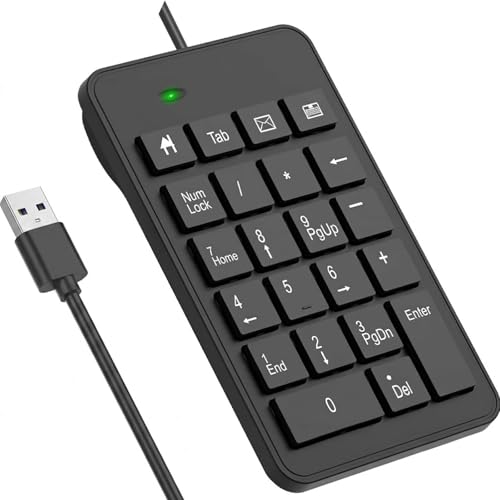
The standout feature on this LOONASA wired numpad is right in the name: big print letters. The oversized legends make each key unmistakable at a glance, which is genuinely helpful for low-vision users, dim home-office setups, or anyone teaching themselves number entry.
The classic USB-A connector works with the vast majority of desktop towers and older laptops without needing a dongle. Setup is plug-and-play on both Windows and macOS, and the 23-key layout extends past the traditional 10-key arrangement for finance shortcuts.
Good Reasons To Consider
- Oversized key legends improve readability in low light or for low-vision users
- Standard USB-A connection fits older desktops and most office laptops
- 23-key layout adds shortcut keys that finance and accounting workflows rely on
- Plug-and-play pairing works without extra driver software
Potential Sticking Points
- USB-A connector rules out modern USB-C-only laptops without an adapter
- Big-print design trades a sleeker aesthetic for legibility, which may not appeal to everyone
Who Will Love This
Older users, students learning ten-key, or anyone working late hours who needs each number key to be instantly readable.
Look Elsewhere When
You want a wireless or USB-C-native numpad, in which case the LOONASA Wireless Number Pad 23 Keys (USB Dongle) or LOONASA Wired USB C Number Pad 23 Keys (Black) is a stronger match.
This LOONASA wireless numpad ships with batteries and a USB dongle, so you can unbox it and start crunching numbers without buying extras. The 2.4 GHz wireless connection (a common short-range radio standard used by wireless keyboards and mice) plugs into any USB-A port and pairs automatically.
Wireless freedom means you can slide the numpad to whichever side of your main keyboard feels comfortable, then tuck it away when you switch to typing-heavy tasks. The 23-key layout brings the same shortcut-friendly extensions as the wired LOONASA models, just without the cable.
Points In Its Favor
- Batteries ship in the box, so it’s ready to use the same day it arrives
- Wireless connection removes cable clutter from clean desk setups
- 23-key layout extends past the standard 10-key for finance and accounting shortcuts
- Repositionable placement suits left- or right-hand users
Trade-Offs To Consider
- 2.4 GHz dongle occupies a USB-A port that some thin laptops no longer have
- Wireless signal can occasionally drop if the dongle is hidden behind a monitor or hub
Quick Facts
Built With In Mind
Hybrid office workers and remote staff who want a clutter-free desk and don’t mind swapping a dongle between machines.
Swap It Out When
You frequently pair with tablets or phones, in which case the LOONASA Bluetooth Number Pad 23 Keys (Battery Included) skips the dongle entirely.
Bluetooth pairing sets this LOONASA numpad apart from the dongle-based wireless option. You don’t need to give up a USB port, which matters on modern ultrabooks and tablets that often have just one or two USB-C ports total.
The 23-key extended layout carries over the same shortcut-friendly design as the rest of the LOONASA family, and batteries ship in the box for first-day usability. Compatibility covers laptop, notebook, PC, desktop, MacBook, and Surface Pro machines with Bluetooth settings.
What Works In Its Favor
- Bluetooth pairing leaves USB ports free for drives, webcams, or chargers
- Broad device compatibility with laptops, tablets, and desktops that support Bluetooth
- 23-key layout adds finance and accounting shortcut keys beyond the standard 10
- Battery-powered design suits roaming between a desk, a couch, and a meeting room
Possible Compromises
- Bluetooth pairing can occasionally lag at startup compared to a wired connection
- You’ll need to keep spare batteries or a charging routine for heavy daily use
The Right Fit
Multi-device workers who swap between a laptop, a MacBook, and a tablet and value a dongle-free desk.
Where Another Pick Suits Better
Gamers and latency-sensitive users are better off with a wired option like the LOONASA Wired USB C Number Pad 23 Keys (Black), which avoids any wireless lag entirely.
The dual-receiver design on this LOONASA wireless numpad ships with both a USB-A dongle and a USB-C adapter in the box. That’s a small detail that solves a real headache for anyone who bounces between an older desktop tower and a newer USB-C-only ultrabook.
Plug-and-play setup and a familiar 23-key extended layout mean you don’t sacrifice shortcut access for the wireless freedom. Compatibility covers laptop, PC, notebook, desktop, and Surface Pro environments, so it’s a safe choice for mixed-fleet offices.
Everyday Perks
- Both USB and Type-C receivers included, so it works across older and newer ports
- Wireless connection keeps the desk surface cable-free
- 23-key layout extends past the standard 10-key numpad for finance workflows
- Batteries included for immediate use out of the box
Details To Watch
- Carrying both adapters around adds small items that can get lost in a laptop bag
- Wireless signal still depends on the dongle staying visible to the receiver
Spec Overview
Who It Suits Best
Mixed-port households or small businesses where some workstations still have USB-A and others have moved to USB-C.
Not Your Match When
You only need to pair with one modern USB-C laptop, in which case the simpler LOONASA Wired USB C Number Pad 23 Keys (Black) does the job without the extra dongle.
How To Pick the Right Numpad for Your Setup
A numpad is a small upgrade that pays off fast, but the wrong one sits in a drawer. The first call is whether you want a full keyboard with a built-in number column or a standalone numpad that adds to a keyboard you already love. The Apple Magic Keyboard, YUNZII C98, and Keychron V1 each integrate differently, while the LOONASA line covers almost every standalone scenario.
Switch type matters if you spend hours typing. Mechanical switches like the K Pro Browns on the Keychron V1 deliver a tactile bump and audible feedback, which many programmers and writers prefer. Scissor or membrane switches, like the ones in the Apple Magic Keyboard, are quieter and slimmer, which suits shared offices and travel bags. For finance teams running eight-hour entry shifts, lighter actuation force (the amount of pressure needed to register a keypress) reduces finger fatigue.
Connectivity shapes the daily experience more than most people expect. Wired USB or USB-C connections are lag-free and never need charging, which is why they’re popular in trading and accounting roles. Wireless dongles like the one in the LOONASA Wireless Number Pad are tidy but occupy a USB port. Bluetooth numpads pair across laptops and tablets, which is ideal for hybrid workers who move between machines.
Layout size is the next decision. A 75% board like the Keychron V1 drops the numpad entirely, while a 96% board like the YUNZII C98 keeps the number column in a tighter footprint. Standard full-size and 100% layouts (which include the numpad, function row, and arrow keys in the traditional arrangement) feel familiar but demand more desk real estate. The LOONASA standalone numpads use a 23-key extended layout, which adds a handful of shortcut keys beyond the classic 10-key arrangement for spreadsheet and accounting workflows.
Compatibility and operating system support deserve a quick check. The Apple Magic Keyboard needs macOS 10.12.4 or later, iPadOS 13.4 or later, or iOS 10.3 or later. The Keychron V1 ships with extra keycaps for Windows users and supports Linux as well. The LOONASA numpads work across Windows, macOS, and most Linux distributions via plug-and-play or Bluetooth pairing. Picking a keyboard that matches your primary operating system avoids weeks of muscle-memory adjustment.
Things Worth Knowing Before You Commit
Slip Ups To Watch For
A common mistake is buying a 75% mechanical keyboard expecting a numpad column, then realizing the arrows and function row take that space. The Keychron V1 is a 75% board with no number column, so anyone who relies on ten-key entry should match the layout to the workflow. Another misstep is ignoring port type. A USB-A numpad on a USB-C-only ultrabook means buying an adapter, which adds bulk and a small point of failure.
When Spending More Actually Pays Off
The premium tier buys you better firmware, sturdier cases, and richer customization. The Keychron V1’s QMK and VIA support is the kind of feature budget numpads don’t offer, and it transforms how you map shortcuts for specific apps. The Apple Magic Keyboard costs more than the LOONASA numpads because of its tight macOS and iPadOS integration, long battery life, and premium scissor mechanism. Spending up makes sense if you type all day, want hot-swappable switches, or need the cleanest Apple ecosystem experience.
Frequently Asked Questions
Do I really need a numpad if my laptop doesn’t have one?
A standalone numpad like the LOONASA 23-key models plugs into any laptop and restores fast number entry. For Excel, accounting, and data-heavy work, the productivity gain is real and immediate.
Are mechanical keyboards with numpads loud?
Mechanical switches are louder than scissor or membrane types, but switch choice matters. Tactile browns like the Keychron V1’s K Pro Browns are quieter than clicky blues, and O-ring dampeners can soften the bottom-out sound.
Can I use a Bluetooth numpad with a desktop PC?
Most desktops built in the last several years include Bluetooth, and pairing works the same way as on a laptop. The LOONASA Bluetooth Number Pad pairs with PC, Mac, and Surface machines that have Bluetooth settings enabled.
What’s the difference between a 96% and full-size layout?
A 96% layout compresses the navigation cluster to fit the numpad in a smaller footprint, similar to the YUNZII C98. Full-size layouts like the Apple Magic Keyboard spread everything out for maximum key spacing.
Is hot-swappable actually useful for casual users?
Hot-swapping, which means changing switches without soldering, shines if you want to experiment with switch types before committing. Casual typists may not need it, but anyone curious about custom keyboards gets a low-risk entry point.
Closing Remarks
The right pick depends on how you actually work, not just on spec sheets. Mac and iPad households will feel right at home with the Apple Magic Keyboard, while tinkerers who want deep customization belong on the Keychron V1. Everyone else should look closely at the LOONASA lineup for a practical, budget-friendly add-on that pairs with whatever laptop or desktop they already own. Trust the workflow, and the numpad choice usually makes itself.