Locking yourself out at the door feels worse than any password reset at a desk. Whether you’re upgrading a tired deadbolt, adding smart entry to a home office, or hunting for a missing number pad to speed up spreadsheets, the right keypad solves a very specific daily frustration. I pulled together seven options that cover the two main worlds of keypads: door hardware that replaces or augments keys, and numeric pads that bring a full ten-key layout back to a laptop without a built-in one.
A Side-By-Side Look

Schlage Camelot Lower Handleset for Electronic Keypad (Antique Pewter)
SimpliSafe Wireless Keypad (Latest Gen)
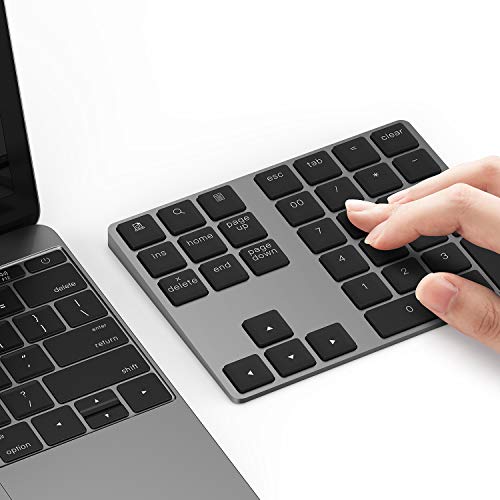
Lekvey Bluetooth Aluminum Wireless Numeric Keypad

FDFDTO Biometric Fingerprint Keypad Door Knob

Lekvey Bluetooth Numeric Keypad for Laptop

FR 210 Digital Lock Black Intelbras

Lekvey Wireless Number Pad and Mouse Combo
Why These Options Stand Out
Most electronic deadbolts look like they were borrowed from a 1990s office building, all plastic and brushed silver. The Schlage Camelot lower handleset flips that script with a sculpted Antique Pewter finish and the curved Accent lever, the kind of trim that actually complements a wood-grain front door. It pairs with the brand’s BE365 keypad deadbolt (sold separately), so you get a complete electronic entry system without mixing two design languages on the same door.
The hardware ships as the lower half of an entry set, which means the exterior and interior handles arrive together and you only need to buy the matching deadbolt. This is a left-hand configuration, so confirm your door swing before ordering. In homes where the front entry is a centerpiece, this handleset makes the keypad feel like a planned design choice rather than an afterthought.
Strengths Worth Knowing
- Decorative Antique Pewter trim reads as upscale on traditional wood doors
- Accent lever curves sit comfortably under the hand for daily use
- Lower handleset ships with both exterior and interior pieces, simplifying a multi-part install
- Designed to coordinate with Schlage BE365 keypad deadbolts for a unified look
Things To Consider
- Requires the matching electronic deadbolt to function as a full smart-entry system
- Left-hand configuration only, so right-hand doors need a different variant
Who It Suits Best
Homeowners renovating a traditional or craftsman-style entryway who want keypad convenience without sacrificing curb appeal.
Consider Something Else When
You need a fully self-contained smart lock in one box; the FDFDTO Biometric Fingerprint Keypad Door Knob bundles fingerprint, code, and key entry into a single knob.
The SimpliSafe Wireless Keypad doesn’t live at your door; it lives wherever you walk in. Mount it by the garage entry, stick it on a bedside table, or leave it on the kitchen counter. Because it uses a touch-to-wake display, the screen stays dark until your hand approaches, which keeps it from glowing like a nightlight all evening. There’s no power cord to route, so placement is genuinely flexible.
This is the latest generation of the keypad, meaning it speaks to the current SimpliSafe base station without older compatibility quirks. Owners commonly rely on it as the central arm/disarm station for a SimpliSafe system, especially since it can sit near an entry sensor so the hub will flag any door left open. If your home already runs SimpliSafe, adding or replacing a keypad is the single biggest usability upgrade you can make.
Well-Handled Touches
- Wireless design opens up placement near beds, doors, and hallways without drilling
- Touch-to-wake screen keeps the panel dark and unobtrusive when idle
- Designed so a smashed unit does not silence the alarm system
- Pairs with SimpliSafe entry sensors to call out open doors on arming
Points To Note
- Only useful inside an existing SimpliSafe ecosystem, so it isn’t a standalone purchase
- Requires occasional battery checks since there’s no plug-in fallback
The Right Fit
Existing SimpliSafe households that want a flexible arming station and prefer a clean wall without a glowing panel.
Where Another Pick Suits Better
You need something that secures the door itself rather than the alarm system; the Schlage Camelot Lower Handleset attaches directly to the entry door.
The Lekvey aluminum pad weighs about half a pound and stands barely half an inch tall, which is the right scale for sitting beside a MacBook on a coffee-shop table. Its aluminum body matches the brushed finish of most Apple laptops, so it disappears next to them rather than looking like an office accessory parachuted in. The built-in tilt angles the keys toward your wrist, which is a small ergonomic kindness during long data-entry sessions.
Because it pairs over Bluetooth, you skip the USB dongle and reclaim a port. The rechargeable battery means you top it up over USB rather than buying coin cells every quarter. For users running spreadsheets, accounting software, or any workflow that leans on a ten-key layout, this pad brings back the speed of a full keyboard without tethering you to one spot.
What Works In Its Favor
- Aluminum shell matches premium laptops visually and survives daily bag-toss wear
- Bluetooth pairing keeps a USB port free on thinner laptops
- Rechargeable battery cuts down on disposable cell swaps
- Built-in tilt reduces wrist extension during long entry sessions
Less Ideal Details
- Needs occasional recharging, which can interrupt an extended work block
- Bluetooth pairing may need reconnection after long sleep cycles on some laptops
Made For
Mobile professionals and students running numbers on MacBooks or slim laptops where a built-in number pad simply doesn’t exist.
Look Elsewhere When
You want a complete input bundle that includes a matching mouse; the Lekvey Wireless Number Pad and Mouse Combo arrives with both pieces sharing a single receiver.
The FDFDTO door knob reads four different ways: a fingerprint, an anti-peep passcode, an app command, or a traditional key. That redundancy is the whole point; if the battery dies or your finger is damp, two more options still get you in. Fingerprint reads are quick, so the knob works as a hands-free entry for anyone carrying groceries or a toddler.
The 400 mAh rechargeable battery handles extended daily use and tops back up over USB. For interior doors like a home office or bedroom that should stay private without needing a smart-home hub, this knob gives you control without a complex install. It mounts in a standard door bore, which most interior doors already have, so swapping in is straightforward for anyone comfortable with a screwdriver.
The Good Stuff
- Four entry methods cover you during dead batteries or wet fingers
- Anti-peep passcode lets you type extra digits before or after your real code
- App control adds remote unlocking without buying a separate hub
- Mechanical key backup means no lockout if electronics fail entirely
Trade Offs
- Needs periodic USB recharging to stay operational
- App features typically require a Bluetooth or Wi-Fi connection that can drop at range
- Fits standard door prep, but older doors may need drilling adjustments
Who Will Love This
Renters, home-office workers, and parents who want code-or-finger entry on a bedroom or study door without overhauling the front entry.
Skip It When
You want to monitor and arm a whole security system; the SimpliSafe Wireless Keypad is built to coordinate with multiple sensors across a home.
Where the smaller Lekvey pad keeps things minimal, this 28-key Bluetooth number pad goes wide. Numlock, Tab, arrow keys, PgUp, PgDn, Home, End, a calculator shortcut, and a double-zero key all live on the board, which is exactly what someone moving from a desktop keyboard expects. The arrow cluster alone makes spreadsheet navigation feel normal again.
Because it pairs over Bluetooth, there’s no dongle to lose in a laptop bag, and the wider footprint gives you room to spread your hand during long entry sessions. Compared with the slimmer Lekvey aluminum model above, this one trades some portability for a more desktop-style layout, which is a worthwhile trade for anyone doing serious number work at a fixed desk.
What Makes Sense
- Full 28-key layout includes Tab, arrow keys, and Home/End for true desktop parity
- Calculator shortcut saves time switching between apps during billing tasks
- Bluetooth connection leaves USB ports open for other peripherals
- Wider footprint gives keys enough spacing to avoid mistypes
Small Caveats
- Larger footprint makes it less convenient for tight travel setups than the smaller Lekvey pad
- Bluetooth reconnection can occasionally require a manual toggle
Best Suited To
Accountants, analysts, and anyone whose workday centers on spreadsheets where the extra keys earn their keep.
Not Your Match When
You need the slimmest possible travel pad; the Lekvey Bluetooth Aluminum Wireless Numeric Keypad weighs about half a pound and slips into a sleeve pocket.
The FR 210 isn’t trying to be a front-door lock; it’s built for sliding doors, which is a profile most keypads ignore entirely. The digital deadbolt pulls the door closed and self-locks, so a partially-shut sliding panel doesn’t sit unlocked all night. For a patio or balcony door, that auto-locking behavior matters more than any smart-home gimmick.
The lock accepts up to four passwords and up to 100 proximity keychains (often called TAGs), so you can hand out a tag to anyone who regularly uses the door. The touch-screen keyboard lights up on demand and stays dark otherwise, which keeps the panel from glowing through a glass door at night. For shared households with a patio entrance, this kind of capacity makes the lock practical rather than theoretical.
Real-World Strengths
- Built specifically for sliding-door geometries that most keypads won’t fit
- Stores up to four passwords and around 100 proximity tags for shared access
- Self-locking behavior prevents the common “left slightly open” mistake
- Touch panel only lights up when activated, preserving a clean look at night
Practical Considerations
- Limited to sliding-door profiles, so it won’t suit a standard hinged entry
- Tag and password management require careful resets whenever access lists change
Perfect Match For
Apartments and homes with sliding glass doors that need real keyless control without retrofitting a standard deadbolt cutout.
Reach For A Different Pick When
Your door is a standard hinged entry; the Schlage Camelot Lower Handleset is engineered around traditional door swings and decorative trim.
The Lekvey combo solves a small but persistent annoyance: matching wireless peripherals that each take their own USB dongle. Both the number pad and the mouse ride a single shared receiver, so one USB port handles both devices. For laptop users who already feel port-starved, that’s a real-world benefit rather than a spec-sheet footnote.
The pairing is aimed at accountants, data analysts, writers, and remote workers who toggle between spreadsheets and documents all day. The numeric pad brings ten-key speed back, and the bundled mouse keeps a matching wireless setup consistent on the desk. If you split time between a home office and a coworking space, pulling one dongle out and instantly reconnecting both pieces is exactly the kind of low-friction setup that earns its keep.
Notable Gains
- Shared USB receiver frees a port on slim laptops
- Matching wireless aesthetic avoids the mismatched-peripherals look
- Portable footprint suits both permanent desks and travel setups
- Full numeric layout supports serious spreadsheet work without compromise
A Few Limitations
- Losing the single dongle means losing both devices at once
- Combo bundle is heavier in a bag than the standalone Lekvey Bluetooth pad
Who Should Grab It
Remote workers and small-business owners who want one quick plug-and-play setup that handles both number entry and pointing.
A Better Fit Elsewhere
You already own a wireless mouse you love; the Lekvey Bluetooth Numeric Keypad for Laptop delivers the 28-key layout without forcing a second peripheral into the mix.
Choosing The Right Keypad For Your Setup
Keypads split into two very different worlds: door hardware that replaces or augments keys, and numeric pads that bring back a missing ten-key layout. Door-side keypads demand attention to door type, hand orientation, and whether you want a standalone lock or a system that talks to other devices. The Schlage Camelot lower handleset is built for traditional hinged entries, while the FR 210 from Intelbras is engineered around sliding doors; picking the wrong profile means a poor fit or a failed install.
On the desk side, the first decision is connection type. Bluetooth keeps USB ports free, which matters on modern laptops, while a shared USB receiver like the Lekvey combo simplifies travel. Layout comes next: a compact 18-key pad handles basic entry, but full 28-key boards with Tab, arrow keys, and a calculator shortcut speed up real spreadsheet work. Materials matter too; aluminum shells match premium laptops and survive daily bag wear better than plastic.
Power source is the quiet trade-off. Rechargeable pads cut down on disposable batteries but need USB top-ups, while coin-cell models run longer between swaps but require you to keep spares. For door locks, rechargeable batteries with mechanical key backup, like the FDFDTO biometric knob, keep you inside even when the electronics go flat.
Key Considerations Across These Picks
Pitfalls Shoppers Hit
The biggest mistake on the door side is buying the wrong hand or door profile; the Schlage Camelot set is left-hand only, and the FR 210 is built for sliding doors, not standard swings. On the desk side, shoppers often grab a Bluetooth pad without checking whether their laptop wakes the connection after sleep, which can mean manual re-pairing. Another common miss is underestimating layout needs: an 18-key pad feels minimal until you reach for arrow keys mid-spreadsheet.
Where The Extra Money Goes
Higher-tier keypads earn their cost through better materials, broader compatibility, and redundancy. An aluminum Lekvey pad survives daily bag wear that cracks plastic shells, and a multi-method door lock like the FDFDTO knob keeps you un-locked-out when one entry method fails. For sliding doors, paying more for a purpose-built lock like the FR 210 beats adapting a standard deadbolt that never quite seats right. The upgrade only pays off when you’ll actually use the extras; casual spreadsheet users get more value from the compact Lekvey aluminum pad than from the 28-key workhorse.
Frequently Asked Questions
Are wireless numeric keypads reliable for daily spreadsheet work?
Modern Bluetooth and 2.4 GHz wireless keypads hold connections reliably in most office environments, and the Lekvey Bluetooth Numeric Keypad pairs quickly with both Mac and Windows laptops.
Do keypad door locks work during a power outage?
Yes, most run on internal batteries, and the FDFDTO knob still accepts a mechanical key when its rechargeable battery is depleted, so you never lose access for long.
Can I install a keypad door knob myself?
Standard interior doors with existing bore holes accept knobs like the FDFTODO model with basic tools, but exterior doors or unfamiliar lock bodies may benefit from a locksmith for proper alignment.
Will a numeric keypad slow down my laptop’s battery?
Bluetooth numeric pads draw very little power and have negligible impact on laptop battery life compared with the screen and CPU load of running spreadsheets.
How many user codes can a typical keypad lock store?
Residential keypad locks generally support between a handful and a hundred unique codes, with the FR 210 accepting up to four passwords and around 100 proximity tags for shared access.
Wrap Up
The right keypad comes down to where it lives and what it replaces. A front door wants hardware that matches the home’s style and the door’s profile, while a laptop wants a number pad that pairs cleanly and stays out of the way. Match the product to the actual frustration; a sliding door calls for the FR 210, a MacBook calls for the slim Lekvey aluminum pad, and a busy entry calls for either the Schlage Camelot set or the multi-method FDFDTO knob. The best pick is the one that disappears into your routine, not the one with the longest feature list.