Typing in two languages without a dedicated layout is awkward, and anyone studying Korean or working with Hangul regularly has hit that wall. I put together this list to cover the most useful angles: full Korean/English keyboards, silicone protectors for MacBook owners, adhesive Hangul sticker sets, and the magnetic-switch gaming boards that handle the heavy typists. Each pick fits a different budget and use case, so you can match your setup instead of overbuying.
An Overview Of The Picks

BT21 Little Buddy Multi Pairing Wireless Retro Computer Keyboards, Membrane 102 Key Design Keyboard (MANG)

Aula WIN60 HE – 60% Mechanical Gaming Keyboard, Hall Effect Magnetic Switch, Adjustable Actuation
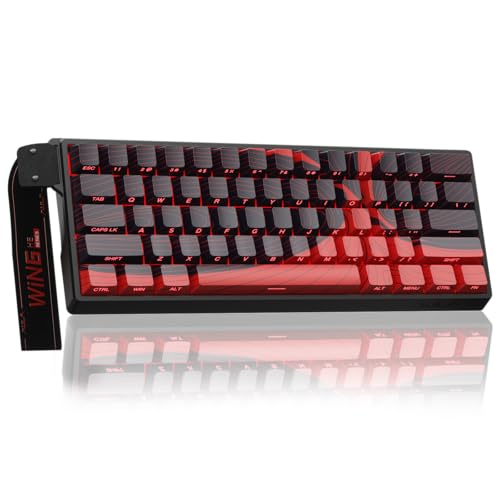
AULA WIN60 HE MAX – 60% Mechanical Gaming Keyboard, Hall Effect Magnetic Switches, Adjustable Actuation Rapid Trigger

ProElife Korean Ultra Thin Silicone Keyboard Cover for MacBook Pro Touch Bar 13″/15″

Korean English Keyboard Stickers, 2 Pack Black Keyboard Replacement
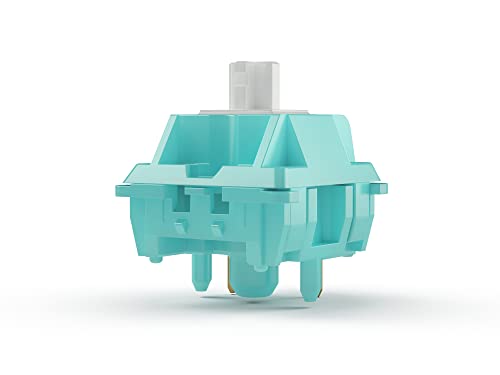
GLORIOUS Lynx Switch (LUBED) – 36x Linear PCB Mounted 5-Pin Switches for Mechanical Keyboard

ProElife Keyboard Cover with Touch ID for MacBook Air 13-in A2337, Korean

Character Keyboard Stickers 2-Pack | For Laptops, Desktops and Mac Devices
Why These Options Stand Out
This BT21 board is one of the few keyboards that ships with native Hangul (the Korean writing system) and English printed on the keys, which matters if you don’t want to swap stickers every time you change devices. A membrane mechanism, meaning soft rubber-dome contacts under each key, keeps typing quiet enough for an open office or a shared apartment. The retro look comes straight from the BT21 collaboration with Royche, and the full 102-key layout keeps a dedicated number pad for spreadsheets.
Multi-pairing through both 2.4 GHz wireless (a USB dongle that plugs into your computer) and Bluetooth lets you connect up to three devices at once, so I think it earns a spot on the desk of anyone juggling a phone, a tablet, and a laptop. Power comes from a single AAA battery, which keeps the chassis light and easy to relocate.
Real Benefits
- Native Hangul and English legends printed directly on the caps.
- Tri-device pairing across Bluetooth and 2.4 GHz wireless.
- Full-size layout with numeric keypad for data entry.
- Membrane switches reduce typing noise in shared spaces.
- Single AAA power keeps the board portable and lightweight.
Points To Note
- Membrane travel feels mushy compared with mechanical boards like the Aula WIN60 HE below.
- AAA battery means owners commonly replace cells every few months with heavy use.
Whose Shelf It Belongs On
Students and remote workers who want a ready-to-type bilingual layout without applying stickers themselves.
A Better Fit Elsewhere
Competitive gamers chasing tactile feedback will find the Aula WIN60 HE a stronger match.
Unlike the BT21’s membrane dome design, this Aula board uses Hall Effect magnetic switches, which detect key depth with magnets instead of metal contacts, giving it both speed and longevity. The 60% layout (no arrow keys, function row, or number pad) frees serious desk space for sweeping mouse movements in FPS games like Valorant and CS2. The compact footprint is a clear change of pace from item 1’s full-size footprint.
An 8000 Hz polling rate, meaning the keyboard reports its key state to the PC 8000 times per second, is overkill for typing but genuine edge territory in ranked play. Adjustable actuation, the point at which a key registers a press, lets competitive users tune sensitivity to their reflex profile.
What Works In Its Favor
- Hall Effect switches avoid the chatter wear common in traditional mechanical contacts.
- 8000 Hz polling gives measurable input advantage in fast-paced games.
- Compact 60% chassis creates room for low-sensitivity mouse aim.
- Hot-swappable switches let owners swap actuation feel without soldering.
Trade-Offs To Consider
- 60% layout omits arrows, so spreadsheet work feels cramped compared with the BT21.
- Driver software is lightweight, but new owners commonly spend an evening tuning profiles.
Feature Snapshot
Best Suited To
Competitive FPS players and fast typists who want low-latency input without giving up desk real estate.
Look Elsewhere When
Anyone building a quieter office board should consider the GLORIOUS Lynx switches used in a custom case.
The HE MAX slots in right next to the WIN60 HE as a refinement rather than a reinvention. Rapid Trigger, a feature that registers a keypress the instant it moves in either direction, lets competitive players reset a direction faster than a standard reset, which is the difference between dodging and dying in tight duels. The Hall Effect switches remain, and so does the 8000 Hz polling rate, so anyone stepping up from the standard HE is paying for tuning and feature polish.
The 60% compact design still leaves arrows and function keys behind, which means Korean/English label stickers become essential if you plan to type Hangul on this board. I’d still recommend the BT21 above for plug-and-play bilingual typing.
The Practical Payoff
- Rapid Trigger mode delivers real reset speed gains in competitive shooters.
- Hall Effect switches keep key response consistent across years of use.
- Hot-swap support allows actuation-style experimentation.
- Same compact 60% size as the WIN60 HE for travel-friendly setup.
Honest Caveats
- Price premium over the standard WIN60 HE may not justify the upgrade for casual players.
- No native Hangul legends; you’ll need separate Korean stickers for bilingual layout.
- Wired-only connection limits placement flexibility versus the BT21.
Who It Suits Best
Esports players who already know they want Rapid Trigger and plan to tune actuation profiles.
Swap It Out When
Typists focused purely on bilingual work should reach for the BT21 Little Buddy instead.
This ProElife cover targets a very specific MacBook Pro crowd: owners of US-layout Touch Bar models released between 2016 and 2019, including the 13-inch A1706, A1989, and A2159 and the 15-inch A1707 and A1990. It’s a silicone skin, not a hard shell, which means it lays flat over each key to print Korean legends on top of the existing English layout. You keep the original keyboard feel rather than buying a new board like the BT21.
Ultra-thin construction matters because thicker covers tend to make typing awkward and the keys feel sluggish. The cover leaves the Touch Bar itself exposed so you don’t lose brightness or function shortcuts.
Well-Handled Touches
- Molded precisely per key for an even feel across the deck.
- Hangul labels added without removing existing English legends.
- Touch Bar cutout preserves slider and brightness controls.
- Silicone adds spill and dust protection during everyday use.
Practical Considerations
- Only fits specific older MacBook Pro model numbers listed above.
- Silicone picks up fingerprints and oils; weekly wipe-downs keep the look clean.
Feature Snapshot
Made For
MacBook Pro Touch Bar owners from 2016-2019 who want Hangul without buying an external keyboard.
Consider Something Else When
Newer MacBook Air users should grab the ProElife Touch ID cover instead.
Sticker overlays are the cheapest path to a bilingual layout, and this 2-pack covers two machines or one machine plus a backup. The Hangul letters sit over each standard English key, so you learn the placement through muscle memory rather than memorizing a separate chart. The black background is meant to blend with most laptop and desktop keyboards.
Compared with the BT21 keyboard above, you trade a ready-to-type experience for the lowest entry cost. That’s an honest swap for anyone who just needs Hangul for occasional messages or study sessions.
Standout Benefits
- Lowest-cost entry to Hangul typing on any existing keyboard.
- Two packs cover a laptop and a desktop, or a backup sheet.
- Stickers adhere to standard key sizes across major brands.
- Helps language learners map Korean letters to physical keys.
Possible Compromises
- Stickers wear at the most-used keys, and replacements are tedious.
- Application takes patience; misaligned letters can hurt accuracy.
Perfect Match For
Beginners dipping into Hangul who want to test the layout before committing to a dedicated keyboard.
Another Choice May Suit
Anyone who already owns a MacBook Air should try the ProElife silicone cover for a cleaner look.
The Lynx switches are pre-lubed linear parts, which means each switch has already been coated in light lubricant to remove scratchy friction. Linear action (no tactile bump or audible click) gives a smooth top-to-bottom press, favored by typists who want consistent travel. Each switch uses a 5-pin PCB mount (five metal legs that anchor the switch into a custom keyboard circuit board) so they fit into most enthusiast keyboard kits.
At 36 switches per pack, you can build a 60% or 65% board like the Aula WIN60 HE without buying spares, though a full-size project would need more. Compared with the Aula’s built-in magnetic switches, these are classic mechanical parts for hobbyists who enjoy the build process.
Practical Pluses
- Pre-lubed from the factory saves an hour of hand-lubing for hobbyists.
- Linear feel reduces finger fatigue during long typing sessions.
- 5-pin PCB mount fits the majority of custom keyboard PCBs (printed circuit boards).
Worth Bearing In Mind
- 36 switches only; building a full-size keyboard needs additional packs.
- No bilingual legend, so this is a build component rather than a finished Korean layout.
Quick Facts
Who Should Grab It
Custom keyboard builders who want smooth linear switches without spending an evening lubing each one.
Reach For A Different Pick When
Plug-and-play bilingual typing fits the BT21 Little Buddy far better than a DIY switch kit.
If your machine is a 2020 or later MacBook Air, this ProElife cover is the matching Korean layout. It’s molded for the M1 MacBook Air (model A2337) and the 2020 Intel version (model A2179), and the Touch ID cutout preserves fingerprint login. Like the MacBook Pro cover earlier, it’s silicone, so it adds spill protection without changing the typing feel much.
Compared with the MacBook Pro cover, the differences come down to chassis shape and Touch ID access. If you own a MacBook Air, picking the wrong cover means misaligned keys, so model-checking is critical here.
The Upside
- Cutout keeps Touch ID usable with the cover in place.
- Slim profile preserves the MacBook Air’s typing feel.
- Hangul overlay turns the Air into a bilingual machine.
- Silicone shields against dust and crumbs during daily use.
Factors To Consider
- Only fits US-layout MacBook Air 13″ with Touch ID; other regions will not align.
- Cleaning takes regular effort because silicone holds oils from fingertips.
Right Fit For
M1 MacBook Air owners who want bilingual Hangul typing without an external board.
A Better Fit Elsewhere
Users who work across multiple machines may prefer sticker overlays for their portability.
This YongMai sticker set is broader than the black Hangul pack earlier and aims at laptops, desktops, and Mac machines alike. The matte finish reduces glare and resists fingerprints better than glossy overlays, and the two-pack format covers a primary and a backup machine. Casual learners and travelers tend to favor this format because the stickers come off cleanly when needed.
Compared with the ProElife silicone covers, stickers are thinner and closer to the keycap, so typing feel is barely affected. The trade-off is durability, since stickers wear faster than silicone.
Everyday Advantages
- Matte finish resists glare during daytime use.
- Broad compatibility across laptops, desktops, and Macs.
- Two packs let you outfit a primary and travel machine.
- Low-profile application keeps typing feel nearly identical to bare keys.
Some Limits To Know
- Stickers wear with heavy use, especially on space, enter, and shift keys.
- Alignment requires care during application, which takes patience.
Built With In Mind
Casual learners and bilingual travelers who want Hangul without committing to a dedicated keyboard.
Where Another Pick Suits Better
Dedicated daily typists will appreciate the BT21 Little Buddy’s printed native legends.
What To Weigh Before Choosing Korean Language Keyboards
Native Korean legends versus overlays is the first real fork. Printed keys on the BT21 save the hassle of applying stickers, but they lock you to that one board. Silicone covers from ProElife are model-locked to specific MacBook models, which is great when matched and a non-starter when not. Sticker overlays cost the least and travel anywhere, though they wear faster on the most-used keys.
Switch type drives feel. Membrane designs (like the BT21) feel soft and quiet; mechanical switches give crisp feedback; Hall Effect magnetic switches (Aula WIN60 HE) add adjustability and durability. If typing noise matters, pre-lubed linear switches such as the GLORIOUS Lynx are worth a look in custom builds.
Connectivity and layout size come next. Multi-pairing boards (the BT21 again) shine for cross-device setups, while wired 60% gaming boards trade desk space for input speed. Match the layout to your real workload rather than chasing maximum compactness.
Smart Choices Across These Picks
Wrong Turns To Avoid
Model mismatches are the most expensive mistake in this category. A ProElife MacBook Pro cover won’t fit a MacBook Air, and vice versa. Buyers often grab the cheaper-looking listing without checking the exact model number printed on the bottom of their laptop. Always verify the A-number before ordering a silicone skin.
Sticker quality varies more than people expect. Glossy, thin stickers peel within weeks and leave residue on keycaps. Matte, wear-resistant sets such as the YongMai pack hold up far longer and tend to feel less slippery during long sessions.
Why Top Tier Costs More
Premium gaming keyboards like the AULA WIN60 HE MAX charge more for Hall Effect switches, Rapid Trigger tuning, and 8000 Hz polling. None of that matters for casual typing, but for competitive play the actuation control is the difference between a tied duel and a won one. The price premium buys responsiveness and longevity, not extra comfort.
Frequently Asked Questions
Do I need a dedicated Korean keyboard or will stickers work?
For occasional Hangul use, stickers are the most cost-effective option and let you keep your current setup. For daily bilingual work, a native Korean/English keyboard saves long-term hassle.
Will a Korean silicone cover hurt typing on a MacBook?
A well-cut, ultra-thin cover barely changes the feel. Thicker third-party skins can make keys sluggish, so model-matched designs from brands like ProElife tend to hold up better.
Are Hall Effect switches worth it for non-gamers?
The adjustable actuation is fun for typists, but most writers won’t notice the difference. Mechanical switches or a quiet membrane board are usually a smarter spend.
Can I install Hangul stickers without misalignment?
Yes, with patience. Clean each key with isopropyl alcohol, peel one sticker at a time, and align using the key edge before pressing down. Rushing almost always leads to crooked letters.
Which pick suits a small desk in 2026?
The Aula WIN60 HE or HE MAX, both 60% layouts, leave the most mouse room. For non-gaming setups, a compact Bluetooth board paired with stickers keeps the footprint minimal.
Final Verdict
Pick the BT21 Little Buddy if you want native Hangul and English without any setup. Reach for a ProElife silicone cover when your machine is a MacBook and you want to keep the built-in keyboard. Choose the Aula WIN60 HE MAX for competitive gaming, and the YongMai stickers if you only need Hangul on the go. The right answer depends on your device, your typing volume, and whether you game.