A great laptop controller turns a flat trackpad session into something that actually feels like a console. I put this list together for PC players who want a proper gamepad without committing to a specific console, students working from dorm desks, and couch gamers whose laptop doubles as their living room rig. Whether your priority is drift-proof sticks, a tiny wireless dongle, or a wired gamepad that just shows up and works, the seven options below cover the major flavors.
The Picks In Brief

FLYDIGI DuneFox Wireless Controller, Hall Effect Joysticks and Triggers
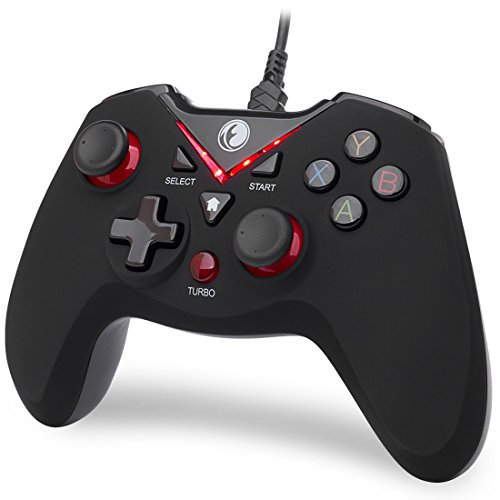
IFYOO V-one Wired USB Gaming Controller Gamepad (Red)

IFYOO ONE Pro Wired USB Gaming Gamepad Joystick

Logitech G F710 Wireless Gamepad with USB Nano Receiver

iNNEXT Classic N64 Controller USB PC Gamepad (Green)

EasySMX 2.4G Wireless Controller for PS3 and PC

IFYOO V-one Wired USB Gaming Controller Gamepad with OTG
The Details Behind The Selections
The FLYDIGI DuneFox arrives as the most versatile controller in this lineup, aimed squarely at gamers who bounce between a laptop, a Nintendo Switch, and an Android phone. Hall effect joysticks and triggers use magnetic sensors instead of physical contacts, which is the modern fix for stick drift on older pads. With three connection options (wired USB, Bluetooth, and a 2.4GHz wireless dongle), it adapts to almost any setup without buying extra receivers.
For someone gaming at a desk one night and propped up in bed with a phone the next, that flexibility earns real shelf space. Compared to the wired IFYOO V-one below, the DuneFox trades instant plug-and-play simplicity for wireless freedom and modern sensor tech. The 600mAh battery handles a workday of commute-style sessions, though heavy vibration users will see that number shrink.
Practical Pluses
- Hall effect sticks and triggers resist drift, which matters for anyone planning to keep the same controller for years.
- Three connection modes mean one gamepad covers Switch, PC, laptop, and Android without juggling receivers.
- Dual motor grip vibration adds weight to gunshots and crashes in shooters and racing games.
- 14-hour battery life is enough for several long sessions before recharging.
- Quick three-hour top-up means lunch breaks can fully refill the pack.
Points To Keep In Mind
- Excludes Xbox and PlayStation consoles, so the dualshock crowd will need a different pad.
- Wireless convenience comes with the usual upkeep: a charging cable and battery awareness over time.
Who It Suits Best
Cross-platform players who want one gamepad for Switch, PC, and Android and care about long-term stick reliability.
A Better Fit Elsewhere
Console-only Xbox or PlayStation owners should look at the Logitech G F710 instead for broader PC and console-native wireless support.
The V-one wired pad is the simplest entry on this list: plug it into a USB port and start playing. Compatibility stretches across Windows XP through Windows 11, Steam, Android tablets and TVs, and even PS3, making it the kind of spare controller that lives in a drawer and rescues friends who forgot theirs. For PC players who mostly launch Steam games in Xinput mode, it just works.
The honest read is that this pad is not chasing premium build or hall effect sensors. It is a pragmatic pick for retro libraries, indie titles, or anyone whose laptop is already tethered to a desk. Next to the FLYDIGI DuneFox above, the V-one trades wireless freedom for a sub-budget price and zero charging.
The Case For It
- Wired connection means zero input lag and no battery anxiety on marathon sessions.
- Broad compatibility covers legacy Windows versions, Steam, and PS3 in one inexpensive shell.
- Compact footprint works well on cluttered dorm desks and tight entertainment centers.
Some Limits To Know
- The cable can tug during couch play, and shorter USB runs may limit how far you sit from the laptop.
- Android use requires buying an OTG adapter separately, which adds a small hidden cost.
Right Fit For
Students and casual PC players who want a no-fuss wired gamepad for Steam indies and older titles on a tight budget.
Consider Something Else When
Couch players wanting wireless freedom should consider the EasySMX 2.4G wireless pad for its 10-meter range.
The ONE Pro builds on the basic V-one formula with a more grown-up feature set. Xinput, Dinput, Android, and PS3 modes mean the pad talks nicely to almost anything that accepts a controller, while turbo and vibration feedback add the kind of tactile depth budget pads usually skip. The white-and-gray colorway and bundled extra joystick caps give it a slightly more polished look on a shared desk.
Compared to the V-one above, the ONE Pro is the same wired backbone with extra functional flexibility for fighting games and shooters. It still needs an OTG adapter for Android phones, but for PC-only or Steam-heavy users the experience is plug-and-play.
What Works In Its Favor
- Turbo function helps in retro shooters and button-mashers, sparing your fingers on long combos.
- Vibration feedback adds weight to crashes and explosions in racers and action games.
- Multi-mode compatibility covers Xinput, Dinput, Android, and PS3 in a single shell.
Trade-Offs To Consider
- Sticks use traditional potentiometers rather than hall effect sensors, so long-term drift prevention is less certain.
- Drivers are still required on Windows XP, a small but real setup step for legacy machines.
Best Suited To
Steam-focused PC players who want turbo and rumble without moving to wireless or premium price tiers.
Look Elsewhere When
Drift-conscious buyers who game daily for years should pick up the FLYDIGI DuneFox for its hall effect sticks.
The Logitech F710 leans on a long-running 2.4GHz wireless design with a tiny nano receiver that stays plugged into the laptop. The classic grey-and-black shell has a familiar console-style weight in the hands, and the bundled Profiler software lets owners remap buttons per game. For laptop gamers who treat their rig as the only console, this pad feels like furniture: sturdy, familiar, dependable.
Compared to the FLYDIGI DuneFox, the F710 skips hall effect sensors but wins on ecosystem maturity and Logitech’s track record for long product lifespans. It is also a wireless-only pad, so anyone who needs a wired fallback will look elsewhere.
Strong Points
- Nano receiver stays in the laptop USB port for fast reconnects, no pairing rituals required.
- Wireless range handles the gap between a desk and a living room couch comfortably.
- Logitech Profiler software supports per-game button remapping for complex PC titles.
- Wide game support profile handles legacy DirectInput titles and modern Xinput games.
Room For Improvement
- Uses AA batteries rather than a rechargeable pack, so ongoing battery costs add up over years of use.
- No hall effect sticks, so heavy daily players may see drift eventually appear on the analog modules.
Who Should Grab It
Laptop owners who want a wireless pad backed by a major brand and plan to keep the same controller for years.
Swap It Out When
Hardcore competitive players who demand drift-proof hall effect sticks should grab the FLYDIGI DuneFox instead.
The iNNEXT N64-style pad is a love letter to one of the most distinctive console controllers ever made. The iconic M-shaped layout puts the analog stick, D-pad, and ten action buttons exactly where retro hands remember them. Plug-and-play USB means it shows up on Windows, macOS, Linux, and Raspberry Pi without driver hunting, which is perfect for emulator rigs.
Compared to the modern shapes of the FLYDIGI DuneFox and Logitech F710, this pad is unapologetically nostalgic. The 6-foot cable reaches from a TV stand to a couch comfortably, and the precision stick handles 3D movement with surprising accuracy for emulated shooters.
The Practical Payoff
- Faithful N64 layout makes emulator sessions feel like the real hardware.
- Ten action buttons plus an 8-way D-pad cover the full original button map without remapping tricks.
- Plug-and-play USB works on Windows, macOS, Linux, and Raspberry Pi out of the box.
- 6-foot cable reaches a TV stand from a typical laptop dock without strain.
Where It May Fall Short
- The shape is wrong for modern shooters and fighting games designed around twin-stick layouts.
- Sticks use traditional analog modules, so heavy 3D gaming may eventually show wear on the precision stick.
Perfect Match For
Emulator hobbyists and retro fans running N64-era games on a laptop, mini PC, or Raspberry Pi setup.
Reach For A Different Pick When
Modern gamers playing twin-stick shooters should pick the IFYOO ONE Pro for its standard dual-stick layout.
The EasySMX pad focuses on one thing: wireless freedom with a healthy 10-meter range through its 2.4GHz receiver. The asymmetric dual vibration motors respond differently to left- and right-side in-game events, which adds directional feedback that budget pads often flatten out. Textured rubber grips keep sweaty palms from sliding during long raids.
Compared to the wired IFYOO V-one, the EasySMX trades cable simplicity for a true living-room setup. The 20-hour battery life on two AA batteries (sold separately) is generous, though the requirement to swap cells means keeping a spare set around.
What Pays Off
- 10-meter wireless range covers most living rooms from the TV stand to the couch.
- Dual asymmetric vibration feedback adds directional nuance to gunshots and explosions.
- Textured rubber grips help during sweaty, high-tension matches.
- Up to 20 hours of runtime on AA batteries for marathon sessions.
Things To Weigh Up
- AA batteries are not included, so initial setup requires buying cells separately.
- Wireless dongle occupies a USB port that is then unavailable for other peripherals.
Made For
Couch laptop gamers who want wireless reach and vibration feedback for action and racing titles.
Not Your Match When
Wired-only purists chasing zero-latency play should reach for the IFYOO V-one instead.
This second IFYOO V-one variant ships with an OTG adapter included, which closes the Android phone gap that its sibling leaves open. Plug-and-play on Windows XP through Windows 10 means the pad works on older spare laptops without driver gymnastics. The same multi-mode approach handles Xinput, Dinput, Android, and PS3 titles.
Compared to the IFYOO ONE Pro above, this V-one is the simpler budget sibling with vibration and turbo but a more bare-bones package. For someone who just needs a controller that handles PC and an Android phone, the included OTG cable is the deciding feature.
Standout Benefits
- Included OTG adapter removes the hidden cost of going mobile with Android phones and tablets.
- Plug-and-play setup works on legacy Windows versions without driver installs.
- Vibration and turbo support bring arcade-style feedback to budget PC play.
Practical Considerations
- OTG adapter typically supports USB-C or Micro-USB only, so iPhone-only owners will need a different path.
- Wired-only design limits placement when the laptop sits far from the couch.
Whose Shelf It Belongs On
Tinkerers who game on a Windows laptop and an Android phone, and who want one inexpensive pad to cover both.
Where Another Pick Suits Better
Anyone chasing a modern hall effect upgrade should pick the FLYDIGI DuneFox for longer stick lifespan.
What To Weigh Before Choosing Your Next Laptop Controller
Wired Or Wireless, And Why It Matters
Wired controllers like the IFYOO V-one and ONE Pro deliver zero-latency input and never need charging, but they pin you close to the laptop. Wireless pads trade a tiny bit of convenience for the freedom to game from a couch or bed. If your laptop lives on a desk and you sit within six feet, wired is the practical pick. If it lives in a living room connected to a TV, wireless wins.
Platform Coverage And Adapter Realities
Every controller here lists broad platform support, but Android is where the catches hide. Phones need an OTG adapter to talk to most USB gamepads, and that adapter is sometimes bundled (IFYOO V-one OTG) and sometimes not (V-one Red, ONE Pro). Console-native pads for Xbox and PlayStation are not on this list at all; the FLYDIGI DuneFox excludes those platforms entirely, while the others mostly support PS3 but not newer Sony hardware.
Stick Tech And Long-Term Reliability
Hall effect sensors in the FLYDIGI DuneFox avoid the drift problems that plague older potentiometer-based sticks after heavy use. Traditional analog sticks still work fine for casual play, but anyone planning 10+ hours a week should factor in eventual stick wear. The Logitech F710 has a long track record for longevity, but uses traditional modules.
Smart Choices Across This Lineup
Pitfalls Shoppers Hit
Skipping the OTG adapter question is the most common mistake. Many shoppers buy a wired pad expecting it to plug into their phone, only to realize Type-C and Micro-USB phones need an extra adapter. Another trap is assuming Xbox One or PS4 support from “PC compatible” wording; these pads mostly target older Xinput and PS3 games, so modern console titles are out of reach.
When Paying More Pays Off
The step up from a $15 wired pad to a $40+ wireless controller with hall effect sensors pays off for daily gamers. Drift-free sticks, rechargeable batteries, and multi-mode wireless add up to fewer replacements over a three-to-five-year window. For casual weekend play, a basic wired pad still earns its keep without the upgrade tax.
Frequently Asked Questions
Are wired or wireless laptop controllers better?
Wired pads give the lowest input lag and never run out of power. Wireless pads win on couch flexibility and a cleaner desk setup. Daily desk players usually prefer wired; living room laptop users usually prefer wireless.
Do these controllers work with Steam games?
Yes. The IFYOO V-one, ONE Pro, and EasySMX pad all support Xinput, which Steam recognizes natively for the vast majority of controller-supported titles. The Logitech F710 also works through Xinput mode.
Can I use these laptop controllers on an Android phone?
Yes, but most need an OTG adapter for Type-C or Micro-USB phones. The IFYOO V-one OTG variant bundles the adapter, while the others require a separate purchase. Android support also depends on the specific game supporting controller input.
What is hall effect, and why does it matter?
Hall effect joysticks use magnetic sensors instead of physical contact points. The lack of contact wear means stick drift (unintended movement when the stick is centered) is far less common over years of use. The FLYDIGI DuneFox is the only pad here using this tech.
Will any of these work with a Mac?
Most of these pads target Windows and Steam primarily. The iNNEXT N64-style pad explicitly supports macOS, while the others may require third-party drivers or may not be detected at all on Apple laptops.
The Takeaway
A laptop controller only earns its place if it matches how you actually play. Couch gamers will lean toward the FLYDIGI DuneFox or EasySMX for wireless reach, while desk-based PC and Steam players will get the most out of the wired IFYOO V-one or ONE Pro. Pick the platform coverage and stick tech that match your habits, and the rest tends to fall into place.