Splitting time between spreadsheets and open-world games used to mean owning two machines. That compromise feels increasingly outdated. The category now spans slim ultrabooks with chip-level AI acceleration, dedicated gaming rigs with OLED panels, and budget notebooks that genuinely handle both workloads. I looked across seven current options, weighing what each one actually does well and where it cuts a corner.
A Fast Comparison Of The Options
A Fast Comparison Of The Options

Apple MacBook Air Laptop with M1 Chip (Space Gray)
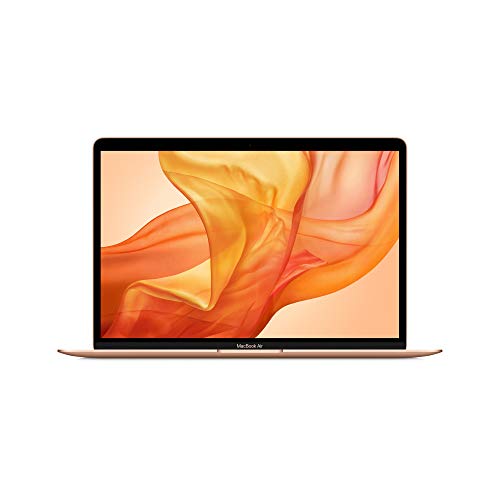
Apple MacBook Air 13-inch Retina (Gold, Previous Model)

Apple 2025 MacBook Air 13-inch with M4 Chip (Sky Blue)

MSI Stealth 16 AI+ 240Hz OLED Gaming Laptop

BLUEING 2026 Laptop with Pentium Gold 6500Y

BLUEING 2026 Laptop Gold 6500Y 256GB SSD

BLUEING 15.6 Inch Laptop Pentium Gold 6500Y Silver
Taking A Closer Look At The Options
The original M1 MacBook Air still earns its place on a hybrid-use shortlist. The 13-inch Retina panel is sharp enough for long editing sessions, and the fanless chassis stays silent in meetings and on long flights. Apple’s first-generation silicon (the M1 chip pairs an 8-core CPU with integrated graphics) handles documents, browser tabs, and casual gaming through Apple Arcade without breaking a sweat.
For shoppers who mainly write, browse, and stream, this older Air remains a sensible buy in 2026. Compared to the newer M4 Air further down this list, the trade-off is memory ceiling and AI acceleration. The trade-off matters most for video editors and gamers chasing newer titles.
Practical Pluses
- Up to 18 hours of battery life covers a full workday without a charger.
- 8GB of unified memory keeps the system responsive during multitasking.
- 256GB SSD boots macOS in seconds and wakes from sleep almost instantly.
- Touch ID streamlines logins and online purchases.
- Fanless design means total silence under typical office workloads.
Things To Consider
- Integrated graphics limit modern AAA gaming to lower settings.
- Storage tops out at 256GB without external drives.
- Only two USB-C ports may require a dock for desktop setups.
Who It Suits Best
Students, writers, and remote workers who prioritize silent operation and battery endurance over raw graphics power.
Consider Something Else When
Gamers chasing high frame rates should look at the MSI Stealth 16 AI+ instead for dedicated GPU muscle.
This pre-M1 MacBook Air represents Apple’s final Intel-powered design. The 13.3-inch Retina display with True Tone (a feature that gently adjusts color temperature to match ambient light) reduces eye strain in long sessions, and the Magic Keyboard’s scissor mechanism feels familiar to anyone who has typed on a recent external keyboard.
For shoppers who run Windows apps through Boot Camp or virtualization, the Intel Core i5 chip provides x86 compatibility that the newer M-series chips lack natively. The Iris Plus Graphics handle light photo editing and indie gaming comfortably. Compared to the M1 Air above, this model runs warmer under load due to active cooling.
A Few Highlights
- 512GB SSD gives breathing room for larger project files.
- Two Thunderbolt 3 ports enable fast external storage and 4K displays.
- Force Touch trackpad offers precise cursor control for design work.
- Stereo speakers deliver wider separation than most thin laptops.
Worth Noting
- Up to 11 hours of battery falls short of M-series endurance.
- Intel architecture limits future macOS compatibility windows.
Made For
Office-focused users who need x86 compatibility and prefer a refined keyboard and trackpad experience.
Look Elsewhere When
Long battery life matters more than native x86 support, in which case the Apple 2025 MacBook Air 13-inch with M4 Chip is the stronger modern pick.
The current MacBook Air with M4 is the most balanced pick in this roundup. The 13.6-inch Liquid Retina display (slightly taller than the older 13.3-inch panel, with thinner borders) gives more vertical workspace for documents and timelines. Apple’s M4 silicon brings dedicated neural engine cores, which accelerate on-device AI features built into macOS without sending data to the cloud.
For hybrid users who switch between spreadsheets, creative apps, and evening gaming, the M4 Air delivers a noticeable jump over the M1 generation. The trade-off shows up in storage: 256GB fills quickly when juggling large project files and game installs. The trade-off is real, but cloud storage and external SSDs remain affordable workarounds.
Positive Points
- 16GB unified memory handles heavy multitasking with room to spare.
- Up to 18 hours of battery life matches the original M1 Air.
- 12MP Center Stage camera keeps you framed during video calls.
- Sky Blue finish stands out from typical silver and gray laptops.
- Fanless chassis runs silent even during extended editing work.
Trade Offs
- 256GB base storage demands external solutions for large media libraries.
- Integrated graphics still cap AAA gaming at modest settings.
- Only two USB-C ports require a hub for wired accessories.
- Higher memory configurations increase the total cost noticeably.
Feature Snapshot
Best Suited To
Hybrid professionals and creative hobbyists who want modern Apple silicon without stepping up to a Pro model.
Skip It When
Dedicated gaming at high frame rates is the priority, in which case the MSI Stealth 16 AI+ offers a far stronger GPU.
The MSI Stealth 16 AI+ is purpose-built for shoppers who refuse to compromise on frame rates. The 240Hz QHD+ OLED panel (a high-refresh display where each pixel produces its own light, giving true blacks and instant response times) is the standout feature. Fast-paced shooters and racing games feel noticeably smoother at this refresh rate, and OLED contrast makes HDR content sing.
Under the hood, the Intel Core Ultra 9 386H processor pairs with an NVIDIA GeForce RTX 5070 Ti GPU and 32GB of DDR5 memory. This combination chews through video renders and modern AAA games simultaneously. The trade-off is weight and battery life: gaming laptops of this caliber rarely last more than a few hours unplugged.
Everyday Advantages
- 1TB NVMe SSD holds a large game library and project files.
- Wi-Fi 7 (the latest wireless standard, offering multi-gigabit speeds on compatible routers) future-proofs networking.
- 32GB DDR5 memory eliminates bottlenecks during streaming or rendering.
- Charcoal Black chassis keeps the design understated for office use.
Room For Improvement
- Gaming laptops run warm, so a cooling pad is widely recommended.
- Battery drains quickly under gaming loads.
- Heavier than ultrabooks, reducing daily commute comfort.
Who Should Grab It
Gamers and creative professionals who want desktop-class performance in a portable form factor.
Not Your Match When
All-day portability is the priority, in which case the BLUEING 2026 Laptop Gold 6500Y 256GB SSD is far lighter on the shoulders.
BLUEING’s 2026 entry-level notebook targets shoppers who need a functional machine without premium pricing. The Pentium Gold 6500Y is an Intel-derived chip with two cores and four threads, capable of boosting up to 3.4GHz. The 14-inch FHD IPS display (In-Plane Switching, a panel technology that improves viewing angles and color consistency) covers 100% sRGB, which is unusually generous for this segment.
For students handling essays, email, and video calls, this laptop handles the essentials without fanfare. The trade-off is storage: 128GB fills quickly with course materials and media. Most owners commonly pair this model with an external drive or cloud storage.
Good Reasons To Consider
- 100% sRGB color coverage delivers accurate visuals at this price point.
- USB-C, HDMI, and USB 3.2 ports cover most accessory needs.
- Wi-Fi 5 and Bluetooth 5.0 handle standard wireless connections.
Points To Note
- 128GB storage demands external solutions for larger files.
- Integrated graphics limit gaming to browser and casual titles.
Quick Facts
Right Fit For
Budget-conscious students and casual home users who need a reliable machine for everyday tasks.
Reach For A Different Pick When
You need more local storage out of the box, in which case the BLUEING 15.6 Inch Laptop Pentium Gold 6500Y Silver offers 512GB.
This second BLUEING model doubles the storage to 256GB while emphasizing portability. USB-C charging removes the need to carry a proprietary brick, which matters on long commutes. Bluetooth 5.2 improves wireless stability for mice, headphones, and conference speakers.
The thin chassis makes this a sensible pick for commuters who alternate between home offices and travel days. The trade-off is the same processor ceiling: demanding creative workloads remain out of reach. For document work, browsing, and streaming, the setup feels snappy and responsive.
The Practical Payoff
- 256GB SSD holds more apps and documents than the 128GB sibling.
- USB-C charging simplifies cable management across devices.
- Thin profile slips easily into backpacks and messenger bags.
- Bluetooth 5.2 delivers steadier wireless peripheral connections.
Less Ideal Details
- Integrated graphics limit modern gaming options.
Whose Shelf It Belongs On
Frequent travelers and commuters who want a lightweight machine with modern connectivity.
A Better Fit Elsewhere
Heavy multitaskers should consider the BLUEING 15.6 Inch Laptop Pentium Gold 6500Y Silver for 16GB of memory and 512GB of storage.
The largest screen in BLUEING’s current lineup measures 15.6 inches diagonally, giving spreadsheets and side-by-side documents room to breathe. The 16GB of RAM and 512GB SSD combination stands out at this tier, since most competitors in the budget segment ship with half the memory and storage.
For home office setups where the laptop stays on a desk most of the time, the larger display and generous storage feel like a quiet upgrade. The trade-off is weight: a 15.6-inch chassis is harder to carry daily than the slimmer 14-inch sibling reviewed earlier.
Everyday Perks
- 16GB RAM handles many browser tabs and apps at once.
- 512GB SSD eliminates immediate storage anxiety.
- 15.6-inch FHD IPS display offers comfortable viewing for long sessions.
- Silver finish reads as professional in client-facing environments.
- Multiple ports including HDMI simplify projector and monitor hookups.
Honest Caveats
- Larger chassis weighs more during daily commutes.
- Same processor ceiling applies across the BLUEING lineup.
- Battery life tends to dip faster on bigger displays.
Perfect Match For
Home office users and small business owners who prioritize screen size and storage over portability.
Where A Sibling Pick Shines
Daily commuters should pick the slimmer BLUEING 2026 Laptop Gold 6500Y 256GB SSD for easier transport.
What To Weigh Before Choosing Your Next Machine
A laptop that handles both work and play has to do three things well: stay cool under sustained load, deliver battery life that matches the day’s schedule, and offer a screen that doesn’t strain eyes during long sessions. Chip choice matters more than raw clock speed, since modern processors from both Apple and Intel balance performance with efficiency in ways older generations did not.
Gaming capability hinges on the graphics solution. Integrated graphics handle casual titles, browser games, and Apple Arcade with ease, while dedicated GPUs like the RTX 5070 Ti in the MSI Stealth open the door to modern AAA experiences at high settings. The honest read is that no single laptop does both perfectly; the right pick depends on which workload dominates your week.
Memory and storage deserve a second look beyond headline numbers. 16GB of RAM has become the practical floor for hybrid use, since browser-heavy workflows consume memory quickly. Storage needs scale with file habits: cloud-first users can manage with 256GB, but local media collectors benefit from 512GB or larger drives.
Connectivity shapes daily friction. Thunderbolt 3 and USB-C ports enable single-cable docking, while HDMI remains useful for conference rooms and older projectors. Wi-Fi 6 or newer ensures smooth streaming on busy networks, which matters more than spec sheets suggest.
Key Considerations Across These Picks
Wrong Turns To Avoid
Chasing the highest benchmark scores often leads shoppers toward gaming laptops that overdeliver on power and underdeliver on portability. A 5-pound machine rarely leaves the desk, no matter how fast it benchmarks. The opposite trap is buying an ultrabook with too little storage, only to spend the first month juggling files and cloud subscriptions.
Another common slip is ignoring the keyboard and trackpad until after the purchase. For users who type all day, the Magic Keyboard on MacBook Air models and the standard layouts on BLUEING machines feel different enough to matter. Trying the typing surface in person, where possible, prevents buyer’s remorse.
Where The Extra Money Goes
Higher-tier models earn their premium through better displays, more memory, and dedicated graphics. The jump from the M1 MacBook Air to the M4 MacBook Air brings a taller Liquid Retina panel, AI acceleration, and a sharper webcam. The MSI Stealth 16 AI+ charges more for an OLED panel, an RTX GPU, and 32GB of DDR5 RAM, components that transform gaming and creative workflows.
The honest question is how often those upgrades get used. Shoppers who game weekly and edit video projects regularly feel the difference immediately. Shoppers who mainly write and browse often find that a mid-range configuration covers their needs without stretching the budget.
Frequently Asked Questions
Can a thin laptop really handle gaming?
Modern integrated graphics handle indie games, browser titles, and Apple Arcade comfortably. Demanding AAA games require a dedicated GPU like the RTX 5070 Ti found in the MSI Stealth 16 AI+.
How much RAM do I actually need?
For document work and browsing, 8GB works but feels tight. 16GB is the practical sweet spot for hybrid users juggling many browser tabs and creative apps.
Is OLED worth the premium for gaming?
OLED panels deliver true blacks and instant pixel response, which noticeably improves fast-paced games and HDR content. The trade-off is brightness uniformity over years of use.
Do I need Wi-Fi 7?
Wi-Fi 7 future-proofs home networks and supports multi-gigabit speeds on compatible routers. Existing Wi-Fi 6 routers handle most current needs without issue.
What’s the real battery difference between M-series and Intel laptops?
Apple’s M-series chips typically deliver 15 to 18 hours of light use, while Intel-based laptops like the BLUEING models generally land closer to 8 to 10 hours under similar workloads.
The Takeaway
A laptop that genuinely bridges gaming and work comes down to matching the workload to the silicon. The MSI Stealth 16 AI+ serves gamers who refuse compromise, while the MacBook Air models cover hybrid professionals who value battery life and silent operation. The BLUEING lineup fills the budget end for students and home offices. Pick the machine that matches the heaviest demand on your week, and the lighter tasks will fall into place naturally.