Shopping for a new gaming rig used to mean a giant tower humming under a desk. Today, the latest gaming laptops pack desktop-grade silicon into a backpack-ready shell, with displays fast enough to keep up with twitch shooters and batteries that survive a coffee shop workday. I spent time digging through specs, thermals, and panel details across seven strong contenders to figure out which machine suits which type of player. Whether you main a competitive shooter, render 3D scenes, or just want smooth frame rates in tonight’s RPG session, there’s a fit below.
The Picks In Brief

KAIGERR Gaming Laptop 15.6″ Ryzen 7 5825U 16GB 1TB

Apple 2024 MacBook Pro M4 Max 16.2″ 36GB 1TB Silver

NIMO 17.3″ Laptop Ryzen 7 7735HS 64GB DDR5 1TB SSD
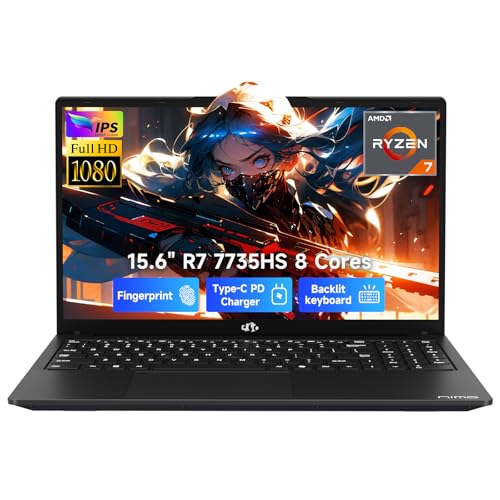
NIMO 15.6″ Laptop Ryzen 7 7735HS 64GB DDR5 2TB SSD

NIMO 17.3″ Gaming Laptop Ryzen 7 7735HS 32GB 1TB
HP Victus 15.6″ FHD 144Hz Gaming Laptop RTX 3050

ASUS ROG Strix G16 RTX 5070 Ti Ryzen 9
A Breakdown Of The Leading Choices
For shoppers who want one machine that handles classwork, side projects, and evening gaming without drama, the KAIGERR 15.6″ leans on AMD’s Ryzen 7 5825U, an 8-core, 16-thread chip that boosts up to 4.5GHz. Integrated Radeon RX Vega 8 graphics cover lighter titles and esports at modest settings, while Wi-Fi 6 keeps latency low in a crowded dorm Wi-Fi zone. I think this lands well for someone who games a few nights a week but does not need ray tracing turned on.
The 1TB NVMe SSD is generous for the category, meaning most people can install a healthy Steam library without juggling storage. The 15.6-inch form factor hits a portable sweet spot, slipping into most backpacks without feeling cramped on a desk. Compared to the higher-end picks below, this one trades raw GPU power for everyday versatility, which suits its intended buyer well.
Notable Gains
- Ryzen 7 5825U handles productivity software and light gaming without breaking a sweat
- 1TB NVMe SSD means you rarely need an external drive for games and project files
- Wi-Fi 6 support helps maintain stable ping in busy networks like shared housing or campus Wi-Fi
- 15.6-inch screen size balances visibility for spreadsheets with carry-friendly dimensions
- 16GB of RAM is comfortable for browser-heavy multitasking alongside a game launcher
Things To Consider
- Integrated Radeon graphics will struggle with demanding AAA titles at high settings
- Owners wanting longer sustained performance should expect warm chassis under heavy loads
Made For
Students, hybrid workers, and casual players who want one laptop for essays, browsing, and lighter gaming sessions without splurging on a dedicated GPU.
Swap It Out When
Gamers chasing higher frame rates in modern AAA titles should reach for the HP Victus 15.6″ with its dedicated RTX 3050 graphics instead.
The 16.2-inch MacBook Pro with M4 Max sits in a different league than the others on this list, targeting professionals who edit, compile, or render for a living. Apple’s silicon packs a 14-core CPU and 32-core GPU, paired with 36GB of unified memory that the CPU and GPU share for faster data access. The Liquid Retina XDR display pushes up to 1600 nits peak brightness, which translates to vivid HDR footage and color-accurate photo work.
For macOS-native creative pipelines, this laptop simply chews through 3D scenes and high-res timelines that would choke less powerful machines. It also runs all-day on battery in lighter workflows, a quiet superpower for traveling editors. That said, dedicated gamers should know macOS still has a narrower game library than Windows, so this is a creator-first machine that happens to handle supported titles beautifully.
Everyday Wins
- M4 Max chip handles intensive workloads like 3D rendering and code compilation with headroom
- 36GB unified memory keeps multiple pro apps responsive without swap-file slowdowns
- Liquid Retina XDR display reaches up to 1600 nits, giving HDR content real punch
- 1TB SSD offers fast read and write speeds for large media libraries
Honest Caveats
- Game catalog on macOS trails Windows, limiting its appeal as a primary gaming rig
- The premium build and silicon come at a serious investment versus the other picks here
Key Specs
Right Fit For
Creative professionals and developers working in macOS who need raw silicon power for video, 3D, or compiling pipelines.
A Better Fit Elsewhere
Dedicated PC gamers chasing high refresh rates in modern titles will find the ASUS ROG Strix G16 a more natural fit.
The NIMO 17.3″ is built around the idea that some shoppers want a giant screen without a second monitor. Its Full HD panel (1920×1080) gives data analysts, project managers, and spreadsheet power users room to keep multiple windows side-by-side. The Ryzen 7 7735HS processor delivers 8 cores and 16 threads, paired with Radeon 680M integrated graphics that handle office software and lighter gaming on the side.
With 64GB of DDR5 memory and a 1TB SSD, this machine refuses to choke when you have dozens of browser tabs, a Zoom call, and a code editor open at once. The slim 18.8mm chassis and under 2.1kg weight make it more portable than older 17-inch notebooks, though it’s still bigger than the 15.6-inch picks in this lineup. I think anyone who splits time between gaming and serious multitasking will appreciate what this brings to the table.
Everyday Perks
- 17.3-inch display is roomy enough for side-by-side documents without external monitors
- 64GB DDR5 RAM keeps heavy multitasking smooth across many browser tabs and apps
- Ryzen 7 7735HS provides eight cores of headroom for productivity and light creative work
- Slim 18.8mm profile keeps the footprint manageable for a 17-inch machine
Points To Note
- Full HD resolution on a 17.3-inch screen means pixel density is lower than on smaller panels
- The integrated Radeon graphics limit serious AAA gaming at higher settings
Whose Shelf It Belongs On
Analysts, project managers, and power multitaskers who value screen real estate and memory capacity over peak gaming performance.
Consider Something Else When
Gamers chasing higher frame rates in modern titles will get more from the HP Victus 15.6″ with its dedicated RTX graphics.
The 15.6-inch sibling to the NIMO above keeps the same Ryzen 7 7735HS and Radeon 680M graphics but swaps a bigger screen for a much bigger SSD. With 2TB of NVMe storage, this laptop is aimed squarely at creators and gamers juggling enormous project files, raw 4K footage, or sizable game libraries. The 64GB of DDR5 RAM means you can scrub through timelines or run virtual machines without paging out to disk.
For shoppers who prefer a more traditional 15.6-inch form factor over the roomier 17.3-inch option, this strikes a reasonable middle ground. The integrated graphics keep the price sensible for productivity while still handling esports titles at modest settings. I find this configuration especially appealing for video editors and 3D artists who would otherwise bolt in an external SSD.
The Helpful Details
- 2TB SSD provides space for game libraries, raw footage, and project archives
- 64GB DDR5 RAM handles memory-hungry apps like editing suites and virtual machines
- 15.6-inch form factor is easier to carry than the 17.3-inch NIMO sibling
- Radeon 680M graphics give casual gaming capability alongside productivity
Trade Offs
- Integrated Radeon graphics cap performance in demanding AAA games
- The 15.6-inch screen leaves less room for side-by-side windows than the 17.3-inch NIMO
Feature Snapshot
Best Suited To
Content creators and power users who carry massive files and want internal storage that removes the need for external drives.
Look Elsewhere When
Competitive gamers who prioritize frame rates over storage should reach for the ASUS ROG Strix G16 instead.
This NIMO 17.3-inch model leans into gaming with a Full HD IPS panel, a 180-degree hinge for flexible positioning, and a 2-year warranty that buys peace of mind. The Ryzen 7 7735HS boosts up to 4.75GHz, paired with Radeon 680M graphics that handle esports titles and many modern games at sensible settings. 32GB of DDR5 RAM keeps the system smooth even with Discord, a browser, and the game itself open.
The 1TB SSD gives reasonable headroom for a few large games plus everyday apps. I find the IPS panel and 180-degree hinge make this a comfortable fit for shared spaces, dorm rooms, or coffee shop gaming. It’s not a flagship performer, but for shoppers wanting a large-screen gaming laptop without flagship pricing, this is a reasonable middle ground.
What It Does Well
- 17.3-inch IPS display offers wide viewing angles for shared-screen gaming
- 180-degree hinge makes it easy to prop up or share content with someone nearby
- Ryzen 7 7735HS boosts to 4.75GHz for responsive single-threaded gaming
- 32GB DDR5 RAM keeps streaming software and games running together smoothly
Small Caveats
- Radeon 680M is integrated graphics, so high-settings AAA play is limited
- The 17.3-inch chassis is less backpack-friendly than the 15.6-inch picks
Who It Suits Best
Budget-aware gamers and students who want a large screen, modern specs, and the comfort of a multi-year warranty.
Not Your Match When
Hardcore gamers chasing the highest frame rates should look at the ASUS ROG Strix G16 with its dedicated RTX 5070 Ti GPU.
The HP Victus lands in this list as the most straightforward dedicated-gaming pick, pairing an Intel Core i5-12450H with an NVIDIA GeForce RTX 3050. The 15.6-inch Full HD panel runs at 144Hz, which is the kind of refresh rate that makes competitive shooters feel noticeably smoother than a standard 60Hz display. RTX support also brings real-time ray tracing and DLSS to titles that take advantage of them.
With 16GB of RAM and a 1TB PCIe SSD, the Victus covers the essentials for modern gaming. The Performance Blue chassis and backlit keyboard keep things comfortable during late-night sessions. For shoppers who care more about frame rates than creative workloads, this represents a sensible middle tier, and it should handle esports titles at high refresh rates with room to spare.
Positive Takeaways
- 144Hz refresh rate delivers visibly smoother motion in fast-paced games
- RTX 3050 enables ray tracing and DLSS in supported titles
- 1TB PCIe SSD gives ample room for a modern game library
- Backlit keyboard helps during late-night gaming sessions
Worth Noting
- The RTX 3050 sits at the entry level for ray tracing, so expect to tune settings for newer AAA games
- 16GB of RAM is fine for gaming but tight for heavy multitasking alongside streaming or editing
Feature Snapshot
Perfect Match For
Esports players and competitive gamers who prioritize high refresh rates and dedicated graphics for popular multiplayer titles.
Reach For A Different Pick When
Creators or developers who need macOS-native workflows should consider the Apple MacBook Pro with M4 Max instead.
The ASUS ROG Strix G16 is the high-performance bookend of this list. An AMD Ryzen 9 processor pairs with the NVIDIA GeForce RTX 5070 Ti laptop GPU, which brings 8GB of dedicated graphics memory, Advanced Optimus (a feature that switches between integrated and discrete graphics to save battery), DLSS, and Frame Generation to the table. That stack targets gamers who want top-tier frame rates in modern AAA titles and streamers who need GPU headroom for encoding.
The RTX 5070 Ti sits in the latest generation of NVIDIA laptop GPUs, so shoppers get current-generation features like upgraded ray tracing and AI-accelerated rendering. Compared to the HP Victus’s RTX 3050, this is several tiers above in raw performance. I think anyone who has been waiting to upgrade from an older flagship will feel the leap immediately in demanding games.
Good Reasons To Consider
- RTX 5070 Ti GPU delivers top-tier frame rates and AI-accelerated rendering features
- Ryzen 9 CPU provides multi-core muscle for streaming, encoding, and heavy gaming
- Advanced Optimus balances battery life and performance automatically
- Cutting-edge silicon means the laptop should age well as newer games arrive
Points To Keep In Mind
- Flagship components generate significant heat under sustained load
- The price tag puts it well above mid-range options like the HP Victus
Built With In Mind
Hardcore gamers, streamers, and 3D enthusiasts who want flagship performance and the latest NVIDIA features in a portable chassis.
Skip It When
Students and casual gamers should consider the more approachable KAIGERR 15.6-inch instead for everyday versatility.
What To Weigh Before Choosing Your Next Gaming Laptop
GPU muscle matters, but it is not the whole picture. Display refresh rate decides how smooth motion feels, while panel size and resolution determine whether you can comfortably edit timelines or read spreadsheets on the go. RAM and storage shape everyday usability: 16GB is the minimum for modern gaming, but 32GB or 64GB pays off if you keep dozens of browser tabs and chat apps running alongside your game. Storage size matters too, since modern AAA titles often exceed 100GB each.
CPU choice tends to matter more for streamers and creators than for pure gamers. AMD Ryzen 7 and Ryzen 9 chips handle multi-threaded workloads well, while Intel Core i5 and i7 processors remain solid for gaming-focused builds. Thermal design (how well the laptop moves heat away from components under sustained load) is another quiet factor, because a thin chassis may throttle performance over a long session. Battery life rounds it out, and realistically, gaming laptops tend to drain faster than ultrabooks, so a battery rated for several hours of light use is a sensible benchmark.
If you travel often, weight and charger size matter more than benchmarks. A 15.6-inch machine is easier to carry daily than a 17.3-inch one, though the larger screen gives more room for windows and split-screen work. Picking the right balance depends on where the laptop will live most of the time, and that’s worth deciding before chasing higher numbers.
Where Shoppers Go Wrong in This Category
Common Shopping Slip Ups
A frequent trap is chasing the biggest spec sheet without checking thermal design. A laptop with a flagship GPU in a thin chassis may throttle under sustained gaming, which means worse real-world frame rates than a slightly slower chip with better cooling. Look for reviews that discuss sustained performance, not just peak benchmark numbers.
Where The Extra Money Goes
Higher-tier gaming laptops buy more than raw frame rates. You get faster display panels with higher refresh rates, better color accuracy for creative work, more robust cooling systems, and premium chassis materials. The upgrade also tends to include more SSD storage and RAM, which keeps the machine relevant for longer. For shoppers who keep a laptop four or five years, the premium tier often pays back in longevity.
Frequently Asked Questions
How much RAM do I need in a gaming laptop?
For most modern games, 16GB of RAM is the practical minimum, while 32GB gives breathing room for streaming software and heavier multitasking. The 64GB configurations on some NIMO models help if you run virtual machines or edit large media files.
Is a 144Hz display worth it on a gaming laptop?
A 144Hz panel makes fast motion in shooters and racing games noticeably smoother than a standard 60Hz display, and once you adjust, going back feels jarring. For slower-paced RPGs or strategy titles, the difference is less pronounced, but the higher refresh rate rarely hurts.
Do I need a dedicated GPU for gaming?
Integrated graphics like Radeon Vega 8 and 680M handle esports and older titles at modest settings, but modern AAA games benefit greatly from a dedicated GPU. The HP Victus’s RTX 3050 and the ASUS ROG Strix’s RTX 5070 Ti illustrate the spectrum from entry-level to flagship performance.
What screen size is best for a gaming laptop?
A 15.6-inch display strikes a balance between portability and usable screen space, while 17.3-inch panels give more room for split-screen work but add weight. Students who carry a laptop daily often prefer the smaller size, while desk-bound users may appreciate the larger display.
How important is the CPU for gaming?
The CPU matters more in CPU-bound games like strategy titles and open-world sandboxes, and it also matters for streamers running encoding software. For most pure gaming scenarios, a modern Ryzen 5 or Core i5 is sufficient, while Ryzen 7, Ryzen 9, and Core i7 chips provide headroom for multitasking.
The Takeaway
The best gaming laptop for you depends on what kind of player you actually are. The KAIGERR 15.6-inch and NIMO models handle productivity and lighter gaming comfortably, while the HP Victus adds a dedicated GPU for serious frame rates. At the top end, the ASUS ROG Strix G16 brings flagship silicon for demanding titles, and the MacBook Pro M4 Max serves macOS-based creators exceptionally well. Match the machine to the games and tasks you actually run, and the rest falls into place.