Shopping for a gaming laptop without breaking the bank used to feel like chasing a contradiction. In 2026, though, the budget category carries real muscle: current-gen Ryzen and Intel H-series chips, RTX 40-series graphics, and 165Hz panels show up at genuinely approachable prices. The catch is that “budget” still means compromise, and the trade-offs vary wildly between models.
I’ve sorted through nine options that span the spectrum, from a Ryzen-powered all-rounder to a renewed Lenovo with discrete RTX graphics, plus a handful of last-gen bargains that still punch above their tier. Each pick here suits a different kind of gamer, whether you’re chasing esports frames, story-driven single-player, or a machine that handles homework and homework-avoidance equally well.
The Leading Options At A Glance

KAIGERR Gaming Laptop 16GB RAM 1TB SSD Ryzen 7
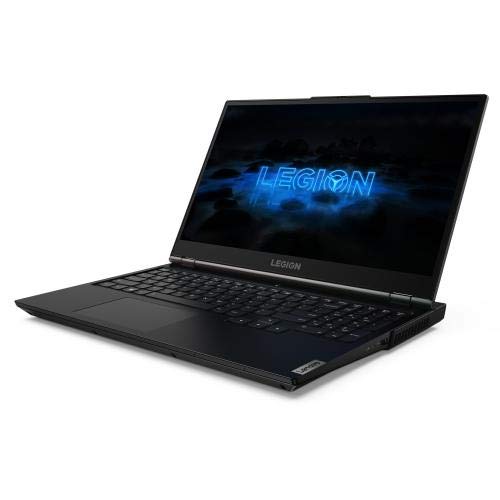
Lenovo Legion 5 Gaming Laptop RTX 2060 (Renewed)
Acer Nitro V ANV15-52-73D8 i7-13620H 16GB 1TB

HP Pavilion Gaming 15 Ryzen 5 4600H GTX 1650
HP Victus 15 i5-12450H RTX 3050 16GB 1TB

Acer Nitro 5 AN515-54-5812 i5-9300H GTX 1650

Acer Nitro V ANV15-52-76NK i7-13620H RTX 4050

Acer Nitro 5 AN515-55-59KS i5-10300H GTX 1650 Ti

HP Pavilion Gaming 15-dk0020nr i5-9300H GTX 1650
A Breakdown Of The Leading Choices
The KAIGERR sits in a sweet spot that most budget shoppers overlook: a true 8-core, 16-thread Ryzen 7 5825U paired with Radeon RX Vega 8 integrated graphics, 16GB of RAM, and a generous 1TB NVMe SSD. For someone splitting time between spreadsheets, video calls, and a few rounds of esports or indie games after work, it covers the basics without forcing an immediate GPU compromise.
Wi-Fi 6 keeps the wireless connection solid in busy apartments or dorm rooms. The 15.6-inch form factor stays portable enough for a backpack, which makes it a sensible pick for commuters who want one machine for class and play.
Standout Benefits
- 8-core Ryzen 7 handles multitasking well for streaming, tabs, and light creative work
- 1TB NVMe storage means most gamers skip the immediate upgrade dance
- Wi-Fi 6 support helps maintain stable ping in congested networks
- 16GB RAM keeps modern titles from choking during background tasks
Things To Consider
- Integrated Vega 8 graphics cap demanding AAA titles to low settings
- Build is more functional than premium; the chassis flexes under pressure
Who It Suits Best
Students, remote workers, and casual gamers who want a single laptop for productivity, light creative work, and entry-level play without leaning on an external GPU.
Where Another Pick Suits Better
Hardcore gamers chasing 60+ fps in modern AAA titles should look at the HP Victus 15 with its discrete RTX 3050 instead.
The Legion 5 in Phantom Black is a 2020-era machine resold through the Amazon Renewed program, which means the RTX 2060 graphics card inside it would have cost a fortune at launch. For shoppers open to refurbished, this is one of the cleanest routes into true 1080p gaming at respectable settings, paired with an octa-core Ryzen 7 4800H and a 144Hz IPS display.
Compared to the KAIGERR’s integrated Vega 8, the RTX 2060 adds real ray tracing and DLSS support, which stretches its relevance into current-generation titles. The 512GB SSD is tight for modern installs, but owners commonly expand through the second M.2 slot.
Reasons It Performs
- RTX 2060 discrete GPU enables DLSS and ray tracing in supported titles
- 144Hz display pairs well with competitive shooters and MOBAs
- Octa-core Ryzen 7 4800H keeps frame pacing stable during streams or recordings
- Legion chassis is well-known for solid thermals and keyboard feel
Trade Offs
- Renewed condition varies; expect cosmetic wear from prior use
- 512GB SSD fills up fast with modern games installed simultaneously
- Renewed warranty terms differ from new manufacturer coverage
Quick Facts
Made For
Value hunters comfortable with refurbished hardware who want genuine discrete GPU performance for AAA gaming at medium-to-high settings.
Consider Something Else When
Shoppers who need a fresh manufacturer warranty and longer support runway should consider the Acer Nitro V ANV15-52-73D8 instead.
The Acer Nitro V ANV15-52-73D8 steps into current-gen territory with a 13th-gen Intel Core i7-13620H processor, 16GB of RAM, and a 1TB SSD wrapped around a 15.6-inch FHD IPS panel running at 165Hz. That refresh rate is the headline feature for anyone playing Valorant, CS2, or Apex Legends, where every frame of motion clarity matters.
Versus the Lenovo Legion 5’s RTX 2060, this Nitro V pairs its newer CPU with newer NVIDIA RTX 50-series mobile graphics. For gamers whose libraries lean toward competitive multiplayer, the combination delivers a noticeable step up in frame pacing and thermal headroom.
Where It Delivers
- 165Hz IPS panel produces noticeably smoother motion than 60Hz screens
- 13th-gen i7 chip handles modern games without bottlenecking the GPU
- 1TB storage means fewer early-game library culls
- Backlit keyboard helps during late-night sessions
Worth Noting
- Higher refresh screens tend to expose weaker GPUs more visibly
- Plastic chassis construction feels light but lacks rigidity
Best Suited To
Esports and competitive multiplayer players who prioritize high frame rates and smooth motion clarity above maximum graphical settings.
Skip It When
Shoppers wanting the absolute newest graphics architecture should look at the Acer Nitro V ANV15-52-76NK with its RTX 4050 GPU.
The HP Pavilion Gaming 15 with the Ryzen 5 4600H and GTX 1650 lands in a category that barely existed a few years ago: a six-core AMD processor with a discrete GPU at a truly approachable price. The 512GB NVMe SSD gives breathing room for a modest Steam library without forcing immediate storage management.
Where the KAIGERR relies on integrated graphics, the Pavilion adds a real GPU that handles esports titles and older AAA games smoothly at 1080p. It’s not a 2026 flagship, but it covers the practical middle ground most casual gamers actually need.
A Strong Showing
- Six-core Ryzen 5 4600H outpaces many older i7 chips in multithreaded work
- GTX 1650 enables smooth 1080p play in esports and indie titles
- HP’s keyboard layout is comfortable for long typing or gaming sessions
- 512GB SSD strikes a workable balance between capacity and boot speed
Honest Caveats
- Only 8GB of RAM fills up fast with Chrome tabs and Discord running
- Display refresh rate sits at the standard 60Hz ceiling
- Older architecture limits future-proofing for next-gen titles
Feature Snapshot
Perfect Match For
Budget shoppers, students, and casual gamers who want reliable 1080p performance for esports and older titles without overspending.
Look Elsewhere When
Gamers chasing high-refresh competitive play should consider the Acer Nitro V ANV15-52-76NK with its 165Hz panel and RTX 4050.
The HP Victus 15 in Performance Blue earns its spot by bundling RTX 3050 graphics with 16GB of RAM, a 1TB SSD, and a 144Hz Full HD display in one machine. The RTX 3050 brings real-time ray tracing and DLSS support to a price tier where those features used to be fantasies, which matters for anyone playing recent releases like Cyberpunk or Hogwarts Legacy.
Versus the older Pavilion Gaming 15 with its GTX 1650, the Victus steps into newer architecture and doubles the memory. Wi-Fi 6 keeps latency tight, and the backlit keyboard helps during late sessions.
Practical Advantages
- RTX 3050 enables DLSS for better frame rates at higher settings
- 16GB RAM handles modern games plus background apps without paging
- 144Hz display delivers visibly smoother motion than 60Hz screens
- Windows 11 Pro adds BitLocker and broader enterprise features
Points To Keep In Mind
- RTX 3050 is the entry-level ray-trading tier; expect lower settings in demanding titles
- Color-accurate work is limited by the display’s modest color coverage
Right Fit For
Gamers prioritizing ray tracing and DLSS support on modern titles, plus anyone who wants Windows 11 Pro features alongside their gaming hardware.
A Better Fit Elsewhere
Shoppers wanting the very newest RTX 40-series architecture at a similar tier should consider the Acer Nitro V ANV15-52-76NK with its RTX 4050.
The Nitro 5 AN515-54-5812 is a 9th-gen Intel Core i5-9300H paired with a GTX 1650, which puts it firmly in the older-but-affordable corner of this list. The 15.6-inch Full HD IPS display and 256GB NVMe SSD cover the basics, while the backlit keyboard and Wi-Fi 6 round out a usable daily driver for esports and indie gaming.
Compared to the HP Pavilion Gaming 15’s Ryzen 5 4600H, this Nitro trades newer AMD multithreading for an established Intel platform with wider driver maturity. Owners commonly note that the chassis runs warm under load, which is worth considering for long sessions.
Everyday Wins
- GTX 1650 handles esports and older AAA titles at 1080p comfortably
- IPS display provides wider viewing angles than TN panels
- Wi-Fi 6 keeps wireless connections stable in crowded environments
- Backlit keyboard helps during low-light sessions
Room For Improvement
- 256GB SSD fills up quickly with modern game installs
- 8GB RAM limits multitasking during demanding sessions
- 9th-gen Intel architecture shows its age in heavily threaded workloads
Feature Rundown
Who Will Love This
Casual gamers and students on tight budgets who prioritize proven hardware and don’t mind older architecture for everyday esports and indie play.
Swap It Out When
Gamers wanting newer Intel processing and a faster display should consider the HP Victus 15 with its 12th-gen i5 and 144Hz panel.
The Nitro V ANV15-52-76NK reads like a hardware enthusiast’s wishlist for 2026: a 13th-gen Intel Core i7-13620H, NVIDIA RTX 4050 laptop graphics, 16GB of DDR5 RAM, a 1TB Gen 4 SSD, and a 15.6-inch FHD IPS display running at 165Hz. DDR5 memory in particular matters because it removes the bandwidth bottleneck that holds back older-budget builds.
Versus the HP Victus 15’s RTX 3050, the RTX 4050 adds newer ray tracing cores and improved DLSS 3 frame generation. For a gamer who plans to keep their machine for several years, this is the most future-ready pick in the roundup.
Benefits That Matter
- RTX 4050 unlocks DLSS 3 frame generation for higher effective frame rates
- DDR5 memory provides better bandwidth headroom for modern games
- 165Hz display pairs naturally with the GPU’s esports-class performance
- 1TB Gen 4 SSD delivers fast load times and ample storage
Small Caveats
- Higher-tier components generate more heat under sustained load
- Premium positioning still carries a higher price than the entry-level Acer picks
Technical Highlights
Built With In Mind
Long-term gamers who want a machine that stays relevant through the current console generation, plus anyone who values DLSS 3 frame generation.
Reach For A Different Pick When
Strictly budget shoppers should consider the HP Pavilion Gaming 15 Ryzen 5 4600H for a more affordable entry point.
The Nitro 5 AN515-55-59KS lands as the middle child between the older AN515-54 and the current-gen Nitro V. Its 10th-gen Intel Core i5-10300H with a GTX 1650 Ti and 144Hz IPS display targets gamers who want smooth motion in competitive titles without paying for the newest silicon.
Compared to its AN515-54 sibling, this model upgrades the GPU to the Ti variant and bumps the display refresh to 144Hz. Wi-Fi 6 and DTS X Ultra audio round out a machine that prioritizes the multiplayer experience.
Useful Touches
- 144Hz IPS display keeps fast-paced motion sharp and readable
- GTX 1650 Ti edges ahead of the base 1650 in most esports titles
- DTS X Ultra enhances positional audio for competitive awareness
- Wi-Fi 6 ensures stable wireless in congested home networks
Worth Bearing In Mind
- 256GB SSD forces frequent library rotation
- 8GB RAM is the minimum for modern multitasking
Whose Shelf It Belongs On
Multiplayer-focused gamers who want a high-refresh display and responsive GPU at a price that won’t sting.
Not Your Match When
AAA enthusiasts chasing modern ray tracing should consider the Acer Nitro V ANV15-52-76NK with its RTX 4050 instead.
The Pavilion Gaming 15-dk0020nr trades raw power for a clean, understated Shadow Black and Acid Green chassis that fits comfortably in classrooms or shared living spaces. Its 9th-gen Intel Core i5-9300H with GTX 1650 covers the basics for esports and indie titles, while the micro-edge bezel maximizes screen space without inflating the footprint.
Versus the flashier Nitro 5 designs, this Pavilion stays subtle. The trade-off is older architecture and a 256GB SSD, but for someone who wants a machine that blends into a professional setting, that’s a fair price.
What It Does Well
- Subtle Shadow Black design avoids the “gamer aesthetic” stereotype
- Micro-edge display maximizes screen real estate in a compact body
- GTX 1650 handles mainstream esports at comfortable frame rates
- HP keyboard layout is comfortable for typing-heavy coursework
Where It May Fall Short
- 9th-gen i5 lags behind current options in heavily threaded games
- 256GB SSD and 8GB RAM feel constrained by 2026 standards
- Windows 10 Home may require an upgrade path for some newer software
Who Should Grab It
Students and shared-space users who want a laptop that handles casual gaming without drawing attention from professors or roommates.
Another Choice May Suit
Gamers wanting a more capable CPU and newer display should consider the Acer Nitro V ANV15-52-73D8 with its 13th-gen i7 and 165Hz panel.
What Matters Most Before Choosing A Budget Gaming Laptop
The first thing most shoppers underestimate is how much RAM matters for gaming in 2026. Eight gigs used to be acceptable, but modern titles plus a browser, Discord, and a streaming tab will fill it fast. Sixteen gigabytes is the realistic floor for smooth play, and DDR5 RAM adds bandwidth headroom that older DDR4 simply can’t match.
The second priority is the GPU generation. An RTX 3050 from 2022 supports DLSS and basic ray tracing, while a GTX 1650 from two years earlier does neither. For shoppers who care about longevity, RTX 40-series cards (like the 4050) bring DLSS 3 frame generation, which effectively multiplies your frame rate without taxing the GPU.
Refresh rate is the third filter many buyers skip. A 60Hz panel shows the same frame for 16 milliseconds, while 165Hz cuts that to about 6 milliseconds. In fast-paced games like Valorant or Apex Legends, that difference translates directly to tracking moving targets. If your gaming leans competitive, prioritize the panel first.
Storage rounds out the practical checklist. 256GB fills up almost immediately with one or two modern titles, so 512GB is a more comfortable starting point and 1TB removes the early upgrade pressure. NVMe SSDs also boot Windows and load games dramatically faster than older SATA drives, even at modest capacities.
Key Considerations Across These Picks
Common Shopping Slip Ups
The biggest mistake I see is chasing raw CPU clock speed while ignoring the GPU. A fast processor paired with a GTX 1650 will bottleneck in most modern games, because the GPU ends up doing the heavy lifting frame after frame. The honest read is that a balanced mid-tier chip with a newer GPU almost always outperforms a flagship CPU with an older graphics card.
Another trap is overlooking thermals and chassis quality. Slim budget laptops often throttle under sustained load, which means your advertised boost clock only holds for a few minutes before performance drops. Look for machines with dual-fan cooling and well-vented bottoms, especially if you plan long gaming sessions.
What Separates Premium From Basic
The jump from a GTX 1650 to an RTX 4050 might seem incremental on paper, but the architectural leap is significant. RTX 40-series cards support DLSS 3, which generates entire frames using AI rather than just upscaling. In practice, that means a budget RTX 4050 laptop can outperform a much older high-end GPU in supported titles.
DDR5 memory is the other quiet upgrade. It doubles the bandwidth of DDR4, which removes a subtle bottleneck that older budget builds struggled with. If you plan to keep your machine for three or more years, DDR5 plus an RTX 40-series card is the combination that ages best.
Frequently Asked Questions
Is a budget gaming laptop good enough for modern AAA games?
Most picks here handle AAA titles at medium settings with 30 to 60 fps, especially when paired with DLSS support on RTX cards. Demanding games like Cyberpunk or Alan Wake 2 will need lower settings or upscaling to stay smooth.
How much RAM do I really need for gaming in 2026?
Sixteen gigabytes is the realistic minimum for modern gaming plus background apps. Eight gigs will technically run most games, but you’ll hit stutters when Discord, Chrome, and your game all compete for memory.
Are refurbished gaming laptops worth the risk?
Renewed units from reputable programs go through inspection and often include a short warranty, which makes them a reasonable value play. The trade-off is shorter support coverage and potential cosmetic wear from prior ownership.
Does an RTX 3050 still hold up against newer titles?
The RTX 3050 handles most current games at 1080p with low-to-medium settings and benefits from DLSS for a frame rate boost. It won’t run the newest ray-traced effects smoothly, but it’s a meaningful step up from older GTX cards.
What is the biggest upgrade I should prioritize first?
After the GPU, a higher refresh display delivers the most visible improvement in everyday use. The jump from 60Hz to 144Hz or 165Hz makes everything from mouse cursor movement to in-game motion feel more responsive, which matters more than most spec sheets suggest.
Bottom Line
A good budget gaming laptop in 2026 doesn’t mean settling for last decade’s leftovers. The right pick depends entirely on what you play: competitive esports players get the most from the Acer Nitro V’s 165Hz panels, while story-driven gamers chasing ray tracing should stretch toward the RTX 4050 build. For everyone else, the KAIGERR and HP Pavilion options cover casual play without forcing a GPU compromise. Whatever you choose, aim for 16GB of RAM and at least an RTX 30-series card if longevity matters to you.