Most folks I know who upgrade their storage eventually hit the same wall: an M.2 slot that’s already full, a motherboard that never had one, or a tiny NVMe drive stuck in a laptop they can’t open. That’s where a well-chosen adapter earns its place, turning an empty PCIe lane or a USB-C port into usable storage without replacing the whole system. I’ve gone through eight solid options for different setups, from internal card installs to portable external enclosures.
The Leading Options At A Glance

JEYI M2 M2PLUS NGFF NVME Extended Transfer Adapter
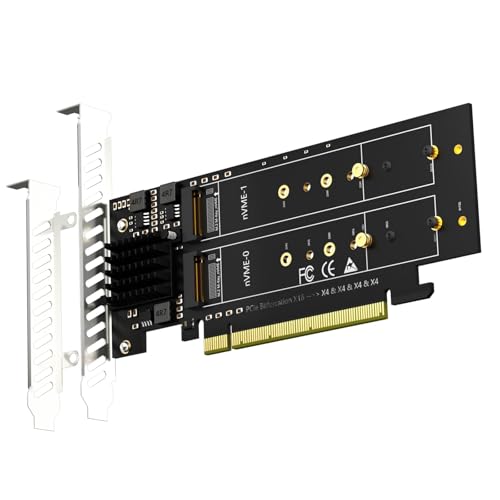
GLOTRENDS PA41 Quad M.2 NVMe to PCIe 4.0 X16 Adapter

AMZPILOT M.2 NVMe SATA to USB Dock Aluminum Case

SABRENT M.2 NVMe SSD to PCIe x16 Gen5 Adapter

GLOTRENDS M.2 NVMe to PCIe 4.0 X4 Adapter with Heatsink
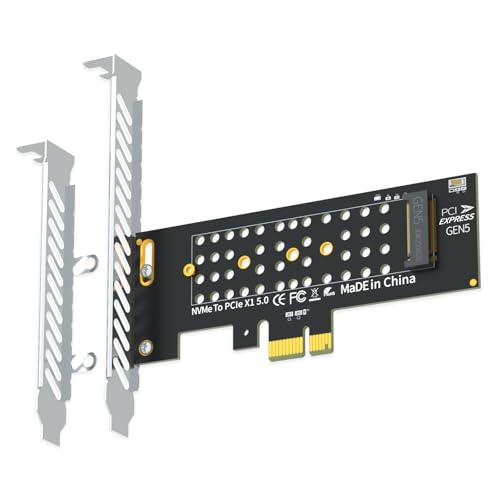
GLOTRENDS PA19-X1 M.2 NVMe to PCIe 5.0 X1 Adapter

ASUS ROG Strix Arion Aluminum M.2 NVMe SSD Enclosure

GLOTRENDS PA20 Dual M.2 NVMe to PCIe 3.0 X4 Adapter
A Deeper Look At The Lineup
The JEYI M2 M2PLUS is an extended bracket that physically relocates an M.2 NVMe or NGFF drive to a different position in the case. It’s the kind of accessory that solves oddball problems: a short 2230 in a board with only 2280 standoffs, or vice versa. The metal body feels sturdy enough for internal chassis work, and the adjustable design covers 2230, 2242, 2260, and 2280 lengths in one piece.
For someone building in a tight case or repurposing leftover drives, this bracket removes the need to hunt for separate adapters per size. Compared to the PCIe-based cards below, it doesn’t change the interface at all; it just moves the drive physically.
The Upside
- Adjusts to five common M.2 lengths on a single bracket
- Metal construction keeps the drive flat and stable
- Useful when standoffs don’t match the drive length you have on hand
- Simple install, no drivers or BIOS settings required
- Works with both NVMe and older NGFF (SATA) M.2 drives
Things To Consider
- It’s a bracket only, so you still need a working M.2 slot on the motherboard
- One transition length (2242 to 2260) is not supported, which may matter for some oddball builds
Key Product Details
Whose Shelf It Belongs On
Anyone rebuilding a compact PC or salvaging odd-length M.2 drives from older laptops.
Where Another Pick Suits Better
The SABRENT M.2 NVMe SSD to PCIe x16 Gen5 Adapter suits builders who need a brand-new NVMe slot, not just a relocated drive.
The GLOTRENDS PA41 turns a single PCIe 4.0 x16 slot into four M.2 NVMe sockets. PCIe bifurcation (a motherboard feature that splits a x16 slot into smaller lanes) is required, and that requirement alone narrows the field. For content creators who edit large 8K projects or homelab builders packing dense arrays, this card earns its keep quickly.
The card supports 22110 and 2280 drive sizes and is built around soft RAID through Windows or Linux, meaning the operating system handles striping instead of a dedicated controller chip. Intel’s VROC option requires a separate license, which is worth budgeting for in a workstation setting.
Noteworthy Benefits
- Four NVMe drives accessible simultaneously from one slot
- PCIe 4.0 x16 lane bandwidth keeps throughput high across all drives
- OS-level soft RAID removes the need for a hardware controller
- Good fit for homelab NAS builds and edit bays
Worth Noting
- Requires a motherboard that supports PCIe bifurcation, ruling out many consumer boards
- Intel VROC adds cost if you want hardware-managed boot RAID
- Physical clearance in the case can be tight with 22110 drives installed
Made For
Workstation users and homelab builders who already own a bifurcation-friendly motherboard.
Consider Something Else When
The GLOTRENDS PA20 Dual M.2 NVMe to PCIe 3.0 X4 Adapter is a friendlier pick for someone running a mainstream board without bifurcation.
The AMZPILOT dock is a small aluminum reader that turns an M.2 NVMe or SATA SSD into a USB 3.2 Gen 2 external drive. It supports 2230, 2242, 2260, 2280, and 22110 lengths, and reads either NVMe or SATA M.2 protocols through one port. The aluminum shell does double duty as a heat spreader during longer file transfers.
Techs who clone drives between machines and travelers moving projects between offices find this style especially useful. It’s not an internal install like the JEYI bracket or PCIe cards above; this lives on the desk and travels in a laptop bag.
Where It Excels
- Reads both NVMe and SATA M.2 drives in one dock
- Aluminum case helps keep sustained transfer thermals in check
- USB 3.2 Gen 2 (10 Gbps) covers most external backup workflows
- Tool-free access to swap drives quickly
Honest Caveats
- Doesn’t work with M.2 SATA AHCI B-Key drives, a common point of confusion for first-timers
- Sustained writes can still throttle without airflow across the aluminum body
Best Suited To
IT technicians and mobile workers who frequently pull data off bare M.2 drives outside a desktop.
Look Elsewhere When
The ASUS ROG Strix Arion enclosure offers a more polished thermal design for daily-driver portable use.
The SABRENT Gen5 adapter is built for builders chasing peak NVMe throughput on modern AMD or Intel platforms. It accepts M.2 M-Key NVMe drives in 2230, 2242, 2260, and 2280 lengths and connects via a PCIe x16 edge connector. A passive heatsink sits over the drive to keep thermals manageable during sustained writes.
The catch is platform dependency: Gen5 bandwidth only flows when the motherboard, CPU, and drive all support it. On PCIe 4.0 systems the card still works, just at 4.0 speeds. SATA M.2 drives aren’t compatible here at all, which rules out a stack of older SSDs.
What Makes Sense
- Native Gen5 x16 edge connector for top-end NVMe throughput
- Included heatsink reduces thermal throttling on sustained workloads
- Backward-compatible with PCIe 4.0 and 3.0 systems
- Wide M.2 length support from 2230 up to 2280
Points To Note
- SATA-labeled M.2 drives will not work on this card
- Full Gen5 speed requires the CPU, board, and drive to all support the standard
Quick Facts
Who Should Grab It
Enthusiast builders running a recent-gen CPU who want every last gigabit out of their NVMe drive.
Skip It When
The GLOTRENDS PA19-X1 M.2 NVMe to PCIe 5.0 X1 Adapter fits better in small-form-factor cases with only x1 slots free.
The GLOTRENDS x4 adapter is a straightforward solution for adding a single NVMe SSD through any PCIe x4, x8, or x16 slot. PCIe x1 slots are not supported, which is the most common source of confusion. For a typical desktop with one open x16 slot from a removed GPU, this card slips right in and gets the drive online.
The included heatsink pulls temperatures down meaningfully under load. PCIe 4.0 speed requires a 4.0-capable CPU and platform, with the caveat that Intel CPUs below 11th gen top out at PCIe 3.0. No capacity limit is enforced, so large 4 TB and 8 TB drives work without trouble.
The Value In It
- Simple drop-in add for any open PCIe x4/x8/x16 slot
- Heatsink trims drive temperatures by 5 to 20 degrees Celsius under load
- Supports large-capacity NVMe drives without artificial limits
- One of the most affordable ways to add an M.2 NVMe slot
Trade Offs
- PCIe x1 slots are unsupported, limiting very compact edge cases
- Older Intel CPUs before 11th gen won’t push full PCIe 4.0 bandwidth
Perfect Match For
First-time PC builders adding a primary NVMe boot drive on a mainstream desktop motherboard.
Reach For A Different Pick When
The SABRENT M.2 NVMe SSD to PCIe x16 Gen5 Adapter makes more sense for users on a recent Gen5 platform.
The GLOTRENDS PA19-X1 is built for the awkward slot. Small-form-factor boards and prebuilts often leave an empty PCIe x1 connector after a wireless card or capture card goes in, and that’s where this adapter shines. It mounts a single NVMe drive and runs at PCIe 5.0 x1 speeds, with full backward support for 4.0 and 3.0 platforms.
Real-world throughput tops out around the x1 lane ceiling, so this isn’t a record-setting card. As a way to add storage where nothing else fits, it’s exactly the right tool. Full 32 Gbps requires CPU, board, and SSD all on the Gen5 standard.
Where It Delivers
- Uses the often-overlooked PCIe x1 slot to add NVMe storage
- Compact footprint suits Mini-ITX and HTPC cases
- Backward-compatible with PCIe 4.0 and 3.0 systems
- No SSD capacity ceiling reported, accommodating 2 TB and 4 TB drives easily
Where It Is Less Suited
- Single x1 lane caps throughput well below full x4 NVMe speeds
- Full Gen5 bandwidth requires every link in the chain to support PCIe 5.0
Built With In Mind
SFF builders and home-theater PC owners reclaiming an unused x1 slot for storage.
A Better Fit Elsewhere
The GLOTRENDS M.2 NVMe to PCIe 4.0 X4 Adapter makes more sense when an x4 or larger slot is actually open.
The ASUS ROG Strix Arion is a portable NVMe enclosure that leans into the gaming-aesthetic crowd. The aluminum shell acts as a heat spreader, the included thermal pads move heat into the body, and the slide-open design means no screwdriver is needed to swap drives. USB 3.2 Gen 2 Type-C tops out at 10 Gbps, with both USB-C to C and USB-C to A cables in the box.
It fits 2230, 2242, 2260, and 2280 PCIe M-Key and B+M Key drives, leaving out SATA-only modules. For a Steam library on the go or fast project handoff between workstations, the speed and build quality justify the spend.
Everyday Perks
- Premium aluminum body doubles as a passive heat spreader
- Tool-free sliding enclosure for fast drive swaps
- Both USB-C to C and USB-C to A cables included
- Wide M.2 length coverage for short and standard NVMe modules
Practical Considerations
- Doesn’t accept SATA-only M.2 drives, only PCIe NVMe and PCIe B+M Key
- Real-world throughput depends on the host USB port hitting Gen 2 speeds
Right Fit For
Gamers and traveling professionals who want a polished, fast external NVMe drive.
Swap It Out When
The AMZPILOT M.2 NVMe SATA to USB Dock is a friendlier choice if SATA M.2 support matters.
The GLOTRENDS PA20 takes a single PCIe x4 slot and splits it into two M.2 NVMe sockets, ideal for budget-minded builders who want RAID-like performance without buying a quad card. The ASM2812 switch chip handles PCIe bifurcation internally, so the host motherboard only needs to expose x4 lanes on the slot. RAID is set up through the operating system rather than a hardware controller.
The card supports 22110 and 2280 sizes primarily, leaving out 2230 and 2242 modules. For SATA-only M.2 drives, this card won’t help. Where it works, the price-to-flexibility ratio is hard to beat for a two-drive setup.
Practical Pluses
- Two NVMe drives accessible through one x4 PCIe slot
- Internal switch chip broadens motherboard compatibility
- OS-level RAID removes the need for a dedicated controller
- Often cheaper than a quad-card setup
Some Limits To Know
- Doesn’t support M.2 SATA SSDs
- Best suited to 2280 and 22110 drives, not shorter lengths
- PCIe 3.0 bandwidth is shared across both drives in use
The Right Fit
Budget-conscious builders running a mainstream desktop who want a dual-NVMe array.
Where A Sibling Pick Shines
The GLOTRENDS PA41 Quad M.2 NVMe to PCIe 4.0 X16 Adapter suits anyone who needs four drives and has a Gen4 platform ready.
Matching Adapters To Real Builds
The right adapter depends less on spec sheets and more on the slot you actually have free. PCIe bifurcation (a motherboard function that splits one slot into smaller lanes) and lane width are the two factors that quietly decide compatibility, and they’re often missed in the spec list. A card promising “PCIe 4.0 x16” only delivers top speed if your CPU and chipset can feed it that many lanes.
Drive protocol is the other quiet gate. NVMe drives speak a different language than SATA M.2 drives, and most cards on this list only handle one of them. The JEYI bracket is the rare exception that supports both, while the AMZPILOT dock reads either through a single USB port.
External enclosures add their own rule set. USB 3.2 Gen 2 caps real-world throughput at 10 Gbps regardless of how fast the drive inside is, so chasing Gen5 speeds inside an external case is wasted bandwidth. The ASUS Arion and AMZPILOT dock both settle on this ceiling because nothing above it matters for portable use today.
Things Worth Knowing Before You Click
Pitfalls Shoppers Hit
The most common mistake is grabbing a PCIe x4 card for a PCIe x1 slot, or buying a card promising Gen5 speeds on a Gen3 platform. Both setups technically work, just nowhere near the advertised throughput. Always confirm the slot type on the motherboard and the lane generation your CPU supports before committing.
Another quiet issue is drive protocol mismatch. SATA-labeled M.2 drives look identical to NVMe drives, but the SABRENT and GLOTRENDS PCIe cards won’t accept them. Reading the label on the drive itself saves a lot of frustration later.
What The Higher Tier Buys
Spending more usually buys one of three things: lane count, generation support, or thermal headroom. The SABRENT Gen5 card and GLOTRENDS PA41 quad adapter both push the top end of lane bandwidth, and the ASUS Arion justifies its cost through thermal management and build quality. For a single drive on a mainstream board, the budget GLOTRENDS x4 adapter covers the same use case for less, just without the headroom for tomorrow’s faster drives.
Frequently Asked Questions
Do M.2 NVMe adapters work in any PCIe slot? Not quite. Each adapter is built for a specific lane width, like x1, x4, or x16. A card needs a slot that matches or exceeds its own rating, and the slot’s generation needs to support the drive speed you expect.
Can I boot from a drive on an M.2 to NVMe adapter? Yes, on most modern motherboards that support NVMe booting through PCIe. The BIOS needs to expose the slot and the drive, and some older boards won’t show NVMe at all. The GLOTRENDS PA41 quad card lists OS boot specifically as a supported feature.
What’s the difference between NVMe and SATA M.2 drives? They use the same physical M.2 slot but speak different protocols. NVMe drives talk over PCIe lanes for much higher throughput, while SATA M.2 drives cap at SATA III speeds. Adapters usually support one or the other, never both internally.
Will a PCIe 4.0 adapter work in a PCIe 3.0 motherboard? Yes, the card will function at PCIe 3.0 speeds. The performance drops to Gen3 ceilings, but the drive and adapter remain compatible. You just won’t see the throughput the card is technically rated for.
How many M.2 drives can one adapter hold? It depends on the model. Single-drive cards like the GLOTRENDS x4 adapter hold one NVMe SSD, dual cards like the PA20 hold two, and quad cards like the PA41 hold four. All three sizes use the same underlying PCIe slot, just split differently.
Bottom Line
An M.2 to NVMe adapter is one of the cheaper upgrades in a PC build, and it pays off fast when it matches the slot and drive you already own. PCIe lane width, drive protocol, and motherboard generation matter more than brand names. Pick the card that fits the slot you have, and the rest tends to take care of itself.