A dedicated trackpad changes how a Mac feels at a desk. Long editing sessions, sprawling spreadsheets, and tight creative timelines all benefit from a surface that responds to the same Multi-Touch gestures the built-in trackpad already understands. Picking the right external option means balancing size, connectivity, and gesture fidelity against the way you actually work.
The Essentials At A Glance
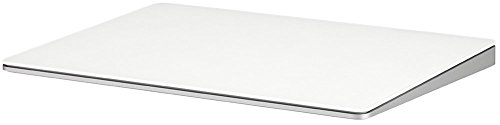
Apple Magic Trackpad 2 (Renewed)

Macally Multi Gesture USB-C Trackpad

Apple Magic Trackpad (White)
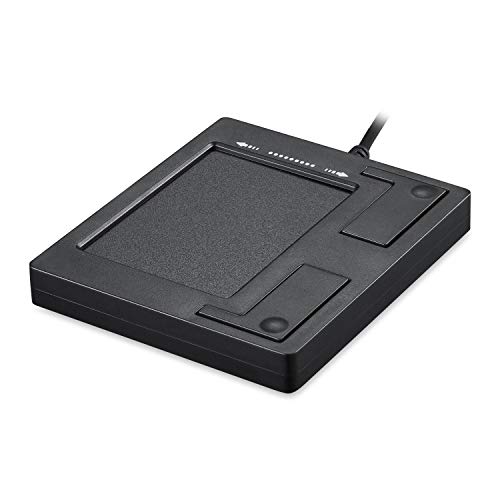
Perixx PERIPAD-501 Wired USB Touchpad
Meet The Standout Selections
The Apple Magic Trackpad 2 has been a desk staple for years, and the renewed MJ2R2LL/A model brings the same Force Touch (a pressure-sensitive layer beneath the surface that registers how hard you press) experience to shoppers who don’t want to pay full retail. Underneath the glass sits a set of sensors that distinguish a light tap from a firm press, which is the difference between a basic click and the deeper “press-and-hold” actions used for Quick Look previews, dictionary lookups, and video scrubbing.
Compared with the Macally pick below, this one leans entirely on wireless pairing, so desk clutter stays minimal. The slim aluminum body slopes gently at the front, which matters during long Premiere Pro or Logic sessions where wrists rest on the edge for hours. Owners who travel between a home iMac and a studio setup often describe this as the most “native feeling” trackpad they can buy without buying new.
Real-World Strengths
- Force Touch sensors deliver precise pressure-aware gestures
- Edge-to-edge glass surface gives fingers room to roam
- Wireless design cuts cable mess from a minimal workstation
- Rechargeable battery typically runs a month between top-ups
Things To Consider
- The Lightning charging port (a small proprietary Apple connector from older iPhones and Macs) feels dated next to USB-C options
- Renewed condition means cosmetic variance between units
Feature Snapshot
Right Fit For
Mac users who want authentic Apple gestures at a lower spend, especially anyone replacing a worn-out older trackpad.
Consider Something Else When
You need wired reliability for shared hot desks where Bluetooth is unreliable, in which case the Perixx PERIPAD-501 is a better match.
Macally built this trackpad for people who want a single accessory that handles both a tidy home office and a chaotic shared desk. The USB-C input pulls double duty: plug in and it works as a wired trackpad with zero pairing fuss, or step away from the cable and use it over Bluetooth. That dual mode is genuinely useful in studio environments where a dock already eats the desk’s USB ports one day and a slim laptop stand the next.
The glass surface runs edge to edge, which gives pinch-to-zoom and three-finger swipe gestures a wider runway than smaller plastic pads. Compared with the Apple Magic Trackpad (White) further down, this one trades Force Touch for gesture breadth and connectivity flexibility, a sensible swap for users who tap more than they press. For most home offices, the footprint feels generous without crowding a keyboard.
Useful Strengths
- Dual wired and wireless modes adapt to changing desks
- USB-C connection matches modern MacBooks without adapters
- Multi-touch gestures cover scroll, swipe, zoom, and Mission Control (the macOS view that spreads open windows for quick switching)
- Edge-to-edge glass gives fingers roomier travel than plastic pads
Points To Note
- No Force Touch, so pressure-sensitive shortcuts fall back to standard clicks
- Glass surface needs occasional wiping, since fingerprint smudges build up faster than on aluminum
Whose Shelf It Belongs On
Hybrid workers who shift between a docked office setup and a portable MacBook, and want one trackpad that covers both.
Look Elsewhere When
You depend heavily on Force Touch for creative work like video scrubbing or pressure-based drawing, where the Apple Magic Trackpad (White) is the stronger choice.
The current-generation Apple Magic Trackpad keeps the wide white surface that has defined the line for a decade, refined with the same sensors that make a MacBook’s built-in pad feel effortless. The rechargeable battery pairs instantly with macOS, and the low-profile wedge sits flush alongside an Apple Magic Keyboard without breaking a desk’s visual line. That aesthetic consistency matters in client-facing or photographed setups where gear looks as intentional as the work it produces.
Underneath, the Multi-Touch surface registers every gesture macOS expects, from two-finger scroll and three-finger Mission Control sweeps to the firm-press Force Touch previews. For designers and editors who live in long sessions, the surface area is generous enough to keep gestures flowing without lifting the hand back to center. Compared with the renewed Magic Trackpad 2 above, this one is the current shipping model, so battery and sensor wear start at zero.
The Helpful Details
- Full Multi-Touch gesture support matches every built-in MacBook trackpad
- Force Touch sensors enable pressure-based lookups and previews
- Edge-to-edge glass maximizes usable surface area
- Wireless and rechargeable with a USB-C cable
Honest Caveats
- Premium positioning puts it above third-party alternatives
- Glass shows smudges within a day of regular use, so a microfiber cloth tends to live nearby
Technical Highlights
Made For
Creative professionals who want the deepest gesture integration macOS offers and plan to keep the pad as part of a long-term desk setup.
Skip It When
Budget drives the decision more than gesture depth, which is exactly where the renewed Apple Magic Trackpad 2 earns its spot.
Where every other pick on this list aims for a permanent spot on a desk, the Perixx PERIPAD-501 leans into mobility. The slim black housing slips into a laptop sleeve alongside a charger, and the wired USB connection means there is no battery to forget on a trip. Plug-and-play setup removes the Bluetooth pairing dance that slows down airport and hotel work sessions.
The two physical buttons on the front edge give a tactile click that some users actually prefer over Force Touch, especially anyone transitioning from a traditional mouse. Touch sensitivity covers the common single-finger slide and two-finger tap gestures without claiming to replicate every advanced macOS shortcut. For most travel-day scenarios, the lighter footprint matters more than gesture breadth, and this pad gets the basics right.
Well-Handled Touches
- Compact size fits inside a laptop bag without adding bulk
- Plug-and-play design needs no drivers or pairing steps
- Two physical buttons offer familiar click feedback
- Silent operation suits shared workspaces and quiet cafés
Trade Offs
- Wired cable limits how far the pad can sit from the laptop
- Smaller surface than the Apple and Macally picks, which may feel cramped during long edits
Perfect Match For
Road warriors and students who need a reliable, no-charge trackpad that travels light and works the moment it is plugged in.
A Better Fit Elsewhere
Your setup stays parked at one desk and you want the richest gesture set, in which case the Apple Magic Trackpad (White) is the stronger fit.
What To Weigh Before Choosing A Mac External Touchpad
Connection Type Sets The Foundation
Wired USB trackpads like the Perixx PERIPAD-501 trade mobility for reliability: they work the second you plug in, with no pairing prompts and no battery anxiety. Wireless and dual-mode options like the Macally pad free up desk space and let the pad sit wherever posture feels right. Match the connection to where the trackpad will actually live most of the time.
Gesture Coverage Drives Daily Feel
A trackpad’s value comes down to how many macOS gestures it interprets accurately. At minimum, look for two-finger scroll and three-finger swipe for Mission Control and app switching. Force Touch adds a pressure-sensitive layer that unlocks previews and dictionary lookups, which matters most for editors and students reading long documents.
Surface Size And Shape Matter Over Time
A wider glass surface, like the edge-to-edge designs on both Apple picks, lets fingers travel without resetting position every minute. Smaller pads are easier to carry but tend to cramp extended sessions. Wrist-friendly slopes at the front edge also matter during long days, since a hard lip becomes noticeable after hour three.
Compatibility With Your Mac
Every trackpad here works with modern macOS, but older Macs with only USB-A ports need an adapter for USB-C pads, while very recent MacBooks may need a hub for USB-A accessories. Confirm the cable type before checkout, especially for travel setups where a forgotten adapter derails the whole point of packing light.
Picking Smarter Across These Options
Where Shoppers Go Wrong
The most common slip is choosing a wireless pad for a desk where Bluetooth pairing is unreliable, then blaming the trackpad for dropped connections. Wired options like the Perixx PERIPAD-501 avoid that entirely. Another trap is assuming every “Mac-compatible” pad supports Force Touch, when in reality only certain Apple models do, so gestures like pressure-based previews quietly go missing.
When Paying More Pays Off
Stepping up to the current Apple Magic Trackpad buys Force Touch precision and a glass surface that holds up over years of daily use. For creative work that depends on pressure-sensitive shortcuts, that upgrade pays back every session. Shoppers who mostly scroll and click can stay with the renewed Magic Trackpad 2 or the Macally dual-mode pad without missing anything essential.
Frequently Asked Questions
Do external trackpads work with all Mac models?
Most modern macOS devices recognize external pads within seconds of pairing or plugging in. Very old Macs may need a software update for full gesture support.
Is Force Touch worth the extra cost?
For designers, video editors, and anyone who uses Look Up or Quick Look daily, yes. For lighter workflows, standard Multi-Touch covers the essentials.
Can I use a wired trackpad with a MacBook that only has USB-C?
Yes, a USB-C cable plugs straight in. Adapters are only needed when crossing USB generations, like USB-A to USB-C.
How long do rechargeable trackpad batteries last?
Between charges, most users report roughly a month of daily use before the first top-up. Heavy gesture workflows drain faster than light browsing sessions.
Will my existing gestures transfer to an external pad?
Core gestures like two-finger scroll and three-finger swipe transfer directly. Some MacBook-specific gestures tied to the built-in pad may behave differently on external hardware.
Wrap Up
The right trackpad comes down to where it will live and how deeply the work depends on gestures. Apple’s current Magic Trackpad earns its spot for Force Touch depth, the renewed Magic Trackpad 2 keeps costs down, Macally covers mixed connectivity needs, and the Perixx PERIPAD-501 handles travel days with zero fuss. Match the pad to the desk, not the other way around.