Soldering a fresh USB port on a Raspberry Pi or chasing a torn flex cable on a phone motherboard is the kind of work where eyeballs alone aren’t enough. A proper microscope turns blurry pads into crisp targets, and the right pick depends on your bench, your eyes, and how often you reach for the iron. I’ve rounded up ten digital microscopes that cover entry-level tinkering through pro-grade rework stations, so you can match gear to the work you actually do.
Your Options, Compared

Andonstar AD249S-Max HDMI Digital Microscope

USCAMEL Handheld Microscope for Kids 8-12

Andonstar AD407 3D HDMI Soldering Microscope

Andonstar AD249S-M 3 Lens HDMI Digital Microscope

LINKMICRO LM208S 4K HDMI Digital Microscope
LINKMICRO LM210S 4K 60FPS HDMI Microscope

Andonstar AD246S-M 3 Lens HDMI Microscope
KEXWAXX Kids Handheld Microscope with Screen

JOYALENS JL109A Digital Microscope Flex Arm

TOMLOV TM3K-AF Autofocus Flex Arm Microscope
The Details Behind The Selections
This Andonstar flagship swaps between three lenses without unscrewing anything, which matters more than people expect on a busy bench. The 10.1-inch screen gives you real estate to actually see a 0402 footprint (a chip component roughly 1mm x 0.5mm), and the HDMI output pushes the same feed to a larger monitor when the room calls for it.
Repair techs juggling phones, laptops, and hobby boards find the lens range genuinely useful, since one microscope covers soldering pads, coin inspections, and even biological slides without buying extras. For someone stepping up from a loupe, the learning curve feels manageable rather than overwhelming.
Where It Excels
- Three lenses cover soldering mid-range, wide overview, and high-magnification slide work in one unit.
- 2160P recording captures fine detail, useful for documenting rework steps on client devices.
- 10.1-inch built-in display reduces neck strain during long repair sessions.
- HDMI passthrough means a teaching setup can show the same image to students or colleagues.
- Larger work envelope (the physical space under the lens) helps when probing around bulky boards.
Things To Consider
- Three lenses mean more accessories to keep track of on a crowded bench.
- Owners commonly report that the included boom arm needs careful tightening to stay put at extreme angles.
Key Specs
Made For
Multi-discipline repair techs who switch between soldering, coin inspection, and biology slides without wanting multiple units cluttering the workbench.
Swap It Out When
The LINKMICRO LM210S suits shoppers who prioritize smooth 60FPS video capture for documentation or live-streamed repair sessions.
This pocketable USCAMEL unit leans into curiosity rather than bench duty. The 2.0-inch built-in screen means there’s no phone app to wrestle with, which makes a real difference when a younger user is at the controls.
Magnification runs from 100X to 1000X, fine for coins, leaves, and fabric weaves, though it lacks the lens stability required for precision soldering. Parents looking for a science gift get a kit that includes prepared slides and a memory card right in the box.
Practical Pluses
- Built-in LCD eliminates the phone-dependence that trips up many toy microscopes.
- 2-in-1 handheld and stand-mounted design gives flexibility for outdoor exploration.
- Included 32GB memory card and slide set shorten the path from unboxing to first experiment.
Worth Noting
- Handheld use introduces shake, which makes steady soldering work impractical.
- Magnification tops out lower than dedicated repair microscopes, so it won’t replace bench gear.
- Plastic-bodied stands can show wear if kids adjust angles aggressively.
Right Fit For
Kids and curious beginners exploring plants, insects, and coins rather than anyone doing circuit-level repair work.
Look Elsewhere When
The Andonstar AD407 makes more sense for shoppers wanting a stable metal stand and proper soldering optics instead of a handheld toy.
The AD407 predates the newer AD249S line but still pulls its weight on a soldering bench. The 7-inch IPS screen sits smaller than the newer flagships, yet the metal lens barrel and focusing hardware feel closer to industrial gear than consumer plastic.
Dual-screen HDMI output is genuinely useful when one technician needs to keep an eye on a customer-facing monitor while working under the lens. Compared to the USCAMEL unit above, the build quality shift is obvious the moment you clamp it to a desk.
Benefits That Matter
- Metal focusing barrel holds calibration better than plastic equivalents after months of use.
- Simultaneous HDMI and built-in screen output supports training setups and shop displays.
- 7-inch IPS panel renders accurate color when matching solder mask (the green coating on PCBs) to component markings.
Honest Caveats
- Smaller screen than the 10.1-inch newcomers, so extended sessions may strain eyes a touch more.
- Lacks the multi-lens versatility of the AD249S series, so users wanting wide overview shots buy extra optics.
Quick Facts
Best Suited To
Everyday soldering techs who want a reliable, no-frills microscope without paying for the latest screen size.
Consider Something Else When
The Andonstar AD249S-Max suits shoppers who want three lenses and the bigger 10.1-inch display in one package.
The AD249S-M is the older sibling to the AD249S-Max covered in Pick 1, and the core experience still holds up. Three lenses, a 10.1-inch panel, and 2160P recording cover most electronic repair scenarios without extra purchases.
The Max version mentioned above adds refinements, so anyone shopping between these two should weigh whether the upgrades justify the price gap. As it stands, this M version still outclasses most standalone soldering scopes in the same tier.
What Earns Its Place
- 2160P output renders sub-millimeter solder pads with enough clarity to inspect under BGA (ball grid array) rework.
- 10.1-inch display is generous for sharing a view across a small shop or classroom.
- Three-lens approach means fewer accessory purchases down the road.
Points To Note
- Sits just below the AD249S-Max in features, so shoppers should compare closely before deciding.
- Stand rigidity at full extension can vary depending on how the boom arm is tightened.
Whose Shelf It Belongs On
Repair pros balancing detail, screen real estate, and budget who don’t need the absolute newest revisions.
Reach For A Different Pick When
The Andonstar AD249S-Max is the better call for shoppers who want the latest refinements over this slightly older configuration.
LINKMICRO steps in with a 4K UHD sensor, which produces noticeably crisper edges than 1080P scopes when zoomed all the way in. The 178-degree viewing angle on the IPS panel means colors stay accurate even when leaning sideways to inspect.
For PCB repair and coin grading alike, the dual-screen output keeps a built-in display and an external monitor synced without lag. It’s a strong alternative when shoppers want 4K detail but don’t need the higher frame rate covered in Pick 6.
Features That Help
- 4K UHD resolution captures fine solder joints and coin details cleanly.
- Wide 178-degree viewing angle keeps colors consistent from off-center positions.
- Simultaneous built-in and external HDMI output supports collaborative setups.
Trade Offs
- 4K files eat storage fast, so most users end up adding a larger memory card.
- 30FPS (frames per second) refresh is fine for still work but feels less fluid for video tutorials.
Feature Snapshot
Who It Suits Best
PCB rework techs and coin graders who want 4K clarity without chasing high frame rates.
Where Another Pick Suits Better
The LINKMICRO LM210S serves shoppers who record repair videos and need the smoother 60FPS capture.
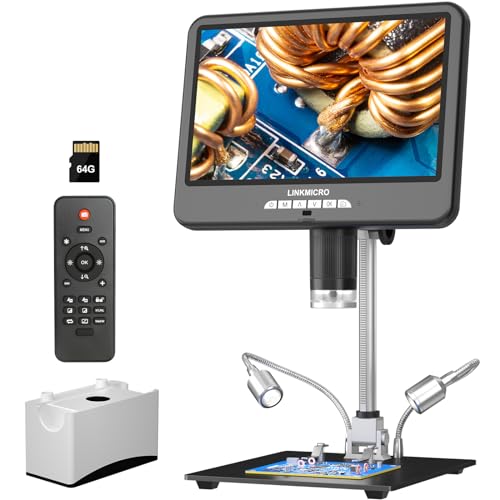
The LM210S pushes 4K at 60 frames per second, which translates to noticeably smoother footage when recording repair sessions for tutorials. A built-in microphone rounds out the package for content creators documenting rework.
Compared to the LM208S above, the jump in frame rate is the headline feature, but the trade-off is bigger file sizes and a steeper cost. Anyone posting YouTube repair guides will feel that difference immediately.
The Practical Payoff
- 4K 60FPS capture produces fluid, professional-looking repair videos.
- Built-in microphone adds scratch audio without buying external gear.
- 10.1-inch display plus HDMI out covers single-bench and dual-monitor workflows.
Room For Improvement
- Higher frame rate demands more storage, and a 4K file at 60FPS fills cards quickly.
- Premium pricing puts it out of reach for casual hobbyists.
Built With In Mind
Content creators, professional repair channels, and technicians who document every job for client records.
Not Your Match When
The LINKMICRO LM208S is a smarter pick for shoppers who mainly solder and don’t need the smoother 60FPS video pipeline.
The AD246S-M swaps the standard boom for a thicker, more adjustable Pro Boom Arm Stand. That arm measures roughly 7 by 7.8 by 13 inches with metal construction throughout, so it tolerates the heat of a hot soldering iron nearby.
Three lenses and 2160P capture sit on the feature side, while the heavy-duty bracket handles the ergonomic side. For technicians who reposition constantly between phone boards and larger assemblies, the upgrade is the part that earns its keep.
Noteworthy Benefits
- Sturdy metal stand resists heat deformation near soldering stations.
- Adjustable front-to-rear and side-to-side arm reaches awkward board angles.
- Three-lens package handles soldering, coin work, and biological slide viewing.
- 2160P output documents jobs with enough detail for client-facing reports.
Points To Keep In Mind
- Larger stand footprint claims more bench space than slimmer alternatives.
- Heavier build means less portable for field work or repair meetups.
Spec Overview
Who Will Love This
Repair techs working long sessions near soldering irons who need a stand that survives the heat and keeps position.
A Better Fit Elsewhere
The JOYALENS JL109A suits shoppers with tighter bench space who need a flexible arm that folds flat when not in use.
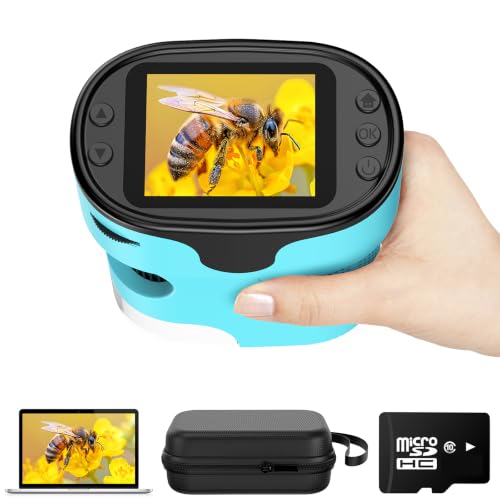
The KEXWAXX leans into the kid-friendly end of the market with a 2.0-inch screen, dual viewing modes, and a magnification range that tops out at 1000X. It runs without a phone connection, which keeps the experience self-contained for younger users.
It won’t replace a soldering microscope, and the listing makes no claim to. Think leaves, fabric, and backyard finds rather than motherboard pads. Parents shopping for a gift that survives clumsy hands get a fair deal here.
Points In Its Favor
- Self-contained screen removes the phone-app friction that frustrates younger users.
- Dual viewing modes support handheld exploration and stable tabletop observation.
- Compact pocket form makes it travel-friendly for nature walks.
Small Caveats
- Not designed for steady electronics work, so any soldering expectations need adjusting.
- Lower-resolution imaging compared to dedicated repair scopes in this list.
Perfect Match For
Kids aged 4 to 12 exploring everyday objects outdoors, with parents wanting a screen-equipped option that doesn’t tether to a phone.
Skip It When
The USCAMEL Handheld Microscope is worth comparing for shoppers prioritizing included slides and a bundled memory card.
The JL109A replaces the rigid 12.6-inch stand with a flexible boom arm that extends to roughly 27.5 inches and rotates a full 360 degrees. That reach makes it useful for watch maintenance and PCB work where the board needs to stay flat while the lens swings around.
When the job is done, the arm folds flat, reclaiming bench space in a way that traditional stands don’t. For crowded repair benches, that storage story is the actual selling point.
A Few Strong Suits
- Heavy-duty flex arm reaches positions that fixed stands can’t match.
- 360-degree rotation simplifies inspection from multiple angles without moving the workpiece.
- Folds flat when not in use, conserving bench space in tight workshops.
Potential Drawbacks
- Long arm can introduce subtle vibration if not anchored to a sturdy desk surface.
- Setup takes longer than fixed-arm scopes when switching between very different board sizes.
Who Should Grab It
Watchmakers, phone techs, and PCB rework specialists who need a flexible arm and a 10.1-inch viewing screen on a small bench.
Where A Sibling Pick Shines
The TOMLOV TM3K-AF is a stronger match for shoppers who want autofocus and preset memory for repeated soldering tasks.
TOMLOV’s TM3K-AF locks onto the subject without manual focusing, which removes one of the most tedious parts of soldering under a microscope. P1 and P2 preset memory stores two focus heights, so flipping between, say, a phone port and a board underside takes a single button press.
That preset memory alone justifies the price for production-line techs running the same job dozens of times a shift. For one-off hobby projects, the autofocus is still nice but less essential.
Positive Points
- Autofocus removes the constant manual tweaks that slow down soldering flow.
- Two preset memory slots snap back to saved heights for repeatable jobs.
- Flex arm design adapts to coin inspection and PCB rework in the same session.
Where It May Fall Short
- Autofocus adds cost that casual users may not recoup through convenience.
- Flex arm requires a sturdy desk to avoid drift during long sessions.
The Right Fit
Repair shops running repeatable soldering tasks and techs who want autofocus to cut down on focus-wheel fiddling.
Another Choice May Suit
The JOYALENS JL109A is a better value for shoppers who mainly need long reach and a 10.1-inch screen without autofocus extras.
Choosing A Repair Microscope Without Regret
The right microscope depends on what kind of repair you actually do. Hobbyists working on a Raspberry Pi every few weekends can get by with a stable 7-inch screen and a single lens, while phone repair techs running daily boards need a 10.1-inch display, HDMI output for customer-facing monitors, and a stand that survives the heat of a hot iron nearby.
Magnification matters, but working distance matters more. A scope that sits too close to the board forces awkward iron angles, so look for units with enough lens-to-subject clearance for your tip. Resolution determines how clearly you can see a torn solder pad, with 4K pulling noticeably ahead of 1080P when zoomed deep.
Build quality and stand stability separate bargain scopes from daily drivers. Metal focusing barrels and rigid boom arms hold calibration through months of repositioning, while plastic equivalents loosen up fast. For shared or production benches, prioritize stands that fold flat or lock firmly without drift.
Picking Smart Without Second-Guessing
Common Shopping Slip Ups
Chasing the highest magnification number usually backfires, since extreme zoom leaves almost no working distance for a soldering iron. Buyers who skip stand stability end up with wobbly images after a few months, and overlooking HDMI output locks them out of teaching or dual-monitor setups later. Always test the working envelope against the boards you actually repair before committing.
What The Higher Tier Buys
Stepping up from a basic 7-inch 1080P unit to a 4K 10.1-inch model buys crisper edges at full zoom, wider viewing angles, and dual-screen output for collaboration. Premium tier also adds metal lens barrels, autofocus, and preset memory that pay off fast for production work. For one-off hobby soldering, the entry tier covers the essentials without the extras.
Frequently Asked Questions
How much magnification do I need for soldering?
For most PCB work, 10X to 40X covers pad-level soldering comfortably. Higher magnification helps with micro-components and inspection but reduces working distance for the iron tip.
Is HDMI output worth the extra cost?
HDMI passthrough is valuable when you need a second screen for teaching, customer-facing displays, or recording to a capture card. Solo hobbyists rarely need it, but repair shops use it constantly.
Can kids’ microscopes handle real repair work?
Handheld kids’ units lack the stability for circuit-level soldering. They suit exploration and learning, not bench repair, so keep them in separate lanes from serious electronic work.
What screen size makes sense for long sessions?
A 10.1-inch display reduces eye strain during multi-hour repair sessions, especially under bright bench lighting. Smaller 7-inch screens fit tight spaces but tire eyes faster.
Do I need a flex arm or fixed stand?
Flex arms reach awkward angles and fold flat for storage, ideal for cramped benches. Fixed stands offer rock-solid stability for production work where the board rarely moves.
Final Verdict
Start with the work you do most. Hobbyists repair phones occasionally and explore coins can land on the Andonstar AD249S-Max without regret, while bench techs running daily rework benefit from the LINKMICRO LM210S for video or the TOMLOV TM3K-AF for autofocus. The right scope is the one you’ll actually keep on the bench and reach for without thinking.