Small desks, dorm shelves, and crowded home offices keep driving a quiet shift toward compact Windows computers. A good mini PC can replace a bulky tower for everyday tasks, while the strongest ones now handle light gaming, video editing, and triple-monitor setups. I pulled together ten current Windows-based mini PCs across budget, mid-range, and high-performance tiers, focusing on real-world fit: processor strength, memory and storage headroom, display support, thermals, and noise. The list leans on what each machine is genuinely built for, so you can match a chassis to your daily workload instead of guessing from spec sheets.
The Leading Options At A Glance
ACEMAGIC X3 Mini Gaming PC Ryzen 7 H 255

Apple Mac mini Desktop Computer with M4 chip
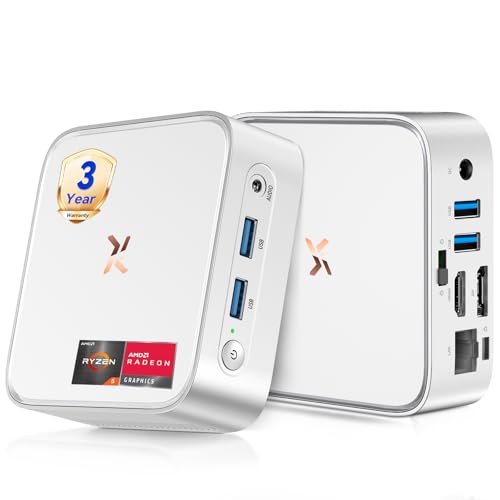
Huidun H80 Mini PC Ryzen 5 3500U 16GB 512GB

FANPEEC Fanless Mini PC Core i5-8350U
Huidun H50 Ryzen 3300U Mini PC Win 11 Pro

Beelink SER3 Mini PC Ryzen 3 3200U

ACEMAGIC K1 Gaming Mini PC Ryzen 7 7730U

C4 SE Mini PC Ryzen 5 3500U 8GB 256GB

ACEMAGIC Mini PC Ryzen 7330U 16GB 256GB

KAMRUI Hyper H1 Mini PC Ryzen 7 7735HS
A Breakdown Of The Leading Choices
The X3 sits at the top of this list for a reason: it pairs an eight-core Ryzen 7 H 255 with integrated Radeon 780M graphics, which is a meaningful step up from the older 680M parts on many compact machines. For a small studio, mobile workstation, or a home office where someone is editing video or doing light 3D modeling, that combination is hard to match in this size class.
It ships with 16GB of RAM and a 1TB SSD out of the box, so most people won’t need to open it up on day one. The unlocked 54W TDP setting lets the chip run at higher sustained speeds than a typical thin-and-light laptop processor, which matters during longer rendering tasks. Compared to the Apple Mac mini reviewed later, the X3 leans Windows-native and trades silent efficiency for raw multi-thread headroom.
Where It Excels
- The eight-core, sixteen-thread Ryzen chip handles multitasking, compile jobs, and video encoding noticeably faster than the Ryzen 5 parts on most of these picks.
- Radeon 780M integrated graphics push light gaming and hardware-accelerated editing workloads further than older Vega-based iGPUs.
- 1TB of SSD storage covers large project folders, game libraries, and media files without an immediate need for external drives.
- Unlocked 54W TDP allows sustained boost behavior during longer sessions, helpful for creators who run CPU-heavy applications.
- 16GB of RAM is comfortable for photo editing, multitasking with dozens of tabs, and running virtual machines.
Points To Keep In Mind
- Higher sustained power draw means the chassis can run warm and the fan may ramp up under heavy multi-thread loads.
- No dedicated GPU, so serious 3D rendering or high-refresh AAA gaming still belongs on a discrete graphics setup.
Who It Suits Best
Power users running photo and video workloads, home studio owners, and small-office creators who need strong multi-thread performance in a compact chassis.
Consider Something Else When
Noise-sensitive listeners and minimal-edit households may prefer the Apple Mac mini, which runs cooler and quieter for everyday document and media tasks.
The M4 Mac mini is the smallest computer on this list at roughly five by five inches, and that footprint is its headline. It tucks behind a monitor, sits on a small bookshelf, or travels between desks without complaint. The M4 chip pairs a ten-core CPU with a ten-core GPU and 16GB of unified memory, which Apple designs as a single fast pool the CPU and GPU share.
Unified memory tends to feel snappier during typical creative work than the same number of gigabytes split across separate CPU and video pools on a Windows machine. The Mac mini also integrates tightly with iPhone and iPad workflows, which matters for shoppers already inside the Apple ecosystem. Compared to the ACEMAGIC X3 reviewed above, the Mac mini gives up raw multi-thread headroom for silent operation and lower power draw.
What Makes Sense
- The five-inch footprint disappears into small desks, kitchen counters, or AV setups without crowding other gear.
- M4 efficiency keeps the chassis cool and quiet, often fully silent under everyday loads.
- Unified memory architecture lets the CPU and GPU pull from the same pool, which feels responsive during mixed creative work.
- Tight iPhone and iPad integration suits households that already rely on Apple services and devices.
Honest Caveats
- The base 256GB SSD fills quickly with large photo libraries, video projects, and downloaded games.
- Software compatibility is narrower than Windows, so specialty engineering or Windows-only tools may not run natively.
- Storage and memory upgrades after purchase are limited, so spec decisions matter up front.
Made For
Apple households, light creative professionals, and shoppers who prioritize silent operation and tight ecosystem integration over raw multi-thread throughput.
Look Elsewhere When
Windows-bound professionals and anyone who needs dedicated GPU horsepower for gaming should step up to the ACEMAGIC X3 or the KAMRUI Hyper H1 instead.
The H80 lands in the middle of the pack as the kind of all-rounder most people quietly need. It runs a Ryzen 5 3500U, a four-core, eight-thread chip that boosts up to 3.7GHz, paired with Radeon Vega 8 integrated graphics. In a small office or family study, that combination handles documents, browser sessions with many tabs, and 4K streaming without breaking a sweat.
The 16GB of DDR4 RAM and 512GB SSD give enough headroom that most shoppers won’t feel cramped in the first year of ownership. Display support is generous for the category: HDMI plus DisplayPort plus USB 3.2 covers dual-monitor setups, and 4K at 60Hz output keeps text crisp on sharp office panels. Compared to the entry-level Beelink SER3 reviewed later, the H80 adds more memory, more storage, and a noticeably stronger integrated GPU.
Everyday Wins
- The Ryzen 5 3500U delivers a clear step up from the dual-core chips on most budget mini PCs, helping during multitasking and 4K playback.
- Radeon Vega 8 graphics handle casual games and hardware-accelerated media work without leaning on the CPU.
- 16GB of RAM and a 512GB SSD cover typical office and study workloads without an immediate upgrade.
- Triple-display support via HDMI, DisplayPort, and USB 3.2 fits nicely into multi-monitor productivity setups.
A Few Limitations
- The Vega 8 iGPU struggles with modern 3D games beyond light or indie titles.
- Wi-Fi and Bluetooth performance depends on the home router and signal strength, so placement still matters.
Right Fit For
Home and small-office users running productivity suites, browser-heavy research workflows, and 4K media playback who want balanced specs without overspending.
Skip It When
Light gamers and content editors should look at the ACEMAGIC K1, which adds stronger integrated graphics for casual play.
The FANPEEC stands apart from the rest of this list because it has no fan at all. The Core i5-8350U inside is an older but still capable four-core, eight-thread Intel chip, and pairing it with a fanless industrial chassis means absolute silence during operation. For libraries, recording booths, and bedrooms where any fan whir becomes irritating, that matters more than benchmark numbers.
It ships with 16GB of DDR4 memory and a 256GB M.2 SSD, which is enough for office work and industrial control setups. The industrial-grade shell also suits workshops and signage applications where dust and vibration would challenge a typical mini PC. Compared to the Beelink SER3 reviewed below, this unit trades newer CPU silicon for fanless reliability and a sturdier chassis.
Everyday Perks
- Fanless operation means zero mechanical noise, which is a real quality-of-life upgrade in recording and study spaces.
- The industrial chassis handles dust-prone environments like workshops, labs, and digital signage better than consumer plastic shells.
- 16GB of DDR4 memory supports multitasking across office apps, browsers, and remote desktop sessions.
- Compatibility with Windows and Linux broadens its usefulness for embedded, industrial, and home-lab projects.
Things To Consider
- Without active cooling, the chip throttles under sustained heavy loads to protect itself.
- The 256GB SSD is small for media-heavy households and fills quickly with project files.
Who Should Grab It
Noise-sensitive workers, industrial users, and home-lab enthusiasts who value silence and a rugged enclosure over peak CPU speed.
Another Choice May Suit
Gamers and multi-thread creators should pick the KAMRUI Hyper H1, which trades fanless silence for stronger sustained performance.
The H50 sits a step below the H80 but stands out for its three-year warranty, which is rare in the mini PC aisle. The Ryzen 3300U is a quad-core chip tuned for everyday office work, and 16GB of DDR4 plus a 512GB SSD give it enough headroom for a small business, home office, or HTPC role.
Connectivity covers the bases: dual-band Wi-Fi, DisplayPort plus HDMI for 4K output at 60Hz, and USB 3.2 for fast external storage. As a media-streaming box hooked up to a TV or a quiet front desk computer, the H50 makes more sense than chasing higher benchmark scores. Compared to the Beelink SER3 reviewed below, the H50 adds stronger multi-thread performance and a longer warranty term.
The Upside
- The three-year warranty is unusually long for this category and signals serious manufacturer support.
- The Ryzen 3300U handles office multitasking, video calls, and 4K streaming without straining.
- Dual-band Wi-Fi plus Bluetooth keeps wireless peripherals and streaming setups simple to deploy.
- DP and HDMI outputs allow flexible dual-display configurations for productivity or signage.
Potential Drawbacks
- The integrated graphics are modest, so modern gaming isn’t realistic on this chip.
- The plastic chassis leans basic compared to the metal shells on some rivals.
Best Suited To
Small business owners, HTPC builders, and home users who want a balanced machine backed by longer manufacturer coverage.
Reach For A Different Pick When
Casual gamers and light editors will find better graphics headroom on the ACEMAGIC K1, which pairs Ryzen 7 silicon with stronger Radeon graphics.
The Beelink SER3 is the smallest, most affordable Windows entry on this list, and it does the simple things well. The Ryzen 3 3200U is a dual-core, four-thread chip that boosts to 3.5GHz, paired with Radeon Vega 3 graphics. For a study desk, a guest-room computer, or a first machine for a student, that combination covers the basics.
8GB of DDR4 and a 480GB PCIe 3.0 SSD are generous for the category, and dual HDMI outputs support a tidy dual-monitor setup. The chassis is small enough to hide behind a monitor arm or sit on a bookshelf. Compared to the Huidun H50 above, the SER3 trades warranty length and CPU muscle for a noticeably lower cost.
Why It Works Well
- The Ryzen 3 chip is efficient enough to handle office apps, browsers, and streaming without thermal strain.
- The 480GB SSD is larger than the storage many budget mini PCs ship with.
- Dual HDMI outputs support simple two-monitor home or study setups.
- Gigabit LAN keeps wired network performance stable for downloads and backups.
Things To Weigh
- Only two cores and four threads means heavy multitasking or large spreadsheets can slow things down.
- The Vega 3 iGPU is fine for video playback, but it isn’t built for modern gaming beyond very light titles.
Who Will Love This
Students, light home users, and anyone setting up a simple secondary workstation on a tight budget.
Where A Sibling Pick Shines
Small business owners who need stronger multitasking should step up to the Huidun H80, which offers four cores and double the graphics muscle.
The ACEMAGIC K1 is positioned for casual and light gaming on a compact Windows box. The Ryzen 7 7730U is an eight-core, sixteen-thread chip that boosts to 4.5GHz, paired with Radeon graphics based on the 680M design. That GPU is significantly faster than the Vega silicon on the Huidun H50 and H80 reviewed above, which translates to smoother frame rates in esports and older titles.
16GB of RAM and a 512GB SSD handle modern game libraries comfortably, though heavy AAA titles will still need lower settings to stay playable. As a living-room gaming box or a bedroom PC that doubles as a productivity machine, the K1 threads a useful needle. Compared to the Beelink SER3 earlier, the K1 is a clear step up in both CPU and graphics performance.
A Few Strong Suits
- The Ryzen 7 7730U delivers strong multi-thread performance for gaming, streaming, and creative workloads alike.
- Radeon 680M-class graphics push casual and indie gaming noticeably past older Vega iGPUs.
- 16GB of RAM keeps games and chat apps running smoothly side by side.
- Compact chassis tucks into entertainment centers without looking like a tower PC.
Where It May Fall Short
- High-end AAA gaming still demands lower detail settings to maintain playable frame rates.
- Fan noise ramps up during long gaming sessions, which may matter in shared spaces.
Feature Snapshot
Built With In Mind
Casual gamers, living-room PC builders, and shoppers who want stronger integrated graphics than typical office mini PCs offer.
Swap It Out When
Hardcore AAA gamers should pair the KAMRUI Hyper H1 with an external GPU enclosure rather than relying on integrated graphics alone.
The C4 SE is the smallest Ryzen 5 mini PC in this roundup, and that matters in tight spots. The Ryzen 5 3500U runs four cores and eight threads at up to 3.7GHz, with Radeon Vega 8 graphics on board. For a reception desk, a digital kiosk, or a dorm room with limited shelf space, the footprint is the whole story.
8GB of DDR4 and a 256GB NVMe SSD are modest, but they are typical for the size class and good enough for office work, point-of-sale setups, and streaming. The system supports wake-on-LAN and auto power-on features that simplify unattended deployments. Compared to the Beelink SER3 above, the C4 SE delivers stronger CPU and GPU silicon at the cost of less storage and memory.
Where It Helps
- Ryzen 5 3500U with Vega 8 graphics handles daily office and streaming tasks smoothly.
- Tiny chassis suits reception counters, kiosks, and cramped study desks.
- Wake-on-LAN and auto power-on support remote and unattended use cases.
- NVMe SSD boot times feel snappy even with modest capacity.
Some Limits To Know
- 256GB of storage is restrictive for users with large local media or project archives.
- 8GB of RAM caps heavy multitasking and large spreadsheet work.
Whose Shelf It Belongs On
Kiosk builders, reception desks, and small-space shoppers who want compact Ryzen 5 performance without paying for extra memory or storage.
Not Your Match When
Home-office multitaskers should choose the Huidun H80, which doubles the storage and adds more RAM out of the box.
ACEMAGIC’s compact Ryzen 7330U mini PC targets the home office crowd with a quiet-cooling 28W design. The chip is a four-core, eight-thread part that boosts to 4.3GHz, balancing speed and efficiency. For typical document work, video calls, and triple-monitor productivity, it hits a sensible middle ground.
16GB of DDR4 RAM gives plenty of headroom for browser-heavy workflows, while the 256GB SSD keeps boot times quick without overshooting typical office needs. Triple 4K display support through HDMI and additional video outputs makes it a natural fit for trading desks, content schedulers, and remote workers who live in spreadsheets. Compared to the C4 SE earlier, this ACEMAGIC trades a slightly larger chassis for more memory and triple-display capability.
What Stands Out
- The 28W power envelope keeps the system cool and quiet during long workdays.
- Triple 4K display support suits productivity and trading setups that need screen real estate.
- 16GB of RAM handles browser-heavy multitasking without slowdown.
- Compact chassis fits on crowded desks or mounts behind a monitor.
Less Ideal Details
- The 256GB SSD may require external storage for users with large local archives.
- Integrated graphics cap casual gaming at light or older titles only.
Quick Facts
Perfect Match For
Home office users, remote workers, and small-business owners who run productivity software across multiple monitors.
A Better Fit Elsewhere
Casual gamers should choose the ACEMAGIC K1, which uses stronger integrated graphics for smoother play.
The KAMRUI Hyper H1 closes the list as the most performance-focused Windows mini PC in the roundup. The Ryzen 7 7735HS pairs eight cores and sixteen threads with boost clocks up to 4.75GHz, and the Radeon 680M graphics push well past what older Vega parts could manage. For shoppers who edit video, run virtual machines, or keep dozens of browser tabs alive, the headroom is meaningful.
24GB of LPDDR5 memory running at 5500MT/s is generous for the category, and the 512GB SSD holds project files without immediate juggling. Networking covers 2.5G LAN, Wi-Fi 6, and Bluetooth 5.2, which keeps modern peripherals and high-speed networks happy. Compared to the ACEMAGIC X3 reviewed first, the Hyper H1 leans into faster memory and stronger connectivity for similar CPU muscle.
Points In Its Favor
- The Ryzen 7 7735HS handles multi-thread workloads like encoding, compiling, and running virtual machines confidently.
- 24GB of LPDDR5 at 5500MT/s delivers fast memory throughput for creative apps and multitasking.
- Radeon 680M graphics provide the strongest integrated gaming experience on this list.
- 2.5G LAN, Wi-Fi 6, and Bluetooth 5.2 cover modern home and office networking needs.
What To Weigh
- The compact chassis can run warm under sustained heavy loads.
- LPDDR5 is soldered, so memory can’t be expanded after purchase.
Spec Overview
Right Fit For
Power users, content creators, and multitaskers who need high memory bandwidth and top-of-list integrated graphics in a compact Windows box.
Look Elsewhere When
Shoppers chasing pure silence should consider the FANPEEC fanless unit, which trades raw throughput for completely noiseless operation.
What Matters Most Before Choosing Mini-Windows Pcs
CPU And GPU Pairing
The processor is the single biggest driver of how a mini PC feels day to day. Modern Ryzen 5 chips like the 3500U handle office work, browser tabs, and 4K streaming without strain, while Ryzen 7 parts add multi-thread headroom for editing, light gaming, and parallel workloads. Integrated Radeon graphics in the 680M and 780M class raise casual gaming frame rates meaningfully over older Vega silicon, which matters for shoppers who don’t plan to add a dedicated GPU.
Memory And Storage Headroom
16GB of RAM is the practical sweet spot in 2026, especially for browser-heavy workflows, light creative work, and family machines that juggle multiple users. Storage needs vary more, but 512GB is a sensible baseline for anyone keeping more than a handful of games or large project files locally. Models with NVMe SSDs boot and load noticeably faster than older SATA-based drives, and many of these picks ship with NVMe out of the box.
Display Outputs And Connectivity
Multi-monitor productivity often hinges on the right mix of HDMI, DisplayPort, and USB-C video outputs. Triple 4K support shows up on several picks here, including the ACEMAGIC Ryzen 7330U and the KAMRUI Hyper H1. Networking is the other quiet factor: 2.5G LAN, Wi-Fi 6, and Bluetooth 5.2 keep modern peripherals and home networks happy for years.
Thermals, Noise, And Form Factor
Compact chassis handle heat differently. Fanless industrial designs like the FANPEEC run silent but throttle under sustained heavy loads, while higher-TDP gaming-focused models like the ACEMAGIC X3 and KAMRUI Hyper H1 move more air to sustain boost clocks. Placement still matters: tight shelves trap heat, so leave airflow room around the vents.
Key Considerations Across These Picks
Common Buying Mistakes Worth Avoiding
Shopping purely by clock speed is a quick way to misread a mini PC. A high boost clock on a slow base design feels sluggish under sustained workloads, while a slightly lower-clocked newer architecture often outperforms it. Storage capacity is the other trap: 256GB fills quickly with modern games, project archives, and local backups, and many mini PCs make upgrades inconvenient.
Why Higher-Tier Models Cost More
Stepping up to the ACEMAGIC X3 or the KAMRUI Hyper H1 brings more cores, faster memory, and stronger integrated graphics, all of which show up in editing timelines, game frame rates, and large spreadsheet recalculations. For shoppers who only stream and write documents, the Huidun H80 or Beelink SER3 covers the work without overspending. Matching the tier to the workload is where most shoppers overpay or underbuy in this category.
Frequently Asked Questions
Are Mini-Windows Pcs powerful enough for everyday work?
Yes. Most modern mini PCs with Ryzen 5 or Ryzen 7 chips handle office suites, browsers, video calls, and 4K streaming without difficulty. The Huidun H80 and ACEMAGIC Mini PC Ryzen 7330U both sit in that comfortable middle for typical daily use.
Can a mini PC replace a full desktop tower?
For most home and office users, yes. Power users running heavy 3D rendering or high-refresh gaming still benefit from a tower with a dedicated GPU, but the ACEMAGIC X3 and KAMRUI Hyper H1 cover most productivity and light creative needs in a smaller box.
How important is RAM in a mini PC?
Very. 16GB of RAM is the practical minimum in 2026 for smooth multitasking and modern browser workflows. Pickers like the KAMRUI Hyper H1 ship with 24GB, which adds headroom for creative apps and virtual machines.
Do these mini PCs support multiple monitors?
Several do. The ACEMAGIC Mini PC Ryzen 7330U and the KAMRUI Hyper H1 both support triple 4K outputs, which suits trading, productivity, and creative layouts. Models with dual HDMI cover simpler two-screen setups.
Is fanless operation worth the trade-offs?
It depends on the room. The FANPEEC fanless unit works well for noise-sensitive spaces like libraries and bedrooms, but sustained heavy workloads can throttle the chip. For louder home offices, a traditional fan-cooled design often feels faster over long sessions.
Bottom Line
The right mini PC comes down to matching a chassis and chip to your daily workload. Apple households and quiet setups lean toward the Mac mini, small offices fit the Huidun H80 or H50, and power users step up to the ACEMAGIC X3 or KAMRUI Hyper H1. Pick the tier that fits your real tasks, leave room around the vents, and the rest takes care of itself.