A clean desk starts with a clean mount. I dug through ten solid monitor mounting brackets covering Mac Mini cradles, gas-spring wall arms, dual-screen desk stands, and a clever reinforcement plate for fragile tabletops. Some keep your screen tucked low to the wall, others float it high above the desk, and one or two are built for very specific hardware. Whatever setup you’re piecing together, there’s something in here that earns its place.
The Leading Options At A Glance

Bedycoon Mac Mini M4 Mount with Remote Holder

VIVO Telescoping Ultrawide Monitor Wall Mount

Monzlteck Mac Mini M4 Steel VESA Mount
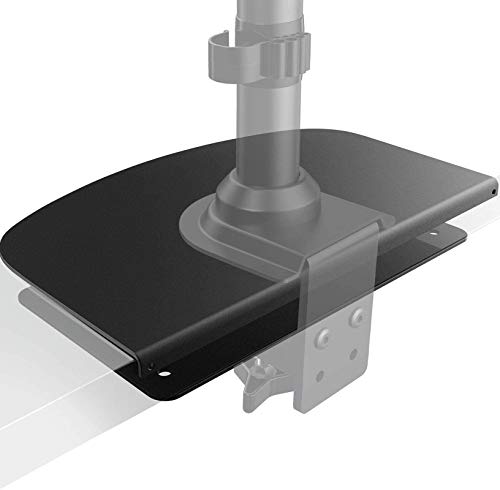
HUANUO Steel Monitor Mount Reinforcement Plate

HUANUO FlowLift Pro Monitor Arm

monTEK Single Monitor Wall Mount
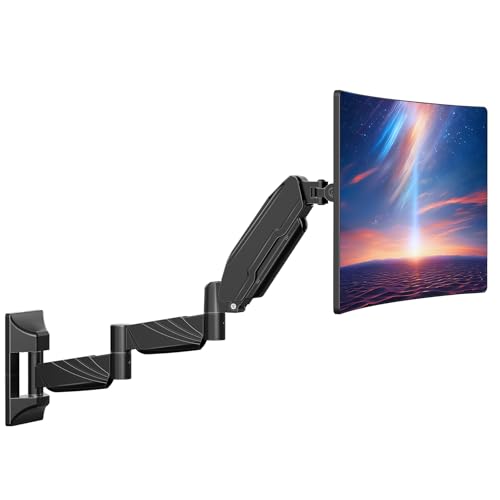
ErgoFocus Long Arm Monitor Wall Mount

ELG Gas Spring Monitor Wall Mount

HUANUO FlowLift Dual Monitor Stand

HUANUO Triple Monitor Mount
The Details Behind The Selections
The Bedycoon mount solves a specific itch: tucking a Mac Mini M4 or M4 Pro out of sight without losing access to it. The metal cradle fits devices up to roughly 12.8 cm wide and 5.2 cm thick, which covers the 2024 Mac Mini footprint exactly. The included remote holder is a thoughtful extra for anyone juggling a home theater PC or a low-profile media setup.
Anti-scratch padding lines the contact surfaces, so sliding the Mini in and out for the occasional port swap shouldn’t leave marks. For VESA (Video Electronics Standards Association, the standard hole pattern on the back of monitors) compatibility, the bracket supports the common 75x75mm and 100x100mm patterns. Compared to the Monzlteck option further down, this one trades heavy-duty steel for a lighter, more decorative build.
What It Does Well
- Sized specifically for the Mac Mini M4 and M4 Pro, so the fit feels intentional rather than improvised
- Anti-scratch padding protects the anodized aluminum finish during install and removal
- VESA 75x75mm and 100x100mm compatibility opens up under-desk and behind-monitor mounting
- Remote holder adds convenience for media-center setups
- Lightweight metal bracket keeps total desk weight low
Points To Keep In Mind
- Won’t fit the older Mac Mini M1 or M2, which is a deal-breaker for anyone holding prior hardware
- Lighter build means it’s not ideal in high-vibration environments like standing desks that move constantly
Built With In Mind
Anyone running a Mac Mini M4 or M4 Pro in a minimalist workspace where every cable and box counts.
Swap It Out When
The Monzlteck Mac Mini M4 Steel VESA Mount suits someone who wants industrial-grade steel over a lighter decorative build.
VIVO built this one for the biggest screens people actually mount. The bracket handles displays up to 49 inches and 44 pounds, which covers most ultrawides and super-ultrawides on the market. Telescoping arms slide into each other for a low-profile look when the screen is parked flush against the wall, extending up to about 10.3 inches when you need forward reach.
All-steel construction handles the torque that big panels put on a mount, and installation works on wood studs as well as concrete or brick. Compared to the gas-spring options further down, this fixed-mount design trades motion for a cleaner, tighter wall profile.
A Strong Showing
- 44-pound load rating handles most 49-inch ultrawides without complaint
- Telescoping arms let the screen tuck tight or pull forward as needed
- Steel-only build resists flex under heavy loads
- VESA 75x75mm and 100x100mm support covers the vast majority of modern panels
- Wood stud and concrete/brick mounting both included in the hardware kit
Where It Is Less Suited
- Fixed-mount design means no swivel or tilt once installed, so this isn’t the pick for shared workstations
- Wall-only installation rules out renters who can’t drill into masonry
Feature Snapshot
Right Fit For
Anyone with a 49-inch ultrawide who wants the screen to feel like part of the wall rather than floating furniture.
Reach For A Different Pick When
The ELG Gas Spring Monitor Wall Mount suits someone who needs full articulation rather than a fixed low-profile position.
The Monzlteck bracket trades polish for toughness. Industrial-grade steel forms the frame, and the 10-pound weight capacity is overkill for a Mac Mini but reassuring if the hardware takes a knock. Anti-scratch padding sits where it counts, and the whole unit doubles as a VESA plate so the Mac Mini can ride along behind a monitor.
Reinforced joints and a rust-resistant finish make this the kind of bracket you install once and forget. For someone tired of plastic cradles flexing under thermal expansion, this steel frame is the antidote. Versus the Bedycoon mount above, this one feels heavier and more workshop-grade.
Where It Excels
- Industrial-grade steel frame resists bending and flex over years of use
- Doubles as a 75x75mm or 100x100mm VESA plate for combined monitor-and-Mini setups
- Anti-scratch padding protects the Mini’s finish during install
- Rust-resistant coating holds up in garages or basement offices
- Complete hardware kit ships in the box
What To Weigh
- Heavier than competing brackets, so it’s not ideal for thin VESA plates with low weight ratings
- No remote holder like the Bedycoon option
- Steel construction can complicate under-desk cable routing if the bracket sits close to other hardware
The Right Fit
Owners who want their Mac Mini M4 mounted behind a monitor with zero wobble and don’t mind the extra heft.
A Better Fit Elsewhere
The Bedycoon Mac Mini M4 Mount with Remote Holder suits someone who values a lighter bracket and bundled remote storage.
This isn’t a monitor arm, it’s a desk-saver. The HUANUO reinforcement plate spreads the clamping pressure of a C-clamp mount across a wider area, so thin tabletops, glass desks, and fragile surfaces don’t pinch or crack under the load. If a clamp-style mount is on the wishlist but the desk is the worry, this steel plate fills the gap.
The plate fits most C-clamp monitor stands, which makes it a versatile add-on rather than a brand-locked accessory. Steel construction keeps it flat and stable under pressure, and the low-profile design sits flush under most desks without disrupting legroom. Compared to the HUANUO arms elsewhere in this list, this is the supporting cast member.
Where It Delivers
- Spreads C-clamp pressure to protect glass and thin tabletops from cracking
- Steel build stays rigid under sustained clamp force
- Universal fit with most C-clamp monitor stands on the market
- Low profile keeps the under-desk area clear for knees and chairs
Honest Caveats
- Doesn’t include any clamp hardware; it pairs with an existing arm
- Adds a small amount of desk thickness, which can matter on motorized sit-stand desks with limited travel
Made For
Anyone with a glass, marble, or thin-top desk who wants a clamp-style arm without risking surface damage.
Not Your Match When
The HUANUO FlowLift Pro Monitor Arm suits someone who needs a full single-screen arm rather than a desk-protection add-on.
The FlowLift Pro handles the screen sizes most home offices actually use: 13 to 32 inches, with a weight range of 4.4 to 19.8 pounds for flat panels. The mechanical spring (HUANUO’s MechaSpring system) holds position without the slow sag that friction joints develop over time. Tilt, swivel, and rotation cover the standard ergonomic adjustments.
Tool-free VESA mounting and a C-clamp or grommet base make installation approachable for someone who doesn’t want to dig out a full socket set. For most wood desks in the 0.59 to 3.54-inch thickness range, the clamp installs cleanly. Compared to the monTEK wall-mount option below, this is the desk-anchored counterpart.
Notable Gains
- Mechanical spring holds position without the slow drift common in friction arms
- Tool-free VESA plate speeds up screen swaps
- Dual C-clamp and grommet base fits a wide range of desk thicknesses
- Full tilt, swivel, and rotation cover ergonomic reach adjustments
- 19.8-pound load rating covers most 32-inch productivity displays
Practical Considerations
- Recommended for wood desks only, so metal or glass tops need a different solution
- Spring tension requires adjustment when swapping to a heavier screen
Feature Snapshot
Best Suited To
Single-monitor home offices where ergonomic reach and easy adjustment matter more than screen real estate.
Consider Something Else When
The HUANUO FlowLift Dual Monitor Stand suits someone running two side-by-side screens on a single clamp base.
The monTEK wall mount covers 17 to 32-inch screens and uses a mechanical spring arm that holds position without the wobble cheaper friction mounts develop. Steel and aluminum construction keeps the arm rigid under load. For anyone who wants full motion on a wall rather than a desk, this hits the basic spec sheet cleanly.
VESA 75x75mm and 100x100mm support covers the standard monitor patterns, though screens without VESA holes need a separate adapter. Compared to the ELG gas-spring option below, this is the simpler mechanical-springs take on the same problem.
Strong Points
- Mechanical spring design reduces wobble compared to basic friction mounts
- Steel and aluminum construction resists flex under load
- 19.8-pound capacity covers most standard productivity displays
- VESA 75x75mm and 100x100mm support covers nearly all modern screens
Trade-Offs To Consider
- Monitors without VESA mounting holes require a separately purchased adapter
- Spring tension can shift after months of use, so periodic readjustment is part of ownership
Whose Shelf It Belongs On
Home offices where the screen needs to float off the wall for shared viewing or occasional repositioning.
Where Another Pick Suits Better
The ELG Gas Spring Monitor Wall Mount suits someone who wants gas-piston smoothness for larger 35-inch screens.
The ErgoFocus arm reaches about 28 inches, which is meaningfully longer than the 21.6-inch reach of typical wall mounts. That extra length matters in tight setups, where the screen has to come out from the wall to clear a deep monitor or stack of books underneath. For a 32-inch screen on a small desk, the extra reach opens up placement options that shorter arms physically can’t.
Load capacity tops out at 17.6 pounds, so it’s not the pick for heavy flagship monitors. Full motion tilt and swivel handle the standard ergonomic angles, and the 100x100mm VESA pattern covers most modern displays. Versus the monTEK option above, this is the longer-reach alternative.
What Pays Off
- 28-inch reach clears deep desks and shallow walls where shorter arms fall short
- Full motion tilt and swivel cover ergonomic adjustments
- Reclaims desk space by lifting the screen off the work surface
Factors To Consider
- 17.6-pound load limit rules out heavier flagship monitors
- Longer arm means more leverage on the wall mount, so stud location matters more than with shorter arms
- Only supports VESA 100x100mm, which excludes older 75x75mm-only displays
Made For
Anyone working from a narrow desk where the screen needs to extend far out from the wall to be usable.
Another Choice May Suit
The VIVO Telescoping Ultrawide Monitor Wall Mount suits someone with a heavier ultrawide display who needs more load capacity.
ELG’s gas-piston design is the headline here. Where most wall mounts at this tier rely on friction joints that loosen over time, the gas spring holds position once set. That translates to a screen that stays exactly where you left it, even after months of nudging. The 15-inch extension range covers most viewing scenarios, from flush-against-wall to pulled-out for a presentation.
Screen support runs up to 35 inches and 19.8 pounds, which covers most 4K displays and 34 to 35-inch ultrawides. Aluminum and carbon steel construction with an electrostatic epoxy coating beats the plastic-mixed builds common at this price. The integrated cable organizer keeps wiring tidy. Compared to the mechanical-spring options above, this is the smoother-motion upgrade.
Advantages To Know
- Gas piston holds position without the slow sag friction mounts develop
- 35-inch and 19.8-pound capacity handles larger ultrawides and 4K panels
- Aluminum and carbon steel construction resists flex and creak
- 15-inch extension range covers close viewing and pulled-out positions
- Integrated cable organizer tames wiring behind the screen
Points To Note
- Gas piston calibration is sensitive; swapping to a much heavier or lighter screen requires re-tuning
- Heavier construction means wall anchoring needs solid stud placement
- Premium positioning makes it overkill for a basic 24-inch office display
Feature Snapshot
Perfect Match For
Anyone mounting a 32-inch curved or 34 to 35-inch ultrawide who values smooth, lasting position control.
Look Elsewhere When
The VIVO Telescoping Ultrawide Monitor Wall Mount suits someone who wants a fixed low-profile look rather than full articulation.
Two screens, one clamp, one cable run. The dual-arm setup frees up the desk surface that two separate stands would otherwise consume, and each arm carries 4.4 to 19.8 pounds independently. That covers most productivity and gaming monitors in the 13 to 32-inch range, with VESA 75x75mm or 100x100mm support on each.
The C-clamp and grommet base lets the stand install on most wood desks within a sensible thickness range. Full motion per arm means each screen tilts, swivels, and rotates independently, so two people can share a desk without fighting over viewing angles. Compared to the triple-mount option below, this is the cleaner two-screen alternative.
Positive Takeaways
- Two independent arms let each screen adjust without affecting its neighbor
- Single clamp base frees up desk space compared to two separate stands
- 19.8-pound-per-arm capacity covers most 32-inch productivity panels
- VESA 75x75mm and 100x100mm support fits nearly all modern monitors
- C-clamp and grommet base covers most desk thicknesses
Trade-Offs To Consider
- Two arms compound desk thickness requirements, so very thin desks may not clamp securely
- Spring tension per arm needs matching to the specific screen weight for best stability
Who Should Grab It
Side-by-side workstation users who want both screens off the desk without committing to a triple-monitor rig.
Skip It When
The HUANUO Triple Monitor Mount suits someone running three screens rather than two.
Triple screens are a commitment, and this mount makes them behave like one setup. Each arm handles 17 to 32-inch displays weighing between 4.4 and 17.6 pounds, which covers the sweet spot for gaming and trading monitors. Swivel, tilt, and rotation per arm means the side screens can angle in for an immersive curve, or stay flat for split-screen workflows.
The clamp and grommet kit supports a range of wood desk thicknesses. Compared to the dual-arm option above, this adds a third arm to the same base, which increases both desk space savings and clamp force requirements. Heavier overall build means the desk needs to be solid.
Why It Works Well
- Three independent arms handle immersive gaming and multi-screen workflows
- Swivel, tilt, and rotation per arm allows curved side-screen positioning
- Clamp and grommet base installs on most wood desks
- Single base frees up significant desk space compared to three stands
What To Weigh Up
- 17.6-pound-per-arm limit rules out some heavier flagship panels
- Triple-arm clamp force demands a sturdy wood desk; glass or hollow-core tops aren’t compatible
- Installation takes longer than single- or dual-arm setups
Feature Snapshot
Who Will Love This
Sim racers, flight sim enthusiasts, and traders running three side-by-side panels from one stable base.
Look Elsewhere When
The HUANUO FlowLift Dual Monitor Stand suits someone who only needs two screens and lighter clamp requirements.
Choosing The Right Mount For Your Setup
Monitor mounting brackets come in more shapes than the word “bracket” suggests. The category splits into wall mounts, desk clamps, Mac Mini cradles, and reinforcement plates, and each solves a different pain point. Before narrowing down, identify where the screen needs to live and what kind of motion, if any, matters day to day.
Screen size and weight drive most of the compatibility math. VESA pattern compatibility matters just as much: 75x75mm and 100x100mm cover the vast majority of modern monitors, but older or specialty displays sometimes use different hole layouts. Checking the back of the screen before buying prevents the frustration of unboxing a mount that simply doesn’t line up.
Desk Type Drives The Decision
Wood desks accept C-clamps cleanly and pair well with the HUANUO FlowLift Pro or FlowLift Dual. Glass, marble, or hollow-core tops need either a grommet mount or a reinforcement plate like the HUANUO Steel Monitor Mount Reinforcement Plate. Wall-mounted options sidestep the desk material problem entirely, but require drilling into studs or masonry.
Motion Versus Fixed Mounts
Gas-spring and mechanical-spring arms hold position over time, while friction joints tend to drift. Fixed wall mounts like the VIVO Telescoping Ultrawide trade motion for a tighter wall profile, which suits single-purpose setups where the viewing angle never changes. For shared workspaces, full-motion arms pay off.
Screen Capacity And Build Quality
Weight ratings between 17.6 and 44 pounds cover most monitors, but heavier flagship panels narrow the field quickly. Steel and aluminum construction holds geometry over years, while plastic-mixed builds can flex. For a mount that lives behind a screen for the next decade, material matters more than feature count.
Key Considerations Across These Picks
Where Shoppers Go Wrong
The most common mistake is buying based on screen size alone. A 32-inch monitor that weighs 25 pounds won’t fit on a mount rated for 32 inches at 17 pounds. Checking both dimensions and weight against the spec sheet prevents the frustration of a mount that arrives and doesn’t actually fit the hardware. Stud location matters just as much for wall mounts; missing the stud by an inch turns installation into a return.
Where The Extra Money Goes
Higher-tier mounts invest in gas-spring mechanisms, aluminum and steel construction, and wider VESA support. The ELG gas-spring mount holds position longer than friction-based alternatives, which translates to fewer adjustments over years of ownership. For setups that get repositioned daily, that long-term stability earns its price difference. For screens that rarely move, a basic mechanical-spring arm delivers most of the benefit at a lower cost.
Frequently Asked Questions
What does VESA mean on a monitor mount?
VESA is the Video Electronics Standards Association, the body that defines the hole pattern on the back of monitors and TVs. The most common patterns are 75x75mm and 100x100mm, measured as the horizontal and vertical distance between the four mounting holes. Matching this pattern between monitor and mount is essential for a secure fit.
Can I mount a monitor on drywall without studs?
Standard drywall can’t hold the leverage a wall mount applies, so stud or masonry anchoring is required. Wood studs, concrete, and brick all work with the appropriate hardware. Hollow drywall anchors are not a substitute, especially for heavier screens or articulating arms that multiply the load.
Are gas-spring mounts worth the upgrade?
Gas-spring mounts hold position longer than friction-based alternatives, which matters for screens that get repositioned often or sit in high-traffic areas. For fixed viewing angles, mechanical-spring arms deliver similar stability at a lower cost. The upgrade pays off most in setups that adjust daily.
Will a C-clamp damage my desk?
A properly torqued C-clamp leaves a small pressure mark but doesn’t damage solid wood desks. Glass, marble, and hollow-core tops need a reinforcement plate to spread the pressure. Checking desk thickness against the clamp’s specified range prevents over-tightening.
How much weight can a typical monitor mount hold?
Most single-arm mounts handle 17 to 20 pounds, which covers standard 27 to 32-inch productivity monitors. Heavy ultrawide or 4K panels sometimes exceed that range, so checking the specific weight against the mount’s rating is the safest move. Wall mounts tend to rate higher because they distribute load into structural framing.
Closing Remarks
A monitor mount is the kind of accessory that quietly earns its keep for years, so the right pick depends on where the screen lives, how often it moves, and how heavy the panel actually is. The list above covers the main categories: Mac Mini cradles, ultrawide wall brackets, single and dual desk arms, a triple-screen rig, and a desk-protection plate. Match the mount to the screen and the desk, and the rest tends to work itself out.