A studio that actually gets used looks different from a showroom render. Most home producers I know work at a desk that’s already crowded with a MIDI keyboard, a pair of monitors, an audio interface, and a tangle of cables, leaving no room for a hulking tower. That’s exactly why the mini PC category has quietly become the most interesting corner of the music production PC market, and why I put this roundup together.
Music production puts a specific kind of load on a machine. You’re running a DAW like Ableton, Logic, or Reaper, layering dozens of tracks, pulling in software instruments and effects that each consume CPU cycles, and streaming audio in real time with latency low enough that a vocalist can’t hear the gap between hitting a note and hearing it back. Some of the picks below lean toward raw multi-core muscle for projects with huge orchestral templates; others prioritize quiet operation and a tiny footprint for a bedroom setup.
I focused on machines with serious CPU headroom, at least 16GB of RAM where possible, and NVMe storage that won’t choke when you load a 5GB sample library. I also looked at compactness, port selection for audio gear, and how each model compares to its neighbors. If you want a full desktop tower, you’re shopping a different category; here, every pick fits in the palm of your hand or close to it.
The Main Contenders

Beelink SER5 Mini PC Ryzen 5 5500U 16GB DDR4
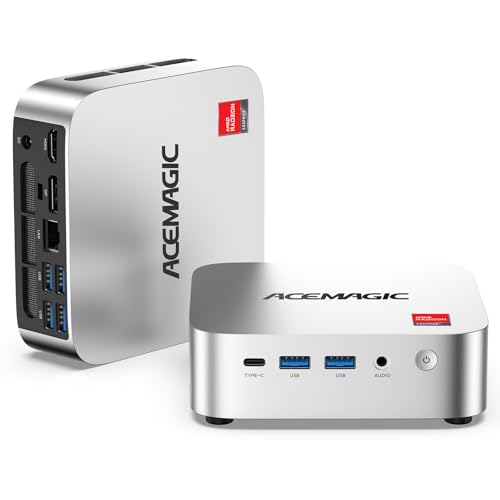
ACEMAGIC K1 Mini PC AMD Ryzen R2544

KAMRUI AK1PLUS Mini PC Intel Celeron N5095

RS2i2 Podcast Bundle for 2 Dynamic Mics

GEEKOM A6 Mini PC Ryzen 7 6800H 32GB

RS2i2 Podcast Bundle 48V XLR Condenser Mic

RS2i2 Podcast Bundle for 2 48V XLR Mics

GEEKOM A5 2027 Edition Mini PC Ryzen 7 7730U

GEEKOM A6 Mini PC Ryzen 7 6800H 16GB

GEEKOM IT13 MAX AI Mini PC Intel Ultra 9 185H
What Each Pick Brings To The Table
The Beelink SER5 sits in a sweet spot that a lot of bedroom producers will recognize: enough CPU cores to handle a mid-sized Ableton session without choking, in a chassis small enough to bolt behind a monitor. The Ryzen 5 5500U is a 6-core, 12-thread mobile chip (a “mobile” CPU is one designed to draw less power and run cooler than a desktop equivalent), and paired with 16GB of DDR4 RAM, it runs comfortably when you’re juggling a DAW, a browser full of plugin tabs, and a chat window.
For most home producers tracking guitars, vocals, and a few virtual instruments, this is the kind of machine that just gets out of the way. Compare that to the ACEMAGIC K1 below, which uses a leaner 4-core chip, and you can feel the extra headroom when you start layering reverbs and parallel compression on every channel.
What Makes Sense
- The 6-core CPU keeps latency stable when you stack a dozen tracks with software effects.
- 16GB of RAM covers most beginner-to-intermediate sessions without forcing a swap.
- The 480GB NVMe SSD (a solid-state drive that uses the NVMe protocol for very fast read/write speeds) loads sample libraries noticeably faster than a SATA drive.
- The compact case fits under a monitor arm or behind a screen, freeing desk space for MIDI controllers.
Worth Noting
- The mobile-class chip throttles under sustained loads, which can show up in long renders of full mixes.
- The integrated graphics aren’t built for visual-heavy tasks like heavy video sync to audio.
- Owners commonly report that fan noise becomes noticeable during long recording sessions in quiet rooms.
Right Fit For
Bedroom producers, students, and hobbyists building their first serious studio PC.
Skip It When
You regularly push dense orchestral templates; in that case, the GEEKOM A6 with 32GB of DDR5 RAM is a stronger match.
The ACEMAGIC K1 is the kind of machine I’d point a friend toward if they told me they wanted to start recording demos at home without committing much money. The Ryzen R2544 is a 4-core, 8-thread chip that boosts up to 3.7GHz, which is plenty for a beginner project with a handful of tracks and one or two software instruments running.
Real talk: this isn’t a session-eater. If you’re building a track with Kontakt libraries and a drum emulator running simultaneously, you’ll feel the ceiling pretty quickly. But for sketching arrangements, recording vocals through a USB interface, and learning the basics of mixing, it covers the ground honestly.
Notable Upsides
- The 4-core chip draws very little power, keeping the unit cool under typical beginner loads.
- The small case disappears on a desk, even more so than the Beelink SER5.
- It handles DAW basics like playback, recording, and light plugin chains without breaking a sweat.
Trade Offs
- 8GB of RAM is the bare minimum for modern DAWs; large projects will hit the wall fast.
- The 256GB SSD fills up quickly when you install a few sample libraries.
- Upgradability is limited compared to larger mini PCs.
Made For
First-time producers sketching demos and recording vocals through a basic USB interface.
Consider Something Else When
You plan to grow into larger projects; the KAMRUI AK1PLUS brings 16GB of RAM for a similar small footprint.
The KAMRUI AK1PLUS is for someone who has a very specific mental image of their studio: clean desk, one screen, maybe a small MIDI controller, and nothing else taking up space. The Intel Celeron N5095 is a 4-core chip that boosts to 2.9GHz, modest on paper but workable for lighter DAW tasks.
The trick that elevates this one over the ACEMAGIC K1 is the 16GB of RAM and the option to add a 2.5-inch SSD later on (a slim drive that slots into a dedicated bay for extra storage). That second slot matters because 256GB disappears the moment you install a couple of orchestral libraries.
Strong Points
- 16GB of RAM out of the box gives meaningful headroom for beginners.
- The 2.5-inch drive bay makes it easy to add bulk storage for samples later.
- Dual 4K display support helps if you like your mixer on one screen and your arrangement on another.
Honest Caveats
- The Celeron’s single-thread performance is weak, and some plugins choke on it.
- Not suited for projects with many software instruments running simultaneously.
Built With In Mind
Writers, beatmakers, and minimalists running lean sessions on a single screen.
Look Elsewhere When
You’re tracking live bands; the Beelink SER5 has the multi-core headroom that group recordings demand.
The RS2i2 two-person dynamic mic bundle is a different category from the mini PCs in this roundup, but it earns its place here because music producers also record spoken-word content, vocals, and interviews, and many of them want a clean, all-in-one starter kit. This bundle ships two dynamic microphones, a sound card with built-in effects, an 8GB memory card, and stands ready to plug into a laptop or one of the mini PCs above.
Dynamic microphones don’t require phantom power (the 48V electrical signal that condenser mics need to operate), which makes them forgiving for untreated rooms. You can set the whole thing up in an afternoon, even if you’ve never touched an audio interface before.
Noteworthy Benefits
- Two dynamic mics capture two hosts without buying separate gear.
- The plug-and-play sound card removes driver setup for beginners.
- The included 8GB card lets you record without a computer present.
- Built-in effects add some polish for streaming without external processing.
Things To Consider
- Dynamic mics need significant gain; quiet voices may pick up hiss.
- The bundled sound card is basic compared to a dedicated interface.
Who Should Grab It
First-time podcasters and small content teams who want a complete package on day one.
Reach For A Different Pick When
You’re capturing detailed vocals or acoustic instruments; the RS2i2 condenser bundle captures more high-end detail.
This is the GEEKOM A6 in its higher-spec configuration, and it’s the machine I’d put on a producer’s desk who treats their studio as a small business. The Ryzen 7 6800H is an 8-core, 16-thread H-class chip (the “H” designation means it draws more power and runs at higher clock speeds than a U-series mobile chip), and it’s paired with 32GB of DDR5 RAM and a 1TB PCIe 4.0 SSD. That stack of components is what you want when you’re running 60-track mixes with heavy plugin chains.
Compared to the Beelink SER5, this thing eats dense sessions for breakfast. Where the SER5 starts to feel the strain on large orchestral templates, the A6 keeps its composure and gives you stable playback at low buffer sizes (the chunk of memory a DAW processes at one time; smaller values mean lower latency but more CPU load).
A Few Highlights
- Eight cores and 16 threads handle sample-heavy sessions without dropouts.
- 32GB of DDR5 RAM lets you preload large Kontakt libraries without unloading between songs.
- The PCIe 4.0 SSD cuts project load times dramatically.
- The 45W TDP (thermal design power, the heat the cooling system must dissipate) holds clock speeds under long sessions, unlike U-series chips.
Soft Spots
- The higher power draw means the chassis runs warm, so ventilation matters in tight racks.
- It costs noticeably more than the 16GB A6 version or the Ryzen 5 picks above.
Who It Suits Best
Professional producers and serious hobbyists running dense, multi-instrument projects every day.
A Better Fit Elsewhere
You mainly record live bands or hardware synths; the GEEKOM A5 2027 Edition runs cooler for those simpler rigs.
This RS2i2 bundle is the solo creator’s version of the two-mic kit: one 48V phantom-powered condenser mic (a condenser capsule that needs 48V of external power to charge its diaphragm, capturing finer detail than a dynamic mic), an adjustable boom arm, and a sound card with dual headphone outputs for real-time monitoring.
Condenser mics pick up far more nuance than dynamic mics, which matters for vocalists, voice-over artists, and anyone recording acoustic instruments. The trade-off is that they also pick up more room noise, so this is better suited to treated spaces than to a spare bedroom with bare walls.
Positive Points
- The condenser capsule captures vocal detail and breath texture that dynamic mics miss.
- Independent mic volume knobs let you balance two sources cleanly.
- The boom arm keeps the desk clear of stand clutter.
Points To Note
- Condenser mics reveal background noise; treat your room first or expect hiss and hum in the recording.
- You must engage 48V phantom power before use, a small but real setup step.
Best Suited To
Solo vocalists, streamers, and voice-over artists working in a reasonably quiet, treated space.
Swap It Out When
You co-host with a partner; the two-mic XLR condenser bundle covers both voices without a second purchase.
The two-condenser version of the RS2i2 bundle is the natural step up for creators who run a co-hosted show. You get two XLR condenser mics, two headphone outputs, and a mixer-style sound card that handles dual inputs without needing a separate interface.
Worth noting though: condenser mics in this kind of package pick up everything in the room, including the other host’s mic when they aren’t careful. Positioning and mic discipline matter a lot more here than with the dynamic version.
Advantages To Know
- Two condenser capsules capture detail from both voices equally.
- The mixer-style sound card removes the need for an external interface.
- Dual XLR inputs let both hosts monitor independently through their own headphones.
Some Limits To Know
- Requires more disciplined mic technique than the dynamic bundle.
- Both mics need 48V phantom power engaged before each session.
Perfect Match For
Two-person podcasts, interview shows, and collaborative YouTube channels.
Where Another Pick Suits Better
You record alone in an untreated space; the RS2i2 single-condenser bundle is more forgiving for solo work.
The GEEKOM A5 2027 Edition is what I’d call a quiet achiever. The Ryzen 7 7730U is a U-series 8-core chip, meaning it sips electricity and stays cooler than the H-series A6 above. For most daily production work, including writing sessions, recording vocals, editing podcasts, and mixing, it has more than enough muscle.
The honest read is that this isn’t a session machine for 80-track film scores. But for the kind of work most producers handle day to day, the A5 runs cool, stays quiet, and asks very little of your desk space.
The Good Stuff
- The U-series chip runs cool enough to sit on a desk without thermal throttling under typical loads.
- 16GB of RAM is a sensible floor for most DAWs out of the box.
- The 512GB NVMe SSD balances speed and storage for starter sample libraries.
- Quiet operation suits bedrooms and small home offices.
Worth Bearing In Mind
- The U-series chip has lower sustained clocks than the A6’s H-class processor.
- Long stem exports and heavy offline bounces take longer than on higher-tier picks.
The Right Fit
Daily producers working on tracks, mixes, and podcasts in a quiet home environment.
Not Your Match When
You run sessions with dozens of software instruments; the GEEKOM A6 with 32GB is built for that workload.
This is the GEEKOM A6 in its 16GB configuration, the same H-class Ryzen 7 6800H chip as the higher-spec version above, but with half the memory and the same 1TB PCIe 4.0 SSD. For producers who want the sustained-clock performance of an H-series chip but don’t need 32GB of RAM on day one, this is the practical middle ground.
The 16GB RAM is upgradable, so you can start here and expand later if your sessions grow. That’s a useful escape hatch that the cheaper picks in this list don’t always offer.
Strengths Worth Knowing
- The 45W H-class chip holds clock speeds during long sessions, unlike U-series alternatives.
- The 1TB SSD gives plenty of room for project files and starter sample libraries.
- Upgradable RAM means you can extend the machine’s life as your sessions grow.
Things To Weigh
- 16GB is the floor for dense sessions; expect to upgrade within a year for heavy templates.
- The chassis runs warmer than the A5 because of the higher TDP.
Whose Shelf It Belongs On
Producers who want H-class performance today with room to grow memory later.
Another Choice May Suit
You refuse to ever upgrade; the GEEKOM A6 with 32GB preinstalled saves you the future tinkering.
The GEEKOM IT13 MAX sits at the top of this list for a reason. The Intel Core Ultra 9 185H is a 16-core, 22-thread processor with boost speeds up to 5.1GHz, paired with 24GB of LPDDR5 RAM (low-power DDR5, soldered to the board for speed and efficiency) and a 500GB SSD. This is the machine you buy when your sessions include AI-assisted tools, dense film score templates, or projects where every minute of render time matters.
Compared to the A6, this CPU has more cores, higher peak clocks, and a built-in NPU (neural processing unit, a chip designed to accelerate AI and machine-learning tasks locally). For producers who run stem separation, AI mastering plugins, or real-time voice synthesis, that NPU takes work off the main cores and keeps playback tight.
The Helpful Details
- The 16-core chip handles large film-score sessions and AI-assisted processing with room to spare.
- The integrated NPU accelerates AI-driven audio tools without taxing the main cores.
- Boost clocks up to 5.1GHz keep single-threaded plugins responsive.
- The compact case still disappears behind a monitor despite the flagship internals.
Points To Keep In Mind
- The flagship chip commands a meaningful price premium over mid-tier picks.
- The 500GB SSD fills up quickly with sample libraries; budget for external storage.
- 24GB of LPDDR5 is soldered and not user-upgradable later.
Who Will Love This
Composers, AI-music creators, and professionals running heavy hybrid sessions daily.
Where A Sibling Pick Shines
You produce conventional rock, pop, or hip-hop sessions; the GEEKOM A6 32GB covers that work without the price.
Picking A Mini PC That Fits How You Actually Make Music
The specs on these listings look similar at a glance, but the difference between a satisfying machine and a frustrating one usually comes down to how you actually work. A beatmaker running Ableton with a drum rack and two synths has completely different needs from a composer layering Spitfire Albion sections across a hundred tracks.
CPU architecture matters more than raw model numbers. A modern multi-core chip with strong single-thread performance will feel snappier in your DAW than an older chip with more cores but weaker per-core speed. For most producers, six cores is the practical floor, and eight is a comfortable upgrade path.
RAM is the next bottleneck. 16GB is the minimum I’d recommend for anyone running a modern DAW with a few plugins per channel. If you load sample-based instruments like Kontakt, that number climbs quickly. RAM is cheap to upgrade later on most mini PCs, so starting at 16GB and adding more is a reasonable strategy.
Storage type affects how fast your projects load and how snappy sample playback feels. NVMe SSDs, which connect directly to the motherboard’s PCIe lanes for maximum throughput, are meaningfully faster than SATA SSDs, and the gap shows up when you load a multi-gigabyte orchestral library.
Port selection matters more than people expect. USB-C is useful for modern audio interfaces and external drives. HDMI or DisplayPort outputs let you run a second monitor for your mixer. Ethernet is still the most reliable connection for low-latency audio over a network, even with Wi-Fi available.
For most home producers, the GEEKOM A6 in either RAM configuration hits the sweet spot. Beginners on a tighter budget get a working machine from the Beelink SER5 or KAMRUI AK1PLUS. Pros and AI-heavy users step up to the IT13 MAX. Podcast creators should treat the RS2i2 bundles as their starting point for audio capture.
Key Considerations Across These Picks
Common Shopping Slip Ups
The mistake I see most often is shopping purely by clock speed or RAM size without thinking about how the machine will sit in a real workflow. A 16-core chip is wasted on someone running four tracks, while a 4-core chip will frustrate someone running forty. Match the machine to the kind of sessions you actually build, not the kind you imagine building someday.
Another slip is ignoring thermals. Mini PCs are small, and small cases trap heat. H-series chips throttle if ventilation is poor, which means your “fast” CPU quietly slows down during a long session. Make sure wherever you place the machine has airflow around it.
Where The Extra Money Goes
Premium mini PCs earn their price through sustained performance, not just peak specs. The IT13 MAX’s NPU and higher core count pay off in AI-assisted workflows and dense film scores. The GEEKOM A6 with 32GB of DDR5 buys headroom for the next two or three years of session growth.
Spending up makes sense when your sessions will outgrow a starter machine within months, or when your time is valuable enough that long render waits matter. For a hobbyist recording demos on weekends, the budget tier is the honest answer.
Frequently Asked Questions
Do I really need a dedicated audio interface with a mini PC?
For any recording beyond a basic USB headset, yes. Mini PCs handle the processing, but a dedicated audio interface handles the analog-to-digital conversion and gives you proper preamps and low-latency monitoring.
How much RAM do I need for music production?
16GB is a sensible floor for modern DAWs. If you load large sample libraries like Kontakt or orchestral instruments, 32GB gives much more comfort and prevents slowdowns.
Are mini PCs powerful enough for professional music production?
Yes, the higher-tier picks here run dense professional sessions without issue. The GEEKOM IT13 MAX and A6 with 32GB are both viable for professional daily use.
Can I use these mini PCs for live performance?
For software instruments and backing tracks, yes. For live vocal processing with low latency, pair the mini PC with an audio interface that has hardware monitoring.
Should I get an SSD or HDD for storing projects?
NVMe SSD for active projects, since load times and streaming performance matter. A traditional hard drive is fine for archival storage of finished projects and old sessions.
Wrap Up
The right music production PC depends on the size and shape of your sessions. Beginners and budget shoppers get a working machine from the Beelink SER5, ACEMAGIC K1, or KAMRUI AK1PLUS. Producers running real daily work find their footing in the GEEKOM A5 or A6 family. Creators adding spoken-word content pair any of those with an RS2i2 bundle.
Pick the tier that matches how you actually make music today, and leave yourself one upgrade step for tomorrow.