Building a capable desktop on a tight budget means making smart trade-offs: choosing a case that doesn’t choke airflow, pairing it with a compact system that handles real workloads, and knowing when a pre-built mini PC saves you the headache of sourcing parts separately. I focused this roundup on the two halves of any sub-$1000 build, the chassis and the small-form-factor computers that often replace traditional tower builds, so anyone planning a 2026 rig can see what fits their workspace and wallet.
An Overview Of The Picks
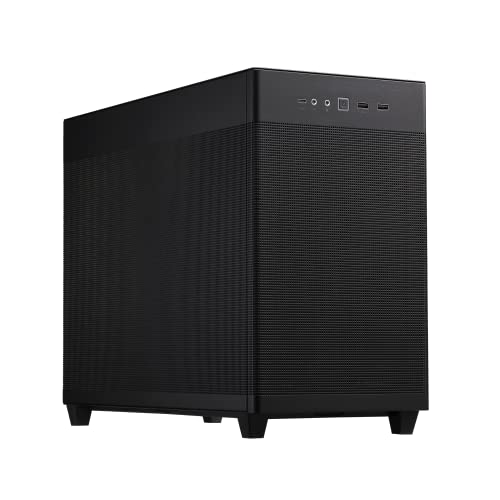
ASUS Prime AP201 Micro ATX PC Case

MUSETEX ATX PC Case with 6 ARGB Fans

GEEKOM IT12 Mini PC (i3, 16GB, 256GB)

ASUS TUF Gaming GT502 White ATX Case

GMKtec G3S Mini PC (N95, 8GB, 256GB)

GMKtec M3Pro Mini PC (i5-13500H, 16GB, 512GB)

GMKtec G10 Mini PC (Ryzen 5, 16GB, 1TB)

GMKtec G11 Mini PC (Ryzen R2514)

MUSETEX ATX PC Case NN8 (6 ARGB Fans)

GMKtec Mini PC (i7-1185G7, 16GB, 1TB)
A Breakdown Of The Leading Choices
The ASUS Prime AP201 is the case I keep coming back to when someone wants a small desk rig without giving up serious hardware. At roughly 33 liters, it tucks beside a monitor but still fits a 360 mm AIO cooler (an all-in-one liquid CPU cooler whose radiator spans 360 mm) and a GPU up to 338 mm long, which covers most mid-range graphics cards without forcing you to compromise.
Tool-free side panels mean I can pop the cover off in seconds to swap a drive or clean the dust filter. The mesh front panel feeds cool air to the GPU and CPU in a straight path, and the minimalist exterior looks at home in a home office, not just a battlestation.
What Works In Its Favor
- 33L footprint leaves desk room for monitors and accessories
- Supports 360 mm AIO radiators for quiet CPU cooling
- Tool-free side panels speed up upgrades and cleaning
- Quasi-filter mesh front balances airflow and dust filtering
- Fits ATX power supplies, which are easier to find than SFX units
Honest Caveats
- 338 mm GPU limit rules out the longest flagship cards
- Compact interior takes patience during cable routing
- Pre-installed fan is just one, so most builders add more
Quick Facts
Right Fit For
First-time builders and small-desk enthusiasts who want a clean, compact chassis that doesn’t choke airflow.
Where Another Pick Suits Better
Step up to the ASUS TUF Gaming GT502 if you need a dual-chamber layout and room for the longest GPUs and largest AIOs.
MUSETEX’s K2 mid-tower lands in the sweet spot for first-time gaming builders who want RGB lighting and good airflow out of the box. Six PWM ARGB fans are already mounted, which is unusual at this tier, so I don’t need to budget extra for case fans or hunt for compatible headers.
The dual tempered glass panels wrap roughly 270 degrees around the chassis, letting internal lighting show through without the all-glass look feeling fragile. A front-panel Type-C port is a small but welcome touch for modern phones and drives.
Strengths Worth Knowing
- Six PWM ARGB fans ship installed, saving time and money
- Dual tempered glass panels showcase the build from multiple angles
- Front Type-C port supports modern devices without adapters
- Mid-tower space simplifies GPU and cooler installation
Trade Offs
- ARGB controller hub may need extra software or motherboard headers
- More fans mean more dust to clear every few months
Made For
New builders who want a flashy, pre-cooled chassis and don’t want to spend weekends sourcing fans separately.
Consider Something Else When
Pick the MUSETEX NN8 instead if you’d rather have a side-opening door for faster dust cleaning.
The GEEKOM IT12 is the kind of mini PC that quietly disappears behind a monitor. The Intel i3-12300HE inside isn’t a flagship, but it packs 8 cores and 12 threads, which keeps web apps, Office files, and video calls running side by side without stuttering.
With 16GB of RAM and a 256GB SSD already in place, it’s ready to handle browser-heavy workdays the moment it boots. The chassis is small enough to mount behind a display with a VESA bracket, freeing the desk entirely.
Practical Pluses
- 16GB RAM handles dozens of browser tabs without slowing down
- Compact chassis fits behind a monitor via standard VESA mount
- 8-core CPU keeps office and study workloads responsive
Points To Note
- 256GB SSD fills up fast with large project files
- Integrated graphics limit serious gaming or 3D work
Feature Snapshot
Best Suited To
Remote workers and students who want a clean desk, near-silent operation, and enough power for everyday software.
Look Elsewhere When
Reach for the GMKtec M3Pro if you edit video or run heavier creative tools that benefit from a 13th-gen i5.
The TUF Gaming GT502 is the case I recommend when airflow is non-negotiable. Its dual-chamber design splits the power supply and cables off into a separate compartment, so the main chamber stays focused on feeding cool air directly to the GPU and CPU.
The white finish gives a clean canvas for RGB, and tool-free panels make swapping GPUs or drives surprisingly quick. Front-panel USB-C rounds out the modern I/O, which is rare on cases this focused on thermals.
Real Benefits
- Dual-chamber layout keeps hot components isolated from the PSU
- Supports 360 mm and 280 mm AIO radiators
- Two-way GPU mounting adds display flexibility for custom builds
- Front USB-C handles modern phones and external SSDs
Worth Bearing In Mind
- Larger footprint than microATX options like the ASUS Prime AP201
- Two-year warranty is solid, but check retailer return terms too
Who Should Grab It
Gaming enthusiasts who want maximum thermal headroom and don’t mind a bigger case on the desk.
Skip It When
Choose the ASUS Prime AP201 if a compact 33-liter footprint matters more than dual-chamber cooling.
For a strict sub-$1000 build where every dollar matters, the GMKtec G3S handles the essentials without drama. The Intel N95 is a low-power chip that turbos to 3.4 GHz, enough for web browsing, point-of-sale displays, and streaming video at 4K on dual HDMI outputs.
It’s quiet, runs cool, and slips behind any monitor. Three USB 3.2 ports keep peripherals happy, while WiFi 5 and Bluetooth 5.0 round out the wireless side.
A Strong Showing
- Tiny footprint fits anywhere on a desk or behind a screen
- Dual HDMI supports two 4K displays at once
- Low-power CPU keeps noise and heat minimal
- Bluetooth 5.0 pairs modern peripherals without dongles
Less Ideal Details
- 8GB RAM is workable but limits heavy multitasking
- 256GB SSD feels tight for media collections
Feature Card
Right Fit For
Shoppers on tight budgets who need a competent everyday computer for browsing, streaming, and basic office work.
A Better Fit Elsewhere
Move up to the GEEKOM IT12 if 16GB of RAM and more cores will meaningfully speed up your daily workload.
The GMKtec M3Pro is the mini PC I’d point a content creator toward. Intel’s i5-13500H brings 12 cores and 16 threads, so photo edits, code compiles, and light 4K timelines actually finish in reasonable time.
Integrated Iris Xe graphics push beyond older i9 mobile chips for casual gaming and hardware-accelerated media work. The 512GB NVMe SSD (a fast solid-state drive connected over the NVMe interface) keeps reads quick enough that large project files don’t bottleneck.
Strong Points
- 12-core CPU handles demanding creative and multitasking workloads
- 16GB RAM keeps dozens of tabs and apps responsive at once
- 512GB NVMe SSD balances speed and storage for project files
- Iris Xe graphics handle media work and casual gaming
Some Limits To Know
- Compact chassis means fan noise can ramp up under sustained load
- No dedicated GPU option for heavy 3D rendering
Perfect Match For
Creators, developers, and multitaskers who want desktop-class CPU power in a mini-PC footprint.
Another Choice May Suit
Pick the GMKtec Mini PC with i7-1185G7 if USB4 and 2.5G Ethernet are higher priorities than raw CPU cores.
The G10 is the Swiss Army knife of this roundup. AMD’s Ryzen 5 3500U handles office work, browser tabs, and light photo edits without complaints, while 16GB of DDR4 keeps everything responsive. A 1TB SSD means I rarely have to think about storage for family photos, work files, and media libraries.
Triple 4K display support via HDMI 2.1 and USB-C (with 2.5G LAN on board) makes it a strong pick for productivity-heavy desks and home theater PCs alike.
The Value In It
- 1TB SSD stores large media libraries without extra drives
- Triple 4K display support expands any desk setup
- 2.5G LAN future-proofs home and small-office networking
- HDMI 2.1 handles high-refresh monitors and modern TVs
What To Weigh
- Ryzen 5 3500U trails newer chips on heavy creative workloads
- USB-C display output depends on cable and monitor support
Who It Suits Best
Home offices and home theater enthusiasts who value storage capacity and display flexibility over peak CPU speed.
Where A Sibling Pick Shines
Step up to the GMKtec M3Pro for noticeably stronger CPU performance on creative tasks.
The G11 is built around an embedded Ryzen R2514, a chip designed for continuous 24/7 operation rather than peak burst speed. That’s exactly what I want for digital signage, kiosk work, or a home server that quietly runs in the background.
The integrated Radeon GPU handles basic 3D tasks and hardware-accelerated video well above what older Intel N-series chips manage, which keeps media playback smooth.
Noteworthy Benefits
- Embedded CPU is rated for continuous 24/7 operation
- Integrated Radeon graphics outperform competing N-series chips
- Low power draw suits always-on commercial environments
Practical Considerations
- Lower clock speeds than mainstream mobile Ryzen chips
- Not aimed at gaming or heavy content creation workloads
Whose Shelf It Belongs On
Small business owners and home-lab hobbyists who need a reliable, always-on system for signage, virtual machines, or networking.
Not Your Match When
Choose the GMKtec M3Pro if your priority is creative app speed rather than continuous-duty operation.
The MUSETEX NN8 solves one of the most annoying parts of PC ownership: dust. A side-opening door swings open without screws, so clearing the radiator and GPU every few months is a 30-second job instead of a half-hour one.
Six PWM ARGB fans handle intake and exhaust out of the box, and the polygonal mesh front panel gives the build a distinctive look that breaks away from the usual tempered glass rectangles.
Features That Help
- Side-opening door makes dust clearing and GPU swaps fast
- Six pre-installed fans cover intake and exhaust from day one
- Polygonal mesh front stands out visually from typical cases
- Dual USB 3.0 ports on the front panel for fast external drives
Points To Keep In Mind
- Side-opening hinge needs clear desk space on the right side
- Multiple ARGB fans mean more cable management work
Built With In Mind
Apartment dwellers and hobbyists who want a striking case that’s easy to keep dust-free without a full disassembly.
Swap It Out When
Pick the MUSETEX K2 instead if dual tempered glass panels matter more than a hinged side door.
This GMKtec mini PC leans into modern connectivity. USB4 (a high-bandwidth port that rivals Thunderbolt for fast external drives and displays) is on board, alongside a 2.5G Ethernet jack driven by an Intel i226V controller, both rare at this size.
The 11th-gen i7 hits up to 4.8 GHz under load and pulls only 35W, so it stays efficient for everyday tasks while still handling heavier creative work. Iris Xe graphics keep media editing and casual gaming in reach.
Positive Takeaways
- USB4 port enables fast external SSDs and modern docking stations
- 2.5G LAN future-proofs home and office networks
- 16GB RAM and 1TB SSD cover most workloads out of the box
- Iris Xe graphics support hardware-accelerated editing
Details To Watch
- Older 11th-gen CPU trails newer 13th-gen options
- WiFi 6 plus BT 5.2 is solid, but Bluetooth audio codecs vary by device
The Right Fit
Power users who want modern I/O, fast networking, and a generous SSD in a compact desktop.
Reach For A Different Pick When
Pick the GMKtec M3Pro if raw CPU muscle matters more than USB4 and 2.5G Ethernet.
What To Weigh Before Choosing Parts For A Sub-$1000 Build
Sizing the case to your space is the first decision. Compact MicroATX options like the ASUS Prime AP201 work well on smaller desks and still support a 360 mm AIO cooler for quiet thermals, while mid-tower cases like the MUSETEX K2 or NN8 give builders more room to maneuver, accept longer GPUs, and ship with extra fans.
If the goal is to skip assembly entirely, a mini PC is often the better pick. Look at the CPU generation first: 13th-gen Intel and Ryzen 5000-series mobile chips handle multitasking well into 2026. RAM of 16GB is the practical floor for office and creative work, and 512GB SSD storage keeps the build responsive.
Cooling and connectivity deserve attention even on tight budgets. AIO liquid coolers move more heat than air coolers with less fan noise, but they need radiator clearance. USB-C or USB4 ports, WiFi 6, and 2.5G Ethernet are quality-of-life upgrades that pay off if you already own modern peripherals or plan to keep the build for several years.
Smart Habits Before Clicking Order
Pitfalls Shoppers Hit
Budget builds often skip thermal planning. A case that doesn’t fit your chosen cooler or GPU length forces last-minute swaps that wipe out savings. Measure twice: check GPU length in millimeters and confirm the case supports your CPU cooler height or radiator size.
Storage and RAM are easy to under-spec. 256GB SSDs fill up within months for anyone storing photos or project files locally. Bumping to 512GB or 1TB at purchase costs less than adding a drive later, and 16GB of RAM avoids the slowdowns that hit hard during browser-heavy workdays.
When Paying More Pays Off
Higher-tier cases like the ASUS TUF Gaming GT502 add a dual-chamber layout that keeps cables and heat away from the GPU, which translates into more consistent boost clocks under load. The same logic applies to mini PCs: stepping up from an Intel N95 to an i5-13500H or i7-1185G7 delivers tangible speed gains on creative tasks.
Modern I/O like USB4 and 2.5G Ethernet looks like overkill today, but it extends the useful life of the system. A machine with these ports in 2026 will still feel relevant when faster peripherals and networks become standard in homes and offices.
Frequently Asked Questions
Can I actually build a gaming PC for under $1000? Yes, but expect mid-range GPU performance rather than flagship framerates. Pairing a case like the MUSETEX K2 with a mid-tier GPU and a recent CPU gives playable settings at 1080p for most modern titles.
Is a mini PC a good replacement for a traditional tower? For office work, media playback, and light creative tasks, modern mini PCs handle the workload while freeing up desk space. Heavy gaming and 3D rendering still benefit from full towers with dedicated GPUs.
How much RAM and storage do I really need? 16GB of RAM is the practical sweet spot for 2026 productivity. 512GB of SSD storage covers most users, while 1TB is worth the step up for media libraries and project archives.
What is an AIO cooler? An AIO (all-in-one) cooler is a sealed liquid cooling loop that mounts a radiator and fans to the case while a block sits on the CPU. It moves heat efficiently and often runs quieter than bulky air coolers.
Do I need a 2.5G Ethernet port? Not yet for most households, but it’s a sensible future-proofing feature if your router supports multi-gig speeds or you transfer large files over a local network regularly.
Closing Remarks
A sub-$1000 build doesn’t have to feel like a compromise. A compact, well-cooled case paired with a sensibly specced mini PC covers most home and office needs in 2026. Match the chassis and computer to your real workflow, and the rest of the components fall into place.