Shopping for a capable desktop without crossing the four-figure line has gotten genuinely interesting. The current crop of budget-friendly towers and mini PCs handles serious productivity, creative work, and even mid-range gaming, so the usual “you get what you pay for” trade-off no longer feels quite so heavy. I put this list together for anyone who wants honest performance per dollar, whether the priority is a compact Mac mini sitting next to a monitor or a full gaming rig ready for the latest titles.
The Essentials At A Glance

Skytech Gaming PC Azure 3 (Ultra 7, RTX 5060, 32GB, 1TB)

Apple 2024 Mac mini M4 (10-core CPU, 16GB, 256GB)
Apple 2024 Mac mini M4 (10-core CPU, 16GB, 512GB)

GEEKOM IT12 Mini PC (i3-12300HE, 16GB, 256GB)
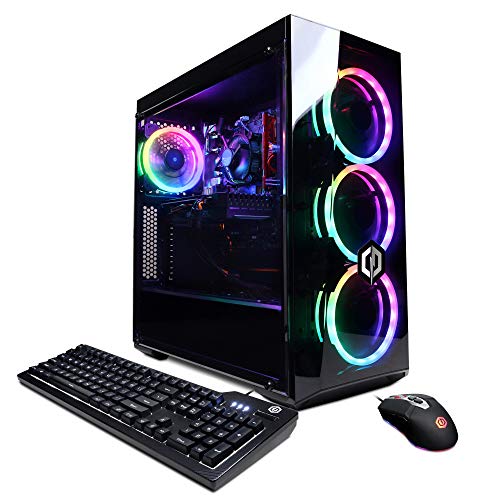
CyberpowerPC Gamer Xtreme VR (i5-10400F, GTX 1660 Super)
Apple 2024 Mac mini M4 Pro (12-core CPU, 24GB, 512GB)
HP ProDesk 600 G6 SFF (i5-10400F, 16GB, 256GB)

ASUS ROG G700 (2025) Gaming Desktop (Ultra 7, RTX 5070, 32GB)

Dell Slim Desktop (Core Ultra 5-225, 512GB, 16GB DDR5)

HP 2026 Desktop Computer (i5-12500, 16GB, 1TB)
The Details Behind The Selections
The Skytech Azure 3 lands in the spot many gaming buyers actually shop in: a prebuilt tower with current-generation parts, modern cooling, and storage that won’t fill up after a handful of installs. The Intel Core Ultra 7 270K pairs with an NVIDIA RTX 5060 graphics card (NVIDIA’s RTX line is the company’s family of gaming-focused GPUs), and together they hit a comfortable note for anyone playing today’s titles at 1080p or dipping into 1440p.
The 360mm AIO liquid cooler is a notable inclusion, meaning the CPU stays under control during long sessions without the jet-engine roar older towers tend to develop. For streamers, content creators, or students who game between assignments, this rig covers more bases than its sticker suggests. Compared to the compact GEEKOM IT12 covered later, you’re trading desk space for genuine gaming muscle.
Everyday Perks
- 32GB of DDR5 RAM keeps background apps, browser tabs, and games running side by side without slowdowns.
- 1TB NVMe SSD storage (a fast solid-state drive connected directly to the motherboard) cuts load screens and leaves room for a healthy Steam library.
- 360mm AIO liquid cooling keeps thermals quiet, a real upgrade over basic air coolers in budget prebuilts.
- Wi-Fi 6 support (the latest common Wi-Fi standard) means fewer adapters on a crowded desk.
- RTX 5060 graphics bring ray tracing (realistic lighting effects in games) and DLSS support (AI-driven frame boosting) to titles that actually use them.
Honest Caveats
- As a traditional mid-tower, it demands a reasonable amount of desk or floor space, unlike the Mac mini or GEEKOM picks.
- The Windows 11 Home install is lean, but the absence of bundled peripherals means a monitor, keyboard, and mouse still factor into the real cost.
Feature Snapshot
Right Fit For
Gamers who want modern frame rates in a turnkey package without sourcing parts themselves.
Look Elsewhere When
Shoppers wanting the absolute smallest footprint should look at the Apple 2024 Mac mini M4 instead.
The Mac mini has always been the “small but mighty” ambassador of Apple’s desktop lineup, and the M4 generation raises that bar noticeably. At roughly five inches on each side, the unit fits beside a monitor, on a shelf, or even tucked behind a display with no fuss. The M4 chip’s 10-core CPU and 10-core GPU handle everyday workloads with headroom, and the front-and-back port layout is finally practical.
This 256GB configuration suits users who lean on cloud storage, external drives, or who simply work with smaller file footprints. Writers, coders, designers running lighter Photoshop or Illustrator projects, and anyone embedded in the Apple ecosystem will feel right at home. If you need more local room, the 512GB version just below offers a sensible step up.
Practical Pluses
- Five-by-five-inch footprint disappears on any desk or media shelf.
- M4 silicon runs cool and quiet, often completely silent under light office loads.
- Apple Intelligence support future-proofs the box for upcoming AI-driven macOS features.
- Deep iPhone and iPad integration makes handoff and continuity genuinely useful.
Things To Consider
- 256GB of internal storage fills up quickly with photo libraries or video projects, so an external SSD is a likely add-on.
- No display, keyboard, or mouse ships in the box, which adds to the total setup cost.
Best Suited To
Minimalist Apple fans who want a quiet, capable hub for office work, creative tasks, and media streaming.
Where Another Pick Suits Better
Gamers chasing high frame rates should look at the Skytech Gaming PC Azure 3, since the Mac mini is not built for that workload.
Stepping up to 512GB on the same M4 Mac mini platform solves the storage anxiety that holds many shoppers back from the smaller sibling. The chip, memory, and compact chassis are identical, which means performance behavior stays consistent across both versions. This is the configuration I usually point people toward, because the doubling of storage pays off the moment you start keeping local photo libraries or Logic Pro sessions.
For anyone editing 4K home videos, managing a large Lightroom catalog, or juggling multiple large apps, 512GB feels notably more relaxed than 256GB. The Mac mini remains whisper-quiet under typical workloads, and the Gigabit Ethernet port on the back is a small but appreciated touch for stable wired networking.
Useful Highlights
- Doubled storage capacity over the base model removes the need for an immediate external drive.
- Same compact five-inch enclosure preserves the desk-friendly footprint.
- Apple Intelligence support keeps the box relevant for years of macOS updates.
Worth Noting
- Power users with multi-terabyte media libraries will still want an external Thunderbolt drive.
- macOS remains a non-starter for shoppers who depend on Windows-only software.
Who It Suits Best
Creative pros and power users who want more local storage without leaving the mini form factor.
Not Your Match When
Buyers wanting maximum horsepower should consider the Mac mini M4 Pro covered later in this list.
The GEEKOM IT12 is the kind of unobtrusive little box that quietly disappears behind a monitor or sits on a small shelf without anyone noticing. It runs an Intel i3-12300HE processor (a 12th-generation mobile-class chip designed for efficiency) paired with 16GB of RAM and a 256GB SSD. For office work, browser-based research, and light creative tasks, it covers more ground than its small size suggests.
Where this machine shines is in tight spaces: kitchens with a single counter, dorm desks, reception counters, and home offices where every square inch matters. The integrated Intel UHD graphics handle streaming and basic photo edits without complaint, though anyone planning serious video work or gaming should set expectations accordingly.
The Value In It
- Ultra-compact chassis slips behind monitors or mounts with VESA brackets for invisible installations.
- 16GB of RAM is generous for the price point and keeps multitasking smooth.
- Low power draw makes it a smart pick for always-on roles like home servers or digital signage.
Trade Offs
- Integrated graphics cap this unit at casual games and older titles.
- 256GB storage fills quickly with media files, so a portable SSD is likely on the shopping list.
- The i3 chip trails the Core Ultra and Apple M4 silicon in heavier creative apps.
Quick Facts
Whose Shelf It Belongs On
Anyone with a tight workspace who needs a quiet, capable machine for productivity and light creative work.
Skip It When
Gamers and video editors should jump to the ASUS ROG G700 for the dedicated GPU they need.
The Gamer Xtreme VR from CyberpowerPC plays a specific role in this lineup: it’s a starting point for newcomers who want a real dedicated GPU without overspending. The GTX 1660 Super (an older but capable NVIDIA card focused on solid 1080p performance) handles esports titles, indie favorites, and many older AAA games at respectable settings. The Intel i5-10400F keeps frame pacing stable in CPU-bound games.
The 8GB of DDR4 RAM is the obvious compromise, though it’s enough for most single-game sessions with light background apps. The 500GB NVMe SSD boots Windows fast and holds a starter library. For VR-curious shoppers, this rig has the connective tissue for entry-level headsets, which is exactly the use case its name hints at.
What Earns Its Place
- GTX 1660 Super is a known quantity for stable 1080p gaming on a budget.
- i5-10400F handles competitive titles and everyday productivity without breaking a sweat.
- 500GB NVMe SSD delivers fast boot times and quick game launches.
- Wi-Fi ready out of the box, a small but useful detail for dorm or bedroom setups.
Room For Improvement
- 8GB of RAM means future game installs may require an upgrade stick sooner than later.
- No modern ray-tracing hardware limits how long this rig stays relevant for newer AAA titles.
Perfect Match For
First-time gaming PC buyers who mainly play esports, MMOs, and lighter indie titles.
Another Choice May Suit
Shoppers wanting longer gaming relevance should consider the ASUS ROG G700 instead.
The M4 Pro Mac mini is where Apple’s compact desktop stops being a productivity machine and starts competing with workstations. The 12-core CPU and 16-core GPU chew through demanding creative software: video exports in Final Cut, batch photo edits in Lightroom, and large Xcode builds all move noticeably faster than on the standard M4. 24GB of unified memory (a shared memory pool that the CPU and GPU both draw from, eliminating bottlenecks) keeps heavy projects responsive.
For freelancers, indie filmmakers, and developers who want genuine pro-class performance in the smallest possible enclosure, this is a uniquely compelling package. The 512GB SSD matches the middle Mac mini’s storage, which is plenty for working files and apps, though external Thunderbolt storage still makes sense for archived footage.
Positive Points
- 16-core GPU brings serious graphics performance for video work and motion design.
- 24GB unified memory holds large project files in RAM without swap penalty.
- Compact five-inch form factor despite workstation-class silicon.
Small Caveats
- 512GB internal storage fills quickly with 4K and ProRes footage.
- Apple’s pricing jumps noticeably at the Pro tier, so this is a clear premium choice rather than an impulse upgrade.
Built With In Mind
Creative professionals who need workstation-grade performance without a tower-sized chassis.
A Better Fit Elsewhere
Shoppers on a tighter budget should consider the HP 2026 Desktop Computer instead.
The HP ProDesk 600 G6 SFF is a “small form factor” desktop, which is corporate shorthand for a tower shrunk down to fit where normal towers cannot. The i5-10400F delivers six cores of dependable performance for spreadsheets, video calls, browser-heavy research, and document workflows. 16GB of DDR4 RAM is a comfortable allotment for office multitasking.
This is a pre-owned business machine in spirit, so the design favors function over flair. Where it really earns its spot is in offices or home setups where desk depth is at a premium. The 256GB SSD keeps Windows and core apps snappy, though large media archives will want external storage.
Useful Strengths
- Small form factor case fits in shallow desk cubbies and tight shelving.
- Six-core i5-10400F handles multi-tab browsing and productivity apps comfortably.
- 16GB DDR4 is generous for typical office workloads.
Points To Note
- The “F” suffix means no integrated graphics, so a dedicated GPU is required for any display output.
- 256GB storage limits how many local files you can keep before offloading to a network drive.
- Older 10th-gen silicon trails newer Intel and Apple chips in efficiency.
At A Glance
Who Should Grab It
Office workers and small business owners who need a compact, dependable productivity machine.
Swap It Out When
Home users wanting a quieter, more modern CPU should consider the Dell Slim Desktop later in the list.
The ASUS ROG G700 is the most forward-looking gaming rig in this roundup, packing the latest NVIDIA RTX 5070 GPU (a current-generation card with dedicated AI tensor cores for upscaling and frame generation) alongside Intel’s Core Ultra 7 265F processor. The dual-glass chassis with customizable Aura Sync RGB is genuinely easy on the eyes, and the components inside are no-compromise.
32GB of DDR5 RAM gives streamers, editors, and heavy multitaskers plenty of room to breathe. The 1TB PCIe 4.0 SSD loads massive open-world games in seconds. For shoppers who plan to keep a desktop for five or more years, this rig’s component choice means a longer runway before another upgrade conversation begins.
Notable Upsides
- RTX 5070 graphics deliver top-tier ray tracing and DLSS 4 multi-frame generation.
- Core Ultra 7 265F brings modern efficiency cores to gaming and creative workloads.
- 32GB DDR5 RAM future-proofs memory for upcoming titles and software.
- Dual-glass chassis with Aura Sync RGB adds visual flair to any setup.
A Few Limitations
- The full tower demands meaningful desk or floor space.
- Component pricing puts this at the upper boundary of the budget category.
Made For
Hardcore gamers and content creators who want the newest GPU and CPU combo available.
Reach For A Different Pick When
Shoppers who don’t need cutting-edge GPU power should look at the HP 2026 Desktop Computer for everyday use.
The Dell Slim Desktop lives up to its name with a thin tower profile that slips onto a shelf or under a monitor without dominating the desk. The Intel Core Ultra 5-225 (a second-generation Core Ultra chip with a built-in neural processing unit for AI tasks) brings modern efficiency to everyday computing, and the 16GB of DDR5 memory feels quicker than older DDR4 in real use.
512GB of storage is generous for a home PC, leaving room for software installs and personal files without immediately reaching for an external drive. Wi-Fi 6 and Bluetooth handle modern wireless accessories cleanly, and the included wired keyboard is a small but appreciated touch for first-day setup.
Bright Spots
- Slim tower footprint fits shallow desks and tight shelving.
- Core Ultra 5-225 includes an NPU for on-device AI features in supported apps.
- 512GB SSD offers comfortable storage for typical home use.
- Wi-Fi 6 and Bluetooth built in for modern wireless peripherals.
Some Limits To Know
- Integrated graphics limit this to light gaming and streaming only.
- The slim case restricts future internal GPU upgrades compared to mid-towers.
Who Will Love This
Families and remote workers who want a quiet, modern PC for productivity and video calls.
Where A Sibling Pick Shines
Gamers should consider the Skytech Gaming PC Azure 3 for dedicated graphics performance.
The HP 2026 Desktop Computer is a straightforward, honest machine built around an Intel i5-12500 processor, six cores, twelve threads, and a turbo boost up to 4.6GHz. That gives it more than enough muscle for homework, browsing, video calls, and the everyday apps that fill a family computer’s day. 16GB of RAM keeps multitasking smooth.
The standout here is the 1TB SSD, a generous allotment that means most shoppers won’t need to think about storage for years. Small business owners managing inventory or students juggling research papers and class software both benefit from this kind of breathing room. The honest read is that this rig doesn’t try to be a gaming PC; it tries to be a reliable everyday PC, and it succeeds.
Benefits That Matter
- 1TB SSD storage holds years of documents, photos, and software without external drives.
- Six-core i5-12500 delivers reliable speed for typical home and office tasks.
- Turbo Boost up to 4.6GHz shortens waits in heavier apps.
- 16GB RAM handles multiple open apps comfortably.
Details To Watch
- Integrated graphics limit gaming to casual and older titles.
- The standard mid-tower footprint isn’t as compact as mini PC options.
Feature Rundown
Right Fit For
Students, families, and home offices that want reliable everyday performance with storage to spare.
Consider Something Else When
Shoppers needing the smallest possible case should look at the GEEKOM IT12 Mini PC instead.
What To Weigh Before Picking A Budget Desktop
CPU and GPU pairing matters more than raw clock speed. A balanced system with a recent-generation processor and a modest dedicated GPU outperforms a machine with an older flagship GPU paired with a weak CPU. For most productivity users, integrated graphics are enough for everyday work, but anyone touching video editing or 3D rendering should prioritize a discrete graphics card. RAM sits comfortably at 16GB for typical users in 2026, with 32GB becoming the smart upgrade for streamers, editors, and multitaskers who keep many apps open at once.
Storage type shapes day-to-day feel more than most shoppers expect. NVMe SSDs (solid-state drives that plug into the motherboard’s M.2 slot for much faster data transfer than older SATA drives) load Windows and apps in seconds and dramatically shorten game load screens. A 512GB SSD suits most home users, while 1TB is a comfortable buffer for families and creators.
Form factor determines where the machine actually lives in your home. Mini PCs like the Mac mini or GEEKOM IT12 disappear behind monitors and suit cramped desks. Slim towers balance compact cases with modest expansion room. Full mid-towers like the Skytech Azure 3 and ASUS ROG G700 demand more space but offer better cooling and future upgrade paths. Match the form factor to the desk, not the other way around.
Connectivity rounds out the practical picture. Wi-Fi 6 has become the modern baseline for wireless networking, and Bluetooth simplifies keyboard, mouse, and headphone connections. For anyone using a wired keyboard, external storage, or multiple monitors, the port selection on the back of the case matters more than the headline specs.
Key Considerations Across These Picks
Where Shoppers Go Wrong
A common slip-up is treating the cheapest option as the best value without checking the storage tier. A mini PC with 256GB feels fine on day one and cramped within months. Match storage to your actual file habits, not just the price tag. Another mistake is buying a gaming-looking tower for a home that mostly needs productivity, paying for a GPU that sits idle while losing out on quieter operation and better efficiency.
When Paying More Pays Off
Stepping up from the entry-level picks to mid-tier machines usually brings a faster CPU generation, more RAM, and larger SSD storage. For shoppers who keep a desktop four or more years, that upgrade curve tends to be worth it. The difference between an 8GB RAM system and a 16GB one, or between a 256GB and 1TB SSD, often determines whether the computer still feels responsive three years in.
Frequently Asked Questions
How much RAM do I really need in a budget desktop? 16GB is the comfortable minimum for most users in 2026, and it’s the sweet spot for multitasking across browsers, office apps, and light creative tools.
Can a desktop under $1000 handle modern games? Mid-range picks with current-generation GPUs can run most modern games at 1080p with reasonable settings, though demanding AAA titles may need quality adjustments.
Is a mini PC powerful enough for daily work? Yes, for office tasks, browsing, video calls, and streaming, modern mini PCs handle daily workloads comfortably and run cool and quiet.
Should I buy a Mac mini or a Windows PC? It depends on your software ecosystem. Mac mini suits anyone invested in Apple services and creative macOS apps, while Windows PCs offer broader software compatibility and gaming support.
How important is the SSD size? A 512GB SSD suits light users, while 1TB is a smarter pick for anyone keeping large photo libraries, videos, or game installs locally.
Closing Remarks
The sweet spot in this category right now sits around mid-range towers and capable mini PCs, which is exactly where this list spends most of its attention. Match the form factor to the desk, the GPU to your gaming appetite, and the storage to your real file habits, and almost any of these picks will serve well for years to come.