I’ve spent enough time staring at spreadsheets, typing out long gaming sessions, and fighting with cramped laptop keyboards to know how much the right setup changes a workday. A reliable keyboard and mouse combo quietly handles hours of typing, gaming, or creative work, and a bad one makes every keystroke feel like a chore. I rounded up nine solid options across wired, wireless, ergonomic, and gaming styles so you can find a pair that fits how you actually use your computer.
The Leading Options At A Glance

Logitech G713 Wired Gaming Keyboard with LIGHTSYNC RGB (White Mist)

Logitech G502 Hero + G213 RGB Gaming Keyboard Combo

YUNZII C98 Cute Cake Wireless Mechanical Keyboard (Purple)

RedThunder K10 Wired Gaming Keyboard and Mouse Combo (Black)

RedThunder K10 Wired Gaming Keyboard and Mouse Combo (Pink)
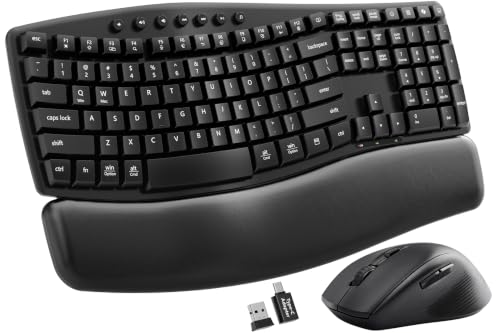
SABLUTE MA41 Quiet Ergonomic Wave Keyboard and Mouse Set

SABLUTE Ergonomic Wireless Keyboard and Mouse Combo (Lambskin)
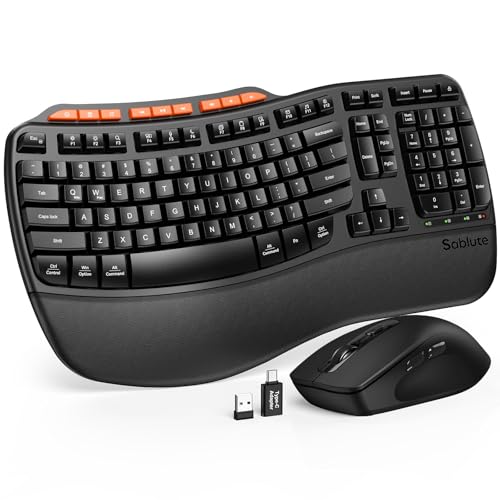
SABLUTE Ergonomic Wireless Keyboard and Mouse Combo (Full Size Wave)

SABLUTE Wireless Backlit Keyboard and Mouse Combo (Rechargeable)
A Breakdown Of The Leading Choices
The G713 sits in a different lane than most gaming keyboards, because Logitech leaned hard into the lifestyle side of the category without gutting the performance. The White Mist finish, low-profile mechanical switches, and cloud-shaped palm rest make it feel closer to a designer accessory than a typical RGB brick.
For streamers, content creators, or anyone whose desk doubles as a visible part of a room, that aesthetic actually matters. It runs GX Brown tactile switches, which give a soft bump without the click of a Blue switch, so late-night sessions stay relatively quiet. Compared to the budget RedThunder options further down, the build quality and switch refinement here are on another level.
The Upside
- Tactile GX Brown switches offer satisfying feedback without loud clicking
- LIGHTSYNC RGB lets the lighting react to on-screen content for a more immersive feel
- Tenkeyless layout saves desk space while keeping arrow keys and function row accessible
- Included cloud-shaped palm rest reduces wrist fatigue during longer typing sessions
- Mac and PC compatibility means you can swap systems without replacing gear
Things To Consider
- Wired only, so cable management matters on a clean desk
- White finish shows dust and fingerprints faster than darker keyboards
- No dedicated numpad, which may frustrate spreadsheet-heavy workflows
Who It Suits Best
Style-conscious gamers and hybrid work-from-home creators who want a tactile mechanical feel and a polished aesthetic that doesn’t look out of place on a webcam.
Consider Something Else When
You need a full-size layout with a dedicated numpad, in which case the SABLUTE Ergonomic Wireless Keyboard and Mouse Combo (Full Size Wave) is a better fit for data-entry workflows.
This combo pairs Logitech’s long-running G502 Hero mouse with the G213 Prodigy keyboard, and the value lies in how well the two play together. The G502 has been a competitive gaming staple for years because of its tunable weight system and high-DPI HERO 25K sensor, and the G213 brings spill resistance and dedicated media controls.
For someone moving from a basic office setup into actual PC gaming, this bundle covers the essentials without forcing a piecemeal purchase. The LIGHTSYNC RGB ties the two peripherals together visually, which matters if you care about a coordinated battlestation. The trade-off is that the G213 uses membrane-style keys rather than true mechanical switches, so the typing feel is softer than the G713 above.
A Favorable Mix
- G502 sensor supports up to 25,600 DPI for high-precision tracking in shooters
- Five tunable 3.6g weights let you adjust the mouse feel for flick shots or steady aim
- Eleven programmable buttons on the mouse handle MMO hotbars and macros
- G213 keyboard is spill-resistant, which helps if snacks are part of your routine
Points To Keep In Mind
- G213 keys are membrane-style, so the tactile feel is less defined than the G713
- Mouse and keyboard both wired, meaning two cables to route on your desk
- G502 is heavier than most modern mice, which may tire smaller hands
Key Specs
Made For
Competitive PC gamers who want a proven mouse and keyboard pairing without buying each peripheral separately.
Reach For A Different Pick When
True mechanical key feel matters more than mouse weight tuning, in which case the Logitech G713 Wired Gaming Keyboard with LIGHTSYNC RGB is a better fit for tactile-typing gamers.
YUNZII built the C98 for people who want a mechanical keyboard that doesn’t look like every other matte-black rectangle on the market. The purple “Cake” theme and dye-sublimated PBT keycaps make it feel like a collectible, while the 96% layout crams a numpad next to the main typing area.
For remote workers, students, or anyone with a visible desk setup, the C98 gives you proper mechanical switches and wireless freedom without sacrificing the number pad that so many productivity users rely on. The Milk Switches deliver a soft, linear feel that’s easy on the fingers during long writing sessions. It skips a mouse pairing, so it’s keyboard only, which is worth knowing if you specifically need a combo.
Standout Benefits
- 96% layout includes a dedicated numpad in a smaller footprint than a traditional full-size board
- PBT keycaps resist shine and oil buildup better than ABS plastic over time
- Wireless connectivity removes cable clutter from your desk
Worth Bearing In Mind
- Keyboard only, so you still need to source a mouse separately
- Cake-themed aesthetic won’t appeal to anyone wanting a minimal or corporate look
- Milk Switch linear feel lacks the tactile bump some typists prefer for accuracy
Best Suited To
Aesthetic-minded typists and content creators who want a mechanical keyboard with personality and the productivity benefits of a real numpad.
Skip It When
You want a matching mouse in the same bundle, in which case the SABLUTE MA41 Quiet Ergonomic Wave Keyboard and Mouse Set covers both peripherals for the same desk.
The RedThunder K10 is the kind of combo that makes sense when you need a full-size keyboard, a working mouse, and a wrist rest without thinking too hard about it. The 104-key layout gives you the complete function row and numpad, and the steel plate inside adds a satisfying rigidity that cheaper plastic boards usually lack.
Anti-ghosting on 26 keys covers most common gaming combinations, so accidental key drops during fast-paced play shouldn’t tank your score. The mouse runs a 7200 DPI optical sensor, which is plenty for casual shooters and most productivity tasks. Compared to the Logitech G502 combo above, the K10 trades proven build polish for a more accessible price and a bundled wrist rest.
Key Advantages
- Full 104-key layout includes every function key and a dedicated numpad
- Steel-reinforced plate gives the keyboard a sturdier feel under heavy typing
- Soft leather wrist rest ships in the box, saving a separate purchase
- RGB backlighting across the keys and bottom light bar adds visual flair
Trade Offs
- “Mechanical feel” switches are not true mechanical, so the typing feedback is softer than the G713
- Wired only, which adds two cables to manage
- Black plastic finish shows dust and fingerprint smudges easily
Right Fit For
First-time PC builders or anyone outfitting a family computer who wants a complete keyboard and mouse setup in a single box.
Look Elsewhere When
True mechanical switches and quieter typing matter more than cost, in which case the SABLUTE Wireless Backlit Keyboard and Mouse Combo (Rechargeable) delivers a quieter scissor-switch feel.
The pink variant of the K10 keeps the exact same hardware as the black version above and swaps the colorway. For someone building a themed battlestation, pastel rig, or a desk that shows up on camera, the pink finish ties the setup together without forcing you to chase down matching accessories later.
Functionally, you still get the 104-key full layout, anti-ghosting on 26 keys, a 7200 DPI optical mouse, and the bundled wrist rest. The RGB lighting pops differently against a pink chassis than a black one, which sounds trivial but matters if your room lighting leans warm or you film content under studio lights. The trade-off is the same as the black K10: “mechanical feel” switches are not genuine mechanical, so the typing experience is softer than dedicated mech boards.
Positive Takeaways
- Pink finish coordinates with pastel or coordinated desk themes
- Same 26-key anti-ghosting coverage as the black K10 for reliable gaming input
- Included leather-style wrist rest cushions long sessions
Honest Caveats
- Switch feel mimics mechanical without delivering true mechanical feedback
- Wired connection means cable routing on a clean desk
- Pink finish may not age as gracefully as darker boards if the coating wears
Who Should Grab It
Streamers, students, and themed-setup builders who want a coordinated pink gaming combo without paying premium brand pricing.
Swap It Out When
Wireless freedom matters for a clutter-free desk, in which case the RedThunder K10 wired feel becomes a limitation, and the SABLUTE Ergonomic Wireless Keyboard and Mouse Combo (Lambskin) covers that need instead.
The SABLUTE MA41 is built for a specific kind of workspace: open-plan offices, late-night home setups, or shared bedrooms where keyboard noise becomes a real problem. The 30 dB claim (decibels, a unit of sound) puts it well below a typical mechanical keyboard, and the wave-shaped key curve aims to reduce awkward finger stretches.
A leather palm rest and a dual-system switch for Windows and Mac make this set travel-friendly between a work laptop and a personal machine. The ergonomic wave key layout can feel unusual at first if you’re used to flat keyboards, but most typists adapt within a few days. Compared to the RedThunder K10 above, the SABLUTE trades flashy RGB for a quieter, more office-appropriate presence.
What Earns Its Place
- 30 dB quiet operation keeps shared spaces peaceful during long work hours
- Ergonomic wave key shape reduces finger travel for more natural typing
- Leather palm rest adds cushioning without a separate accessory
- Dual-system switch lets you toggle between Windows and Mac setups
Some Limits To Know
- Wireless dongles add a small pairing step versus plug-and-play wired options
- Wave key curve takes adjustment if you’re used to flat keyboards
- Leather palm rest may show wear faster than fabric in high-sweat environments
Perfect Match For
Business teams, remote workers in shared spaces, and anyone who values quiet typing over flashier gaming features.
A Better Fit Elsewhere
Gaming responsiveness and tactile feedback matter more than silence, in which case the Logitech G713 Wired Gaming Keyboard with LIGHTSYNC RGB is the more engaging pick.
This SABLUTE combo takes the ergonomic wave concept and wraps it in a more premium-feeling package. The faux lambskin palm rest gives the keyboard a softer landing spot for wrists than the hard plastic you usually see at this level, and the 4000 mAh (milliamp-hour, a battery capacity rating) rechargeable battery doubles down on uptime versus typical backlit keyboards.
For home office users running eight-hour days in front of a screen, the comfort angle genuinely matters. The matte finish on the keyboard resists fingerprints better than glossy plastic, and broad OS compatibility covers Windows, Mac, and Chrome OS setups. The trade-off versus the SABLUTE MA41 above is that the mouse isn’t called out for special noise reduction, so it may not be as quiet in shared rooms.
What Pays Off
- Faux lambskin palm rest cushions wrists during long work sessions
- 4000 mAh rechargeable battery extends time between charges versus standard backlit keyboards
- Backlit keys help in dim rooms or late-night schedules
- Works across Windows, Mac, and Chrome OS without driver juggling
A Few Limitations
- Lambskin-style material may need occasional wiping to stay clean over months of use
- Wireless connectivity requires charging both keyboard and mouse periodically
- Wave key shape takes adjustment if you’re coming from a flat keyboard
Feature Snapshot
Built With In Mind
Long-hour home office workers who prioritize wrist comfort and battery life over gaming-grade switches or high-DPI mice.
Where Another Pick Suits Better
Shared-room silence is the priority, in which case the SABLUTE MA41 Quiet Ergonomic Wave Keyboard and Mouse Set offers a more specifically noise-focused design.
Where some ergonomic keyboards shrink the layout to fit the curve, this SABLUTE model keeps the full-size layout intact. You still get a dedicated numpad, function row, and arrow cluster, but the keys themselves follow the natural arc of your fingers. For accountants, analysts, or anyone living in spreadsheets all day, that combination is the whole point.
The leatherette palm rest is the same sweat-resistant material as the lambskin model above, and the adjustable typing angles let you tilt the board to match your chair height. The honest read is that this keyboard trades the smaller footprint of the YUNZII C98 for full-size productivity coverage. If your work demands numpad access without sacrificing wrist comfort, this is a sensible middle ground.
The Value In It
- Full-size layout preserves every productivity key without compromise
- Wave-shaped keys follow finger length for more natural reach
- Sweat-resistant palm rest wipes clean easier than fabric alternatives
- Adjustable tilt angles help match your chair and desk height
Where It May Fall Short
- Full-size wave design takes more desk space than tenkeyless ergonomic boards
- Wireless means occasional charging rather than always-on wired reliability
- Mouse details aren’t called out, so mouse feel is a question mark versus more documented picks
Whose Shelf It Belongs On
Data-entry heavy workers, accountants, and analysts who want ergonomic key shaping without giving up the dedicated numpad.
Not Your Match When
You prefer a compact mechanical board for gaming and typing, in which case the YUNZII C98 Cute Cake Wireless Mechanical Keyboard delivers a similar small-footprint feel with mechanical switches.
The final SABLUTE on this list strips things back to the essentials. Laptop-style scissor switches sit low on the chassis for a slim profile, the keyboard carries a 4000 mAh rechargeable battery, and the mouse pairs with its own 750 mAh cell for the same recharge-once-in-a-while convenience.
For someone moving from a laptop keyboard to a desktop setup, the scissor-switch feel stays familiar rather than introducing a new typing style. Quiet operation and backlighting make this set suitable for shared bedrooms or late-night work sessions. Compared to the SABLUTE MA41 earlier in the lineup, this model trades the wave ergonomic curve for a flatter laptop-style profile that’s easier to drop into an existing workspace.
Features That Help
- Laptop-style scissor switches feel familiar to anyone coming from a notebook keyboard
- 4000 mAh keyboard battery reduces how often you need to charge
- Quiet operation works well in shared rooms or late-night sessions
- Backlit keys help in dim environments without external lighting
Practical Considerations
- Low-profile scissor keys lack the travel and feedback of mechanical switches
- Wireless setup requires keeping both keyboard and mouse charged over time
- Minimalist design skips the numpad for those who depend on dedicated number entry
Feature Card
Who Will Love This
Minimalist desk owners and laptop-upgraders who want a quiet, rechargeable, slim keyboard and mouse combo without learning a new typing feel.
Another Choice May Suit
Ergonomic wave keys reduce hand strain across long days, in which case the SABLUTE Ergonomic Wireless Keyboard and Mouse Combo (Full Size Wave) is a more comfort-oriented alternative.
What To Weigh Before Picking A Pc Keyboard And Mouse Set
Switch type matters more than most shoppers realize. Mechanical switches (individual spring-loaded mechanisms under each key) give clearer feedback and longer lifespans but tend to be louder, while membrane and scissor-switch designs run quieter but feel softer under the fingers. If you spend hours typing, the difference compounds across a workday.
Wired versus wireless is a real trade-off. Wired combos deliver zero-latency input and never run out of battery, which competitive gamers usually prefer. Wireless sets free up your desk, but they require charging and can occasionally introduce lag in fast-paced games.
Ergonomic shaping helps if your wrists ache after long sessions. Wave-shaped keys and cushioned palm rests reduce the angle your hands have to bend, which can matter more than RGB lighting once you hit hour five of editing. Match your pick to your room. A loud mechanical keyboard sounds great in a private office but becomes a problem in shared apartments or late-night setups.
Key Considerations Across These Picks
Common Shopping Slip Ups
Chasing RGB lighting without checking switch feel is the easiest way to end up with a flashy board you hate typing on. Spec sheets don’t always clarify whether a keyboard uses true mechanical switches or “mechanical-feel” membranes, and the difference is dramatic in daily use. Make sure the key feel matches your environment: an open office usually rewards quieter scissor or membrane designs, while a private battlestation can take advantage of louder tactile or linear mechanicals.
Where The Extra Money Goes
Premium picks like the Logitech G713 earn their cost through better switches, refined aesthetics, and longer-lasting keycaps. Mid-tier options like the SABLUTE combos trade some refinement for broader feature sets like rechargeable batteries and ergonomic curves. Budget combos like the RedThunder K10 deliver the essentials at accessible prices, but you’ll feel the difference in switch consistency and long-term durability. If you type or game for hours daily, a moderate upgrade often pays off in reduced fatigue and fewer replacements.
Frequently Asked Questions
What is the main difference between mechanical and membrane keyboards?
Mechanical keyboards use individual switches under each key for crisper feedback and longer lifespan, while membrane keyboards rely on a rubber dome that feels softer and quieter. The right choice depends on whether you value typing precision or a quieter office-friendly feel.
Do wireless keyboards add input lag for gaming?
Modern wireless combos use 2.4 GHz connections (a fast radio frequency) that feel nearly identical to wired for most casual and mid-level gaming. Competitive esports players sometimes still prefer wired for absolute consistency, but most shoppers won’t notice the difference.
Are ergonomic keyboards worth it for everyday typing?
If you spend six or more hours a day at a keyboard, wave-shaped keys and cushioned palm rests can reduce wrist strain noticeably. For shorter sessions, the ergonomic shape can feel unfamiliar without providing much real benefit.
How long do rechargeable keyboard batteries typically last?
Battery life depends heavily on backlight use, but a 4000 mAh battery in a backlit keyboard usually lasts several weeks of typical office use before needing a recharge. Turning the backlight off extends that significantly.
Can I use the same mouse and keyboard across a laptop and desktop?
Most modern wireless combos support multiple device pairing or simple USB dongle swapping, which makes moving between machines straightforward. Check the OS compatibility list if you bounce between Windows, Mac, and Chrome OS devices.
The Takeaway
A good keyboard and mouse combo quietly shapes every hour you spend at your computer, so matching the set to your real environment matters more than chasing the most expensive option. Whether you want tactile gaming switches, silent ergonomic curves, or a coordinated themed setup, the right pair should disappear into your workflow and let you focus on the work itself. Pick the option that fits your desk, your noise tolerance, and the way your hands actually move through a long day.