I keep a mental list of what actually breaks a workday. Cable spaghetti, dead batteries, a loud click that wakes the dog during a 7 a.m. call, and a keyboard that pretends ergonomics means “looks like it might be.” A well-matched keyboard and mouse combo clears all four of those in one shot. This roundup covers ten combos built for different setups, from dorm-room writers to RGB-obsessed gamers and hybrid workers juggling a MacBook on Monday and a Windows tower by Friday.
Your Options, Compared

Logitech G502 Hero Wired Gaming Mouse and G213 RGB Gaming Keyboard – mice with programmable Buttons and Adjustable Weights – Customizable Backlit Keyboard

EDJO Wireless Keyboard and Mouse Combo, USB Plug & Play (Black)
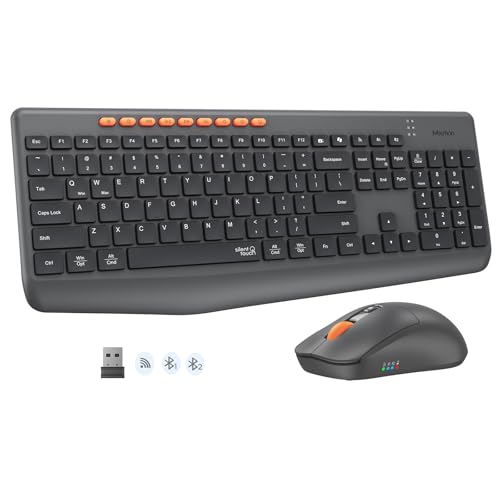
MEETION Wireless Bluetooth Keyboard and Mouse, Silent Full Size Keyboard
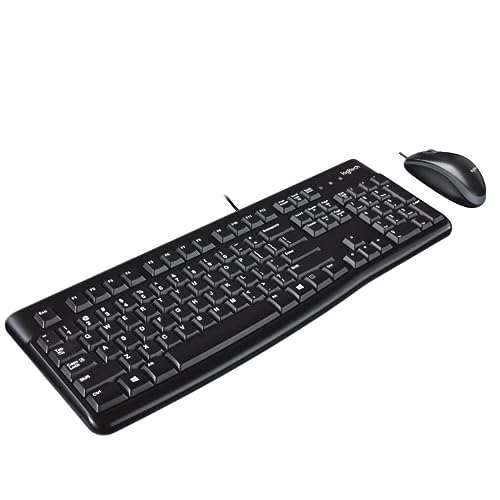
Logitech MK120 Wired Desktop Set Keyboard/Mouse USB Black LOG920002565
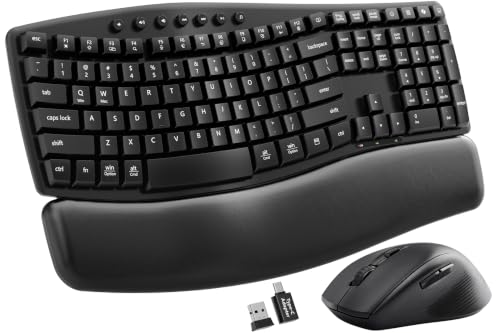
SABLUTE MA41 30dB Quiet Ergonomic Wave Keyboard Combo with Soft Leather Palm Rest

EDJO Wireless Keyboard, USB Plug & Play, Windows & Mac Compatible (Black)

SABLUTE MA31 Purple Ergonomic Wireless Keyboard and Mouse Combo, Full Size Wave

EDJO Wireless Keyboard and Mouse Combo, Quiet Key, Windows & Mac Compatible
SABLUTE MA41 Pink Wireless Keyboard and Mouse Combo, Ergonomic Wave, 30dB Quiet
SABLUTE White Wireless Keyboard and Mouse Combo for MacBook & Windows, 30dB Quiet Wave
Meet The Standout Selections
Competitive gamers who treat every millisecond like a personal insult should weigh the Logitech G502 Hero and G213 combo. It’s a wired pair, which removes battery anxiety during a ranked push, and the G502’s tunable weight system means you can add or remove 3.6 gram increments until the glide feels right.
Where the G213 Prodigy differs from the wireless picks later in this list is its dedicated media keys and spill-resistant construction. For RGB enthusiasts, the LIGHTSYNC setup lets both pieces react to gameplay or audio, which adds a little theater to an otherwise cluttered battlestation.
The Upside
- HERO 25K sensor supports 100 to 25,600 DPI tracking for twitch-precise aim adjustments
- Eleven programmable mouse buttons let me bind macros for MMO rotations or productivity shortcuts
- Five 3.6 gram tuning weights shift the balance for palm or claw grippers
- Tactile keys on the G213 feel deliberate, not mushy, which helps during long typing sessions
- LIGHTSYNC RGB ties the keyboard and mouse into one cohesive lighting scheme
Points To Note
- Wired only, so cable routing on a small desk can get tangled with your mouse pad edge
- The full-size keyboard footprint competes for desk real estate against compact 60 percent boards
- Gaming-grade switches are louder than the silent membranes in picks two and three
Quick Facts
Who It Suits Best
Competitive PC gamers who already know their grip style and want a wired setup that won’t drop frames or signal mid-game.
Where Another Pick Suits Better
Casual users should grab the EDJO Wireless Keyboard and Mouse Combo instead, since it skips the gaming tax for daily productivity.
The first wireless combo I hand to a nervous parent or first-time apartment renter is usually the EDJO Wireless Keyboard and Mouse Combo. It’s a true plug-and-play set: drop the USB receiver into the laptop, both peripherals wake up, and nothing else has to happen. That kind of setup confidence matters when the user would rather not open a settings panel.
Compared to the Logitech MK120 further down, the EDJO adds wireless freedom while trimming the build quality a bit. The full-size layout with palm rest and folding tilt stand helps during long writeups, and the anti-slip pads keep the keyboard planted when typing speed picks up.
Where It Excels
- Single USB receiver pairs both pieces, freeing up a port for a webcam or external drive
- Full-size layout with number pad suits anyone moving from a laptop to a tower
- Integrated palm rest and folding tilt holder reduce wrist angle for long sessions
- Anti-slide pads stop the keyboard from drifting across a slick desk surface
Trade-Offs
- Mouse battery life depends on which cells you buy, and replacements aren’t always obvious to find
- Key feel is a generic membrane, so tactile fans should look at the Logitech G213 instead
- Plastic body flexes under heavy-handed typing, which may bother heavy typists
Made For
First-time wireless shoppers and students who want a no-fuss full-size setup without learning curves or driver installs.
Skip It When
Hybrid Mac and PC users should grab the SABLUTE White Wireless Combo instead, since it adds a dedicated system switch.
Most wireless combos force you into a single connection method. The MEETION Wireless Bluetooth Keyboard and Mouse breaks that pattern with both Bluetooth and 2.4 GHz wireless, which means I can jump between a tablet, a laptop, and a desktop without re-plugging anything. For hybrid workers, that flexibility often outweighs a fancier sensor.
Silent key switches are the headline feature, since the typical clack of a mechanical keyboard wakes up everyone in the next apartment. The full-size layout keeps the numpad intact, which helps anyone entering data in spreadsheets or working in accounting software.
Benefits That Matter
- Dual-mode Bluetooth plus 2.4 GHz wireless covers laptops, tablets, and phones in one set
- Silent key and mouse clicks keep shared workspaces and late-night sessions tolerable
- Multi-device pairing through a single click removes the cable juggling act
- Full-size layout keeps productivity muscle memory intact when switching from a laptop
Small Caveats
- Bluetooth pairing can occasionally drop during crowded wireless environments, depending on your router setup
- The mouse shape is symmetric and modest in size, which may feel small for users with larger hands
Key Product Details
Best Suited To
Multi-device households where one person bounces between a MacBook, a tablet, and a desktop tower across the week.
Look Elsewhere When
Gamers chasing tournament-grade sensors should pick the Logitech G502 Hero and G213 set instead.
Offices that cycle through a thousand keyboards a year tend to keep coming back to the Logitech MK120 wired set. It’s not glamorous, but the spill-resistant build and quiet low-profile keys survive clumsy coffee incidents that would kill a fancier board. The familiar full-size layout includes F-keys and a dedicated number pad.
The wired optical mouse pairs with the keyboard over USB and tracks well enough for spreadsheets, browser tabs, and light design work. Compared to the wireless EDJO combo earlier in this list, the MK120 trades freedom for predictability: no batteries, no pairing menus, no lag complaints.
Everyday Perks
- Low-profile keys feel soft and stay quiet during long typing stretches
- Spill-resistant construction handles the accidental latte better than most bare boards
- Standard full-size layout with full F-key row keeps shortcuts familiar across team rollouts
- Plug-and-play USB means zero configuration for incoming workstations
Honest Caveats
- Cable length on the mouse may feel short for users with deep desks or under-mount keyboard trays
- No backlighting, which makes late-night shifts a finger-memory exercise
Whose Shelf It Belongs On
IT managers and office managers outfitting shared workstations that need to last through years of mixed use.
Consider Something Else When
Remote workers typing eight hours at home will find the SABLUTE MA41 ergonomics and palm rest more comfortable.
My wrists started complaining before my back did, and that is how the SABLUTE MA41 ended up on my desk. The wave-shaped key layout splits the fingers into a more natural arc, and the cushioned palm rest takes pressure off the heel of the hand during marathon writing sessions. The 30 dB quiet switch rating keeps roommate noise complaints at bay.
Compared to the EDJO Wireless set earlier, this SABLUTE adds the dual-system switch for moving between Windows and Mac layouts without memorizing key positions. Two adjustable tilt angles let you nudge the slope until the typing posture feels right for your body.
A Strong Showing
- Wave-shaped key arrangement supports a more relaxed finger spread during long shifts
- Cushioned leather-style palm rest softens pressure on the wrist heel
- 30 dB quiet switches keep typing nearly library-quiet
- Dual-system switch recognizes Windows and Mac layouts on the fly
- Two tilt angles fine-tune the slope for desk-chair height combinations
Areas To Watch
- Wave keys feel unfamiliar for the first week, which slows down fast typists temporarily
- The leather-style palm rest needs an occasional wipe-down to stay presentable
Feature Snapshot
Who Should Grab It
Knowledge workers and writers logging six to ten hours of daily typing who feel the strain by 3 p.m.
Reach For A Different Pick When
Gamers who need RGB and a high-DPI sensor should stick with the Logitech G502 Hero and G213 combo.
The EDJO Wireless Keyboard is the keyboard-only answer for minimalist desks where a separate mouse already lives. It runs over a 2.4 GHz USB dongle that promises a stable connection up to roughly 33 feet, which is more than enough reach for a couch-and-laptop streaming setup. No software install is required.
Compared to the bundled EDJO combo earlier, this keyboard-only version makes sense when someone wants to keep their favorite mouse or upgrade the keyboard later without replacing the whole set. The Windows and Mac compatibility means it tracks a laptop today and a Mac mini tomorrow.
What Stands Out
- Plug-and-play 2.4 GHz wireless skips software installs and pairing menus
- 33 foot range handles living-room laptop use without losing the signal
- Windows and Mac compatibility covers most modern home setups
- Full-size key layout preserves typing habits from a laptop keyboard
Things To Weigh
- Keyboard-only means owning a mouse separately, which can confuse shoppers expecting a full set
- Battery cells aren’t included in some bundles, so check the listing before checkout
Right Fit For
Minimalists and living-room tinkerers who already own a wireless mouse and want a clean keyboard upgrade.
A Better Fit Elsewhere
Shoppers wanting an all-in-one bundle should pick the SABLUTE MA41 combo instead.
Most office gear ships in two finishes: black or slightly different black. The SABLUTE MA31 Purple version breaks that pattern with a lavender body that lifts a drab desk setup. The wave-shaped keys still cradle the fingers like the MA41 reviewed earlier, so this is style plus actual ergonomics, not just a paint job.
The MA31 is a step down in palm rest material from the MA41, which keeps the price gentler. For shoppers who care about color coordination as much as posture, this set makes a bedroom office or shared creative space feel intentional.
Real-World Strengths
- Purple finish adds personality to a workspace without leaning into novelty territory
- Wave-shaped key layout spreads the fingers into a more relaxed arc
- Wireless connection cuts down on desk clutter for a cleaner creative setup
- Full-size layout keeps the number pad available for occasional data work
Less-Strong Areas
- The palm rest is more utilitarian than the cushioned MA41 model
- Purple finish can show dust and fingerprints more than matte black alternatives
Perfect Match For
Style-conscious home office workers who want a cohesive look without sacrificing wave-key ergonomics.
Swap It Out When
Anyone needing a leather-style palm rest should pick the SABLUTE MA41 instead for cushioned support.
Dorm rooms and shared apartments have a way of exposing loud keyboards at midnight. The EDJO Wireless Keyboard and Mouse Combo with quiet keys is built for that reality. Press Fn plus P or O to flip between Windows and Mac layouts, so it adapts when a roommate hands you their laptop for the night.
Compared to the earlier EDJO combo, this version leans harder into low-noise switches and cross-platform layout switching. The slim profile keeps the keyboard light enough to slide into a backpack, which makes sense for hybrid class and work schedules.
Real Benefits
- Quiet key switches keep late-night typing from waking the roommate down the hall
- Quick system toggle via Fn+P or Fn+O handles Windows and Mac layouts without re-mapping
- Wireless design clears the dorm desk of one more cable
- Slim body slips into a backpack pocket for class commutes
Practical Considerations
- Battery cells may need separate purchase depending on the bundle configuration
- Mouse shape is on the smaller side, which can feel cramped for users with larger hands
Built With In Mind
Dorm and apartment residents sharing tight spaces with roommates, partners, or thin walls.
Not Your Match When
Design-focused shoppers should grab the SABLUTE MA31 Purple combo for more personality.
The pink SABLUTE MA41 is essentially the same keyboard and mouse pair I covered earlier, finished in a softer color that suits a brighter studio or content creator’s corner. The wave key shape and 30 dB quiet switches carry over unchanged, which is the part that actually matters for comfort.
The ergonomic angle and the cushioned palm rest are what separate this from a basic wireless combo. For someone spending long hours editing video or writing copy, those features tend to matter more than the finish once the keyboard is in daily use.
Where It Delivers
- Wave-shaped key layout reduces finger strain during multi-hour creative sessions
- Cushioned palm rest softens the wrist heel position
- 30 dB quiet switches keep shared studio spaces calm
- Pink finish brightens a neutral desk without overpowering it
Some Limits To Know
- Pink finish shows smudges faster than darker alternatives, depending on lighting
- Mouse ergonomics are modest, which may matter during extended editing work
Who Will Love This
Creators and writers who want the MA41 ergonomics in a friendlier color that fits a softer room aesthetic.
Another Choice May Suit
Professionals needing a sober finish should pick the original SABLUTE MA41 in black instead.
Hybrid households with a MacBook on the kitchen counter and a Windows tower in the office need one combo that talks to both. The SABLUTE White Wireless Keyboard and Mouse is built for exactly that. The dual-system switch retunes the keys for either layout without rebooting.
The 30 dB quiet switches and wave-shaped keys carry over from the other SABLUTE boards, so the typing comfort story stays consistent. The white finish plays nicely with a silver MacBook and bright home office setups where a black keyboard would feel out of place.
A Few Highlights
- Dual-system switch supports MacBook and Windows machines from one keyboard
- 30 dB quiet switches handle back-to-back video calls without microphone bleed
- Wave-shaped keys keep finger strain low across long writing days
- White finish matches modern home office decor and silver laptops
Possible Compromises
- White surfaces can yellow or stain over years, depending on sun exposure and cleaning habits
- Mouse feels small during all-day use for users with larger hands
Product Snapshot
The Right Fit
Hybrid Mac and PC users who swap between a personal MacBook and a work Windows tower across the week.
Where A Sibling Pick Shines
Anyone wanting the same ergonomics in a darker finish should grab the original SABLUTE MA41 instead.
Picking A Combo That Actually Fits Your Setup
Match The Connection To Your Devices
Wired combos like the Logitech MK120 and the G502 set never worry about batteries or dropped signals, which makes them friendly to permanent desk installations. Wireless 2.4 GHz sets, including most of the EDJO and SABLUTE picks here, run over a single USB dongle and stay stable in most rooms. Bluetooth adds the ability to jump between a tablet and a laptop without re-plugging, which matters for hybrid workers juggling screens. The right choice depends on how often the keyboard moves between machines, not on the speed of the connection itself.
Decide How Loud Is Too Loud
Switch noise shapes a workspace more than most specs suggest. Mechanical and gaming-grade keys, like the G213 Prodigy, give satisfying tactile feedback but register on every Zoom call. Silent scissor or membrane switches keep shared apartments, late-night sessions, and studio recordings calmer. For households with thin walls or sleeping kids, quieter switches tend to matter more than RGB lighting.
Weigh Ergonomics Against Desk Space
Wave-shaped keyboards, like the SABLUTE MA41 family, ask for a few days of relearning before the typing speed returns. The payoff shows up during long sessions, where the wrist rests flatter on the desk. Full-size flat boards, including the Logitech MK120 and the MEETION combo, keep muscle memory intact and slide easily into tight setups. The right call depends on how many hours a day the keyboard actually sees use.
Smart Shopping Notes Across These Picks
Pitfalls Shoppers Hit
The most common mistake is buying a wireless combo and forgetting to budget for fresh batteries, since some bundles ship without cells. Another trap is grabbing a 60 percent board when the previous keyboard had a numpad, then losing months of spreadsheet shortcuts. Match the layout to your workflow before chasing smaller footprints or color choices.
Where The Extra Money Goes
Higher-priced combos in this list usually spend the budget on quieter switches, cushioned palm rests, and dual-system switching. Those upgrades matter most for anyone logging six or more hours a day at the keyboard. Casual users will rarely feel the difference between a budget membrane and a premium quiet switch, which makes the lower tiers a smart fit for light daily use.
Frequently Asked Questions
How Do I Choose Between Wired And Wireless Keyboard And Mouse Combos?
Wired sets stay reliable and never need charging, which suits permanent desks. Wireless sets clean up the cable mess and let one keyboard roam between a laptop, tablet, and phone, which suits hybrid users.
Are Quiet Or Silent Switches Worth The Upgrade?
Quiet switches matter most in shared rooms, open offices, and late-night work setups. For solo use in a private study, the difference shrinks and a standard membrane often feels just as comfortable.
Will These Combos Work With A Mac And A PC?
Most modern combos, including the SABLUTE MA41 family and the EDJO quiet key set, include a system switch for Windows and Mac layouts. The MEETION combo adds Bluetooth pairing for an extra device on top of that.
How Long Do Wireless Combos Typically Run On Batteries?
Battery life depends on the cell type, usage hours, and whether RGB lighting stays on. Heavy daily use tends to drain cells within a few months, while light use can stretch past half a year between swaps.
Do Ergonomic Wave Keyboards Slow Down Typing At First?
The first week can feel slower as fingers adjust to the arc, but most typists return to normal speed within a fortnight. The longer-term payoff is less wrist strain during marathon sessions.
Closing Remarks
A keyboard and mouse combo is one of those purchases that quietly runs in the background for years. Picking the right pair means matching the connection, the noise level, and the layout to how the desk actually gets used. Whether the answer is the gaming focus of the G502 Hero set or the ergonomic calm of a SABLUTE wave board, the right combo makes every workday feel a little smoother.