Finding the right desktop at the $1500 mark means balancing a fast CPU, a real graphics card, enough memory, and storage that won’t feel cramped next year. Some shoppers in this range want AAA gaming, others want a quiet productivity machine, and a growing group just wants a small box that disappears behind a monitor.
I’ve focused this list on systems that make sense for actual day-to-day ownership, from full-size gaming towers built for high frame rates to compact mini PCs that trade raw power for a footprint smaller than a paperback book. Each pick below maps to a specific type of person, so you can match the build to how you’ll really use it.
How The Shortlist Stacks Up
CyberPowerPC Gamer Xtreme VR Gaming PC RTX 4060
CYBERPOWERPC Gamer Master Gaming PC Ryzen 5 5500

GMKtec G3S Mini PC Intel N95

GMKtec M3Pro Mini PC i5-13500H

CyberPowerPC Gamer Xtreme VR Gaming PC RTX 5060

GMKtec G10 Mini PC Ryzen 5 3500U

GMKtec G11 Mini PC Ryzen Embedded R2514
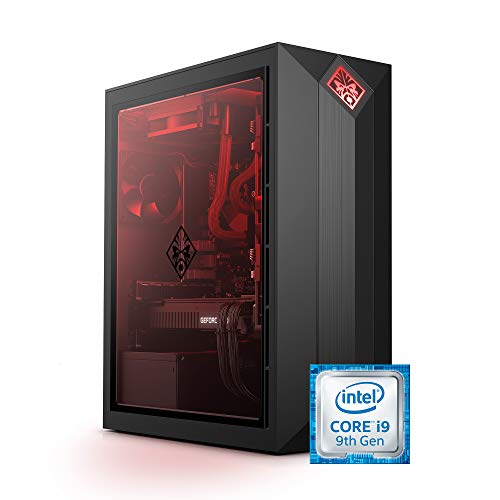
Omen by HP Obelisk i9-9900K RTX 2080 SUPER

CyberPowerPC Gaming PC i5-14400F RTX 5060

GMKtec Mini PC i7-1185G7 16GB 1TB
Inside Each Recommended Option
The CyberPowerPC Gamer Xtreme sits right in the sweet spot for someone who wants a tower that just works on day one. It pairs an Intel Core i5-13400F, which is a 10-core CPU that handles background tasks while you game, with a GeForce RTX 4060 that drives modern games at 1080p and pushes into 1440p without breaking a sweat. You also get 16GB of DDR5 memory, the kind that lets you keep Discord, a browser, and a game open at the same time without the system choking.
Storage comes from a 1TB PCIe Gen4 SSD, which means Windows boots in seconds and large game installs load noticeably faster than older SATA drives. The tower ships with Windows 11 Home and built-in WiFi, so setup is mostly a matter of plugging in a monitor and signing in. For shoppers who want a turnkey gaming PC around the $1500 mark, this build covers the bases without obvious weak links.
Useful Highlights
- 10-core Intel i5-13400F keeps streaming, chat apps, and gameplay running together smoothly.
- RTX 4060 8GB delivers dependable 1080p frame rates and solid 1440p entry-level performance.
- DDR5 memory gives you headroom for productivity tasks and creative workloads.
- 1TB PCIe Gen4 SSD loads games faster than the SATA drives still common in budget towers.
- Windows 11 Home and WiFi come preinstalled, so there’s no extra setup cost.
Things To Consider
- Mid-tower cases run warm under sustained load, so placing it with breathing room on the desk helps.
- Owners commonly report that the stock fans are adequate but loud during long sessions.
Feature Snapshot
Who It Suits Best
Mainstream PC gamers who want a balanced tower for 1080p and 1440p gaming without picking parts themselves.
Skip It When
The GMKtec G3S Mini PC is a better fit if you only stream and browse and need a quiet box that fits on a bookshelf.
The Gamer Master is the route to take when the budget leans lower and esports titles are the priority. It uses an AMD Ryzen 5 5500, a 6-core, 12-thread chip that multitasks well for the price, paired with a Radeon RX 6400 that comfortably runs competitive games like Valorant, CS2, and League at high refresh rates. Where the Gamer Xtreme above aims higher, this build keeps the lid on cost.
You get 16GB of DDR4 memory and a 500GB PCIe Gen4 SSD, which is enough to hold Windows plus a few games at a time. WiFi comes built in and Windows 11 Home is preinstalled, so the experience feels familiar from the moment it powers on. It’s the kind of starter rig that lets you save the difference toward a future GPU upgrade instead of locking it into the case today.
What It Does Well
- Ryzen 5 5500 handles esports and everyday multitasking comfortably for the money.
- 16GB DDR4 keeps the system responsive when you keep multiple browser tabs and chat apps running.
- 500GB PCIe Gen4 SSD trims boot times compared to older mechanical drives.
- Compact mid-tower form factor fits on a standard desk without crowding the workspace.
Worth Noting
- RX 6400 4GB is not built for ray-traced AAA games; expectations should stay at 1080p esports.
- 500GB of storage fills up quickly with modern titles, so adding a drive is a likely first upgrade.
- DDR4 memory is slower than DDR5 picks elsewhere on this list, which shows in heavy content workflows.
Right Fit For
Competitive gamers on a tight budget who mostly play 1080p esports and want room to upgrade later.
Consider Something Else When
The CyberPowerPC Gamer Xtreme VR Gaming PC with the RTX 4060 is the smarter pick for AAA titles and longer-term graphics headroom.
The G3S is for the person who would rather forget a desktop exists. It runs an Intel N95 chip, which is a small, low-power processor designed for office and streaming tasks, and pairs it with 8GB of DDR4 memory and a 256GB SSD. None of those numbers impress on paper, but in a kitchen, a dorm, or a small studio, they feel like exactly enough. The chassis is genuinely tiny, closer to a TV box than a PC.
Dual HDMI outputs mean you can drive two 4K monitors at once, which is rare at this size. WiFi 5 and Bluetooth 5.0 handle wireless peripherals and streaming without adapters. Where the Gamer Xtreme above wants a permanent home under a desk, this one hides behind the monitor and stays out of the way.
What Works In Its Favor
- Intel N95 with burst speeds up to 3.4GHz handles documents, streaming, and light multitasking without fan noise ramping up.
- Dual HDMI outputs let you run a dual-monitor setup from a box the size of a paperback.
- WiFi 5 and Bluetooth 5.0 keep wireless keyboards, mice, and speakers cable-free.
- Low power draw keeps it cheap to leave on as a media or download box.
Trade Offs
- 256GB of storage fills up fast with apps, photos, and offline video, so a microSD or external drive is likely needed.
- The N95 chip is not meant for gaming or video editing, so heavier workloads will feel sluggish.
- 8GB of RAM limits how many browser tabs and apps you can keep open at once.
Made For
Anyone who wants a quiet, hidden desktop for email, browsing, streaming, and dual-monitor productivity.
Look Elsewhere When
The GMKtec M3Pro Mini PC fits better if you need more CPU threads for photo editing or running virtual machines.
The M3Pro is what happens when a mini PC stops acting like a compromise. It uses an Intel Core i5-13500H with 12 cores and 16 threads, which is real mobile workstation silicon, not a cut-down chip. That extra thread count is what makes a difference when you have Premiere open in one window, a browser in another, and a meeting running in the background.
The 16GB of DDR4 and 512GB NVMe SSD land in the practical zone for creators and streamers who don’t want to add storage right away. The Iris Xe integrated graphics won’t replace a discrete GPU, but they’re a clear step up from the smaller N95 in the G3S above. For someone who travels between a home office and a studio, this is a strong compact pick.
The Case For It
- 12-core, 16-thread i5-13500H chews through multitasking and light creative work.
- 16GB of RAM out of the box keeps dozens of browser tabs and apps responsive.
- 512GB NVMe SSD gives a usable starting point without a forced upgrade on day one.
- Compact chassis makes it easy to tuck behind a monitor or pack into a laptop bag.
Points To Note
- Integrated Iris Xe graphics mean AAA gaming is off the table without an external GPU.
- Mini PC thermals run warm under sustained all-core loads, so airflow around the chassis matters.
- DDR4 is a generation behind the DDR5 found in the CyberPowerPC Gamer Xtreme above.
Who Will Love This
Mobile creators and streamers who need real CPU horsepower in a chassis smaller than a hardcover book.
A Better Fit Elsewhere
The CyberPowerPC Gamer Xtreme VR Gaming PC with the RTX 4060 is the better pick if you want actual gaming frame rates in addition to productivity speed.
Where the Gamer Xtreme at pick 1 leans on the RTX 4060, this version swaps in the newer RTX 5060. That’s the meaningful upgrade for anyone planning to keep the system for several years. The CPU stays at the same 10-core Intel i5-13400F, which keeps productivity strong, but the GPU bump translates to noticeably better ray tracing and higher frame rates at 1440p on demanding games.
Memory is still 16GB of DDR5 and storage remains a 1TB PCIe 4.0 SSD, so the rest of the package feels familiar. WiFi and Windows 11 Home come standard. For shoppers willing to spend a touch more for a graphics card that won’t feel outdated in two years, this build is the most forward-looking tower in the lineup.
Benefits That Matter
- RTX 5060 8GB handles 1440p gaming with newer features and better ray-tracing performance than the RTX 4060.
- Same proven 10-core i5-13400F keeps frame pacing smooth in CPU-bound titles.
- DDR5 memory future-proofs the build against slower RAM becoming a bottleneck.
- 1TB PCIe 4.0 SSD leaves room for several large modern game installs.
Some Limits To Know
- Costs more than the RTX 4060 version above without changing the CPU or memory configuration.
- Mid-tower thermals still demand decent airflow in the room during long sessions.
Best Suited To
Gamers who plan to play the latest titles at 1440p and want a GPU that holds up through several release cycles.
Swap It Out When
The CYBERPOWERPC Gamer Master Gaming PC is the smarter call for tight budgets that don’t need AAA frame rates.
The G10 is built for the kind of desk where you want a trading-style triple-screen setup without the tower dominating the room. It uses an AMD Ryzen 5 3500U, a 4-core, 8-thread chip that runs cool and stays quiet. What sets it apart from other mini PCs on this list is the triple 4K display support, which is genuinely useful for finance, coding, or any workflow that lives across multiple windows.
You get 16GB of DDR4, a generous 1TB SSD, and 2.5G networking through a USB-C port, which is the kind of detail network-focused users notice. HDMI 2.1 support keeps the high-refresh displays happy. Compared to the G3S above, this is the version for someone whose desk setup is the system.
The Upside
- Ryzen 5 3500U balances everyday productivity with low heat and quiet operation.
- Triple 4K display support covers trading, coding, and content review workflows.
- 1TB SSD removes the usual first-week storage upgrade for most home offices.
- 2.5G LAN through USB-C supports fast network backups and NAS transfers.
Honest Caveats
- Integrated Radeon graphics cap gaming at older or casual titles, not modern AAA releases.
- Ryzen 5 3500U trails the i5-13500H in the M3Pro above for raw multi-threaded speed.
- Cooling is minimal under sustained loads, so the case should sit in open air, not enclosed shelving.
Quick Facts
Whose Shelf It Belongs On
Multi-monitor home office workers who value quiet operation and screen real estate over raw CPU power.
Reach For A Different Pick When
The GMKtec G3S Mini PC suits a simpler single or dual-screen setup without the triple-display requirement.
The G11 is the box to buy when the computer needs to stay on for weeks at a stretch. It uses an AMD Ryzen Embedded R2514, which is a chip from the embedded product line, the same family used in kiosks, digital signs, and industrial controllers. That lineage matters because embedded silicon is engineered for 24/7 operation under steady thermal loads.
The integrated Radeon graphics step up over the typical N-series mini PC chips, which makes the G11 a stronger fit for digital signage or light media work than a basic office NUC. Where the G3S above is a dorm-room PC, this one is meant to live behind a checkout counter.
Everyday Wins
- Embedded-class Ryzen R2514 is rated for continuous 24/7 operation.
- Radeon integrated graphics outpace the N95 in the G3S for signage and light 3D work.
- Compact chassis mounts cleanly behind displays using standard VESA patterns.
- Lower power draw than a full gaming tower keeps electrical costs minimal in always-on setups.
Possible Compromises
- Not designed as a gaming machine, so frame rates on modern titles are not competitive.
- Embedded chips sometimes lag behind consumer CPUs in driver updates for new software.
- Limited upgrade path inside the case compared to the larger Gamer Xtreme towers above.
Perfect Match For
Small business owners and signage operators who need a quiet box that runs reliably around the clock.
Where Another Pick Suits Better
The GMKtec M3Pro Mini PC fits better if the workload is creative software rather than always-on display duty.
The Omen Obelisk is an older flagship, and that matters here. It ships with a 9th-generation Intel Core i9-9900K, which was a top-tier gaming CPU at launch and still holds up for many titles. The GeForce RTX 2080 SUPER graphics card brings real-time ray tracing, which was the headline feature when this system was new, and 32GB of HyperX RAM makes it hard to run out of memory for everyday tasks.
A 1TB SSD rounds out the storage, and VR readiness means the original design supported headsets of its era. Where the CyberPowerPC Gamer Xtreme above is a fresh 2024 build, this Omen is a chance to grab last-generation flagship silicon. Enthusiasts who know what they’re shopping for will find value here, though anyone chasing the newest drivers and features should look elsewhere on this list.
The Practical Payoff
- i9-9900K with 8 cores and high boost clocks handles CPU-heavy games and productivity well.
- RTX 2080 SUPER 8GB still supports ray tracing in many current titles.
- 32GB of RAM is generous and skips the typical 16GB starting point of newer builds.
- 1TB SSD keeps load times competitive with newer systems.
Factors To Consider
- The CPU and GPU are a generation behind the new RTX 5060 build at pick 5, so future driver support is shorter.
- Older platforms may need a BIOS update before some newer SSDs or memory kits behave correctly.
- HP’s case design is functional but bulkier than modern mid-towers, so plan for desk space.
Feature Card
Who Should Grab It
Enthusiasts comfortable with older flagship hardware who want a strong CPU and a lot of RAM in a recognizable brand.
Skip It When
The CyberPowerPC Gaming PC with the RTX 5060 at pick 9 is the better match if driver longevity and modern features matter more than raw core count.
This CyberPowerPC build shifts the CPU up a notch to the 14th-generation Intel Core i5-14400F, while pairing it with the same RTX 5060 graphics card found in pick 5. The result is a more balanced 2024-era platform where the CPU has more cores for streaming, chat, and background tasks, leaving the GPU free to push frames.
16GB of DDR5 and a 1TB PCIe 4.0 SSD match the rest of the Gamer Xtreme family, so the experience inside games feels consistent. WiFi and Windows 11 Home are standard. Versus the i5-13400F build at pick 5, the 14400F gives you more breathing room in productivity, which matters if you multitask while gaming.
Key Advantages
- 14th-gen i5-14400F offers extra cores for streaming and multitasking during gameplay.
- RTX 5060 8GB is the modern graphics tier for 1440p with ray tracing.
- DDR5 memory and PCIe 4.0 SSD storage keep the platform current.
- Preinstalled Windows 11 Home gets you gaming the day the box arrives.
Worth Bearing In Mind
- Costs more than the 13400F version above for a CPU bump that casual gamers may not notice.
- Mid-tower cooling remains adequate but not silent under heavy loads.
Built With In Mind
Gamers who stream or record while playing and want headroom for the CPU side of the build.
Not Your Match When
The GMKtec G11 Mini PC fits better if the box needs to run quietly for hours, not game at high refresh rates.
The last pick closes the list with the GMKtec Mini PC built around an 11th-generation Intel Core i7-1185G7, a 4-core, 8-thread chip that still pulls real productivity weight. The 16GB of DDR4 and 1TB SSD give you a complete package out of the box, and the Intel i226V 2.5G Ethernet port is the detail that home lab enthusiasts notice first.
USB4 support means fast external storage and, in some cases, support for an external GPU enclosure. WiFi 6 and Bluetooth 5.2 round out a modern wireless stack. Compared to the N95-based G3S at pick 3, this i7 system sits in a different tier of performance while keeping the same compact footprint.
Well-Handled Touches
- i7-1185G7 brings meaningful CPU speed for code, photo editing, and dev work.
- 2.5G Ethernet port supports fast NAS transfers and modern home network speeds.
- USB4 port opens the door to high-speed external drives and eGPU setups.
- WiFi 6 and Bluetooth 5.2 keep wireless peripherals current.
- 1TB SSD ships with comfortable storage headroom for most home users.
Things To Weigh Up
- Integrated Iris Xe graphics cap serious gaming performance without an external GPU.
- 11th-gen Intel chips are a few generations behind the i5-13500H in the M3Pro above.
- Compact case means internal expansion is limited compared to full towers.
The Right Fit
Home lab enthusiasts and developers who want modern networking and USB4 in a small, quiet box.
Another Choice May Suit
The GMKtec G10 Mini PC is a better pick if triple 4K display support matters more than CPU clock speed.
Choosing a Desktop Around the $1500 Mark
A $1500 desktop is where the price stops being an apology and starts becoming a real tool. The biggest decision is GPU versus CPU, because spending most of the budget on one leaves the other underpowered. Match the use case to the bottleneck: gamers should weight the graphics card more heavily, while creators and streamers benefit more from extra cores and RAM.
Form factor matters more than people expect. A mid-tower runs cooler and accepts longer graphics cards, but it dominates the desk. Mini PCs like the GMKtec G3S or G10 trade raw gaming headroom for a footprint that disappears behind a monitor, which fits dorms, kitchens, and home offices where space is tight. For always-on roles like digital signage or a home server, embedded-class chips like the R2514 in the G11 are built to run 24/7.
Storage type quietly decides the daily experience. PCIe NVMe SSDs load Windows and games noticeably faster than older SATA drives, and 1TB is the practical floor for a primary drive today. For shoppers who keep large media libraries, a secondary hard drive is still the cheapest way to add capacity. RAM at 16GB is the new baseline; dropping below that shows up first in heavy browser use.
Connectivity gets overlooked until the day you need it. A 2.5G Ethernet port, WiFi 6, USB4, and Bluetooth 5.2 are real quality-of-life upgrades that don’t show up in synthetic benchmarks but make daily ownership smoother. If the desk has multiple monitors, count the display outputs before falling in love with a build.
Finally, think about lifespan. A 14th-generation Intel CPU or a Ryzen 5000 series will keep receiving driver and OS support longer than older hardware like the i9-9900K in the Omen Obelisk. Last-generation flagships still perform, but the upgrade runway is shorter, so factor that into the decision rather than only the spec sheet.
Key Considerations Across These Picks
Pitfalls Shoppers Hit
One of the easiest mistakes is chasing the largest GPU number without checking whether the rest of the system can keep up. A strong graphics card paired with an old CPU and only 8GB of RAM bottlenecks the entire build, so the money spent on the GPU is wasted.
Another common slip is underestimating storage. A 256GB or 500GB SSD fills up fast once a handful of modern games are installed, and a full primary drive slows down Windows updates. Plan for at least 1TB or budget for an internal or external drive on day one.
Where Shoppers Go Wrong
Buyers also tend to ignore physical constraints. A full-size mid-tower like the CyberPowerPC Gamer Xtreme may not fit beside a small desk, while a tiny mini PC can choke on heat if it’s stuffed into a closed cabinet. Measure the space and check airflow before committing.
The last trap is forgetting the operating system. The CyberPowerPC towers ship with Windows 11 Home, but older listings like the Omen Obelisk may show Windows 10, which has reached end of mainstream support. Confirm the OS before purchase, since upgrading adds cost.
Frequently Asked Questions
Is a $1500 PC enough for modern gaming?
A $1500 desktop handles most AAA games at 1080p and many at 1440p. Pairing a current-generation GPU like the RTX 5060 with 16GB of DDR5 memory gives comfortable frame rates for the next few years without major upgrades.
Should I buy a mini PC or a full tower?
Mini PCs like the GMKtec G3S or G10 win on footprint, quiet operation, and placement flexibility. Full towers like the CyberPowerPC Gamer Xtreme win on cooling, graphics card headroom, and easier future upgrades. The choice depends on space and whether gaming matters more than minimalism.
How much RAM do I actually need?
16GB is the practical baseline for gaming and general productivity in 2026. Heavy multitasking, video editing, or running virtual machines benefits from 32GB, which is why older flagships like the Omen Obelisk still feel comfortable for power users.
Do I need a discrete graphics card for office work?
Most office and productivity tasks run fine on integrated graphics, which is why mini PCs like the GMKtec G3S work so well for that role. A discrete GPU is worth it only for gaming, video editing, 3D work, or AI workloads.
How long will a $1500 PC stay relevant?
With a current-generation CPU and GPU, expect three to four years of comfortable use before feeling slow. Last-generation flagships like the i9-9900K in the Omen can stretch further if workloads stay light, but driver and OS support will fade sooner.
Closing Remarks
The right $1500 desktop is the one that matches what you actually do each day. A CyberPowerPC Gamer Xtreme tower covers gamers who want plug-and-play frame rates, while a GMKtec mini PC serves shoppers who care more about a quiet footprint than GPU benchmarks. Pick the build that fits the desk, the games, and the software you run, and the system will stay out of your way for years.