Editing video is a different beast than browsing or office work, and the PC under your desk needs to keep up. I put together this list of nine capable machines, from palm-sized mini PCs to full-sized editing towers, so anyone cutting footage in 2026 can match their workload and workspace. Whether you trim short social clips or color-grade 4K timelines, one of these belongs on your desk.
The Lineup, Simplified
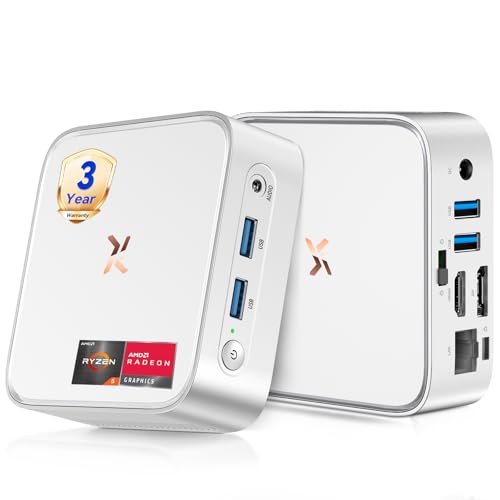
Huidun 2026 H80 Mini PC Ryzen 5 3500U 16GB 512GB

GEEKOM IT12 Mini PC i3-12300HE 16GB 256GB

Getorli Ryzen 5 3501U Mini PC 8GB 256GB
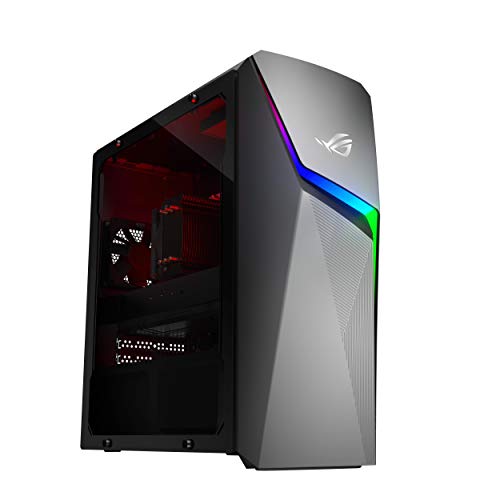
ASUS ROG Strix GL10DH Ryzen 7 3700X GTX 1660 Ti

Lenovo Legion Tower 5i Ultra 7 265F RTX 5070 Ti
KAMRUI Pinova P2 Mini PC Ryzen 7330U 16GB 256GB

Dell Tower Ultra 7 265F RTX 5060 64GB 2TB

HP 2026 Desktop i5-12500 16GB 1TB

GEEKOM A6 Mini PC Ryzen 7 6800H 16GB DDR5 1TB
Inside Each Recommended Option
The Huidun H80 mini PC is small enough to vanish behind a monitor, yet it carries an AMD Ryzen 5 3500U processor (a chip with 4 cores and 8 threads, meaning it can handle two streams of work per core) that clocks up to 3.7 GHz. Radeon Vega 8 graphics live on the same chip and handle 4K output at 60Hz through HDMI and DisplayPort, so a clean dual-screen editing bay fits on a small desk.
With 16GB of RAM and a 512GB SSD, this little box keeps timelines responsive for 1080p cuts in Premiere or DaVinci Resolve. The silver chassis stays quiet during lighter workloads, which matters when you sit close to it for hours. Wi-Fi and Bluetooth cover wireless peripherals, and the USB 3.2 port moves footage off a card reader quickly.
A Few Highlights
- 4K@60Hz output through HDMI plus DisplayPort gives you a sharp preview monitor alongside a primary screen.
- The 16GB RAM configuration handles 1080p timelines without choking on layered effects.
- Compact silver chassis tucks behind a monitor, freeing desk space for a tablet, coffee, or notes.
- Bluetooth support means a wireless editing keyboard or shuttle controller pairs without dongles.
- Up to 3.7 GHz boost speed shortens export times for short-form social clips.
Things To Consider
- Integrated Radeon graphics cap you at lighter effects; heavy color grading in 4K will push the chip hard.
- Mini PCs run warm under sustained load, so plan for open airflow around the chassis.
Made For
YouTubers, vloggers, and side-hustle creators cutting 1080p or light 4K footage who want a quiet desktop that fits a tight workspace.
Consider Something Else When
Pros handling long 4K timelines with heavy effects will want the Lenovo Legion Tower 5i and its dedicated RTX 5070 Ti graphics.
The GEEKOM IT12 runs on Intel’s i3-12300HE, a 12-thread chip that holds its own against common i5 mobile processors in everyday benchmarks. 48 Execution Units of Intel UHD graphics (the small processor cores that handle video and image work) feed those threads through AV1 decoding, which is a modern video format that shrinks file sizes without quality loss.
With 16GB of RAM and a 256GB NVMe SSD, this machine starts in seconds and stays snappy through typical editing sessions. Compared to the Huidun H80 above, it trades raw clock speed for better thread management, which helps when running a browser, chat app, and timeline at once. It is a natural pick for creators who edit more than they game.
What Pays Off
- AV1 hardware decoding helps modern codecs play back smoothly in editing software.
- The 12-thread CPU multitasks well across editing, uploads, and browser tabs.
- Compact GEEKOM build quality keeps noise low for home office setups.
Worth Noting
- The 256GB SSD fills up fast with 4K source files, so an external drive is almost required.
- Integrated graphics keep effects work modest; plan around that ceiling.
Feature Snapshot
Right Fit For
Students, hobbyist editors, and remote workers who want a quiet, small-footprint machine for daily editing and office tasks.
Skip It When
Heavy colorists and motion designers should reach for the GEEKOM A6 Mini PC and its Ryzen 7 6800H processor instead.
The Getorli mini PC runs on an AMD Ryzen 5 3501U with 4 cores and 8 threads, a similar chip family to the Huidun H80 above but tuned for efficiency. Wi-Fi 6 and Bluetooth 5.3 are baked in, so wireless transfers from a phone or camera stay quick, and 8GB of DDR4 RAM keeps basic projects moving.
This is the pick for someone just starting out, a creator who edits a few videos a month for fun, or a student building a first portfolio. The 256GB PCIe 3.0 NVMe SSD (a storage drive that reads and writes data faster than older SATA drives) loads project files faster than a spinning hard disk ever could. Memory is expandable, so the box can grow with you as your skills sharpen.
Well-Handled Touches
- Wi-Fi 6 supports fast wireless transfers from modern cameras and phones.
- The expandable memory path means the box can stretch as projects get larger.
- Bluetooth 5.3 keeps wireless mice, keyboards, and audio gear stable.
Honest Caveats
- 8GB of RAM limits how many timeline layers and browser tabs can run at once.
- 256GB of storage fills quickly when archiving raw footage, so external drives help.
- Integrated graphics keep the ceiling low for advanced effects or 4K timelines.
Best Suited To
New editors learning the craft, casual creators, and students cutting short 1080p projects for class or personal channels.
Not Your Match When
Working creators handling daily 4K footage should look at the HP 2026 Desktop with its 1TB SSD for storage headroom.
The ROG Strix GL10DH sits in a different league from the mini PCs above, a mid-tower with room for cooling and expansion. An AMD Ryzen 7 3700X brings 8 cores to the table, paired with a GeForce GTX 1660 Ti (a dedicated graphics card that handles video rendering faster than integrated chips). 16GB of DDR4 RAM and a 512GB SSD round out a balanced creator build.
For editors stepping up from a laptop or a small desktop, the Strix delivers headroom for 1080p and light 4K work in Premiere, Resolve, or Vegas. Wi-Fi 5 covers wireless connections, and the larger chassis makes future upgrades painless. It feels like a confident step up for a creator whose channel is finally taking off.
The Case For It
- 8-core Ryzen 7 processor chews through export queues faster than 4-core alternatives.
- Dedicated GTX 1660 Ti graphics accelerate timeline scrubbing and effects rendering.
- Mid-tower design leaves physical room for storage and memory upgrades later.
Trade Offs
- The GTX 1660 Ti lacks the AI acceleration (smart rendering features that speed up exports) found in newer RTX cards.
- Wi-Fi 5 is dated compared to Wi-Fi 6 on competing systems.
- 512GB of storage runs short for long-form raw archives.
Spec Overview
Who It Suits Best
Growing creators, freelance editors, and gamers who also cut video and want a balanced mid-range tower.
Look Elsewhere When
Pro studios chasing AI-accelerated exports and ray tracing (realistic lighting simulation in modern graphics) should move up to the Lenovo Legion Tower 5i.
The Legion Tower 5i is the heavyweight on this list, built for editors who refuse to wait on their machines. An Intel Core Ultra 7 265F processor pairs with an NVIDIA GeForce RTX 5070 Ti, a graphics card that handles ray tracing (lighting and reflections that mimic real-world physics) and DLSS, an AI feature that renders frames at lower resolution and upscales them, speeding up exports without losing sharpness. 1TB of storage holds a serious raw archive.
Legion Coldfront cooling keeps the system quiet and stable during marathon rendering sessions, and the 32GB of memory leaves room for 4K timelines with stacked effects. This tower is meant for a creator’s studio, not a dorm desk. Compared to the ASUS Strix above, it doubles down on AI acceleration and thermal design.
Reasons It Performs
- RTX 5070 Ti graphics bring AI-powered DLSS rendering to video exports and previews.
- Coldfront cooling manages thermals during long batch renders.
- 1TB storage handles active project libraries without constant offloading.
- 32GB memory tackles heavy 4K timelines with multiple effects layers.
Practical Considerations
- A full tower takes dedicated floor or desk space that mini PCs never demand.
- Power draw is high compared to mini PCs, so surge protection is worth considering.
Made For
Pro studios, full-time content creators, and colorists handling 4K+ timelines with stacked effects and color grades.
A Better Fit Elsewhere
Creators in tight apartments who want flagship power should consider the Dell Tower with its RTX 5060 in a similar chassis.
The KAMRUI Pinova P2 stands out for one feature the other mini PCs cannot match: triple 4K display support. The AMD Ryzen 7330U inside uses Zen 3 architecture on a 7nm process (a chip manufacturing process where smaller numbers mean better efficiency), with 4 cores, 8 threads, and 8MB of L3 cache, a small pool of fast memory on the processor itself that helps it retrieve data quickly.
Sixteen gigabytes of RAM keeps multiple apps open, which suits streamers who monitor chat, OBS, and a timeline at the same time. Boost speeds up to 4.3GHz help when scrubbing through footage or pushing an export. It is a flexible mini PC for someone who wants serious screen real estate without a full tower.
What It Does Well
- Triple 4K display support is rare at this size and perfect for editing bays.
- 8MB of L3 cache keeps repeated effects work snappy in software like Resolve.
- Zen 3 efficiency means lower heat output during long sessions.
Room For Improvement
- 256GB of internal storage fills up quickly when juggling multiple client projects.
- Integrated graphics still cap heavy effects work, so dedicated GPUs in the ASUS Strix handle bigger lifts.
Who Will Love This
Streamers, multitasking editors, and remote professionals who want three screens on a small desk without buying a tower.
Reach For A Different Pick When
Editors pushing serious color grading should pivot to the GEEKOM A6 Mini PC for its higher-tier Ryzen 7 6800H chip.
The Dell Tower is built like a storage-first workstation, with 2TB of SSD space and 64GB of memory ready to hold massive raw archives. The Intel Ultra 7 265F ships with a dedicated NPU (neural processing unit), a chip built specifically to handle AI tasks like smart rendering and scene detection. An RTX 5060 graphics card with 8GB of GDDR7 memory (the latest generation of fast graphics memory) accelerates modern workloads.
Compared to the Lenovo Legion Tower 5i above, this Dell leans toward memory and storage density rather than top-end GPU horsepower. For documentary editors, archivists, and creators managing years of footage, the storage headroom is the real story. You spend less time shuffling files and more time cutting.
Positive Takeaways
- 64GB of RAM opens room for massive timelines and multi-cam editing.
- 2TB SSD holds years of active project libraries without external drives.
- Dedicated NPU offloads AI tasks like transcription and auto-color from the main CPU.
Where It May Fall Short
- The RTX 5060 trails the RTX 5070 Ti in pure graphics horsepower for rendering.
- Tower size and weight reduce flexibility for creators who move their setup often.
Best Suited To
Documentary editors, agency studios, and archivists managing long-form projects with deep raw footage libraries.
Another Choice May Suit
Solo creators chasing maximum export speed should weigh the Lenovo Legion Tower 5i and its RTX 5070 Ti graphics.
The HP 2026 Desktop is the dependable choice on this list, built around an Intel i5-12500 with 6 cores and turbo speeds reaching 4.6GHz. Sixteen gigabytes of RAM and a 1TB SSD cover most creator workloads without forcing external drives. It is a tower designed to sit quietly in a small office or home studio and just work.
This is the desktop for someone who edits part of the week and handles emails, spreadsheets, or CRM tools the rest of it. Compared to the ASUS Strix, the HP leans more toward balanced productivity than raw graphics. Owners commonly report straightforward setup and clean HP build quality, which matters when a machine doubles as an office workhorse.
The Practical Payoff
- 1TB SSD provides generous room for active project files and archives.
- 4.6GHz turbo helps single-threaded software stay responsive during scrubbing.
- HP’s mainstream tower design is serviceable and quiet for office environments.
Points To Note
- No dedicated GPU listed, so effects-heavy timelines rely on integrated silicon.
- The 12th-gen i5 trails newer Ultra and Ryzen 7 chips in raw benchmarks.
Perfect Match For
Small business owners, hybrid workers, and creators who edit alongside office work and want one reliable machine.
Swap It Out When
Pro creators needing dedicated graphics should step up to the ASUS ROG Strix GL10DH with its GTX 1660 Ti.
The GEEKOM A6 is the most capable mini PC in this roundup, built around an AMD Ryzen 7 6800H that holds a steady 45W TDP, the wattage a chip draws under load, meaning it does not slow down when pushed. Most competing mini PCs use 15W U-series chips that throttle (automatically slow down to avoid overheating) during long sessions. The A6 keeps its clock speed steady.
With 16GB of DDR5 RAM (the newest, fastest generation of system memory) and a 1TB PCIe 4.0 SSD (an even faster storage standard than PCIe 3.0), the machine loads projects in seconds and keeps multi-track timelines smooth. For creators running a small home server or always-on workstation, that thermal stability is the headline feature. Compared to the KAMRUI Pinova P2 above, the A6 trades display count for raw CPU throughput.
Standout Benefits
- 45W sustained power means no thermal throttling during marathon renders.
- DDR5 memory offers higher bandwidth for modern editing workloads.
- 1TB PCIe 4.0 SSD reads and writes project files noticeably faster than PCIe 3.0 drives.
- Compact GEEKOM chassis suits a permanent workstation setup.
Things To Weigh
- No dedicated GPU means heavy GPU-accelerated effects rely on integrated Radeon graphics.
- The 45W draw produces more heat than 15W mini PCs, so airflow around the chassis matters.
Built With In Mind
Power users, always-on workstations, and creators who edit daily and need sustained CPU performance in a small box.
Where A Sibling Pick Shines
Editors chasing dedicated GPU acceleration will be happier with the ASUS ROG Strix GL10DH and its GTX 1660 Ti card.
What To Know Before Picking An Editing PC
Video editing eats CPU cycles and RAM more than most tasks, so a balanced chip and generous memory matter more than flashy branding. A six-core processor is a comfortable starting point, while multi-cam or 4K work pushes you toward eight cores or higher. RAM is the most underrated spec; 16GB is the floor for 1080p editing, and 32GB is worth it once timelines get busy.
Storage planning is the second pillar. SSDs (solid-state drives, which have no moving parts and load data quickly) should hold active project files, while large raw archives belong on secondary drives. A PC with only 256GB internal storage still works, but external or NAS (network-attached storage) backups become mandatory. Look for NVMe SSDs (faster drives that plug directly into the motherboard) when export times matter.
Display output shapes your workspace. A single 4K monitor works for most editors, but timelines with multiple bins, scopes, and previews thrive on dual or triple displays. Mini PCs like the KAMRUI Pinova P2 support three screens, which removes the need for a larger tower. If color accuracy matters, plan for a calibrated external monitor regardless of which PC you pick.
Graphics cards deserve honest scrutiny. Integrated graphics handle 1080p cuts, but GPU acceleration (offloading work to the dedicated graphics card for faster playback and exports) in Premiere, Resolve, and Vegas transforms 4K editing. The jump from integrated to a dedicated RTX or GTX card is felt most during export and effects rendering, less during basic cuts.
Key Considerations Across These Picks
Pitfalls Shoppers Hit
Skipping RAM and chasing cores alone is the most common trap. Eight cores mean little if the system chokes on layered timelines because the OS and browser have eaten half the memory. Aim for 16GB minimum, and bump to 32GB once 4K enters the picture. Underestimating storage is the close second; raw footage balloons quickly, and a 256GB SSD can fill in a week of shooting.
Where The Extra Money Goes
The leap from integrated graphics to a dedicated GPU delivers the most noticeable day-to-day speedup for editors. AI features like DLSS, real-time ray tracing, and dedicated NPUs cost more because they handle specialized tasks much more efficiently than general-purpose CPUs. Spending up makes sense when export queues eat hours of every week, not for casual hobbyists cutting clips once a month.
Frequently Asked Questions
How much RAM do I really need for video editing?
16GB handles 1080p timelines with light effects, but 32GB is the comfortable sweet spot for 4K work and multi-cam projects.
Do I need a dedicated graphics card for editing?
Integrated graphics work for basic 1080p cuts, but a dedicated GPU dramatically speeds up rendering, scrubbing, and effects-heavy timelines.
Are mini PCs good enough for serious editing?
Modern mini PCs with Ryzen 7 or Core Ultra chips handle 1080p and light 4K editing well, especially when paired with 16GB or more RAM and fast NVMe storage.
What is the best storage setup for editors?
Use an NVMe SSD for active projects, then move raw footage and archives to a secondary drive or external storage to keep timelines fast.
How important is the processor generation?
Newer generations bring efficiency and AI features, but core count and clock speed still drive most editing performance, so prioritize those first.
The Takeaway
The right PC for editing depends on your footage, your workspace, and how often you cut. Mini PCs like the Huidun H80 and GEEKOM A6 prove you do not need a tower to edit seriously, while full desktops like the Lenovo Legion Tower 5i and Dell Tower handle the heaviest 4K timelines. Match the machine to your real workflow, and the upgrade will pay back in saved hours every week.