Typing on a touchscreen for longer sessions gets old fast, especially when a flight, train ride, or hotel night turns into a working sprint. A genuinely portable Bluetooth keyboard changes that equation: a real key feel, real spacing, and a way to type across a phone, tablet, or laptop without hauling a full desktop setup. Some fold down small enough for a coat pocket, others light up for red-eye work, and a few lean into mechanical switches for actual gaming-grade feedback. The ten options below cover the range of what portable Bluetooth keyboards actually do well in 2026, from ultralight phone-first designs to a full-size mechanical board that happens to travel.
Your Options, Compared
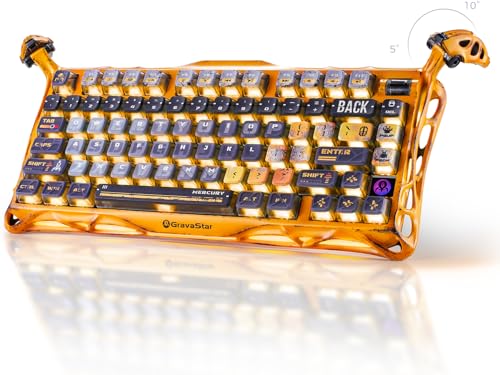
GravaStar Mercury K1 Pro 75% Wireless Mechanical Gaming Keyboard (Hot-Swap)

ProtoArc XK01 Full-Size Foldable Bluetooth Keyboard for Travel (Black)

ProtoArc XKM01 Full-Size Foldable Keyboard Mouse Combo for Travel (Gray)
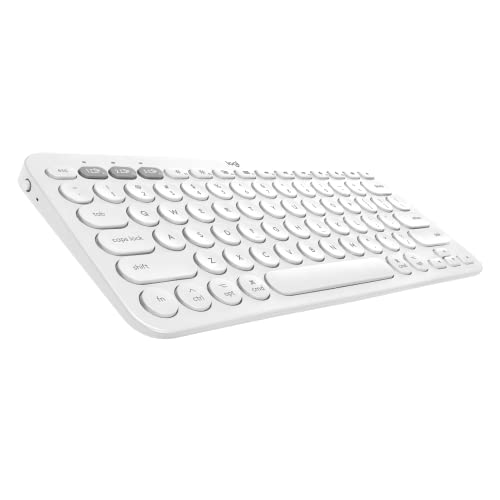
Logitech K380 Multi-Device Bluetooth Keyboard for Mac (Off White)

Logitech K380 Multi-Device Bluetooth Keyboard QWERTZ German (Pink)

ProtoArc XKM01 Pro Backlit Foldable Keyboard and Mouse, Full Size (Gray)

ProtoArc XKM01 CaseUp Foldable Bluetooth Keyboard Mouse Combo

ProtoArc XK01 TP Foldable Keyboard with Touchpad (Black)

ProtoArc XK04 Foldable Compact Keyboard for Phone and Tablet (Black)

Logitech K380 Pebble Wireless Multi-Device Keyboard (Off White)
Why These Options Stand Out
The GravaStar Mercury K1 Pro stands apart from the rest of this list because it is genuinely a mechanical board, not a membrane typing tool in disguise. An aluminum alloy exoskeleton gives it a weighty, planted feel that you do not normally associate with portable keyboards, and the skeletal frame design keeps it visually interesting on a desk.
For gamers and heavy typists who want real switch feedback on a wireless board, this is the most mechanical option here. The 75% layout trims off the numpad to save travel space while keeping arrow keys and a function row intact.
The Value In It
- Hot-swap switch sockets let owners swap switch types without soldering
- Aluminum alloy chassis adds long-term durability for daily travel
- 75% layout keeps arrow keys and function row without numpad bulk
- Mechanical feedback suits both gaming sessions and long typing days
Practical Considerations
- Heavier than folding boards, so it eats more backpack space
- Open-frame design means dust settles between switches faster
Best Suited To
Gamers and tactile-typing enthusiasts who travel but refuse to give up mechanical feedback.
Consider Something Else When
Someone prioritizing pocket-friendly folding should look at the ProtoArc XK04, which packs down much smaller.
The ProtoArc XK01 is the kind of foldable keyboard that tries to keep the desktop feel alive while shaving the footprint. With 105 keys, a numpad, a function row, and standard navigation keys, it folds into a slim package rather than asking you to relearn a cramped layout on the road.
Internal aluminum hinges are rated for over 10,000 folds, which matters when you open and close a keyboard three or four times a day. Bluetooth 5.1 with three-device pairing covers the laptop, phone, and tablet switching that hybrid work demands.
Useful Strengths
- Full-size layout means no relearning for spreadsheet and coding tasks
- Three paired devices via Bluetooth 5.1 cover laptop, phone, and tablet
- Aluminum hinges support repeated folding without loosening
- 0.65-inch keycaps keep spacing close to a standard desktop board
Points To Note
- No tilt means long sessions may need a separate wrist rest
- Folding seam sits in the middle of the key area, which some typists notice
Built With In Mind
Remote workers and frequent travelers who do real spreadsheet or coding work in hotel rooms.
Skip It When
Pure mobile typists working off a phone should consider the ProtoArc XK04 instead.
The ProtoArc XKM01 takes the same full-size foldable keyboard idea and pairs it with a wireless mouse in one travel kit. For anyone who has tried to navigate a tablet with a trackpad-less Bluetooth keyboard, having a mouse in the box solves a real problem.
The flat typing surface skips any tilt, which is a tradeoff for a thinner profile when folded. Compared to the GravaStar Mercury K1 Pro at the top of this list, this is a far more travel-oriented build, though it loses the mechanical feel entirely.
What Stands Out
- 105-key layout gives spreadsheet and data entry users a real numpad
- Mouse included avoids packing a separate pointing device
- Ultra-slim folded profile slides into a laptop sleeve easily
- No-locking fold mechanism speeds up deploy and pack-up
Some Limits To Know
- Flat typing angle may feel wrist-heavy over long sessions
- Membrane switches cannot match the mechanical feedback of the GravaStar option
Made For
Frequent travelers and remote workers who want a full typing and pointing setup in a single kit.
Look Elsewhere When
Mechanical switch fans should jump up to the GravaStar Mercury K1 Pro for proper key feel.
The Logitech K380 for Mac drops right into an Apple ecosystem, with a layout that matches macOS shortcuts without remapping tricks. It is the same compact footprint as the standard K380 but with Mac-specific key labels that line up with what an Apple user already expects.
Switching between a MacBook, an iPad, and an iPhone is the keyboard’s headline feature, and the round chiclet keys give a quieter typing sound suited to shared offices. Where the folding boards above try to add travel utility, this one simply gets out of the way.
A Few Strong Suits
- Mac-specific labels match MacBook, MacBook Air, iMac, and iPad shortcuts
- Multi-device pairing makes Apple-only households simpler
- Quiet key action suits shared workspaces and libraries
- Compact body fits beside a laptop without dominating the desk
Things To Consider
- No numeric keypad means spreadsheet work stays compressed
- Requires AAA batteries, which most owners commonly report replacing every few months
The Right Fit
Mac-first users who split time between a MacBook, an iPad, and an iPhone in the same day.
Another Choice May Suit
Anyone who needs a numpad for heavy data entry should move up to the ProtoArc XK01 full-size foldable.
The QWERTZ variant of the Logitech K380 exists for a reason: German-language typists should not have to retrain their fingers on a US layout just to use a portable keyboard. This version keeps the standard K380 form factor but swaps in the QWERTZ key arrangement familiar across German-speaking regions.
The pink finish is a personality choice that some shoppers actively look for in workspace gear. Beyond the layout and color, the typing and pairing experience matches the rest of the K380 family covered elsewhere in this list.
What Works In Its Favor
- QWERTZ layout skips the constant mental remapping for German users
- Multi-device Bluetooth pairing handles phone, tablet, and laptop swaps
- Pink color stands out on a desk without screaming for attention
- Compact footprint slips into most laptop bags
Honest Caveats
- Pink finish may not match minimalist workspace setups
- Limited availability in this specific color and layout combination
Whose Shelf It Belongs On
German-language typists who want a portable keyboard that matches their native layout.
Reach For A Different Pick When
Anyone working in English should consider the standard Logitech K380 Pebble instead.
The Pro version of the XKM01 adds a white backlight under the keys with three brightness levels, which sounds simple until you try to type on a dim red-eye flight without it. The backlight makes a meaningful difference for late-night work in hotels and planes where overhead lights are off.
It still ships with a wireless mouse and a hard carrying case, keeping the all-in-one travel package that defines the XKM01 line. Compared to the backlight-less XKM01 earlier in this list, the Pro is the right pick for anyone regularly working after dark.
Real-World Strengths
- Three-level white backlight keeps keys visible in dim rooms
- Hard carrying case protects the folded keyboard in transit
- Mouse included completes a full travel pointing setup
- Full-size layout preserves numpad access for data tasks
Where It May Fall Short
- Backlight draws extra battery life on long trips without a charger
- Backlit keys slightly increase folded thickness versus the non-Pro XKM01
Who Should Grab It
Late-night workers and frequent flyers who type in dim hotel rooms or cabin lighting.
Not Your Match When
Day-only desk workers can save money on the standard ProtoArc XKM01 without missing much.
The CaseUp version expands the XKM01 idea by adding a height-adjustable laptop stand into the kit. That single addition shifts the whole package from “typing on a flat surface” toward “actual laptop ergonomics wherever you set up.”
Raising the screen closer to eye level addresses the neck strain that comes with long stretches hunched over a laptop. The foldable keyboard, mouse, stand, and hard case travel together, which means the workstation rebuilds itself in about a minute at a new desk.
Everyday Wins
- Adjustable laptop stand lifts screen to a healthier viewing height
- Complete kit folds into a single hard case for travel
- Mouse included removes the need to pack a second pointing device
- Full-size keyboard layout covers spreadsheet and coding work
Practical Considerations
- Bigger packed footprint than keyboard-only kits like the XK01
- Stand adds setup steps versus a flat-surface keyboard
Feature Snapshot
Who It Suits Best
Hybrid workers and digital nomads who set up at different desks throughout the week.
Swap It Out When
Light travelers without posture concerns should stick with the slimmer ProtoArc XK01.
The XK01 TP is the keyboard to reach for when you want to leave the mouse at home. A multi-touch trackpad built into the right side of the keyboard handles gestures, taps, and clicks, so the device alone covers both typing and pointing.
A built-in phone stand and a PU leather carrying pouch round out the package, which is genuinely useful for tablet and phone-first users. Compared to the mouse-equipped XKM01 above, this is a leaner, more couch-friendly setup.
Well-Handled Touches
- Integrated trackpad removes the need to carry a separate mouse
- Built-in phone stand props up a screen for hands-free typing
- PU leather pouch protects the keyboard between uses
- Tri-fold design keeps the package compact in transit
Worth Bearing In Mind
- Trackpad precision cannot fully replace a mouse for detailed work
- Touchpad placement crowds the right-side keys slightly when folded
Perfect Match For
Tablet and phone users who want laptop-style navigation without packing a mouse.
A Better Fit Elsewhere
Anyone needing mouse-grade precision should consider the ProtoArc XKM01 Pro instead.
The XK04 is the smallest keyboard on this list, built around the idea that phone-first typing should not require a full-size board. At roughly 7.8 ounces and folding into a pocket-friendly shape, it disappears into a bag in a way no full-size board can match.
The layout is specifically tuned for phone and tablet use, so keys are sized for thumbs and fingers working off a mobile screen. This is the keyboard to grab when the workspace is a park bench, a train seat, or anywhere a full board would be overkill.
What Earns Its Place
- 7.8-ounce carry weight barely registers in a bag
- Two-fold body collapses to pocket-friendly dimensions
- PU leather cover protects keys during pocket carry
- Compact layout suits phone and tablet typing specifically
Trade-Offs To Consider
- Smaller keys slow down typists used to full-size spacing
- No numeric keypad limits heavy data entry
At A Glance
Right Fit For
Phone-first mobile typists who want physical keys without hauling a full-size board.
Consider Something Else When
Anyone doing serious spreadsheet work should step up to the ProtoArc XK01.
The Logitech K380 Pebble rounds out this list as the most widely compatible compact option, pairing with Apple iOS, Apple TV, Android, Chrome OS, Windows, and macOS without needing a remap. Three devices can stay paired at once, which is the practical feature that defines the K380 family.
The compact, rounded key shape makes it the lightest non-folding board here, and it slides beside a laptop on almost any surface. Where the GravaStar at the top of this list leans into mechanical gaming, the K380 stays firmly in the quiet office lane.
The Upside
- Multi-OS support covers Apple, Android, Chrome, and Windows devices
- Three paired devices switch with a single key press
- Compact footprint suits small desks and travel trays
- Quiet key action keeps shared spaces friendly
Points To Keep In Mind
- No backlight means dim-room typing stays guesswork
- Compact body has no numpad for spreadsheet-heavy users
Who Will Love This
Mixed-device households and shared-space typists who want one quiet board for everything.
Where A Sibling Pick Shines
Late-night workers should look at the backlit ProtoArc XKM01 Pro for visibility in dim rooms.
Matching Portable Bluetooth Keyboards To Real Working Habits
Choosing between portable Bluetooth keyboards comes down to three honest questions: how often it travels, what kind of work happens on it, and how many devices it has to switch between. A board that disappears into a coat pocket serves a different owner than one that takes over a hotel desk.
Key travel and switch type matter more than shoppers expect. Mechanical switches, like those on the GravaStar Mercury K1 Pro, give a tactile bump and audible click that helps typing speed and accuracy. Membrane switches, common in folding boards, feel softer and quieter but lack the same feedback loop. For long writing days, the difference becomes noticeable within the first hour.
Layout size sets the daily ceiling. A full-size 105-key board covers spreadsheets and data entry without compromise, but it folds into a larger package. A compact board like the Logitech K380 or the ProtoArc XK04 saves space but compresses the numpad into shared keys, which slows down anyone doing regular number work.
Multi-device pairing matters once you start juggling a laptop, a phone, and a tablet in the same day. Bluetooth 5.1 with three-device memory (as on the ProtoArc XK01) lets you swap between work and personal machines without re-pairing every time, which becomes a real time-saver across a workweek.
Backlighting is a quiet game-changer for frequent flyers. A board with a backlight, like the ProtoArc XKM01 Pro, makes red-eye flights and dim hotel rooms workable, while unlit boards force screen brightness up and strain the eyes.
What To Weigh Before Pulling The Trigger
Common Shopping Slip Ups
The most frequent mistake is buying on fold-down size alone and ignoring key spacing. A board that folds to half the size of its open layout will have keys packed tighter than a standard keyboard, which slows down typists who already have muscle memory. Always check the unfolded dimensions and key pitch before assuming a foldable will feel familiar.
Another trap is assuming every portable keyboard pairs identically across devices. Apple-specific layouts like the Mac-version Logitech K380 work seamlessly with iPads and MacBooks but feel wrong on a Windows laptop, where the Cmd and Option keys map inconsistently. Match the board to the dominant device in your rotation.
Where The Extra Money Goes
Spending more on a portable keyboard usually buys one of three things: better switches, backlighting, or a more complete accessory kit. Mechanical switches (GravaStar), backlighting (ProtoArc XKM01 Pro), and bundled stands plus cases (ProtoArc XKM01 CaseUp) all add cost over a baseline folding board.
The upgrade pays off most for owners who type daily in transit or after dark. A casual user typing a few emails a week on a tablet will not feel the difference between a budget and premium portable board the way a working writer or developer will.
Frequently Asked Questions
Do portable Bluetooth keyboards work with tablets and phones?
Yes, most portable Bluetooth keyboards pair with iPads, iPhones, Android tablets, and Android phones without extra apps. The layout may feel slightly cramped on a phone screen compared to a tablet, but pairing itself is straightforward through the device’s Bluetooth settings.
How long does the battery last on a portable Bluetooth keyboard?
Battery life varies by model and usage, but most portable Bluetooth keyboards run for weeks to months on a single charge under typical use. Backlit boards like the ProtoArc XKM01 Pro tend to drain faster when the backlight stays on at higher brightness.
Are foldable keyboards durable enough for daily travel?
Many foldable keyboards use aluminum hinge designs rated for thousands of folds, which is generally enough for daily opening and closing over several years. Treat the hinge gently and avoid sitting weight on the folded keyboard, since the seam is the most common failure point reported by owners.
Can I use one portable keyboard across multiple devices?
Yes, most portable Bluetooth keyboards support pairing with two or three devices at once, with hotkeys to switch between them. Look for Bluetooth 5.0 or newer for the most reliable multi-device experience, like the ProtoArc XK01 or the Logitech K380 family.
Is a mechanical portable keyboard worth it for typing?
Mechanical switches offer more tactile feedback and longer lifespan than typical membrane keys, which heavy typists often prefer. The trade-off is weight and noise, so mechanical portable boards like the GravaStar Mercury K1 Pro suit dedicated workspaces more than quiet shared ones.
Closing Remarks
The right portable Bluetooth keyboard depends entirely on where and how typing happens. A phone-first typist wants the pocket-friendly XK04, while a spreadsheet-heavy remote worker leans toward the XK01 or the XKM01 Pro. Match the board to the dominant use case rather than chasing a feature you will rarely touch, and the keyboard becomes a tool that quietly improves every working day away from a desk.