Not every laptop survives a backpack full of textbooks, a job site in the rain, or a teenager who treats electronics like contact sports. Rugged computers exist for exactly those scenarios, and the category has quietly grown beyond bulky old brick-style machines. Today’s rugged laptops span everything from classroom-ready Chromebooks with reinforced corners to MIL-STD-tested business workstations built for field engineers, plus gaming rigs that pair durable chassis with serious graphics muscle. I put together this list to match the right level of toughness to real-world use, from a kindergarten classroom to a remote construction site to a dorm room where the floor counts as storage.
Your Options, Compared
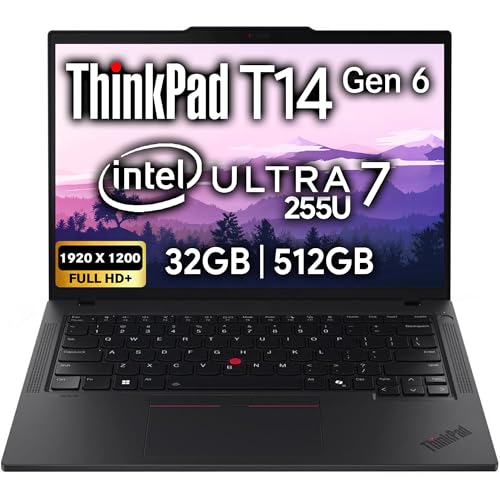
Lenovo ThinkPad T14 Gen 6 Business Laptop (32GB, 512GB)

Lenovo ThinkPad T14 Gen 6 Business Laptop (64GB, 2TB)

ASUS TUF Gaming F16 (2025) Gaming Laptop

Lenovo ThinkPad T14 Gen 6 Business Laptop (32GB, 1TB)
ASUS ROG Strix-G16 Gaming Laptop (32GB, 2TB)

ASUS Chromebook C202SA 11.6″ Ruggedized Spill-Resistant

Lenovo 100E Chromebook 2nd Gen 11.6″ HD

ASUS TUF F17 Gaming Laptop (8GB, 512GB)
Meet The Standout Selections
The ThinkPad T14 Gen 6 carries the same military-tested chassis that made Lenovo’s business line a favorite of traveling workers. Built to MIL-STD-810H standards (a U.S. military benchmark covering drops, vibration, and extreme temperatures), this 14-inch machine shrugs off the kind of rough handling that sidelines consumer laptops.
Inside, the Intel Core Ultra 7 255U pairs with 32GB of DDR5 RAM, a faster memory standard than older DDR4 that helps with multitasking. Two Thunderbolt 4 ports handle docking stations and fast file transfers, while Wi-Fi 6E keeps wireless connections stable on crowded networks. For mobile professionals who dock at a desk and unplug for client visits, the balance feels right.
A Strong Showing
- MIL-STD-810H chassis built to survive drops, dust, and temperature swings
- 32GB DDR5 RAM handles dozens of browser tabs and spreadsheets without stutter
- Fingerprint reader and 5MP webcam support secure logins and clear video calls
- Backlit keyboard keeps typing comfortable on red-eye flights
- Two Thunderbolt 4 ports allow a single-cable dock connection at the office
Worth Noting
- 512GB storage fills up fast for users handling large media files locally
- 14-inch screen may feel compact for spreadsheet-heavy workflows
- Business-class pricing reflects the durability investment
Who It Suits Best
Frequent business travelers and field consultants who need a dependable machine that handles airport hustle and conference room duty equally well.
Where Another Pick Suits Better
Shoppers needing maximum storage out of the box should look at the Lenovo ThinkPad T14 Gen 6 (64GB, 2TB) configuration instead.
Same rugged ThinkPad frame, but this configuration cranks memory to 64GB and storage to a roomy 2TB SSD. For data analysts, video editors who travel, or anyone running virtual machines locally, that extra headroom changes the daily experience. The T14 keeps the same MIL-STD-810H rating and Thunderbolt 4 flexibility of its sibling.
Compared to the 32GB version above, the doubled RAM lets heavier creative apps stay resident alongside dozens of Chrome tabs. The 2TB drive also means less reliance on external drives for project archives. It is the same dependable chassis with a workload ceiling that stretches much further.
Good Reasons To Consider
- 64GB DDR5 RAM supports demanding multitasking and creative workloads
- 2TB SSD holds extensive project files without external storage
- Carries the same MIL-STD-810H durability as the base T14
Trade Offs
- Premium configuration lands in a noticeably higher price tier
- Overkill for users who mainly work in cloud-based apps
Made For
Power users in finance, engineering, or content production who run heavy local applications and can’t afford slowdowns from memory limits.
Consider Something Else When
Casual office users will find the Lenovo ThinkPad T14 Gen 6 (32GB, 1TB) a smarter balance of cost and capability.
The TUF Gaming F16 wears ASUS’s signature military-grade construction on a frame designed to survive being hauled to LAN parties. Inside sits an Intel Core i5-13450HX processor and an NVIDIA GeForce RTX 5050 graphics card, a pairing that handles modern esports titles at high frame rates and most AAA games at sensible settings.
The 16-inch 165Hz display, meaning the screen refreshes 165 times per second for smoother motion, suits both competitive shooters and cinematic single-player adventures. The 16:10 aspect ratio (taller than the typical 16:9 widescreen) gives a bit more vertical space for scrolling through documents when gaming sessions end. Wi-Fi 6E rounds out the connectivity for low-latency online play.
What Pays Off
- 165Hz display delivers visibly smoother motion in fast-paced games
- RTX 5050 GPU supports ray tracing (realistic lighting effects) in supported titles
- TUF chassis meets MIL-STD-810H durability standards
- 16:10 panel adds useful vertical screen space for productivity
- Wi-Fi 6E reduces lag on congested home networks
Points To Note
- 512GB SSD fills up quickly with modern game installs
- 16GB RAM is adequate now but may feel tight in a few years
Right Fit For
Gaming newcomers and students who want a durable laptop that handles classwork and after-hours play without breaking a sweat.
Look Elsewhere When
Hardcore gamers chasing maximum frame rates at high settings should step up to the ASUS ROG Strix-G16 instead.
Slotting between the 512GB and 2TB T14 models, this ThinkPad offers 32GB of RAM paired with a 1TB SSD. The result covers most office workers without pushing into the premium tier. The same MIL-STD-810H chassis, Thunderbolt 4 ports, and Wi-Fi 6E connectivity appear across all three ThinkPad configurations here.
For someone who edits photos, manages project files, and rarely touches external storage, 1TB hits a comfortable middle. The Intel Core Ultra 7 255U keeps daily apps responsive, and the backlit keyboard helps during late shifts. Where the premium version overdelivers, this one aims squarely at practical needs.
Strong Points
- 1TB SSD balances storage space with reasonable cost
- 32GB DDR5 RAM supports multitasking across typical office tools
- MIL-STD-810H construction resists daily wear
Honest Caveats
- Not as future-proof as the 64GB model for memory-hungry workflows
- 14-inch display may feel tight for users used to external monitors
- Commonly reported fan noise under sustained heavy loads
Best Suited To
Hybrid office workers who split time between home, commutes, and client sites and want a tough laptop without overpaying for headroom they won’t use.
Not Your Match When
Creators managing massive raw photo or video libraries should consider the Lenovo ThinkPad T14 Gen 6 (64GB, 2TB) configuration.
The ROG Strix-G16 sits at the top of this list in raw muscle. An AMD Ryzen 9 8940HX processor with 16 cores handles everything from live-streamed gaming sessions to 3D rendering. The NVIDIA GeForce RTX 5070 Ti pushes high frame rates at demanding settings, well above what the TUF F16’s RTX 5050 manages.
The 16-inch 165Hz panel with 300 nits brightness (a measure of screen luminance; higher numbers mean easier viewing in bright rooms) keeps visuals punchy even in well-lit spaces. The 2TB SSD swallows game libraries without constant uninstalling. It is heavier than the TUF, but the chassis is built to take travel abuse.
Practical Pluses
- RTX 5070 Ti GPU handles current AAA games at high settings
- Ryzen 9 8940HX with 16 cores chews through rendering and streaming
- 2TB storage accommodates large game and project libraries
- 300-nit display holds up in bright environments
- 32GB DDR5 RAM keeps multitasking fluid under heavy loads
Where It Is Less Suited
- Heavier chassis than ultraportable alternatives
- Battery life tends to be shorter under gaming loads
- High-end specs come at a notable price jump
Feature Snapshot
Who Will Love This
Competitive gamers, streamers, and creative professionals who need desktop-class power in a laptop that can survive the road.
A Better Fit Elsewhere
Casual gamers on a tighter budget will find the ASUS TUF Gaming F16 a more sensible match.
The ASUS C202SA was designed specifically to survive the kind of abuse kids dish out: drops from desks, juice spills, and constant shoving into backpacks. Reinforced rubber corners absorb impact, and the keyboard is spill-resistant, meaning liquid can drain through without killing the internals. The 180-degree hinge lets the screen lay flat for sharing.
Under the hood sits an Intel Celeron N3060, a basic dual-core chip designed for light web browsing and Google Docs rather than heavy multitasking. With 4GB RAM and 32GB storage, it is a Chrome OS machine aimed at schoolwork, not gaming. Battery life tends to last a full school day under typical use.
What Works In Its Favor
- Reinforced corners and spill-resistant keyboard handle student abuse
- 180-degree hinge supports collaborative viewing on desks
- Compact 11.6-inch form fits small backpacks and tight workspaces
- Chrome OS keeps software management simple for IT departments
Where It May Fall Short
- Celeron N3060 struggles with more than basic browsing tasks
- 32GB storage fills up quickly with downloaded files
Feature Rundown
Perfect Match For
Elementary and middle school students who need a budget-friendly machine that takes rough handling in stride.
Skip It When
High school or college students running heavier software should look at the Lenovo ThinkPad T14 Gen 6 lineup.
Lenovo markets the 100E Chromebook as a classroom workhorse, and the design reflects that focus. The drop-resistant build and water-resistant keyboard shrug off the kind of accidental abuse that ends most laptops early. At roughly 2.7 pounds, it is light enough for younger students to carry between classes without strain.
The MediaTek MT8173C processor is built for efficiency rather than speed, which helps the battery stretch toward a full school day on a charge. The 11.6-inch HD screen uses antiglare technology for easier reading under fluorescent lights. With 4GB RAM and 16GB storage, it leans hard on cloud-based tools.
Notable Upsides
- Drop-resistant chassis targets classroom durability standards
- Water-resistant keyboard handles minor spills without damage
- Lightweight 2.7-pound build is easy for younger students to carry
- Chrome OS integrates smoothly with Google Workspace for Education
- Antiglare display reduces eye strain under bright classroom lighting
Some Limits To Know
- MediaTek processor feels sluggish compared to Intel-based Chromebooks
- 16GB eMMC limits offline file storage significantly
Feature Card
Who Should Grab It
School IT departments and parents buying in volume for younger learners who need tough, no-fuss machines.
Swap It Out When
Older students or anyone wanting faster performance should consider the ASUS Chromebook C202SA instead.
The TUF F17 trades portability for screen real estate, with a 17.3-inch panel that makes sprawling game worlds and multi-window workflows easier on the eyes. The 144Hz refresh rate, meaning the screen redraws 144 times per second, keeps fast action smooth, though it sits below the 165Hz of the newer F16 model above.
An 11th-generation Intel Core i5-11400H pairs with an RTX 3050 GPU, a previous-generation graphics card that still handles esports titles and many AAA games at medium settings. The patented Anti-Dust Cooling system helps extend the laptop’s lifespan by keeping internal fans clear. At 8GB RAM, multitasking is more limited than the newer entries on this list.
Advantages To Know
- 17.3-inch display delivers an immersive gaming and viewing experience
- TUF chassis meets military-grade durability standards
- Anti-Dust Cooling extends long-term fan reliability
- Wi-Fi 6 support offers stable wireless connections
What To Weigh
- 8GB RAM limits heavy multitasking compared to newer picks
- RTX 3050 GPU handles older titles better than the latest AAA releases
- Larger footprint reduces portability for daily commutes
Quick Facts
Built With In Mind
Gamers who mostly play at home and want a desktop-replacement laptop with a big screen and rugged build.
Reach For A Different Pick When
Anyone wanting more future-proofed specs and a lighter frame should look at the ASUS TUF Gaming F16 (2025).
Choosing Rugged Computers That Actually Fit
Rugged computers are not all built for the same kind of punishment. A classroom Chromebook and a MIL-STD business laptop both claim toughness, but they handle very different threats. Before settling on a machine, it helps to match the durability standard to the daily reality.
What “Rugged” Really Means
The gold standard is MIL-STD-810H testing, a U.S. military benchmark that subjects hardware to drops, vibration, humidity, and extreme temperatures. The ThinkPad T14 lineup, both TUF Gaming models, and the ROG Strix-G16 all meet this benchmark. Education-focused Chromebooks use a lighter approach: reinforced corners, spill-resistant keyboards, and drop testing from desk height rather than full military certification. The ASUS C202SA and Lenovo 100E fall into that practical classroom category, which matters more for younger users than lab-grade certification.
Matching Build To Use Case
For business travelers and field workers, full MIL-STD-810H matters because laptops face airports, rental cars, and unpredictable worksites. For gamers, “rugged” usually means a reinforced chassis that survives LAN trips and dorm-room living, not necessarily full military certification. The TUF and ROG lines deliver that gaming-focused toughness. For students, the realistic threats are drops, spills, and backpack crush, which is where reinforced corners and sealed keyboards earn their keep.
Ports, Battery, And Repair Considerations
Thunderbolt 4 ports on the ThinkPad models let a single cable handle charging, data, and external displays through a docking station. Gaming laptops sacrifice some port flexibility for graphics power but still offer USB-C and HDMI. Battery life varies wildly: the Chromebooks stretch toward a full day of light use, while gaming machines drain faster under load. Repairability matters too; business-class ThinkPads tend to have easier service access than gaming chassis.
Budget Versus Capability
The cheapest rugged options, the Chromebooks here, cover basic needs at low cost but cannot run demanding software. Mid-range picks like the TUF F16 or TUF F17 add real graphics power without breaking the bank. Premium configurations like the ROG Strix-G16 or the 64GB ThinkPad push into territory where every dollar buys measurable performance gains. The honest read is that matching the budget to actual workload prevents overspending on specs that won’t get used.
Key Considerations Across These Picks
Pitfalls Shoppers Hit
The most common mistake is buying on toughness alone while ignoring specs that matter daily. A rugged Chromebook cannot run Photoshop, and a MIL-STD ThinkPad does not automatically mean fast graphics. Another trap is underestimating storage: modern games, project files, and even photo libraries fill 512GB faster than expected. Finally, shoppers sometimes overlook weight. The 17.3-inch TUF F17 is far heavier to carry daily than the 14-inch ThinkPad, and “rugged” does not mean “lightweight.”
Where The Extra Money Goes
Stepping up from a Chromebook to a ThinkPad buys faster processors, more memory, and Thunderbolt 4 connectivity that Chromebooks typically lack. Moving from the TUF F16 to the ROG Strix-G16 jumps the GPU from RTX 5050 to RTX 5070 Ti, which translates to real frame-rate gains in demanding games. Doubling RAM from 8GB to 16GB or 32GB extends the laptop’s useful lifespan by several years. For shoppers who keep machines four or five years, those upgrades often pay for themselves.
Frequently Asked Questions
What Does MIL-STD-810H Actually Cover?
It is a U.S. military testing standard that evaluates hardware against drops, vibration, dust, humidity, and extreme temperatures. Passing it suggests a laptop can survive harsher conditions than typical consumer machines, though it does not guarantee indestructibility.
Are Rugged Laptops Heavier Than Regular Ones?
Often yes, especially full MIL-STD models with reinforced frames. Education Chromebooks stay light because they use simpler reinforcement, while gaming-rugged laptops like the TUF series add weight for cooling and structural integrity.
Can Gaming Laptops Really Be Called Rugged?
The ASUS TUF and ROG lines meet military-grade durability standards, so yes, they qualify. Their ruggedness focuses on chassis strength and cooling rather than sealed keyboards, since gamers need airflow for performance.
How Long Do Rugged Chromebooks Typically Last?
With cloud-based workflows and light local storage needs, Chromebooks like the C202SA and 100E often serve schools for four to five years before performance feels dated.
Is A Rugged Computer Worth It For Home Use?
For households with kids, frequent travel, or job-site work, the extra durability pays off. For a stationary desk setup that rarely moves, a standard laptop usually suffices.
The Takeaway
The right rugged computer depends entirely on where the laptop will live and what it will face. School-bound kids get the most value from spill-resistant Chromebooks, mobile professionals thrive on MIL-STD ThinkPads, and gamers who travel find their match in TUF or ROG chassis. Match the build to the environment, and the machine will earn its keep for years.