I pulled together ten single board computers spanning every reasonable use case, from pocket-sized microcontroller boards to full desktop-replacement kits with all the extras. Whether you’re building a retro arcade, a home automation hub, or just learning Linux for the first time, this list covers a board that fits.
The Leading Options At A Glance
The Leading Options At A Glance

CanaKit Raspberry Pi 4 8GB Extreme Kit (128GB)
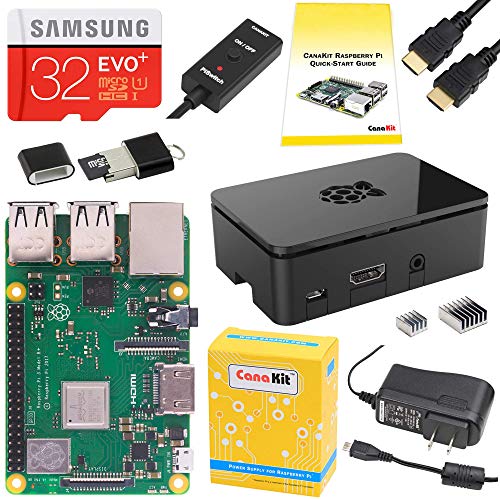
CanaKit Raspberry Pi 3 B+ Starter Kit (32GB Black)

Raspberry Pi 4 Model B 4GB (Quad Core 64-bit)
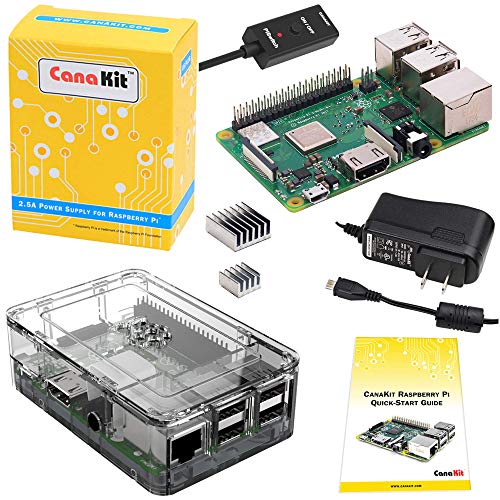
CanaKit Raspberry Pi 3 B+ Clear Case Kit

CanaKit Raspberry Pi 4 Basic Kit (8GB RAM)

CanaKit Raspberry Pi 4 4GB Starter PRO Kit

SANOOV Raspberry Pi 5 4GB Active Cooler Kit

Raspberry Pi Pico WH (RP2040 Microcontroller)
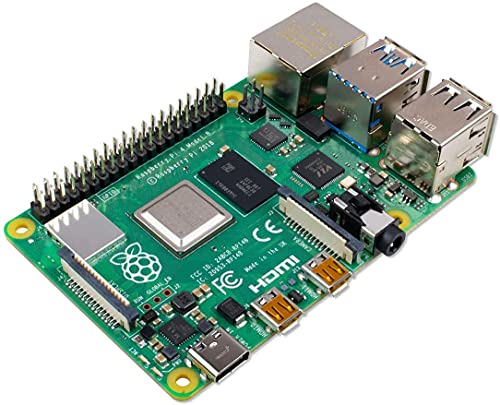
Raspberry Pi 4 Model B 2GB (Quad Core 64-bit)

Raspberry Pi 4 Model B 8GB Bare Board
More Details On Our Top Picks
The CanaKit Raspberry Pi 4 8GB Extreme Kit arrives with essentially everything a first-timer needs in a single box: the Pi 4 Model B with 8GB of RAM, a 128GB Class 10 microSD card already flashed, two micro HDMI cables supporting 4K at 60 frames per second, a 3.5A USB-C power supply with a built-in noise filter, a premium case with an integrated fan mount, and a low-noise cooling fan. The bundled card reader spares you the scramble to find a compatible adapter, and the included heat sinks sit neatly on the CPU, USB, and Ethernet chips. For most home labs, this is the kit I’d hand a friend who’s nervous about sourcing parts piecemeal.
Compared to the entry-level Pi 3 B+ kits later in this list, the Pi 4 silicon here is roughly two generations ahead, which matters for anyone planning to run a desktop environment, dual 4K monitors, or container workloads. The 8GB RAM ceiling also future-proofs the board for memory-hungry tasks like running multiple browser tabs, a lightweight database, or a small media server.
Well-Handled Touches
- Pre-flashed 128GB card removes the need to image an SD card yourself.
- 3.5A USB-C supply with noise filter keeps the board stable under heavier loads.
- Two micro HDMI cables support dual 4K 60p monitor setups straight out of the box.
- Integrated fan mount plus heat sinks means thermal headroom for sustained workloads.
- 8GB RAM comfortably handles browser tabs, IDEs, and small server tasks at once.
Things To Consider
- The 128GB card fills up faster than you’d think once projects, ROMs, and media libraries land on it.
- Case assembly takes a few minutes and the acrylic panels can scratch if you’re not careful.
At A Glance
Who It Suits Best
First-time builders and home-lab enthusiasts who want a complete, ready-to-boot kit without hunting down individual cables and cards.
Where Another Pick Suits Better
Shoppers who already own spare Pi accessories should consider the lighter CanaKit Raspberry Pi 4 Basic Kit, which strips out the extras to focus on the board itself.
The CanaKit Raspberry Pi 3 B+ Starter Kit wraps the venerable Pi 3 B+ in a matte black enclosure and pairs it with a 32GB EVO+ microSD card that’s pre-loaded with an operating system. A 2.5A USB power supply with a built-in noise filter and a micro USB cable round out the bundle, alongside a USB microSD card reader for quick transfers. The Pi 3 B+ uses a 1.4GHz 64-bit quad-core processor, dual-band Wi-Fi, and improved Ethernet throughput compared to its predecessor.
For hobbyists stepping into the SBC scene for the first time, this kit offers a friendlier learning curve than the higher-end Pi 4 boards. The slower CPU and 1GB RAM cap make it a poor choice for intensive desktop work, but it’s perfectly comfortable for a print server, retro gaming frontend, or a Pi-hole network-wide ad blocker.
Positive Takeaways
- 32GB EVO+ card with OS pre-loaded means no extra downloads on day one.
- Dual-band 2.4GHz and 5GHz Wi-Fi is reliable for most home networks.
- Matte black case looks clean on a desk or entertainment center.
- Lower power draw suits always-on projects like network ad blockers.
Worth Noting
- 1GB of RAM limits how many services and browser tabs you can run concurrently.
- The micro USB power input is older hardware compared to the USB-C Pi 4 kits.
- Heavy desktop use feels sluggish compared to the Pi 4 Model B picks elsewhere on this list.
Made For
Beginners who want a forgiving starter kit for headless or light desktop projects on a tighter budget.
Look Elsewhere When
Shoppers who plan to run a full Linux desktop or multiple 4K monitors will find the CanaKit Raspberry Pi 4 4GB Starter PRO Kit a far smoother fit.
The Raspberry Pi 4 Model B in the 4GB configuration strikes a practical middle ground for shoppers who don’t need the absolute maximum memory but want a genuine desktop experience. It runs the same 1.5GHz 64-bit quad-core CPU as the 8GB siblings, with two micro HDMI outputs, USB 3.0 ports, and dual-band Wi-Fi. The bare-board format lets you choose your own case, storage, and power supply, which appeals to anyone re-using parts from an older Pi.
For a kitchen media player, a retro console, or a compact home automation controller, 4GB of RAM is usually plenty. Power users running virtual machines, large databases, or compiling code might prefer stepping up to the 8GB pick later in this list.
Real-World Strengths
- Quad-core 1.5GHz CPU handles 4K video playback without dropped frames.
- USB 3.0 ports allow fast external SSDs for storage expansion.
- Bare-board format suits hobbyists with existing cases and supplies.
Trade Offs
- No included case, power supply, or SD card means more sourcing upfront.
- Runs warmer than older Pi models and benefits from at least passive cooling.
Quick Facts
Right Fit For
DIY builders who already own Pi accessories and want a flexible, mid-spec board for a wide range of projects.
Skip It When
First-timers without spare parts will get more value from the CanaKit Raspberry Pi 4 8GB Extreme Kit, which ships ready to run.
The CanaKit Raspberry Pi 3 B+ with Premium Clear Case takes the same 1.4GHz 64-bit quad-core Pi 3 B+ board and tucks it inside a transparent acrylic enclosure that lets the PCB show through. The 2.5A USB power supply is specially tuned for the Pi 3 B+ with a noise filter, and a pair of aluminum heat sinks sits on the most thermally active chips. A quick-start guide walks beginners through the first boot.
For electronics teachers, makerspace demos, or anyone who wants their build to look as interesting as it runs, the clear case is a small but meaningful upgrade over a plain plastic shell. Functionally, the board performs identically to other Pi 3 B+ kits.
Practical Pluses
- Transparent case turns the board into a visual learning tool.
- Dual-band Wi-Fi covers both 2.4GHz and 5GHz networks.
- Aluminum heat sinks help with passive cooling during long sessions.
Minor Gripes
- Acrylic panels show fingerprints and dust more than opaque enclosures.
- Same 1GB RAM ceiling as other Pi 3 B+ kits limits heavy desktop use.
Best Suited To
Educators, students, and anyone showcasing electronics who wants the board itself on display.
Consider Something Else When
Buyers prioritizing raw speed over visual style should look at the Raspberry Pi 4 Model B 4GB, which offers a notable jump in performance.
The CanaKit Raspberry Pi 4 Basic Kit pares the bundle down to the essentials: the Pi 4 8GB Model B board, a 3.5A USB-C power supply with a noise filter, a USB-C PiSwitch for clean on-and-off control, and a set of three aluminum heat sinks. There’s no SD card, no case, and no HDMI cables, which keeps the kit lean for owners who already have a card loaded and a chassis in mind.
Compared to the Extreme Kit at the top of this list, you’re trading accessories for flexibility. This is a sensible pick if you’re migrating from an older Pi and reusing storage, or if you plan to embed the board inside a custom 3D-printed enclosure. The included PiSwitch is a thoughtful touch, since yanking the USB-C cable to reboot wears out the port over time.
Real Benefits
- 8GB RAM at a lower cost than the Extreme Kit version.
- USB-C PiSwitch protects the power port from repeated plug cycling.
- Lower price leaves room in the budget for a case or accessories of your own.
Points To Note
- You’ll need to supply your own microSD card and micro HDMI cables.
- No case means the board sits exposed during early testing.
Who Will Love This
Shoppers re-using an existing SD card and case who want the Pi 4 8GB silicon without paying for parts they already own.
Reach For A Different Pick When
Anyone without spare accessories should start with the complete CanaKit Raspberry Pi 4 8GB Extreme Kit, which avoids the accessory scramble.
The CanaKit Raspberry Pi 4 4GB Starter PRO Kit lands in the sweet spot for many shoppers: a 4GB Pi 4 Model B paired with a pre-loaded 32GB EVO+ Class 10 microSD card, a USB microSD card reader, a high-gloss case with an integrated fan mount, a low-noise cooling fan, a 3.5A USB-C power supply with a noise filter, and a 6-foot display cable supporting 4K 60p output. Heat sinks are included for the main hot spots on the board.
This is the kit I’d recommend for someone who’s past the absolute beginner stage but doesn’t want to source six separate components. Compared to the 8GB Extreme Kit earlier on, you’re trading some RAM headroom for a lighter price tag, and the included 32GB card is ample for most hobby projects.
Strong Points
- Pre-flashed card means the first boot happens minutes after unboxing.
- Low-noise cooling fan keeps thermals in check under sustained load.
- Display cable supports 4K 60p output to a single monitor.
- Glossy case doubles as visual flair on a desk or shelf.
Room For Improvement
- Only one display cable is included, so dual-monitor setups need an extra cable.
- 4GB RAM caps the headroom for memory-hungry workloads.
Feature Snapshot
Built With In Mind
Intermediate hobbyists who want a complete Pi 4 package without paying for the higher-RAM tier.
A Better Fit Elsewhere
Power users chasing maximum RAM should reach for the CanaKit Raspberry Pi 4 8GB Extreme Kit instead.
The SANOOV Raspberry Pi 5 4GB Kit represents the current top of the Raspberry Pi lineup, pairing the new Pi 5 single board computer with an active cooler, a durable ABS case, and a screwdriver so everything goes together without extra trips to the toolbox. The Pi 5 silicon brings meaningful CPU and GPU gains over the Pi 4 generation, which translates to smoother 4K playback, faster code compilation, and better headroom for AI experiments.
Where the Pi 4 kits earlier in this list already feel capable for most projects, the Pi 5 pushes into territory that feels closer to a thin-and-light laptop. The active cooler is genuinely needed here, since the faster CPU generates more heat than passive solutions can shed comfortably.
Points In Its Favor
- Pi 5 silicon delivers a noticeable jump in CPU and GPU performance.
- Active cooler is included and recommended for sustained workloads.
- ABS case offers sturdy physical protection for everyday desk use.
- 4GB RAM handles typical project loads with room to spare.
A Few Limitations
- Pi 5 cases and accessories aren’t always cross-compatible with older Pi 4 gear.
- Power supply recommendations are stricter than older Pi models, depending on peripherals.
- Software support for the newest silicon sometimes lags behind the Pi 4 ecosystem.
Tech Notes
The Right Fit
Tinkerers chasing the latest generation of Pi hardware for 4K media, AI tinkering, or compute-heavy projects.
Swap It Out When
Shoppers prioritizing a mature accessory ecosystem over raw performance should consider the Raspberry Pi 4 Model B 4GB pick instead.
The Raspberry Pi Pico WH is a fundamentally different class of board from the rest of this list. Rather than running a Linux desktop, the Pico is a microcontroller: a tiny dual-core ARM Cortex M0+ processor running up to 133MHz, with 264KB of SRAM and 2MB of on-board flash memory. The “WH” suffix means the headers are pre-soldered and the board adds built-in Wi-Fi, which spares you a soldering iron and a separate wireless module.
For physical computing projects like robotics, sensor arrays, custom keyboards, and LED installations, microcontrollers often outperform full single board computers on cost, latency, and power draw. The Pico runs MicroPython or C/C++ rather than a Linux distribution, which is a different workflow but well-documented in the maker community.
What Works In Its Favor
- Tiny form factor fits inside compact enclosures and wearable projects.
- Pre-soldered headers mean no soldering required for breadboard use.
- Built-in Wi-Fi on the WH variant simplifies connected devices.
- MicroPython support lowers the entry bar for hobbyist programming.
Honest Caveats
- 2MB flash is tiny compared to microSD-equipped Pi 4 boards.
- No HDMI, USB host ports, or Linux means it’s not a desktop replacement.
Whose Shelf It Belongs On
Electronics hobbyists building physical projects, sensors, or LED controllers who don’t need a full operating system.
A Better Fit Elsewhere
Shoppers wanting to run a Linux desktop or media server should pivot to the Raspberry Pi 4 Model B picks earlier in this list.
The Raspberry Pi 4 Model B in the 2GB trim delivers the same quad-core 1.5GHz 64-bit CPU as the higher-RAM siblings, just with a smaller memory pool. For headless server projects, network-attached storage controllers, and dedicated automation hubs, 2GB is often plenty. The bare-board format means you supply your own case, power supply, and storage.
This is the Pi 4 pick for builders who treat the board as a tool rather than a desktop. Compared to the 4GB version, you’ll notice the difference if you load up browser tabs or run a full graphical desktop, but for command-line work the gap is small.
Benefits That Matter
- Same fast CPU as the 4GB and 8GB models at a lighter entry cost.
- USB 3.0 ports support fast storage for network-attached storage builds.
- Compact footprint tucks into small server enclosures easily.
Factors To Consider
- 2GB RAM runs out quickly under browser-heavy desktop sessions.
- Accessories like a power supply and case are not included.
Perfect Match For
Shoppers building headless servers, Pi-hole ad blockers, or light home automation hubs where memory isn’t the bottleneck.
Another Choice May Suit
Anyone planning to use a graphical desktop should consider the Raspberry Pi 4 Model B 4GB pick instead, which gives more breathing room.
The Raspberry Pi 4 Model B 8GB arrives as a bare board, ready to slot into whatever case or project enclosure you have in mind. Inside, the ARM Cortex-A72 architecture runs at 1.5GHz across four cores, paired with 8GB of RAM and a GPU that drives dual 4K displays at 60 frames per second. Wi-Fi and Bluetooth come built in, along with gigabit Ethernet and USB 3.0 ports.
Versus the kits earlier in this list, the bare board format is the most flexible: a smart robot chassis, a custom arcade cabinet, a workstation, or a media center all start from the same foundation. The trade-off is that every cable, card, and case becomes your responsibility.
Strengths Worth Knowing
- 8GB RAM tops the Pi 4 lineup for memory-hungry workloads.
- Dual 4K 60p output supports serious multi-monitor setups.
- Bare-board format suits permanent installations and embedded projects.
Details To Watch
- Heat generation is significant without active cooling.
- No included accessories means higher total cost once you add power and storage.
Whose Build It Belongs In
Makers designing custom enclosures, smart robots, or media centers who want maximum flexibility in parts selection.
Not Your Match When
Shoppers wanting a fast, painless first boot should choose the CanaKit Raspberry Pi 4 8GB Extreme Kit instead.
Factors To Consider When Choosing Single Board Computers
CPU and RAM Pairing
The two specs that drive most purchase decisions are the processor and the memory. A quad-core CPU at 1.5GHz handles desktop workloads, 4K media, and small server tasks comfortably, while 1GB of RAM is enough for simple scripts and 8GB opens room for heavier multitasking. Match the pair to your project rather than chasing the highest numbers, since a Pico’s microcontroller silicon is overkill-free for sensor projects that don’t need Linux.
Connectivity and Display Output
Wi-Fi, Bluetooth, gigabit Ethernet, and USB 3.0 shape how the board fits into your setup. Dual micro HDMI ports on the Pi 4 family allow two monitors at 4K 60p, which matters if you want a true desktop feel. For media servers, the Ethernet throughput often matters more than raw CPU speed.
Form Factor and Ecosystem
Board size affects which cases and accessories work, and the Raspberry Pi ecosystem offers the broadest library of cases, HATs, and tutorials. Microcontroller boards like the Pico trade Linux for raw simplicity, which suits embedded projects where an operating system would be overkill. Consider the long tail of community support when picking a platform.
Key Considerations Across These Picks
Pitfalls Shoppers Hit
The most common mistake is underestimating the accessory list. Bare boards need a case, power supply, microSD card, and often micro HDMI cables, which can quickly double the apparent cost of a budget pick. Another trap is choosing RAM based on a single project’s needs without considering how the board will be used six months from now, since SBCs tend to attract ever-expanding side projects.
Where The Extra Money Goes
Stepping up from a 2GB or 4GB Pi 4 to the 8GB variant mostly buys memory headroom for browser-heavy desktops and multi-service containers. Premium kits add convenience extras like pre-flashed storage, noise-filtered power supplies, and cooling fans, which save time and reduce first-boot headaches. Whether the upgrade pays off depends on how much you value that headroom versus saving for cases, sensors, or HATs that expand the board’s actual capability.
Frequently Asked Questions
What Is A Single Board Computer?
A single board computer is a complete computer built on one circuit board, with the CPU, RAM, storage interface, and connectivity all included without needing expansion cards. They’re popular for learning, prototyping, and embedded projects.
How Much RAM Do I Need On A Single Board Computer?
For light headless projects, 1GB to 2GB is typically enough. For a full desktop or multiple services, 4GB is comfortable and 8GB gives meaningful headroom for browser tabs and larger workloads.
Can A Raspberry Pi Replace A Desktop Computer?
For basic browsing, document editing, and media playback, a Pi 4 with 4GB or 8GB of RAM comes close. Heavier tasks like video editing or gaming still favor a traditional laptop or desktop.
What Is The Difference Between A Single Board Computer And A Microcontroller?
A single board computer runs an operating system like Linux and handles multitasking, while a microcontroller like the Pi Pico runs a single program with very low latency and power draw. Microcontrollers suit sensors and motor control, while SBCs suit general computing tasks.
Do I Need A Case For My Single Board Computer?
A case isn’t strictly required but protects the board from shorts, dust, and accidental damage. For Pi 4 and Pi 5 boards especially, a case often doubles as a passive or active cooling solution.
Bottom Line
The right single board computer depends on what you’re building. Beginners get a smoother start with a complete CanaKit kit, while tinkerers chasing the newest silicon or maximum memory lean toward the Pi 5 or 8GB Pi 4 picks. For sensor projects and embedded devices, the Pico WH fills a different role entirely. Match the board to the workload, and the rest of the kit falls into place.