Running a small business in 2026 rarely means dedicating an entire back office to a beige tower anymore. The right small form factor machine now handles point-of-sale software, video calls with clients, spreadsheets with thousands of rows, and a browser full of tabs without breaking a sweat, all while sitting quietly behind a monitor. I spend a lot of time talking to owners who want desktop muscle without the desktop footprint, so this roundup pulls together nine mini PCs and compact desktops that fit real working environments, from a single-counter café to a five-person studio. Each pick balances raw CPU choice, memory ceiling, display support, and connectivity in a way that matches a specific business profile.
The Shortlist At A Glance

Getorli Mini PC Ryzen 5 3501U Triple Display
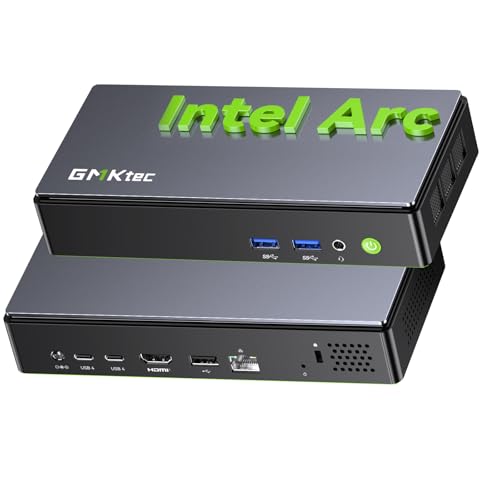
GMKtec K13 Mini PC Intel Ultra 7 256V

GMKtec K15 AI Mini PC Intel Ultra 5 125U
Huidun H50 Ryzen 3300U Mini PC Win 11 Pro

GMKtec T1 AI Mini PC Intel Ultra 9 285H

Beelink Mini S12 12th Gen Quad-Core N95

Beelink SER5 MAX Ryzen 7 7735U Mini PC

Beelink SER5 Ryzen 5 5500U Mini PC

GMKtec K17 Mini PC Intel Ultra 226V
More Details On Our Top Picks
The Getorli Mini PC with the Ryzen 5 3501U is the kind of quiet, four-core workhorse I think about when a friend asks for a desktop to run a small shop. It comes with 16GB of DDR4 RAM and a 512GB NVMe SSD, which is enough breathing room for browser-based point-of-sale, accounting software, and a few Chrome tabs without that frustrating whirr of the disk catching up.
Triple-display support matters more than people expect at this size. A retail counter running a customer-facing screen plus a back-office monitor plus a receipt printer view fits naturally here. Compared to the Beelink Mini S12 later in the list, this one pairs a more capable AMD CPU with WiFi 6 (the latest generation of Wi-Fi, offering faster throughput and better handling of many connected devices), so daily logins and cloud backups stay snappy.
Useful Strengths
- Ryzen 5 3501U with four cores handles spreadsheets, browser tabs, and video calls without choking
- 16GB of DDR4 RAM keeps multitasking smooth and supports heavier tabs and lightweight creative apps
- 512GB PCIe NVMe SSD cuts boot and load times sharply against older spinning disks
- WiFi 6 reduces lag on busy networks with many connected staff devices
- Triple-display output suits counter-plus-back-office arrangements common in small retail
Points To Note
- Integrated graphics are fine for office work but cap creative or 3D ambitions
- Compact case means ventilation relies on good placement, so avoid sealing it in a tight cabinet
Right Fit For
Front-desk and small retail operations that need a quiet, capable all-rounder for everyday office and POS software.
Reach For A Different Pick When
Teams needing more graphics horsepower for creative work should look at the GMKtec K17 Mini PC, whose Arc graphics and AI tuning are aimed at studios.
The GMKtec K13 sits at the modern end of the mini PC market, and I think of it as the option for owners who want their hardware to stay relevant through the next wave of AI-assisted software. The Intel Core Ultra 7 256V pairs high TOPS ratings (tera operations per second, a measure of how many trillion calculations an AI accelerator can perform) with SK Hynix LPDDR5X memory at 8533 MT/s, which translates to very fast access to working data.
For businesses trialing local AI tools, transcription services, or smart assistants that keep data on premises, that combination helps the chip stay ahead of the curve. Compared to the Getorli reviewed earlier, this is a step up in both raw and AI-specific compute, though the everyday office experience feels similar for routine tasks.
Practical Advantages
- Intel Ultra 7 256V delivers strong multi-thread and AI acceleration for modern apps
- LPDDR5X at 8533 MT/s keeps the processor fed for responsive multitasking
- Compact footprint fits behind a monitor or on a small shelf in tight offices
Some Limits To Know
- Onboard memory means upgrading RAM later is more limited than socketed DDR4 designs
- Top-tier silicon comes with a noticeable jump in cost over entry mini PCs
- AI workflows are still maturing in business software, so the AI uplift may go unused for routine office tasks
Key Product Details
Built With In Mind
Forward-looking small businesses experimenting with local AI tools, transcription, and on-prem assistants that need modern hardware.
Skip It When
Owners on a tighter budget running mostly browser-based work will get more value from the Getorli Mini PC reviewed earlier.
Connectivity is the headline feature on the GMKtec K15, and it is genuinely useful for specific kinds of small offices. The Intel Core Ultra 5 125U brings twelve threads and a sensible AI Boost NPU, but the real story is the port layout: dual 2.5GbE NICs (network interface cards, the wired networking ports that connect to your router or switch), OCuLink, USB4, and HDMI 2.1 supporting up to four displays at high resolution.
For a trading-floor-style setup where an operator wants market feeds on multiple panels, or a small control room with camera feeds, this kind of bandwidth matters. Compared to the K13 above, the K15 trades raw AI performance for far more display and storage flexibility, with three M.2 2280 slots (a small, fast internal SSD form factor) ready for expansion.
What Helps Most
- Quad 8K display support creates a genuine multi-monitor command station from a tiny box
- Three M.2 2280 slots make capacity expansion painless as data grows
- Dual 2.5GbE NICs support link aggregation (combining two network cables for higher throughput) or failover for reliable connectivity
- OCuLink and USB4 give future-friendly paths to external GPUs or storage
Honest Caveats
- More ports mean a slightly larger chassis than the simplest mini PCs
- Quad-display setups need the right cables and monitors to actually use the bandwidth
- Power users with GPU-heavy workloads will still want a dedicated graphics card
Whose Shelf It Belongs On
Trading desks, control rooms, and operations centers that want a tiny machine driving four high-resolution screens.
A Better Fit Elsewhere
Single-monitor offices that will not use the quad-display stack should consider the Beelink SER5 MAX instead.
The Huidun H50 is built for the unglamorous truth of small business computing: the machine that sits in the back office running payroll software, email, and that one legacy CRM. The Ryzen 3300U is a quad-core part that handles everyday workloads without fanfare, and pairing it with Windows 11 Pro means features like BitLocker drive encryption and Remote Desktop are ready out of the box.
I appreciate that the display output is dual-format, with DisplayPort plus HDMI 4K at 60Hz, which keeps older and newer monitors both happy. Compared to the Beelink Mini S12 further down the list, this Huidun offers a stronger CPU and a Pro license, which often matters more for compliance-minded owners than raw benchmarks suggest.
Benefits That Matter
- Windows 11 Pro enables BitLocker and Remote Desktop, useful for protecting client data
- 16GB DDR4 plus 512GB SSD is a sensible baseline for several years of office work
- Dual-band WiFi supports modern routers and crowded networks in shared buildings
- Three-year warranty coverage offers peace of mind for shops without dedicated IT staff
Factors To Consider
- Integrated graphics limit any interest in 3D or creative workflows
- The Ryzen 3300U is a capable but older chip, so heavy multitasking has a ceiling
- Some owners may find the included cooling slightly audible under sustained load
Feature Snapshot
Who Should Grab It
Back-office administrators and small business owners who want Windows Pro features and a longer warranty.
Consider Something Else When
Shops chasing heavy creative or AI workloads should look at the GMKtec K17 Mini PC reviewed later in this roundup.
The GMKtec T1 is, in my view, the closest a small business gets to a workstation without buying a real tower. The Intel Core Ultra 9 285H delivers sixteen cores and a turbo clock of 5.4GHz, with 32GB of DDR5 in dual-channel config (two memory modules working together for higher bandwidth than a single stick) and a 1TB PCIe 4.0 SSD (a fast internal storage standard with double the bandwidth of PCIe 3.0). It is the kind of spec sheet that handles CAD renders, 4K timeline edits, and large data exports.
Three M.2 slots, dual 2.5GbE, and quad 8K display support make this a tiny box that punches far above its weight. For a design studio or engineering consultancy with five workstations, choosing this as the lead workstation saves real floor space.
Where It Excels
- Sixteen-core Ultra 9 285H chews through CAD, rendering, and data workloads
- Dual-channel DDR5 with 32GB headroom keeps large working files accessible
- 1TB PCIe 4.0 SSD offers fast read and write speeds for active projects
- Quad 8K display output suits color-critical creative reviews across multiple panels
Trade-Offs To Consider
- Premium components push this into a higher price bracket than typical mini PCs
- Power draw is higher than entry chips, so expect more heat under sustained loads
- Overkill for shops whose work tops out at email and spreadsheets
Best Suited To
Design studios, engineering consultancies, and prosumers who need workstation muscle without tower footprint.
Look Elsewhere When
Smaller teams running cloud-based software should save money with the Getorli Mini PC reviewed earlier.
The Beelink Mini S12 with the 12th Gen Intel N95 is the smallest practical pick on this list, and it covers a real slice of small business needs. Digital signage, kiosks, reception check-in screens, and inventory terminals do not need a Ryzen 7; they need something reliable, fan-quiet, and easy to hide behind a monitor. The N95 fits that bill with four cores, modest power draw, and an SSD instead of a spinning disk.
Compared to the GMKtec T1 above, this is a completely different category of machine, and that is the point. For deployments where ten units will live behind ten screens across one retail floor, the price difference across the fleet is where the savings add up.
Why It Works Well
- Very compact chassis fits behind any VESA-mount setup (a standard bracket pattern on the back of monitors and small desktops)
- 12th Gen N95 handles browser apps and digital signage playback smoothly
- Low power draw keeps running costs manageable across multi-unit deployments
- SSD storage reduces noise and mechanical wear versus older HDD designs
Possible Compromises
- Only four cores limit heavy multitasking compared to Ryzen options
- Not suited for any creative or compute-heavy workflows
- Smaller RAM configurations may need attention for browser-heavy workloads
Perfect Match For
Small businesses rolling out digital signage, kiosk stations, or reception screens where simplicity and low cost matter most.
Where Another Pick Suits Better
Staff doing real document work or video calls should step up to the Beelink SER5 reviewed later in this list.
The Beelink SER5 MAX sits in a sweet spot that I keep recommending to operations teams. The Ryzen 7 7735U brings eight cores and sixteen threads on a 6nm process, with boost speeds up to 4.75GHz, so juggling a CRM, three spreadsheets, a Zoom call, and a browser full of research tabs feels effortless rather than cramped.
What I appreciate is the balance: enough CPU for serious multitasking, integrated Radeon graphics that handle light photo edits, and a small footprint that fits on any desk. Compared to the GMKtec K15 earlier, this Beelink trades the K15’s quad-display ambitions for simpler cabling and a friendlier price, which matters more for typical office workflows.
What Stands Out
- Eight-core Ryzen 7 handles video calls plus multitasking without slowing down
- 6nm efficiency keeps thermals and fan noise modest during the workday
- Integrated Radeon graphics offer headroom for light creative tasks
- Compact chassis tucks behind a monitor or under a stand
Things To Weigh Up
- Limited storage in base configurations means adding an SSD sooner
- Display output tops out short of quad-screen setups
- Not aimed at heavy AI or 3D rendering workloads
Quick Technical Notes
Who It Suits Best
Operations teams and analysts who run multiple apps at once and want a quiet, capable desktop under their monitor.
Swap It Out When
Workshops needing four-screen dashboards should pick the GMKtec K15 AI Mini PC instead.
The Beelink SER5 with the Ryzen 5 5500U is the pick I suggest when a client wants something that simply works, day after day, across a small team. Six cores and twelve threads handle the standard office stack comfortably, and 16GB of DDR4 paired with a 480GB NVMe SSD gives plenty of room for documents, emails, and project files.
Compared to its bigger sibling the SER5 MAX above, this is the calmer option: less raw speed, lower cost, and a more straightforward fit for typical reception, sales, or admin desks. Owners commonly cite the quiet operation and reliable everyday feel as the reason it ends up rolled out across multiple workstations.
The Upside
- Six-core Ryzen 5 handles everyday office suites and light multitasking well
- 480GB NVMe SSD keeps boot times short and apps responsive
- 16GB of DDR4 supports modern browsers and spreadsheets comfortably
- Compact footprint frees up desk space compared to traditional towers
Things To Consider
- Storage fills up faster with media-heavy businesses, so plan expansion early
- Not built for heavy creative software or AI acceleration
- Performance tops out short of the SER5 MAX for very heavy workloads
Feature Card
Made For
Reception desks, sales floors, and shared workstations where steady, predictable performance matters more than peak power.
Not Your Match When
Power users running CAD or heavy data pipelines should instead consider the GMKtec T1 Mini PC earlier in this list.
The GMKtec K17 closes the roundup as the pick I think about for small studios producing video, photography, or AI-assisted content. The Intel Core Ultra 5 226V pairs a strong NPU with up to 97 TOPS of AI throughput, and the integrated Intel Arc 130V graphics add genuine muscle for video work and GPU-accelerated tasks (computing jobs that shift heavy lifting from the main processor onto the graphics chip for speed).
LPDDR5X memory at 8533 MT/s keeps the data path wide, which matters when editing 4K timelines or running generative AI tools locally. Compared to the GMKtec K13 reviewed earlier, this K17 trades some multi-thread score for much stronger graphics and AI tuning, making it the better creative pick.
Strengths Worth Knowing
- Intel Arc 130V graphics handle video playback, light editing, and AI visual tasks
- 97 TOPS of AI throughput supports local generative and productivity tools
- LPDDR5X bandwidth keeps editing timelines and large models responsive
- Compact chassis suits studio desks where space is at a premium
Less-Strong Areas
- Onboard memory limits future RAM upgrades compared to socketed designs
- Heavy 3D rendering still trails a full workstation GPU
- Premium pricing may be hard to justify for purely text-based workflows
Core Features
The Right Fit
Small content studios, video producers, and creative shops that want desktop-class graphics without a tower case.
Another Choice May Suit
Offices without creative or AI ambitions should save with the Beelink SER5 Ryzen 5 covered earlier in this roundup.
What To Match Between These Picks And Your Business
CPU Choice Matters More Than RAM Headroom
For most office workloads, the processor determines how snappy the machine feels. AMD Ryzen chips tend to bring strong multi-core performance at lower cost, while Intel Core Ultra adds AI acceleration and modern integrated graphics. Pick a CPU that matches the heaviest task the desktop will run, not the lightest, because that sets the ceiling on responsiveness.
RAM and Storage Drive Day-To-Day Feel
16GB of DDR4 or DDR5 covers most office stacks for several years. SSDs make a bigger difference to perceived speed than CPU upgrades for everyday work, so never settle for a spinning hard disk in 2026. Expansion slots matter for growing file archives, and several picks here offer multiple M.2 slots for painless upgrades.
Display and Connectivity Match Your Setup
Count the monitors before buying. Three-screen counters, four-panel dashboards, and single-monitor desks each fit different machines. Ports like USB4, OCuLink, and dual Ethernet open up future accessories, but cost money today if you will not use them.
Common Shopping Slip Ups
Buying on CPU alone ignores RAM, storage, ports, and OS edition. Over-provisioning for hypothetical workloads wastes budget that could go toward better monitors or a reliable backup drive. Confirm Windows edition and warranty terms before checkout, since Pro features and longer coverage can save real headaches later.
Why Top Tier Costs More
Higher-end picks like the GMKtec T1 and K17 pair more cores, faster memory, stronger integrated graphics, and modern AI accelerators. The extra cost buys headroom for creative work, local AI tools, and multi-monitor setups that entry chips struggle with. For shops running browser-based work and spreadsheets, that headroom often goes unused.
Frequently Asked Questions
Do small businesses really need a mini PC instead of a tower? For many offices, yes. Mini PCs fit behind a monitor, run cool and quiet, and handle the same office apps as a tower, saving desk and floor space without sacrificing capability.
Is an integrated graphics card enough for accounting and POS software? Yes. Modern integrated graphics handle spreadsheets, point-of-sale, and browser-based tools without trouble. Discrete GPUs only matter for creative, 3D, or AI-heavy tasks.
How important is Windows 11 Pro versus Home? For most small businesses, Pro enables BitLocker encryption and Remote Desktop, which matter for data protection and remote support. Home is fine for simpler setups without compliance needs.
Can I upgrade RAM and storage later? It depends on the model. Beelink and GMKtec designs with socketed RAM and multiple M.2 slots are friendlier to upgrades, while LPDDR5X-based machines have fixed memory.
What is a TOPS rating and does it matter? TOPS stands for tera operations per second, a measure of AI accelerator throughput. Higher TOPS means the chip can handle more demanding on-device AI tasks, though most office software does not yet require it.
Wrap Up
The right small business desktop comes down to matching the machine to the actual work that runs through it, whether that is a quiet counter terminal, a multi-screen operations desk, or a creative workstation hiding behind a monitor. Any of these nine picks should serve a small business well, and the differences between them mostly come down to CPU muscle, port layout, and OS edition rather than raw reliability. For most owners starting out, a balanced mid-range option covers years of everyday office work, and the upgrade path is there when the workload grows.