A thin wireless keyboard clears desk space, slips into a laptop bag without weighing it down, and keeps the typing surface low enough that wrists stay happier over long sessions. Anyone moving between a home office, a coworking spot, and a café table needs a board that disappears when packed and reconnects the second a laptop opens. The picks below span Apple’s polished scissor-switch options, Keychron’s ultra-slim mechanical and scissor boards, E-YOOSO’s wired compact keyboard, seenda’s metal combo, and wegear’s pastel membrane lineup, so every typing preference and budget has a match.
A Fast Comparison Of The Options

Apple Magic Keyboard with Numeric Keypad (US English)

Apple Magic Keyboard (Spanish Layout, White)

Keychron K17 Max 96% Ultra-Slim Wireless Mechanical Keyboard

E-YOOSO 96% Wired Creamy Mechanical Keyboard (Cyan LED)

Keychron B1 Pro Ultra-Slim Wireless Keyboard (White)
wegear Pastel Wireless Keyboard (Pink)
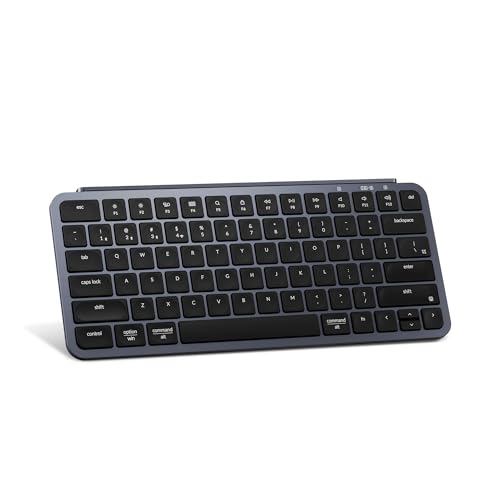
Keychron B1 Pro Ultra-Slim Wireless Keyboard (Gray)

seenda COE64-3 Pro Wireless Keyboard and Mouse Combo

wegear Pastel Wireless Keyboard (Blue)
wegear Pastel Wireless Keyboard (Green)
The full-size Apple Magic Keyboard with Numeric Keypad is the board I keep reaching for on long workdays spent in spreadsheets and dual-monitor setups. Its low scissor-switch profile sits almost flush with the desk, so wrists stay in a more neutral position than they would over a tall mechanical stack. The included ten-key block, document navigation keys, and full-size arrow cluster turn it into a productivity tool rather than a stripped-down travel companion.
Bluetooth pairing keeps the desk cable-free, and the rechargeable internal cell runs roughly a month between charges in my usual mix of typing and shortcut work. Charging and pairing happen through the included Lightning to USB cable. Compatibility covers Macs running macOS 10.12.4 or later, iPads with iPadOS 13.4 or later, and iPhones or iPod touches on iOS 10.3 or later, so the same keyboard travels between devices without juggling cables.
Useful Strengths
- Extended layout with numpad, document navigation keys, and full-size arrows, a real productivity upgrade for finance and spreadsheet work.
- Low scissor-switch mechanism keeps the typing surface flat, which helps wrists over multi-hour writing sessions.
- Bluetooth pairing with Mac, iPad, and iPhone means one keyboard covers three device categories without dongles.
- Internal rechargeable battery rated at roughly a month per charge, so daily recharging anxiety fades.
Honest Caveats
- Lightning port rather than USB-C means Apple households mid-transition may need a separate cable for charging.
- No tactile click or mechanical bounce, so typists who prefer pronounced feedback may find the action flat.
Who It Suits Best
Apple-centric professionals and students who live in spreadsheets, finance apps, or long-form writing and want a low-profile full-size board.
Where Another Pick Suits Better
Typists craving a more pronounced mechanical feel should look at the Keychron K17 Max instead of settling for scissor-switch action.
The tenkeyless Apple Magic Keyboard trims the numeric pad and keeps the slim profile, which makes it the board I prefer when traveling light. Without the number column, the footprint shrinks enough to leave room for a notebook, a coffee cup, and a trackpad on a tiny café table. The Spanish layout here suits bilingual or Spain-region typists, while the typing feel matches the larger Magic Keyboard sibling above.
Bluetooth pairs quickly across Mac, iPad, and iPhone, and the woven USB-C to Lightning cable handles both pairing and recharging. The internal battery holds out for roughly a month of regular use, so short trips rarely require a charger. For anyone already using USB-C on a recent MacBook or iPad, the cable situation is cleaner than the older Lightning-equipped model.
The Good Stuff
- Compact tenkeyless footprint saves serious desk space and slides easily into a laptop sleeve.
- Woven USB-C to Lightning cable suits newer Mac and iPad owners who have moved past USB-A.
- Same comfortable scissor-switch action and roughly month-long battery as the larger Magic Keyboard.
Soft Spots
- Spanish key labels may confuse English-only typists who rely on muscle memory for special characters.
- No number pad, so heavy spreadsheet users lose dedicated input that the larger Apple board offers.
Made For
Mobile Apple users who pack light and prefer the Spanish layout, whether for region or bilingual work.
Skip It When
Anyone who types numbers constantly should reach for the Apple Magic Keyboard with Numeric Keypad above instead.
The Keychron K17 Max is the board I would grab for anyone who refuses to give up mechanical feel just to save desk space. Low-profile Gateron Brown switches keep the typing surface slim while still delivering the tactile bump and gentle click that mechanical fans expect. The 96% layout squeezes a number pad, arrow cluster, and function keys into a frame that does not feel oversized.
Triple connectivity covers 2.4 GHz wireless at a 1000 Hz polling rate (a measurement of how often the keyboard reports its position to the computer, where higher means more responsive input), Bluetooth 5.1 for up to three paired devices, and USB-C wired for charging or low-latency play. QMK open-source firmware and the Keychron Launcher web app let users remap keys and update features without flashing through complicated tools. Compared with the Apple Magic Keyboard above, this is the board for typists who want feedback on every keystroke.
Everyday Advantages
- Low-profile mechanical switches bring real tactile feedback without the tall stance of standard mechanical boards.
- Three-way connectivity, including 1000 Hz 2.4 GHz wireless, handles gaming, mobile, and desk work from one board.
- QMK firmware with the Keychron Launcher means deep remapping and updates without command-line fuss.
- 96% layout preserves the number pad while cutting the wasted space of a full-size frame.
Worth Noting
- Mechanical switches produce more audible sound than scissor or membrane keyboards, which can be a concern in shared rooms.
- Heavier than membrane or scissor boards, so daily backpack carry may feel bulky.
Quick Facts
Right Fit For
Mechanical typists and gamers who want slim design, a numpad, and triple connectivity across Mac and Windows.
Look Elsewhere When
Typists in noise-sensitive environments should pick the silent Keychron B1 Pro instead for library-friendly typing.
The E-YOOSO 96% wired mechanical keyboard delivers mechanical typing without the premium tax of Keychron’s wireless boards, which makes it my go-to recommendation for fixed desk setups. The 99-key layout drops the function row margin to keep numpad, arrows, and shortcuts in a frame that measures 15.35 by 5.4 by 1.5 inches, so it tucks neatly into compact workstations.
A detachable USB-C to USB-A cable makes transport and replacement painless, while cyan LED backlighting gives a glow for late-night sessions. Compatibility covers both PC and Mac, which is handy for shared households or hybrid offices. Compared with the K17 Max above, this E-YOOSO skips wireless entirely in favor of a steadier connection that never asks for charging.
What Earns Its Place
- Compact 96% layout preserves the number pad while freeing up desk space compared to standard full-size boards.
- Detachable USB-C to USB-A cable simplifies travel and makes replacements easy if the original wears out.
- Cyan backlighting keeps keys legible in dim rooms without the distraction of RGB rainbow modes.
Points To Note
- Wired-only design ties the keyboard to the desk and rules out couch or café use without a cable.
- Cyan LED backlighting is fixed, so users wanting per-key color control should look elsewhere.
Best Suited To
Budget-conscious desk typists who want mechanical feel, a numpad, and a tidy footprint without paying for wireless extras.
A Better Fit Elsewhere
Cord-cutters and laptop commuters will get more value from the Keychron K17 Max above with its Bluetooth and 2.4 GHz options.
The Keychron B1 Pro in white is my pick when a household runs a mix of Mac, Windows, and Linux machines and nobody wants to fight over keyboards. The ultra-slim scissor-switch frame keeps the desk line clean, while ZMK open-source firmware and the Keychron Launcher web app let tinkerers remap and update the board across operating systems. The white finish pairs well with light wood or Scandinavian-style setups.
Triple connection covers 2.4 GHz wireless with a 1000 Hz polling rate for responsive input, Bluetooth 5.2 for swapping between devices, and USB-C wired for charging or permanent desktop use. Scissor switches stay quiet, which makes the B1 Pro welcome in shared offices and late-night home workspaces. Compared with the Apple Magic Keyboard above, this board brings similar scissor feel but adds cross-platform flexibility and a much higher polling rate on the wireless link.
Real-World Strengths
- Cross-platform support for Mac, Windows, and Linux means one keyboard covers a mixed-device household.
- Ultra-slim scissor-switch frame keeps the typing surface low and the desk profile tidy.
- 1000 Hz polling rate on 2.4 GHz wireless makes the board feel as responsive as a wired connection.
- ZMK firmware with Launcher access enables custom layouts and updates without command-line work.
Where It May Fall Short
- No dedicated number pad, so spreadsheet-heavy users lose the dedicated column the Apple Magic Keyboard with Numeric Keypad offers.
- White finish shows dust and surface marks more readily than darker boards, so it may need frequent wiping.
Perfect Match For
Multi-OS households and remote workers who bounce between a MacBook at home and a Linux or Windows desktop at the office.
Reach For A Different Pick When
Typists needing a dedicated number pad for spreadsheets should consider the Apple Magic Keyboard with Numeric Keypad above.
The pink wegear Pastel Wireless Keyboard is the board I suggest when style matters as much as function, especially for first workspaces, dorm rooms, or anyone redecorating on a tight budget. The soft pastel finish brings warmth to a desk that would otherwise feel sterile under LED strips and white monitors. The membrane key feel stays soft and cushioned, with a multi-layer design that absorbs harsh bottoming-out for casual typing comfort.
Tri-mode connectivity covers USB-C wired, 2.4 GHz wireless, and Bluetooth, so the board can move between a desktop tower, a laptop, and a tablet without swapping dongles. Rated for 10 million keystrokes, the keyboard holds up well under daily office work and light gaming sessions. Membrane keys do not hot-swap, so users wanting customizable switches should look at the Keychron K17 Max instead.
The Helpful Details
- Tri-mode connection (USB-C, 2.4 GHz, Bluetooth) handles desktop, laptop, and tablet use from one board.
- Multi-layer cushion design softens the bottom-out feel, which reduces finger fatigue on long typing days.
- 10 million keystroke rating suggests solid longevity for students and casual home use.
Trade-Offs To Consider
- Membrane switches do not provide the tactile bump that mechanical typists expect.
- No hot-swap support, so switch feel cannot be customized after purchase.
Whose Shelf It Belongs On
Students, first-time home office shoppers, and casual typists who want pastel style and tri-mode connectivity without mechanical pricing.
Swap It Out When
Gamers and fast typists should step up to the Keychron K17 Max above for low-profile mechanical feedback.
The gray Keychron B1 Pro shares the same ultra-slim chassis and ZMK-based programmable firmware as the white sibling above, but the gray finish hides smudges and matches darker workstation builds. The headline spec is the rated 1200-hour battery life, which frees users from constant charging during long trips or extended remote work stints.
Silent scissor-switch keys keep typing volume low, which is exactly what shared offices, libraries, and late-night home users want. Triple connectivity covers Bluetooth, 2.4 GHz wireless, and USB-C wired, with the 1000 Hz polling rate holding steady on the wireless link for responsive input. Compared with the Apple Magic Keyboard above, this board brings similar quiet action with a longer-rated battery and broader OS support.
What Makes Sense
- Rated 1200-hour battery life means charging drops to a monthly rather than weekly chore.
- Silent scissor-switch keys suit shared offices and late-night work without distracting nearby listeners.
- Triple connection (Bluetooth, 2.4 GHz, USB-C) keeps the board flexible across Mac, Windows, and Linux.
- Gray finish hides smudges better than the white version, helping the board look clean between wipes.
Factors To Consider
- No dedicated number pad, so spreadsheet-heavy users lose quick numeric entry.
- Scissor-switch feel is quieter but lacks the tactile bump mechanical typists prefer.
Who Should Grab It
Remote workers and quiet-office typists who want long battery life and silent keys in a slim Mac, Windows, or Linux board.
Not Your Match When
Typists who want dedicated numeric entry should step up to the Apple Magic Keyboard with Numeric Keypad instead.
The seenda COE64-3 Pro bundle is the pick I lean toward for shared desks or anyone outfitting a complete workstation in one purchase. The keyboard runs slim at 0.18 inches thin with a full-size US QWERTY layout, so the numeric pad stays available for accounting and spreadsheet work. The metal frame keeps the board rigid under fast typing and resists flex during intense sessions.
Seven backlight colors with three brightness levels keep the keys readable across dim rooms and bright afternoons, while two typing angles (5.5° and 9°) let the user dial in a comfortable wrist position. Multi-device pairing across three devices through Bluetooth rounds out the flexibility, and the included mouse completes the combo. Compared with the Keychron B1 Pro above, this set adds a dedicated number pad and backlighting at a competitive price.
Standout Benefits
- Full-size layout with numeric pad handles spreadsheets and accounting without sacrificing slim design.
- 0.18-inch metal frame stays rigid and resists flex during heavy typing.
- Seven backlight colors with three brightness levels keep typing legible in any room.
- Two typing angles (5.5° and 9°) let users pick the wrist position that feels best over long sessions.
Possible Compromises
- Bundle mouse may not satisfy power users who already own a higher-end pointing device.
- Backlighting and metal frame add a bit of weight compared to plastic-only ultra-slim boards.
The Right Fit
Shared-desk households, students, and first-time home offices who want a full-size slim keyboard and a matching mouse in one bundle.
Consider Something Else When
Minimalists wanting only a keyboard should skip the combo and pick the Apple Magic Keyboard above for a cleaner desk.
The blue wegear Pastel Wireless Keyboard brings the same cushioned membrane feel as the pink sibling above, but in a calm tone that suits serious-looking home offices and minimalist desks. The soft blue finish pairs naturally with wood-grain desks and lighter wall colors, helping the board blend in rather than shout. For shared workspaces with multiple users, the color also helps distinguish each person’s keyboard at a glance.
Tri-mode connectivity (USB-C wired, 2.4 GHz wireless, Bluetooth) keeps the board flexible across laptops, desktops, and tablets. The 10 million keystroke rating suggests solid longevity for daily office work and casual play. Membrane keys are not hot-swappable, so users wanting to tune switch feel should pick the Keychron K17 Max instead.
Positive Takeaways
- Calm pastel blue finish blends into minimalist and wood-toned desks without clashing.
- Multi-layer cushion design softens the bottom-out feel for longer typing sessions.
- Tri-mode connectivity handles desktop, laptop, and tablet from one keyboard.
Points To Keep In Mind
- Membrane switches lack the tactile bump that mechanical or scissor-switch typists expect.
- No hot-swap support, so the typing feel cannot be customized after purchase.
Built With In Mind
Home office users and shared desks who want a calm blue finish, cushioned typing, and tri-mode connection at an approachable cost.
Where A Sibling Pick Shines
Typists craving a real mechanical feel should pick the Keychron K17 Max instead of a membrane board.
The green wegear Pastel Wireless Keyboard rounds out the pastel trio with a fresh tone that pops on neutral desks and bright rooms. It carries the same cushioned membrane key feel as the pink and blue versions, with a multi-layer design that softens each bottom-out for casual typing comfort. The finish works especially well in study spaces, kids’ rooms, or anyone decorating around green plants and natural tones.
Tri-mode connectivity through USB-C wired, 2.4 GHz wireless, and Bluetooth covers laptops, desktops, and tablets. The 10 million keystroke rating handles daily office work and light gaming without concern. Users wanting hot-swappable switches or pronounced tactile feedback should pick the Keychron K17 Max instead, but for a budget-friendly color-forward board, this one does the job.
Where It Excels
- Fresh pastel green tone adds personality without overwhelming a minimalist desk.
- Multi-layer cushion design softens typing fatigue over long sessions.
- Tri-mode connection handles multiple device types from one board.
- 10 million keystroke rating supports years of regular office use.
Some Limits To Know
- Membrane keys cannot match the tactile feedback of mechanical or scissor-switch boards.
- No hot-swap support, so switch tuning after purchase is not possible.
Who Will Love This
Students and first-time home office shoppers who want a budget board with personality, tri-mode connection, and comfortable typing.
Another Choice May Suit
Mechanical fans should look at the Keychron K17 Max above for tactile feedback and deeper customization.
What To Weigh Before Choosing A Thin Wireless Keyboard
A slim profile is the starting point, but the details underneath decide whether the board becomes a daily favorite or gets shoved in a drawer. Connection type matters first: Bluetooth 5.x and modern 2.4 GHz links feel just as responsive as wired for most typing tasks, and they free the desk from cable clutter. Wired mechanical boards still have their place for permanent setups where zero latency and constant power matter more than portability.
Switch type shapes the typing experience far more than thickness does. Scissor switches (the flat, low-travel mechanism used in most laptops and Apple’s Magic Keyboards) stay quiet and low-profile, while mechanical switches add tactile feedback but raise the typing surface. Membrane boards (rubber-dome keys with a printed circuit underneath) keep the cost down and the action cushioned, which suits casual home offices but may frustrate heavy typists. Polling rate (how often the keyboard reports its input to the computer, measured in hertz) matters most for gamers and fast typists: 1000 Hz feels instant, while 125 Hz can feel sluggish in fast play.
Compatibility is the easy miss. Apple-centric keyboards map cleanly to iPads and iPhones, but Windows or Linux users may lose specific key functions without remapping. Cross-platform boards like the Keychron B1 Pro solve this with dedicated OS modes. Layout size, battery life, and backlighting round out the practical decisions, especially for shared desks and travel setups. Match the keyboard to the device mix, the typing style, and the noise tolerance of the room, and the rest sorts itself out.
What Matters Most In This Category
Polling Rate And Wireless Latency
A 1000 Hz polling rate on 2.4 GHz wireless keeps input feeling as immediate as a wired connection. Standard Bluetooth often runs closer to 125 Hz, which is fine for typing but may feel slow in games. For most office and writing tasks the difference is invisible, so weigh this only if fast reaction time matters.
Switch Feel And Noise
Scissor switches stay quiet and low, mechanical switches add feedback and height, and membrane keys cushion the action at lower cost. Quiet offices and shared rooms tend to favor scissor or silent mechanical options. Personal preference and room acoustics should drive the call more than any spec sheet.
Key Considerations Across These Picks
Common Buying Traps
First-time shoppers often chase the lowest profile and forget about layout. A slim tenkeyless board can save space, but spreadsheet work suffers without the numeric pad. Wireless boards that pair only over older Bluetooth versions can also drop connections on busy Wi-Fi channels, so checking the Bluetooth version (5.0 or higher is a safe baseline) and connection flexibility pays off. Backlighting looks great in product photos, but if typing happens in a well-lit office, that feature adds cost without daily benefit.
When The Higher Tier Pays Off
Premium boards justify their price through switch quality, firmware support, and battery life. A keyboard rated for 1200 hours of typing means the charger practically disappears from the routine. Mechanical enthusiasts gain deeper remapping through QMK or ZMK firmware (open-source software that lets users reprogram every key and macro), which is worth the step up for anyone who relies on custom shortcuts. The honest read is this: budget boards handle light typing fine, but daily heavy users notice the difference in switch consistency and software polish within weeks.
Frequently Asked Questions
How thin is “thin” for a wireless keyboard?
Most boards marketed as slim sit under 0.8 inches at the tallest point, with ultra-slim options like the Keychron B1 Pro measuring closer to a laptop keyboard’s height. Thinner generally means easier travel but less key travel (the distance a key moves when pressed), which affects typing comfort.
Do thin wireless keyboards feel as good as full-size mechanical ones?
Slim scissor and membrane keyboards feel shallower, while low-profile mechanical boards try to bridge the gap. Typists used to full-height mechanical switches may find any slim board flat, but most casual users adapt within a few sessions.
Is Bluetooth or 2.4 GHz better for a wireless keyboard?
Bluetooth 5.x handles multi-device pairing and saves USB ports, while 2.4 GHz with a 1000 Hz polling rate wins for gaming and fast typing. Many slim keyboards offer both, so the choice comes down to which devices need pairing.
Can I use a Mac keyboard with Windows or Linux?
Yes, but expect a few remapped keys. The Keychron B1 Pro and similar cross-platform boards include OS switch modes that map Command to Ctrl and adjust function keys automatically. Apple’s Magic Keyboard works with Windows and Linux but lacks OS-specific legends.
How long does a wireless keyboard battery really last?
Battery life depends on backlight use, connection type, and typing volume. The Keychron B1 Pro rates up to 1200 hours, while the Apple Magic Keyboard runs roughly a month per charge. Membrane boards with RGB lighting often drain faster, so factor backlight settings into expectations.
Final Verdict
Thin wireless keyboards cover a lot of ground, from Apple’s polished scissor-switch boards to Keychron’s programmable slim mechanicals and wegear’s color-forward membrane options. Apple households will feel right at home with the Magic Keyboard pair, while multi-OS users and typists who want deeper customization will appreciate the Keychron B1 Pro or K17 Max. Pick the board that matches the device mix, the typing feel, and the noise tolerance of the room, and the daily upgrade pays off every time fingers hit the keys.