That deep, satisfying “thock” sound has turned mechanical keyboards into an obsession for hobbyists and everyday typists alike. Thocky switches deliver that punchy, lower-pitched tone with a solid bottom-out feel, and the right board transforms typing sessions into something I genuinely look forward to. I put together this list to help anyone chasing that signature sound find a board that fits their setup, budget, and tinkering tolerance.
The Main Contenders

IQUNIX EV63 Hall Effect Magnetic Gaming Keyboard 60%
YUNZII C75 Cute 75% Wireless Mechanical Keyboard

YUNZII C98 Cute Cake Wireless Mechanical Keyboard
LEOBOG x Aula F75 MAX Wireless Gaming Keyboard
GATERON Milky Yellow Pro V3 Keyboard Switches 90PCS

MechLands Aula F99 PRO 96% Mechanical Gaming Keyboard

Ajazz AK820 TKL 75% Hot Swappable Mechanical Keyboard

COSTOM WK87 75% TKL Wireless Mechanical Gaming Keyboard

Razer BlackWidow Elite Mechanical Gaming Keyboard

Special Edition Cat Paw ESC Keycap (Pink)
More Details On Our Top Picks
The EV63 stands apart from every other board on this list because it swaps traditional mechanical contact for Hall-effect magnetic switches. That technology measures how far a key travels using magnets and sensors, which is why this keyboard can advertise a 0.01mm rapid trigger with adjustable actuation. In practice, that means you can tune each key to register at a hairline press for fast counter-strafing in Valorant, then back it off for typing comfort.
The 60% layout frees up enormous amounts of mouse space, which competitive FPS players tend to appreciate on smaller mousepads. The aluminum chassis with a forged carbon accent plate keeps weight down without feeling hollow, and the SOCD-aware firmware handles rapid opposite-direction inputs cleanly. Where the YUNZII boards lean pastel and aesthetic, this one leans flat-out esports.
Positive Points
- Hall-effect sensing enables per-key actuation depth, so the same board can feel twitchy for gaming and cushioned for typing.
- Hot-swap sockets mean you can experiment with switch feel without soldering, a real advantage for tinkerers.
- The 0.125ms latency claim combined with 8kHz polling is meaningfully faster than standard 1ms mechanical boards.
- Aluminum housing with carbon inlay keeps the board rigid on a desk, which deepens the thock resonance.
Trade Offs
- The 60% layout drops arrow keys and function row, so spreadsheet-heavy workflows will feel cramped.
- Hall-effect switches lack the classic stem swap ecosystem that traditional MX-switch hobbyists enjoy.
Whose Shelf It Belongs On
Competitive FPS and Valorant players who want every input advantage and don’t mind a compact footprint.
Reach For A Different Pick When
The YUNZII C75 fits better if you prefer wireless freedom and a softer pastel aesthetic for everyday desk work.
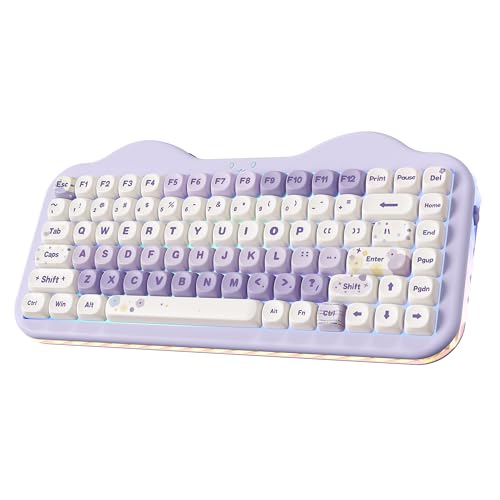
The YUNZII C75 leans into a cake-themed visual language that I find genuinely charming rather than gimmicky. The 75% layout keeps arrows and a function column while cutting the numpad, which fits a wide range of desk widths. Candy linear switches arrive pre-lubed for that creamy bottom-out sound the thock crowd loves.
Triple-mode connectivity (2.4GHz, Bluetooth, and wired USB-C) makes this a flexible daily carry for someone who bounces between a home office and a laptop on the couch. Where the IQUNIX EV63 is a precision tool for esports, the C75 is a personality piece that still types and games respectably.
Good Reasons To Consider
- Compact 75% layout saves desk space without sacrificing arrow keys or the function row.
- Pre-lubed linear switches deliver the satisfying thock right out of the box, no modding required.
- Wireless and wired modes cover desktop, tablet, and phone pairings in a single board.
Honest Caveats
- The pastel purple colorway won’t appeal to anyone who wants a stealthy, low-profile look.
- Battery life in active wireless use tends to drain faster with RGB at full brightness, so expect to charge weekly depending on habits.
Feature Snapshot
Made For
Typists who want personality and triple-mode flexibility for a hybrid work-and-play desk.
Where Another Pick Suits Better
The IQUNIX EV63 makes more sense if competitive gaming latency matters more than color and aesthetic.
Stepping up from the C75, the YUNZII C98 keeps the cake-themed styling but adds a dedicated numpad through its 96% layout. That extra column of keys is genuinely useful for anyone doing accounting, data entry, or heavy spreadsheet work, where the C75 forces a function-layer tap. The Milk switches are linear and tuned for a creamy, low-pitched acoustic.
The MOA profile keycaps in dye-sub PBT give the board a taller, sculpted feel that supports longer typing stints. Compared to the COSTOM WK87 further down this list, this one prioritizes visual flair over marathon battery life.
Everyday Wins
- 96% layout keeps the numpad for productivity while trimming the empty edges of a full-size board.
- Ergonomic MOA keycap profile reduces finger travel during long writing sessions.
- Wireless support frees the desk from cable clutter, helpful for tidy setups.
Small Caveats
- The cake-themed aesthetic can clash with serious corporate environments.
- Wider footprint than the C75 means smaller desks may feel crowded.
Best Suited To
Home office typists who crunch numbers and want their keyboard to feel cheerful.
Swap It Out When
The MechLands Aula F99 PRO is a better match for shoppers who prefer a more neutral look while keeping the rotary knob.
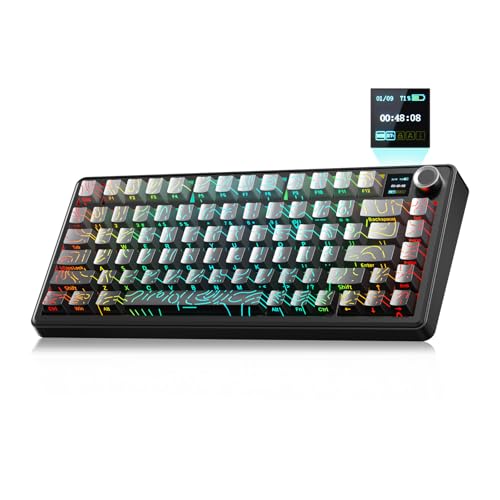
The F75 MAX stands out because it crams a small TFT display and an aluminum rotary knob onto a 75% wireless board. That screen shows battery percentage, connection mode, and a clock, but it also accepts custom GIF uploads for anyone who wants their keyboard to double as desk art. The knob handles volume, scrubbing, and backlight tweaks without diving into software.
Side-printed PBT topographic keycaps keep legends visible at an angle while letting the RGB shine through cleanly. Pre-lubed linear switches mean the thock is solid right away, and hot-swap sockets invite experimentation. Compared to the Ajazz AK820, this board trades a metal volume knob for the smart screen, which is the main reason to step up.
Practical Pluses
- Smart TFT display surfaces useful system info without opening software menus.
- Aluminum rotary knob gives precise volume control and frees the function row from media duties.
- Side-printed keycaps stay readable and let RGB backlighting come through unfiltered.
A Few Limitations
- GIF upload software is a small extra step some hobbyists will skip.
- The added screen and wireless hardware push weight up compared to simpler boards.
Quick Facts
Perfect Match For
Tinkerers who love customization, GIFs, and rotary knobs on a wireless 75% chassis.
Skip It When
The Ajazz AK820 is the better budget-friendly thock if you don’t care about a built-in display.
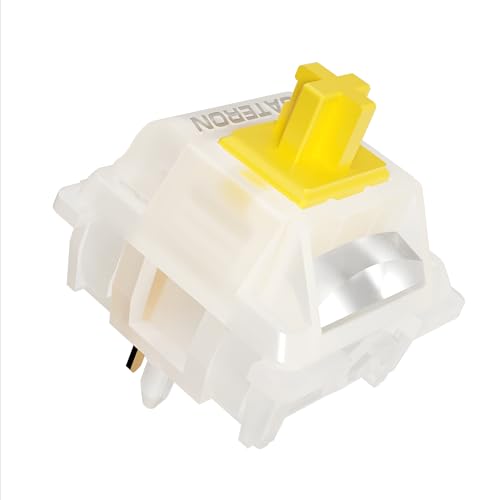
This entry is different: instead of a finished keyboard, it’s a 90-pack of GATERON Milky Yellow Pro V3 switches, the heart of the thocky sound itself. The Milky Yellow is a 50gf linear switch with a pre-lubed stem and detachable light guide pole for SMD-LED RGB compatibility. For anyone building a custom board from a kit, these are a low-friction starting point.
Five-pin housings fit most MX-style hot-swap PCBs, which covers nearly every entry on this list. Compared to factory-lubed switches from Ajazz or Aula, the Gateron Milky Yellow Pro V3 has a longer reputation in the hobby community. For someone who already owns a hot-swap board, swapping these in is the cheapest route to that creamy thock.
Advantages To Know
- Factory pre-lubing cuts out the manual lubing step most beginners find intimidating.
- Detachable light guide pole means cleaner RGB diffusion in SMD-LED compatible boards.
- Five-pin design fits standard MX-style hot-swap sockets across most enthusiast kits.
Things To Consider
- These are switches only, so you still need a compatible keyboard or kit to install them.
- Linear feel won’t satisfy typists who prefer tactile bumps under their fingers.
Feature Card
Right Fit For
First-time switch builders who want creamy linear switches without breaking out the lube station.
Look Elsewhere When
The Ajazz AK820 is a better starting point if you’d rather have a complete board instead of loose switches.
The Aula F99 PRO slots into the 96% layout family, retaining most keys from a full 108-key board while trimming the case. A rotary knob handles volume and backlight tweaks, and triple-mode connectivity covers Bluetooth 5.0, 2.4GHz wireless, and USB-C wired. The gasket-mount structure adds a cushioned typing feel that supports that deeper thock sound.
For someone bouncing between a phone, a tablet, and a desktop, the BT5.0 pairing is genuinely handy. Compared to the YUNZII C98, this one swaps cake-themed colorways for a more neutral aesthetic, which suits a grown-up office.
Useful Touches
- Rotary knob simplifies volume and backlight adjustments without key combos.
- Gasket mount structure softens bottom-out for a deeper acoustic profile.
- Triple-mode connectivity supports cross-device workflows at a desk or on the go.
Points To Keep In Mind
- The 96% footprint takes more desk real estate than a 75% board.
- Stock stabilizers tend to benefit from aftermarket tuning for the cleanest sound.
Who It Suits Best
Hybrid workers who switch between devices and want a quiet thock at the office.
A Better Fit Elsewhere
The YUNZII C98 makes sense if you want personality along with the productivity layout.
The Ajazz AK820 lands in the sweet spot for anyone who wants a creamy thock without paying premium prices. It uses a gasket-mount chassis, pre-lubed linear switches, and a metal volume knob, all wrapped in an 82-key 75% layout. South-facing RGB keeps shine-through clean with most Cherry-profile keycap sets.
Wired-only connectivity keeps things simple: no batteries to manage, no pairing hiccups. Hot-swap sockets let you drop in alternatives like the GATERON Milky Yellow Pro V3 from earlier on this list without a soldering iron. For a first-time custom keyboard, this is a sensible starting point.
What Stands Out
- South-facing RGB avoids interference with most aftermarket keycap profiles.
- Hot-swap compatibility lets you swap switches later without soldering.
- Gasket mount adds depth to the bottom-out sound, deepening the thock.
Worth Noting
- Wired-only design means no wireless freedom if that’s important to your setup.
- PBT keycaps ship in a basic set, so most owners upgrade the caps eventually.
Built With In Mind
First-time custom keyboard builders who want thocky sound and easy switch swaps on a budget.
Consider Something Else When
The COSTOM WK87 is a better fit if you want wireless connectivity plus a longer battery life.
The WK87 stands out for its 5000mAh battery, which the manufacturer rates for up to 400 hours with backlighting off. That means a working week or two between charges, depending on RGB habits, which beats most budget wireless boards I see. The 87-key layout splits the difference between a 75% and a TKL, keeping arrows and a navigation column.
Gasket-mount structure, five layers of sound-absorbing padding, and POM linear switches at 55gf combine for that creamy thock the category is named for. Triple-mode connectivity covers Windows, macOS, and iOS. Compared to the YUNZII C75, this one swaps personality for stamina and a more neutral gray finish.
Standout Benefits
- 5000mAh battery delivers multi-day use between charges, even with RGB enabled.
- Triple-mode connectivity supports desktop, tablet, and phone pairings seamlessly.
- Five-layer sound-absorbing padding deepens the thock and softens high-pitched clack.
Possible Compromises
- Companion software requires a download to access macro and lighting customizations.
- Heavier battery adds noticeable weight to the chassis compared to slimmer boards.
Tech Sheet
The Right Fit
Wireless-first users who want marathon battery life without sacrificing thocky sound.
Not Your Match When
The Ajazz AK820 is a better match if you prefer a wired-only, lower-cost entry point.
The BlackWidow Elite is the veteran of this roundup, and Razer Green switches lean tactile and clicky rather than the linear thock most of these boards deliver. That distinction matters: if you actually like a pronounced bump and audible click on every press, this is one of the few options here that gives you that. It runs full-size with a magnetic wrist rest and dedicated media keys plus a multi-function dial.
Chroma RGB integrates with popular games and a wide ecosystem of partner hardware, including smart lighting from Philips Hue. For shoppers who want brand-name support and traditional mechanical feel, the Elite is a familiar, dependable choice. It’s also the heaviest board on this list, which contributes to its solid, planted feel on a desk.
Strengths Worth Knowing
- Tactile and clicky Green switches satisfy typists who want audible feedback per keystroke.
- Multi-function digital dial handles media scrubbing and backlight tweaks without reaching for software.
- Magnetic wrist rest supports longer gaming sessions with less wrist fatigue.
Points To Weigh
- Clicky switches generate more ambient noise than the linear thock boards elsewhere on this list.
- Full-size layout demands substantial desk depth, especially with the wrist rest attached.
Who Should Grab It
Traditionalists who want brand-name mechanical switches, tactile feel, and a familiar full-size layout.
Wrong Turns To Avoid
The IQUNIX EV63 is the better pick for esports players who prefer smooth linear switches over clicky feedback.
This last entry isn’t a full keyboard. It’s a sculpted cat-paw ESC keycap with a soft silicone topper that sits on top of any MX-style switch. For someone who already owns a board from earlier in this list, dropping in this novelty cap is a low-cost way to inject personality onto a single key without replacing the whole set.
The ABS plastic base keeps cost down, and the silicone paw gives a slightly squishy landing that changes how the ESC key feels compared to standard caps. It’s compatible with the Ajazz AK820, COSTOM WK87, and most other MX-style hot-swap boards above. Compared to a full keycap set, this is a tiny but charming change.
Where It Helps
- Universal MX compatibility means it fits the Ajazz, COSTOM, Aula, and YUNZII boards above.
- Sculpted silhouette adds visual personality to a single key without committing to a full set.
- Soft silicone topper creates a unique landing feel under the ESC key.
Less Ideal Details
- ABS base has a shorter shine-resistance lifespan than PBT caps over years of use.
- Limited to one key, so the rest of the board keeps its original look and feel.
Feature Card
Perfect Match For
Keyboard customizers who want a tiny, affordable aesthetic accent on an existing build.
Where A Sibling Pick Shines
The YUNZII C75 is a better fit if you’d rather have a fully themed board instead of a single novelty cap.
Choosing Thocky Switches Without Regret
A few core attributes separate a satisfying thock from a hollow clack. The first thing I look at is switch type, since linear switches like GATERON Milky Yellow Pro V3 or Candy switches produce the smooth, bottom-out-driven thock most people chase. Tactile and clicky switches like Razer’s Green switches sound great, but they generate a higher-pitched clack that splits opinion in shared spaces.
Switch weight matters more than most shoppers expect. A 50gf linear switch feels feather-light for fast typists but may feel twitchy for slower writers. A 55gf or heavier switch slows down accidental presses but can fatigue hands over marathon sessions. For most desk work, the 50-55gf range hits the sweet spot.
Pre-lubed switches save beginners from buying lube, brushes, and switch openers. The GATERON Milky Yellow Pro V3 and the switches inside the Ajazz AK820 both arrive factory-lubed, which is the easiest entry into a creamy sound. Hall-effect boards like the IQUNIX EV63 sidestep lubing entirely, since they have no contact leaves to lubricate in the traditional sense.
Keycap material is the second-tier decision. PBT keycaps resist shine and stay textured for years, while ABS caps feel smoother initially but develop a greasy gloss over time. Most boards on this list lean PBT, which is the more durable choice for daily drivers.
Mount style rounds out the audio profile. Gasket-mount designs like the Ajazz AK820 and COSTOM WK87 use foam and silicone pads between the plate and case to soften bottom-out and deepen resonance. Tray-mount boards feel stiffer and produce a sharper sound that some hobbyists love and others find harsh.
Key Considerations Across These Picks
Common Buying Slip Ups
The most common mistake is choosing a switch type based purely on sound rather than feel. A creamy thock from a linear switch means smooth travel with no bump, which some typists find unsatisfying for daily writing. Clicky switches sound exciting in reviews, but they fatigue fingers and annoy coworkers faster than expected.
Another frequent trap is ignoring layout until after the board arrives. A 60% board like the IQUNIX EV63 is liberating for FPS gaming, but anyone who needs a numpad will regret it within a week. Measure the desk, decide which keys matter, then narrow the layout pool.
Battery life gets overlooked on wireless boards. The COSTOM WK87 is a clear standout in this roundup, but cheaper wireless boards may need charging every few days depending on RGB brightness.
What The Higher Tier Buys
The IQUNIX EV63 costs more than most entries here because of Hall-effect sensing, which delivers adjustable actuation and near-zero latency. For competitive gamers, that technology is genuinely useful. For casual typists, the price premium rarely translates into a noticeable experience gain over a well-built mechanical board.
Premium boards also tend to feature gasket mounts, multi-layer sound-absorbing foam, and PBT keycaps across the entire set. These touches deepen the thock and extend the lifespan of the keyboard, but they only matter if the board sees daily heavy use. Lighter users will get nearly as much value from the Ajazz AK820 at a fraction of the cost.
Frequently Asked Questions
What exactly makes a switch “thocky”?
A thocky switch produces a deep, low-pitched sound on bottom-out rather than a sharp clack. Linear switch types, gasket-mount chassis, and PBT keycaps all contribute to that acoustic profile.
Are linear or tactile switches better for thocky sound?
Linear switches generally deliver the cleanest thock because there’s no tactile bump to interrupt the bottom-out. Tactile switches can still thock, but the bump adds a subtle ping to the sound.
Do I need to lube my switches for thocky sound?
Pre-lubed switches like GATERON Milky Yellow Pro V3 arrive ready for a creamy feel. Hand-lubing can deepen the sound further, but it’s not required for most people chasing that signature thock.
What’s the difference between gasket mount and tray mount?
A gasket mount sandwiches the plate between foam or silicone pads, softening bottom-out and deepening resonance. Tray mount attaches the plate directly to the case, producing a stiffer, sharper sound that some find harsher.
Can I install thocky switches in any mechanical keyboard?
Only hot-swap boards accept new switches without soldering. Most of the keyboards above support hot-swap, so swapping in switches like the Milky Yellow Pro V3 takes just a few minutes per switch.
Closing Remarks
The right thocky keyboard depends entirely on what kind of typing you do, how much desk space you have, and whether wireless freedom matters to your daily routine. Competitive gamers will find the IQUNIX EV63 hard to beat, while home office workers may prefer the YUNZII C98 or Aula F99 PRO for the productivity-friendly layouts. Whatever you choose, that signature thock sound makes every typing session a little more satisfying.