Touch screens have reshaped what a desktop can feel like. For students juggling notes and research tabs, parents managing a shared family workstation, or small business owners who want one tidy setup instead of a cable nest, the right touch-enabled machine turns the screen into something you interact with, not just look at. The five picks below cover tight budgets, big creative workflows, and specialty commercial touchscreens, so you can match the machine to your actual day, not a spec sheet fantasy.
The Shortlist At A Glance

Lenovo IdeaCentre 24 23.8″ N100 8GB 512GB SSD All-in-One

HP 24-inch All-in-One Desktop, Athlon Silver 3050U, 8GB RAM, 256GB SSD

Elo 2270L 21.5″ PCAP 10-Touch Touchscreen Monitor
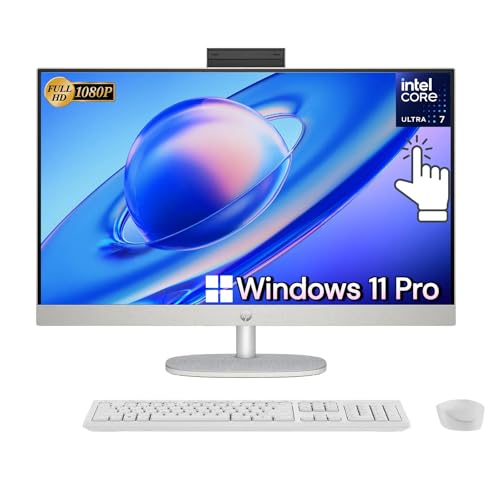
HP All-in-One 27″ Touchscreen, Ultra 7-155U, 64GB DDR5, 2TB SSD
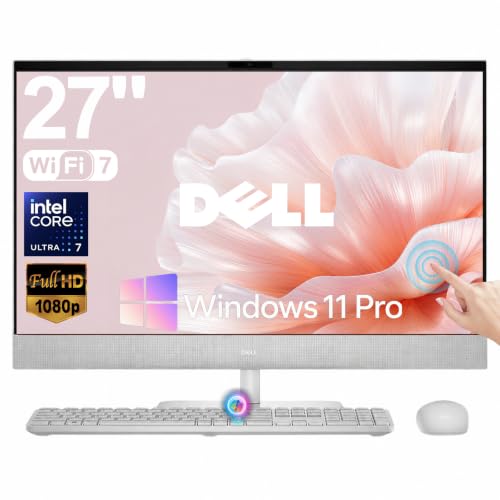
Dell 27″ All-in-One Touchscreen Desktop, Intel Ultra 7 355, Wi-Fi 7
Why These Options Stand Out
The Lenovo IdeaCentre 24 keeps everything in one slab, which makes it a natural fit for a cramped dorm desk or a kitchen counter doubling as a homework station. Inside, an Intel N100 quad-core chip (a low-power processor designed for basic productivity rather than heavy creative work) handles browsing, office docs, and video calls without breaking a sweat.
The 512GB PCIe SSD boots Windows fast and leaves room for years of school files or family photos. Compared to the HP 24-inch all-in-one later on this list, this Lenovo ships with double the storage, which matters more than most shoppers realize once the photo library starts growing.
Everyday Perks
- WiFi 6 plus Bluetooth 5.2 keeps wireless peripherals and home networks responsive.
- USB-C at 10Gbps, two USB-A 3.2 ports, and HDMI-out make a clean dual-monitor setup realistic.
- 512GB SSD out of the box means no immediate storage panic for a household.
- The 23.8-inch footprint fits a small desk without dominating it.
Things To Consider
- The N100 chip is fine for schoolwork and browsing, but video editing will push it past its comfort zone.
- All-in-ones are harder to upgrade later, so the RAM and storage you pick now are largely the RAM and storage you keep.
Who It Suits Best
Students and remote workers who want a tidy desk and steady performance for documents, classes, and casual streaming.
Consider Something Else When
Creators running demanding software should look at the HP All-in-One 27″ Touchscreen, which pairs a much stronger CPU with serious memory headroom.
The HP 24-dd0010 exists for one clear job: getting a touch-enabled all-in-one onto a kitchen counter or a kid’s homework corner without a major financial commitment. The Athlon Silver 3050U is AMD’s entry-level mobile chip, and it leans into efficiency over raw power.
The micro-edge display (HP’s term for bezels slimmed down on three sides) leaves more screen than frame, which makes reading and tapping feel less cramped than older all-in-ones. Where the Lenovo IdeaCentre earlier offers a bigger SSD, this HP counters with a familiar footprint that drops neatly into tight spaces.
Positive Takeaways
- Adjustable tilt stand helps find a comfortable angle for tapping or watching recipes.
- Built-in speakers and webcam remove two extra purchases from the shopping list.
- Compact white chassis blends into living areas without looking like office gear.
Worth Noting
- 256GB fills up fast once a family starts saving photos and school projects.
- Windows 10 Home means a future OS upgrade path worth planning around.
- Heavy browser-tab workloads may slow the Athlon chip noticeably.
Made For
Tight-budget households who mainly browse, stream, and handle light office work on a single shared machine.
Look Elsewhere When
Anyone wanting modern wireless speed should turn to the Dell 27″ All-in-One Touchscreen, which ships with Wi-Fi 7.
The Elo 2270L is not a PC. It is a commercial-grade touch monitor meant to live above a point-of-sale register, an industrial workstation, or a self-service kiosk. PCAP (projected capacitive) is the same touch technology used in phones and tablets, so ten-finger input feels fluid rather than the resistive single-finger poke of older screens.
The 21.5-inch panel runs at 1920×1080 and pairs with a clear glass surface built to handle constant finger traffic. Where the Lenovo and HP all-in-ones above are whole-computer solutions, this is the touch layer for a setup that already has a brain elsewhere.
A Few Strong Suits
- IK07-rated durability (an impact-resistance rating for electronics) suggests the glass tolerates bumps common in retail and warehouse settings.
- Low Blue Light and Flicker-Free operation reduce eye strain during long shifts.
- VESA mount compatibility (a standard mounting pattern on the back of the panel) lets the screen bolt to a wall, arm, or kiosk frame.
- Narrow bezel keeps the display modern and minimizes accidental edge taps.
Points To Keep In Mind
- This is a monitor only, so a separate computer or media player is required.
- The commercial focus means it costs more than a typical 21.5-inch home display.
Right Fit For
Small business owners building a POS station or a self-service kiosk who need a touch surface that handles real-world use.
Not Your Match When
Households wanting a complete plug-and-play computer should look back at the HP 24-inch All-in-One, which includes the CPU inside the screen.
The HP All-in-One 27″ Touchscreen is the heavyweight in this lineup, built for people who push their machines. The Intel Core Ultra 7-155U is a 12-core mobile processor designed for thin-and-light productivity, and pairing it with 64GB of DDR5 RAM (the current standard for fast, power-efficient memory) means dozens of browser tabs, a photo editor, and a video call can all run at once.
The 27-inch FHD IPS touch panel (IPS is a screen technology known for wide viewing angles and accurate color) gives creators room to work without squinting. Where the Lenovo IdeaCentre earlier focuses on budget-friendly productivity, this HP targets the kind of multitasker who treats slowdowns as a deal-breaker.
A Few Highlights
- 2TB SSD gives creators and families years of headroom before storage anxiety kicks in.
- Adjustable height stand supports long sessions without neck strain.
- Wi-Fi 6 keeps the wireless connection modern and reliable for large file transfers.
- Windows 11 Pro adds business-friendly features like BitLocker drive encryption.
Trade Offs
- The hardware stack pushes this firmly into premium pricing territory.
- All-in-one designs still limit future internal upgrades.
Key Specs
Who Should Grab It
Power users, content creators, and busy households running a wide mix of apps who want a touch-enabled centerpiece that won’t stall.
A Better Fit Elsewhere
Shoppers focused on bleeding-edge wireless should consider the Dell 27″ All-in-One Touchscreen, which adds Wi-Fi 7.
The Dell 27″ All-in-One Touchscreen is built around the newest Intel Core Ultra 7 355 chip, paired with a dedicated NPU (neural processing unit) for on-device AI tasks like background blur and smart search. Compared to the HP All-in-One 27″ earlier, this Dell leans harder into forward-looking silicon rather than maximum RAM.
Wi-Fi 7 is the headline upgrade, delivering the fastest home wireless standard available today for households running multi-gig internet. The 27-inch touch canvas stays the same generous size, but the internals lean modern.
Well-Handled Touches
- Dedicated NPU accelerates AI-assisted workflows without taxing the main CPU.
- Wi-Fi 7 future-proofs the wireless setup for years of router upgrades.
- 27-inch display gives a generous workspace for split-screen multitasking.
- All-in-one form keeps the desk clear of tower clutter.
Some Limits To Know
- Premium positioning means a higher cost than most household shoppers budget for.
- Wi-Fi 7 benefits only show up on a compatible router, so older homes may not see the speed jump right away.
Best Suited To
Future-focused professionals and AI-curious creators who want the newest wireless and on-device intelligence in a clean all-in-one.
Reach For A Different Pick When
Anyone needing massive RAM for heavy multitasking should turn back to the HP All-in-One 27″ Touchscreen, which ships with 64GB DDR5.
What Matters Most Before Choosing Touch Screen Desktop Computers
Match The Touch Tech To Your Workflow
PCAP screens feel like phones, fluid and precise, while older resistive screens need firmer presses. Most modern picks here use PCAP, but anyone building a kiosk or industrial station should confirm the touch layer handles gloved or wet hands when needed.
Size Versus Desk Space
A 21.5-inch panel fits a checkout counter; a 27-inch panel rewards split-screen creators with breathing room. Measure the intended spot before committing, because all-in-ones rarely move once anchored.
Specs That Survive Five Years Of Use
RAM and processor choice decide how long the machine stays useful. Entry-level chips handle today’s schoolwork fine, but anyone editing photos or running AI tools benefits from modern multi-core silicon and at least 16GB of memory.
Ports, Wireless, And Future Headroom
USB-C, HDMI-out, and the latest Wi-Fi standard keep a touch desktop useful as peripherals evolve. Shoppers planning dual monitors or fast external storage should check port speeds before buying.
Key Considerations Across These Picks
Pitfalls Shoppers Hit
Plenty of shoppers buy on screen size alone and end up with a gorgeous 27-inch panel running a chip that struggles with browser tabs. Others ignore storage and feel the squeeze within a year once photos and project files pile up.
Where The Extra Money Goes
Premium tiers buy newer processor generations, more memory, faster wireless, and AI acceleration hardware. The upgrade pays off for multitaskers and creators, while casual browsers can comfortably save by stepping down to a basic all-in-one.
Frequently Asked Questions
Do Touch Screen Desktop Computers Need A Special Operating System?
Modern Windows handles touch input natively, so no extra software purchase is required for everyday tapping and swiping.
Can A Touch Desktop Replace A Traditional Tower?
For most households, yes, as long as the workload stays within the built-in processor and memory limits.
How Do I Clean A Touch Screen Without Damaging It?
A soft microfiber cloth with a small amount of screen-safe cleaner works well, and powering off the display first reduces streaking.
Are All-In-One Touch Desktops Easy To Move?
They are lighter than a tower plus monitor combo, but the integrated screen means two hands and a clear path are still needed.
Do Touch Screens Work With A Regular Mouse And Keyboard?
Yes, and most touch-desktop owners end up mixing both inputs depending on the task at hand.
Bottom Line
The right touch screen desktop is the one that matches your daily workload without forcing compromises on size, speed, or storage. Students and casual browsers land well with the Lenovo IdeaCentre or HP 24-inch all-in-one, while creators and professionals should set their sights on the HP or Dell 27-inch machines. Build your shortlist around how you actually use a computer, and the rest of the decision tends to follow.