Setting up a home workspace around a full-sized tower sounds old-fashioned, then you spend a week with one and stop apologizing for it. The right tower handles real multitasking, stays quiet under pressure, and gives you room to grow without the laptop throttle you have learned to hate. I put together this roundup for anyone who wants a dependable home command center, whether the priority is a productivity workhorse, a gaming rig that doubles as the family PC, or a smarter way to park an existing tower off the carpet and away from dust.
The Main Contenders

STORMCRAFT Sirius AI Gaming Desktop, Intel i5 14400F, Arc B570 10GB

HP OmniDesk Desktop AMD Ryzen 5, Radeon 740M, 16GB DDR5, 1.5TB Storage

Hovadova Adjustable Computer Tower Stand, Ventilated Mobile CPU Holder

Hovadova PC Stand with Dual Cooling Fans and RGB Lighting

EUREKA ERGONOMIC Height-Adjustable PC Stand with Wheels

CyberpowerPC Gamer Xtreme VR Gaming PC, i5-10400F, GTX 1660 Super
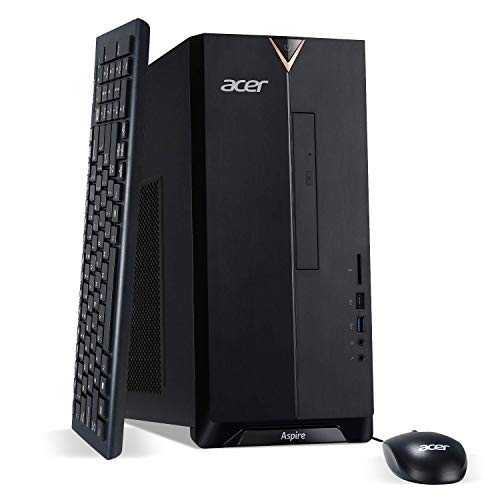
Acer Aspire TC-895-UA91 Desktop, i3-10100, 8GB DDR4, 512GB SSD

Hovadova Adjustable Mobile CPU Stand, Metal
HP OmniDesk Desktop AMD Ryzen 5, Radeon 740M, 32GB DDR5, 3TB Storage
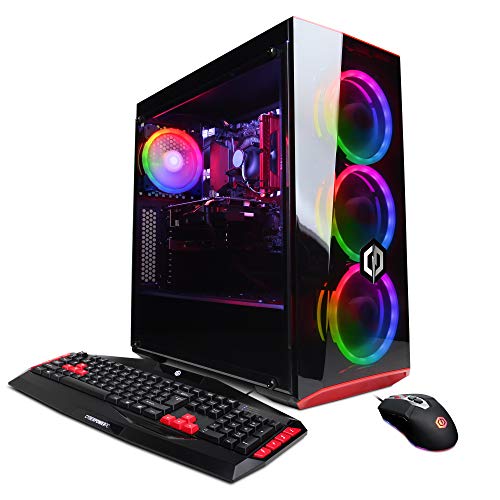
CyberpowerPC Gamer Xtreme VR Gaming PC, i5-9400F, GTX 1660, 1TB HDD
More On The Choices That Made The List
The STORMCRAFT Sirius slots into a household that wants the family PC to pull double duty as a 1440p gaming rig. It runs a 14th-generation Intel Core i5-14400F, which is a 10-core, 16-thread processor built for multitasking between a game, a Discord call, and a Chrome tab farm. Pair that with the Intel Arc B570 graphics card carrying 10GB of GDDR6 memory, and the system has enough muscle for modern titles at higher detail than a typical prebuilt.
Owners looking to future-proof get 16GB of DDR4 RGB memory for visibility inside the case, plus a 1TB NVMe solid-state drive that boots Windows in seconds and has room for a serious game library. The “VR Ready” label in the title hints at enough headroom for entry-level headsets. For shared family use, I think this is the pick if the home office chair doubles as the gaming chair after hours.
Noteworthy Benefits
- The 10-core CPU is a genuine multitasking workhorse for spreadsheets, browsers, and games running side by side.
- The 10GB Arc B570 graphics card handles 1440p gaming with comfortable memory headroom for texture-heavy titles.
- A 1TB NVMe SSD means fast boot times and enough storage for a moderate Steam library without juggling drives.
- RGB-equipped DDR4 memory gives the case a bit of personality and is user-upgradeable later on.
- Built as a complete desktop tower, so setup is essentially plug in the cables and power on.
Things To Consider
- The dedicated GPU is mid-range, so the latest AAA releases will require tweaking settings to stay smooth at 1440p.
- RGB-lit components draw slightly more power, and the case may collect dust faster than a sealed prebuilt.
- Some owners may find 16GB of RAM limiting once heavier creative workloads enter the mix.
Who It Suits Best
Households where one PC has to handle productivity during the day and 1440p gaming at night.
Consider Something Else When
Pure office work without any gaming at all should default to the HP OmniDesk AMD Ryzen 5, which trims the GPU cost.
The HP OmniDesk lands squarely in home-office territory, where quiet operation and a clean desk matter more than benchmark numbers. Under the hood sits an AMD Ryzen 5 8500G with 6 cores and 12 threads, capable of base speeds around 3.5GHz and a turbo up near 5GHz. That is enough for video calls, browser-heavy research, light photo work, and the occasional spreadsheet crunch.
The integrated Radeon 740M graphics handle everyday visuals, and the system officially supports up to four monitors for traders, editors, or anyone running a multi-pane workflow. Wi-Fi 6 and Bluetooth 5.4 keep wireless peripherals and networks fast, while the included wireless keyboard and mouse trim the accessory list to a single monitor. With 16GB of DDR5 memory and a 1.5TB split between a 512GB SSD and a 1TB HDD, it feels like a balanced everyday pick rather than a stripped-down starter.
Positive Takeaways
- Quad-monitor support is unusual at this tier and ideal for trading dashboards or productivity layouts.
- Wi-Fi 6 plus Bluetooth 5.4 means fewer dongles and stable wireless peripherals.
- A 1TB HDD paired with a 512GB SSD gives quick boot and ample long-term file storage.
- The included wireless keyboard and mouse remove two extra shopping trips.
Worth Noting
- Integrated graphics mean light creative work only, not modern gaming or heavy 3D rendering.
- 1.5TB can fill up quickly if the household stores raw photos or 4K video locally.
Made For
Remote workers running multi-monitor setups who care more about stability than frames per second.
Look Elsewhere When
A household that wants 1440p gaming should pivot to the STORMCRAFT Sirius AI Gaming Desktop instead.
Carpet and tower computers are a bad combination. The Hovadova Adjustable Computer Tower Stand solves that quietly by lifting the case off the floor, where dust bunnies, pet hair, and accidental vacuum bumps live. Dual guardrails hold the tower in place while keeping the rear ports accessible for cables.
Four swiveling casters let the stand roll around the room, useful in shared spaces where the tower moves between the office and the living room. The matte black finish blends with most home setups, and the mobile design means anyone can slide the PC out for cleaning without dragging it. Compared to the Hovadova model with dual cooling fans, this one stays simpler, since it relies on passive airflow rather than active fans.
Useful Touches
- Lifting the tower off carpet significantly cuts dust intake, which helps long-term reliability.
- Swiveling casters make repositioning easy in multi-use rooms.
- Guardrails prevent slips while still allowing easy access to rear ports.
Trade Offs
- No active cooling means heat output still depends on the tower’s own airflow design.
- Plastic casters may scuff hardwood floors over time.
Right Fit For
Apartment dwellers with carpeted floors who want a clean, mobile PC base.
Skip It When
The tower runs hot under load, in which case the Hovadova PC Stand with Dual Cooling Fans makes more sense.
This Hovadova stand goes a step beyond the basic mobile model by adding two bottom-mounted cooling fans to push air through the tower’s underside intake. For a gaming PC parked on carpet, that active airflow can shave a few degrees off the CPU and GPU under load, which adds up over years of daily use.
The stand adjusts in width between roughly 9 and 12.5 inches, which covers most mid-towers on the market, and the locking wheels keep it planted once positioned. RGB lighting under the platform gives the setup a tasteful glow rather than a flashy one. The 110-pound support rating means even a fully built ATX tower with multiple drives sits comfortably. Compared to the simpler Hovadova mobile stand, this one earns its place when thermals are a real concern.
What Helps Most
- Dual fans actively pull air through the tower’s intake, helping thermals on carpeted floors.
- Adjustable width fits a wide range of mid-tower cases without forcing a rebuild.
- Locking wheels stop the stand from drifting during heavy mouse work.
- RGB lighting adds visual character without being overbearing.
Room For Improvement
- Active fans mean a small amount of added noise from the base of the PC.
- RGB fans add a slight cost premium over passive stands.
Quick Facts
Best Suited To
Gamers and creators running hot components on carpet or in poorly ventilated rooms.
Swap It Out When
A simple non-fan stand is enough; the Hovadova Adjustable Computer Tower Stand handles basic setups for less.
The EUREKA ERGONOMIC stand treats the tower like office furniture, with six height gears ranging from about 23 to 33 inches. That makes it useful for standing-desk households, where the PC needs to ride up and down with the work surface. The two-tier design also gives space for a printer or accessories below the tower.
Built on a durable steel frame, the platform supports full-size ATX cases and rolls on smooth-glide casters for repositioning. Compared to the Hovadova models, this one is taller and more furniture-like, so it fits best in a dedicated office corner. Owners commonly report the height adjustment works smoothly once assembled, and the lockable wheels keep it in place during typing sessions.
Why It Works Well
- Six height gears cover a wide range, suiting both sitting and standing desks.
- Steel frame handles full-size ATX towers without flexing.
- The lower tier stores a printer or paperwork, saving desk space.
- Smooth-rolling casters make it easy to move for cleaning.
Points To Note
- Larger footprint than simpler mobile CPU stands.
- Height adjustment requires manual resetting between gears.
Who Should Grab It
Anyone running a sit-stand desk and wanting the tower to follow the monitor’s height.
Reach For A Different Pick When
Floor-level placement is the goal, in which case the Hovadova Adjustable Computer Tower Stand fits better under a desk.
The CyberpowerPC Gamer Xtreme VR is a mature, broadly compatible gaming platform built around a 10th-generation Intel Core i5-10400F processor and an NVIDIA GeForce GTX 1660 Super with 6GB of VRAM. The CPU runs at 2.9GHz base with boost headroom for gaming and streaming tasks, while the GTX 1660 Super is a known quantity for solid 1080p performance in esports and older AAA titles.
Inside sits 8GB of DDR4 memory and a 500GB NVMe SSD, which is enough for the operating system and a handful of frequently played games. Wi-Fi readiness cuts the need for a wired Ethernet drop, and the included Windows 10 Home license means setup is essentially out-of-the-box. This is the kind of PC that fits a household wanting dependable 1080p gaming without chasing the latest hardware cycles.
Bright Spots
- The GTX 1660 Super handles 1080p gaming in most titles with comfortable frame rates.
- 500GB NVMe SSD boots Windows and loads games noticeably faster than older spinning drives.
- VR-ready certification means headsets like entry-level Oculus models work out of the box.
Honest Caveats
- 8GB of RAM can bottleneck in modern open-world titles and heavy multitasking.
- The 10th-gen Intel platform is aging, limiting future CPU upgrade paths within the same board.
- 500GB fills up quickly with modern game installs.
Feature Snapshot
Who Will Love This
Casual 1080p gamers and families sharing a single entertainment PC for older or popular titles.
A Better Fit Elsewhere
Anyone wanting 1440p gaming and longer platform longevity should consider the STORMCRAFT Sirius AI Gaming Desktop instead.
The Acer Aspire TC-895-UA91 is a textbook starter tower, pairing a 10th-generation Intel Core i3-10100 quad-core CPU with 8GB of DDR4 memory at 2666MHz. That is plenty for a student doing homework, a retiree managing email and photos, or a small business owner running point-of-sale software.
The 512GB NVMe M.2 SSD keeps the system snappy on boot and application launch, while the 8X DVD writer is a rare inclusion that still matters for anyone ripping discs or burning backups. Wi-Fi 6 and a USB 3.2 Type-C port up front give it modern connectivity without forcing adapters. Compared to the HP OmniDesk AMD Ryzen 5, this Acer leans further toward the basics but costs less as a result.
Features That Help
- Quad-core i3 handles typical office and study software without breaking a sweat.
- 512GB NVMe SSD keeps the system responsive even under everyday workloads.
- Built-in DVD drive supports older media workflows.
- Front-facing USB-C simplifies plugging in modern phones and storage.
Some Limits To Know
- Integrated graphics rule out modern gaming and limit creative workloads.
- Only 8GB of RAM, with no easy path to higher capacities on some boards.
Perfect Match For
Students, first-time PC owners, and households needing a reliable study or family room computer.
Where Another Pick Suits Better
Anyone running quad-monitor productivity setups should move up to the HP OmniDesk AMD Ryzen 5 instead.
The metal-bodied Hovadova Mobile CPU Stand trades some elegance for sturdiness, which makes it a natural fit for workshops, basements, and shared maker spaces. The all-metal frame handles repeated repositioning without the wobble cheaper plastic bases develop over time. Four 360-degree swivel casters glide across concrete, tile, and low-pile carpet, and each wheel locks independently.
The perforated bottom plate encourages passive airflow under the tower, which helps keep dust from settling directly against the case intake. Compared to the Hovadova stand with dual cooling fans, this one stays quiet since there are no spinning fans to add to the room. Owners commonly report that assembly is straightforward and the locking wheels hold firm once the tower is in place.
Strong Points
- Metal construction outlasts plastic alternatives in high-traffic or workshop settings.
- Perforated base panel encourages airflow even without active fans.
- Four independently locking wheels keep the stand firmly planted.
- Adjustable width suits many mid-tower cases.
A Few Limitations
- No active cooling means heat-sensitive builds may still run warm.
- Metal casters can be louder rolling across hard floors.
Built With In Mind
Workshops, basements, and shared family spaces where the tower gets moved frequently.
Consider Something Else When
The PC sits in a quiet office and active cooling matters; the Hovadova Dual Cooling Fans stand handles that scenario better.
This higher-tier HP OmniDesk shares the same AMD Ryzen 5 8500G processor and Radeon 740M integrated graphics as its 16GB sibling, but doubles down on memory and storage. The 32GB of DDR5 RAM handles heavy browser sessions, large spreadsheets, and creative apps without resorting to swap files. The 3TB split between a 2TB SSD and a 1TB HDD gives ample room for raw photo libraries and 4K video projects.
Quad-monitor support and the same Wi-Fi 6 plus Bluetooth 5.4 wireless stack carry over, making this the productivity-focused configuration in the OmniDesk family. Compared to the 16GB model reviewed earlier, this one is worth stepping up to only if memory-heavy work is part of the daily routine.
What Works In Its Favor
- 32GB of DDR5 RAM removes the memory ceiling that holds back heavy multitasking.
- A 2TB SSD plus 1TB HDD balances speed and bulk storage in a single build.
- Same quad-monitor support and modern wireless connectivity as the smaller OmniDesk.
Potential Drawbacks
- Higher cost than the 16GB OmniDesk without a corresponding bump in CPU or graphics power.
- Integrated graphics still rule out modern gaming or GPU-accelerated workloads.
Right Fit For
Creators, analysts, and families juggling large local files alongside productivity apps.
Not Your Match When
Daily use stays light on memory; the HP OmniDesk AMD Ryzen 5 with 16GB is the better value.
The 9th-generation CyberpowerPC Gamer Xtreme VR is an older but still functional gaming desktop. The Intel Core i5-9400F handles 1080p esports and older AAA titles, while the NVIDIA GeForce GTX 1660 with 6GB of VRAM keeps frame rates playable in most popular games at medium settings.
Storage is split between a small 120GB SSD for the operating system and a roomy 1TB HDD for games and media. That is a workable combination, though loading times on HDD-installed games feel slow next to the NVMe-equipped picks earlier in this list. Wi-Fi readiness and a Windows 10 Home license round out a package that suits a household with light gaming expectations and a tight budget.
Useful Strengths
- The GTX 1660 is a known mid-range card for 1080p gaming at medium settings.
- The 1TB HDD provides plenty of space for a back catalog of older games.
- Pre-built Windows setup gets the system running quickly out of the box.
Less Ideal Details
- Only 120GB of SSD space means most games will land on the slower HDD.
- The 9th-gen Intel platform limits future CPU upgrades within the same motherboard.
- 8GB of DDR4 can bottleneck in modern multitasking scenarios.
Feature Card
Whose Shelf It Belongs On
Light 1080p gamers and study rooms where fast load times matter less than storage space.
A Better Fit Elsewhere
Anyone wanting faster storage and a newer CPU platform should pick the CyberpowerPC Gamer Xtreme VR with the i5-10400F instead.
What Matters When Buying Tower Computers For Home Use
Match the CPU to the workload first. A 6-core chip handles everyday browsing, office work, and study without strain, while 10-core processors give room for gaming and creative apps to breathe. Look at clock speed (measured in GHz, or gigahertz) for how fast the chip can complete tasks, and core count for how many things it can juggle at once.
Graphics define whether the tower can game or render. Integrated graphics, where the processor handles visuals on its own, are fine for office work and video calls. A dedicated graphics card with its own memory pool, like the GTX 1660 or Arc B570 in this list, opens up gaming and creative work. Storage is the third pillar: an NVMe SSD (a fast solid-state drive that plugs directly into the motherboard) makes the system feel snappy, while a paired HDD adds affordable bulk for media.
Connectivity rounds out the package. Wi-Fi 6 supports modern wireless networks, Bluetooth simplifies peripherals, and a front USB-C port saves adapter hassle. For shared family PCs, a wireless keyboard and mouse bundle keeps the desk uncluttered. If the PC will sit on carpet, factor in a stand that lifts the case and improves airflow at the same time.
Key Considerations Across These Picks
Common Shopping Slip Ups
Picking on raw core count alone ignores clock speed, and choosing only on graphics card ignores memory and storage balance. Buyers sometimes forget to check Wi-Fi standards, ending up with slower wireless than their router supports. Another trap is underestimating how fast 500GB of storage fills with modern games and 4K video.
Where The Extra Money Goes
A higher tier typically doubles memory, swaps in faster DDR5 RAM (the newest standard for speed and bandwidth), and adds a second storage drive. In this list, that jump shows up between the 16GB HP OmniDesk and the 32GB version. The upgrade is worth it when memory pressure is the bottleneck, but pointless when the workload stays light and a smaller SSD would suffice.
Frequently Asked Questions
How much storage do I really need?
A 512GB SSD handles the operating system and a modest game library, but households juggling photo libraries or 4K video benefit from a 1TB-plus secondary drive.
Is integrated graphics enough for a home PC?
For office work, study, and video calls, integrated graphics run smoothly. Modern gaming and creative work usually need a dedicated graphics card.
What is Wi-Fi 6 and why does it matter?
Wi-Fi 6 is the latest mainstream wireless standard, offering faster speeds and better performance on networks with many connected devices.
Can a tower sit directly on carpet?
It can, but dust and reduced airflow shorten the system’s life. A mobile stand lifts the case and improves cooling on soft floors.
Do I need a DVD drive in 2026?
Most households do not, but families with disc-based media or legacy software still find a built-in DVD writer useful.
The Takeaway
A tower computer earns its space when it matches the household’s actual workload, not the loudest spec sheet. For pure productivity, the HP OmniDesk setups cover the most ground. For gamers, the STORMCRAFT Sirius and CyberpowerPC Xtreme models split the budget tiers cleanly. And for keeping any of them healthy, a good stand quietly does the work nobody notices until it is missing.