I spent years wrestling with tangled server-room setups before I appreciated what a solid rack-mount monitor actually does. The right console turns a cramped rack into something I can actually work inside, with crisp video, a real keyboard, and no improvised KVM jiggling. This list covers IT pros managing a handful of servers, home-lab builders running a small rack closet, and anyone tired of crawling behind towers to swap inputs.
The Shortlist At A Glance
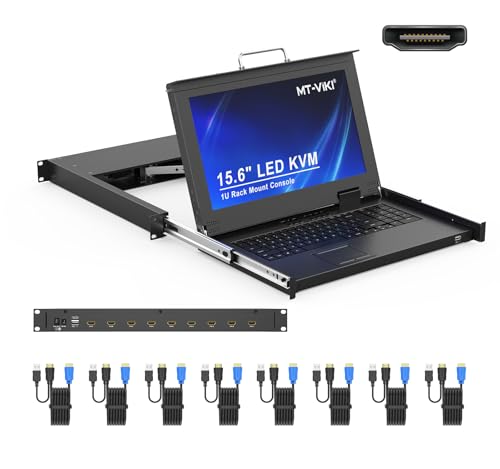
MT-VIKI 15.6″ HDMI Rack Mount KVM Console 1U
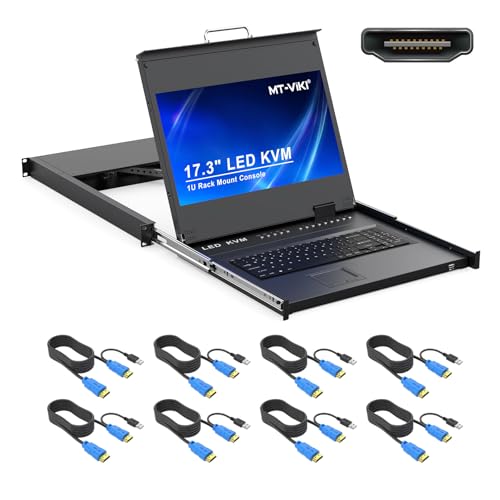
MT-VIKI 17.3″ HDMI Rack Mount KVM Console 1U

WALI Dual Monitor Stand Adjustable Riser

MT-VIKI 8 Port IP KVM with 17″ LCD Console

Simple Trending 2-Tier Monitor Stand Riser

MT-VIKI 15.6″ VGA Rack Mount KVM Console 1U

MT-VIKI 17″ VGA Rack Mount KVM Console 1U
Meet The Standout Selections
For most IT closets running a mix of newer HDMI servers, the MT-VIKI 15.6-inch console hits a comfortable middle ground. The drawer design folds monitor, keyboard, and touchpad into a single 1U slot, which is the kind of space saving that matters once a rack starts filling with switches and patch panels. The eight-port HDMI KVM switch supports 1920×1080 at 60Hz, and the integrated keyboard keeps cabling honest.
Mounting depth runs from 18.9 inches to 31.5 inches, with two sets of rack rails included, which saved me from a separate rail purchase in a previous install. The included eight cables mean the box is genuinely turnkey once it lands. For shops that have already moved off VGA, this is the cleanest option in the lineup.
Where It Excels
- 1U drawer consolidates monitor, keyboard, and touchpad, freeing rack space for switches and patch panels.
- Full HD at 60Hz over HDMI keeps BIOS screens and console logs readable without scaling headaches.
- Eight included KVM cables remove the last-minute hardware scramble during racking day.
- Wide mounting-depth range covers most 19-inch server racks without custom rails.
Things To Consider
- 15.6 inches is fine for quick admin tasks, though long diagnostic sessions can feel tight compared to the 17.3-inch MT-VIKI option.
- Touchpad-only input is not ideal for heavy command-line work; owners commonly pair a USB mouse via the front port.
Key Specs
Right Fit For
IT admins running eight or fewer HDMI servers in a 19-inch rack and wanting a clean, integrated console drawer.
Consider Something Else When
You need VGA for older gear; the MT-VIKI 15.6″ VGA Rack Mount KVM Console keeps legacy video chains alive.
Stepping up to a 17.3-inch panel changes the feel of a rack session considerably. More real estate means side-by-side terminal windows fit comfortably, which matters during firmware updates or cluster debugging. The MT-VIKI 17.3-inch console still packs into a single rack unit, so the rack depth doesn’t take a hit.
OSD menus and hotkey switching cover the day-to-day switching workflow, and the included eight KVM cables match the eight-port switch. A front USB 2.0 port handles a mouse or external keyboard without fishing behind the drawer. Compared to the 15.6-inch MT-VIKI above, the trade is screen size for a slightly larger closed footprint.
Positive Takeaways
- 17.3-inch 1080p panel gives breathing room for split terminal workflows.
- Front USB port keeps an external mouse or recovery drive within reach.
- Eight included cables make this a complete eight-server console out of the box.
Worth Noting
- Mount depth of 23.6 to 31.8 inches rules out the shallowest wall cabinets.
- Display tilts to roughly 110 degrees, which is fine for standing work but not for sharing screens with a colleague across the aisle.
Feature Snapshot
Built With In Mind
IT teams that spend long hours at the rack and value screen real estate over a smaller footprint.
A Better Fit Elsewhere
Your rack is shallower than 24 inches; the MT-VIKI 15.6″ HDMI Rack Mount KVM Console starts at 18.9 inches.
The WALI stand isn’t a rack-mount console, but it earns a spot here for the home-office crowd that still wants monitor-rack discipline on a desk. The 14.6 by 9.3-inch metal shelf supports up to 44 pounds, which covers most flat-screen displays, laptops, and even small printers. Anti-skid rubber pads keep the shelf from sliding during height adjustments.
Height adjustment runs through a few preset steps (around 3.9 and 4.7 inches of lift), letting a screen sit closer to eye level without buying a separate monitor arm. For someone converting a closet or garage into a small rack-plus-desk hybrid, the WALI bridges the gap between ergonomic furniture and rack-style hardware.
A Favorable Mix
- 44-pound load capacity handles dual-monitor stacks or a heavy ultrawide.
- Anti-skid pads protect wood desks from scratches during repositioning.
- Multiple height stops let users dial in posture without swapping parts.
Trade Offs
- Not actually rack-mountable, so it won’t serve a true 19-inch server cabinet.
- Height adjustment is stepped rather than fully continuous, which may matter for very specific ergonomic setups.
Made For
Remote workers and home-lab owners who want a sturdy desktop monitor riser with a rack-style metal build.
Skip It When
You need a real 1U rack console; the MT-VIKI HDMI Rack Mount KVM Console fits an actual server rack.
For teams who manage servers across rooms, buildings, or even cities, an IP KVM (a switch you can reach over the network) reshapes the workflow. The MT-VIKI 8-port IP KVM console pairs a 17-inch LCD with a built-in remote user, so an admin can sit at the rack with a keyboard and touchpad while another engineer pulls up the same machines from a laptop. The remote path runs over standard CAT5e or CAT6 cabling.
Remote access reaches up to 230 feet (70 meters) over copper, which handles most data-center layouts. The 1U form factor and eight-port count match the local-only MT-VIKI units earlier in this list, so the rack footprint stays the same. If the office runs on out-of-hours reboots and weekend patches, IP access quickly pays for itself.
Everyday Perks
- Simultaneous local and remote users keep physical and remote admins in sync.
- CAT5e or CAT6 cabling avoids running dedicated KVM lines through the facility.
- 230-foot reach covers most data-center rows and branch office server closets.
Minor Gripes
- Remote management introduces network-security responsibilities that a local console avoids.
- IP KVM firmware updates can be a maintenance chore; owners commonly schedule them during planned maintenance windows.
Quick Facts
Who Should Grab It
IT teams running multi-site or after-hours server management who want a 1U drawer with built-in remote access.
Reach For A Different Pick When
You only need a local console; the MT-VIKI 17.3″ HDMI Rack Mount KVM Console covers local-only setups at lower cost.
The Simple Trending riser slots into the same home-office niche as the WALI stand but with a different build philosophy. Two tiers of MDF (medium-density fiberboard) shelving add a small storage layer underneath the monitor, which is useful for keyboards, notebooks, or a mini PC. The painted finish keeps the surface looking clean in shared workspaces.
It is not a rack-mount product, and it isn’t trying to be. For someone organizing a small desk and adding a second shelf for peripherals, the footprint is gentle. The honest read is that this is furniture-adjacent, while the WALI above leans closer to equipment-grade metal construction.
What Pays Off
- Two-tier layout adds usable storage under the monitor for keyboards or accessories.
- MDF construction keeps the unit light enough to reposition on a whim.
- Painted finish blends into most home-office setups without industrial vibes.
Points To Keep In Mind
- MDF is more vulnerable to moisture and dings than the WALI’s metal shelf.
- Load capacity is suited to typical monitors and laptops, not heavy ultrawides or rack gear.
Perfect Match For
Home users who want a tidy two-shelf desk organizer rather than a heavy-duty monitor platform.
Not Your Match When
You need 44 pounds of support or a metal build; the WALI Dual Monitor Stand handles heavier hardware with a sturdier frame.
Older servers and certain industrial PCs still ship with VGA outputs, and adapters can introduce flicker or resolution headaches. The MT-VIKI 15.6-inch VGA console solves that by keeping the analog signal end-to-end, with a KVM switch (a device that shares one keyboard, video, and mouse across multiple computers) dedicated to VGA inputs. Like its HDMI sibling, it folds the monitor, keyboard, and touchpad into a single 1U drawer.
Mounting depth spans 18.9 to 31.5 inches, and eight cables come in the box. For a small data center with mixed-age hardware, this keeps a clean console setup without forcing video adapters at every port. The trade is sticking with 1080p at 60Hz over analog, which still looks acceptable for console work.
Everyday Advantages
- Native VGA support avoids digital-to-analog conversion artifacts on legacy hardware.
- Eight included cables cover a full eight-server rollout immediately.
- 1U drawer design preserves rack space for switches and patch panels.
Room For Improvement
- Not forward-compatible with newer DisplayPort or HDMI-only servers without adapters.
- 15.6-inch display is smaller than the 17.3-inch MT-VIKI console for users who prefer more screen real estate.
Technical Highlights
Best Suited To
Data centers and IT shops running legacy VGA servers that want a clean, integrated 1U console.
Where Another Pick Suits Better
Your fleet is mostly HDMI; the MT-VIKI 15.6″ HDMI Rack Mount KVM Console is the digital-native option.
Closing out the list is the MT-VIKI 17-inch VGA console, which keeps legacy video alive while adding a slightly larger panel. The 1U drawer still consolidates monitor, keyboard, and touchpad, and the 17-inch screen gives a little more room than the 15.6-inch VGA unit for split views during diagnostics.
Mount depth of 23.6 to 31.8 inches targets mid-to-deep racks, and three switch modes (front-panel buttons, keyboard hotkeys, and an on-screen display) give flexibility for different operator styles. For shops that want VGA compatibility and a larger display, this hits the middle ground between the 15.6-inch VGA and the 17.3-inch HDMI units above.
Advantages To Know
- 17-inch panel adds visible area over the 15.6-inch VGA model without changing form factor.
- Three switching modes (OSD, hotkey, and front-panel) suit varied operator habits.
- All-in-one drawer keeps cabling contained inside the rack rails.
Honest Caveats
- Mount depth starts at 23.6 inches, so it won’t fit shallow wall-mounted cabinets.
- VGA-only signal path still locks the unit out of HDMI or DisplayPort native servers.
Whose Shelf It Belongs On
IT pros running older VGA server fleets in deeper 19-inch racks who want a slightly larger 1U console.
Look Elsewhere When
You want a smaller or shallower drawer; the MT-VIKI 15.6″ VGA Rack Mount KVM Console fits racks starting at 18.9 inches deep.
Choosing Rack Mounts That Actually Fit Your Setup
The first thing I check on any rack-mount console is mounting depth, since rails that don’t reach the cabinet’s internal depth are an instant return. Measure from the front rack rail to the rear rail inside the cabinet, not the outside dimensions, and compare that figure to the console’s supported range.
Screen size and resolution matter more than marketing suggests. A 15.6-inch drawer is fine for occasional admin, but anyone running frequent firmware work benefits from a 17-inch or 17.3-inch panel. 1080p at 60Hz is the practical floor for readable text on BIOS and log screens.
Video signal type (HDMI, VGA, or DisplayPort) should match the servers you actually have, not the ones you wish you had. VGA still has its place in legacy industrial and enterprise hardware, but HDMI is the right call for anything built in the last few years. For distributed teams, an IP KVM with remote user access turns overnight server work into a desk job.
Form factor should stay at 1U unless the rack is purpose-built for deeper consoles, since most data-center cabinets are sized around standard 1U gear. Finally, the included cable bundle matters: a console that ships with eight KVM cables removes a hidden cost that adds up fast across a multi-server deployment.
Common Shopping Slip Ups
Many first-time shoppers pick a console based on screen size alone and forget to verify the rack depth. A 17-inch drawer that needs 24 inches of depth is useless in a 20-inch wall cabinet. Measure twice before ordering.
Another slip is ignoring the video standard. A shiny HDMI console won’t help a fleet of VGA servers, and stacking adapters behind a rack usually ends in flaky signal at exactly the wrong moment. Match the console to the actual outputs on your hardware.
What The Higher Tier Buys
Stepping up from a basic 15.6-inch HDMI unit to a 17.3-inch model buys more screen real estate and often a deeper mounting range, which reduces clearance headaches in larger server cabinets. Premium IP KVM consoles add remote user access, which can replace after-hours trips to the data center. The honest case for spending more is the workload, not the brand.
Frequently Asked Questions
What is a KVM switch? A KVM switch is a hardware device that lets one keyboard, video monitor, and mouse control multiple computers, which is essential for rack environments with several servers.
Do I need HDMI or VGA on my rack console? Pick the video standard that matches the outputs on the servers you already own, since adapters can introduce signal issues, especially with analog VGA signals running long distances.
Can a rack-mount console fit any 19-inch rack? Most consoles fit standard 19-inch wide racks, but the depth range varies, so always check the console’s minimum and maximum mounting depth against your cabinet’s internal depth.
How many servers can a typical rack console handle? The consoles in this roundup support up to 8 servers or workstations through their built-in KVM switches, which covers most small to mid-sized deployments.
What is an IP KVM used for? An IP KVM adds remote network access to the keyboard, video, and mouse of connected servers, so an admin can manage machines from anywhere on the network without being physically at the rack.
The Takeaway
The right computer monitor rack mount depends almost entirely on the rack depth, the video outputs on your servers, and how often someone is actually at the rack. HDMI drawers fit modern fleets, VGA drawers keep legacy hardware useful, and IP KVM units buy back time for distributed teams. Pick the console that matches the workload you already have, not the one with the most features on the spec sheet.