Most people set up their first monitor stand the same way: they grab whatever’s nearby, eyeball the height, and call it done. Then a few months in, neck tension creeps in, the laptop runs warm under a solid shelf, and the cables underneath look like a tangle of black spaghetti. A proper riser fixes all of that, and the ten below cover a wider spread of setups than the typical one-size-fits-all list.
How The Shortlist Stacks Up

WALI Computer Monitor Stand Adjustable Laptop Riser (44 lbs)

HUANUO Monitor Riser with Vented Steel Shelf

WALI Adjustable Monitor Riser with Under-Desk Storage (PTT001)

Fenge Dual Monitor Stand 2-Tier Desk Organizer with Drawers (Oak)

BONTEC Dual Monitor Stand Adjustable Length and Swivel (White)

BONTEC Wooden Monitor Stand Riser 2-Tier Shelf
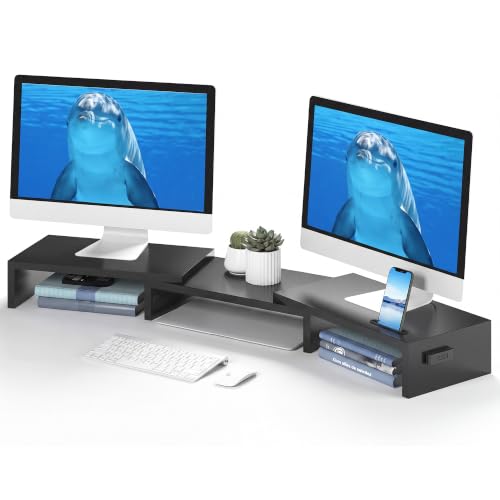
BONTEC Dual Monitor Stand Adjustable Length and Swivel (Black)

WALI Adjustable Laptop Desk Mount for 17″ Notebook or 32″ Screen

WALI Laptop Desk Mount for 17″ Notebook and 34″ Screens

loukin Monitor Stand Riser 22.4″ × 8.2″ Brown
A Deeper Look At The Lineup
This is the kind of riser you set up once and forget about. A 14.6 x 9.3 inch metal shelf gives most flat panels a stable footing, and the 44 lb weight rating leaves room for a chunky 27-inch monitor, a printer, or even a small desktop tower laid on its side.
Three height steps (3.9, 4.7, and 5.5 inches) let you nudge the screen up to a more neutral neck angle, and rubber pads on the feet keep the whole assembly from skating around during a typing sprint. For a home office where the screen doubles as a TV on weekends, that’s the kind of capacity most plastic risers struggle to match.
Where It Excels
- Three height stops cover most chair-and-desk pairings without tools
- Metal shelf carries heavier monitors and printers without flex
- Rubber feet protect wood desks from scratches and slow drift
- Open underside creates room to tuck a keyboard away at the end of the day
Worth Noting
- The metal surface can show scuffs over time, especially under darker gear
- Wiping down the ventless shelf occasionally requires moving the monitor to reach the corners
Feature Snapshot
Right Fit For
Anyone running a single mid-to-large monitor and printer at a stationary desk where stability matters more than adjustability.
Look Elsewhere When
The BONTEC Dual Monitor Stand Riser suits shoppers who need two screens on one base, since this WALI shelf is sized for one display.
Where the WALI uses a solid shelf, this HUANUO swaps to a powder-coated steel plate punched full of ventilation holes. That single design choice changes the whole ownership story for anyone running a hot laptop as a daily driver.
The footprint is 14.57 x 9.25 inches and the lift is fixed at roughly 3.94 inches, which puts the screen right around eye level for most standard chair-and-desk pairings. Think of it as the cooling-focused sibling to the WALI above: less height range, more airflow.
Positive Takeaways
- Perforated shelf lets heat escape from underneath laptops and mini PCs
- Powder-coated steel resists scratches and holds up to long daily use
- Fixed 3.94 inch lift lands most users at a comfortable neck position out of the box
- Compact frame fits tighter desks where the WALI’s larger shelf would crowd the keyboard
Trade Offs
- No height adjustment means taller users may find the lift too low
- Small items like USB drives can slip through the perforations if you’re not careful
Built With In Mind
Remote workers and students running a laptop as their primary machine, especially anyone whose machine runs hot under a solid slab.
A Better Fit Elsewhere
Shoppers who prefer a wooden aesthetic and open lower storage will find the BONTEC Wooden Monitor Stand Riser 2-Tier Shelf more visually in line with a home office.
The PTT001 takes the same 14.6 x 9.3 inch shelf footprint as the metal WALI at the top of the list, but trades steel for a molded plastic shelf and pushes the lift range higher. That’s the trade worth noticing: lighter material, taller reach.
Three height stops at 4.5, 5.3, and 6.1 inches give roughly an inch more elevation than the metal version, which matters for taller users or anyone working at a sit-stand desk’s seated height. The plastic shelf is also kinder to bare laptops without rubber feet.
What Helps Most
- Taller 6.1-inch maximum lift suits users who need more screen height
- Plastic shelf won’t scuff or scratch laptop lids the way bare metal can
- Same 44 lb capacity as the metal model, so the lighter build doesn’t cost strength
- Open underside leaves room to store a keyboard, dock, or notebook
Honest Caveats
- Plastic shelves can flex slightly under very heavy, narrow-based monitors
- No ventilation means laptops sit on a sealed surface and may run warmer
Quick Facts
Whose Shelf It Belongs On
Taller users or anyone working from a high chair who needs more lift than the metal WALI offers.
Swap It Out When
Laptop-first setups that run warm will benefit more from the HUANUO Monitor Riser with its perforated steel shelf.
The Fenge sits in a different weight class from the risers above. At 42.5 inches wide and built from MDF, it’s designed to host two 32-inch monitors side by side while hiding office clutter inside a slide-out drawer.
The 10.9-inch drawer is the practical hook. Pencils, charging cables, sticky notes, even a small notebook slide in and out without disturbing the screens on top. For a desk where monitors have become the focal point and storage has evaporated, that’s a meaningful add.
Positive Points
- Wide 42.5-inch surface fits two 32-inch displays with room to spare
- Slide-out drawer adds hidden storage without eating floor space
- MDF build keeps the look warmer than black metal on a wood desk
- Lower shelf creates space for keyboards, laptops, or paperwork
Small Caveats
- Wood-grain finish can show water rings if a cold drink sits without a coaster
- Wide footprint crowds smaller desks, so measure before committing
Spec Overview
Perfect Match For
Knowledge workers running dual 27 to 32 inch monitors who want both screens elevated and a drawer for daily clutter.
Reach For A Different Pick When
Single-monitor setups looking for compact height adjustment will be happier with the WALI Computer Monitor Stand Adjustable Laptop Riser.
Where the Fenge above commits to a single wide shape, the BONTEC adjusts. The frame stretches from 31.5 to 42.5 inches, and the two side shelves swivel so the screens can sit straight, angled, or wrapped around a corner.
That’s a real upgrade for anyone whose desk sits in an L-shaped corner or who likes to angle their secondary screen away from glare. For a standard rectangular desk, the swivel can sit flat and the unit behaves much like the Fenge, only without the drawer.
Why It Works Well
- Length adjusts between 31.5 and 42.5 inches to match desk depth
- Swivel shelves support straight, angled, or corner layouts
- White finish brightens minimalist or Scandinavian-style work areas
- Open frame leaves room for keyboards and laptops underneath
Points To Note
- Swivel joints can drift over time if monitors are heavy and frequently repositioned
- No drawer means small supplies need another home
Best Suited To
Corner-desk owners and anyone running two screens at an angle who needs a frame that adapts rather than dictates layout.
Not Your Match When
Shoppers wanting a hidden drawer for office supplies will find the Fenge Dual Monitor Stand 2-Tier Desk Organizer a more organized pick.
If the metal risers earlier read like office furniture, this one leans into the home. A wooden 2-tier frame delivers a 5.6-inch lift while the lower shelf catches keyboards, notebooks, or a laptop that’s running a video call.
Compared to the loukin stand reviewed further down, the wood tone here feels slightly more finished, and the open lower tier is the kind of detail that quietly clears a desk of clutter. For a setup that doubles as a dining table when the laptop closes, the warmer look matters.
Well-Handled Touches
- Wood finish blends with most home furniture instead of standing out as office gear
- 5.6-inch lift puts most users at a comfortable neck angle
- Lower tier doubles as a storage shelf for keyboards or accessories
- Sturdy frame handles standard monitors and small printers without wobble
Things To Weigh
- Wood surfaces need coasters under drinks to avoid ring marks
- Single-tier screen shelf means dual-monitor users should look at the Fenge instead
The Key Facts
Made For
Home offices and shared spaces where the desk needs to look like part of the room, not a beige cubicle.
Another Choice May Suit
Dual-monitor households chasing extra width and a drawer will prefer the Fenge Dual Monitor Stand 2-Tier Desk Organizer.
The black BONTEC is mechanically identical to the white version reviewed above: same 31.5 to 42.5 inch adjustable length, same swivel shelves, same footprint. The difference is purely cosmetic, and that matters for darker battlestations.
Pairing the black frame with RGB peripherals keeps the visual line tight, and matte black tends to hide the dust that accumulates under active setups. For a shared desk or rental where the white version would feel too bright, this one’s the obvious swap.
The Upside
- Black finish matches gaming gear and dark-themed desks
- Swivel shelves adapt to corner, angled, or straight monitor layouts
- Adjustable length fits smaller student desks or larger executive surfaces
- Sturdy frame holds two mid-size monitors without sag
A Few Limitations
- Matte black shows fingerprint smudges more than the white version
- No built-in drawer means cables and small accessories need a separate tray
Who Will Love This
Gamers, streamers, and anyone running a dark-themed battlestation who needs two screens on one adjustable frame.
Consider Something Else When
Shoppers wanting a softer aesthetic and extra storage will appreciate the BONTEC Wooden Monitor Stand Riser 2-Tier Shelf instead.
Every riser before this one sits on the desk. This WALI clamps onto the desk edge instead, freeing the entire surface underneath. For tiny apartments or shared tables, that footprint difference is everything.
The mount accepts a laptop tray or a VESA plate (75x75mm or 100x100mm patterns), so the same arm can host a 17-inch notebook or a 32-inch screen. The C-clamp fits desks 0.4 to 4 inches thick, which covers most standard surfaces.
What Stands Out
- Clamp mount leaves the desk surface completely free for papers and coffee
- Dual mounting options support both laptops and VESA-compatible monitors
- Height-adjustable arm lets users find a precise eye-level position
- Detachable plates make it easy to switch between laptop and monitor use
Practical Considerations
- Installation requires drilling or clamping, which renters should plan around
- Clamp adds a small ledge users may bump their knees against under the desk
Who Should Grab It
Apartment dwellers and small-office workers who need every square inch of desk space and want their screen floating above the surface.
Skip It When
Anyone wanting a simple, no-tools riser will find the HUANUO Monitor Riser with Vented Steel Shelf a friendlier first stand.
The newer WALI mount extends what the previous model started. Same VESA 75x75mm and 100x100mm compatibility, same C-clamp, but the screen side now handles up to 34-inch ultrawides up to 26.4 lbs while the laptop tray caps at 22 lbs.
For a desk built around a curved ultrawide, the higher weight rating removes the wobble that smaller mounts develop when a heavy screen extends out. The laptop tray also has ventilation holes, which keeps heat moving away from the notebook during long sessions.
Strong Points
- Supports ultrawide displays up to 34 inches and 26.4 lbs
- Vented laptop tray helps heat dissipate from underneath the notebook
- Detachable tray lets the same arm serve as a monitor mount alone
- Articulating arm reaches around corners for angled monitor setups
Things To Consider
- Higher weight rating requires a sturdy desk edge for the C-clamp
- Full motion arm needs occasional tension adjustments over months of use
Perfect Match For
Creators and traders running ultrawide screens who want a single arm capable of holding both their display and a paired laptop.
Where A Sibling Pick Shines
Standard single-monitor desks will be over-served by this mount; the WALI Computer Monitor Stand Adjustable Laptop Riser is a simpler, more stationary option.
The loukin closes the list with a wider, simpler take on the riser idea. A 22.4 x 8.2 inch MDF top is roughly seven inches wider than the WALI models reviewed earlier, which translates to more room for a tablet, a speaker, or both alongside the monitor.
The MDF surface is waterproof, so a spilled coffee wipes off without staining. For a kitchen-table office or a homework station where the riser doubles as a charging shelf, that practicality matters more than adjustability.
The Case For It
- Wide 22.4-inch top fits a tablet or speaker beside the monitor
- Waterproof MDF wipes clean after spills without staining
- Brown finish blends with most home furniture pieces
- Lower shelf adds open storage for keyboards or paperwork
Points To Keep In Mind
- No listed height adjustment, so taller users should confirm lift height before buying
- MDF edges can chip if the riser is dragged across hard floors repeatedly
Built With In Mind
Home-office workers who want a wider desk shelf for accessories and don’t need adjustable height.
Reach For A Different Pick When
Anyone needing step-wise height changes should look at the WALI Adjustable Monitor Riser with Under-Desk Storage (PTT001) instead.
What To Weigh Before Picking A Riser
Height range is the first thing worth measuring against your chair and desk. Sit in your normal work position and note where your eye line lands; a riser that lifts the screen to that height will save you from hunching by the end of a long day. Three-step adjustability, like on the WALI risers reviewed above, covers most desk-chair pairings without overcomplicating the setup.
Weight capacity is the second checkpoint. A 24-inch monitor usually weighs under 10 lbs, but a 32-inch panel with a stand can climb past 15, and printers or all-in-ones often tip heavier. The 44 lb WALI models absorb that overhead comfortably, while the vented HUANUO shelf handles lighter laptops and screens without strain.
Materials and ventilation matter more than people expect. Solid shelves look clean but trap laptop heat. Perforated steel, like the HUANUO, lets warm air escape, which can keep a hot-running machine from throttling during long video calls. Wood and MDF finishes, like the loukin and BONTEC wooden models, look warmer in a home setting but benefit from coasters under drinks.
Footprint and mounting style are the final pieces. A clamp-mounted arm, like the WALI mounts in picks 8 and 9, frees the desk entirely but asks for a sturdy edge to anchor to. A freestanding shelf like the Fenge or BONTEC wooden unit offers storage and a stable surface, but it claims real estate on the desk. For tight apartments, that trade-off often decides the choice.
Key Considerations Across These Picks
Pitfalls Shoppers Hit
Choosing a riser based on looks alone is the easiest way to end up with neck strain. A wood-finish stand that sits two inches too low forces the same forward head posture the riser was supposed to solve, and a metal shelf without ventilation can shorten a laptop’s life if the machine already runs warm.
Where The Extra Money Goes
Spending more in this category usually buys one of three things: height adjustability, integrated storage, or a heavier weight rating. The BONTEC dual stands and the WALI PTT001 lean on adjustability for the price difference. The Fenge leans on storage with its drawer. The WALI heavy-duty mount leans on weight capacity for ultrawide support. Pick the attribute that solves your specific desk problem, and the price tag follows naturally.
Frequently Asked Questions
How high should a monitor riser lift the screen?
The goal is for the top of the screen to sit roughly at eye level when seated. For most adults that means a lift of 4 to 6 inches above the desk, which is why adjustable models like the WALI risers cover that range in three steps.
Will a monitor riser damage my desk?
Most risers on this list use rubber pads or soft feet that protect wood and laminate surfaces. The clamp-mounted WALI mounts don’t touch the desk surface at all, while wood-finish shelves like the loukin should still get a quick wipe-down now and then to prevent grit buildup.
Can I put a printer on a monitor riser?
Yes, as long as the riser’s weight rating covers both the monitor and the printer. The 44 lb WALI models handle a typical mid-size printer and a monitor together without strain. Lighter vented shelves like the HUANUO are better suited to laptops and small accessories.
Do I need ventilation under my laptop?
Laptops that run warm during video calls or heavy browsing benefit from a perforated shelf. The HUANUO’s vented steel design is the clearest example on this list. If the laptop already runs cool, a solid shelf like the WALI plastic PTT001 is perfectly fine.
Are clamp mounts better than standing risers?
Clamp mounts save desk space and offer more height range, but they require a sturdy desk edge and a bit of installation. Standing risers are easier to set up and move, and they offer built-in storage. For tiny desks, clamp wins. For flexible layouts, standing is the simpler pick.
Wrap Up
The right riser matches your desk size, your monitor weight, and the way you actually sit during a long workday. Run through height first, weight capacity second, and storage third, and one of the ten above should click into place without much debate. Once it’s set up, the difference shows up by the second afternoon of better posture.