Working from a coffee shop, hopping on a flight, or sharing a four-person cubicle row, the side-glance problem shows up faster than you’d expect. A computer monitor screen guard solves three problems at once: side-angle privacy, harsh overhead glare, and the long-day blue-light fatigue that creeps in by mid-afternoon. I put this list together for anyone who works around other people, stares at spreadsheets for hours, or just wants a calmer screen experience.
The Choices Worth Comparing
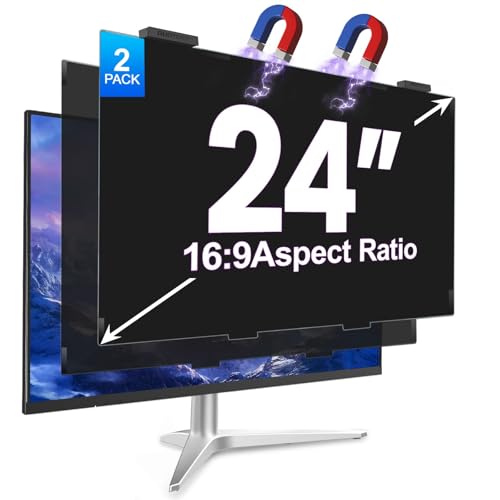
GUDTEKE 2Pack Magnetic 24 Inch Privacy Screen

JEAPKA 2 Pack Magnetic 24″ Privacy Filter

Verponity 2 Pack 27 Inch Magnetic Privacy Screen

PJOVORY Magnetic Privacy Screen for 24 Inch Monitor

GUDTEKE 2Pack Magnetic 27 Inch Privacy Screen
Zspeed [2-Pack] 24 Inch Privacy Screen for Monitor

EZ-Pro Anti Blue Light Screen Protector for MacBook Air 11″

Izmapaic 24 Inch Privacy Screen Filter 16:9
The Strengths Of Each Pick
The GUDTEKE 2Pack lands at the top of the roundup because it solves the single most common pain point with monitor privacy filters: the install. The hanging magnetic design snaps on and pulls off in roughly a second, with no adhesive strips, no bubbles, and no need to peel backing film every time you want to share your screen. For a 24-inch 16:9 widescreen (the most common office and home setup), two filters in the box covers a primary monitor plus a secondary display, or one for the office and one to rotate home.
Daily use feels low-effort: pull it off for a screen-share, snap it back on for a confidential email. The anti-blue and anti-glare coatings address eye comfort during long sessions, which matters for anyone grinding through spreadsheets or code reviews. Compared to the JEAPKA filter further down, this one leans more on the magnetic-hang convenience than on a heavy-duty alignment frame, so the trade-off is fit precision on slightly oversized or undersized bezels.
Real Benefits
- Magnetic-hang install removes the usual alignment headache.
- Two-pack pricing effectively halves the cost per monitor.
- Anti-blue and anti-glare coatings reduce fatigue on long days.
- Removes cleanly with no residue, friendly to shared hot-desks.
Things To Consider
- Fit depends on the bezel holding the magnets; thin or curved displays may not grip.
- Owners commonly report the privacy angle darkening edges when sitting off-center.
Key Specs
Right Fit For
Office workers and hybrid commuters on standard 24-inch widescreens who switch between private work and screen shares several times a day.
Consider Something Else When
Owners of 27-inch frameless displays should look at the Verponity 2 Pack 27 Inch Magnetic Privacy Screen, which targets the larger size class.
JEAPKA’s take on the magnetic privacy screen leans into precision fit. The snap-fit design is meant to keep the filter flush against the panel, which addresses a complaint I see in this category: ghosting or doubled text when the filter sits a few millimeters off the surface. For a home office where the screen stays put all day and rarely needs to be removed, that locked-down fit tends to be worth more than quick-release convenience.
It also folds in blue-light filtering and glare reduction, so the eye-comfort story lines up with the privacy story. The trade-off compared to the GUDTEKE pick above: the magnetic attachment here is more about a secure rest than a one-second swap, so anyone planning to take the filter on and off constantly might find it less forgiving. For most setups where the filter lives on the monitor and only comes off monthly, it’s a tidy middle-ground option.
Practical Advantages
- Snap-fit mounting reduces ghosting and edge lifting on flat panels.
- Adhesive-free design keeps the original screen surface clean.
- Blue-light filter supports late-evening work without a harsh tint.
Worth Noting
- Snap-fit magnets are tighter than hanging-style alternatives, slower to remove for quick shares.
- Cleaning the filter with standard screen wipes may streak the anti-glare coating over time.
Feature Snapshot
Best Suited To
Home-office users on 24-inch monitors who want a low-maintenance, stay-on privacy filter with eye-comfort benefits baked in.
Look Elsewhere When
Anyone who frequently flips between private and shared viewing may prefer the quicker magnetic-hang design of the GUDTEKE 2Pack Magnetic 24 Inch Privacy Screen.
Once you move past 24 inches, the privacy-filter market thins out, and a lot of people end up forcing a smaller filter onto a larger panel. The Verponity 2 Pack 27 Inch Magnetic Privacy Screen is built for the 27-inch 16:9 class specifically, which is the sweet spot for QHD creative work and modern ultrawide-adjacent setups. Tool-free magnetic hanging keeps the install as painless as the smaller-format options above.
The brand calls out frameless-screen compatibility, which matters because bezels have shrunk dramatically on recent 27-inch panels. A filter that relies on a thick magnetic strip can struggle with super-thin bezels, but the hanging-style approach here sidesteps that problem. For a designer, analyst, or anyone who parks a laptop next to a 27-inch external display and wants both shielded, the two-pack covers a primary work monitor and a secondary screen in a single buy.
Practical Pluses
- Sized for the 27-inch 16:9 widescreen class, the most common pro-creator panel size.
- Frameless-screen friendly, avoiding magnetic-strip slip on thin bezels.
- Tool-free mounting keeps the workflow fast during screen-share pivots.
Points To Note
- Privacy coverage is more demanding on a 27-inch panel; you may find the side-privacy cone narrower than on a 24-inch filter.
- Anti-glare coating is mild, so direct overhead lighting still requires monitor positioning.
Who Should Grab It
Creators, analysts, and dual-monitor professionals on 27-inch 16:9 displays who want privacy without the install friction of adhesive filters.
A Better Fit Elsewhere
Anyone on a smaller 24-inch 16:9 monitor gets a more cost-effective match in the GUDTEKE 2Pack Magnetic 24 Inch Privacy Screen.
PJOVORY skips the multi-pack format and goes single-filter, which makes the buying decision easier for someone who only needs to cover one monitor. The dimensions get specific in the listing (the visible area runs roughly 20 15/16″ wide by 11 13/16″ tall), which is a refreshing change in a category where “fits most 24-inch monitors” usually does the heavy lifting. For shoppers who like to measure twice and buy once, that precision lands well.
It’s explicitly built for flat-panel displays, so curved screens are out. The trade-off versus a 2-pack option is purely quantity: you pay per filter rather than per pair, and there’s no spare if a corner gets nicked. For a single-monitor home setup, that’s a fair swap, and the magnetic-hang install keeps the day-to-day experience on par with the bigger 2-pack rivals above.
What Stands Out
- Detailed visible-area dimensions help with fit-checking before purchase.
- Single-pack format suits minimalist buyers who don’t need a spare.
- Magnetic install protects the screen from adhesive-related wear.
Honest Caveats
- Curved and thick-bezel monitors are explicitly unsupported, narrowing the use cases.
- No backup filter included, so damage means a full repurchase.
Perfect Match For
Solo home workers on a single flat-panel 24-inch 16:9 monitor who want one well-fitting filter without paying for a second one.
Swap It Out When
Anyone running two displays should step up to the GUDTEKE 2Pack Magnetic 24 Inch Privacy Screen for better value and a backup.
The 27-inch sibling to the GUDTEKE 24-inch pick carries the same magnetic-hang install philosophy into the larger format. Open-plan offices are the natural home for this one: two 27-inch displays, two privacy filters, one purchase, no alignment rituals at the start of each shift. The hanging approach means a single motion removes the filter when a teammate needs to review something on-screen, which keeps the collaboration flow intact.
Anti-blue and anti-glare coatings carry over, which is the practical payoff for a designer or analyst spending six-plus hours in front of dual 27-inch panels. The honest read is that a 27-inch privacy filter is more demanding than a 24-inch version, since the wider viewing cone means more off-angle surface to darken. For most users, that’s a small compromise for the much larger visible area.
Everyday Wins
- Two filters cover a full dual-27-inch workstation.
- Magnetic-hang design supports fast filter swaps for collaboration.
- Anti-blue coating reduces end-of-day eye strain on long sessions.
Small Caveats
- Privacy cone narrows slightly versus smaller filters at the same viewing angle.
- Heavier panel size makes the filter slightly more cumbersome to store when removed.
Whose Shelf It Belongs On
Hybrid-office workers and creatives running dual 27-inch 16:9 displays who need both screens shielded without a daily install routine.
Another Choice May Suit
A single-display 24-inch setup is better served by the GUDTEKE 2Pack Magnetic 24 Inch Privacy Screen, which costs less and fits smaller panels more precisely.
Zspeed’s 24-inch filter is the broadest-fit option in this roundup, and the brand explicitly lists compatibility across Dell, HP, Samsung, Lenovo, LG, Acer, ASUS, Toshiba, ViewSonic, AOC, Sceptre, and Philips. For a household with mixed-brand monitors, that kind of cross-vendor support saves the usual “is this the right one?” guessing game. The hanging removable design means a kid’s homework station and a parent’s work-from-home setup can both get shielded with the same install method.
The trade-off versus a single-brand-tuned filter is precision: when a filter claims compatibility with a dozen brands, the visible-area dimensions tend to sit in the middle of the range. For monitors right at the standard 16:9 24-inch spec, the fit feels natural. For edge-case panels with slightly undersized or oversized bezels, a more specialized option like the PJOVORY filter above may sit more precisely.
Standout Benefits
- Wide brand compatibility covers most consumer 24-inch monitors on the market.
- Two-pack value works well for a parent-and-kid or dual-office setup.
- Anti-spy and blue-light layers address both privacy and comfort in one filter.
Factors To Consider
- Fit precision may slip on monitors with non-standard bezel thicknesses.
- Anti-glare performance is moderate; bright direct lighting still demands screen-angle tweaks.
Quick Facts
Made For
Multi-monitor households with mixed-brand 24-inch displays who want one filter order that works across the board.
Reach For A Different Pick When
Anyone with a single well-defined 24-inch panel may get a tighter fit from the JEAPKA 2 Pack Magnetic 24″ Privacy Filter.
This is the only laptop-scale option in the roundup, and it earns its place for a specific reason. Older MacBook Air 11-inch models (A1370 and A1465) are still in heavy rotation as travel and student machines, and a privacy filter sized for a desktop monitor is useless on an 11-inch laptop screen. EZ-Pro builds this one specifically for that form factor, with an adhesive-style application rather than a magnetic mount, since laptop lids are too thin to support magnets reliably.
The focus here is blue-light filtering in the 380nm to 495nm range, which is the spectrum most associated with eye strain and disrupted sleep patterns. A 2-pack plus installation kit means there’s a backup if the first application goes wrong, which matters more on a laptop where dust under the film is immediately visible. The catch: this is a model-specific fit, so anyone with a different MacBook Air or Pro will need a different size.
The Good Stuff
- Tailored specifically for MacBook Air 11-inch (A1370 and A1465).
- Two-pack plus install kit supports a clean first application with a backup.
- Blue-light filter targets the spectrum most linked to eye fatigue.
Points To Keep In Mind
- Adhesive application is less forgiving than magnetic desktop filters, and dust during install shows easily.
- Strictly model-specific, so it won’t transfer to a different laptop later.
Who Will Love This
Frequent travelers and students still running a MacBook Air 11-inch (A1370 or A1465) who want blue-light protection sized for the laptop form.
Skip It When
Desktop-monitor users are better served by any of the 24-inch or 27-inch magnetic options, such as the GUDTEKE 2Pack Magnetic 24 Inch Privacy Screen.
Izmapaic keeps it simple: a single 24-inch 16:9 privacy filter with the visible area measured at 20 15/16″ by 11 13/16″ (532mm by 299mm), and a clear note that this size is not for 16:10 panels. For shoppers who have been burned by the wrong-aspect-ratio filter before, that explicit warning is a small but meaningful trust signal. The filter leans into the side-angle privacy story without overpromising on blue light or glare tech.
It’s a more traditional take than the magnetic-hang options above, which means installation is more deliberate. The honest read is that for anyone who values a one-time careful install and a filter that just stays put, this kind of straightforward design has its own appeal. It’s the option to reach for when the magnetic approach feels too informal for a permanent desk setup.
Where It Excels
- Explicit 16:9 dimensions reduce the risk of buying the wrong aspect ratio.
- Clear size callout helps with measurement-based shopping.
- Single-filter format fits a one-monitor, no-spare-needs shopper.
Trade-Offs
- No magnetic quick-release, so the install is more permanent.
- Blue-light and glare handling is more basic than the multi-coating rivals in this list.
Right Fit For
Privacy-focused shoppers on a 24-inch 16:9 panel who prefer a one-time install over a magnetic quick-swap system.
Not Your Match When
Anyone who frequently toggles between shared and private viewing should pick the GUDTEKE 2Pack Magnetic 24 Inch Privacy Screen instead.
Picking The Right Monitor Shield For Your Setup
Measure Before Anything Else
Privacy filters live and die by exact dimensions, so the first move is a tape measure, not a shopping cart. Pull the visible width and height of the screen, excluding the bezel, and write them down. Diagonal measurement alone is a recipe for returns, because the same “24-inch” label can describe both 16:9 and 16:10 panels with very different widths. Most 24-inch 16:9 screens land in the 20 15/16″ by 11 13/16″ range, but a few millimeters off in either direction is the difference between a snug fit and a filter that bows in the middle.
Decide Between Magnetic And Adhesive Mounts
Magnetic-hang designs dominate the current crop of computer monitor screen guards, and for good reason: they install in seconds, leave no residue, and let you peel the filter off for screen shares. Adhesive and slide-mount styles still exist and tend to sit closer to the panel, which can reduce ghosting. For a desk that doubles as a collaboration surface, magnetic wins. For a permanently private workstation, adhesive’s tighter fit can be worth the install time.
Match The Filter To The Environment
Shared bullpen or open-plan office? Lean into a 2-pack with broad brand compatibility, so a colleague borrowing a display or a second monitor at home can stay shielded. Solo home office? A single filter with precise dimensions is often the better value. Coffee shops and travel days? A laptop-specific filter (like the MacBook Air 11-inch option) matters more than another desktop screen guard.
Think About Eye Comfort On Top Of Privacy
A privacy filter is doing double duty when it also tames glare and filters blue light. Anyone logging six-plus-hour days in front of a monitor benefits from that extra layer, especially in window-facing desks. The honest read is that blue-light filtering is subtle, not transformative, so set expectations accordingly, but combined with glare reduction it can make a real dent in end-of-day eye fatigue.
Mistakes And Upgrades Worth Noting
Wrong Turns To Avoid
The most common slip-up in this category is ordering by diagonal size only, then discovering the filter is the wrong aspect ratio for the panel. Aspect ratio (16:9 vs 16:10) and visible-area dimensions (not bezel-included) are the two numbers that actually matter. A second common miss is assuming magnetic filters fit every monitor: thin bezels, curved screens, and unusual panel thicknesses can all reject the magnetic hang, and the listing’s compatibility list is worth reading carefully before checkout.
When Paying More Pays Off
Premium-tier privacy filters in this space earn their higher cost by stacking better coatings, broader aspect-ratio support, and stronger multi-pack value. For someone using a single 24-inch monitor at home, the basic Izmapaic filter does the job at a lower entry price. For a dual-27-inch workstation or a 2-pack that needs to cover two locations, stepping up to a magnetic-hang design like the GUDTEKE or Verponity picks tends to pay back in saved install time and better daily ergonomics. The honest case for spending more: a filter you actually leave on the screen, instead of one that ends up in a drawer because it was annoying to use.
Frequently Asked Questions
Do magnetic privacy filters damage monitors?
No, the magnetic fields used in hanging-style computer monitor screen guards are too weak to affect LCD, LED, or OLED panels. They attach to the bezel, not the active display area, so there’s no contact with the screen surface itself.
Will a privacy filter reduce screen brightness?
Yes, any privacy filter dims the display slightly because the filter itself absorbs some light. Most users compensate by raising brightness a notch or two. The side-angle darkening is more noticeable than the head-on dimming.
Can I use a 24-inch filter on a 23.8-inch monitor?
Usually yes, since 23.8-inch and 24-inch monitors share the same 16:9 visible-area dimensions in most cases. The safer move is to measure the visible width and height of your specific monitor and compare against the filter’s spec sheet rather than trusting the diagonal label.
How do I clean a computer monitor screen guard?
A microfiber cloth with a small amount of water is the safest option. Avoid ammonia-based cleaners, which can break down anti-glare and blue-light coatings over time. Light pressure and slow strokes work better than scrubbing, especially on the coated side of the filter.
Do privacy filters work on curved monitors?
Standard flat-panel privacy filters do not fit curved screens properly, since the curve prevents the filter from sitting flush. Curved-monitor owners should look for filters specifically labeled for curved displays rather than trying to adapt a flat-panel option.
Wrap Up
A good computer monitor screen guard fades into the background, the kind of accessory you forget is there until you try working without one. Match the filter to your panel size and aspect ratio, decide whether you want magnetic convenience or a more permanent install, and consider whether glare and blue-light filtering matter for your day. With those three calls made, any of the eight picks above will do its job well.