A solid gaming mouse (or the pad that anchors it) can transform how every match feels. After long sessions, the right sensor, weight, and surface stop feeling like gear and start feeling like an extension of the hand. I’ve pulled together nine solid options that cover most grip styles, hand sizes, and budgets, from ultra-light wireless shells to wide cloth pads and a hard-surface mat with RGB lighting. My goal here is simple: help you skip the spec-sheet rabbit hole and land on gear that fits how you actually play.
The Leading Options At A Glance
PickWhy We Picked ItBest ForAction

Editor’s ChoiceCorsair MM300 Anti-Fray Cloth Gaming Mouse Pad (Extended)
Wide cloth surface, stitched edges
Low-DPI desk-wide players
Space SaverCorsair MM300 Anti-Fray Cloth Gaming Mouse Pad (Medium)
Compact cloth, same texture
Small desks and travel

Design StandoutRazer Firefly Hard V2 RGB Gaming Mousepad
Hard surface, Chroma RGB
Setup-focused RGB battlestations
Compact ChoicePulsar X2H Crazylight Wireless Mouse, Mini (Jet Black)
Ultra-light, mini shell
Fingertip and small-hand players
Clean AestheticPulsar X2H Crazylight Wireless Mouse, Mini (Uyuni White)
Mini shell, bright finish
Minimalist white setups
Performance LeaderPulsar X2H Crazylight Wireless Mouse, Medium (Jet Black)
Ultra-light, medium shell
Competitive FPS mains
Refined PickPulsar X2H Crazylight Gaming Mouse, Medium (Uyuni White)
Medium shell, light tone
Pulsar X2H Crazylight Wireless Mouse, Medium (Uyuni White)
Medium shell, light tone
Claw-grip aesthetic builds
Feature RichPulsar X2H Crazylight Wireless Mouse, Medium (BadSeed)
Custom finish, medium shell
Collectors and custom-design fans
Specialty ChoicePulsar X2H Crazylight Wireless Mouse, Mini (BadSeed)
Custom finish, mini shell
Small-hand collectors
More Details On Our Top Picks
The Extended MM300 stretches wide enough for a full keyboard and mouse setup, which is the first thing most low-sensitivity players notice when they unroll it. The textile-weave surface is tuned for control, so flicks land where the cursor was supposed to rather than skating past the target. Stitched edges run the full perimeter, which keeps the cloth from peeling after months of wrist drag.
Compared with the medium MM300 reviewed next, this version trades desk footprint for tracking real estate, the kind of room that makes wide-arm sweeps feel natural. Owners commonly report the cloth surface holding up well under daily use, though heavy arm rests can leave visible wear over time.
Positive Points
- ✓Wide footprint supports both keyboard and mouse in one surface.
- ✓Textile-weave material is tuned for control, helping slower flicks land precisely.
- ✓Stitched perimeter guards against the peeling that ruins cheaper cloth pads.
- ✓Multi-color variants let the pad blend with most battlestation themes.
- ✓Surface works with both optical and laser sensors, so no need to re-tune DPI per pad.
Things To Consider
- •Larger size demands a deep desk to lay flat without overhang.
- •Cloth texture traps dust and crumbs, so a weekly wipe-down helps the glide stay consistent.
Feature Snapshot
| | Feature | Specification | Why It Matters |
|---|
| Surface material | Textile-weave cloth | Tuned for control over raw glide speed. |
| Edge construction | Reinforced stitched edges | Resists fraying at the perimeter. |
| Size variant | Extended | Covers full keyboard plus mouse area. |
| Sensor compatibility | Optical and laser | Plays well with most modern mice. |
Who It Suits Best
Players who use low DPI and wide arm sweeps on a deep desk will get the most out of this surface.
Where Another Pick Suits Better
The Corsair MM300 Medium version is the better call for tighter desks where the extended footprint would drape over the edge.
The Medium MM300 keeps the same control-oriented cloth and stitched-edge build as the extended version, just trimmed down for smaller footprints. On a tight 24-inch desk, it sits cleanly under a mouse without crowding the keyboard tray. The textile-weave pattern delivers pixel-precise tracking, which matters when a sensor is dialed to a high DPI for fast-paced shooters.
This pad also travels well, sliding flat into a laptop bag without curling at the corners. Compared with the wider MM300 above, this one prioritizes space efficiency over sweep room, so palm-grip players who move the mouse a lot may notice the smaller canvas. Cloth pads in this size range often need a quick vacuum pass now and then to keep dust from affecting glide.
What Helps Most
- ✓Compact size fits small desks and travel bags.
- ✓Stitched edges protect against fraying during transport.
- ✓Low-friction cloth weave supports consistent sensor readings.
Points To Note
- •Limited sweep area compared with the extended MM300.
- •Cloth surface can slow quick flick gestures that work better on hard pads.
- •Edges benefit from occasional smoothing if the pad arrives rolled.
Right Fit For
Gamers with limited desk space or anyone who moves between locations and wants one consistent surface.
Consider Something Else When
Low-DPI players who sweep wide will find the Razer Firefly Hard V2 a more forgiving canvas.
The Firefly Hard V2 flips the script with a micro-textured hard surface instead of cloth, and that single swap changes how the mouse glides. At roughly 15.2 by 12 inches, it is wide but slim, the kind of low-profile mat that disappears under the wrist while the RGB border does the visual talking. Razer Chroma support syncs the lighting with compatible mice, keyboards, and Hue gear, so the whole desk can pulse in one color wave.
The hard top favors fast, controlled swipes, which is why competitive players tend to gravitate here. By contrast with the cloth MM300 pads above, this surface shrugs off spills and crumbs in seconds. Owners commonly mention the textured finish needing an occasional wipe to keep oils from dulling the tracking.
The Upside
- ✓Hard micro-textured surface tracks precisely across optical and laser sensors.
- ✓Chroma RGB lighting syncs with Razer peripherals and supported third-party gear.
- ✓Non-cloth finish wipes clean in seconds after spills.
- ✓Slim profile keeps the desk looking tidy under the wrist.
Trade Offs
- •Hard surface transmits more noise into the desk than a cloth pad.
- •RGB requires the USB cable to be plugged in, adding one wire to manage.
- •Surface oils build up faster on hard pads, so weekly cleaning pays off.
Key Specs
| | Feature | Specification | Why It Matters |
|---|
| Dimensions | 15.2L x 12W inches | Covers mouse and a small keyboard strip. |
| Surface | Micro-textured hard coat | Tuned for both speed and control. |
| Lighting | Razer Chroma RGB | Syncs with compatible peripherals. |
| Sensor calibration | Lab-tested for mouse sensors | Tracks precisely across DPI ranges. |
Made For
Gamers who run a coordinated battlestation and want a fast, low-maintenance hard surface under their mouse.
Skip It When
Anyone who wants a soft, cloth-style feel should stay with the Corsair MM300 Extended above instead.
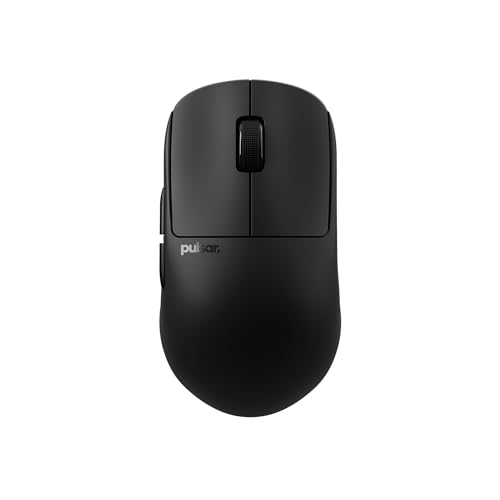
The Mini X2H Crazylight in Jet Black tips the scales at a hair under 37 grams, which is the headline number on this shell. That kind of weight drop matters in long FPS sessions, since the wrist does less work to accelerate the mouse across the pad. The mini chassis suits smaller hands and fingertip grips where the palm stays anchored and the fingers do the flicking.
Wireless here means no drag from a cable interfering with target tracking, an upgrade that many players feel immediately. Compared with the medium X2H further down the list, this one sacrifices palm room for agility. Depending on your hand size, the mini shell may feel cramped during long grinding sessions, so trying it for fit first helps.
The Helpful Details
- ✓37-gram shell reduces wrist fatigue over marathon sessions.
- ✓Wireless connection removes cable drag for cleaner tracking.
- ✓Mini form factor suits fingertip and claw grips on smaller hands.
- ✓XS-1 sensor supports a high DPI range for fast-paced shooters.
Honest Caveats
- •Mini shell may feel cramped for users with larger hands.
- •Lightweight body lifts off the pad more easily during lifts-and-clicks.
Quick Facts
| | Feature | Specification | Why It Matters |
|---|
| Weight | Approximately 37g | Reduces fatigue during long sessions. |
| Shell size | Mini | Best for smaller hands and fingertip grip. |
| Connection | Wireless | No cable drag during fast swipes. |
| Sensor | XS-1 | Supports high DPI for FPS tracking. |
Who Will Love This
Small-handed fingertip players who want the lightest wireless shell they can find for competitive matches.
Not Your Match When
Medium-to-large hands will find the Pulsar X2H Medium in Jet Black a better fit for palm grip.
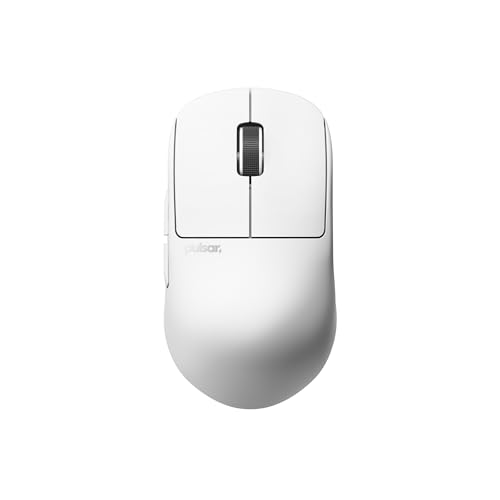
The Uyuni White version of the Mini X2H keeps the same 37-gram chassis, just dressed in a brighter finish that pops against darker desks. For anyone running a white or pastel battlestation, this shell ties the look together without forcing a color compromise. The underlying performance tracks the Jet Black Mini above, so the only real decision is the finish.
Wireless freedom keeps the desk clean, and the mini shell still rewards fingertip control on a tight pad. Light-colored surfaces do show grime faster than darker shells, so a microfiber pass every few days keeps the finish looking fresh.
Reasons It Performs
- ✓Same 37-gram shell as the Jet Black Mini for low-fatigue sessions.
- ✓Bright Uyuni White finish suits minimalist and pastel setups.
- ✓Wireless design keeps the cable off the playing field.
- ✓Compact shape supports quick directional changes in clutch moments.
Less Ideal Details
- •Light finish shows fingerprints and desk grime more visibly.
- •Mini shell still feels small for medium-to-large hands.
Built With In Mind
Players with smaller hands who want a wireless shell that matches a clean, light-themed setup.
Look Elsewhere When
Anyone wanting a darker, more low-key finish should consider the Pulsar X2H Mini in Jet Black instead.
The Medium X2H Crazylight lands around 43 grams, slightly heavier than the Mini siblings but still firmly in the ultra-light category. That small weight bump is the trade for a longer shell that supports palm and claw grips comfortably for average-to-larger hands. The wireless connection stays consistent during long ranked sessions.
This shell tends to be the sweet spot for most FPS players who want light weight without cramping the palm. Compared with the Mini variants above, the Medium gives the hand a fuller footprint to rest on. Depending on your grip style, this size may finally feel like an extension of the hand rather than something perched on the fingertips.
Notable Gains
- ✓43-gram body stays in the ultra-light category while supporting fuller grips.
- ✓Medium shell fits palm and claw grips across most hand sizes.
- ✓XS-1 sensor supports a high DPI ceiling for sniper and tracking play.
- ✓Wireless design eliminates cable interference during flick practice.
A Few Limitations
- •Slightly heavier than the Mini shells, so fingertip-only grippers may feel the extra gram.
- •Wireless charging cycles still need management for marathon use.
Spec Overview
| | Feature | Specification | Why It Matters |
|---|
| Weight | Approximately 43g | Still ultralight while supporting fuller grips. |
| Shell size | Medium | Fits palm and claw grips on average hands. |
| Connection | Wireless | Cleaner swipes without cable drag. |
| Sensor | XS-1 | Tracks accurately at high DPI settings. |
Best Suited To
Competitive FPS players with average-to-large hands who want a featherweight shell that still supports palm grip.
A Better Fit Elsewhere
Small-handed fingertip players will find the Pulsar X2H Mini in Jet Black more comfortable to maneuver.
The Uyuni White Medium X2H blends the comfortable medium shell with a softer, brighter finish that brightens a desk. The 43-gram weight lands in the same featherlight zone as the Jet Black Medium above, so the feel under the hand barely shifts. For claw-grip players who like a fuller shell, this finish adds visual variety without changing performance.
On a clean desk, the lighter shell coordinates well with white keyboards, monitors, and case interiors. A microfiber wipe every few sessions keeps the finish looking crisp, since white surfaces show oils faster than darker ones.
Useful Strengths
- ✓43-gram medium shell suits palm and claw grips on average hands.
- ✓Uyuni White finish coordinates with bright, minimalist setups.
- ✓Wireless connection keeps the cable off the playing surface.
Some Limits To Know
- •Light finish shows smudges more quickly than darker shells.
- •Medium size still feels oversized for very small hands.
Whose Shelf It Belongs On
Gamers with average hands who want a featherweight shell that matches a white or pastel battlestation.
Reach For A Different Pick When
Fingertip grippers on small hands should reach for the Pulsar X2H Mini in Uyuni White instead.
The BadSeed edition of the Medium X2H swaps the standard finish for a custom look that stands out on a crowded desk. Underneath the skin, the wireless shell, sensor, and roughly 43-gram weight match the standard Medium above, so the handling stays familiar. The draw is the finish itself, which appeals to collectors and anyone building a themed battlestation.
Compared with the Jet Black Medium reviewed earlier, this one is more of a personal style call than a performance upgrade. Limited-run finishes can be harder to find later, so grabbing one when it shows up in stock is the safer move.
The Value In It
- ✓Custom BadSeed finish gives the shell a distinct look.
- ✓Same 43-gram Medium shell as the standard Jet Black variant.
- ✓Wireless design keeps the desk free of cable clutter.
Practical Considerations
- •Custom finishes can be harder to replace if the shell is damaged.
- •Special-edition pricing can sit above the standard colorways.
Perfect Match For
Collectors and themed-build enthusiasts who want a standout finish without giving up the featherweight Medium shell.
Swap It Out When
Practical shoppers focused on pure performance should pick the Pulsar X2H Medium in Jet Black instead.
The Mini BadSeed edition wraps the 37-gram mini shell in a custom finish aimed at small-handed collectors. The handling matches the Jet Black Mini reviewed earlier, so the size, weight, and wireless performance stay identical. The appeal is purely aesthetic, which matters when several identical shells already share desk space.
Limited finishes tend to come and go, so timing the purchase around availability is part of the deal here. The mini shell still rewards fingertip control, which is the same trade-off noted on every mini variant in this list.
What Stands Out
- ✓Custom BadSeed finish adds character to the 37-gram mini shell.
- ✓Mini chassis suits small hands and fingertip grips.
- ✓Wireless design keeps the cable off the playing field.
Where It Is Less Suited
- •Custom finish can be harder to source if a replacement is ever needed.
- •Mini size still feels cramped for medium-to-large hands.
Who Should Grab It
Small-handed collectors who want a distinctive finish on a featherweight wireless shell.
Where A Sibling Pick Shines
Anyone prioritizing function over finish should grab the Pulsar X2H Mini in Jet Black for the same performance profile.
What Matters Most Before Choosing Computer Mouses For Gaming
Grip Style Drives Shell Shape
Palm, claw, and fingertip grips each demand a different mouse footprint. Palm players usually want a longer shell so the hand rests fully on the body, while claw and fingertip grippers often prefer shorter shells that move easily under the fingers. Matching the shell length to your grip is the fastest way to make a mouse feel right.
Weight Changes Long Sessions
Ultra-light shells (often under 45 grams) cut down on the wrist work needed for repeated flicks. Heavier shells around 70 grams or more can feel planted but tire the wrist faster during long ranked nights. Light shells feel almost weightless, though the trade is that they lift off the pad more easily during lifts-and-clicks.
Sensor DPI and Tracking
DPI (dots per inch) is how sensitively the sensor reads movement, and IPS (inches per second) is how fast it can track before losing accuracy. Most modern sensors cover more DPI than anyone realistically uses, so the IPS and acceleration specs matter more for fast-twitch shooters. A wide DPI range also helps users who switch between productivity and gaming tasks.
Wired Versus Wireless
Wireless mice today match wired latency on the polling rate side, which is how often the mouse reports its position to the computer. The trade-off is battery management, since wireless shells need charging cycles. Wired options stay powered forever but add cable drag that some players feel immediately.
Smart Choices To Lock In Early
Wrong Turns To Avoid
Picking a mouse purely on sensor specs is a common misstep. The shell shape, weight, and grip fit affect daily comfort far more than a few thousand extra DPI. Another easy trap is buying a mouse pad without checking desk size, since an extended pad that overhangs the edge tends to curl over time.
When Paying More Pays Off
Premium shells usually show up in weight, finish quality, and sensor consistency at high tracking speeds. If you play fast-paced shooters competitively, the upgrade to an ultra-light wireless shell often shows up in click fatigue over long sessions. For casual players, the extra spend is harder to justify, and a mid-range shell covers most needs without the premium finish.
Frequently Asked Questions
QWhat DPI should I use for gaming?
Most FPS players land between 400 and 1600 DPI, depending on in-game sensitivity and personal preference. Higher DPI works fine on modern sensors but can feel twitchy without lowering the in-game multiplier.
QAre wireless gaming mice as fast as wired?
Modern wireless mice use polling rates (how often they report position) that match or beat many wired options. For competitive play, the difference is usually imperceptible, though wired still removes battery concerns entirely.
QHow important is mouse pad size?
Low-DPI players who sweep wide need extended pads to avoid running out of surface. High-DPI players on smaller mouse movements can usually get by with medium or even compact pads.
QDo I need RGB on a gaming mouse pad?
RGB on a pad is mostly aesthetic, useful for matching a themed battlestation or syncing lighting across peripherals. It adds a USB cable to manage but does not affect tracking or sensor performance.
QHow long do gaming mouse pads last?
Cloth pads with stitched edges typically last several years with regular cleaning. Hard-surface pads can last longer since they resist fraying, though their coatings may wear under heavy daily use.
Bottom Line
The right computer mouse for gaming comes down to grip fit, shell weight, and how you like the surface under the mouse. Cloth pads reward control and quiet play, hard pads favor speed and easy cleaning, and ultra-light wireless shells cut down on fatigue. Pick the shell that matches your hand and the pad that matches your desk, and the rest usually falls into place.