The right desk machine quietly shapes every workday, from the first spreadsheet at sunrise to the last video call after dinner. I put this list together for anyone setting up or refreshing a home workspace and trying to sort the all-in-ones from the tiny towers without drowning in spec sheets. Remote workers, hybrid employees, students, and home-based business owners should find a realistic fit somewhere below.
A Snapshot Of The Selections

Apple 2024 iMac All-in-One Desktop with M4 Chip (Pink)

HP 24-inch All-in-One Desktop, Athlon Silver, 8GB RAM
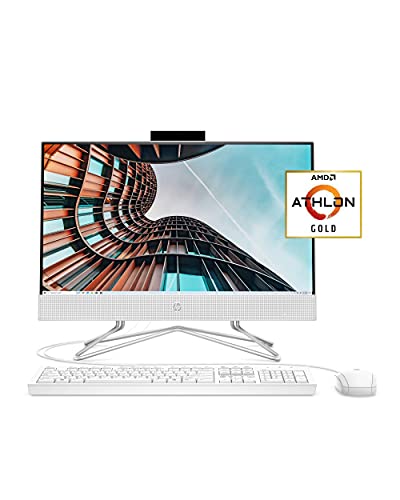
HP 22 All-in-One PC, Athlon Gold, Full HD

EUREKA ERGONOMIC Height Adjustable PC Stand
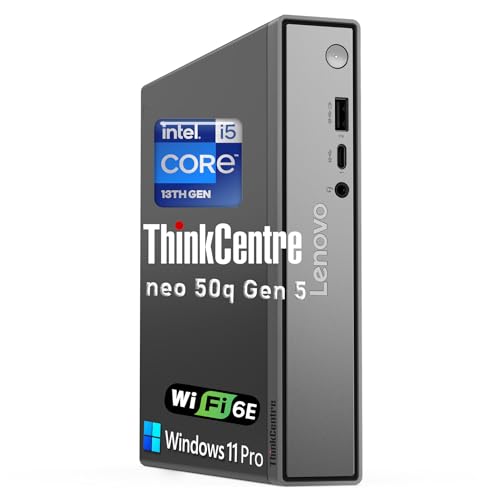
Lenovo ThinkCentre neo 50q Gen 5 Tiny Desktop, i5-13420H

Lenovo ThinkCentre Tiny M70q, i5-14400T, 16GB, 512GB
Lenovo ThinkCentre Tiny M70q, i5-14400T, 16GB, 256GB
Lenovo ThinkCentre Tiny M70q, i5-14400T, 32GB, 1TB

Lenovo ThinkCentre neo 50q, i5-13420H, 16GB, 512GB

Lenovo ThinkCentre neo 50q 1L Mini Desktop, Core 5 210H
What Each Pick Brings To The Table
The 2024 iMac leans on Apple’s M4 silicon, pairing a 10-core CPU with a 10-core GPU on a single unified memory pool. That memory, starting at 16GB, is shared by the processor and graphics, which means apps stay snappy when juggling a few browser tabs, a video call, and a document side by side. The all-in-one chassis keeps cables to a minimum, so a small writing desk feels calm instead of cluttered.
The pink finish won’t be for everyone, but it’s a quiet reminder that a work machine can also blend into a living space. Configurations scale up to 24GB of unified memory and 512GB of SSD storage for those editing video or running heavier creative tools. Owners can add AppleCare+ coverage for three years if they want a longer safety net around accidental damage.
Benefits That Matter
- Unified memory architecture keeps multitasking fluid across everyday work apps.
- All-in-one design cuts cable clutter for cleaner home setups.
- M4 GPU is comfortable with photo edits and light video work.
- Color-matched chassis helps the machine blend into living spaces.
- AppleCare+ option extends accidental damage coverage to three years.
Things To Consider
- Base 256GB SSD fills up quickly with project files and photos.
- External display support can require extra adapters depending on the workflow.
Key Specs
Who It Suits Best
Knowledge workers and creative pros who want a quiet, beautiful screen-and-computer combo and lean on macOS apps daily.
Where Another Pick Suits Better
Anyone needing Windows-native software should look at the Lenovo ThinkCentre Tiny M70q with i5-14400T instead, since that platform runs Windows out of the box.
This HP all-in-one packs an AMD Athlon Silver 3050U processor with 8GB of RAM and a 256GB SSD into a slim 24-inch frame. The three-sided micro-edge display gives a tidy look from any angle, and the adjustable tilt stand helps with long reading sessions. For a family desk where one person handles email while another watches a lesson, this format keeps everything visible without a separate tower.
The integrated webcam includes a physical privacy switch, a small but reassuring detail in a shared room. Built-in speakers and Wi-Fi round out a setup that mostly needs a power outlet to get going. Owners commonly report that the included peripherals feel basic but functional, which fits the overall positioning of the machine.
What Works In Its Favor
- 8GB of RAM is comfortable for browser-based office tasks.
- Physical webcam shutter adds a layer of everyday privacy.
- Tilt stand supports varied postures across the workday.
- 256GB SSD keeps boot and app launches snappy compared to older spinners.
Worth Noting
- Athlon Silver is light work for heavy spreadsheets or multitasking.
- Windows 10 Home is reaching end of support, so an OS upgrade plan may factor in.
Made For
Families and shared spaces that need a simple, clean all-in-one for browsing, email, schoolwork, and the occasional streaming session.
Skip It When
Power users juggling large spreadsheets or dozens of browser tabs will find more headroom in the Lenovo ThinkCentre Tiny M70q with i5-14400T.
The HP 22 sits at the entry end of the all-in-one category with an Athlon Gold 3150U, 4GB of RAM, and a 21.5-inch Full HD IPS anti-glare panel. The IPS screen is a nice perk at this tier, since it keeps colors and text looking consistent from wider viewing angles during long calls. The anti-glare coating helps when a window sits behind the screen, which is common in spare bedrooms turned into offices.
A wired USB mouse and keyboard ship in the box, so the setup is largely plug-and-play. The 256GB SSD is generous for a budget machine, and the built-in HD privacy camera plus dual-array microphones are tuned for video meetings. Owners commonly find the included speakers adequate for calls but thin for music.
The Helpful Details
- IPS panel keeps text readable from off-center seating positions.
- Privacy camera with HP True Vision hardware covers the lens when not in use.
- Dual-array microphones help pick up voices clearly on calls.
- Anti-glare coating reduces reflections near bright windows.
- Wired mouse and keyboard included for a quick start.
Room For Improvement
- 4GB of RAM can bottleneck heavy browser sessions.
- Windows 10 Home means an OS upgrade is on the horizon.
Best Suited To
Students, first-time home-office setups, and anyone needing a tidy screen-and-PC combo for email, research, and video calls on a budget.
Consider Something Else When
Anyone expecting to keep dozens of browser tabs open should step up to the HP 24-inch All-in-One, which ships with 8GB of RAM for more breathing room.
The EUREKA ERGONOMIC PC Stand isn’t a computer, it’s a mobile home for one. The two-tier steel frame supports most ATX cases on the market, with six manual height adjustments between roughly 23 and 33 inches. Caster wheels on the base let a heavy tower roll out for cable swaps or cleaning without dragging it across the floor.
Adjustability here is mechanical rather than motorized, so there’s no power brick to find a spot for. The frame is built for everyday loads, and the second tier can double as a printer shelf in a tight corner office. Anyone working in a carpeted room should expect a bit more push to roll the loaded stand around.
Strengths Worth Knowing
- Six-gear height range fits full-size ATX towers and printers.
- Locking caster wheels let the tower roll out for cleaning.
- Two-tier design doubles as storage or a printer perch.
- Steel frame handles the weight of typical gaming or workstation towers.
Points To Note
- Manual adjustment means re-pin every time the height changes.
- Carpeted rooms may need firmer push on the casters.
Whose Shelf It Belongs On
Tower owners who want to free up floor space or improve airflow under their machine without mounting anything to the wall.
A Better Fit Elsewhere
Anyone working without a separate tower should skip this and look at the Lenovo ThinkCentre neo 50q Gen 5, which already packs everything into a 1L chassis.
The ThinkCentre neo 50q Gen 5 crams a 13th Gen Intel Core i5-13420H into a chassis that’s about 7 inches square and just over an inch tall. That footprint means it can hide behind a monitor with a VESA mount, slip under a standing desk, or ride on a small shelf next to a printer. The 8-core, 12-thread chip has enough muscle for spreadsheets, browser-heavy workflows, and back-to-back video calls.
Because the case is so small, cooling relies on a compact fan, which tends to stay quiet under normal office loads. Ports on the front and rear keep daily cable swaps painless. Owners with dense USB setups may want a small hub to round out the experience.
A Few Highlights
- 1L form factor frees up desk real estate.
- Eight-core CPU handles multitasking comfortably.
- VESA-mountable design tucks behind most modern monitors.
- Compact footprint suits standing-desk converters and small nooks.
Points To Keep In Mind
- Compact fan can ramp up under sustained heavy loads.
- Internal expansion is limited compared to full-size desktops.
Right Fit For
Tidy desk enthusiasts and standing-desk users who want a near-invisible PC without sacrificing modern CPU performance.
Look Elsewhere When
Anyone running heavy virtualization or large datasets will find more RAM and storage in the Lenovo ThinkCentre Tiny M70q with 32GB and 1TB SSD.
This M70q configuration pairs a 10-core Intel i5-14400T with 16GB of DDR5 RAM and a 512GB NVMe SSD. DDR5 is the current generation of system memory, which moves data faster and uses less power than DDR4. The 512GB drive is a comfortable middle ground for documents, project files, and a healthy inbox without leaning on cloud storage.
Wi-Fi 6 support keeps the wireless connection snappy in homes crowded with phones, tablets, and smart devices. The unit ships with Windows 11 Pro, which adds features like BitLocker encryption and Remote Desktop that come in handy for small business owners. The “T” suffix in the CPU name signals a lower-power variant tuned for compact desktops, which helps keep the fan quiet in a bedroom office.
Where It Delivers
- DDR5 memory future-proofs the system for upcoming software.
- 512GB SSD holds years of work files locally.
- Wi-Fi 6 holds steady in busy wireless environments.
- Windows 11 Pro includes business-friendly tools like Remote Desktop.
Points To Note
- Lower-power CPU trades raw speed for quieter operation.
- Discrete graphics aren’t included for serious creative work.
Feature Snapshot
Who Should Grab It
Hybrid workers and small business owners who want a quiet, dependable mini PC with current-generation specs and pro-level Windows features.
Reach For A Different Pick When
Anyone needing more memory or local storage for big project files should look at the Lenovo ThinkCentre Tiny M70q with 32GB of RAM and a 1TB SSD.
This M70q variant keeps the same 10-core i5-14400T and 16GB of DDR5 RAM as its sibling, but drops the SSD to 256GB. Cloud-first workflows, where most documents live in services like OneDrive, Google Drive, or Dropbox, won’t notice the difference. Anyone backing up large media libraries locally will feel the smaller drive quickly.
The trade-off shows up in upfront cost, since smaller SSDs help trim the price without sacrificing CPU muscle. Owners who later need more space can attach an external drive over USB or use the network-attached storage route. For everyday browsing, email, and calls, the 256GB capacity is plenty.
What Stands Out
- Same 10-core CPU as higher-capacity siblings.
- Lower entry cost for cloud-driven workflows.
- Wi-Fi 6 and Bluetooth keep wireless accessories responsive.
- Compact size fits beside monitors without dominating the desk.
Honest Caveats
- 256GB fills up fast with local video files or project archives.
- External drives add clutter unless hidden behind the monitor.
Built With In Mind
Remote workers and students who live inside browser tabs and cloud documents and rarely keep large files on the local drive.
Swap It Out When
Anyone editing video or managing large design files will breathe easier with the Lenovo ThinkCentre Tiny M70q configuration that pairs 16GB of RAM with a 512GB SSD.
This is the top-spec M70q in the lineup, matching the same 10-core i5-14400T with 32GB of DDR5 RAM and a 1TB NVMe SSD. The doubled memory and storage headroom keep dozens of browser tabs, large spreadsheets, and a virtual meeting running in parallel without the system bogging down. The 1TB drive gives breathing room for project archives and local backups before external storage becomes necessary.
The three-year warranty is a quiet reassurance for anyone running a business-critical setup out of a home office. Owners commonly find this configuration comfortable for light content creation, spreadsheet modeling, and heavier multitasking. For dedicated video editing or 3D work, however, a discrete GPU would still be the missing piece.
Practical Pluses
- 32GB RAM handles heavy multitasking and large datasets.
- 1TB SSD swallows years of work files locally.
- Three-year warranty covers business-critical setups.
- Same compact chassis keeps desk footprint minimal.
Small Caveats
- Premium price reflects the doubled memory and storage.
- Integrated graphics limit serious rendering workloads.
Perfect Match For
Power users, analysts, and home-based business owners who run memory-heavy apps and want a future-proof foundation in a tiny box.
Where A Sibling Pick Shines
Anyone satisfied with lighter workloads will save money with the Lenovo ThinkCentre Tiny M70q that pairs 16GB of RAM with a 256GB SSD.
The neo 50q Gen 5 in this trim carries the same 13th Gen Intel Core i5-13420H chip as its smaller sibling but pairs it with 16GB of DDR5 RAM and a 512GB PCIe SSD. PCIe is the interface that connects the SSD to the rest of the system, and modern PCIe drives move data faster than older SATA SSDs. Windows 11 Pro comes preinstalled, which is friendly to business workflows that lean on group policies, BitLocker, or Remote Desktop.
The black chassis fits unobtrusively behind most monitors or under a standing desk. Wi-Fi 6 keeps the wireless connection steady in homes with lots of devices. Owners commonly pair this configuration with a USB-C dock to add extra monitors and peripherals without crowding the front panel.
A Strong Showing
- Windows 11 Pro supports business-grade security tools.
- 512GB PCIe SSD delivers fast boot and load times.
- DDR5 memory handles modern multitasking comfortably.
- Compact 1L chassis works with VESA mounting kits.
Factors To Consider
- Integrated graphics cap heavier creative workloads.
- Limited internal expansion compared to larger towers.
Who Will Love This
Hybrid employees and small business owners who want a quiet, business-ready mini PC that tucks out of sight without feeling underpowered.
Another Choice May Suit
Anyone needing heavier local storage for media libraries should look at the Lenovo ThinkCentre Tiny M70q with 32GB of RAM and a 1TB SSD.
The neo 50q 1L Mini Desktop shifts to Intel’s Core 5 210H, an 8-core chip with a hybrid design that splits performance cores from efficiency cores. Performance cores handle demanding apps, while efficiency cores take care of background tasks to save power. P-core speeds top out around 4.8GHz, which is helpful for crunching through large spreadsheets and reports.
The same 1L chassis keeps the desk footprint tiny, and the cooling system is tuned to stay composed under sustained loads. In a small home office, the low fan noise helps during long calls. Owners who want a newer CPU architecture for upcoming software may find this a sensible middle step before jumping to a full workstation.
Standout Benefits
- Hybrid CPU architecture balances speed and efficiency.
- Higher P-core boost helps with spreadsheets and reports.
- Tiny 1L chassis disappears behind monitors or under desks.
- Modern platform supports upcoming Windows updates comfortably.
Some Limits To Know
- Still integrated graphics for everyday apps only.
- Limited upgrade path inside the compact case.
Right Fit For
Knowledge workers running demanding productivity apps who want a forward-looking CPU in a small, quiet chassis.
Consider Something Else When
Anyone needing more RAM or local storage for big datasets should look at the Lenovo ThinkCentre Tiny M70q with 32GB and 1TB SSD.
Matching A Home Office PC To Real Life
Picking the right shape matters as much as picking the right specs. All-in-one machines like the HP 24 and HP 22 collapse the screen and computer into one tidy unit, which works beautifully for kitchen counters, guest bedrooms, and kids’ homework stations where cable clutter feels overwhelming. Tiny desktops like the ThinkCentre neo 50q and M70q keep the desk minimalist, and they pair well with the monitor, keyboard, and mouse already on hand.
For most home offices, 16GB of RAM is the comfortable floor in 2026. Browsers have grown heavy, and a typical workday juggles a video call, a document, a few SaaS dashboards, and a music stream. Anyone running local databases, frequent video editing, or large spreadsheets should aim for 32GB.
Storage choices matter too. A 256GB SSD fills up faster than people expect once cloud sync caches, family photos, and archived projects pile in. A 512GB drive hits the sweet spot for mixed personal and professional use, while 1TB suits anyone keeping large local files. NVMe SSDs load apps and boot the system faster than older SATA drives, which makes the whole PC feel snappier from the moment it powers on.
Connectivity deserves a quick check before checkout. Wi-Fi 6 is now common in newer homes and routers, and it holds up better than Wi-Fi 5 in busy wireless neighborhoods. Anyone planning to plug in multiple monitors should look for a unit with both DisplayPort and HDMI, or plan on a USB-C dock. Wired Ethernet, the RJ-45 port, is still useful for stable video calls when Wi-Fi gets crowded.
Quiet Wins And Worthwhile Upgrades
Where Shoppers Go Wrong
The most common slip-up is buying a budget machine with 4GB of RAM and expecting it to keep up with modern browser tabs. A second mistake is overlooking the operating system: machines still shipping with Windows 10 Home may need an upgrade path that adds friction later. Shoppers also tend to undercount the storage they’ll actually use, especially once cloud sync starts mirroring files locally.
What The Higher Tier Buys
Stepping up to a current-generation CPU like the Core 5 210H or the i5-14400T pays off when work involves large spreadsheets, multiple monitors, or frequent context-switching between apps. Doubling memory to 32GB keeps the system responsive under heavier multitasking, and a 1TB SSD removes the daily tension of clearing space. For most home offices, these upgrades buy headroom rather than raw speed, and that headroom tends to age well.
Frequently Asked Questions
How much RAM do home office computers really need in 2026?
16GB covers most productivity workflows, including browser-heavy multitasking and video calls, while 32GB makes sense for analysts, content creators, and anyone keeping large spreadsheets or local files open at once.
Are mini desktop PCs powerful enough for daily work?
Modern mini PCs with 10-core or 8-core hybrid CPUs handle email, documents, browser-heavy SaaS apps, and video meetings comfortably, though heavy 3D rendering or video editing still calls for a dedicated graphics card.
Is an all-in-one computer a good fit for a home office?
All-in-ones cut cable clutter and look clean in shared spaces, but they’re harder to upgrade later and tend to cost a bit more than a comparable mini PC paired with a separate monitor.
Should I pick a larger SSD or a faster CPU?
For typical office tasks, storage capacity usually matters more day to day than a small CPU step-up, since running out of space creates daily friction while a slightly slower chip is rarely noticed.
Do I need Wi-Fi 6 on my home office computer?
Wi-Fi 6 helps in homes with many connected devices, but a wired Ethernet port delivers the most stable video-call experience, so either a Wi-Fi 6 connection or an RJ-45 jack is a smart check before checkout.
Bottom Line
The right machine depends on your desk, your workflow, and how long you plan to keep it. All-in-ones like the HP 24 and HP 22 fit tidy shared spaces, the iMac lifts creative work, and the Lenovo mini desktops offer quiet power for serious multitasking. Match the shape to your room, the memory to your workload, and the storage to your files, and the rest tends to take care of itself.