Music production has changed. A decade ago, a bedroom studio meant a bulky tower, an interface, and patience. Today, a slim all-in-one or a pocket-sized mini PC can host dozens of tracks, virtual instruments, and effects, so long as the silicon inside can keep up. The picks below cover the spectrum, from budget-friendly all-in-ones for first-time producers to compact workstations with serious headroom for mixing full bands. I focused on CPU strength, memory capacity, storage speed, and quiet operation, because every one of those shapes how a session actually feels at 2 AM with a deadline looming.
An Overview Of The Picks

HP 24-inch All-in-One Desktop, Athlon Silver, 8GB RAM, 256GB SSD
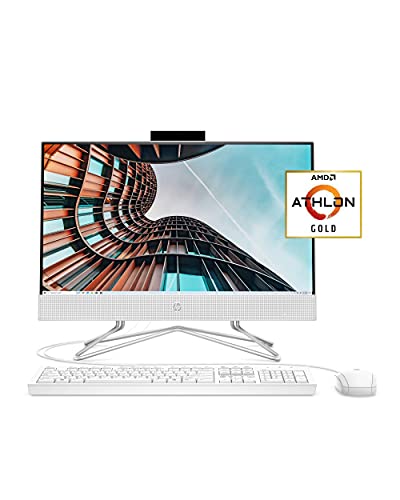
HP 22 All-in-One PC, Athlon Gold 3150U, 4GB RAM, 256GB SSD
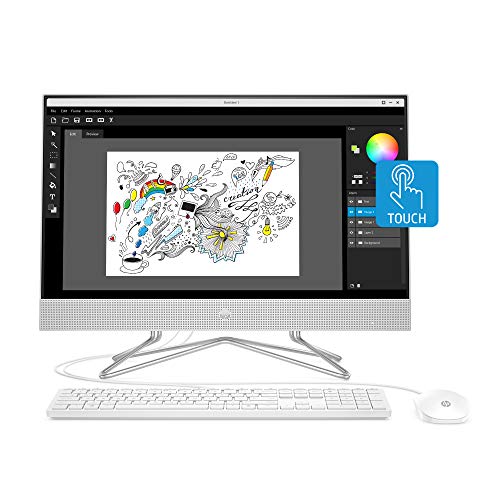
HP 24-inch All-in-One Touchscreen Desktop, Ryzen 5 4500U, 12GB RAM, 512GB SSD
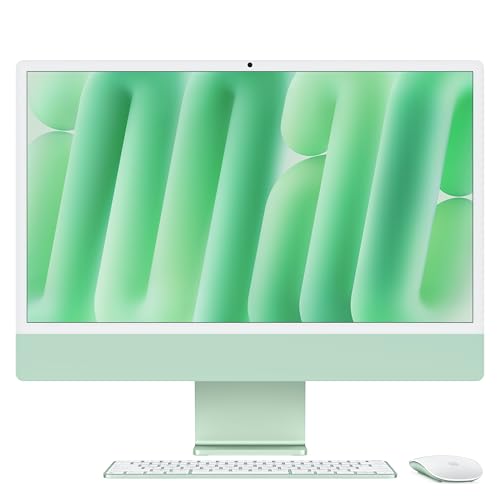
Apple 2024 iMac All-in-One, M4 chip, 24-inch Retina, 16GB Unified Memory

BOSGAME P6 Mini PC, Ryzen 9 6900HX, 24GB RAM, 1TB PCIe 4.0 SSD

GEEKOM A5 Mini PC, Ryzen 7 7730U, 16GB RAM, 512GB NVMe SSD

GEEKOM A6 Mini PC, Ryzen 7 6800H, 16GB DDR5, 1TB PCIe 4.0 SSD

GEEKOM IT13 MAX AI Mini PC, Intel Ultra 9 185H, 24GB LPDDR5, 500GB SSD
A Closer Look At Each Pick
The HP 24-inch All-in-One keeps things tidy for first-time producers working in a spare bedroom or shared space. The Athlon Silver 3050U and 8 GB of RAM handle a basic DAW (Digital Audio Workstation, the software used to record and arrange music) with a handful of tracks and a couple of soft synths without choking. A 256 GB SSD means the system itself boots fast, and there’s enough room for project files before you add an external drive.
The 24-inch display gives you enough timeline real estate to see a full arrangement, and the adjustable tilt stand helps if you’re switching between sitting at a desk and standing at a mic. If you’re moving up from a laptop and want a clean, single-cable workspace, this HP delivers the essentials.
Standout Benefits
- Clean all-in-one form factor, no tower or cable clutter to manage
- SSD storage keeps the OS and DAW responsive on launch
- 8 GB of RAM covers a starter session with a few tracks
- Built-in speakers and webcam are handy for quick reference listens
- Adjustable tilt stand helps with long mixing sessions
Things To Consider
- Athlon Silver sits at the entry level, so bigger sessions may strain it
- Limited upgrade path for RAM later on
Who It Suits Best
First-time producers running a small DAW with a handful of tracks and virtual instruments benefit most from this HP’s simplicity.
Consider Something Else When
The HP 22 All-in-One sits below this one on price, while the HP 24-inch All-in-One Touchscreen above it offers a stronger Ryzen 5 CPU for producers ready to expand their track count.
The HP 22 is the most affordable door into music production on this list, and that matters if you’re a student or hobbyist testing the waters. The Athlon Gold 3150U is a modest step up from the Athlon Silver, and the Full HD IPS (In-Plane Switching, a panel technology that keeps colors and contrast steady at wider viewing angles) anti-glare display makes waveform editing easier on the eyes during late nights.
The wired mouse and keyboard bundle means you can plug in and start producing without buying extras. Compared to the larger HP 24 above, you give up screen real estate and a bit of RAM, but you save dollars for a starter audio interface.
What Earns Its Place
- Lowest cost of entry on the list
- Anti-glare panel is easy on the eyes during long sessions
- Bundled wired keyboard and mouse included
- SSD keeps boot and load times snappy
Worth Noting
- 4 GB of RAM is the tight spot, you’ll want to upgrade or keep sessions very small
- Smaller 21.5-inch screen means less timeline visible at once
- Limited headroom for plugin-heavy sessions
Key Specs
Made For
Students and hobby producers with simple arrangements and a tight gear budget get the most value out of this HP 22.
Skip It When
The HP 24-inch All-in-One is the natural step up if you can stretch the budget, with double the RAM and a larger screen for serious sessions.
The HP 24-inch Touchscreen is where this list starts to feel like a real studio machine. The Ryzen 5 4500U is a serious upgrade over the Athlon chips in the two HPs above, and 12 GB of RAM lets you load bigger projects with more virtual instruments and effect chains running in parallel.
The 512 GB SSD doubles your project storage, which matters as sample libraries grow. The touchscreen adds a tactile option for scrubbing through a timeline or nudging faders, though most producers still reach for a mouse. A pop-up privacy webcam keeps video calls covered when you’re not streaming lessons.
Everyday Wins
- Ryzen 5 4500U handles multi-track sessions comfortably
- 12 GB RAM is a meaningful jump for plugin-heavy work
- 512 GB SSD leaves room for sample libraries
- Pop-up privacy camera is a small but useful touch
Room For Improvement
- All-in-one design limits future CPU upgrades
- Touchscreen is helpful but not essential for most DAW workflows
Best Suited To
Home producers running multi-track sessions with several virtual instruments and effects benefit from the extra RAM and storage here.
Look Elsewhere When
The BOSGAME P6 Mini PC trades the all-in-one display for a much faster Ryzen 9 chip if raw plugin headroom matters more than screen size.
The 2024 iMac with the M4 chip is the quietest machine on this list, both literally and acoustically, and that combination is rare in a desktop. The 10-core CPU and 10-core GPU chew through Logic Pro sessions with dozens of tracks and software instruments, and the unified memory architecture (where the CPU and GPU share a single pool of RAM) means 16 GB goes further than it would on a traditional PC.
The 24-inch Retina display remains the gold standard for color-accurate mixing work. Compared to the HP all-in-ones earlier in this roundup, you sacrifice Windows compatibility for macOS-only workflows, but most major DAWs ship native versions for both. For producers working in Logic, Ableton, or Pro Tools on Mac, this iMac feels tailor-made.
Points In Its Favor
- M4 chip with 10-core CPU delivers strong per-watt performance
- 16 GB unified memory handles large sessions with ease
- 24-inch Retina display is excellent for waveform and meter work
- Fanless-to-quiet operation keeps the recording environment clean
Honest Caveats
- macOS-only, so Windows-based VST plugins may need bridging
- 256 GB SSD fills up fast with sample libraries
- Higher cost than most Windows all-in-ones on this list
Quick Facts
Who Should Grab It
Mac-based producers in Logic, Ableton, or Pro Tools who want a clean, color-accurate studio centerpiece benefit most from this iMac.
Reach For A Different Pick When
The GEEKOM IT13 MAX AI Mini PC is a smarter pick for Windows-based producers who need more raw multi-core CPU power under heavy plugin loads.
The BOSGAME P6 squeezes a Ryzen 9 6900HX and 24 GB of fast DDR5 RAM (Double Data Rate memory, the latest generation of system RAM with higher bandwidth than DDR4) into a chassis that fits in your hand. For a producer working at a tight desk, that’s transformative, because you can mount it behind a monitor and reclaim the space a traditional tower would take.
The 1 TB PCIe 4.0 SSD (a high-bandwidth solid-state drive that loads samples much faster than older SATA SSDs) gives you a serious amount of project and library storage out of the box. Triple 4K display output is useful if you like spreading your DAW across multiple monitors. Compared to the GEEKOM A5 a few slots down, the Ryzen 9 chip is a meaningful jump for plugin-heavy work.
Notable Upsides
- Ryzen 9 6900HX handles dense sessions and many plugins
- 24 GB DDR5 RAM at 4800MT/s (megatransfers per second, a measure of memory bandwidth) keeps many tracks live at once
- 1 TB PCIe 4.0 SSD leaves room for sample libraries
- Compact chassis frees up desk space for audio gear
- Triple 4K display support for multi-monitor editing
Points To Note
- You’ll need to bring your own monitor, keyboard, and mouse
- Mini PC cooling can get audible under sustained CPU loads
Right Fit For
Project studio owners running dense sessions with many plugins, who need power but not a giant tower, find this BOSGAME a natural match.
Another Choice May Suit
The GEEKOM A6 Mini PC offers a similar compact footprint with upgradable RAM for producers who want flexibility to grow.
The GEEKOM A5 is a small-footprint mini PC aimed squarely at producers who want dependable everyday output without the bulk of a tower. The Ryzen 7 7730U with 8 cores and 16 threads gives you solid multi-track performance, and 16 GB of RAM is enough for bedroom sessions with moderate plugin use.
The integrated Radeon graphics help if you ever branch into video scoring. Where the A5 shines is quiet, dependable operation for writing sessions and small mixes. Compared to the BOSGAME P6 above, you trade raw CPU power for a quieter, more office-friendly profile.
Practical Advantages
- Ryzen 7 7730U with 8 cores handles typical DAW sessions smoothly
- 16 GB RAM fits most bedroom and project workflows
- 512 GB NVMe SSD (a fast solid-state drive that plugs directly into the motherboard) loads sessions quickly
- Compact chassis fits anywhere on a desk or behind a monitor
Some Limits To Know
- Not as much CPU headroom as the BOSGAME P6 for very dense sessions
- 512 GB storage fills up with large sample libraries
Feature Snapshot
Perfect Match For
Bedroom producers and songwriters working on small-to-moderate sessions in a tight space get a tidy, capable setup from this GEEKOM.
A Better Fit Elsewhere
The HP 24-inch All-in-One Touchscreen adds a built-in display and is a better pick if you’d rather skip the monitor purchase.
The GEEKOM A6 leans into a 45W Ryzen 7 6800H instead of the lower-power U-series chips found in many mini PCs. That higher power budget means more sustained performance for producers running long sessions, and the chassis is built to keep thermals in check without aggressive throttling (where the CPU intentionally slows itself down to avoid overheating).
The 16 GB of DDR5 is upgradable later, which matters as your session sizes grow. The 1 TB PCIe 4.0 SSD matches the BOSGAME P6 for storage capacity. If you’re choosing between the A5 and A6, the A6 is the better long-term home for a producer who plans to add tracks and plugins over time.
The Case For It
- 45W Ryzen 7 6800H maintains performance under long sessions
- Upgradable DDR5 RAM grows with your projects
- 1 TB PCIe 4.0 SSD is generous for a mini PC at this tier
- Compact size suits a desk-bound studio
Trade-Offs
- Higher TDP (Thermal Design Power, the maximum heat a chip is rated to produce under load) means more heat to manage than the A5
- You’ll still need to supply your own monitor and audio interface
Whose Shelf It Belongs On
Producers who want a compact PC that can scale up with them as sessions grow get strong value from the A6’s upgradable memory path.
Swap It Out When
The GEEKOM IT13 MAX AI Mini PC is the natural jump if your projects demand the highest single-core CPU speed available on this list.
The GEEKOM IT13 MAX sits at the top of this list for a reason. The Intel Ultra 9 185H is a 16-core chip with boost speeds up to 5.1 GHz, which is the kind of headroom that matters when you’re running convolution reverbs, amp sims, and a full virtual drum kit at once.
The 24 GB of LPDDR5 (Low-Power Double Data Rate 5, the latest generation of energy-efficient RAM) is plenty for most producers without an upgrade path, which is something to keep in mind. The 500 GB SSD is on the lean side for a flagship, so plan for an external drive if you work with big sample libraries. Compared to the BOSGAME P6, the IT13 MAX trades the Ryzen 9’s all-around speed for stronger single-core bursts that many plugins love.
What Makes Sense
- Intel Ultra 9 185H with 16 cores drives fast single and multi-threaded work
- 24 GB LPDDR5 handles very dense sessions
- Compact chassis despite flagship internals
- Strong choice for AI-assisted mixing tools that lean on the NPU (Neural Processing Unit, a chip dedicated to AI tasks)
A Few Points To Keep In Mind
- 500 GB SSD is light for sample-heavy producers
- LPDDR5 is soldered, so you can’t expand later
- Premium positioning puts it above most home budgets
Built With In Mind
Pro studios and serious project owners running heavy sessions with many plugins and AI-assisted tools get the most from this IT13 MAX.
Not Your Match When
The BOSGAME P6 Mini PC is a smarter call for producers who want similar compact power with a larger SSD and more RAM upgradability.
What Matters Most Before Choosing A Computer For Music Production
CPU Strength And Core Count
The CPU handles every plugin instance, virtual instrument, and effect in real time. More cores help when running many tracks in parallel, while higher single-core speed matters for individual instruments and amp sims that lean on one fast thread. Ryzen 5 and above, plus the M4 chip, all clear the bar for most projects.
Memory Headroom
RAM determines how many tracks, samples, and plugins can live in memory at once. 8 GB works for tiny starter sessions, 16 GB is the comfortable middle, and 24 GB gives breathing room for full band arrangements. Solo producers writing one song at a time can live lower than producers mixing many stems at once.
Storage Speed And Capacity
An SSD, especially a PCIe NVMe drive, loads projects and samples much faster than a spinning hard drive. For music production, 512 GB is a workable starting point, while 1 TB suits producers with growing sample libraries.
Form Factor And Connectivity
All-in-ones save desk space and ship with a display, while mini PCs let you choose your own monitor and keep the footprint tiny. Audio interfaces typically connect over USB, so checking available USB ports and Thunderbolt support matters if you run external gear.
Cooling And Noise
A loud fan in a recording environment is more than a nuisance, it can leak into quiet vocal takes. Look for machines known for quiet operation, and consider where the PC will sit relative to your microphones.
Key Considerations Across These Picks
Common Shopping Slip Ups
The most frequent mistake is underestimating how fast a project outgrows its hardware. A producer who starts with a four-track beat often ends up running 40 stems and a half-dozen amp sims, and a machine that felt fine in month one may feel sluggish in month six. Buy with at least one tier of headroom beyond your current need.
Another trap is focusing only on CPU and ignoring RAM or storage speed. A fast chip paired with 4 GB of RAM or a slow hard drive bottlenecks the entire workflow. Sample libraries also eat disk space faster than most newcomers expect, so factoring in an external SSD is wise.
Where The Extra Money Goes
Higher-tier models in this category cost more because of stronger multi-core CPUs, more RAM, and faster PCIe 4.0 storage. That extra silicon translates directly into how many plugins you can run, how fast your DAW responds, and how large your projects can grow before the machine protests. For producers who plan to work professionally or run AI-assisted plugins, that upgrade is usually worth it.
Frequently Asked Questions
How Much RAM Do I Need For Music Production?
At least 8 GB for very small sessions, 16 GB for most home producers, and 24 GB or more for dense projects. RAM fills up quickly when you load sample-based instruments.
Is An All-In-One Or A Mini PC Better For Producing Music?
All-in-ones save desk space and include a display, while mini PCs let you choose your own monitor and usually offer more upgrade flexibility. Pick based on whether screen or flexibility matters more to you.
Do I Need A Dedicated GPU For Music Production?
Most DAWs lean on the CPU more than the GPU, so integrated graphics are fine for audio work. A discrete GPU helps mainly if you also do video editing or heavy visual plugin work.
Can A Mini PC Handle Plugin-Heavy Sessions?
Yes, especially models with Ryzen 7 or Ryzen 9 chips and 16 GB or more of RAM. Look for sustained performance rather than peak boost numbers.
Is macOS Or Windows Better For Music Production?
Both run the major DAWs natively. macOS offers strong out-of-the-box performance with Apple silicon, while Windows gives you broader hardware choice and easier upgrades over time.
Closing Remarks
Pick the machine that matches the sessions you actually run, not the ones you imagine running. A budget all-in-one handles a four-track demo as well as a flagship, and a compact powerhouse shines when the projects grow. Trust your real workflow over spec sheets, and the right computer will feel like an extension of your ideas rather than a barrier to them.