Remote work has settled into a real rhythm for most of us, and the right computer quietly decides whether your day flows or fights you. Long video calls, layered browser tabs, and the occasional side project all stack up fast. I put together this list for the people who need dependable gear that disappears into the background, the kind of machine you stop thinking about because it simply keeps up.
The Lineup, Simplified

Apple 2025 MacBook Air 15-inch Laptop with M4 chip 16GB 512GB

Apple 2025 MacBook Pro 14-inch Laptop with M5 chip 16GB 512GB

Apple 2024 iMac 24-inch All-in-One Desktop with M4 16GB 512GB

Apple 2024 MacBook Pro 16-inch Laptop M4 Pro 48GB 512GB

DinoFire USB-C Wireless Presenter Remote with Red Pointer
NIMO 15.6-inch FHD Laptop Intel 4 Cores 8GB 256GB Windows 11

Wireless Presenter RF 2.4GHz USB PowerPoint Clicker with Hyperlink
NIMO 15.6-inch FHD Laptop Intel 4 Cores 16GB 512GB Windows 11
Dinofire USB-C Finger Ring Wireless Presenter with Laser Pointer
Inside Each Recommended Option
The 15-inch MacBook Air with the M4 chip sits in that sweet spot I keep coming back to: roomy enough to keep two windows side by side during a long meeting, thin enough to disappear into a tote bag. The Liquid Retina display runs 15.3 inches across, which is enough real estate to read a spreadsheet without zooming.
For remote work, that screen size matters more than people expect. You stop juggling tabs, your eyes stop ping-ponging, and the day feels calmer. Touch ID handles the login handshake quickly, and the 12MP Center Stage camera keeps you framed when you shift in your chair. It’s the kind of laptop you forget you own because it just works.
Practical Pluses
- The M4 chip handles Slack, Zoom, a browser full of tabs, and a doc without breaking a sweat
- The 15.3-inch Liquid Retina display gives genuine split-screen breathing room
- 512GB of storage swallows project files, downloads, and a local photo library
- Touch ID login keeps security friction near zero in a shared home
- The slim aluminum body travels well between rooms, cafés, and client sites
- Long battery stretches cover a full workday without a charger hunt
Worth Noting
- 16GB of unified memory is generous today but may feel tight for very heavy creative workloads in a few years
- The Starlight finish shows fingerprint smudges more visibly than darker chassis colors
- Port selection is minimal, so a dock or hub becomes a near-requirement for external accessories
Who It Suits Best
Remote workers who split their time between home, cafés, and travel and want a big screen without the bulk of a heavier workstation.
Consider Something Else When
Power users running demanding creative pipelines should consider the Apple 2025 MacBook Pro 14-inch Laptop with M5 chip 16GB 512GB for extra GPU headroom.
The 14-inch MacBook Pro with the M5 chip shifts into a different gear. The M5 pairs a 10-core CPU and 10-core GPU with a Neural Accelerator built into each core, which is engineering shorthand for “machine learning happens fast and on-device.” If you use AI-assisted tools daily, that throughput shows up in real minutes saved.
The 14.2-inch Liquid Retina XDR display pushes peak brightness up to 1600 nits, which sounds like spec-sheet noise until you try to review a design deck near a sunny window. The Space Black finish gives the chassis a serious, professional look that fits a video-call backdrop. Battery life holds steady whether you’re plugged in or working from a kitchen table, which matters when outlets are scarce.
Where It Excels
- The M5 chip’s Neural Accelerator speeds on-device AI tools noticeably compared to older M-series hardware
- Liquid Retina XDR display reaches 1600 nits peak brightness for clear work in bright rooms
- 10-core CPU and 10-core GPU handle video calls layered with editing software
- All-day battery stays consistent whether the laptop is plugged in or running on battery
Trade Offs
- The 14-inch screen is generous but noticeably smaller than the 15-inch MacBook Air for spreadsheet work
- 512GB of SSD storage fills up quickly with raw photo or video project folders
- Pro models run warmer under sustained load, so a hard desk surface works better than a soft lap
Made For
Knowledge workers who lean heavily on AI features, creative pros running mid-tier editing tools, and anyone who values the XDR display’s extra brightness.
Look Elsewhere When
Frequent travelers craving the larger 15.3-inch canvas should reach for the Apple 2025 MacBook Air 15-inch Laptop with M4 chip 16GB 512GB instead.
The 24-inch iMac with the M4 chip trades portability for a dedicated workspace. The display is the whole pitch: 24 inches of Retina screen real estate, the M4 chip with a 10-core CPU and 10-core GPU, and a slim all-in-one body that doesn’t eat desk space. It’s the cleanest setup you can build if your office is also your living room.
Compared to the MacBook Air earlier in this list, the iMac stays put, and that’s the point. You dock into a familiar chair, the same big screen, the same peripherals. Standard or Nano-Texture glass options matter depending on whether your desk sits near a window, since glare is the one thing that can sour the otherwise crisp panel.
A Favorable Mix
- The 24-inch Retina display makes long document review and spreadsheet work far easier on the eyes
- All-in-one design cuts cable clutter to a single power cord and a USB-C cable at most
- M4 chip with 10-core CPU and 10-core GPU keeps video calls and creative apps responsive
- The Silver finish blends into most office color schemes without dominating the room
Minor Gripes
- No battery means this stays at one desk; moving it daily is more hassle than a laptop
- The 24-inch screen, though sharp, is smaller than most external monitors productivity folks prefer
- Standard glass can pick up reflections in sun-facing setups, so plan on Nano-Texture if that’s your layout
Best Suited To
Remote workers with a permanent desk who want a clean, single-cable setup and don’t need to roam.
Skip It When
Anyone who splits work between home and a second location should consider the Apple 2025 MacBook Air 15-inch Laptop with M4 chip 16GB 512GB for the same M4 silicon in a portable body.
The 16-inch MacBook Pro with the M4 Pro chip is the heavy hitter of the bunch. The 14-core CPU and 20-core GPU clear through compile jobs, layered After Effects timelines, and codebases that would choke smaller machines. The 16.2-inch Liquid Retina XDR display gives you editing canvas space the smaller MacBooks just can’t match.
Where the M4 Pro separates itself from the M5 model earlier in this list is memory headroom: 48GB of unified memory means you can run several heavy apps at once without the OS swapping to disk. If your work involves large datasets, RAW photo batches, or development environments, that breathing room is the difference between a productive afternoon and a frustrating one. The Space Black finish hides smudges better than lighter chassis options.
Everyday Advantages
- 14-core CPU and 20-core GPU handle professional creative and development workloads without slowdown
- 48GB of unified memory supports multiple heavy apps running simultaneously
- 16.2-inch Liquid Retina XDR display offers serious editing real estate with up to 1600 nits peak brightness
- 512GB SSD gives a workable starting capacity that pairs well with external or cloud storage
Points To Keep In Mind
- The 16-inch chassis is noticeably heavier than the 14-inch MacBook Pro for daily commutes
- Battery life stays strong but the larger display draws more power than smaller MacBook panels
- Power this deep is overkill for tasks that a MacBook Air handles comfortably
Who Should Grab It
Creative professionals, developers, and data-heavy users who run demanding applications as part of their daily work.
A Better Fit Elsewhere
Casual remote workers who don’t need this much horsepower should consider the NIMO 15.6-inch FHD Laptop Intel 4 Cores 16GB 512GB Windows 11 for a more modest price.
The DinoFire USB-C wireless presenter remote solves the most common hybrid-meeting annoyance: showing up to a client site and finding a laptop that only takes USB-C, while your trusty old remote is USB-A only. This clicker covers both connection types in a single device, plus a red pointer that holds up against bright projectors.
For remote workers who present more than they type, the clicker handles page forward and back, full or black screen toggles, volume control, and window switching. Long-range RF keeps you moving around a conference room without losing the link. Compared to the older DinoFire remote later in this list, the dual-head design is the meaningful upgrade.
What Earns Its Place
- Dual USB-A and USB-C receivers handle older laptops and newer MacBooks without adapters
- Red pointer stays visible against most projector backgrounds and bright slides
- Volume control, hyperlink navigation, and screen-blackout features keep you away from the keyboard mid-talk
- Long-range signal lets you walk a room without losing slide control
Things To Consider
- Carrying two receivers means one more small part to misplace between gigs
- The remote relies on the included dongle, so losing it sidelines the whole remote
Quick Facts
Right Fit For
Hybrid presenters who switch between personal MacBooks and client-supplied Windows laptops on a regular basis.
Another Choice May Suit
Speakers who prefer a wearable form factor should consider the Dinofire USB-C Finger Ring Wireless Presenter with Laser Pointer for hands-free carrying.
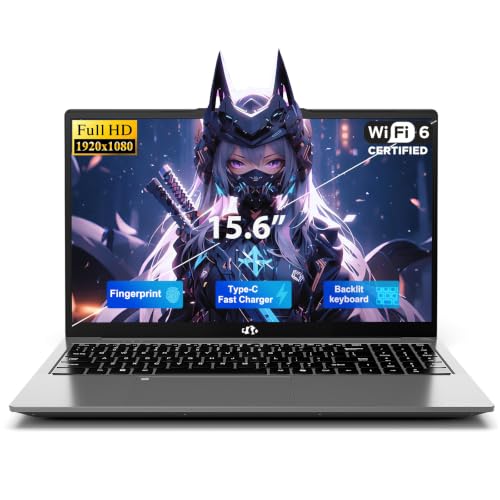
The NIMO 15.6-inch FHD laptop is the budget end of this roundup. It runs Windows 11 on an Intel 4-core processor with 8GB of RAM and a 256GB SSD, which is enough for browser tabs, Word docs, and a Zoom call, all the basic rhythm of a remote workday without frills.
The honest comparison: this is not a MacBook, and it isn’t trying to be. Where the Apple picks earlier in this list deliver premium build and years of headroom, the NIMO delivers a functional Windows laptop at a friendlier entry point. For someone setting up a home workstation for the first time, that’s a meaningful tradeoff.
Features That Help
- 15.6-inch Full HD display gives comfortable document viewing without external monitor setup
- Windows 11 comes preinstalled so the out-of-box experience is short
- 256GB SSD boots and loads apps faster than older spinning-drive laptops in the same range
- The 4-core Intel CPU handles everyday office apps and video calls smoothly
Some Limits To Know
- 8GB of RAM will feel tight once you stack Chrome tabs and a few SaaS apps together
- 256GB of storage fills up quickly with downloads, photos, and project archives
- Build quality and chassis materials don’t match the premium feel of the Apple picks earlier in this list
Whose Shelf It Belongs On
First-time remote workers, students, or anyone who mainly needs a Windows laptop for emails, docs, and video calls.
Swap It Out When
Power users who routinely run heavier workloads should consider the NIMO 15.6-inch FHD Laptop Intel 4 Cores 16GB 512GB Windows 11 for double the RAM and storage.
The DinoFire 2.4GHz wireless presenter is the original plug-and-play slide clicker. Plug the USB receiver into a Windows or Mac laptop, the system recognizes it instantly, and you have forward, back, hyperlink, volume, and blackout controls at your thumb. No drivers, no app install, no waiting.
Where it differs from the dual-connect DinoFire remote earlier in this list: it’s USB-A only, which matters in 2026 because many newer laptops have shifted to USB-C. If you’re presenting from an older office machine or a dock with USB-A ports, this is the simpler, more reliable choice.
What Makes Sense
- 2.4GHz RF receiver pairs without drivers on Windows and macOS systems
- The compact remote stores the USB receiver in its base so it doesn’t get lost in transit
- Hyperlink and volume controls reduce keyboard time mid-presentation
- Black casing hides scuffs and fingerprints on long-term use
Where It May Fall Short
- USB-A only won’t plug directly into modern USB-C-only laptops without an adapter
- The 2.4GHz signal can pick up interference in dense office Wi-Fi environments
- Battery replacement is something to plan for across years of regular use
Perfect Match For
Office presenters using Windows laptops or shared meeting-room machines with reliable USB-A ports.
Not Your Match When
MacBook-only presenters should reach for the DinoFire USB-C Wireless Presenter Remote with Red Pointer, which covers both USB-A and USB-C natively.
The higher-tier NIMO 15.6-inch laptop doubles the RAM to 16GB and the storage to 512GB compared to its sibling earlier in this list. Same 4-core Intel CPU, same Full HD display, same Windows 11 foundation, but with the headroom that turns a tight, tab-hoarding workflow into a calm one.
The case for this model over the 8GB version comes down to longevity. In most home offices, 16GB of RAM is the comfortable minimum for running Teams or Zoom alongside a busy browser, a doc, and a few background apps. Owners who push the 8GB model report noticeable slowdowns once they hit a dozen browser tabs.
The Case For It
- 16GB of RAM keeps the OS responsive when several apps and browser tabs run together
- 512GB SSD swallows project files and downloads without forcing constant cleanup
- Same 15.6-inch Full HD display as its lower-tier sibling, comfortable for daily work
- Windows 11 arrives preinstalled so setup is quick
Honest Caveats
- The Intel 4-core CPU is fine for office work but limited for creative apps or light video editing
- Chassis and trackpad feel modest compared to premium picks like the MacBook Pro M5 earlier in this list
- Wi-Fi and Bluetooth performance depend on the laptop’s antenna placement, which can be picky in some rooms
Who Will Love This
Remote workers who want a Windows laptop with comfortable multitasking headroom and don’t need premium build quality.
Reach For A Different Pick When
Professionals who value a refined chassis and pro-grade silicon should consider the Apple 2025 MacBook Pro 14-inch Laptop with M5 chip 16GB 512GB instead.
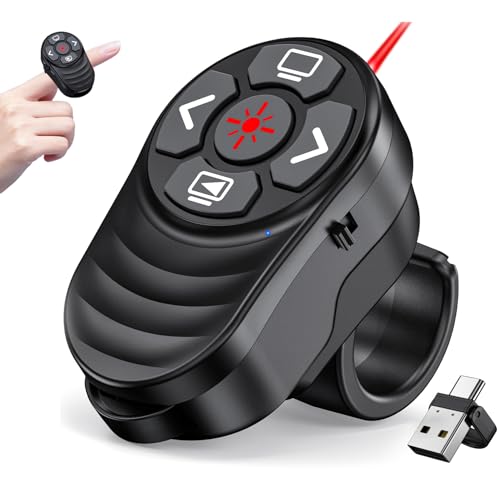
The Dinofire finger-ring presenter slides onto your index finger and stays out of the way until you need it. The dual USB-A and USB-C receiver design covers modern laptops and older setups alike, while silicone buttons keep the clicker usable during long talks without slipping.
The honest read is that this is a specialty pick. Where the standard DinoFire remotes earlier in this list live in a laptop bag, this one lives on your hand. For trainers who gesture while they teach, or speakers who hate holding a clicker, that hands-free angle is the entire appeal.
Useful Highlights
- Finger-ring form factor leaves your hands free to gesture, write, or hold a prop mid-talk
- Dual USB-A and USB-C receiver fits both legacy and modern laptops without an adapter
- Silicone buttons stay grippy even during longer presentation sessions
- Compact size slips into a small pocket or laptop sleeve pouch easily
A Few Limitations
- The ring form factor takes practice to use confidently compared to a traditional handheld clicker
- Smaller buttons can be tough to find by feel during a high-energy presentation
- Wearable design isn’t ideal for presenters who pass the clicker between co-speakers
Built With In Mind
Mobile trainers, classroom teachers, and field presenters who want slide control without holding a separate device.
Where A Sibling Pick Shines
Office presenters who prefer a classic handheld clicker should consider the Wireless Presenter RF 2.4GHz USB PowerPoint Clicker with Hyperlink for a more familiar form.
What Matters Most Before Choosing Computers For Remote Work
Processing Power For Your Actual Workload
A processor, the main chip that runs every app and tab on the laptop, defines how a remote workday feels. The Apple M4 chip in the MacBook Air handles typical office work comfortably. The M5 chip adds a Neural Accelerator, which is dedicated silicon that speeds machine-learning tasks, while the M4 Pro chip offers 14 cores for heavier creative or development work. For most remote workers, matching chip tier to actual workload matters more than chasing the highest spec on the page.
Screen Size And Resolution Tradeoffs
A 15-inch display gives breathing room for spreadsheets and side-by-side windows, while a 14-inch panel trades screen space for portability. The 16-inch MacBook Pro M4 Pro gives editing-room canvas at the cost of carrying weight. Resolution matters too: Liquid Retina XDR panels reach higher peak brightness, useful when your desk sits near a sunny window. Smaller or budget panels work fine if your home office is window-free.
Memory And Storage Headroom
Unified memory, the RAM shared between CPU and GPU tasks in Apple silicon systems, lets multiple heavy apps run simultaneously without slowdown. 16GB is a comfortable minimum today; 48GB on the MacBook Pro M4 Pro future-proofs for creative work. SSD capacity fills faster than people expect, especially with project folders and downloads, so 512GB is a sensible starting tier over 256GB.
Ports, Peripherals, And The Right Accessories
MacBooks lean on USB-C and may need a dock for older peripherals. Presentation-focused workers should consider a presenter remote alongside the laptop, since a clicker turns a slide deck into a hands-free talk. Matching accessories to your real routine matters as much as the computer itself.
Key Considerations Across These Picks
Where Shoppers Go Wrong
A common slip is buying the cheapest laptop that fits the spec sheet without checking real workflow fit. An 8GB Windows laptop handles today’s workload but can choke within a year as browsers grow heavier. Another trap is choosing a high-end Pro machine for tasks that a basic Air handles just fine, paying for headroom that never gets used. Test your real workflow against the laptop tier before committing.
The Upgrade Payoff
Higher-tier picks like the MacBook Pro M4 Pro or MacBook Pro M5 cost more because they bring dedicated AI acceleration, brighter XDR displays, and substantial memory headroom. The honest case for paying up is workload durability: if your job involves large files, layered apps, or on-device AI tools, the upgrade returns its cost in saved minutes daily. For straightforward office work, the savings on a mid-tier Air or NIMO are well spent.