Running a small business means every dollar counts, and the wrong computer eats into both time and budget. I looked at nine machines that cover everything from a solo freelancer who travels between client sites to a growing team that needs a quiet desk tucked behind a monitor. The goal here is simple: match the right form factor and horsepower to the work you actually do, without paying for extras you won’t touch.
The Main Contenders
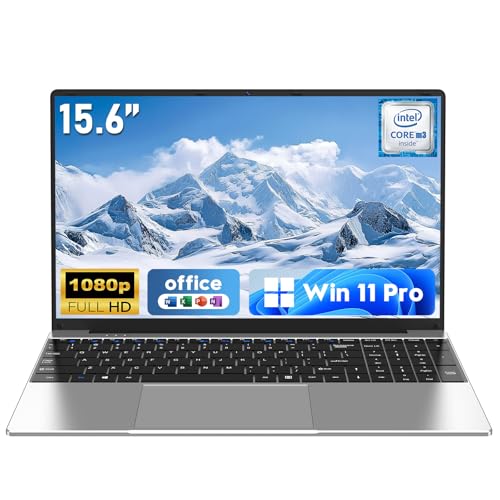
NAIKLULU Laptop Computer, Win 11 Pro, 15.6 Inch Laptop 2026, 16GB RAM 256GB SSD

Apple 2024 MacBook Pro Laptop with M4 Pro, 14‑core CPU, 20‑core GPU; Space Black

GEEKOM IT15 AI Mini PC, Intel Ultra 9 285H, 32GB DDR5, 1TB SSD

Lenovo ThinkCentre Tiny M70q Gen 5 i5-14400T, 16GB DDR5, 512GB NVMe SSD
Lenovo ThinkCentre Tiny M70q Gen 5 i5-14400T, 16GB DDR5, 256GB NVMe SSD
Lenovo ThinkCentre Tiny M70q Gen 5 i5-14400T, 32GB DDR5, 1TB NVMe SSD
GEEKOM AX8 Max Silent Mini PC, Ryzen 7 8745HS, DDR5 16GB 1TB SSD
GEEKOM Mini PC IT13 MAX Ultra 9 185H, 24GB RAM, 500GB SSD

GEEKOM IT13 MAX AI Mini PC 2026, Intel Ultra 9 185H, 24GB LPDDR5 500GB SSD
A Closer Look At Each Pick
The NAIKLULU 15.6-inch laptop is the kind of machine that quietly disappears into a workday. It runs Windows 11 Pro on an M3-6Y30 dual-core, quad-thread chip, paired with 16GB of RAM, so a freelancer juggling browser tabs, spreadsheets, and video calls won’t feel the system fighting back. The 1920×1080 display gives enough room for side-by-side documents, and the 5000mAh battery keeps the lid open through a coffee-shop shift.
For a small business owner who bounces between client meetings and a home desk, the lightweight chassis and familiar Windows environment remove most setup friction. It isn’t a creator’s machine, and it won’t pretend to be one. Think of it as a reliable daily-driver laptop that gets the basic stack running without ceremony.
Practical Pluses
- The 15.6-inch Full HD panel leaves enough screen real estate for split-window workflows, which matters when you’re comparing invoices or editing copy against a brief.
- 16GB of RAM handles a dozen Chrome tabs, a spreadsheet, and a chat client simultaneously without visible slowdowns for most office workflows.
- Windows 11 Pro ships standard, so BitLocker device encryption and Remote Desktop are ready without an extra license purchase.
- Wi-Fi 5 and Bluetooth 4.2 cover the standard office peripherals and most home networks without a dongle pile.
Things To Consider
- The M3-6Y30 dual-core chip is comfortable for everyday work but will feel stretched under heavy video rendering or large database queries.
- The 5000mAh battery delivers a few hours of mixed use at high brightness, so a charger stays in the bag for long client days.
- 256GB of storage fills up quickly with project files, depending on your line of work, so external or cloud storage becomes a near-necessity.
Feature Snapshot
Made For
Solo operators and first-time small business owners who want a portable, no-fuss Windows machine for everyday office work.
Look Elsewhere When
Anyone editing video, running virtual machines, or working with large creative files should step up to the Apple MacBook Pro with M4 Pro for serious headroom.
The 16-inch MacBook Pro with M4 Pro is the rare laptop that genuinely earns its price tag in a small-business context. The 14-core CPU and 20-core GPU chew through code compilations, large Photoshop files, and Final Cut timelines without breaking a sweat, while the 16.2-inch Liquid Retina XDR display makes color-critical work possible on the road. 48GB of unified memory means heavy multitaskers rarely hit a swap-file slowdown.
For a creative studio, an indie dev shop, or a consultancy that lives inside large data sets, this machine removes a category of frustration that cheaper laptops just normalize. It isn’t for everyone, and I want to be honest about that, but for the workload it targets, it delivers in ways a small-business budget rarely sees.
The Helpful Details
- The M4 Pro chip handles multi-app workflows and compiles large codebases noticeably faster than the NAIKLULU laptop’s dual-core chip, which matters for studios billing by the hour.
- 48GB of unified memory lets creative pros keep massive files open alongside reference browsers and chat tools.
- The Liquid Retina XDR panel reaches up to 1600 nits peak brightness, which makes outdoor client meetings and bright offices far more usable.
- macOS integration with iPhone calls, messages, and AirDrop reduces friction for small teams already inside the Apple ecosystem.
- All-day battery life means leaving the charger at the desk for most meetings, which is rarer than it sounds at this performance level.
Points To Keep In Mind
- The premium pricing puts it out of reach for owners who mainly handle email, invoicing, and a browser.
- macOS still requires adjustment for teams standardizing on Windows-only line-of-business software.
Who It Suits Best
Creative agencies, indie developers, and small studios that need workstation-class horsepower in a portable form factor.
Consider Something Else When
Teams deploying Windows-specific software at scale should look at the Lenovo ThinkCentre Tiny M70q Gen 5 lineup for fleet-friendly desktop value instead.
The GEEKOM IT15 is a small box with a big workload target. The Intel Core Ultra 9 285H chip pushes 16 cores at up to 5.4GHz, paired with 32GB of DDR5 memory and a 1TB SSD, so it handles multi-display trading desks, retail signage back-ends, and conference-room PCs without choking. Wi-Fi 7 keeps network latency low in crowded office environments, and the Arc 140T graphics support quad 8K and 4K display setups.
Compared to the MacBook Pro, this is a stationary workstation built for offices that need many screens and a small physical footprint. For finance firms, digital signage operators, and front-desk deployments, the IT15 quietly outperforms traditional towers while fitting behind a monitor.
Notable Upsides
- The 16-core Ultra 9 285H delivers desktop-class throughput for spreadsheet models and analytics dashboards, which often matter more than raw gaming power in offices.
- Quad 8K and 4K display support means a single unit can drive a multi-monitor front desk or signage wall, replacing what used to require a tower and a discrete GPU.
- Wi-Fi 7 future-proofs the network connection for offices upgrading their access points in the next refresh cycle.
Room For Improvement
- The flagship specs come at a price that exceeds the GEEKOM AX8 Max, so small operations may not need this much horsepower.
- The compact chassis can run warm under sustained all-core loads, depending on the office environment.
- Volume pricing depends on direct vendor quotes, which adds a step to procurement for smaller shops.
Best Suited To
Small enterprises running multi-display finance desks, retail digital signage, or front-desk terminals that need serious CPU and graphics headroom in a tiny box.
Swap It Out When
A basic office workflow with one or two monitors will be served just as well by the Lenovo ThinkCentre Tiny M70q Gen 5 16GB model, often at a friendlier entry point.
The Lenovo ThinkCentre Tiny M70q Gen 5 with the Intel i5-14400T is the desktop most small offices should be looking at first. The 10-core chip splits into 6 performance and 4 efficiency cores, so it chews through email, browser stacks, and accounting software while staying cool and quiet under the desk. The 16GB of DDR5 RAM and 512GB NVMe SSD give a comfortable runway for several years of office work.
Where this machine earns its keep is fleet rollouts. The Tiny form factor mounts behind a monitor, freeing desk space, and the Lenovo ThinkCentre line has a long track record in offices. Compared to the GEEKOM IT15, this is the calmer, more conservative pick that still has enough headroom for a real workload.
Bright Spots
- The 10-core i5-14400T handles typical office multitask without the fan noise that haunts cheaper towers.
- 512GB of NVMe storage covers years of documents and project files for most small teams.
- The Tiny chassis mounts behind a monitor or sits flat under a keyboard, which helps cramped front desks and reception counters.
- DisplayPort and HDMI outputs support a dual-monitor setup out of the box for spreadsheet-heavy roles.
Honest Caveats
- The “T” suffix means a lower-power chip, which keeps noise and heat down but caps peak performance versus full-power CPUs.
- Wi-Fi 6 is current but already a step behind the GEEKOM IT15’s Wi-Fi 7 if you plan to refresh access points soon.
Quick Facts
Right Fit For
Front-desk staff, account managers, and small offices that want a quiet, reliable desktop with room for dual monitors.
Reach For A Different Pick When
Teams handling large media files or running multiple resource-hungry apps at once will appreciate the Lenovo ThinkCentre Tiny M70q Gen 5 32GB model with extra memory and storage.
The 256GB NVMe sibling of the ThinkCentre M70q keeps the same 10-core i5-14400T and 16GB of DDR5 memory, just with a smaller boot drive. For an office that leans heavily on cloud storage, SharePoint, or Google Workspace, that trade often makes sense. The system flies through browser apps and Office files, leaving local capacity for apps and a light file library.
It is the same physical machine as the 512GB model I covered earlier, so the chassis, port layout, and three-year coverage carry over. The honest read is that most offices will appreciate the extra space, but budget-conscious deployments sometimes need the leaner storage tier.
Advantages To Know
- The identical 10-core i5-14400T means the same snappy everyday performance as the higher-capacity M70q.
- Cloud-first workflows rarely feel the missing local storage, which keeps the system responsive.
- The Tiny form factor keeps desks uncluttered in coworking and shared-space setups.
Things To Weigh
- 256GB fills up quickly with locally synced OneDrive caches and project archives, depending on usage.
- Adding internal storage later means opening the chassis, which is easy but still an extra step.
At A Glance
Who Should Grab It
IT buyers outfitting cloud-first offices or roles that primarily use browser apps and shared documents.
Skip It When
Roles that need large local project libraries, like video editors or CAD operators, should step up to the Lenovo ThinkCentre Tiny M70q Gen 5 32GB 1TB model instead.
The top-spec ThinkCentre Tiny M70q Gen 5 doubles the memory to 32GB of DDR5 and the storage to a full 1TB NVMe SSD. For small teams running heavier line-of-business apps, mid-size databases, or large project archives, that extra capacity shows up immediately in how many browser tabs and pivot tables stay open without lag.
This is the same dependable Tiny chassis the earlier M70q picks use, just configured for growth. Owners commonly keep these machines running for years, so spending a little more upfront often beats a mid-cycle upgrade.
Key Advantages
- 32GB of DDR5 RAM keeps dozens of browser tabs, large spreadsheets, and chat clients responsive without hitting the page file.
- 1TB of NVMe storage absorbs years of project files and locally cached OneDrive or Dropbox syncs.
- The 10-core i5-14400T carries the same quiet, cool thermals that make the Tiny line office-friendly.
- The three-year coverage window is a meaningful buffer against early-life hardware issues.
Practical Considerations
- The higher configuration costs more than the 16GB models, which may not pencil out for very small teams.
- The Tiny form factor is compact, but cable management still matters when packing four or five peripherals behind a monitor.
Core Details
Perfect Match For
Growing teams that need headroom for analytics, large client files, or locally cached project archives on a small footprint desktop.
Not Your Match When
A solo operator with cloud-only files will be just as well served by the 16GB 256GB ThinkCentre Tiny M70q model for less money.
The GEEKOM AX8 Max leans into silence. Its AMD Ryzen 7 8745HS chip has 8 cores running up to 4.9GHz, paired with 16GB of DDR5 and a 1TB SSD, all in a chassis designed to stay quiet under load. For meeting rooms, recording studios, and reception counters where fan noise interrupts calls, that silence is the headline feature.
Compared to the GEEKOM IT15, this is the AMD-flavored sibling that trades a little peak horsepower for a quieter profile. It still handles creative apps, broadcast workflows, and CAD-adjacent tasks, just with a more acoustic-friendly footprint.
Well-Handled Touches
- The Ryzen 7 8745HS keeps performance strong while the cooling system targets quiet operation, which matters in shared offices.
- The 1TB SSD covers large project files for video and design studios without an external drive.
- The AMD platform gives Windows shops an alternative to Intel-based ThinkCentre deployments, which helps with chip diversity in mixed fleets.
Some Limits To Know
- 16GB of RAM is comfortable but lighter than the GEEKOM IT15’s 32GB, which limits how many heavy apps stay open simultaneously.
- The integrated graphics aren’t aimed at discrete-GPU workstation tasks, so heavy 3D rendering still needs a stronger GPU somewhere else.
Feature Rundown
Built With In Mind
Studios, podcast rooms, and small offices where quiet desktops matter as much as raw performance.
A Better Fit Elsewhere
Heavy multi-display analytics setups will appreciate the GEEKOM IT15’s higher core count and quad-display support instead.
The GEEKOM IT13 MAX is the upgrade pick on the list. The Intel Core Ultra 9 185H has 16 cores and 22 threads, reaching up to 5.1GHz, paired with 24GB of RAM and a 500GB SSD that’s upgradeable down the road. Intel Arc graphics and an AI Boost NPU handle 4K editing, AI-assisted workflows, and 8K media playback without a full tower taking over the office.
It slots between the AX8 Max and the IT15 in GEEKOM’s lineup, leaning toward creators and technical users who don’t quite need the IT15’s 32GB ceiling but want the same compact footprint. The upgrade-friendly storage path is a quiet bonus for owners who hate paying for capacity they won’t use this year.
What Earns Its Place
- The 16-core Ultra 9 185H makes light work of 4K video editing and 3D design tasks that would bog down smaller chips.
- 24GB of RAM balances creative apps with multitasking, which suits design studios running Adobe and Office side by side.
- The AI Boost NPU accelerates on-device AI workflows, which is increasingly relevant for teams piloting AI tools.
- The 500GB SSD is upgradeable, so capacity can grow as project libraries do.
Worth Bearing In Mind
- The integrated Arc graphics are strong but still a step behind discrete-GPU workstations for the most demanding 3D work.
- The 500GB starting storage may feel modest for video and design teams, though it can be expanded.
Quick Facts
Whose Shelf It Belongs On
Small creative studios and AI-curious teams that want workstation-class performance in a compact case.
Where A Sibling Pick Shines
Offices running quiet, general-purpose workloads will get more value from the GEEKOM AX8 Max Silent Mini PC with its quieter profile.
The IT13 MAX AI variant keeps the same 16-core Intel Core Ultra 9 185H chip and 24GB of LPDDR5 memory, but is marketed toward AI creative studios, simulation work, and bulk enterprise deployments. LPDDR5 brings tighter power efficiency, which helps the chassis stay cooler during long AI inference sessions.
For a small studio dabbling in on-device AI workflows, medical imaging visualization, or engineering simulations, this is a compact machine with the right silicon headroom. It pairs naturally with the GEEKOM IT15 for offices that want a tiered mini-PC strategy across different roles.
What Helps Most
- LPDDR5 memory is more power-efficient than standard DDR5, which keeps thermals manageable during long workloads.
- The Ultra 9 185H’s AI Boost NPU accelerates on-device AI tools, an emerging need for small studios.
- The compact case still fits behind a monitor or under a desk, freeing floor space for client-facing offices.
Trade-Offs To Consider
- LPDDR5 is often soldered, which limits future memory upgrades compared to a standard DDR5 system.
- The 500GB SSD will fill quickly with simulation and imaging files, depending on the workflow.
The Right Fit
Tech-heavy small studios and engineering-adjacent teams piloting AI tools in a compact footprint.
Where Another Pick Suits Better
General office roles get more practical value from the Lenovo ThinkCentre Tiny M70q Gen 5 32GB model, which trades AI silicon for higher memory capacity.
Factors To Weigh Before Picking A Business Computer
Matching a computer to a small business means matching the workload first, then the form factor. A solo consultant who travels needs a portable machine like the NAIKLULU 15.6-inch laptop, while a five-person front desk benefits more from a fleet of ThinkCentre Tiny desktops that mount behind monitors and stay quiet. RAM and storage are the two specs that age fastest: 16GB of DDR5 covers most office work today, but a year of growing project files makes 32GB a safer bet for small studios.
Ports and connectivity matter more than people expect. Dual DisplayPort and HDMI outputs enable a comfortable dual-monitor setup without a dock, while Wi-Fi 6 or Wi-Fi 7 keeps the office wireless futureproof. For creative shops, an AI-capable chip like the Intel Core Ultra 9 series speeds up rendering and AI workflows in ways a budget chip simply can’t.
Reading The Spec Sheet Like An Owner
CPU cores split into performance and efficiency cores on modern chips, which matters for laptops that need both speed and battery life. SSD storage affects how fast the system boots and how quietly it runs, since SSDs have no moving parts. “Unified memory” on Apple silicon means the CPU and GPU share the same RAM pool, which is why even modest MacBook configurations feel snappy. Mini PCs like the GEEKOM lineup pack desktop-grade parts into a case the size of a paperback, but their compact cooling can mean louder fans under sustained load.
Form Factor First, Horsepower Second
Laptops win on portability, desktops win on longevity and upgradability, and mini PCs split the difference for offices that want clean desks without sacrificing power. A business buying computers for a coworking space or a customer-facing counter cares more about footprint and noise than peak performance. A creative studio that bills by the hour cares more about render times than desk appearance.
Key Considerations Across These Picks
Mistakes Worth Dodging
A common slip is overspec’ing for general office work. Many small businesses pay for 32GB of RAM or an AI-capable chip when 16GB of DDR5 and a 10-core i5 would handle email, browsers, and accounting software without strain. The reverse is just as risky: underestimating how fast project files and browser tabs grow, then hitting swap-file slowdowns six months in.
Another trap is ignoring port layout and monitor plans. A tiny desktop with only one HDMI output forces an unplanned adapter purchase the day it lands. Owners also commonly overlook cooling and noise. A machine that runs hot under load shortens component life and annoys staff in open offices, which is why the GEEKOM AX8 Max’s silent design and the ThinkCentre Tiny’s low-watt T-series chips earn their keep.
Where The Extra Money Goes
Higher-tier models buy more than marketing. The Intel Core Ultra 9 chips in the GEEKOM IT15 and IT13 MAX add a dedicated AI Boost NPU, more cores, and stronger integrated graphics, which translate directly to faster renders and smoother AI workflows. Apple’s M4 Pro pushes unified memory bandwidth far beyond typical DDR5 systems, which is why the MacBook Pro handles large creative files without breaking stride.
In practice, paying up pays off for teams that bill by the hour, run simulations, or train AI models locally. For a three-person office that lives in browsers and spreadsheets, that extra money usually doesn’t come back as productivity. Pick the tier that matches the work, not the wish list.
Frequently Asked Questions
How much RAM does a small business computer really need?
For most office work, 16GB of DDR5 RAM is a comfortable baseline, while creative shops running video or design apps benefit from 32GB.
Should a small business buy laptops or desktops?
Laptops make sense for owners who travel or work from multiple sites, while desktops and mini PCs suit fixed offices that want quieter operation and longer service life.
Are mini PCs powerful enough for business use?
Modern mini PCs like the GEEKOM IT15 and IT13 MAX pack desktop-class CPUs and ample RAM, so they handle demanding office and creative workloads in a compact case.
What is the advantage of an AI-capable processor?
AI-capable chips like the Intel Core Ultra 9 series include a neural processing unit that accelerates on-device AI tools, which speeds up transcription, image work, and automation.
Is the Lenovo ThinkCentre Tiny reliable for long-term office use?
The ThinkCentre line has a strong track record in offices, and the three-year coverage window on these models adds a useful buffer against early-life hardware issues.
The Takeaway
The right computer for a small business is the one that matches the actual workload, not the wish list. For solo operators and road warriors, the NAIKLULU laptop and the MacBook Pro cover the portable end. For office-based teams, the ThinkCentre Tiny lineup and the GEEKOM mini PCs give quiet, dependable horsepower in a small footprint. Pick the tier that fits the work today, and leave a little headroom for where the business is heading next.