Introduction
If your phone gallery is bursting at the seams, or your camera roll lives in a tangled mess across devices, the right storage gear turns chaos into a tidy archive. I’ve pulled together eight practical picks that cover the main ways photographers and everyday picture-takers actually park their files: rugged cards for fieldwork, fast flash drives for shuttling images, multi-device photo sticks that handle phones and laptops, and a hefty internal drive for serious desktop libraries.
The goal here is simple: match your storage habit to a tool that fits it, not the other way around. Whether you shoot one weekend a month or push out thousands of RAW frames a year, there’s an option below that lines up with how you actually work.
The Main Contenders

ProMaster SDXC 64GB Rugged Memory Card UHS-I 5421

Samsung BAR Plus 128GB USB 3.1 Flash Drive

SanDisk 32GB Ultra USB 3.0 Flash Drive

SanDisk 32GB Cruzer Glide 3-Pack

Seagate BarraCuda 4TB Internal Desktop HDD

512GB Photo Stick for iPhone, Android, Mac, PC

Samsung FIT Plus 512GB USB 3.2 Flash Drive
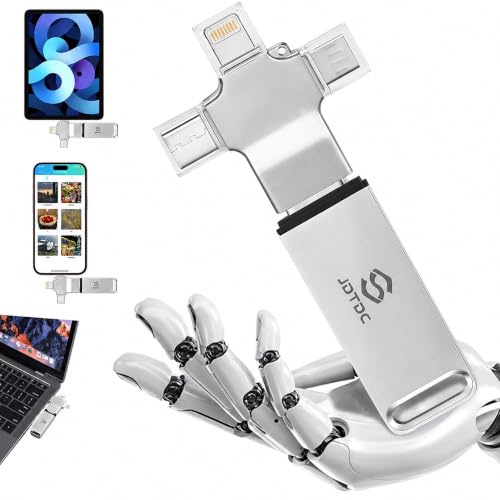
256GB Photo Stick Auto Backup iPhone & PC
Inside Each Recommended Option
The ProMaster rugged card earns its name by being the sort of SDXC (a high-capacity SD format for cameras and camcorders) that shrugs off the bumps of a hike or a sandy beach shoot. The UHS-I bus (Ultra High Speed, the standard that lets cards hit well over 80 MB/s) gives it solid throughput for stills and modest 4K video, so it slots straight into most modern mirrorless bodies and mid-range DSLRs.
For travelers and outdoor shooters, 64GB is a realistic working size, big enough for a long weekend of RAW+JPEG but small enough to offload to a laptop each night. Compared with the Samsung BAR Plus that follows, this is a card you leave in the camera, not a drive you carry around. Owners commonly report that the reinforced housing handles accidental drops well, though the card still deserves the usual padded case for serious abuse.
Practical Advantages
- Reinforced build designed to survive drops and rough fieldwork
- UHS-I speed class supports quick burst shooting and 4K capture
- 64GB balances a long shooting day with manageable file offloads
- Plugs into any camera or reader that accepts standard SDXC media
Things To Consider
- 64GB fills up fast on RAW-heavy workflows, so daily offloading is wise
- Not as fast as pricier UHS-II cards for sustained burst modes
Key Specs
Best Suited To
Travelers, hikers, and outdoor photographers who shoot in conditions where a fragile card would not survive the trip.
Where Another Pick Suits Better
Desktop archivists looking to centralize huge libraries will get more room for their money from the Seagate BarraCuda 4TB Internal Desktop HDD.
Samsung’s BAR Plus leans hard into a minimal, all-metal aesthetic that feels closer to a small tool than a piece of plastic. The unibody casing shrugs off pocket lint and the occasional drop, and the lack of a cap means one fewer thing to lose. It’s a drive that earns its keep by being pleasant to actually use every day.
The 128GB capacity lands in a sweet spot for shuttling photo libraries between computers, handing off files to a client, or keeping a recent project close at hand. Read speeds up to 400 MB/s through USB 3.1 (a fast USB standard found on most modern laptops) keep transfers brisk when moving large RAW folders. For most everyday users, this is the kind of drive that disappears into a routine and just keeps working.
What It Does Well
- Solid metal unibody resists everyday wear, drops, and splashes
- Capless design avoids the lost-cap problem common to flash drives
- Fast USB 3.1 throughput trims wait times on large photo transfers
- 128GB holds a solid library of RAW files or a year’s phone dumps
Honest Caveats
- Higher price per gigabyte than budget plastic drives
- USB-A only, so newer USB-C-only laptops need a dongle
Who It Suits Best
Working photographers and content creators who want a pocketable drive that looks the part and moves files fast.
Consider Something Else When
Shoppers who want to leave the drive plugged in permanently will find the tiny Samsung FIT Plus 512GB a less obtrusive companion.
The SanDisk Ultra is the kind of flash drive most people have used at least once, and it has earned that familiarity by being cheap, simple, and dependable. USB 3.0 (an older but still common fast USB standard) pushes read speeds up to 100 MB/s, which is plenty for moving a folder of vacation photos or backing up a phone’s worth of snapshots.
32GB isn’t a lot by modern standards, but that’s actually the point for many folks. It forces a habit of moving files off and onto a larger drive, which doubles as a backup. For a first spare drive, a school project archive, or a quick handoff, the Ultra CZ48 is hard to argue with. Owners commonly report the retractable design holding up well to pocket carry, though the plastic shell is lighter than the Samsung BAR Plus that sits earlier in this list.
Good Reasons To Consider
- Low price makes it easy to keep a spare drive in a bag
- USB 3.0 speeds handle everyday photo and document moves with ease
- Retractable connector keeps the USB tip safe from pocket debris
- Backwards compatible with USB 2.0 ports, just at slower speeds
Points To Keep In Mind
- 32GB fills quickly with modern RAW photos or 4K clips
- Plastic body is lighter and less rugged than metal-cased alternatives
- Not the fastest drive on this list for big library transfers
Made For
Casual picture-takers and students who need a simple, affordable drive for occasional transfers and small backups.
Skip It When
Anyone regularly moving 50GB+ libraries will save time with the 512GB Photo Stick that arrives later in this lineup.
The Cruzer Glide three-pack is a quietly clever option for anyone whose photo library sprawls across projects, years, or family members. Three matching drives let you split archives by theme, decade, or person without resorting to folders buried ten levels deep. The sliding cap design covers the USB connector when the drive lives in a drawer or a bag.
The catch is the bus speed. These are USB 2.0 drives, which means transfer speeds top out well below what the SanDisk Ultra or the Samsung BAR Plus offer. For moving a few gigabytes at a time, that’s fine. For a 30GB library, it will feel slow. Where this pack shines is organization: label each drive, hand one to a family member, and the chaos of “where did I save that photo” gets a real answer.
A Strong Showing
- Three matched drives encourage an organized, multi-bucket workflow
- Sliding connector cap protects the USB tip during transport
- Compact size makes each drive easy to misplace, so label them early
- Useful for separating work, family, and hobby libraries cleanly
Practical Considerations
- USB 2.0 speeds make large transfers noticeably slower than USB 3.0 drives
- 32GB per drive is small by modern photo archive standards
Right Fit For
Organizers and family archivists who would rather sort photos across drives than dig through a single mega-folder.
Not Your Match When
Speed-focused users moving big RAW batches will find the single SanDisk Ultra a faster swap.
The BarraCuda 4TB is a classic 3.5-inch desktop hard drive (the larger HDD form factor used in full-size PCs, not laptops), built for the kind of storage job that flash drives cannot touch: a multi-year archive of RAW photos, edited projects, and high-resolution scans. The SATA 6 Gb/s interface and 256MB cache keep it responsive enough for photo editing directly from the drive, though it spins at 5400 RPM (revolutions per minute, the spindle speed that controls how fast the read head finds data), which is slower than 7200 RPM performance drives.
This is not a portable pick. It belongs inside a desktop tower or a multi-bay enclosure, and it needs that physical home to earn its keep. For hobbyists, family historians, and serious shooters who measure archives in terabytes rather than gigabytes, the BarraCuda’s 4TB capacity is a relief. Compared to the Samsung FIT Plus that follows, this is the “leave it at home” anchor of a photo workflow, not a traveling companion.
What Pays Off
- 4TB capacity holds years of RAW photos, 4K video, and edited libraries
- 256MB cache helps with multi-file reads during browsing and editing
- SATA 6 Gb/s interface is standard on virtually every modern desktop
- Time-tested BarraCuda line widely deployed in home and prosumer builds
Trade Offs
- 3.5-inch form factor requires a desktop tower or external enclosure
- 5400 RPM spindle is slower than 7200 RPM alternatives for editing
- Mechanical drive, so it is more shock-sensitive than solid-state options
Quick Facts
Who Should Grab It
Desktop-based photo archivists with growing RAW libraries who want a single, roomy home drive.
Look Elsewhere When
Laptop-only users will get more mileage from the Samsung FIT Plus, which adds storage without needing a tower.
This 512GB photo stick is built around a simple pitch: plug it in, hit one button, walk away with a backup. The companion app handles the cross-device shuffle between iPhone, Android, Mac, and PC, which removes the cable-and-cloud dance that trips up a lot of casual users. It even skips duplicate files on its own, so repeat backups don’t eat space.
The 512GB capacity is comfortable for phone galleries in the 30,000-photo range, plus room for video clips and a chunk of computer backups. Compared with the SanDisk Ultra 32GB drive earlier on, this is the move for someone whose phone is their main camera and whose laptop holds a modest secondary library. The honest read is that “one-click” software is only as smooth as the app update cycle, so it’s worth checking the app’s compatibility with your current OS before committing.
Features That Help
- One-click backup app handles phones and computers in a single workflow
- Automatic duplicate skipping prevents wasted space on repeat runs
- 512GB holds years of phone photos plus a computer backup or two
- Multi-connector design supports both phone and laptop use
Where It Is Less Suited
- App-driven, so compatibility depends on continued software updates
- Not as fast as a dedicated USB 3.2 drive for huge single transfers
Feature Snapshot
Who Will Love This
Phone-first photographers and parents who want an effortless backup without juggling cables or cloud subscriptions.
Reach For A Different Pick When
Power users editing RAW on a fast laptop will appreciate the Samsung FIT Plus 512GB and its higher USB 3.2 throughput.
The FIT Plus is a tiny stick barely larger than a USB plug, designed to live semi-permanently in a laptop’s port without snagging on a backpack or a coffee shop table. With 512GB inside and read speeds up to 400 MB/s through USB 3.2 (the latest mainstream USB standard, twice the effective bandwidth of 3.0), it doubles as instant extra storage for working photographers who constantly max out their laptop SSDs.
The metal body adds a measure of water, temperature, and shock resistance, and the integrated key ring keeps the drive from disappearing into couch cushions. It’s a strong match for ultrabook owners whose internal storage can’t be upgraded. Compared to the bulkier Seagate BarraCuda earlier, the FIT Plus is the opposite solution: small, portable, and always attached.
Reasons It Performs
- Low-profile design sits flush in a laptop port for permanent storage
- USB 3.2 read speeds keep large photo library transfers brisk
- 512GB capacity suits full RAW workflows on storage-limited laptops
- Metal body resists water, heat, and everyday wear
Small Caveats
- USB-A only, so USB-C-only laptops still need an adapter
- Small size makes it easy to lose if the key ring isn’t used
Feature Card
Whose Shelf It Belongs On
Laptop-tethered photographers and traveling editors who need extra storage that just stays in the port.
A Better Fit Elsewhere
Households archiving across phones and PCs will find the multi-device 512GB Photo Stick a more versatile daily tool.
This 256GB photo stick is the smaller sibling of the 512GB version earlier, tuned for households that mostly want to keep phone galleries safe without paying for capacity they will not use. The auto-backup routine scans for new photos and videos each time the drive is plugged in, which removes the “I forgot to back up again” problem that plagues most families.
Cross-device support covers iPhone, iPad, Android phones and tablets, Mac, and Windows PCs, so the same stick can float between everyone in the house. The trade-off is capacity: 256GB is comfortable for one or two active phone libraries but tighter for a four-person household. Where it shines is simplicity. For grandparents, teens, and anyone allergic to cloud subscriptions, the plug-and-blink workflow feels almost magical.
Where It Helps
- Auto-backup app removes manual steps for non-technical users
- Cross-device compatibility covers iPhone, Android, Mac, and PC
- 256GB hits a sweet spot for one or two phone libraries
- Compact stick travels easily between household members
Factors To Consider
- 256GB may run tight for households with multiple heavy phone galleries
- Backup app needs occasional updates to keep up with OS changes
Technical Highlights
Perfect Match For
Families and casual users who want a single stick everyone can plug into their phone or laptop without a learning curve.
Swap It Out When
Solo power users managing big RAW libraries will outgrow 256GB quickly and should consider the Samsung FIT Plus 512GB instead.
Picking Storage That Fits How You Actually Shoot
Capacity gets all the attention, but speed and durability quietly decide whether a storage tool stays in your bag or lives in a drawer. For most photo workflows, the UHS-I bus or USB 3.0+ interface is the practical floor. Older USB 2.0 drives still work, but they stretch a 20GB transfer into an overnight chore.
Match Format to Workflow
SD cards belong in cameras; flash drives and photo sticks belong at the desk or in a laptop bag; internal drives belong in a desktop tower. Choosing the wrong format for the job is the most common storage regret. A card that stays in a camera forever becomes a single point of failure, while a flash drive left in a hot car can warp plastic housings. Match the device to the environment and the habit.
Speed Is More Than a Number
Read speed (how fast files come off the drive) matters for backups and browsing, while write speed (how fast files land on the drive) matters for recording video or burst shooting. The ProMaster card’s UHS-I rating handles stills and modest 4K well, but sustained 4K at high bitrates wants UHS-II. On the flash drive side, USB 3.1 and 3.2 Gen1 both push up to 400 MB/s in real-world conditions, which is plenty for photo libraries but not for hour-long video projects.
Capacity Headroom
The honest rule is to buy more than you think you need. A 64GB card that feels roomy on day one feels cramped by Christmas. Most photo libraries grow 20-30% a year, so picking the next size up pays for itself in not having to rebuy storage mid-trip.
Smart Choices for Smoother Photo Storage
Wrong Turns To Avoid
The most common slip-up is treating any flash drive as a long-term archive. Flash memory holds data well, but a single drive sitting in a drawer is a single point of failure. Pairing a working drive with a second copy, whether on the Seagate BarraCuda desktop drive or a cloud service, is the simplest insurance policy in this category.
Another trap is buying a card that looks fast on paper but bottlenecks in your camera. A UHS-II card in a UHS-I camera falls back to UHS-I speeds, and a USB 3.2 drive in a USB 2.0 port crawls. Check the host device before chasing peak numbers.
Where The Extra Money Goes
Stepping up from a budget 32GB SanDisk to the 128GB Samsung BAR Plus or 512GB FIT Plus pays for three real upgrades: faster transfer speeds, tougher physical builds, and longer warranty-backed lifespans. For a working photographer, the time saved on transfers alone often justifies the price gap within a year. The honest read is that casual users who only back up occasionally can skip the premium tier, but anyone handling RAW files or 4K video will feel the difference quickly.
Frequently Asked Questions
What is the best type of storage for photo libraries?
For active libraries on the go, USB flash drives and SD cards are the easiest tools. For long-term archives, an internal hard drive like the Seagate BarraCuda 4TB provides roomy, affordable storage. A good rule is to combine at least two formats so one failure does not wipe the library.
How much storage do I actually need for photos?
Casual phone shooters usually fit in 128-256GB, while serious photographers with RAW files and 4K video typically want 1-4TB or more. Estimate current library size, then double it to leave room for growth.
Are photo sticks worth it for non-technical users?
Yes, especially the JSL JDTDC models in this list. The companion apps handle cross-device backups with a single tap, which removes the cable and cloud juggling that frustrates beginners. They shine in households with multiple phones and laptops.
Can I use a USB flash drive as long-term photo storage?
You can, but it is not ideal as the only copy. Flash drives are great for working libraries, transfers, and short-term backups, but they should be paired with a larger drive or cloud copy for archival safety.
What is the difference between SDXC and UHS-I?
SDXC is the SD card format that supports capacities above 32GB, while UHS-I is the bus speed rating that controls how fast data moves on and off the card. A card can be SDXC without being fast, and UHS-I applies to both SDXC and smaller SDHC cards.
The Takeaway
The right pick comes down to where your photos actually live and how often they move. Travel shooters lean toward rugged SD cards and metal flash drives, while phone-first households get the most value from auto-backup photo sticks. Desktop archivists with growing RAW libraries will always end up back at a multi-terabyte internal drive. Match the tool to the habit, keep at least one backup copy, and the photo archive stops being a source of stress.