Setting up a streaming rig means juggling a decent CPU, enough memory for OBS or similar software, and reliable thermals when a broadcast runs for hours. I put together this roundup for creators, hobbyists, and remote professionals who want hardware that won’t flinch during a long stream. Inside you’ll find compact desktops, all-in-ones, portable laptops, and the controller decks that tie a streaming workflow together.
The Leading Options At A Glance

Apple Mac mini Desktop Computer with M4 chip, 16GB Unified Memory, 256GB SSD
TreasLin/VSDinside XL Streaming Deck with 32 Customizable Keys

TreasLin/VSDinside Stream Dock XL Advanced Studio Controller White

Dell 27″ All-in-One Desktop with Intel Core 7 150U, 16GB

TreasLin Stream Controller Deck N3 Black with 12 Customizable Macro Keys

Dell 27″ All-in-One Desktop with Intel Core 5 120U
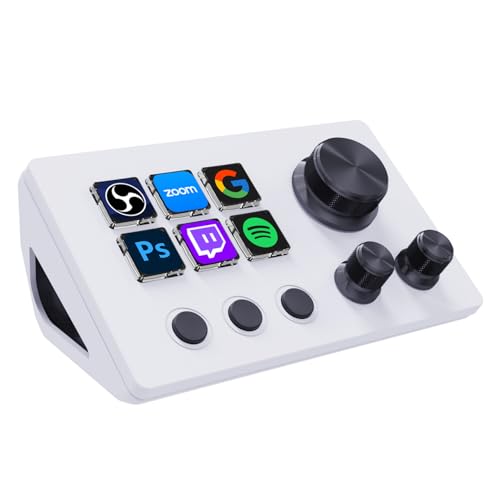
TreasLin VSDinside Streaming Controller Deck N3 White with 12 Macro Keys
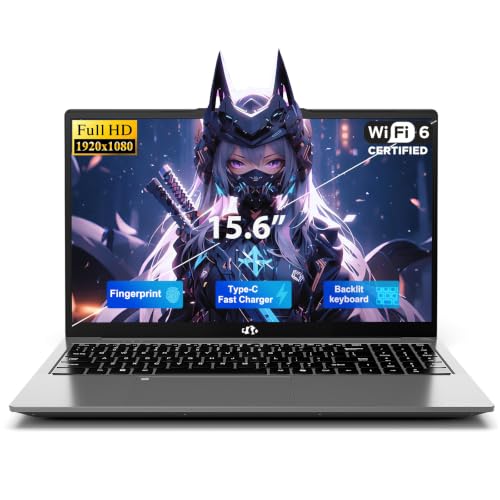
NIMO 15.6″ FHD Laptop with 16GB RAM, 512GB SSD, Windows 11

Dell Slim Desktop ECS1250 with Intel Core i3, 8GB DDR5, 512GB SSD
More Details On Our Top Picks
Apple’s Mac mini with the M4 chip measures roughly five by five inches, which means it tucks behind a monitor or beside a microphone arm without crowding the desk. The base configuration pairs a 10-core CPU and 10-core GPU with 16GB of unified memory, the shared RAM pool that Apple silicon uses for both system and graphics workloads. Gigabit Ethernet handles wired networking, which tends to matter once you’re pushing a steady bitrate to a live audience.
For streamers anchored in the Apple ecosystem, the handoff with iPhone and iPad shortcuts feels native, and owners commonly report that macOS handles multistreaming through software encoders like OBS without much fuss. Compared to the Dell all-in-ones later in this list, the Mac mini trades a built-in display for a fraction of the desk footprint.
Useful Touches
- Compact five-by-five-inch housing disappears into small studio corners
- Unified memory architecture (a shared RAM pool for CPU and GPU) keeps multitasking fluid while encoding video
- Front and back port placement reduces cable clutter around streaming gear
- Gigabit Ethernet supports the stable upload throughput live broadcasts need
Trade Offs To Consider
- 256GB of base storage fills up fast when recording stream archives locally
- You’ll supply your own monitor, keyboard, and speakers to complete the setup
- Software compatibility on macOS is narrower than Windows for some niche streaming plugins
Feature Snapshot
Who It Suits Best
Creators already in the Apple ecosystem who want a small, quiet streaming brain for a desk that doubles as an editing station.
Reach For A Different Pick When
The NIMO 15.6″ FHD Laptop makes more sense if you stream from cafés, hotels, or co-working spaces rather than a fixed home studio.
The XL Streaming Deck leans into density: 32 programmable LCD keys, plus scroll wheels and an RGB light strip that signals scene state at a glance. Each key can host custom images or animated icons, which makes it easier to read a complicated layout during a tense moment on stream. It is designed to plug into OBS, Twitch, Zoom, Teams, and other broadcast or productivity apps.
For creators who run layered scenes, audio cues, and chat commands, the key count removes a lot of alt-tabbing. Unlike the smaller TreasLin N3 decks covered later, this unit is built for power users who treat their stream like a small broadcast studio.
The Practical Payoff
- 32 keys cover scene switches, soundboards, and chat macros on one surface
- Scroll wheels add tactile control for volume or timeline scrubbing
- RGB ambient light gives a quick visual cue when mute or record state changes
- Cross-app compatibility keeps the deck useful across streaming and conferencing
Worth Noting
- Setup time runs longer than simpler decks because of the dense key map
- Some buyers find the bundled software less polished than rival ecosystems
- The physical footprint is large enough to crowd compact streaming corners
Made For
Established creators running multi-scene productions who want tactile control without building a custom hardware panel.
A Better Fit Elsewhere
The TreasLin Stream Controller Deck N3 Black is the calmer choice for someone stepping into streaming for the first time.
This white-finish Stream Dock XL shares the 32-key layout with the XL Streaming Deck above but wraps it in a brighter, studio-friendly color. A double-layer display lets owners build full-screen backgrounds with translucent icons, which is genuinely useful for matching a stream’s branding palette. The unit works with OBS, Twitch, YouTube, and a long list of creative apps on both Mac and PC.
I see this deck as the “showpiece” version of the platform: same key count as the black model, but a visual design that suits a brighter streaming setup or a content creator’s video backdrop. It still pairs nicely with the Mac mini from pick one or the Dell all-in-ones covered later.
What Makes Sense
- Customizable double-layer LCDs blend icons with branded backgrounds
- Mac and PC compatibility fits mixed-shop creators who swap systems
- White finish photographs well on stream and matches lighter desk builds
- 32 keys carry complex live productions without leaning on the keyboard
Honest Caveats
- White surface shows dust and fingerprints more than darker decks
- Software learning curve mirrors the other 32-key model
- Price tier sits higher than entry-level macro pads without adding physical features
Feature Rundown
Right Fit For
Visual-led creators who want a control surface that looks intentional on camera during live broadcasts.
Look Elsewhere When
The TreasLin VSDinside Streaming Controller Deck N3 White is a friendlier entry point if 32 keys feels like overkill.
Dell’s 27-inch all-in-one folds the display and the Intel Core 7 150U processor into a single slab, which keeps the streaming desk visually clean. The Full HD IPS panel (a screen technology that holds color and contrast at wide angles) covers 99 percent of the sRGB color space, the standard range used for web and video content, so previewing scenes looks closer to what viewers see. Dell’s ComfortView feature is built in for long reading sessions, a useful touch during marathon streams.
For someone who wants a turnkey setup without shopping for a separate monitor, this model removes a lot of friction. Compared to the Mac mini above, the trade-off is bulk: the all-in-one gives you a built-in screen but takes up the full footprint of a 27-inch display.
Points In Its Favor
- Integrated 27-inch display removes the need for a separate monitor purchase
- 99 percent sRGB coverage supports accurate on-stream color preview
- ComfortView reduces blue light during long live sessions
- 16GB of RAM handles streaming software plus a chat browser comfortably
Small Caveats
- All-in-one designs are harder to upgrade later than a traditional tower
- The Full HD resolution feels modest next to 1440p panels in the same size
- Repairs beyond simple fixes typically mean a service visit rather than a swap
Whose Shelf It Belongs On
Home streamers and remote presenters who want one tidy machine with a built-in screen and minimal cable clutter.
Consider Something Else When
The Dell Slim Desktop ECS1250 is the smarter move for anyone who already owns a quality external monitor and prefers a compact tower.
The N3 Black is the calmer entry point in the TreasLin line: 12 keys split across visual LCD buttons, plain tap keys, and rotary controls. That mix is genuinely useful for a first-time streamer because the rotaries handle volume or lighting without needing extra software mapping. It plugs into OBS, Twitch, and YouTube, and works on both PC and Mac.
Compared to the 32-key decks earlier in this roundup, the N3 Black asks less of your muscle memory. I find the rotary trio especially handy for fine adjustments that a single tap can’t replicate.
Where It Helps
- 12 keys make scene mapping feel manageable for first setups
- Three rotary controls add tactile volume and lighting tweaks
- Compatible with both PC and Mac, which is useful for mixed households
- Compact footprint fits smaller desks and portable studios
A Few Limitations
- Twelve keys fills up fast once you add soundboards and chat macros
- Black finish shows dust and oil from fingers under bright lights
- Software support trails the larger 32-key siblings in some areas
Feature Card
Best Suited To
First-time creators building a small streaming setup who want fewer keys to memorize than the 32-key decks.
Swap It Out When
The TreasLin/VSDinside XL Streaming Deck with 32 Customizable Keys is the upgrade path once your scene library starts to grow.
This sibling to the Core 7 all-in-one uses an Intel Core 5 120U and ships with Windows 11 Home on the same 27-inch Full HD IPS panel. For streamers who don’t need the extra headroom of the Core 7 chip, the Core 5 model keeps the same clean desk footprint and color-accurate screen at a more approachable tier. ComfortView support returns, which matters for marathon broadcasts.
It is essentially the everyday pick: built-in display, sensible processor, and a tidy single-cable setup. Stack it with one of the macro decks and you have a complete streaming station.
Features That Help
- 27-inch IPS panel with strong color coverage for accurate previews
- ComfortView cuts blue light during long streaming sessions
- All-in-one form factor saves desk space and cuts cable clutter
- Windows 11 Home offers wide streaming-software support out of the box
Softer Spots
- Core 5 chip has less headroom than the Core 7 sibling for heavy multitasking
- Internal upgrades are limited once the all-in-one is assembled
- Full HD resolution looks softer next to QHD panels at the same screen size
Perfect Match For
Casual streamers and remote workers who want a single tidy machine without a separate monitor purchase.
Where Another Pick Suits Better
The Apple Mac mini with M4 chip is worth considering if you prefer macOS tools and a smaller desk footprint.
The N3 White mirrors the black model above but trades dark casing for a brighter finish. The same 12-key layout is split across visual LCD buttons, tap keys, and rotary controls, so the workflow stays identical for streamers who just prefer a lighter desk aesthetic. It runs on PC and Mac and integrates with OBS, Twitch, and YouTube out of the box.
Owners commonly report that the white finish pairs nicely with bright webcam lighting and minimalist creator setups. It is essentially a styling choice over the black N3, and the right pick if your stream’s color palette leans light.
Advantages To Know
- White finish blends well with bright creator desks and on-camera setups
- Rotary trio gives analog-style control for volume or lighting tweaks
- Mac and PC support fits hybrid streamers who switch systems
- Compact 12-key layout stays approachable for newer creators
Practical Considerations
- White surface tends to show smudges under studio lights
- Twelve keys run out quickly once audio cues and overlays pile up
- Software polish trails the larger 32-key decks in some updates
Who Will Love This
Minimalist creators who want a control surface that matches a clean, light-toned desk and stream backdrop.
Skip It When
The TreasLin/VSDinside Stream Dock XL Advanced Studio Controller White is the upgrade if your scene count keeps climbing.
The NIMO laptop is the only portable entry in this roundup: a 15.6-inch Full HD display, 16GB of RAM, and a 512GB SSD wrapped in a clamshell form factor. Windows 11 Home is pre-installed, so streaming software like OBS or Streamlabs drops in without a separate license. Four CPU cores keep multitasking steady when a browser tab, chat window, and encoder are all open at once.
For traveling creators who broadcast from hotel rooms, coworking spaces, or back-to-back events, a laptop removes the need to pack a separate monitor. The trade-off is thermals, so a stand with airflow is wise during long sessions.
What Helps Most
- Portable clamshell design runs broadcasts from anywhere with power and Wi-Fi
- 16GB of RAM keeps OBS, browser tabs, and chat windows running together
- 512GB SSD leaves room for stream recordings and assets on the go
- Windows 11 Home supports the broadest range of streaming software
Some Limits To Know
- Compact laptop cooling can throttle under extended encode-heavy streams
- 15.6-inch screen is smaller than the 27-inch all-in-ones elsewhere in this list
- Battery life drops sharply once a stream pushes the GPU and CPU together
Right Fit For
Traveling creators and remote presenters who broadcast from hotels, events, or borrowed studios rather than a fixed home setup.
Consider Something Else When
The Dell 27″ All-in-One Desktop with Intel Core 7 150U is the calmer pick if your stream lives at a single desk.
The Dell Slim Desktop ECS1250 is a compact tower built around an Intel Core i3 14100, 8GB of DDR5 RAM, and a 512GB SSD. Wi-Fi 6 (the latest mainstream wireless standard for faster, more stable connections) handles networking without forcing an Ethernet cable, and Intel UHD Graphics 730 covers the on-screen work. Onsite Service is included, which is genuinely useful for shoppers who don’t want to mail a tower in for repairs.
Compared to the all-in-ones above, this tower asks you to bring your own monitor but rewards you with easier upgrades and a slimmer shelf footprint. It is the entry-level anchor of this roundup.
Good Reasons To Consider
- Slim tower fits narrow shelves and tight entertainment centers
- DDR5 memory is faster and more future-friendly than older DDR4 kits
- Wi-Fi 6 keeps the desk free of an extra Ethernet cable run
- Onsite Service adds a repair pathway that doesn’t require shipping
Points To Keep In Mind
- 8GB of RAM fills up fast once OBS, chat, and a browser all stay open
- Intel UHD Graphics 730 leans on the CPU for software encoding
- You’ll need to supply a monitor, keyboard, and mouse to use it
Quick Facts
Built With In Mind
Entry-level streamers who already own a monitor and want a slim, upgradeable tower at a sensible price.
Not Your Match When
The Dell 27″ All-in-One Desktop with Intel Core 7 150U is the better call if you’d rather skip the separate monitor entirely.
What Matters Most When Picking A Streaming Computer
A streaming computer does two jobs at once: run your streaming software (OBS, Streamlabs, vMix) and push a live encode to your audience. That dual workload is why CPU and RAM matter more than raw graphics horsepower for most setups. A recent Intel Core i5 or Ryzen 5 with at least 16GB of RAM handles 1080p encodes comfortably for one-person streams; anything heavier usually needs an upgrade in CPU tier or memory.
The encode path is the other big decision. Software encoding (x264) leans on the CPU and is flexible, while hardware encoding uses the GPU’s dedicated chip and runs cooler on long sessions. If your workflow includes gaming or 3D scenes, a stronger GPU pays off. If you broadcast talking-head or screen-share content, a balanced CPU with hardware encode support often streams more reliably.
Connectivity matters too. Wired Gigabit Ethernet gives the most stable upstream for long broadcasts, while Wi-Fi 6 is a reasonable fallback for laptops and slim desktops. USB port count is worth checking if you plan to add a camera, microphone, capture card, and a stream deck, since running out of ports mid-stream is a common headache.
Finally, think about your real space. All-in-ones remove cable clutter but limit future upgrades. Compact towers like the Dell Slim Desktop ECS1250 leave more room to grow, while laptops trade expandability for portability. The right pick depends on whether you stream from one fixed desk or hop between locations, and that answer usually drives the rest of the decision.
Key Considerations Across These Picks
Mistakes Worth Dodging
The most common slip-up is buying a computer with enough power to run the stream but not enough RAM to keep the chat browser, Discord, and streaming software open at the same time. Under 8GB of memory is risky in 2026. Another trap is overlooking port count: many slim desktops ship with limited USB outputs, so adding a camera, mic, and capture card can exhaust the available slots without a hub. Finally, don’t pair a great computer with an underpowered router, since live streams are sensitive to upload speed and packet consistency.
Where The Extra Money Goes
Stepping up to a higher tier typically buys a faster encode path, more RAM, and a quieter thermals profile under sustained load. The Dell all-in-ones with the Core 7 chip, for example, add headroom for heavier scene libraries and smoother multitasking. Premium picks like the Mac mini with M4 bring Apple’s unified memory architecture and the macOS toolchain, which can matter if you edit video on the same machine. Spend up when your stream is monetized, when broadcasts run for hours at a stretch, or when your content pushes the CPU beyond basic talking-head setups.
Frequently Asked Questions
How much RAM do I need for streaming?
For most 1080p streams in 2026, 16GB is the comfortable baseline. It leaves enough room for OBS, a chat browser, and overlay tools without stutter, and it future-proofs against heavier scene libraries. Under 8GB is risky once you add a second monitor of browser tabs.
Is a laptop good enough for streaming?
Modern laptops like the NIMO 15.6″ model handle single-platform streams well, especially talking-head or screen-share content. Long gaming sessions can push thermals, so a cooling pad or a hard surface helps. For travel-heavy creators, a laptop is often the most practical streaming computer.
Do I need a dedicated GPU for streaming?
Not always. Software encoding (x264) leans on the CPU and works fine for non-gaming content, while hardware encoding (NVENC on Nvidia, Quick Sync on Intel) takes the load off the CPU during gaming streams. A dedicated GPU pays off when the stream includes gameplay or 3D scenes at higher resolutions.
What is the difference between an all-in-one and a slim desktop?
An all-in-one like the Dell 27″ models integrates the display and computer into one unit, which keeps the desk clean but limits future upgrades. A slim desktop like the Dell ECS1250 needs a separate monitor but is easier to repair, upgrade, and re-deploy. The trade-off is desk space versus flexibility.
Are stream decks necessary for streaming?
A stream deck isn’t required, but it removes a lot of keyboard shortcuts and window switching. The TreasLin decks in this roundup range from 12 keys for beginners to 32 keys for power creators. Pick a key count that matches your scene complexity rather than going straight to the largest model.
Closing Remarks
The right streaming computer depends on where you broadcast, what your scenes look like, and how long your sessions run. Compact desktops like the Mac mini and Dell Slim Desktop ECS1250 suit fixed studios, the Dell all-in-ones tidy up the desk with a built-in display, and the NIMO laptop covers creators who stream on the road. Layer in a macro deck once your scenes grow, and the workflow starts to feel intentional rather than improvised.