Picking a computer for school used to mean one beige box per household. Now it means weighing a MacBook against a Windows machine, a compact 14-inch against a desk-bound all-in-one, and figuring out whether a student’s workload is mostly essays or also video editing. I focused on the real trade-offs: battery life for the back-to-back class day, screen size for split-screen research, processing muscle for design coursework, and budget headroom for a four-year stretch. Every option here is sized for student workloads, not gaming marathons.
The Lineup, Simplified

Zrasu 15.6 Inch Pink Laptop, 16GB RAM, 256GB SSD

2020 Apple MacBook Air M1, 8GB RAM, 256GB

Apple 2025 MacBook Air 13-inch M4, 16GB, 256GB

Dell 27-Inch All-in-One Desktop, Core 7, 16GB

Dell 27-Inch All-in-One Desktop, Core 5, 16GB

PADIX 15.6 Inch Laptop, N4020, 4GB RAM, 128GB

Dell Slim Desktop ECS1250, Core i3, 8GB DDR5, 512GB
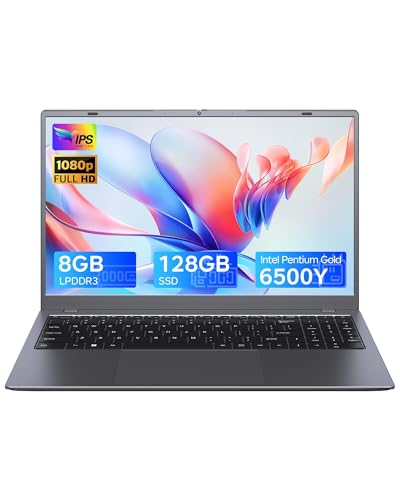
Zrasu 15.6 Inch Laptop, 8GB RAM, 128GB SSD, Gray
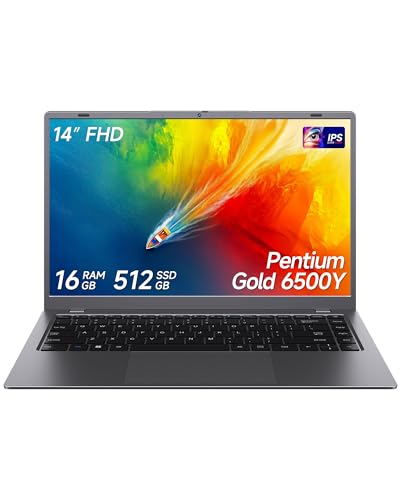
Zrasu 14 Inch Laptop, 16GB RAM, 512GB SSD, Gray
A Closer Look At Each Pick
The pink chassis is the headline feature here, and for a high schooler who wants something that looks theirs, that’s a real reason to consider it. The 15.6-inch Full HD display gives enough screen real estate for split-view essays and research tabs, and the 16GB of RAM paired with the Pentium Gold 6500Y (a dual-core chip with a 3.4GHz boost) handles typical coursework without choking.
USB-C, WiFi 5, and Bluetooth 5.0 round out a modern port and wireless loadout. Compared to the entry-level PADIX later in this list, this one doubles the memory and storage, so it should age better across four years of high school. For students who care about the look as much as the spreadsheet, this lands in a sweet spot.
The Helpful Details
- Pink finish stands out on a crowded lecture-hall desk
- Full HD 1080p panel keeps text crisp for long reading sessions
- 16GB RAM handles browser tabs and Office apps without a stutter
- 256GB SSD boots Windows and apps in seconds, not minutes
- USB-C port simplifies charging with one cable
Things To Consider
- Penium Gold chip is fine for schoolwork, not for video editing
- Pink finish shows scuffs more visibly than darker shells over a four-year stretch
Quick Facts
Who It Suits Best
A high school or early-college student who wants a roomy screen, personality in the chassis, and enough RAM to last past freshman year.
Look Elsewhere When
Anyone running creative software like video editors or CAD should look at the Apple 2025 MacBook Air 13-inch M4 instead, since its M4 chip handles heavier workloads with far more headroom.
The original M1 MacBook Air remains one of the smartest entry points into Apple’s laptop ecosystem. The M1 chip (Apple’s first in-house processor for Macs, pairing CPU, GPU, and memory on a single chip) delivers more than enough speed for note-taking, browser research, and photo editing, and the 13-inch Retina display makes long reading sessions easy on the eyes. Touch ID handles password and payment logins without typing, and the keyboard stays comfortable through long typing sprints.
The Space Gray finish keeps things low-key in lectures. Battery life in this generation runs long enough to skip the charger on a full school day. Compared to the newer M4 Air further down, this one trades some headroom for a friendlier entry point, making it a sensible pick when budgets matter but macOS is non-negotiable.
The Good Stuff
- M1 chip still handles coursework and creative apps with ease
- All-day battery covers back-to-back classes without a charger
- 13-inch Retina display keeps text sharp for long reading sessions
- Touch ID speeds up logins and app-store purchases
- macOS works smoothly with iPhone for file and message handoff
Worth Noting
- 8GB of unified memory is workable but tight for heavy multitaskers
- 256GB storage can fill up fast with photo and video project files
- Only two USB-C ports, so a hub may be needed for older accessories
Made For
Students who want the Apple ecosystem, a fanless quiet design, and long battery life without stretching into premium pricing.
Consider Something Else When
Power users running demanding software like video editing suites should step up to the Apple 2025 MacBook Air 13-inch M4, which doubles the memory and steps up to a newer processor.
The M4 MacBook Air in Sky Blue is the most capable student laptop on this list, hands down. The M4 chip handles everything from multi-track podcast editing to running local AI features in macOS without breaking a sweat, and 16GB of unified memory keeps dozens of tabs and apps in rotation. The 13.6-inch Liquid Retina display (Apple’s color-accurate, high-resolution laptop screen) hits a sweet spot of size and crispness for note-taking apps.
The 12MP Center Stage camera follows you during video calls, useful for group projects where you move around. Up to 18 hours of battery life means leaving the charger in the dorm on heavy days. Compared to the older M1 Air, this one is meaningfully faster and ships with more memory, so four years of coursework won’t outgrow it. It’s a genuine premium option.
Notable Upsides
- M4 chip handles video editing and demanding apps with ease
- 16GB unified memory supports heavy multitasking without slowdown
- Liquid Retina display offers strong color accuracy for design coursework
- Long battery life covers back-to-back class days
- Center Stage camera keeps framing on video calls
Honest Caveats
- 256GB storage is the base tier and may feel tight for video projects
- Premium positioning means a steeper initial outlay
Feature Snapshot
Best Suited To
A college student in design, computer science, or media production who plans to lean on demanding software for the next four years.
Swap It Out When
Budget-focused shoppers should consider the 2020 Apple MacBook Air M1 instead, which delivers a similar Apple experience at a friendlier entry point.
A 27-inch all-in-one makes sense for a dorm or shared study space where a laptop screen starts to feel cramped. The Dell 27 All-in-One bundles the computer into the display itself, so the desk stays clean with one cable for power and minimal cable clutter. The 99% sRGB coverage (sRGB is the standard color range for web and most digital work) means projects look the way they should.
The Intel Core 7 150U is a modern chip with enough cores for research papers, spreadsheets, browser tab chaos, and the occasional Zoom call. 16GB of RAM keeps Windows 11 Home running smoothly under study loads. Compared to the smaller PADIX laptop earlier, this is a desk-anchored setup that trades portability for a much more comfortable workspace. For a student who lives at one desk, it’s a strong choice.
Useful Strengths
- 27-inch FHD display gives generous room for split-screen work
- All-in-one design eliminates tower clutter on a small desk
- Core 7 chip handles research and Office work without slowing down
- 16GB RAM supports heavy browser and document workflows
- 99% sRGB color coverage benefits design and media projects
Trade-Offs
- Not portable; moving between home and class requires a second device
- Larger footprint demands a dedicated study space
Who Will Love This
A student whose coursework happens at a fixed desk and who values screen real estate over portability.
A Better Fit Elsewhere
Students who need a portable daily driver should consider the Zrasu 14 Inch Laptop with 16GB RAM and 512GB SSD, which keeps the same memory but slips into a backpack.
The Core 5 version of the Dell 27 All-in-One steps the processor down a notch from the Core 7 sibling, but keeps the same spacious 27-inch display and Windows 11 Home setup. For a household with one student and shared study time, the slightly lower-spec chip still handles every assignment-based task, from essays to video playback to spreadsheet work. The 27-inch panel makes online research feel less cramped.
Like its bigger sibling, this all-in-one keeps the desk tidy by tucking the computer behind the screen. The trade-off shows up only in heavier workloads like simultaneous video calls and large-file exports. For most school days, the Core 5 chip gives plenty of breathing room. Compared to the M4 MacBook Air, this trades portability for a much larger screen at a friendlier footprint for shared family use.
Everyday Wins
- 27-inch FHD screen gives generous room for multitasking
- Core 5 processor handles schoolwork and casual streaming with ease
- Integrated design keeps the desk clean and uncluttered
- Windows 11 Home runs Office and browsers without issue
- Easy setup, no separate tower to place or hide
Points To Note
- Core 5 chip trails Core 7 for heavy multitasking and exports
- Fixed installation means it’s not a travel companion
Perfect Match For
A family study setup where one student shares a fixed workspace with parents or siblings and doesn’t need to take the machine on the go.
Reach For A Different Pick When
Students who split time between home and campus should consider the Zrasu 15.6 Inch Laptop with 8GB RAM and 128GB SSD, a portable option built for the backpack.
The PADIX 15.6-inch laptop is the most affordable Windows option here, and for a middle-schooler or early-high-school student with light homework loads, it covers the basics without drama. The Intel Celeron N4020 (a low-power dual-core chip designed for basic computing) handles web browsing, document editing, and video calls at modest speeds, and the 15.6-inch Full HD screen keeps text readable for long reading sessions.
128GB of eMMC storage (eMMC is a compact, flash-based storage type common in budget laptops, slower than a true SSD but adequate for light use) is enough for school files and a handful of apps, though heavier media libraries will need external space. Windows 11 Home ships ready to go. Compared to the pink Zrasu earlier, this one skips the style play for a friendlier entry price, but 4GB of RAM is genuinely tight for modern multitasking.
Advantages To Know
- Entry-level pricing makes it accessible for tight budgets
- Full HD 15.6-inch display keeps reading comfortable
- Windows 11 Home pre-installed for familiar software
- Portable enough to slip into a backpack daily
Things To Consider
- 4GB RAM limits multitasking; browser tabs may reload under load
- Celeron N4020 is slow for video editing or large spreadsheets
- 128GB eMMC fills up quickly with school projects and photos
Right Fit For
A middle school student or younger learner whose work stays inside a browser and Office, with no heavy creative software in the mix.
Skip It When
High schoolers managing bigger projects should consider the Zrasu 15.6 Inch Laptop with 8GB RAM and 128GB SSD, which doubles the memory for smoother multitasking.
The Dell Slim Desktop ECS1250 is a small-form-factor tower for students who want desktop muscle and a clean desk. The 14th-gen Intel Core i3 14100 (a four-core desktop chip with strong single-thread performance) tackles engineering coursework, CAD, and large datasets with more authority than most laptops in this price bracket, and 8GB of DDR5 RAM (the latest generation of system memory, faster and more efficient than DDR4) keeps things responsive.
512GB of SSD storage gives breathing room for project files, and WiFi 6 means modern campus network support. The slim chassis slides behind a monitor or under a desk without dominating the room. Compared to the Dell 27 All-in-One earlier, this setup requires a separate display but offers more expandability and stronger sustained performance for coursework like programming or simulation software.
Benefits That Matter
- Core i3 desktop chip outperforms most student laptops at similar cost
- DDR5 RAM future-proofs the system against memory-intensive software
- 512GB SSD holds years of coursework and project archives
- WiFi 6 keeps speeds steady on modern campus networks
- Slim chassis fits behind a monitor or under a desk
Where It May Fall Short
- Requires a separate monitor, keyboard, and mouse
- Not portable; moving between locations needs a full teardown
Technical Highlights
Built With In Mind
Engineering, computer science, or data-focused students who want desktop-class performance at a study desk and don’t need to carry their machine to class.
Where A Sibling Pick Shines
Students who need the same power in a portable form should look at the Apple 2025 MacBook Air 13-inch M4, which delivers strong performance with built-in screen and keyboard.
The gray Zrasu 15.6-inch keeps the same Pentium Gold 6500Y chip as the pink sibling earlier, but trades the bold look for a more neutral finish and pares the memory and storage back to 8GB and 128GB. For a high schooler who needs a workhorse laptop without the flair, this covers the essentials at a friendlier price. The Full HD 15.6-inch display makes long study sessions easier than squinting at a smaller screen.
WiFi 5 and Bluetooth 5.0 keep wireless accessory support solid, and the USB-C port simplifies cable management on a cluttered desk. Compared to the budget PADIX earlier, this one moves to a faster SSD and a slightly more capable processor, which helps when multitasking across browser tabs. The honest read is that 8GB of RAM is workable for schoolwork, though heavy multitaskers may feel the ceiling.
What Pays Off
- 15.6-inch Full HD screen offers comfortable split-screen study
- SSD storage boots and loads apps faster than eMMC alternatives
- Neutral gray finish suits any backpack or desk setup
- USB-C simplifies charging with one cable
- Pentium Gold chip handles essays, slides, and video calls
Some Limits To Know
- 128GB storage fills up quickly with school projects and photos
- 8GB RAM is enough for typical work but tight for heavy multitasking
Whose Shelf It Belongs On
A high school student who wants a low-key, capable laptop for daily homework, browser research, and video calls without paying for higher specs.
Not Your Match When
Students planning to keep large media libraries locally should consider the Zrasu 14 Inch Laptop with 16GB RAM and 512GB SSD, which quadruples the storage and adds memory headroom.
The 14-inch Zrasu is the most backpack-friendly option in this roundup, trimming the screen to a more portable size while keeping the larger memory and storage of the higher-tier pink model. 16GB of RAM is generous for student workloads, and 512GB of SSD storage swallows a year of projects, photos, and reading lists without external drives. The compact shell suits daily commuters and students cycling between dorm, library, and home.
The Pentium Gold 6500Y keeps the same proven chip as its bigger Zrasu siblings, so day-to-day schoolwork runs the same. The Full HD panel stays sharp at 14 inches. Compared to the 15.6-inch pink Zrasu earlier, this one trades screen real estate and personality for portability and storage headroom, making it a smarter pick for students who move between locations every day.
The Upside
- 14-inch form factor slips into backpacks and small lockers
- 16GB memory handles heavy multitasking across browser and apps
- 512GB SSD holds years of coursework without external drives
- Full HD display stays crisp at the smaller screen size
- USB-C, WiFi 5, and Bluetooth 5.0 cover modern connectivity
Practical Considerations
- Smaller screen is less comfortable for long split-screen sessions
- Pentium Gold chip is fine for schoolwork, not for creative suites
- Compact chassis means fewer full-size ports on the sides
Core Details
Who Should Grab It
A commuter student who values portability, generous storage, and enough memory to last through a four-year degree cycle.
Where Another Pick Suits Better
Students who stay at one desk and want maximum screen comfort should consider the Dell 27-Inch All-in-One Desktop with Core 7 and 16GB, which trades portability for a much larger workspace.
How To Pick The Right Computer For Class
Match The Machine To The Major
Liberal arts and humanities students can comfortably run on 8GB of RAM and a modern dual-core processor, since the workload stays inside Office, browsers, and note-taking apps. Engineering, computer science, and design majors benefit from 16GB of memory and a stronger processor to handle simulations, code compilers, and creative suites. Misjudging the workload tends to be the most common regret four years in.
Decide On Portability Versus Screen Space
A laptop lets students move between classes, libraries, and home without thinking twice, but the trade-off is a smaller screen. All-in-one desktops like the Dell 27 give back that screen real estate and stay parked in one spot. Hybrid families often combine a desktop for home study with a cheaper laptop for travel days.
Battery And Build For The Daily Commute
A long-rated battery matters when outlets are scarce in lecture halls. The M4 MacBook Air and M1 MacBook Air both stretch across a full school day, while most Windows laptops in this list benefit from a mid-day top-up. Build quality also matters: a metal chassis survives backpack life better than a thin plastic shell for students who toss their bag around.
Plan For Four Years, Not One
Software demands grow over a degree cycle. Choosing 16GB of RAM and at least 256GB of SSD storage buys headroom for the second half of college. Cloud storage helps, but local storage still matters for project files and offline work.
Common Slip-Ups And Where The Extra Money Goes
Where Shoppers Go Wrong
The most common mistake is buying a laptop with too little memory for the workload. 4GB of RAM looks fine on paper but struggles once students add video calls, browsers with dozens of tabs, and PDF readers simultaneously. Another trap is overlooking storage type: eMMC storage feels slower than SSD in everyday use, and that gap shows up in boot times and app launches. Skipping the keyboard and trackpad test is another regret, since students type thousands of words a week.
Why Top Tier Costs More
Higher-tier machines bring stronger processors, more memory, better displays, and longer battery life. The Apple 2025 MacBook Air with M4, for instance, costs more because the M4 chip handles creative software and AI features that older chips struggle with. Premium builds also tend to use metal chassis, higher-resolution displays, and better speakers, which add up over years of daily use. Paying more makes sense when the student’s coursework genuinely needs the extra performance, or when a longer-lasting build saves money across a four-year stretch.
Frequently Asked Questions
How Much RAM Does A Student Laptop Need?
For most students, 8GB of RAM covers basic coursework, though 16GB gives much smoother multitasking and more headroom over four years. Anyone running creative software should aim for 16GB at minimum.
Is A Mac Or Windows Laptop Better For School?
It depends on the school’s required software and the student’s preferred ecosystem. Macs handle creative work well and pair smoothly with iPhones, while Windows machines offer wider software compatibility and often better value at lower prices.
How Long Should A Student Laptop Last?
A well-chosen student laptop should stay useful for the full four-year degree cycle. Choosing 16GB of RAM, an SSD, and a modern processor buys enough headroom to handle software updates over that span.
Are All-In-One Desktops Good For Students?
All-in-ones work well for students who study at a fixed desk and want a clean setup. They sacrifice portability, so a separate laptop may be needed for travel between home and campus.
What Size Screen Is Best For Studying?
A 14 to 15.6-inch laptop screen balances portability and readability for most students. Larger 27-inch displays make sense for dorm setups and shared study spaces where the laptop stays put.
Closing Thoughts
The right computer comes down to where and how the student works. MacBook Airs handle long days and creative work, the Dell all-in-ones turn a dorm desk into a serious study space, and the Zrasu lineup offers budget-friendly laptops for everyday homework. Match the specs to the major, give the machine room to grow, and the four-year stretch gets a lot easier.