Core XY 3D printers have reshaped my home workshop. The Core XY motion system moves the print head along both X and Y axes with stationary motors, which keeps the moving mass light and lets the machine hit aggressive travel speeds without sacrificing print quality. I put together this roundup after watching how these printers handle real jobs, from multi-color prototypes to engineering-grade composites. Whether you’re producing batch parts, mixed-material models, or colorful cosplay props, the picks below cover the angles worth considering.
The Lineup, Simplified

AD5X Light Kit, 56 LEDs Ultra-Thin Magnetic Light Strip
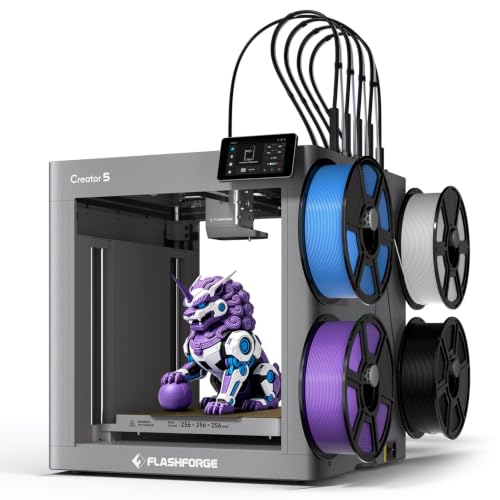
FLASHFORGE Creator 5 CoreXY 3D Printer with 4 Toolheads

FLASHFORGE Camera Kit for Adventurer 5M/Pro/AD5X

FLASHFORGE Creator 5 Pro CoreXY Printer with Active Chamber Heating

FLASHFORGE AD5X Multi-Material CoreXY Printer 4-Color

Entina Tina2C Mini 3D Printer Bundle for Beginners
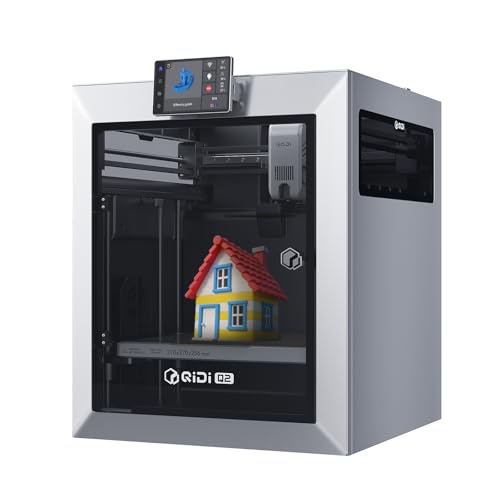
QIDI Q2 CoreXY 3D Printer with 65℃ Heated Chamber
Meet The Standout Selections
Anyone printing late into the evening has struggled to read fine layer lines inside a dim chamber. This magnetic LED strip fixes that problem by snapping onto the AD5X’s metal frame without tools or screws. At 6500K, the light leans toward crisp daylight rather than warm yellow, which means subtle artifacts and stringing show up clearly during inspection.
For a maker running stringy PETG or glossy silk filaments, the contrast boost alone can shave minutes off every visual check. It suits anyone who already owns the AD5X or AD5M series and wants better visibility without rewiring anything.
Noteworthy Benefits
- Magnetic mounting means installation takes seconds and leaves no residue.
- Daylight-balanced 6500K output makes layer lines and stringing easy to spot.
- Ultra-thin profile stays out of the way of the print head’s travel envelope.
- 56-LED density gives even coverage across the chamber rather than a single hot spot.
Worth Noting
- Designed specifically for the AD5X frame, so it won’t help owners of unrelated machines.
- Users in fully dark rooms may want a second strip angled at the rear of the bed.
Right Fit For
Existing AD5X owners who print into the night or work in dim basements and want clearer layer-by-layer monitoring.
Skip It When
The FLASHFORGE Camera Kit for Adventurer 5M/Pro/AD5X is the better add-on for users who want remote monitoring rather than brighter in-room lighting.
Most multi-color systems waste a spool’s worth of filament just purging between swaps. The Creator 5 takes a different route: four preloaded toolheads swap in roughly seven seconds, so material changes happen without dumping expensive PLA into a purge bucket. Travel speeds up to 600mm/s come courtesy of the CoreXY frame, which keeps inertia low even at the upper end of acceleration.
Compared to the AD5X Light Kit above, this is the actual printer, not an accessory, and it carries the same multi-material DNA found on the bigger Creator 5 Pro later in this list. It fits small studios producing labeled prototypes, hobbyists running multi-material art pieces, and anyone tired of single-color compromises.
A Few Highlights
- Seven-second toolhead changes dramatically cut wasted filament during multi-color runs.
- 600mm/s travel speed rivals much larger industrial units while staying desk-friendly.
- Auto bed leveling and smart extrusion simplify the first print for newcomers.
- Four independent toolheads support mixed materials, including PLA paired with TPU or PETG.
Trade Offs
- Four toolheads raise the upfront cost versus a single-extruder CoreXY like the QIDI Q2.
- Maintenance includes keeping all four nozzles clean, which takes more routine attention than a one-nozzle setup.
Key Specs
Best Suited To
Small studios and serious hobbyists who run multi-color or mixed-material batches and want fast color changes without the waste.
Swap It Out When
The FLASHFORGE Creator 5 Pro is the better fit for users who also need a heated chamber for engineering filaments.
Long prints are nerve-wracking when the only way to check progress is to walk over and peek through the door. This official camera module streams live footage through the Flash Maker app, so a 14-hour nylon job can be monitored from a laptop at the office. It mounts cleanly on the Adventurer 5M, 5M Pro, and AD5X lines without aftermarket brackets.
Where the AD5X Light Kit earlier in this list improves in-room visibility, this camera extends that awareness to anywhere with a network connection. It suits anyone running overnight prints, training a print farm, or supervising jobs at a co-working makerspace.
Benefits That Matter
- Live remote viewing catches failed first layers before wasting hours of filament.
- Native Flash Maker app integration means no third-party firmware or workarounds.
- Compatible with multiple Flashforge models, so a mixed fleet can share the same accessory.
- Time-lapse recording makes a satisfying record of finished pieces for portfolios or social posts.
Points To Note
- The camera relies on a stable Wi-Fi signal, so basement shops may need a range extender.
Made For
Anyone running long, unattended prints on a compatible Flashforge machine who wants visual confirmation without hovering over the printer.
A Better Fit Elsewhere
The AD5X Light Kit is the smarter pick for makers who mostly want better in-room chamber lighting rather than off-site monitoring.
Engineering filaments like ABS, ASA, and PPS-CF warp badly when the chamber sits at room temperature. The Creator 5 Pro solves that with an enclosed CoreXY frame and active chamber heating that holds the air around 65°C, which dramatically reduces layer separation on long prints. The four-toolhead FlashSwap system carries over from the standard Creator 5 reviewed above, so material changes still take about seven seconds.
Engineers, prototyping shops, and serious hobbyists working with composites or high-temp materials get the clearest path to functional parts. The fully enclosed design also helps when printing near curious pets or in shared workspaces where drafts cause trouble.
Advantages To Know
- Active chamber heating up to 65°C prevents warping on ABS, ASA, and reinforced composites.
- Same 7-second toolchanger as the Creator 5 keeps multi-material waste low.
- Fully enclosed frame blocks drafts, which matters in workshops with open windows or fans.
- Industrial focus means better dimensional stability for engineering-grade prints.
Some Limits To Know
- The heated chamber pulls meaningful power, so older circuits in detached garages may struggle.
- Larger footprint than the open-frame Creator 5, so apartment dwellers should measure first.
Feature Snapshot
Who Will Love This
Engineers and small-batch workshops printing functional parts in reinforced filaments like PPS-CF, ABS, or ASA.
Look Elsewhere When
The FLASHFORGE AD5X is the better match for users who want multi-color productivity in a smaller, open-frame footprint.
Downtime from a filament runout can ruin a 12-hour print. The AD5X packs a backup filament system that swaps to a fresh spool without babysitting, plus full auto calibration that measures multiple bed points before each job. Speed lands at 600mm/s, and DIY IFS (Independent Filament System) modules let users customize their loading setup.
Compared to the Creator 5 Pro above, this is a lighter, more productivity-focused machine aimed at color rather than engineering composites. Small shops, Etsy sellers, and print farms juggling multiple jobs at once get the most value from the auto-switching filament bay.
What Makes Sense
- Filament backup system prevents print failure when one spool runs dry.
- Full-auto calibration removes the manual leveling step that frustrates first-time users.
- 600mm/s travel speed keeps batch jobs competitive with larger industrial units.
- DIY IFS modules open room for custom color combinations and third-party filaments.
Practical Considerations
- The open frame means drafts can disrupt tall, thin prints in breezy workshops.
- DIY modules add setup steps that complete beginners may find intimidating.
Key Product Details
Whose Shelf It Belongs On
Small shops and serious hobbyists running multi-color jobs who want a printer that handles filament changes without constant supervision.
Reach For A Different Pick When
The Entina Tina2C is a friendlier starting point for users who value plug-and-play simplicity over multi-color productivity.
First-time printer owners rarely want to spend a weekend assembling a frame and debugging firmware. The Tina2C arrives fully assembled, pairs over Wi-Fi with the Poloprint app, and walks the user through setup with guided prompts. The bundle includes four colors of PLA and a curated library of beginner projects, so a first print can happen within minutes of unboxing.
It targets a different audience than the heavy-duty Creator 5 Pro earlier in this list. Kids, classrooms, gift buyers, and tinker-curious adults who want a low-stakes entry into 3D printing will find the soft learning curve welcoming.
Features That Help
- Fully assembled out of the box means no frame building or belt tensioning.
- Poloprint app guides calibration and slicing, even for users with zero prior experience.
- Included 4-color PLA bundle lets a first print happen without buying extras.
- 3000+ model library and 20+ DIY modules keep creative momentum going past the first week.
Honest Caveats
- Smaller build volume rules out the large prototypes a Creator 5 handles easily.
- Single-extruder design means swapping filament for color changes takes manual effort.
Perfect Match For
Beginners, families, and classrooms that want a friendly introduction to 3D printing without a steep setup curve.
Consider Something Else When
The FLASHFORGE AD5X is the right step up once a beginner outgrows the small format and wants multi-color printing at production speed.
High-performance composites like PPS-CF need both a hot nozzle and a hot chamber to bond properly without warping. The Q2 pushes the nozzle to 370°C and runs the chamber at 65°C, which opens up materials most desktop printers refuse to touch. The nozzle doubles as a leveling sensor, so first-layer accuracy holds across different bed surfaces.
Compared to the multi-color focus of the AD5X earlier, the Q2 is unapologetically about engineering output. Mechanical engineers, lab researchers, and product designers printing in carbon-fiber blends get a desktop machine that handles materials usually reserved for industrial units.
Points In Its Favor
- 370°C nozzle unlocks PPS-CF, PEKK, and other high-temp composites.
- 65°C active chamber keeps large prints dimensionally stable throughout long jobs.
- Nozzle-as-leveling-sensor simplifies calibration across varied bed surfaces.
- CoreXY frame delivers the speed and precision engineering workflows demand.
Where It May Fall Short
- Specialized toward engineering use, so casual hobbyists may not use the full temperature range.
Core Details
Built With In Mind
Engineers and serious makers who print in advanced composites like PPS-CF and need both a hot nozzle and a heated chamber on a desktop footprint.
Where A Sibling Pick Shines
The FLASHFORGE Creator 5 Pro is the stronger pick for users who want multi-material printing alongside their engineering materials.
What To Weigh Before Choosing Core Xy 3d Printers
Speed vs. material range is the core trade-off in this category. Core XY frames push travel speeds well past 500mm/s, but that speed only matters if the machine can also handle the filaments the buyer plans to run. PLA hobbyists can stay with fast, open-frame units, while anyone touching ABS, ASA, or PPS-CF should look for a heated chamber first.
Build volume shapes what is actually printable. A small desktop Core XY fits a figurine or a small bracket, but a workshop printing jigs, enclosures, or replacement panels needs a larger format. Measure the largest part on the wish list and work backward from there, because a too-small machine forces awkward tiling.
Multi-material capability is the dividing line between hobby and production use. Toolchanger systems cut waste dramatically but add cost and maintenance. Single-extruder machines stay simple but require manual filament swaps between colors.
Connectivity and ecosystem matter more than spec sheets suggest. A printer that pairs with a polished app, supports remote monitoring, and has a stocked accessory catalog (like replacement nozzles or camera kits) tends to age better than a faster machine with no support path.
Key Considerations Across These Picks
Pitfalls Shoppers Hit
Chasing headline speed numbers alone is the most common mistake. A 600mm/s travel speed is wasted on a printer without a heated chamber if the filament in question is ABS or nylon. Equally, ignoring build volume leads to creative compromises that turn prints into puzzle pieces rather than finished parts. Buyers also frequently overlook the ecosystem: printers without accessible replacement nozzles, camera upgrades, or filament backup systems can feel stranded once the first accessory breaks.
What Separates Premium From Basic
The jump from a basic Core XY to a premium model typically pays for three things: an actively heated chamber, a high-temperature nozzle, and a multi-toolhead system. Each of these adds manufacturing complexity, and each unlocks materials or workflows the basic models cannot reach. Buyers who stick to PLA at modest volumes rarely recoup that premium, but anyone printing engineering composites or running multi-color batches finds the upgrade pays back fast through reduced waste and fewer failed prints.
Frequently Asked Questions
What makes Core XY different from a standard Cartesian printer?
Core XY moves the print head using stationary motors that drive belts along both X and Y axes, keeping the moving parts light. A standard Cartesian moves the bed or the entire gantry, which adds weight. The lighter frame is the reason Core XY machines reach higher acceleration without losing print quality.
Do Core XY 3D printers need an enclosure?
Not for PLA, but an enclosure becomes important for ABS, ASA, nylon, and any reinforced composite. Even small drafts across the print chamber can cause warping or layer separation on these materials. Active chamber heating takes that a step further by holding the air at a stable elevated temperature.
How fast can a Core XY printer actually print without losing quality?
Travel speeds of 500 to 600mm/s are common, but real-world print quality depends more on acceleration tuning and vibration control than on the raw speed number. Lower acceleration settings usually produce cleaner surfaces, even on the same hardware.
Are multi-toolchanger systems worth the extra cost?
For shops producing multi-color batches or mixed-material prototypes, a toolchanger dramatically reduces wasted filament and shortens print time. For users who print single-color items most of the time, a single-extruder Core XY is more straightforward and cheaper to maintain.
Can a Core XY printer handle engineering composites?
Yes, but the printer must support a high nozzle temperature and ideally a heated chamber. Composites like PPS-CF need nozzle temperatures around 350 to 370°C and chamber temperatures near 65°C to bond properly without warping.
Final Verdict
A Core XY 3D printer pays off most when its strengths line up with the work at hand. Hobbyists running colorful prints will love the AD5X or the Entina Tina2C for different reasons, while engineers printing in reinforced composites will get the most from the QIDI Q2 or the Creator 5 Pro. The right pick is the one that matches the materials, the volume, and the workflow rather than the one chasing the biggest spec sheet.