Finding the right workstation for programming often comes down to a few stubborn details: enough memory to keep an IDE, browser, and Docker all open at once, a processor that won’t stall when you compile, and a chassis that disappears behind your monitor. I’ve spent years running through code on everything from tiny mini PCs to full-sized business towers, and the gap between “feels fast” and “keeps up by month six” usually traces back to those three things.
This roundup gathers ten machines that cover most of what developers actually need in 2026. Some sit quietly behind a display, others pack serious horsepower for compile-heavy languages and AI-assisted workflows. The list moves from everyday productivity boxes up to workstation-grade builds, so you can match the machine to the kind of code you write, not the other way around.
A Fast Comparison Of The Options
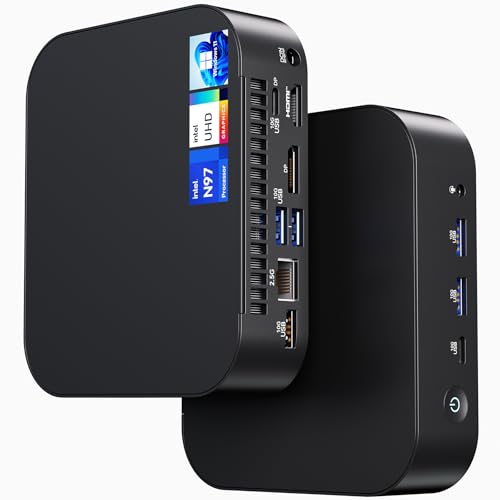
NENCHIN ASUS NUC 14 NUC14MNK Essential Mini PC

GEEKOM IT15 AI Mini PC, Intel Ultra 9 285H

NENCHIN ASUS NUC 13 Pro NUC13ANHi5 Barebone Kit

HP ProDesk 400 G9 Business SFF Desktop, Intel i7-14700
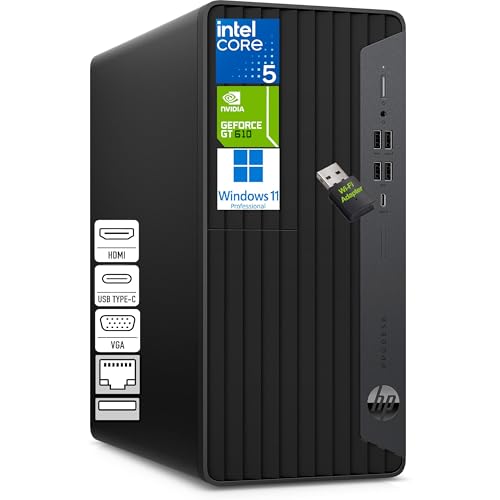
HP Desktop Computer Tower PC, Intel i5-10400F

HP 2026 Desktop Computer, Intel i5-12500
GEEKOM AX8 Max Silent Mini PC, Ryzen 7 8745HS
GEEKOM Mini PC IT13 MAX Ultra 9 185H

NENCHIN ASUS NUC13ANHi5 Mini PC, Core 1340P

GEEKOM IT13 MAX AI Mini PC 2026, Intel Ultra 9 185H
Meet The Standout Selections
This NUC punches well above its size, sliding behind a monitor and staying out of the way. The Intel Processor N97 paired with 8GB of RAM is more capable than the spec sheet suggests for everyday scripting, Git workflows, and lighter IDE sessions. For a solo developer who mainly works on web front-ends or smaller backend services, it covers the daily grind without complaint.
Wi-Fi 6E and Bluetooth 5.3 keep the desk free of dongles, which matters when every USB port already hosts a keyboard, mouse, and dock. The 256GB SSD is tight for projects with large node_modules folders, so most folks will eventually attach external storage.
Useful Touches
- VESA-mountable chassis keeps the desk uncluttered
- Windows 11 Pro pre-installed means first boot is fast
- Low fan noise during typical code editing sessions
- Compact footprint suits small apartment desks
Things To Consider
- 8GB of RAM fills up quickly when running Docker containers alongside an IDE
- 256GB storage feels cramped for multi-repo workflows
Who Should Grab It
Students, junior developers, and remote workers who mostly handle scripting, markup, or web front-end projects will find this NUC a tidy match.
Swap It Out When
Backend engineers running multiple services or containers may want to step up to the GEEKOM IT15 AI Mini PC for its 32GB DDR5 and larger storage.
For a box this small, the IT15 holds its own against mid-tower workstations. The Intel Core Ultra 9 285H with 16 cores handles simultaneous builds, linters, and browser sessions without breaking a sweat, which is exactly what larger engineering teams need at the desk. Compared to the previous pick’s modest 8GB, this model ships with 32GB of DDR5 and a 1TB SSD, giving a real runway for project files and Docker images.
Wi-Fi 7 and quad 8K/4K display support make it ideal for traders, kiosk deployments, or any workflow that depends on multiple screens. The Intel Arc 140T integrated GPU also steps in nicely for AI-assisted code completions and lightweight visualization tasks.
Real-World Strengths
- 32GB DDR5 keeps dozens of browser tabs and containers open at once
- 1TB SSD handles large monorepos without external drives
- Quad-display output reduces the need for a second machine
- Compact design fits enterprise front desks and reception kiosks
- Wi-Fi 7 future-proofs the network connection
Trade-Offs
- Higher power draw under sustained compile loads
- Integrated GPU limits heavy CUDA-style training
- Compact cooling can get audible during long builds
Key Specs
Right Fit For
Engineering teams running enterprise workloads, multi-display setups, or AI-assisted development on a daily basis.
Consider Something Else When
Quiet shared offices may prefer the GEEKOM AX8 Max Silent Mini PC, which trades raw multi-core power for lower fan noise.
Not everyone wants a sealed box, and this NUC leans into that. Sold as a barebone kit, it ships with the Core i5-1340P processor and the chassis, leaving RAM, storage, and operating system for you to choose. For developers who already have spare SODIMMs or prefer a specific Linux distro, that’s a real advantage over the locked-down picks above.
The 13th Gen hybrid architecture, mixing performance and efficiency cores, gives surprisingly quick compile times for its size. It also supports VESA mounting and offers Gigabit Ethernet alongside Wi-Fi 6 for stable network access during long pulls.
A Few Highlights
- Barebone design lets you pick exact RAM and SSD specs
- Hybrid CPU architecture balances background and foreground tasks
- Gigabit Ethernet ensures reliable Git operations
- VESA-friendly for monitor-back mounting
Worth Noting
- No operating system included, adding setup time
- Requires separate purchase of compatible RAM and storage
- Less convenient for those wanting a plug-and-play machine
Best Suited To
Linux enthusiasts, tinkerers, and developers who want to control every component inside their workstation.
A Better Fit Elsewhere
Anyone wanting a ready-to-go Windows box should consider the NENCHIN ASUS NUC13ANHi5 Mini PC at pick nine, which ships pre-configured.
The ProDesk 400 G9 is what shows up when a company standardizes on a real workstation. With the Intel Core i7-14700 offering 20 cores and 28 threads, it chews through code reviews, CI builds, and parallel test suites without blinking. The small form factor keeps it off the desk while leaving room inside for future upgrades.
The package comes ready to work: 16GB of DDR5, a 1TB SSD, and Windows 11 Pro. Dual 4K display support through DisplayPort and HDMI is genuinely useful when debugging across documentation and stack traces side by side.
Where It Helps
- 20-core CPU powers heavy compilation and virtualization
- 16GB DDR5 supports multiple IDE instances and services
- 1TB SSD holds large projects and database snapshots
- DisplayPort and HDMI drive dual 4K monitors natively
- Business-grade chassis with accessible internals for upgrades
Points To Keep In Mind
- Larger footprint than mini PCs on this list
- Discrete GPU absent for GPU-bound workloads
Quick Facts
Perfect Match For
Office-based development teams and IT departments needing a reliable traditional workstation with upgrade potential.
Where Another Pick Suits Better
Solo remote developers working from small desks may prefer the GEEKOM IT15 AI Mini PC, which delivers similar performance in a much smaller chassis.
Older doesn’t mean useless, and the i5-10400F is a good reminder of that. With 6 cores and 12 threads hitting up to 4.3GHz, it covers everyday web development, scripting, and learning environments without complaint. For students or hobbyists just getting into Python, JavaScript, or basic data work, it offers honest performance at a sensible cost.
The tower format leaves physical room for adding storage or swapping parts down the road. Most owners report it as a quiet, dependable machine for daily tasks.
Reasons It Performs
- 6-core CPU handles typical development workflows
- Tower design supports easy upgrades and repairs
- Mature platform with broad driver support
- Good fit for learning programming languages
Some Limits To Know
- Lacks integrated graphics, requiring a separate GPU for display output
- Older architecture trails newer chips on heavy compile jobs
- Not ideal for AI or ML workloads
Whose Shelf It Belongs On
Students, coding bootcamp participants, and hobbyists building their first project setups.
Look Elsewhere When
Professionals shipping production code daily will want the newer HP 2026 Desktop Computer with the i5-12500 for a meaningful jump in single-thread speed.
The 12th Gen i5-12500 hits a sweet spot for full-stack developers who don’t need workstation-grade silicon. Boosting up to 4.6GHz, it handles IDE startup, browser testing, and Node-based servers with little visible lag. Compared to the older i5-10400F in the previous pick, the newer architecture offers noticeably faster single-threaded performance.
With 16GB of RAM and a 1TB SSD in the box, the machine ships ready for medium-sized projects and CRM or inventory apps. The included wired keyboard and mouse keep setup costs low.
Where It Excels
- 4.6GHz boost speed accelerates single-threaded builds
- 16GB RAM comfortably runs modern IDEs and dev servers
- 1TB SSD handles monorepo storage with room to spare
- Wired peripherals included for immediate use
Room For Improvement
- No dedicated GPU limits graphical workloads
- Tower footprint takes up floor space
Feature Snapshot
Made For
Full-stack web developers and small business owners who want reliable daily performance without overpaying.
Reach For A Different Pick When
Anyone working on machine learning or 3D rendering will find the GEEKOM IT13 MAX Ultra 9 185H far better suited to those heavier tasks.
The AX8 Max trades silence for nothing. With the Ryzen 7 8745HS delivering 8 cores up to 4.9GHz, it stays cool and quiet even under sustained workloads, which makes it a great choice for shared offices or home studios where fan noise gets noticed. AMD’s HS-series chips are designed for thin-and-light laptops, so this mini PC inherits that efficient thermal profile.
It also brings 16GB of DDR5 and a 1TB SSD to the table, which is enough for typical multi-project setups without reaching for external drives. The compact case disappears behind any monitor.
What Helps Most
- Whisper-quiet operation during long compile sessions
- 8-core CPU handles parallel tasks smoothly
- 1TB SSD keeps everything local
- Mini chassis frees up desk space
Honest Caveats
- AMD integrated graphics limit GPU-heavy workflows
- 16GB may feel tight for heavy virtualization
Quick Technical Notes
Who Will Love This
Developers working in shared offices, recording spaces, or quiet home environments who care about low acoustic output.
Skip It When
Engineers running heavy AI inference should consider the GEEKOM IT13 MAX AI Mini PC 2026 instead, which pairs a similar quiet chassis with a flagship Ultra 9 chip.
This is where the IT13 MAX line earns its name. The Intel Core Ultra 9 185H brings 16 cores and an integrated AI Boost NPU, meaning on-device AI completions and local model inference don’t have to round-trip through a server. For developers prototyping AI features or working alongside coding assistants, that on-device acceleration is a real workflow upgrade.
The 24GB of RAM and 500GB SSD cover most needs, though the latter is upgradable if your project collection grows. Compared to the AX8 Max earlier, this one trades quiet efficiency for raw horsepower.
Benefits That Matter
- 16-core CPU with NPU accelerates AI-assisted workflows
- 24GB RAM handles multiple AI tools alongside the IDE
- Compact design suits creative studios and home offices
- Intel Arc graphics assist with video editing and rendering
Things To Weigh
- 500GB SSD may require an upgrade for large datasets
- Higher thermal output than lower-tier mini PCs
Feature Rundown
Built With In Mind
Developers building AI features, ML prototypes, or 3D design tools who need workstation performance in a compact form factor.
Not Your Match When
Strict office-noise requirements may push buyers toward the GEEKOM AX8 Max Silent Mini PC, which runs cooler and quieter at lower loads.
Think of this as the ready-to-go sibling of the barebone kit at pick three. The Core i5-1340P handles general development tasks with ease, while 16GB of RAM and a 512GB SSD give a comfortable starting point for medium-sized projects. Windows 11 Pro is pre-installed, so first boot drops you straight into a working environment.
It’s a sensible middle-ground pick between the entry-level NUC at pick one and the heavier workstation builds. Most developers will find it covers their day-to-day coding, documentation, and light virtualization needs.
What It Does Well
- 12-core hybrid CPU balances speed and efficiency
- 16GB RAM runs modern IDEs without slowdowns
- 512GB SSD offers decent local project storage
- Plug-and-play with Windows 11 Pro installed
Small Caveats
- Storage fills up quickly with multiple large repositories
- Older generation chip compared to the 14th Gen NUC at pick one
Who It Suits Best
Developers who want a balanced, ready-to-use NUC for general programming without picking components manually.
Where A Sibling Pick Shines
Tinkerers wanting component-level control should consider the barebone version at pick three.
Closing out the roundup is the IT13 MAX with 24GB of LPDDR5 and the same flagship Ultra 9 185H silicon as pick eight. LPDDR5 (low-power double data rate memory) draws less energy than standard DDR5 while delivering high bandwidth, which keeps thermals manageable in such a compact case. For AI-assisted coding workflows, that balance matters more than raw numbers suggest.
The 500GB SSD is the obvious trade-off, though most developers pair this class of machine with cloud or network storage anyway. It’s a future-ready pick for anyone leaning into AI tooling.
Standout Benefits
- Flagship 16-core Ultra 9 chip in a mini form factor
- 24GB LPDDR5 balances speed and efficiency
- Ideal for AI coding assistants and local model experiments
- Compact enough for monitor-back mounting
Possible Compromises
- 500GB storage requires external expansion for big datasets
- Premium pricing reflects flagship internals
Whose Shelf It Belongs On
AI-focused developers and engineering teams adopting local model workflows in 2026.
Not Your Match When
Traditional backend or web developers may get better value from the HP ProDesk 400 G9 at pick four, which offers more storage out of the box.
What Matters Most Before Choosing A Coding Workstation
CPU architecture sets the ceiling for compile speed and parallel builds. Modern hybrid designs, which combine performance cores with efficiency cores, handle mixed workloads more smoothly than older generations. For most coding tasks, 6 to 8 cores are enough, but 16-core chips earn their keep on large monorepos and AI tooling.
RAM is where projects tend to choke first. A modern IDE plus browser tabs plus Docker containers will use 12GB before you blink, so 16GB is the practical floor for 2026 and 32GB is comfortable headroom. DDR5 (the latest memory standard) offers higher bandwidth than DDR4 and is worth prioritizing when shopping.
Storage type matters more than raw capacity. SSDs, especially NVMe drives that connect directly to the PCIe bus, dramatically cut boot times and project loading compared to older spinning disks. Plan for at least 512GB if your repos include node_modules, build artifacts, or database snapshots.
Form factor shapes the rest of the desk. Mini PCs vanish behind a monitor and draw less power, while traditional towers offer easier upgrades and more cooling headroom. Matching the chassis to your workspace often matters more than chasing benchmark numbers.
Key Considerations Across These Picks
Pitfalls Shoppers Hit
One common mistake is buying on clock speed alone. A 4.6GHz chip from an older generation can lose to a 3.8GHz modern chip in real compile benchmarks because newer architectures do more work per cycle. Architecture generation and core count together tell a more honest story than GHz alone.
Another trap is underestimating RAM needs. Many shoppers pick 8GB because it looks fine on paper, then hit painful swap usage (where the system shuffles data to slower storage) once they open Docker, an IDE, and a browser together. For coding specifically, RAM matters more than flashy CPU specs.
Where The Extra Money Goes
Higher-tier models in this roundup, like the GEEKOM IT15 and IT13 MAX, pay for more cores, faster memory, and AI accelerators. Those upgrades show up in shorter compile times, smoother virtualization, and on-device model inference that doesn’t depend on cloud latency.
For solo developers on smaller projects, the premium tier may not earn its keep. The jump makes sense once you start juggling AI tooling, large monorepos, or multiple concurrent services, but for everyday web work, the mid-range options deliver plenty of headroom.
Frequently Asked Questions
How much RAM do I really need for coding in 2026?
For most developers, 16GB is the practical minimum, while 32GB is the sweet spot if you run Docker or multiple services alongside an IDE. Heavy AI workloads benefit from 32GB or more to avoid constant swapping.
Are mini PCs powerful enough for serious development work?
Yes, modern mini PCs with 16-core CPUs and 32GB of RAM handle most coding tasks, including compilation, virtualization, and AI-assisted workflows. The trade-off is usually limited GPU performance and less internal expansion room.
Should I choose Intel or AMD for a coding workstation?
Both vendors offer strong options. Intel’s hybrid architectures often lead in single-threaded speed, while AMD’s Ryzen HS-series chips balance multi-threaded performance with cool, quiet operation. Match the chip to the workload rather than the brand.
Is a dedicated GPU necessary for programming?
Not for most coding tasks, since compilation and IDE work rely primarily on the CPU. A dedicated GPU helps with machine learning training, 3D rendering, and some AI workloads, but isn’t required for everyday development.
How important is storage type for a coding machine?
Very important. NVMe SSDs dramatically reduce project loading and build times compared to older SATA drives or spinning disks. Aim for at least 512GB of NVMe storage, with more headroom if you work with large datasets or multiple repositories.
Closing Remarks
The right workstation depends less on spec sheet glory and more on what your code actually demands each day. Match the form factor to your desk, the RAM headroom to your multitasking habits, and the CPU tier to your heaviest compile or training workload. Any of these ten machines will get you coding, but the best fit is the one that quietly disappears into your workflow.