Picking parts one socket at a time gets old fast. A matched CPU and GPU combo saves that headache, especially when the pairing has already been tested for chipset fit, BIOS support, and power draw. I pulled together nine bundles ranging from budget starter boards to a 50-series gaming tower, so you can shop by the room the PC will live in rather than by a spreadsheet of TDP numbers.
The Shortlist At A Glance

Micro Center AMD 5500 + GIGABYTE B550M K Micro-ATX Combo
CyberPowerPC Gamer Xtreme VR i5-13400F RTX 4060

Newegg B550-F ATX Bundle with Ryzen 5 5500 and 16GB DDR4

Newegg B550-PLUS ATX Bundle with Ryzen 5 5500 and 1TB NVMe
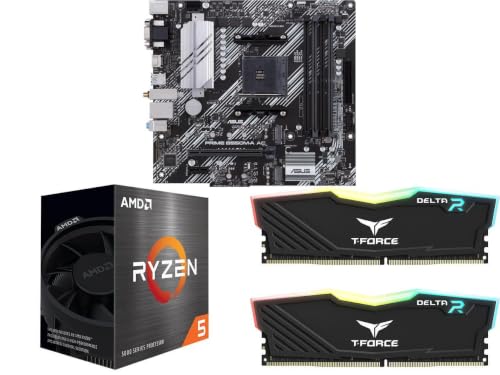
Newegg B550M-A Micro ATX Bundle with Ryzen 5 5500 and 16GB

Newegg B550M PRO-VDH WiFi Bundle with Ryzen 5 5500 and RGB RAM

CyberPowerPC Gamer Xtreme VR i5-13400F RTX 5060
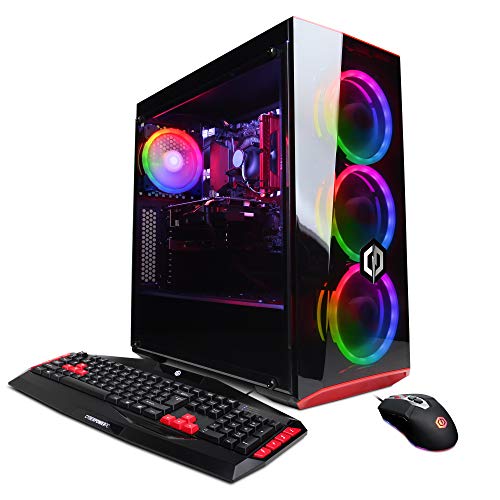
CyberpowerPC Gamer Xtreme VR i5-9400F GTX 1660

MSI B850 Gaming Plus WiFi AM5 Motherboard
More Details On Our Top Picks
This pairing lands in the smallest tower on my list, so it suits a corner desk where a full ATX board simply will not fit. The Ryzen 5 5500 (a 6-core, 12-thread chip with a 4.2 GHz boost) sits on a GIGABYTE B550M K Micro-ATX board, and the combo is tuned for a quiet workstation rather than a flagship gaming rig.
For most folks building a study PC or a living-room media box, the AM4 socket and DDR4 support keep the upgrade path open without forcing a pricey platform change. The board’s dual M.2 slots give you a fast NVMe boot drive plus room for a second SSD later on.
Features That Help
- Micro-ATX footprint fits small cases other ATX combos cannot enter.
- Dual M.2 slots leave headroom for a second SSD when game libraries grow.
- AM4 socket is widely supported, so future CPU swaps stay inexpensive.
- SATA 6Gb/s ports cover older drives and optical units you might keep around.
Worth Noting
- The 5500 lacks integrated graphics, so a discrete GPU is required from day one.
- PCIe 3.0 only, which may feel dated next to a newer GPU.
- Stock Wraith Stealth cooler is fine for office loads, but it runs warm under sustained all-core work.
Who It Suits Best
First-time builders working in a shoebox-sized case who want a calm, office-grade foundation.
Consider Something Else When
Gamers should look at the CyberPowerPC Gamer Xtreme VR i5-13400F RTX 4060, since that prebuilt comes with discrete graphics ready to play.
Unlike the bare-bones combo above, this is a finished tower, so you skip the assembly bench entirely. An Intel Core i5-13400F runs the show, paired with an RTX 4060 8GB, and the 16GB of DDR5 plus a 1TB PCIe Gen4 SSD cover most modern gaming libraries without a clean-up pass.
You may find the 13400F’s lack of integrated graphics limiting if the GPU ever fails, since the system cannot boot to a display without it. WiFi readiness and Windows 11 Home round it out as a true out-of-box rig for a dorm room or family TV stand.
Noteworthy Benefits
- Comes pre-built and pre-loaded with Windows 11, so setup is plug-and-play.
- 1TB Gen4 SSD keeps load times short and the install queue roomy.
- DDR5 memory leaves bandwidth headroom for upcoming game releases.
- WiFi ready out of the box, which helps in rentals where Ethernet is awkward.
Points To Keep In Mind
- The “F” suffix means no integrated graphics, so a GPU failure means no fallback display.
- Pre-built cases tend to use proprietary cabling, which complicates later PSU swaps.
- Bloatware removal is commonly reported as a first-day chore.
Made For
Shoppers who want a 1080p gaming PC without touching a single screwdriver.
Look Elsewhere When
Build-it-yourselfers should consider the Newegg B550-F ATX Bundle with Ryzen 5 5500, which arrives as parts ready to assemble.
This bundle trades the mATX board of Pick 1 for a full-size ATX layout, and that extra PCB space translates to more headers and easier cable routing. The ASUS B550-F brings PCIe 4.0 readiness, USB 3.2 Gen 2 Type-C, plus on-board WiFi 6E and a 2.5 Gb Ethernet port that home streamers will appreciate.
The Ryzen 5 5500 and 16GB of DDR4 3200 in a 2x8GB configuration keep memory channels saturated, which matters more than raw frequency for everyday multitasking. Owners commonly report the BIOS update path being a smooth step on day one for full Ryzen 5000 support.
Standout Benefits
- WiFi 6E plus 2.5 Gb Ethernet handles fast home networks without add-in cards.
- Two-M.2 PCIe 4.0 slots allow RAID-style boot setups later on.
- USB 3.2 Gen 2 Type-C is genuinely useful for external SSDs and modern phone syncs.
- DDR4 3200 in a matched 2x8GB kit avoids the single-stick bandwidth penalty.
Trade Offs
- ATX board demands a mid- or full-size case, so small-form-factor builds are out.
- The 5500 chip lacks integrated graphics, so a GPU is mandatory before first boot.
Quick Facts
Best Suited To
Mainstream builders who want ATX expandability with no surprises on day one.
A Better Fit Elsewhere
Tight-budget shoppers may prefer the Newegg B550M-A Micro ATX Bundle, which keeps the same CPU and RAM in a smaller, less expensive shell.
Pick 4 keeps the same Ryzen 5 5500 CPU but shifts the board to the ASUS B550-PLUS, and the headline change is the included 1TB NV5000 M.2 NVMe drive. That single addition saves you a separate SSD purchase, and it boots Windows in the time it takes to grab a coffee.
The 8+2 DrMOS power stages and alloy chokes give the VRM enough headroom for the 5500 and a likely future swap to a 5700X. A fanless VRM and PCH heatsink keep the board quiet under typical home loads.
What It Does Well
- 1TB NVMe SSD bundled in, so storage is a solved problem on arrival.
- 8+2 DrMOS power stages handle sustained CPU loads without throttling.
- Fanless VRM and PCH heatsink mean fewer spinning parts under light work.
- PCIe 4.0 support unlocks current-gen GPU bandwidth headroom.
Honest Caveats
- No on-board WiFi, so wireless setups need a separate card or USB adapter.
- Stock Wraith Stealth cooler is borderline under a heavy gaming load.
- ATX board is overkill for compact mini-ITX cases.
Whose Shelf It Belongs On
Anyone who wants a fast boot drive and strong power delivery without buying parts piecemeal.
Swap It Out When
Wireless-first households should look at the Newegg B550M PRO-VDH WiFi Bundle, which ships with on-board WiFi built in.
This is the most affordable AM4 bundle on the list, and it leans on the Prime B550M-A board to keep costs grounded. The micro-ATX form factor lets it slip into slim cases a standard ATX board cannot enter, which is the whole point if your build space is a closet shelf.
You still get dual M.2 slots, Fan Xpert 2+ thermal controls, and PCIe 4.0 support, so the trade-off is mostly on rear I/O rather than core capability. Aura Sync RGB headers let builders add a tasteful light strip without buying a separate controller.
Practical Advantages
- Lower entry cost than the larger ATX siblings on this list.
- Fan Xpert 2+ lets you tune curves without third-party software.
- Aura Sync headers coordinate case lighting cleanly across compatible parts.
- Dual M.2 slots cover a fast boot drive and a data SSD.
Possible Compromises
- Fewer rear USB ports than full ATX siblings.
- No on-board WiFi on the B550M-A, so a wireless add-in is required for cable-free setups.
The Right Fit
Quiet home office or HTPC builders who need a slim case footprint and do not need wireless on the motherboard.
Skip It When
Anyone wanting built-in wireless should pick the Newegg B550M PRO-VDH WiFi Bundle instead, which adds WiFi without changing the form factor.
The PRO-VDH WiFi variant of the B550M is the same micro-ATX size as Pick 5, but it adds on-board WiFi and ships with T-Force Delta RGB memory. That pairing trims the cable clutter and skips the USB WiFi adapter that often ends up dangling off a desk PC.
For most desks that double as a workspace, the integrated wireless module means one less thing to lose behind the monitor. A-XMP OC MODE support opens the door to higher memory clocks, which is a small but tangible future upgrade.
Practical Pluses
- Built-in WiFi removes the need for a USB or PCIe wireless adapter.
- T-Force Delta RGB memory gives a tidy light bar without extra software.
- Micro-ATX size fits compact mid-towers and many HTPC enclosures.
- AM4 socket with BIOS update support covers future Ryzen 5000 chips.
Potential Drawbacks
- RGB control can fight with case software, which owners commonly report as a first-week tweak.
- Smaller board means fewer fan headers than ATX options on this list.
Perfect Match For
Builders who want a tidy, cable-free setup with WiFi baked into the board.
Another Choice May Suit
Hardcore gamers chasing higher memory bandwidth should consider the MSI B850 Gaming Plus WiFi AM5 Motherboard, which is built for the next platform generation.
Step up from the RTX 4060 build in Pick 2 and you land on this RTX 5060 version, which targets high-FPS 1080p and entry-level 1440p play. The Core i5-13400F stays put, so the leap is purely on the graphics side and the 1TB PCIe 4.0 SSD keeps load screens brief.
You may find the chassis fans a touch loud under sustained boost, depending on your room’s noise tolerance. WiFi readiness and Windows 11 Home round out the package, and the CyberPowerPC ecosystem means replacement parts tend to be in stock.
What Stands Out
- RTX 5060 GPU brings newer architecture to a similar 8GB VRAM footprint.
- 1TB PCIe 4.0 SSD keeps install queues short for modern triple-A titles.
- Pre-built and pre-loaded, so first-boot setup is essentially plug-and-play.
- WiFi ready, which suits living-room or dorm placements.
Worth Bearing In Mind
- No integrated graphics on the 13400F, so a GPU failure halts the whole system.
- Pre-built cases can use proprietary connectors, which limits PSU upgrades later.
- Bloatware removal is a commonly reported first-day task.
Feature Snapshot
Who Should Grab It
Esports and competitive gamers who want current-generation GPU power without assembling parts.
Reach For A Different Pick When
Tinkerers should grab the MSI B850 Gaming Plus WiFi AM5 Motherboard, which opens the door to next-generation CPU and memory upgrades.
The oldest pick on the list, this Gamer Xtreme VR rig pairs an i5-9400F with a GTX 1660, and it earns its spot as the entry-level gaming option. The 120GB SSD covers the OS and a few favorites, while the 1TB HDD swallows game libraries without complaint.
You may find the older Windows 10 Home install dated if your household has standardized on Windows 11 elsewhere. 8GB of DDR4 is fine for casual play, but heavy multitaskers will want to plan a RAM upgrade early.
Where It Excels
- Lower cost tier than the RTX-based towers on this list.
- 1TB HDD gives ample game storage without extra purchases.
- WiFi ready, which fits older homes without Ethernet drops.
- Pre-built format skips assembly entirely.
Less Ideal Details
- 8GB of DDR4 is the bare minimum for modern gaming and will feel tight in two years.
- 120GB SSD is small; expect to manage installs actively or add a second drive.
- Windows 10 Home will reach end of support before Windows 11’s lifecycle ends.
Who Will Love This
Casual gamers playing esports titles or older single-player favorites on a tight budget.
Where A Sibling Pick Shines
Anyone wanting newer Windows 11 should look at the CyberPowerPC Gamer Xtreme VR i5-13400F RTX 4060, which is the same chassis family with modern internals.
The MSI B850 Gaming Plus WiFi is the only motherboard-only item on the list, and it earns that distinction by jumping to the AM5 platform. PCIe 5.0 x16 plus a second PCIe 4.0 x16 slot give it room for the next two GPU generations without a board swap.
Wi-Fi 7 and 5G LAN push wired and wireless networking far past what the AM4 bundles offer, and DDR5 memory boost support over 8200 MT/s opens the door to high-bandwidth kits. EZ M.2 Shield Frozr II makes drive installation tool-less, which is a small but appreciated touch.
Everyday Advantages
- PCIe 5.0 x16 slot covers the next GPU generation without a board swap.
- Wi-Fi 7 and 5G LAN future-proof home networking for years.
- DDR5 boost over 8200 MT/s welcomes high-bandwidth memory kits.
- EZ M.2 Shield Frozr II makes SSD installs tool-free.
Where It May Fall Short
- AM5 platform cost runs higher than older AM4 picks in this list.
- CPU and DDR5 memory must be sourced separately, which raises total build cost.
Built With In Mind
Builders planning a long-horizon AM5 rig with future CPU and memory upgrades on the roadmap.
Not Your Match When
Shoppers on a tighter budget get more value from the Newegg B550M-A Micro ATX Bundle, which arrives as a complete AM4 kit ready to assemble.
Choosing Parts That Play Well Together
A good combo avoids the most common build pitfalls: a chipset that cannot run the chosen CPU, a board that bottlenecks a future GPU, or RAM that runs single-channel and halves memory bandwidth. Match the socket first, confirm the chipset on the manufacturer’s CPU support list, then size the GPU to the resolution you actually game at.
For most home offices, a Ryzen 5-class chip with 16GB of DDR4 and a modest discrete GPU is the sweet spot. For 1440p or higher refresh gaming, the GPU carries far more weight than the CPU, so spending on a stronger card beats paying up for an extra two cores the games will not use.
Cooling and case airflow matter more than people expect. A bundled Wraith Stealth cooler is fine for office work, but a 65W TDP chip under sustained all-core load will throttle without a tower-style cooler, so plan a budget line for that upgrade.
Power supply sizing is the silent decider. A 550W PSU handles most mid-range builds, but an RTX 5060 plus a modern Intel CPU wants at least 650W with headroom for transient spikes. Quality matters as much as wattage, since a flaky PSU can take the whole board with it.
Key Considerations Across These Picks
Pitfalls Shoppers Hit
Picking a board that does not support the chosen CPU’s generation is the single most common mistake. AM4 bundles look similar on the outside, but older chipsets may need a BIOS update before a Ryzen 5000 chip will boot, and skipping that step turns a brand-new build into a no-display mystery.
Pairing a top-tier GPU with a CPU that bottlenecks it is the next trap. An RTX 5060 deserves at least a modern six-core chip, and dropping it onto a five-year-old processor will leave graphics performance on the table. Check resolution targets, not just brand names, when sizing parts.
Where The Extra Money Goes
The MSI B850 Gaming Plus WiFi commands more than the AM4 bundles because it adds PCIe 5.0 bandwidth, Wi-Fi 7, and DDR5 headroom. Those features matter when you plan to keep a board across two or three CPU generations, since each new socket change forces a fresh platform purchase.
A pre-built CyberPowerPC tower costs more than the equivalent parts separately, but the premium covers assembly, OS installation, warranty handling, and shipping in a single box. That trade-off makes sense for anyone without the time or workspace to build themselves.
Frequently Asked Questions
Do CPU and GPU combos usually include cooling?
Most bundles include a basic stock cooler, which is fine for office loads but borderline for sustained gaming. A separate tower cooler is a common first upgrade on any of these builds.
Is AM4 still worth buying in 2026?
AM4 boards and chips are inexpensive, and the platform supports Ryzen 5000 chips fully after a BIOS update. AM5 is the better long-term pick if you want PCIe 5.0 and DDR5, but AM4 keeps initial costs down.
Can I add a discrete GPU to any combo on this list?
Every combo here expects a discrete GPU, since none of the included CPUs have working integrated graphics. Make sure your case and PSU can physically fit the card you choose.
How much RAM do these combos really need?
16GB is the realistic minimum for modern gaming and multitasking. 32GB is worth the jump for video editing, large game mod folders, or running virtual machines alongside games.
Should I pick a pre-built or a bundle of parts?
Pre-built towers save time and ship working out of the box, while part bundles give you control over case, cooling, and future upgrades. Pick pre-built if setup time matters, and a bundle if long-term tinkering matters more.
Closing Remarks
A matched combo removes the worst part of PC building, which is hunting for parts that actually cooperate. For most desks I would start with one of the Newegg B550 bundles for value, jump to the MSI B850 for future headroom, or grab a CyberPowerPC tower if the goal is to game tonight rather than build this weekend.