Picking the right enclosure for a new build, a home server, or a single-board computer changes how the whole project feels day to day. A cramped case fights you during cable routing, while a poorly cooled chassis turns a quiet office into a wind tunnel. I put together this list of ten solid options spanning full-tower gaming rigs, compact NAS builds, passive cooling for Raspberry Pi, and even protective storage trays for older Intel CPUs. There is real variety here, and each pick has a clear use case where it makes sense.
An Overview Of The Picks

Miuzei Aluminum Passive Cooling Case for Raspberry Pi 4

GAMDIAS Atlas M1 Mid Tower Gaming PC Case (ARGB)

Geekworm P173 Heavy Duty Aluminum Case for Raspberry Pi 4

Antec Flux Pro Full-Tower E-ATX PC Case (Black)

JONSBO N3 Mini-ITX NAS Chassis (8+1 Bays)

JONSBO N2 Black NAS ITX Case (5+1 Bays)
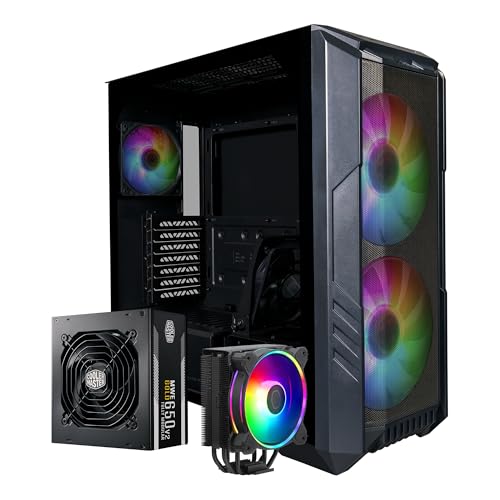
Cooler Master HAF 500 Pro Bundle (Case, PSU, Cooler)

JONSBO C6 White Mini MATX Mesh Case
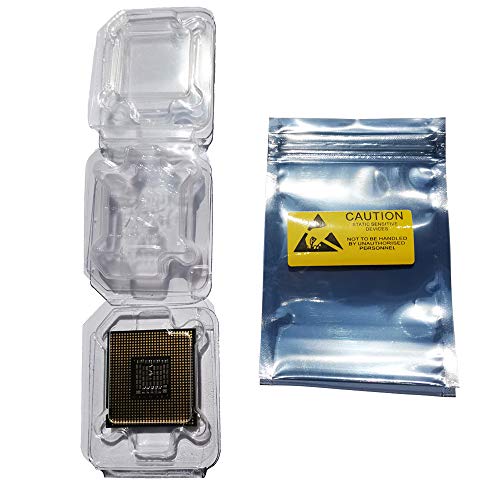
Daarcin CPU Clamshell Case Trays with Antistatic Bags

GAMDIAS AURA GC1 ELITE ARGB Mid Tower Case
Inside Each Recommended Option
The Miuzei case is built around a two-layer aluminum shell, with extra-large cooling columns pressed into the body so heat climbs away from the Pi 4’s SoC without a fan. It works with Pi 4 boards in the 2GB, 4GB, and 8GB versions, and the layered design snaps together without much fuss. For hobbyists running a Pi as a small home server or retro console, that silent, fanless approach is genuinely useful.
Compare that to a typical open-frame acrylic case, which looks neat but does very little for thermals. Miuzei is clearly aimed at people who care more about sustained loads than RGB lighting. Access to the GPIO header and ports is preserved, so you don’t lose Pi functionality just to gain cooling.
Notable Gains
- Passive cooling design means no fan noise, ideal for bedrooms and offices
- Aluminum body doubles as a heatsink for extended Pi 4 sessions
- Compatible with 2GB, 4GB, and 8GB Pi 4 variants
- Two-layer construction keeps assembly quick
Points To Keep In Mind
- Aluminum body adds weight compared to plastic alternatives
- For very heavy CPU loads, you may still want a small supplemental fan
Feature Snapshot
Made For
Pi 4 hobbyists who run media centers, ad blockers, or lightweight servers and want a silent, low-maintenance enclosure.
Consider Something Else When
The Geekworm P173 suits builders who want a heavier, brick-like aluminum block for industrial or always-on Pi projects.
The GAMDIAS Atlas M1 is a tempered-glass mid tower with a small status display on the front panel and app-controlled ARGB lighting. Three 120mm ARGB PWM fans come preinstalled, and the chassis accepts up to a 360mm AIO radiator, six 120mm fans total, a 410mm graphics card, and a 160mm CPU cooler. For someone building a modern ATX gaming rig, that headroom covers most component combinations on the market.
The M1 differs from earlier airflow-only cases in this list by leaning hard into lighting and visual feedback. If the front display and app controls appeal to you, this is a more lifestyle-driven choice than a stripped-down builder’s chassis.
The Good Stuff
- Three ARGB PWM fans preinstalled for immediate out-of-box airflow
- Front display shows system info without extra software windows
- Supports large 360mm radiators and 410mm GPUs
Trade Offs
- App dependency for full lighting control may not suit minimalists
- Mid-tower footprint is a real commitment on smaller desks
Who It Suits Best
Mid-range gaming builders who want a glass showcase with lighting and a built-in front readout.
A Better Fit Elsewhere
Quiet-focused builders should look at the JONSBO C6, which trades the ARGB show for mesh-driven silence.
The Geekworm P173 turns a Raspberry Pi 4 into a small aluminum brick weighing around 174 grams, with four internal heatsink pillars doing the passive cooling work. At roughly 90 by 65 by 33 millimeters, it’s compact enough to mount almost anywhere, and it leaves access to every port on the board, including the GPIO header.
Compared to the Miuzei case, the P173 is more about mass than layered airflow columns. That extra heft suits always-on Pi deployments, like network-wide ad blockers or sensor hubs, where a steady operating temperature matters more than looks.
Good Reasons To Consider
- Four integrated heatsink pillars spread thermal load across the body
- No fan required, so dust and noise stay out of the equation
- Maintains access to GPIO and full port layout
Worth Noting
- Heavier than lighter aluminum shells, so it tips over if not mounted
- Designed specifically for the Pi 4 Model B, nothing else
Who Will Love This
People running Pi 4 nodes 24/7, especially in tight spaces like network closets or behind monitors.
Skip It When
Builders who want easy panel access and a lighter chassis should look at the Miuzei aluminum case instead.
The Antec Flux Pro is a full-tower E-ATX chassis blending metal, glass, and a wood-grain accent panel for a more furniture-friendly feel. Six PWM fans are preinstalled, and the case supports up to twelve fans, a 90-degree rotated PSU, and a dual temperature display that shows CPU and GPU readings at a glance. The multi-directional vent design is the heart of the airflow story.
For most people building a single mid-range rig, this is overkill. The Flux Pro earns its place when the build needs a serious motherboard, oversized cooling, and a chassis that doesn’t look out of place next to a wood desk.
Real-World Strengths
- Preinstalled PWM fan array covers immediate cooling needs
- Supports 12 fans for serious custom loops and radiators
- Wood accent softens the typical gaming-tower look
- Rotated PSU mount and dual temp display add functional flair
Room For Improvement
- Full-tower footprint demands a generous desk or floor space
- Higher-tier pricing puts it out of reach for casual builders
Feature Snapshot
Right Fit For
Enthusiasts building flagship E-ATX systems who want airflow, room to grow, and a more refined aesthetic.
Another Choice May Suit
First-time builders get more value from the Cooler Master HAF 500 Pro Bundle, which pairs a smaller case with a PSU and cooler.
The JONSBO N3 is purpose-built for NAS builds, fitting eight 3.5-inch hard drives and a 2.5-inch SSD into a Mini-ITX footprint. The split top-and-bottom chamber keeps the motherboard and storage thermally separated, and the unified top cover and pull-out drive trays are designed to be removed without tools. Two 10cm fans come built in, with room for radiator support.
Unlike the JONSBO N2 below, the N3 is clearly a capacity play, for someone who has outgrown a smaller home server. The aluminum-and-steel construction also makes it feel sturdier than typical sheet-metal server boxes.
What Makes Sense
- Eight 3.5-inch bays plus an SSD slot cover most home server needs
- Tool-free top cover and pull-out trays simplify drive swaps
- Split chamber design reduces heat transfer to the motherboard
Some Limits To Know
- Power supply support tops out around 105mm SFX, limiting PSU choice
- 130mm CPU cooler ceiling rules out many larger tower coolers
Feature Snapshot
Best Suited To
Home server builders who want serious storage density in a chassis that still fits next to a desk.
Look Elsewhere When
Smaller-scale NAS users can save money with the JONSBO N2, which handles fewer drives in a tighter cube.
The JONSBO N2 is a cube-style Mini-ITX NAS chassis in the 222mm size range, holding five 3.5-inch drives and a 2.5-inch SSD. A 12cm exhaust fan comes built in, and the removable top cover helps with drive installation. The front panel includes a USB 3.2 Gen 2 Type-C port alongside USB 3.0 and audio jacks.
For most people running a small media or backup server, the N2 is the right size, and it leaves desk space for the rest of the setup. It is the smaller sibling of the N3 above, and that smaller footprint is the whole point.
The Value In It
- Cube chassis with five drive bays suits compact home servers
- Type-C front port matches modern peripherals
- Aluminum-and-steel blend gives a more premium feel than typical NAS boxes
Worth Bearing In Mind
- CPU cooler height limited to 65mm, which excludes most tower coolers
- GPU clearance tops out at 197mm for low-profile cards only
Who Should Grab It
Apartment dwellers and small-office users who want a tidy NAS that disappears into the room.
Swap It Out When
Anyone needing more than five drives should step up to the JONSBO N3 for its eight-bay capacity.
The Cooler Master HAF 500 Pro Bundle pairs a mesh-fronted high-airflow mid-tower with a Hyper 212 Halo CPU air cooler and a 650W Gold-rated MWE power supply. Dual 200mm ARGB fans lead the airflow story, and the case supports standard ATX motherboards, making this a one-stop foundation for a new build.
Where other picks on this list require buying the PSU and cooler separately, this bundle removes that guesswork. For first-time builders, the bundled approach takes a real chunk of the anxiety out of picking parts that play nicely together.
Standout Benefits
- Three core components arrive together, simplifying the parts list
- Mesh front panel and dual 200mm fans provide strong intake
- 650W Gold PSU covers most mid-range gaming configurations
Things To Weigh Up
- Bundled PSU and cooler cap customization for high-end builds
- Glass and mesh panels need periodic dusting to keep airflow clean
Feature Snapshot
Perfect Match For
First-time builders who want a matched case, PSU, and cooler without the parts-compatibility headaches.
Reach For A Different Pick When
Experienced builders chasing maximum GPU space should look at the GAMDIAS AURA GC1 ELITE, which supports longer graphics cards.
The JONSBO C6 is a compact micro-ATX chassis wrapped in mesh on all sides, with front, upper, and lower fan positions. The upper cover and side panel come off without tools, which speeds up build sessions. It accepts ATX power supplies up to 185mm long, a 75mm CPU cooler, and GPUs between 200mm and 255mm, so it fits real desktop hardware despite the small frame.
It is the quietest-looking option on this list, in terms of styling. Where the GAMDIAS cases emphasize ARGB and tempered glass, the C6 leans into a calm, almost appliance-like aesthetic.
Reasons It Performs
- All-mesh exterior keeps components cool without flashy lighting
- Tool-free panels make drive swaps and cleaning quick
- White finish fits modern, minimal desk setups
Honest Caveats
- 75mm CPU cooler ceiling excludes most tower coolers
- Mesh panels collect dust and benefit from regular wipe-downs
Built With In Mind
Quiet-focused builders who want a small, clean-looking desktop with plenty of airflow.
Where Another Pick Suits Better
Gaming builds with a flagship GPU will appreciate the GAMDIAS Atlas M1’s larger GPU clearance.
This Daarcin set is a different kind of CPU case entirely: ten clamshell plastic trays plus ten antistatic bags and labels, sized for older Intel LGA 775, 1155, 1151, 1150, and 1156 processors. The clamshell design insulates against air and humidity to help prevent oxidation on stored chips, which matters if you keep a drawer of spare CPUs for legacy systems.
For most modern builds, this pick is irrelevant. For someone maintaining a parts bin, a repair workshop, or a small PC refurbishing business, it is genuinely useful and inexpensive compared to specialty CPU storage.
Strong Points
- Ten trays plus antistatic bags cover multi-CPU storage needs
- Humidity insulation helps protect older chips from oxidation
- Heat-sealable bags extend long-term storage options
Things To Consider
- Limited to specific Intel sockets, so it won’t fit AMD or newer Intel chips
- CPUs are not included, this is storage only
Whose Shelf It Belongs On
PC repair technicians and hobbyists with a stockpile of legacy Intel processors who need organized, safe storage.
Not Your Match When
Anyone building a new system should skip this and head to the Cooler Master bundle or the GAMDIAS cases instead.
The GAMDIAS AURA GC1 ELITE pairs a mesh front panel with four preinstalled 120mm ARGB fans and a tool-free tempered glass side panel. The case supports up to six fans, 340mm GPUs, 360mm radiators, and a 160mm CPU cooler, so it covers mainstream gaming builds comfortably. The tool-free glass makes it easy to show off a clean build.
Compared to the Atlas M1 earlier in the list, this case skips the front display and the app-based lighting, leaning instead on straightforward mesh airflow and included fans. The trade is fewer smart features for a slightly cleaner experience.
Positive Points
- Four ARGB fans included for immediate, colorful airflow
- Mesh front panel emphasizes cooling over style alone
- Tool-free glass simplifies component swaps
Where It May Fall Short
- GPU clearance of 340mm rules out the longest flagship cards
- No integrated display means system info needs separate software
Feature Snapshot
Made For
Mainstream gaming builders who want ARGB lighting and solid airflow without paying for premium extras.
Where A Sibling Pick Shines
Builders who want front-panel system readouts should consider the GAMDIAS Atlas M1 instead.
Matching Cases To Real Builds
Motherboard Size And Layout
The single most important fit check is the motherboard form factor. A micro-ATX board will not take advantage of a full-tower’s room, and an E-ATX board simply will not fit in a Mini-ITX chassis. The picks here cover three form factors: Mini-ITX (Miuzei, Geekworm, JONSBO N2, JONSBO N3), micro-ATX (JONSBO C6), and ATX or larger (GAMDIAS Atlas M1, GAMDIAS AURA GC1, Antec Flux Pro, Cooler Master HAF 500 Pro). Match the case to the board first, then worry about GPU and cooler clearance.
Airflow Versus Style Trade-Off
Cases that lean on mesh panels, like the JONSBO C6 and the Antec Flux Pro, run cooler and quieter at the cost of visible fans and dust accumulation. Cases that emphasize tempered glass, like the GAMDIAS duo, look better on a desk but need the included fans and a good CPU cooler to keep thermals in check. For most home users, mesh wins on practicality, though style choices are valid.
Bundle Versus Bring Your Own
The Cooler Master HAF 500 Pro Bundle solves the parts-matching problem for new builders by including a 650W Gold PSU and a Hyper 212 Halo cooler. For first builds, that simplicity is often worth more than chasing the cheapest individual parts. Experienced builders usually prefer mixing their own components to hit specific performance targets.
Storage Capacity For NAS Builds
The JONSBO N3 holds eight 3.5-inch drives plus an SSD, while the N2 holds five drives plus an SSD. The right choice depends on how much raw storage the home server actually needs. Most media-focused households can run comfortably on five drives in a redundant array, but anyone planning heavy backups or media libraries will appreciate the N3’s extra bays.
Key Considerations Across These Picks
Common Shopping Slip Ups
A frequent mistake is choosing a case for its looks before checking the GPU length, CPU cooler height, and PSU size limits. The Cooler Master HAF 500 Pro Bundle sidesteps this for first builders, while the JONSBO N2 and C6 have tight cooler clearances that exclude many popular tower coolers. Always confirm the three clearance numbers before checking out, and watch for SFX versus ATX PSU compatibility on the smaller Mini-ITX chassis.
Where The Extra Money Goes
Premium cases like the Antec Flux Pro cost more because of material choices (metal, glass, wood), preinstalled PWM fans, and features such as rotated PSU mounts and integrated temperature displays. For most mainstream builders, a mid-range case with mesh and good included fans performs very similarly to a flagship, so the upgrade only pays off when the build needs E-ATX space, a custom loop, or a more refined aesthetic.
Frequently Asked Questions
What size case do I need for a standard ATX build?
A standard ATX build fits comfortably in any mid-tower case, including the Cooler Master HAF 500 Pro Bundle and the GAMDIAS AURA GC1 ELITE. Micro-ATX cases also accept ATX boards in many cases, but check the product page for the specific chassis.
Are mesh front panels better than glass?
Mesh panels generally allow more airflow and lower component temperatures, especially for high-TDP CPUs and GPUs. Tempered glass looks cleaner but restricts intake unless paired with strong fans, as the GAMDIAS duo demonstrates.
Do Raspberry Pi cases need fans?
For light use, passive aluminum cases like the Miuzei and Geekworm P173 handle cooling without fans. Under sustained heavy CPU loads, a small supplemental fan or a heatsink with more mass helps keep thermals in check.
How many drive bays do I need for a NAS?
Most home NAS users find five to eight 3.5-inch bays sufficient for media and backups. The JONSBO N2 covers the smaller end with five bays, while the N3 covers heavier storage needs with eight.
Is a bundled PSU and cooler a good idea?
For first-time builders, bundles like the Cooler Master HAF 500 Pro remove the guesswork from parts compatibility and ship matched components. Experienced builders usually prefer picking their own PSU and cooler for specific performance or efficiency goals.
Closing Remarks
Ten picks is a lot of variety, but the right case really comes down to what you are building: a Pi 4 in a quiet corner, a NAS stuffed with drives, or a glass-paneled gaming rig. Start with motherboard size, then check GPU and cooler clearance, and the rest tends to fall into place. The list above should cover the most common scenarios without overcomplicating the choice.