Building a custom PC sounds romantic until the parts list grows past a dozen tabs and the budget quietly doubles. I’ve spent enough time helping friends spec out machines to know the real win comes from matching the build to what someone actually does: daily gaming, tight office work, video editing at midnight, or tinkering with homelab storage. The nine systems below cover most of those lanes without forcing a wrench into anyone’s hand. Some arrive fully built and ready to game; others ship as barebone shells meant for hands-on upgrades. I’ll flag which is which so the only decision left is which trade-off you’re willing to live with.
A Fast Comparison Of The Options

CYBERPOWERPC Gamer Master Gaming PC (RTX 4060, Ryzen 5 7600)

MINISFORUM MS-01 Mini Workstation (i5-12600H, 10G SFP+)

Lenovo ThinkCentre Tiny M70q (i5-14400T, 16GB, 512GB)
Lenovo ThinkCentre Tiny M70q (i5-14400T, 16GB, 256GB)
Lenovo ThinkCentre Tiny M70q (i5-14400T, 32GB, 1TB)
MINISFORUM MS-01 Workstation (i9-13900H, 10G SFP+)

Skytech Gaming King 95 (RTX 5070 Ti, Ultra 7)

Lenovo Legion Tower 5i (Ultra 7 265F, RTX 5070 Ti)
CyberpowerPC Gamer Xtreme VR (GTX 1660, i5-9400F)
The Strengths Of Each Pick
For someone stepping into PC gaming without ever having held a screwdriver, this CyberpowerPC build is the most direct way to skip the assembly anxiety. The Ryzen 5 7600 (a six-core AMD chip built on the AM5 platform, the newer CPU socket that supports current and future Ryzen processors) pairs with an RTX 4060 graphics card, which in plain terms means solid 1080p frame rates in most modern titles and quiet enough fans that late-night sessions don’t wake the next room over.
The case ships with a tempered glass side panel and customizable RGB lighting, so the visible personality matches what most people picture when they imagine a “gaming PC.” A 500GB NVMe boot drive keeps Windows snappy, and the included keyboard and mouse mean the only extra expense is a monitor and a headset. Compared to the Lenovo ThinkCentre Tiny M70q models later in this list, this machine trades compact office efficiency for raw gaming throughput, and the trade feels honest.
What Makes Sense
- Pre-assembled with Windows 11 Home, no technical setup beyond plugging in peripherals.
- Ryzen 5 7600 and RTX 4060 cover the bulk of 1080p and light 1440p gaming out of the box.
- 16GB of DDR5 RAM (the latest-generation system memory, faster than DDR4) handles modern games and multitasking without bottlenecks.
- Multiple USB ports, gigabit Ethernet, and Wi-Fi built in, no separate adapters needed.
- Tempered glass side panel plus RGB lighting give the build a visual identity instead of a beige office box look.
Points To Keep In Mind
- The 500GB SSD fills up fast once a handful of modern games install.
- The bundled keyboard and mouse work but feel light; most gamers replace them within months.
Who Will Love This
First-time PC owners who want the gaming experience without the build, plus anyone replacing an aging office desktop with something that can handle modern games.
Consider Something Else When
Office-first shoppers living in tight quarters will get more mileage from the Lenovo ThinkCentre Tiny M70q (i5-14400T, 16GB, 512GB) reviewed below.
The MS-01 is a barebone unit, which in PC terms means it ships without RAM, storage, or an operating system; the chassis, CPU, and motherboard arrive ready for components to be added. That detail changes who this product is for. A homelab enthusiast running network-attached storage, a software developer spinning up local containers, or anyone wiring a 10-gigabit backbone will find this little box unusually generous with ports.
The Intel Core i5-12600H uses a hybrid CPU design, blending performance cores for heavy lifting with efficiency cores for background tasks, which keeps the unit responsive under mixed loads. Two 10G SFP+ ports (small-form-factor network jacks designed for fiber or direct-attach cables at 10 gigabits per second) and dual 2.5G LAN open the door to fast local networks without buying a separate switch. Unlike the Skytech Gaming King 95 reviewed later, the MS-01 isn’t chasing frame rates; it’s chasing connectivity.
What Helps Most
- Dual 10G SFP+ and dual 2.5G LAN ports handle serious network throughput in a tiny footprint.
- Three M.2 slots (small motherboard sockets for fast solid-state drives) plus U.2 support allow flexible storage configurations.
- HDMI plus two USB4 ports drive multiple 8K-capable displays from one chassis.
- Hybrid-core i5 CPU keeps background services and active workloads running smoothly side by side.
Worth Bearing In Mind
- Barebone means separate purchases for RAM, SSD, and OS, which adds complexity for newcomers.
- No dedicated GPU slot; any graphics work relies on the integrated Intel Iris Xe chip.
- Tight interior can make cable management fiddly during component installation.
Built With In Mind
Network-minded DIYers and homelab tinkerers comfortable installing their own memory and storage.
A Better Fit Elsewhere
Plug-and-play shoppers wanting a ready-made system should look at the CYBERPOWERPC Gamer Master Gaming PC (RTX 4060, Ryzen 5 7600) above.
Most desktops wear their power on the outside; the M70q hides it. Lenovo’s Tiny form factor slips behind a monitor or under a desk and stays out of sight, which is the entire point for a home office. The 10-core Intel i5-14400T uses a hybrid layout with six performance cores (P-cores, designed for demanding workloads) and four efficiency cores (E-cores, designed for background tasks), so spreadsheet crunching and dozens of browser tabs stay smooth without spinning up fans.
Wi-Fi 6 (the latest mainstream Wi-Fi standard, faster and more efficient than Wi-Fi 5) and Bluetooth cover wireless peripherals, while HDMI and DisplayPort handle dual monitors for anyone who lives in spreadsheets and Slack. Windows 11 Pro comes preinstalled, which is a quiet upgrade over Home for anyone managing group policies or remote work tools. Compared to the MINISFORUM MS-01 above, the M70q gives up raw network throughput for a quieter office presence and ready-to-go software.
Real-World Strengths
- Small chassis disappears behind a monitor, ideal for shared spaces and minimalist desks.
- Hybrid-core i5 handles dozens of browser tabs, video calls, and documents without slowing down.
- Wi-Fi 6 plus Bluetooth reduce cable clutter for keyboards, headsets, and mice.
- Windows 11 Pro supports business features like BitLocker encryption and remote desktop out of the box.
Honest Caveats
- Integrated graphics limit gaming to light or older titles.
- 512GB of storage fills up fast for anyone keeping large media libraries locally.
Right Fit For
Knowledge workers, remote staff, and small-business owners who value quiet operation over raw speed.
Reach For A Different Pick When
Heavy multitaskers juggling large datasets will appreciate the extra RAM and storage on the Lenovo ThinkCentre Tiny M70q (i5-14400T, 32GB, 1TB) covered later in this roundup.
This is the same compact ThinkCentre shell with one deliberate dial-down: 256GB of NVMe storage instead of 512GB. For anyone whose work lives in cloud apps, email, and a browser, that smaller drive is plenty and keeps the build lean. The rest of the spec sheet matches its sibling above, including the 10-core i5-14400T, 16GB of DDR5, and Windows 11 Pro.
The real appeal is cost. Stepping down from 512GB is one of the cheapest ways to enter a quiet, capable office machine without sacrificing CPU performance. Think Google Workspace, web-based point-of-sale systems, or remote desktops, anywhere the local hard drive is more boot volume than archive. For larger local files, the Lenovo ThinkCentre Tiny M70q (i5-14400T, 32GB, 1TB) reviewed below offers a more comfortable ceiling.
Where It Helps
- Lower entry cost thanks to the smaller NVMe drive, useful for budget-conscious offices.
- Same hybrid-core i5 and 16GB DDR5 keep multitasking performance intact.
- Compact chassis fits behind monitors, on shelves, or inside kiosks without fuss.
Trade Offs To Consider
- 256GB fills quickly for anyone keeping local photo or video libraries.
- No dedicated GPU, so any creative work falls to integrated graphics.
Made For
Cloud-first workers, reception desks, and kiosks where the machine runs web apps more than local software.
Swap It Out When
Power users handling big files locally should pick the Lenovo ThinkCentre Tiny M70q (i5-14400T, 32GB, 1TB) further down.
Think of this ThinkCentre as the upper limit of the office line: the same quiet chassis, the same 10-core i5-14400T, but double the RAM and quadruple the storage of the entry version. 32GB of DDR5 means spreadsheets, IDEs (integrated development environments used by programmers), dozens of browser tabs, and creative tools can all sit open at once without paging out to slower memory. 1TB of NVMe storage leaves room for project archives, photo libraries, and container images for anyone running local development environments.
It’s still a tiny box. The jump from the 16GB/256GB model costs more, but it also buys several years of breathing room for a workstation that won’t feel slow in 2027. For gamers or anyone needing a discrete GPU, the Lenovo Legion Tower 5i further down offers that path in a different chassis.
Good Reasons To Consider
- 32GB of DDR5 RAM keeps heavy multitasking smooth without slowdown under load.
- 1TB NVMe SSD holds large project files, photos, and local databases comfortably.
- Compact form factor stays out of the way in studio, lab, or shared desk setups.
A Few Limitations
- Integrated graphics still cap creative workloads that need a real GPU.
- Smaller chassis can run warm under sustained heavy loads, depending on ventilation.
- Costs more than lower-storage siblings in the same product family.
Best Suited To
Power users, developers, analysts, and creators who keep big working sets open throughout the day.
Where Another Pick Suits Better
Anyone wanting serious graphics horsepower should move up to the Lenovo Legion Tower 5i (Ultra 7 265F, RTX 5070 Ti) covered later.
The barebone MS-01 returns, this time with the higher-tier Intel Core i9-13900H, a 14-core chip with thread counts that punch well above what most mini PCs offer. The chassis is the same compact slab as the i5 model reviewed earlier, but the CPU jump turns this box into something that can handle heavier virtualization, video transcoding, or local AI workloads while still drawing less power than a full tower.
The networking pedigree carries over: dual 10G SFP+ ports, dual 2.5G LAN, three SSD slots, and USB4 display outputs. Anyone who already has a 10-gigabit switch and wants a small box that won’t bottleneck it will appreciate what this delivers. Compared to the Skytech Gaming King 95 reviewed next, this is a different mission: networking and CPU density over graphical horsepower.
What Works In Its Favor
- 14-core i9 CPU brings serious compute density to a tiny footprint.
- Three M.2 slots give plenty of room for caching, boot drives, and bulk storage.
- Same chassis as the i5 sibling, so accessories and case layout stay consistent across the line.
Where It May Fall Short
- Barebone format still requires buying RAM, storage, and an OS separately.
- Integrated graphics limit any gaming or 3D acceleration work without a discrete card.
Whose Shelf It Belongs On
DIY builders who want high CPU throughput in a small box, particularly for labs, content servers, or compile-heavy work.
Skip It When
Gamers chasing high frame rates will be happier with the Skytech Gaming King 95 (RTX 5070 Ti, Ultra 7) below.
Skytech built the King 95 around a clear idea: stuff high-end gaming components into a tower that doesn’t require a screwdriver to enjoy. The Intel Ultra 7 270K Plus handles CPU-heavy games and streaming software without flinching, while the NVIDIA RTX 5070 Ti (a graphics card from NVIDIA’s latest 50-series lineup, designed for high frame rates and AI-assisted rendering) drives 1440p and entry-level 4K gaming with ray tracing (a lighting technique that simulates how light behaves in real life) and DLSS (an AI-driven feature that renders frames at lower resolution and upscales them, boosting performance).
The 360mm AIO liquid cooler (an all-in-one liquid cooling unit with a 360mm radiator, larger than typical 240mm setups for better heat dissipation) keeps thermals in check during long sessions, and 32GB of DDR5-6000 RAM (fast system memory running at 6000 MT/s) leaves headroom for streaming, voice chat, and background tools. Compared to the CYBERPOWERPC Gamer Master above, the King 95 trades plug-and-play simplicity for a much higher ceiling on visual settings and frame rates.
Advantages To Know
- RTX 5070 Ti graphics card handles demanding 1440p and 4K gaming with ray tracing on.
- 32GB of DDR5-6000 RAM supports streaming, recording, and multitasking without slowdowns.
- 360mm AIO liquid cooler manages sustained gaming sessions with lower noise than air cooling.
- 850W Gold-rated PSU (power supply unit, 80 Plus Gold certified for higher energy efficiency) leaves headroom for future GPU upgrades.
Some Limits To Know
- Mid-tower footprint demands more desk or floor space than the mini PCs above.
- High-spec build runs warm in confined spaces, depending on room ventilation.
- RGB lighting and ARGB fans (fans with addressable RGB, allowing per-LED color control) add visual flair that not every household wants.
Who Should Grab It
Enthusiast gamers, streamers, and creative users wanting strong 1440p and 4K performance out of the box.
Not Your Match When
Small-apartment dwellers and minimal-desk setups should pivot to the Lenovo ThinkCentre Tiny M70q (i5-14400T, 16GB, 512GB) earlier in this list.
The Legion Tower 5i is Lenovo’s mainstream gaming pitch: a polished tower with an Intel Core Ultra 7 265F and an RTX 5070 Ti, aimed at households who want a gaming PC without spending a weekend tuning fans. Lenovo pairs the components with Coldfront cooling (Legion’s branded airflow system designed to keep components cool under sustained load) and a clean, branded case that doesn’t scream for attention on a desk.
The included 3 months of PC Game Pass adds a meaningful head start for anyone who hasn’t yet built a Steam library (Game Pass is Microsoft’s subscription service that gives access to a rotating catalog of games). 32GB of memory and a 1TB drive line up with the Skytech build above, though this Lenovo leans harder into the polished-brand aesthetic. For anyone wanting a quieter tower that still handles modern games, the Legion 5i lands comfortably.
What Earns Its Place
- RTX 5070 Ti graphics card drives modern games at high settings with AI-assisted upscaling.
- Coldfront cooling keeps the system relatively quiet during long gaming sessions.
- 3 months of PC Game Pass offers a library to play immediately out of the box.
- 32GB of memory and a 1TB drive cover most mainstream gaming setups without upgrades.
Trade-Offs To Consider
- The Ultra 7 265F lacks integrated graphics, so a GPU failure means no display output at all.
- Mid-tower chassis still demands dedicated floor or desk space compared to mini PCs.
Perfect Match For
Mainstream gamers and family households wanting a polished, ready-to-go gaming tower with brand-name support.
Where A Sibling Pick Shines
Builders chasing extreme cooling and bigger power supplies should look at the Skytech Gaming King 95 (RTX 5070 Ti, Ultra 7) reviewed just above.
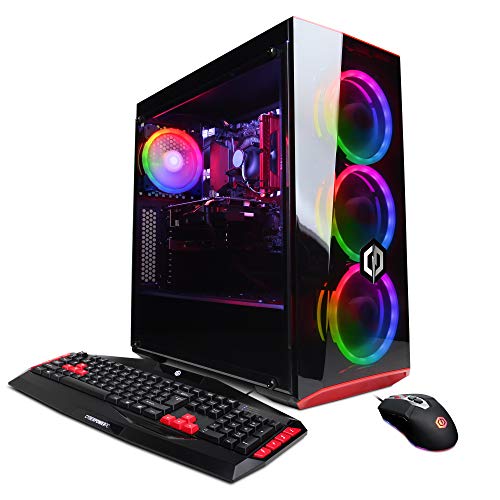
This is the older sibling in the CyberpowerPC lineup, and reading its spec sheet today takes a little context. The GTX 1660 and the i5-9400F are both last-generation parts; they handle esports titles, indie games, and older AAA releases at respectable frame rates, but they aren’t built for the latest 1440p or 4K experiences. For someone setting up a study desk, a first gaming PC for a teen, or a secondary machine for the living room, that’s perfectly fine.
The dual-storage layout (120GB SSD for Windows plus a 1TB HDD for files) gives some breathing room, though modern games will eat that SSD quickly. Windows 10 ships preinstalled, which may matter to anyone tied to specific software. Compared to the CYBERPOWERPC Gamer Master above, this older build trades newer components and faster RAM for a more approachable entry price.
What Pays Off
- Lower entry cost makes it accessible for first-time PC owners and student setups.
- GTX 1660 handles esports and indie games smoothly at 1080p.
- Pre-built with Windows 10, no assembly required out of the box.
- Dual-storage layout combines fast boot drive with bulk file space.
What To Weigh
- Older CPU and GPU generation limit future-proofing for upcoming game releases.
- 8GB of DDR4 RAM may bottleneck in newer titles; an upgrade is worth planning.
- 120GB SSD is small for modern game libraries, with most installs needing the HDD.
The Right Fit
Budget-conscious gamers, students, and households wanting a low-stakes entry point into PC gaming.
Look Elsewhere When
Anyone planning to play current and upcoming AAA titles should step up to the CYBERPOWERPC Gamer Master Gaming PC (RTX 4060, Ryzen 5 7600) at the top of this list.
Picking The Right Build For How You Actually Use A PC
Start with the work, not the parts list. A gamer chasing high frame rates needs a recent GPU, fast RAM, and decent cooling; someone running a homelab wants network ports, storage slots, and CPU threads; a remote worker needs quiet thermals and a chassis that disappears. The nine systems above each lean into one of those lanes, so matching the spec sheet to daily habits usually answers the question faster than comparing benchmark charts.
Match The Chassis To The Room
A mini PC behind a monitor works for an office or kitchen counter. A mid-tower makes more sense in a den or basement where desk space exists and airflow isn’t an issue. Compact boxes like the Lenovo ThinkCentre Tiny M70q series are easy to hide; towers like the Skytech Gaming King 95 or Lenovo Legion Tower 5i are easier to upgrade later because the interior room makes adding RAM, swapping storage, or replacing a GPU far less fiddly.
Understand What “Barebone” Really Means
A barebone unit arrives without RAM, storage, or an operating system, just the case, motherboard, and CPU. The MINISFORUM MS-01 models in this list are barebone, which lowers the base cost but adds separate purchases and an installation step. Anyone comfortable inside a PC will appreciate the flexibility; anyone who has never opened a case should look at the pre-built options instead.
Think About Ports, Not Just Processor Speed
CPU cores get the headlines, but the ports around the back decide whether the system fits the workflow. Dual 10G SFP+ ports matter for a network engineer; HDMI plus DisplayPort matter for anyone running two monitors; multiple USB ports (especially newer USB4 or Thunderbolt-speed connections) matter for creators moving large files. Looking at the back panel before buying saves an adapter purchase later.
Plan Storage In Real Terms
Manufacturers love round numbers. A 500GB SSD sounds large until a few modern games install; a 1TB drive fills up faster than expected once photos, videos, and project archives join the system. Anyone keeping big local libraries should look at 1TB or larger configurations. Anyone running mostly cloud apps can save money with smaller drives and put the difference toward better CPU or RAM.
Mistakes And Upgrade Math Worth Knowing
Traps First Timers Fall Into
The most common slip is buying more graphics card than the rest of the system can feed. A high-end GPU paired with 8GB of older RAM creates a bottleneck that no amount of driver updates will fix. Equally common is ignoring the power supply: a strong GPU needs a PSU with enough wattage and the right connectors, and swapping a PSU later costs more than buying the right one upfront. Finally, picking a tiny case for a build that plans to grow creates upgrade headaches; small chassis often limit which GPUs and coolers physically fit.
What The Higher Tier Buys
Stepping up from a budget gaming build to a mid-range tower usually pays off in three places: a more recent GPU generation (which supports newer rendering features like frame generation and AI upscaling), faster RAM (which keeps frame rates steadier and helps CPU-heavy games), and better cooling (which keeps fans quieter during long sessions). The jump from a budget build to a premium one makes sense for anyone planning to keep the system for four or more years. For shorter ownership horizons or light gaming, the budget tier is often the more honest choice.