Shopping for a new desktop usually starts with one nagging question: how do you actually tell value from filler specs? I’ve sorted through prebuilt towers, tiny mini PCs, and one clever accessory to map out where each dollar genuinely earns its place. Whether you game at 4K, run a home office, or just want something quiet on a corner of your desk, the right machine depends on the work you actually do, not the loudest spec sheet.
The Shortlist At A Glance
PickWhy We Picked ItBest ForAction

Performance LeaderUltra 50 V3 Gaming PC with RTX 5080 and Ryzen 7 9800X3D
High-end gaming muscle
Hardcore PC gamers

Compact ChoiceASUS NUC 14 Essential Mini PC with N97 CPU
Tiny footprint, ready to go
Front desks and signage
Design StandoutApple Mac mini Desktop Computer with M4 chip
Five-inch aluminum cube
Mac users in tight spaces
Upgrade PickASUS NUC 13 Pro Barebone Kit with Core i5-1340P
Build-it-yourself NUC kit
Tinkerers and IT pros
Workshop PickEUREKA ERGONOMIC Height Adjustable PC Stand with Wheels
Mobile tower base
Tower PC owners
Value PickApple Mac Mini with M2 Chip (Renewed)
Refurbished Mac value
Budget-conscious Mac fans
![]()
Home Office PickHuidun H50 Mini PC with Ryzen 3300U
Quiet office workhorse
Small business desks
Smart UpgradeKAMRUI AM21 Mini PC with Ryzen 7 8745HS
Mini PC with real CPU power
Creators and multitaskers
Budget FriendlyORIGIMAGIC C4 SE Mini PC with Ryzen 5 3500U
Lean and inexpensive
Light daily computing
Professional PickASUS NUC 13 Pro Mini PC with Core i5-1340P
Pre-built NUC with muscle
Office power users
A Deeper Look At The Lineup
The Andromeda Insights Ultra 50 V3 sits at the top of this lineup for one reason: it skips the usual compromises that show up in prebuilt gaming towers. Inside, an AMD Ryzen 7 9800X3D handles heavy frame rates with 3D V-Cache, while the RTX 5080 16GB GDDR7 graphics card drives modern titles at settings most people only dream about. Pair that with 32GB of DDR5 RAM at 6000MHz, a 2TB Gen4 NVMe SSD, and an 850W Gold-rated PSU, and you have a system built for 1440p and 4K work without bottlenecks.
For someone running a primary rig at home, this build removes the worry of upgrading next year. The PSU headroom leaves room for a future GPU swap, the ARGB fans stay quiet under load, and the Wi-Fi plus Bluetooth combo keeps cable clutter down. Compared to the mini PCs later on this list, the Ultra 50 V3 is heavier, louder, and more power-hungry, but it earns every dollar for someone who actually pushes frames.
Useful Strengths
- ✓3D V-Cache on the Ryzen 7 9800X3D delivers noticeably smoother frame pacing in CPU-bound games.
- ✓RTX 5080 16GB GDDR7 handles path tracing and 4K textures without choking.
- ✓32GB DDR5 at 6000MHz leaves headroom for streaming, recording, or heavy multitasking.
- ✓2TB Gen4 SSD cuts game load times and holds a large modern library.
- ✓850W Gold PSU gives efficient power delivery and room to grow.
Things To Consider
- •The full tower takes up meaningful floor or desk space compared to any mini PC on this list.
- •ARGB fans bring visual flair, but you’ll want to manage fan curves to keep noise reasonable during long sessions.
Feature Snapshot
| | Feature | Specification | Why It Matters |
|---|
| CPU | AMD Ryzen 7 9800X3D, 4.7GHz base, 5.2GHz turbo | Extra cache benefits gaming frame consistency |
| Graphics | NVIDIA RTX 5080 16GB GDDR7 | Drives modern games at 1440p and 4K with ray tracing |
| Memory | 32GB DDR5 at 6000MHz | Plenty of bandwidth for multitasking and creator apps |
| Storage | 2TB Gen4 NVMe SSD | Fast load times plus room for a large game library |
Who It Suits Best
Hardcore PC gamers who want a turnkey rig that handles today’s most demanding titles without a parts list.
Consider Something Else When
The Apple Mac mini with M4 chip is a smarter match for shoppers who prefer macOS, quiet operation, and a fraction of the desk space.
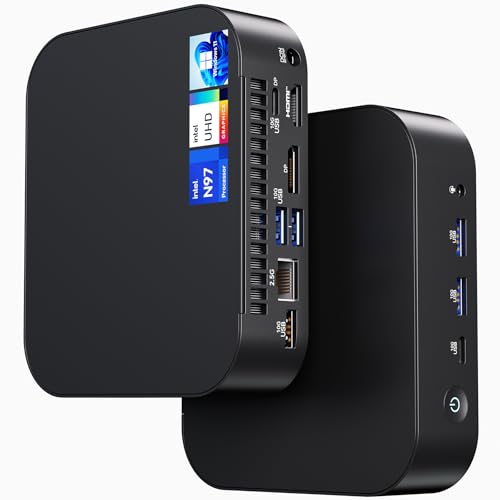
The NENCHIN-built ASUS NUC 14 Essential is the kind of machine that disappears into a reception desk or a retail counter. It’s tiny, fan-cooled, and ships ready to plug in, with an Intel N97 processor, 8GB of RAM, and a 256GB SSD. Wi-Fi 6E and Bluetooth 5.3 handle modern wireless networks, and Windows 11 Pro comes preinstalled, which matters for businesses that want BitLocker and remote management on day one.
Compared to the Ultra 50 V3, this is the opposite philosophy: less raw power, far less space. In a small office, behind a kiosk display, or beside a point-of-sale terminal, that trade is exactly what you want. The honest read is that the N97 is enough for spreadsheets, browser tabs, and signage, but starts to feel tight the moment someone asks it to edit video.
Noteworthy Benefits
- ✓Sub-compact chassis fits where traditional towers never could.
- ✓Windows 11 Pro unlocks business security features out of the box.
- ✓Wi-Fi 6E and Bluetooth 5.3 cover modern networks without dongles.
- ✓Low power draw means quiet operation and minimal heat in tight spaces.
Trade Offs
- •8GB RAM and a 256GB SSD leave little room for heavy multitasking or large local files.
- •Intel N97 graphics limit creative workloads to basic image editing and 4K playback only.
Right Fit For
Front-desk staff, education labs, and small businesses that need a reliable, compact Windows machine for daily office tasks.
Reach For A Different Pick When
Power users should look at the ASUS NUC 13 Pro with Core i5-1340P, which offers much stronger performance in the same small footprint.
The 2024 Mac mini is the smallest desktop I’ve ever tucked behind a monitor, yet it carries an M4 chip with a 10-core CPU and a 10-core GPU. The five-by-five-inch aluminum body feels closer to a coaster than a computer, and Apple put ports on both the front and back for easy cable access. With 16GB of unified memory and a 256GB SSD in this configuration, it’s aimed at everyday Mac users rather than pro editors.
Unified memory is Apple’s shared architecture where the CPU and GPU draw from the same pool, which helps small configurations punch above their weight. Compared to the Windows mini PCs earlier in this list, the Mac mini runs cooler, stays quieter, and plays nicely with iPhone and iPad workflows. The honest read is that 256GB fills up fast once you start managing a photo library.
The Value In It
- ✓Five-inch footprint slips behind any monitor or beside a laptop dock.
- ✓M4 efficiency means the fan rarely spins up under normal use.
- ✓Front and rear ports remove the daily reach-around for USB drives.
- ✓Tight integration with iPhone and iPad makes handoff and AirDrop effortless.
Small Caveats
- •256GB of storage fills quickly for anyone working with photos or video.
- •RAM is not user-upgradable later, so the 16GB configuration is your ceiling.
Made For
Existing Apple households that want a quiet desktop hub for browsing, creative work, and Apple Intelligence features.
Not Your Match When
Gamers and Windows-only professionals will be better served by the Ultra 50 V3 with its RTX 5080 and full tower expandability.
Where most NUCs arrive ready to plug in, this NENCHIN-built ASUS NUC 13 Pro Arena Canyon ships as a barebone kit. The Core i5-1340P, with its hybrid 12-core layout, is already on the board, but you’ll bring your own RAM, SSD, and operating system. That tradeoff trades convenience for the freedom to pick exact components and avoid paying for memory or storage you don’t need.
The 1340P is a 13th-gen mobile-class chip with a hybrid architecture that splits work between performance cores and efficiency cores, which is why a small box like this can still feel responsive under spreadsheets, code editors, and many browser tabs. For IT teams rolling out fleets, it also means standardized specs across every desk. Compared to the prebuilt NUC 13 Pro further down, this kit rewards people who like opening boxes and saving a few dollars on parts.
Bright Spots
- ✓Hybrid CPU design handles mixed workloads without burning out.
- ✓Supports 8K and 4K UHD output for high-resolution monitor setups.
- ✓Gigabit Ethernet plus Wi-Fi 6 covers both wired and wireless networks.
- ✓VESA-mountable chassis tucks behind a monitor for a clean desk.
Honest Caveats
- •No RAM, SSD, or OS included, so total cost climbs once you add components.
- •Setup assumes comfort with installing SO-DIMM memory and an M.2 drive.
Best Suited To
Tinkerers, IT administrators, and small studios who want to spec their own memory and storage inside a tiny, reliable chassis.
Swap It Out When
Anyone who wants a turnkey experience should pick the ASUS NUC 13 Pro with 16GB RAM and 512GB SSD preinstalled instead.
This is the one entry on the list that isn’t a computer, and for tower owners it solves a real problem. The EUREKA ERGONOMIC PC Stand lifts an ATX case off the floor with six height settings between roughly 23 and 33 inches, and the wheels let you roll the whole rig out for cleaning or cable work. The two-tier design adds a top shelf for a printer or a stack of paperwork, which is genuinely useful in shared workspaces.
Compared to leaving a tower on carpet, this stand improves airflow around the intake fans, which can keep internal temperatures lower during long sessions. The steel frame feels sturdy, though owners commonly report that the included casters work best on hard floors rather than thick carpet. For anyone whose main desktop is the Ultra 50 V3 or any full-size tower, this is a small upgrade that pays back in convenience.
Strengths Worth Knowing
- ✓Six gear settings fit most ATX cases and printers without wobble.
- ✓Locking wheels make repositioning the tower genuinely easy.
- ✓Lifts the case off carpet to improve intake airflow and reduce dust.
- ✓Second shelf doubles as a printer stand or hardware storage tray.
Points To Note
- •Heavy carpet may cause the included casters to drag rather than roll smoothly.
- •Not needed for anyone running a mini PC like the Mac mini or KAMRUI AM21.
The Right Fit
Anyone running a full-size tower PC who wants better airflow, easier access, and a tidier floor setup.
A Better Fit Elsewhere
Mac mini shoppers should put their money toward the Apple Mac mini itself rather than a tower stand they won’t use.
The 2023 Mac mini with the M2 chip remains a smart buy on the renewed market. Apple’s M2 pairs an 8-core CPU with enough GPU muscle for everyday creative work, and 8GB of unified memory plus 256GB of SSD storage covers most households’ needs. Renewed units typically arrive inspected and cleaned, which is the trade-off for a noticeably lower entry point into the Mac ecosystem.
Compared to the M4 Mac mini a few spots above, this older model gives up a couple of CPU generations and Apple Intelligence support, but still handles browsing, documents, and light photo editing without complaint. For a first Mac or a secondary machine for a student, the savings are worth the older silicon.
Notable Gains
- ✓Lower entry cost into macOS than buying the current Mac mini new.
- ✓Unified memory design keeps multitasking smooth for typical workloads.
- ✓Same compact aluminum chassis as newer Mac minis.
- ✓Renewed inspection usually catches cosmetic and functional flaws before shipping.
A Few Limitations
- •8GB unified memory caps the size of projects you can comfortably run.
- •256GB SSD fills quickly with any photo or video library.
- •Renewed units may show minor cosmetic wear, depending on the seller.
Who Should Grab It
Students, first-time Mac owners, and side-desk setups that want genuine Apple silicon without paying for the newest model.
Look Elsewhere When
Anyone planning to keep the machine for five or more years should consider the Apple Mac mini with M4 for longer headroom.
Huidun’s H50 leans into the “small but capable” category with a Ryzen 3300U quad-core processor, 16GB of DDR4 RAM, and a 512GB SSD. The dual-band Wi-Fi handles crowded networks well, and the DisplayPort plus HDMI outputs can run dual 4K monitors at 60Hz, which is a quiet luxury for an office machine. Windows 11 Pro is preinstalled, plus a three-year warranty covers parts and labor.
Where the ASUS NUC 14 Essential prioritizes absolute size and low power, the H50 trades a slightly larger chassis for real multitasking headroom. In a home office, this means leaving Outlook, a browser, a spreadsheet, and a video call running without the system gasping. The integrated graphics aren’t built for modern games, but casual titles and 4K video play just fine.
What Makes Sense
- ✓16GB RAM handles multi-app workflows without constant swapping.
- ✓Dual 4K display output makes a clean two-monitor desk possible.
- ✓512GB SSD holds a reasonable document and project library.
- ✓Three-year warranty offers longer coverage than most mini PCs.
Worth Bearing In Mind
- •Ryzen 3300U integrated graphics limit modern gaming ambitions.
- •USB 3.2 ports are present but the chassis offers fewer total connections than a full tower.
Built With In Mind
Home office workers and small business owners who run multiple windows at once and want a tidy, quiet desktop.
Where A Sibling Pick Shines
Shoppers needing stronger graphics for content creation should look at the KAMRUI AM21 with its Ryzen 7 8745HS.
The KAMRUI AM21 is what happens when a mini PC stops apologizing for being small. Its AMD Ryzen 7 8745HS is a Zen 4 eight-core, sixteen-thread chip that boosts to 4.9GHz, and the integrated Radeon 780M graphics use the newer RDNA 3 architecture. For context, RDNA is AMD’s graphics architecture, and version 3 brings features closer to a discrete GPU. That means the AM21 handles 1080p gaming on lighter titles and pushes creative apps harder than most mini PCs can manage.
Compared to the Huidun H50 above, this is a noticeable step up in raw CPU and GPU power at a similar physical size. Windows 11 Pro is preinstalled, and the compact chassis still fits behind a monitor. The trade is heat: under sustained load, the small body gets warmer than a tower, so placement in a ventilated spot matters.
Practical Pluses
- ✓Ryzen 7 8745HS delivers eight-core speed rarely seen in mini PCs.
- ✓Radeon 780M graphics handle esports titles and light creative work.
- ✓Small footprint fits beside a monitor without dominating the desk.
- ✓Windows 11 Pro ready for business and security features.
Less Ideal Details
- •Sustained heavy loads push thermals higher than a full tower would.
- •Storage and RAM configurations vary by listing; check the spec sheet before ordering.
Key Attributes
| | Feature | Specification | Why It Matters |
|---|
| CPU | AMD Ryzen 7 8745HS, 8 cores, 16 threads, 4.9GHz boost | Handles demanding multitasking and creative apps |
| Graphics | Radeon 780M (RDNA 3) | Integrated GPU that punches above its class |
| OS | Windows 11 Pro | Adds business and security features on day one |
Whose Shelf It Belongs On
Content creators and multitaskers who want real CPU muscle in a tiny, monitor-mounted package rather than a full tower.
Another Choice May Suit
Dedicated gamers chasing high-refresh 1440p should step up to the Ultra 50 V3 with its discrete RTX 5080 GPU.
The ORIGIMAGIC C4 SE is the lightest pick in this lineup, and that’s its selling point. A Ryzen 5 3500U with Radeon Vega 8 graphics, 8GB of DDR4, and a 256GB NVMe SSD covers the everyday basics: documents, video calls, 4K streaming, and light photo edits. The Ryzen 5 3500U is an older mobile chip, but at this price tier, the value proposition is hard to argue with for someone whose needs stay simple.
Where the Huidun H50 and KAMRUI AM21 push into heavier multitasking, the C4 SE focuses on a lean, inexpensive daily driver. Auto Power On, RTC Wake, and Wake-on-LAN features make it useful for kiosks or lab machines, which is a nice bonus beyond a typical home setup. The honest read is that anyone planning to run dozens of browser tabs at once should look one tier up.
A Favorable Mix
- ✓Ryzen 5 3500U is well-suited for typical office and study workloads.
- ✓256GB NVMe SSD boots quickly and stores basic files.
- ✓Wake-on-LAN and Auto Power On suit small business deployments.
- ✓Compact body slips behind monitors or onto cramped desks.
Possible Compromises
- •8GB RAM is tight for heavy browser sessions or large spreadsheets.
- •Vega 8 integrated graphics aren’t built for modern games beyond casual titles.
Perfect Match For
Students, casual users, and anyone needing a simple, inexpensive Windows desktop for schoolwork or browsing.
Skip It When
Power office users should pick the Huidun H50, which doubles the RAM and storage for similar money.
Closing out the list is the prebuilt version of the NUC 13 Pro that the barebone kit earlier offers in pieces. NENCHIN assembles this unit with 16GB of RAM and a 512GB SSD already installed, and Windows 11 Pro is ready to go. The Core i5-1340P with twelve cores and a turbo up to 4.6GHz gives this machine enough headroom for serious spreadsheet work, light content creation, and code editing.
Compared to the barebone kit, this version removes the assembly step entirely and ships as a working desktop. Compared to the Mac mini or Huidun H50, it trades a slicker ecosystem for stronger native multi-core performance. For a small office where reliability matters more than branding, it’s an easy recommendation.
Useful Touches
- ✓Preinstalled 16GB RAM and 512GB SSD avoid the assembly step.
- ✓12-core hybrid CPU handles heavy productivity workloads comfortably.
- ✓Windows 11 Pro includes business security features on day one.
- ✓Compact chassis still mounts via VESA for clean desk setups.
Potential Sticking Points
- •Integrated graphics limit serious gaming or 3D rendering ambitions.
- •Cost is higher than the barebone kit once you factor in pre-installed components.
Feature Rundown
| | Feature | Specification | Why It Matters |
|---|
| CPU | Intel Core i5-1340P, 12 cores, 4.6GHz turbo | Hybrid cores balance speed and efficiency |
| Memory | 16GB RAM (preinstalled) | Ready for multitasking out of the box |
| Storage | 512GB SSD (preinstalled) | Holds office files and a moderate media library |
| OS | Windows 11 Pro | Includes BitLocker and remote management features |
Who Will Love This
Office power users who want a turnkey NUC with strong CPU performance and zero setup friction.
Where Another Pick Suits Better
Creative pros working with video should consider the KAMRUI AM21, whose Ryzen 7 8745HS offers stronger integrated graphics.
Picking The Right Desktop For Your Setup
Choosing a desktop computer comes down to matching the machine to the work, not chasing the highest number on the spec sheet. Start by listing the three tasks you do most: gaming, office work, creative production, or casual browsing. Each of those maps to a different kind of hardware, and overspending in the wrong area is the most common mistake I see.
For a gaming-first setup, the GPU and CPU both matter, and cooling headroom becomes critical when sessions run long. A mini PC with strong integrated graphics, like the KAMRUI AM21, can handle lighter titles, but only a discrete GPU like the RTX 5080 in the Ultra 50 V3 will sustain modern AAA games at high settings. Pay attention to PSU wattage and case airflow too, since both affect how long a gaming rig stays quiet and cool.
For office and productivity work, the priority shifts to RAM, storage, and connectivity. Sixteen gigabytes of memory is the comfortable floor for anyone running browsers, spreadsheets, and chat apps side by side. An NVMe SSD makes a noticeable difference in how snappy a machine feels day to day. Wireless standards matter as well: Wi-Fi 6E and Bluetooth 5.3 keep a desk free of dongles, and gigabit Ethernet is worth having for stable video calls.
For creative work like video editing, 3D modeling, or large photo libraries, look at memory capacity first, then storage speed and capacity. CPU core count starts to matter for rendering and exports, and a beefier power supply gives a system room to grow. Mini PCs can handle lighter creative tasks, but sustained heavy work usually benefits from a full tower with better thermals.
For casual or secondary setups, the smallest reasonable machine often wins. The Mac mini, ORIGIMAGIC C4 SE, or ASUS NUC 14 Essential all tuck away behind a monitor and stay out of the way. Consider how much storage you actually use, since upgrading later is harder on machines with soldered memory or limited internal bays.
If you already own a tower PC, accessories like the EUREKA ERGONOMIC PC stand can meaningfully improve airflow and access without changing the computer itself. And remember that renewedeal pre-owned options, like the Mac mini with M2, can shift what you can afford at a given budget.
Key Considerations Across These Picks
Pitfalls Shoppers Hit
The most common mistake I see is matching the wrong machine to the workspace. Mini PCs are tempting for their size, but a household that edits video or plays modern games will hit the limits of integrated graphics fast. On the flip side, a full tower in a tiny apartment eats floor space and runs louder than necessary for someone who only browses and streams. Measure twice, as they say.
Storage is another trap. 256GB sounds like a lot until a photo library or game install fills it within months. Picking up an external SSD or choosing a configuration with more storage from the start is almost always cheaper than retrofitting later. RAM follows the same logic: 8GB is fine for light use and painful for everything else.
Where The Extra Money Goes
Spending more in this category typically buys three things: better cooling, longer support windows, and stronger components that age well. The Ultra 50 V3, for instance, pairs a Ryzen 7 9800X3D with an RTX 5080 and a Gold-rated PSU, which is the kind of build that should stay relevant through several GPU generations. A higher-tier mini PC like the KAMRUI AM21 buys newer silicon and a more capable integrated GPU, which keeps it useful for creative work a few years longer.
Paying up also tends to buy quieter operation, which matters more than most people expect in a shared home or apartment. Higher-efficiency PSUs generate less heat, better fans stay quiet at low loads, and SSD-only systems eliminate the mechanical noise of older hard drives.
Frequently Asked Questions
QHow much RAM do I really need in a desktop computer?
Sixteen gigabytes is the comfortable minimum for most households in 2026, especially if you keep a browser, email, and a chat app open at the same time. Light browsing and document work can get by on 8GB, but heavier multitasking benefits from the extra headroom.
QIs a mini PC powerful enough for gaming?
Some can handle light or esports titles using strong integrated graphics, but demanding modern games still want a discrete GPU. A mini PC is a fine choice for casual play, while serious gamers should plan for a full tower or an external GPU setup.
QShould I buy a renewed desktop to save money?
A renewed desktop can be a smart way to step into a higher tier at a lower cost, especially for premium machines that hold their value. The trade-off is that warranty coverage and cosmetic condition depend on the seller, so it pays to check the listing details carefully.
QHow long should a desktop computer last?
Most modern desktops stay useful for five to seven years for everyday tasks, with the GPU and storage usually being the first parts to feel outdated. Higher-end builds with quality power supplies tend to age better because they leave room for component swaps.
QDo I need a separate monitor, keyboard, and mouse?
Yes, none of the desktops on this list ship with a display or input devices. Plan for those separately, and check the video outputs on whichever machine you choose to make sure they match your monitor’s cable.
Final Verdict
The honest read is that the right desktop depends almost entirely on what sits across from it. The Ultra 50 V3 earns its spot for gamers chasing high-refresh 4K, while the Mac mini and ASUS NUC 13 Pro cover most office and creative needs in a fraction of the space. Take a minute to picture where the machine will live and what you’ll actually do on it, and the rest of the decision lines up neatly from there.