Choosing a desktop for office work shouldn’t feel like homework, but most spec sheets make it one. I put together this list for anyone tired of comparing bare numbers, whether outfitting a small office, replacing an aging family computer, or trying to build a quiet workspace at home.
A Snapshot Of The Selections

Apple 2024 iMac All-in-One Desktop with M4 Chip 24-inch Retina

HP 24-inch All-in-One Desktop with AMD Athlon Silver 3050U

GEEKOM IT15 AI Mini PC with Intel Ultra 9 285H 32GB DDR5
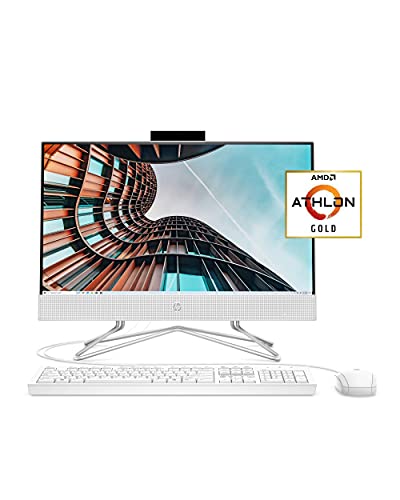
HP 22 All-in-One PC with AMD Athlon Gold 3150U

EUREKA ERGONOMIC Height Adjustable PC Stand

GEEKOM A5 2027 Edition Mini PC with Ryzen 7 7730U

GEEKOM A6 Mini PC with Ryzen 7 6800H 16GB DDR5
GEEKOM AX8 Max Silent Mini PC with Ryzen 7 8745HS
GEEKOM IT13 MAX Mini PC Ultra 9 185H 24GB RAM

GEEKOM IT13 MAX AI Mini PC 2026 with Intel Ultra 9 185H
Why These Options Stand Out
The 2024 iMac trims the gap between office machine and desk centerpiece. A 24-inch Retina panel (a high-resolution Apple display with 4.5K sharpness and wide color) anchors a remarkably thin enclosure, leaving enough clean workspace for a notebook, coffee, and a clean keyboard tray. Compared with the HP 24-inch all-in-one later in this list, this one leans into higher fidelity visuals and a unified memory architecture (where CPU and GPU share the same RAM pool) for smoother multitasking.
I see this one landing on desks where aesthetics, low cable clutter, and quiet performance matter as much as raw throughput. Small business owners, designers running Adobe apps, and remote workers who attend a lot of video calls will appreciate how it stays out of the way.
Noteworthy Benefits
- The all-in-one format eliminates a separate tower, freeing floor space in tight offices.
- The M4 chip’s unified memory handles many browser tabs and Office apps at once.
- The 24-inch Retina panel makes long document work easier on the eyes.
- Built-in accessories like the camera and speakers are tuned for daily video calls.
Worth Noting
- Storage tops out at 512GB on this configuration, so external drives may be needed for large media files.
- Repair or service depends on Apple’s network, which can mean shipping the unit for some fixes.
- The 16GB unified memory is fine for typical office work, but heavier creative pipelines may push it.
Right Fit For
Design-led offices, creative freelancers, and home workers who want one clean unit with no tower clutter.
Consider Something Else When
The HP 24-inch All-in-One is a more budget-friendly Windows option for everyday document and email work.
The HP 24-inch all-in-one is the kind of machine that quietly does the job in a reception area or shared workspace. Its three-sided micro-edge display (a panel design with thin bezels on three sides) gives a modern look without demanding a lot of desk depth, and the adjustable tilt stand lets staff angle the screen for comfort during long shifts.
I find this configuration a sensible fit for offices running mostly browser-based tools, scheduling software, and email. The HD webcam with a slide-switch privacy cover is a small touch that matters in shared spaces.
Practical Pluses
- The 24-inch display is generous for spreadsheets and side-by-side documents.
- Built-in Wi-Fi keeps cabling to a power cord and a keyboard.
- The privacy camera switch gives immediate peace of mind in shared areas.
- The all-in-one design reduces clutter in front-of-house workstations.
Trade Offs
- 8GB of RAM is enough for light multitasking but may slow under heavier browser loads.
- Windows 10 Home will eventually need a Windows 11 compatibility check for newer features.
- 256GB of SSD storage fills up quickly with large project files.
Made For
Reception desks, small clinics, and small offices where staff handle emails, scheduling, and light documents.
Skip It When
The GEEKOM A5 2027 Edition Mini PC fits better for multitaskers who need more RAM headroom.
The GEEKOM IT15 packs workstation-class silicon into a chassis that fits behind a monitor. With an Intel Core Ultra 9 285H processor (Intel’s high-end mobile chip with 16 cores and integrated Arc graphics) and 32GB of DDR5 RAM (the latest generation of fast system memory), it handles multi-display financial dashboards or retail signage arrays without breaking a sweat. The 1TB SSD leaves comfortable room for project files and software libraries.
This is the pick for IT managers building out conference rooms, kiosks, or trading desks where four screens is the norm. WiFi 7 (the newest Wi-Fi standard, offering faster wireless speeds and lower latency) future-proofs the wireless side of the install.
What It Does Well
- 16-core processing holds up under multi-display business workloads.
- Quad 8K/4K display support drives complex workstation and signage setups.
- WiFi 7 reduces latency for cloud-based workflows.
- The compact size hides cleanly behind VESA-mounted monitors (using the standard mounting holes on the back of a display).
Honest Caveats
- Cooling fans may ramp up under sustained heavy loads in enclosed cabinets.
- Volume-oriented buyers should plan rack or mounting space ahead of time.
Technical Highlights
Whose Desk It Belongs On
IT teams and operations leads setting up multi-display finance, retail, or enterprise workstations.
Look Elsewhere When
The Apple 2024 iMac suits a single-user creative office that wants display and computer in one elegant unit.
The HP 22 All-in-One proves you don’t need a sprawling desk to get a real PC experience. Its 21.5-inch Full HD IPS anti-glare display (a panel with wide viewing angles and a matte finish that fights reflections) reads cleanly even under overhead office lighting, and the included USB mouse and keyboard mean the box truly is everything you need.
I think of this as the family-room or spare-bedroom office machine. It’s well matched to homework stations, light invoicing, and small business owners who only need email, web tools, and a word processor.
Where It Helps
- Anti-glare IPS panel is easier on the eyes in bright rooms.
- HP True Vision HD camera handles casual video calls.
- Front-facing speakers keep the desk free of extra audio gear.
- Compact 21.5-inch footprint fits on smaller desks and counters.
A Few Limitations
- 4GB of RAM limits how many apps and browser tabs run smoothly at once.
- The Athlon Gold 3150U is built for light workloads, not heavy multitasking.
- Windows 10 Home may require a future Windows 11 upgrade decision.
Feature Card
Best Suited To
Home users, students, and small business owners running light productivity on a budget.
Another Choice May Suit
The HP 24-inch All-in-One offers a larger screen and 8GB of RAM for a similar use case with more comfort.
Not every desktop upgrade is about silicon. The EUREKA ERGONOMIC PC Stand rolls your tower off the floor and up to a working height that suits the desk. With six manual height settings between roughly 23 and 33 inches, it doubles as a moving shelf for full-size ATX cases (the standard size for traditional desktop towers) or even a printer.
I see this one fitting into offices where someone has invested in a proper tower and wants better airflow plus easier access to ports. The wheels make it simple to roll out for a quick cable swap.
Where It Excels
- Six gear height stops fit a wide range of ATX towers and printers.
- Wheels add mobility for cleaning behind the desk.
- Two-tier design gives a shelf for accessories or paper trays.
- Steel frame keeps the stand steady under heavier cases.
Things To Weigh Up
- Assembly is required, and the included instructions could feel minimal to first-timers.
- Smaller mini PCs do not need this much stand; this is sized for full towers.
Quick Facts
Who It Suits Best
Office workers using full-size ATX towers who want better ergonomics and airflow under the desk.
Reach For A Different Pick When
Anyone running a compact mini PC like the GEEKOM A5 or GEEKOM IT15 does not need this stand at all.
The GEEKOM A5 is the small desktop I keep recommending to friends setting up a first proper home office. Its AMD Ryzen 7 7730U chip (an 8-core, 16-thread mobile processor with integrated Radeon Vega graphics) handles browser tabs, Office apps, light Photoshop, and video calls without becoming the bottleneck. The 16GB of RAM and 512GB NVMe SSD (a fast solid-state drive that uses the NVMe interface for higher throughput than older SATA drives) cover daily storage comfortably.
It’s the kind of machine that tucks behind a monitor and disappears, leaving the desk for actual work. Compared to the HP 22 All-in-One, this trades the built-in display for raw multitasking headroom.
Strong Points
- 8-core Ryzen chip multitasks smoothly across productivity apps.
- 512GB NVMe SSD keeps boot and load times short.
- The compact case fits behind VESA-mounted monitors.
- Low power draw keeps running costs modest in a 24/7 office.
Small Caveats
- You’ll need to bring your own monitor, keyboard, and mouse.
- Heavy sustained workloads can warm the chassis in enclosed shelves.
Perfect Match For
Home office workers, freelancers, and small offices needing reliable everyday performance.
Swap It Out When
The GEEKOM A6 is a smarter match for always-on, heavy business workloads at higher TDP (thermal design power, a measure of how much heat the chip generates under sustained load).
The A6 takes the same compact-mini-PC concept and gives it real workstation energy. Its AMD Ryzen 7 6800H chip runs at a sustained 45W TDP, which keeps performance stable under long-running business apps instead of throttling back like lower-wattage chips often do. The 16GB of DDR5 memory can be upgraded later, and the 1TB PCIe 4.0 SSD (a fast solid-state drive using the PCIe 4.0 interface for quicker read and write speeds) keeps storage roomy for project files.
I think of this one as the workhorse for a 24/7 office, a small server room, or a hybrid workstation that also handles heavier creative tasks.
The Good Stuff
- 45W sustained power avoids thermal throttling (the automatic slowdown that happens when a chip gets too hot).
- Upgradable RAM extends the machine’s useful lifespan.
- 1TB PCIe 4.0 SSD supports large media and project libraries.
- The chassis stays quiet enough for desk-side placement.
Points To Note
- The higher TDP means the fan may ramp up under sustained loads.
- A monitor and peripherals need to be sourced separately.
Right Fit For
Always-on business operations and small office servers needing sustained performance.
Not Your Match When
The GEEKOM A5 is a quieter, lower-cost choice for typical eight-hour office days.
The AX8 Max leans into the silent-office promise of the mini-PC format. Its Ryzen 7 8745HS processor delivers 8 cores up to 4.9 GHz, paired with 16GB of DDR5 and a 1TB SSD. The fan profile is tuned for low-noise operation, which matters when a workstation sits a few feet from a microphone on video calls.
This is the pick for open-plan offices and home workers who value quiet over flashy benchmarks. The compact shell mounts cleanly behind a VESA display.
Bright Spots
- Silent operation suits shared and open offices.
- Modern Ryzen 7 chip holds up under multitasking loads.
- 1TB SSD covers typical office file libraries.
- Small footprint keeps the desk uncluttered.
Possible Compromises
- Silent cooling caps sustained peak loads compared to louder towers.
- Requires a separately purchased monitor and peripherals.
Made For
Open-plan offices and remote workers who need quiet performance near microphones or recording setups.
Consider Something Else When
The GEEKOM IT15 is a stronger match for finance or CAD users who need multi-display throughput.
The GEEKOM IT13 MAX sits in the comfortable middle of the lineup. The Intel Core Ultra 9 185H chip pairs 16 cores with Intel Arc graphics and an AI Boost NPU (a dedicated neural processing unit that accelerates on-device AI tasks like background blur and transcription). 24GB of RAM is generous for office multitasking, and the 500GB SSD leaves room to expand later.
I see this fitting hybrid users who run Office apps in the morning and switch to video editing or CAD in the afternoon. Compared to the GEEKOM A6, this adds AI acceleration and a faster integrated GPU.
Points In Its Favor
- Intel Ultra 9 chip handles productivity and creative workflows.
- 24GB of RAM keeps large spreadsheets and browsers responsive.
- AI Boost NPU accelerates on-device AI features.
- Compact chassis fits anywhere a small book would.
Things To Consider
- 500GB of starting storage fills up faster than the 1TB options in this list.
- High performance in a small box means the fan can ramp under heavy loads.
Key Attributes
Who Should Grab It
Hybrid creators, engineers, and remote workers who want one machine for office and creative work.
Where Another Pick Suits Better
The GEEKOM IT13 MAX AI Mini PC 2026 is a better fit for specialized compute and AI workloads needing the very newest platform.
The 2026 refresh of the IT13 MAX AI Mini PC pushes the same Intel Core Ultra 9 185H platform into 24GB of LPDDR5 memory, the modern low-power variant of DDR5 RAM that’s soldered directly to the board for compact builds. The result is a small box that handles 4K editing, AI workloads, and engineering simulations without taking up a corner of the office.
I think of this one as the specialty-workstation tier of the roundup. Medical imaging, film production, automotive simulation, and AI creative studios are the kinds of buyers who get the most from the extra memory bandwidth and AI acceleration.
The Upside
- 16-core Intel Ultra 9 chip handles high-compute workloads.
- 24GB LPDDR5 supports data-heavy creative and AI tasks.
- Compact form factor suits clustered workstation deployments.
- AI Boost NPU accelerates supported AI applications.
Things To Keep In Mind
- LPDDR5 is soldered and not user-upgradeable, so plan memory needs ahead.
- The 500GB SSD is a starting point and may need an external drive for large media projects.
Quick Technical Notes
Built With In Mind
Specialized compute users in AI, film, engineering simulation, and medical imaging environments.
A Better Fit Elsewhere
The GEEKOM IT15 is a smarter match for multi-display enterprise setups that prioritize screen count over AI workloads.
Picking The Right Workstation For Your Office
Choosing desktop computers for office work starts with honest answers about how the machine gets used day to day. A small business owner running email and invoicing needs very different horsepower than a finance team driving four monitors at once.
Form factor matters as much as raw spec. All-in-one designs like the HP 24-inch or Apple 2024 iMac cut cable clutter and disappear into a clean reception area. Mini PCs like the GEEKOM A5 or GEEKOM IT15 tuck behind a monitor and free desk space entirely. Full-size towers still earn their place in heavier compute rooms, especially paired with the EUREKA ERGONOMIC stand for airflow and access.
RAM and storage drive daily comfort more than peak benchmark scores. 8GB is the practical floor for typical office multitasking, while 16GB or more keeps large spreadsheets and many browser tabs responsive. SSDs in the 256GB to 1TB range cover most office file libraries without forcing external drives on day one.
Matching Specs To Workloads
Light office work, email, scheduling, and document editing run smoothly on Athlon and Ryzen 7 U-series chips. Heavier multitasking across dozens of tabs, code editors, and light creative tools benefits from the Ryzen 7 H-series and Intel Core Ultra 9 chips. Specialized AI, simulation, and 4K editing workloads justify stepping up to 24GB or more of fast RAM and the newest Intel Ultra 9 platform.
Connectivity is easy to overlook. WiFi 7 and modern wireless standards keep cloud tools and video meetings responsive. Multiple display outputs matter for trading, finance, and control room setups where a single screen is not enough.
Budget, Longevity, And Repair Coverage
Total cost of ownership goes beyond the sticker. A lower upfront cost on a 4GB or 8GB machine may need a RAM upgrade sooner, while a slightly larger investment in 16GB pays off across several office cycles. Coverage for accidental damage and 24/7 support plans soften the blow of drops and spills, which are more common in busy shared offices than most people expect.
What To Watch Before You Buy
Where Shoppers Go Wrong
The most common slip-up in this category is buying by clock speed or RAM number without considering the actual workload. A 4GB office PC may look affordable, but it bottlenecks quickly under real browser loads. The other trap is overlooking form factor: a powerful mini PC needs a monitor and peripherals you may not have, while an all-in-one includes a display that may not match a quality external monitor.
What The Higher Tier Buys
Stepping up to a premium tier typically buys a faster, more efficient processor, more RAM headroom, and better integrated graphics. For most office workers, the real payoff is longevity: a higher-tier machine handles tomorrow’s software updates and heavier tabs without needing an early replacement. Specialized buyers in finance, creative, or AI fields get the extra compute they actually need, which justifies the higher spend.