A trader’s workstation lives and dies by reliability. Charts refreshing across multiple monitors, brokerage platforms, scanners, spreadsheets, news feeds, and chat windows all open at once, with split-second execution depending on a machine that won’t choke. I put together this list of nine pre-built desktops that can handle exactly that kind of load, mixing compact mini PCs, mid-tower workhorses, and higher-spec systems for traders who push harder.
Your Options, Compared
HP Pro Tower 290 G9 Desktop, i3-13100, 16GB RAM, 512GB SSD, Windows 11 Pro

GEEKOM IT12 Mini PC, i3-12300HE, 16GB RAM, 512GB SSD, USB4, 8K UHD

HP Desktop Computer Tower, i5-12500, 8GB RAM, 512GB PCIe SSD, Windows 11 Home
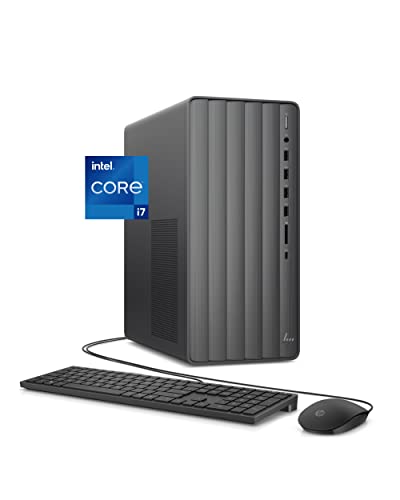
HP Envy Desktop, i7-12700, 16GB RAM, 512GB SSD + 1TB HDD, Windows 11 Pro

HP OmniDesk Desktop, i3-14100, 8GB RAM, 512GB SSD, Meteor Silver

Dell Tower Desktop, Core Ultra 7-265, 32GB RAM, 1TB NVMe SSD, Wi-Fi 6

Dell Slim Desktop, Core Ultra 5-225, 16GB DDR5, 512GB SSD, Wi-Fi 6

HP 2026 Desktop, i5-12500, 16GB RAM, 1TB SSD

HP Pro Tower 290 G9 Desktop, i3-13100, 32GB RAM, 1TB SSD, Windows 11 Pro
Taking A Closer Look At The Options
HP’s Pro Tower 290 G9 is the kind of machine that quietly disappears into a corner of the desk and just works. The 13th Gen Intel Core i3-13100 is a four-core, eight-thread chip that handles brokerage platforms, browser-heavy charting suites, and a chat client without breaking a sweat. Pair that with 16GB of RAM and a 512GB SSD, and you have enough headroom for a typical two-monitor day-trader setup.
Wired networking through the RJ-45 port is a meaningful perk for traders who don’t want to gamble on wireless latency. Compared with the larger HP Envy later on this list, this Pro Tower trades raw clock speed for a more conservative footprint, easier serviceability, and Windows 11 Pro out of the box. It’s the desk workhorse most retail traders actually need.
Real-World Strengths
- 16GB RAM keeps multiple browser tabs, charting tools, and a brokerage platform responsive at the same time.
- SSD-only storage (no mechanical drive) means charts and watchlists load quickly throughout the session.
- RJ-45 Ethernet port supports the wired connection serious traders prefer for stability.
- Windows 11 Pro unlocks BitLocker and Remote Desktop, handy for traders on the go.
Things To Consider
- Only 512GB of storage fills up quickly if you keep years of tick data locally.
- The i3 chip, while efficient, can feel strained under heavy backtesting workloads.
- No optical drive, so loading older trading software from disc requires a workaround.
Who It Suits Best
Day traders running two monitors who want a no-drama Windows Pro machine with wired networking built in.
Where Another Pick Suits Better
Traders who hoard tick data across many years should look at the HP Pro Tower 290 G9 with 1TB SSD instead.
The GEEKOM IT12 takes everything bulky about a tower and shrinks it down to a slab small enough to mount behind a monitor. The Intel i3-12300HE chip pulls less power than the larger towers earlier in this list, runs cooler, and still offers enough threads to keep brokerage software and charts happy. The metal chassis feels reassuringly solid for something this small.
USB4 is the standout port feature, giving traders a single cable path to a high-resolution display dock when the home office gets more ambitious. The unit ships with 16GB of RAM and a 512GB SSD, both upgradable later. Versus the Pro Tower 290 G9, this IT12 sacrifices internal expansion room for an unbelievably tidy desk.
A Few Strong Suits
- Tiny footprint frees up desk space for keyboard, mouse pad, and notebook notes.
- USB4 connectivity simplifies a multi-monitor setup through a single dock.
- Upgradable RAM and SSD let the machine grow with your trading volume.
- Low-heat operation means quieter long sessions, with fewer fan distractions.
Honest Caveats
- No dedicated graphics card means heavy charting with many indicators may strain integrated graphics.
- Repair and internal access require a bit more patience than opening a full tower.
Quick Facts
Made For
Apartment traders and remote workers who want a clean, compact machine that disappears behind a monitor arm.
Consider Something Else When
Anyone running five-plus browser tabs of dense charts may want the Dell Tower Desktop with Core Ultra 7-265 for more headroom.
This HP tower lands at a sweet spot for traders just stepping up from a laptop. The 12th Gen Intel Core i5-12500 is a six-core chip with room to spare, so even if you keep a scanner, a spreadsheet, and a streaming news feed open alongside your brokerage window, things stay smooth. The 512GB PCIe SSD keeps boot and load times tight, which matters more than people think when reopening everything every morning.
WiFi and Bluetooth are baked in, plus a wired keyboard and mouse come in the box. The 8GB of RAM is the only modest spec, fine for starters but worth monitoring as workloads grow. Compared with the OmniDesk that appears later, this tower gives you more cores at the cost of a slightly older processor generation.
Practical Pluses
- Six-core i5 handles multitasking across charting, scanning, and news without breaking a sweat.
- PCIe SSD delivers noticeably snappier app launches than older SATA drives.
- Keyboard and mouse included so the box truly is ready to plug in and trade.
Trade Offs
- 8GB RAM fills up fast once multiple browser-based platforms are open.
- Windows 11 Home lacks the BitLocker encryption that Pro offers.
- WiFi performance varies based on router distance in a home office.
Right Fit For
Newer traders upgrading from a laptop who want a reliable six-core starter tower that just works.
Skip It When
Anyone planning to keep dozens of charts and tabs open should reach for the HP Pro Tower 290 G9 with 32GB RAM instead.
The HP Envy TE01-3022 is the kind of pre-built that lets traders stop thinking about hardware and get back to the market. The 12th Gen Intel Core i7-12700 brings twelve cores to bear, so even demanding backtesting scripts or several Excel-heavy watchlists run smoothly. Integrated Intel UHD Graphics 770 is enough for 4K displays, which fits the modern multi-monitor desk.
The dual-storage setup is a real practicality win. The 512GB SSD handles the operating system, your brokerage platform, and active charts, while the 1TB SATA drive swallows years of tick archives or saved screen recordings. Versus the more compact IT12, this Envy trades desk footprint for muscle and storage depth.
The Good Stuff
- Twelve-core i7 chews through backtesting and indicator-heavy charts in stride.
- Dual storage pairs a fast boot drive with a deep archive bay.
- 4K-capable integrated graphics support premium trading monitors cleanly.
- Wi-Fi and Bluetooth built in, with a wired keyboard and mouse in the box.
Points To Note
- Pre-built enclosures sometimes restrict future GPU upgrades.
- The mechanical 1TB HDD is slower for active workloads, so keep it for archives only.
- 12th Gen i7 is now a generation behind newer Ultra chips in raw efficiency.
Feature Snapshot
Who Should Grab It
Active multi-platform traders who want i7 muscle plus archive storage without building their own PC.
Not Your Match When
Traders who need the latest Intel Ultra CPU should look at the Dell Tower Desktop with Core Ultra 7-265.
HP’s OmniDesk M02-0010 brings a fresh Meteor Silver chassis and a 14th Gen Intel Core i3-14100 to the entry-level category. The newer processor brings efficiency gains and modern platform support, even though core counts stay modest. Microsoft Copilot integration is a forward-looking feature as more trading platforms adopt AI-assisted workflows.
For traders starting out with a couple of charts, a brokerage window, and a news tab, the 8GB of RAM and 512GB SSD combo is enough on day one. Compared with the older HP Pro Tower 290 G9 earlier in this list, the OmniDesk trades the Pro operating system for a sleeker consumer design and the latest 14th Gen silicon.
Practical Advantages
- 14th Gen i3 offers newer platform features than older 12th or 13th Gen chips.
- Sleek Meteor Silver case looks at home in a modern home office.
- Microsoft Copilot ready for AI-assisted research and charting add-ons.
Small Caveats
- 8GB RAM is the bare minimum for traders, so upgrades may come sooner than later.
- Windows 11 Home, not Pro, so no BitLocker encryption out of the box.
- Limited internal expansion compared to larger tower designs.
Best Suited To
Casual traders buying their first dedicated desktop and wanting the latest Intel generation at an entry spec.
A Better Fit Elsewhere
Traders planning to scale into heavier multi-chart setups should consider the HP 2026 Desktop with i5-12500 and 16GB RAM.
The Dell ECT1250 with the Core Ultra 7-265 is the heavyweight in this lineup. Intel’s Ultra series brings AI acceleration, modern efficiency cores, and serious multitasking headroom, so traders running multiple platforms, scanners, and even light video feeds benefit noticeably. The 32GB of DDR RAM is more than most retail traders will ever fill, and the 1TB NVMe SSD leaves room for years of data on the fast tier.
Wi-Fi 6 keeps wireless setups modern, though serious traders should still prefer the wired Ethernet path. Versus the HP Envy earlier, this Dell trades the dual-storage setup for a single but very fast 1TB NVMe drive. It feels like a workstation built for someone who treats the trading desk like an office.
Standout Benefits
- Core Ultra 7 chip brings AI acceleration for future trading platform features.
- 32GB RAM handles dozens of charts and tabs without slowing down.
- 1TB NVMe SSD combines fast storage capacity in a single drive bay.
- Wi-Fi 6 future-proofs the wireless networking for years to come.
Less Ideal Details
- Premium specs come at a higher price than entry-level towers.
- Integrated graphics, not discrete, so heavy GPU work falls to the CPU.
- Windows 11 Home rather than Pro, despite the workstation positioning.
Technical Highlights
Who Will Love This
Power traders running dense multi-platform setups who want AI-ready silicon and memory to spare.
Reach For A Different Pick When
Traders who need Windows Pro features should look at the HP Pro Tower 290 G9 with 32GB RAM instead.
The Dell ECS1250 Slim trades tower bulk for a clean low-profile footprint that slides under a monitor without dominating the desk. The Intel Core Ultra 5-225 still uses the latest platform, just with fewer cores than its Ultra 7 sibling earlier. DDR5 memory is the meaningful upgrade here, since faster memory speeds help with data-heavy trading platforms.
Wi-Fi 6 is welcome for traders whose router sits far from the desk. Compared with the GEEKOM IT12 mini PC, this Dell Slim is easier to upgrade internally but still keeps a tidy profile. For a clean two-monitor home office, it strikes a nice middle ground.
Points In Its Favor
- Latest-gen Ultra 5 chip with DDR5 memory support keeps the platform modern.
- Slim form factor fits on or under a narrow desk without intrusion.
- Wi-Fi 6 and Bluetooth cover wireless peripherals cleanly.
Factors To Consider
- 512GB SSD fills up faster than the 1TB option in larger Dell towers.
- Slim cases often limit future graphics card additions.
- Only 16GB of RAM, fine today but worth watching as workloads grow.
Built With In Mind
Home traders who want a low-profile desktop with current-generation Intel silicon and DDR5 speeds.
Where A Sibling Pick Shines
Traders wanting the Ultra platform with double the RAM and storage should step up to the Dell Tower Desktop with Core Ultra 7-265.
The HP 2026 Desktop is a straightforward spec sheet aimed at traders who want room to grow without paying for workstation muscle. The six-core i5-12500 boosts up to 4.6GHz when workloads demand it, which helps during opening-bell surges when multiple platforms light up at once. The 1TB SSD is the real value hook, doubling the storage of many entry-level towers.
16GB of RAM is the comfortable middle ground for now. Compare that to the HP Envy from earlier, and the trade is obvious: this HP 2026 gives up dual storage and the i7 chip for a fast, generous single SSD. It’s a smart middle-ground choice.
Reasons It Performs
- Six-core i5 with 4.6GHz turbo keeps platforms responsive during peak market hours.
- 1TB SSD leaves generous room for tick data and software without external drives.
- 16GB RAM sits comfortably in the middle for current trading workloads.
Some Limits To Know
- No optical drive, so installing older disc-based software needs a workaround.
- Older 12th Gen chip generation compared with newer Ultra options.
- Integrated graphics, not a discrete GPU, limits heavy chart rendering.
Core Details
Whose Shelf It Belongs On
Traders who want generous SSD storage paired with a six-core chip at a sensible spec.
Swap It Out When
Traders needing AI acceleration and 32GB of RAM should consider the Dell Tower Desktop with Core Ultra 7-265.
This upgraded Pro Tower 290 G9 is the answer for traders who never close a browser tab. The i3-13100 chip stays the same as the earlier Pro Tower in this list, but the 32GB of RAM and 1TB SSD transform the experience. Memory-heavy workflows like dozens of open charting tabs, screeners, and chat windows stay snappy in a way 16GB simply can’t match.
Windows 11 Pro is included, which brings BitLocker encryption and Remote Desktop for traders who bounce between locations. RJ-45 keeps wired networking in play. Versus the base Pro Tower 290 G9 reviewed first, this is the same chassis with much more breathing room under the hood.
Bright Spots
- 32GB RAM handles extreme tab counts and multiple trading platforms without slowdown.
- 1TB SSD gives traders long-term storage without juggling external drives.
- Windows 11 Pro with BitLocker protects sensitive account credentials.
- Two monitor ports (HDMI plus VGA) make dual-display setups simple.
A Few Limitations
- i3 processor lags i5 and i7 chips during heavy backtesting or scripting.
- The VGA port feels dated compared to DisplayPort-only modern monitors.
- Larger SSD plus more RAM raise the price beyond entry towers.
The Right Fit
Traders who treat their browser like a workspace and never want to close a single tab or chart.
Look Elsewhere When
Traders prioritizing CPU power over RAM should pick the HP Envy Desktop with i7-12700 instead.
Matching The Hardware To Your Trading Style
Stock trading desks vary more than people realize. A long-term investor checking positions twice a day has very different needs from a futures day trader running a six-monitor scanning operation. The picks above cover that full spectrum, but the way you match specs to your routine matters more than the brand sticker.
The processor, the RAM, and the storage are the three numbers worth focusing on first. CPU cores handle how many apps can think at once. RAM decides how many browser tabs, charts, and platform windows stay alive without reloading. SSD capacity decides how much historical data you can keep locally without relying on cloud archives.
Processor Generation And Core Count
The Intel Core i3, i5, i7, and Ultra 5 and 7 families all show up in this list. For active traders running charts and a brokerage, a six-core chip (like the i5-12500) is the comfortable minimum. i3 chips handle light trading fine but feel constrained during backtesting. The newer Ultra series brings efficiency gains and AI acceleration that future trading platforms may rely on.
RAM And Multi-Tasking Comfort
8GB is the floor for a trading desktop today, and honestly, it’s only comfortable for very light setups. 16GB gives room to breathe across browser tabs and a brokerage. 32GB is overkill for some, liberating for anyone who never closes a tab.
Storage Type And Capacity
SSD-only is the new normal and worth insisting on. A 512GB SSD handles the operating system, a brokerage, and active charts. A 1TB SSD leaves room for years of tick data and screen recordings. Mechanical drives are slow enough that they tend to hurt chart-loading speed noticeably.
Key Considerations Across These Picks
Common Shopping Slip Ups
The biggest mistake is buying on raw clock speed alone. Traders who run multi-platform setups actually hit RAM and storage limits before CPU limits most of the time. Another common slip is overlooking the operating system: Windows 11 Pro unlocks BitLocker encryption and Remote Desktop, which matters more than casual shoppers expect. Finally, ignore the temptation to chase dedicated graphics cards unless you run heavy chart-rendering workloads; integrated graphics on modern Intel chips handle trading screens cleanly.
Where The Extra Money Goes
Stepping up from an i3 to an i5 or i7 gives you more cores and longer turbo headroom, which translates to smoother behavior when several platforms compete for CPU time. Paying for 32GB of RAM instead of 8GB or 16GB is the most underrated upgrade in this category, since it removes the most common daily bottleneck. Bigger SSDs, Ultra-series chips, and AI acceleration are premium moves that pay off mainly for traders pushing the heaviest workloads.
Frequently Asked Questions
How Much RAM Do I Really Need For Stock Trading?
16GB is the comfortable sweet spot for most active retail traders, while 32GB makes sense if you keep dozens of charts and browser tabs open all day. 8GB works for very light setups but tends to feel tight once multiple platforms are running.
Do I Need A Dedicated Graphics Card For Trading?
Most trading platforms run fine on integrated Intel graphics, especially when paired with a modern CPU. A discrete card helps mainly with heavy chart drawing, backtesting visuals, or running multiple high-resolution 4K monitors, so casual traders can skip it.
Is Windows 11 Pro Worth It For Traders?
Pro adds BitLocker encryption, which protects login credentials and saved sessions if the machine is lost or stolen. It also unlocks Remote Desktop, useful for traders who want to access their desk setup from another machine while traveling.
Can I Use A Mini PC Like The GEEKOM IT12 For Trading?
Yes, for typical retail trading setups with two or three monitors. Mini PCs handle brokerage platforms, charts, and chat clients well, though power users running dense multi-chart configurations may prefer a full tower.
What Storage Size Should I Aim For?
A 512GB SSD handles the operating system and active apps comfortably. A 1TB SSD is worth the upgrade if you keep historical tick data locally or save screen recordings of your sessions for review.
Wrap Up
The right trading desktop depends on how dense your workflow really gets. Casual investors can stay productive on an i3-based tower or the OmniDesk, while active day traders benefit from the six-core i5 or i7 picks in this list. Power users running multiple platforms side by side will appreciate the Ultra-series Dell towers or the 32GB Pro Tower at the end. Match the specs to your routine, and the machine will stay out of your way while the markets do their thing.