A reliable desktop shouldn’t require a four-figure outlay, but the sub-$500 bracket is full of odd trade-offs: a bargain tower with no OS, an all-in-one with weak internals, or a tiny box that quietly does everything. I’ve rounded up ten machines that handle web work, school, office tasks, and even some entry-level creative work, so you can match your real needs to the right box.
An Overview Of The Picks

Lenovo IdeaCentre 24 All-in-One Desktop

GEEKOM IT15 AI Mini PC Ultra 9
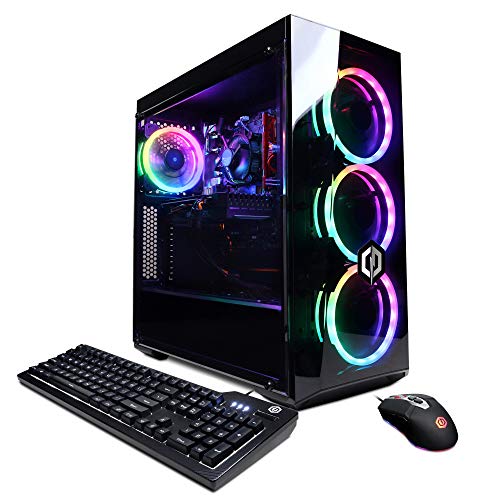
CyberpowerPC Gamer Xtreme VR Gaming PC

KAMRUI Hyper H2 Mini PC

Beelink SER3 Mini PC Ryzen 3

HP Pro 400 G9 Mini Desktop

KAMRUI Hyper H1 Mini Gaming PC
GEEKOM AX8 Max Silent Mini PC
GEEKOM IT13 MAX Mini PC Ultra 9

GEEKOM IT13 MAX AI Mini PC 2026
The Picks, Examined More Closely
The IdeaCentre 24 crams a full computer behind a 23.8-inch display, which makes it a natural fit for dorm desks, reception counters, and cramped home offices where a tower plus monitor feels like overkill. The Intel N100 is a quad-core chip (four processing cores that handle tasks in parallel) aimed at light productivity rather than heavy compute, so think spreadsheets, browser tabs, and Zoom calls rather than video rendering. With 8GB of DDR4 RAM (DDR4 is the current standard type of working memory) and a 512GB PCIe SSD (a fast solid-state drive that connects through the PCIe bus), boot times land under ten seconds and app launches feel snappy for everyday workflows.
Port selection covers the modern basics: one USB-C at 10Gbps, two USB-A 3.2 at the same speed, two legacy USB-A 2.0 ports, HDMI-out 1.4b for a second display, Gigabit Ethernet, and a 3.5mm audio jack. WiFi 6 (the current fast wireless standard) and Bluetooth 5.2 handle wireless duties. For someone furnishing a small workspace without a tower, the cable savings alone justify the form factor.
What It Does Well
- Built-in 23.8-inch display eliminates the need to buy a monitor separately
- Single-cable simplicity keeps a small desk genuinely clean
- WiFi 6 and Bluetooth 5.2 cover modern wireless needs out of the box
- 512GB SSD holds years of documents and personal media without expansion
- Two-display support via HDMI-out suits side-by-side multitasking
Things To Consider
- The N100 chip struggles with sustained multitasking once you open a dozen browser tabs plus a video call
- You cannot upgrade the display panel later, so buy the size you want from the start
- No dedicated GPU, so gaming or GPU-accelerated creative work is off the table
Who It Suits Best
Students and remote workers who want a tidy all-in-one for web work, documents, and video calls without managing a tower.
Consider Something Else When
The GEEKOM AX8 Max Silent Mini PC is the better fit for anyone who already owns a good monitor and needs stronger multitasking headroom.
The GEEKOM IT15 is the loudest statement in this lineup: an Intel Core Ultra 9 285H with 16 cores (the chip’s independent processing units) reaching up to 5.4GHz, paired with 32GB of DDR5 memory (the newest generation of working memory, faster than DDR4) and a 1TB SSD. The integrated Arc 140T GPU (the graphics processor built into the CPU) plus an NPU (neural processing unit, a dedicated chip that accelerates AI tasks) give it 99 TOPS of AI throughput (TOPS means tera operations per second, a measure of AI compute power), which matters for anyone experimenting with local AI models or AI-assisted editing. WiFi 7 support means it is ready for the newest wireless routers.
Display output is the standout feature: quad 8K-capable outputs make this a serious multi-monitor workstation. For a finance desk running several live charts or a studio editing video across reference displays, the headroom is real, not marketing fluff. Compared to the Lenovo all-in-one above, this is a different class entirely, trading the built-in screen for raw compute density in a box you can mount behind any monitor.
A Few Highlights
- 16-core Ultra 9 handles parallel workloads that choke smaller chips
- Quad-display support transforms a tiny box into a serious command center
- WiFi 7 future-proofs wireless networking for years
- 1TB SSD removes any near-term storage anxiety
Worth Noting
- Fan noise rises under sustained loads, so plan placement away from quiet zones
- No dedicated GPU means gaming performance relies on integrated Arc graphics
- Power draw at full tilt is meaningfully higher than smaller mini PCs
Made For
Power users running multi-display workflows, AI experiments, or video editing who do not want a full tower on the desk.
Look Elsewhere When
The Beelink SER3 is the smarter pick for shoppers who only need light office tasks and want a quieter, cheaper box.
This CyberpowerPC tower is the only entry on the list built around a true dedicated GPU: the GeForce GTX 1660 Super with 6GB of VRAM (video memory dedicated to graphics). That alone makes it a different animal from every mini PC above. The Intel i5-10400F is a six-core chip running at 2.9GHz base clock, and paired with 8GB of DDR4 RAM plus a 500GB NVMe SSD (a compact, very fast storage drive), it covers 1080p esports and many AAA titles at medium settings.
The catch is the form factor and platform age. This is a mid-tower with the older 10th-gen Intel platform, and 8GB of RAM is tight for modern gaming. VR-ready status means it handles a headset, but newer titles at ultra settings will push it. If you want a prebuilt that plays games out of the box without buying a graphics card, this tower handles that brief.
Good Reasons To Consider
- Dedicated GTX 1660 Super GPU unlocks real 1080p gaming
- Mid-tower offers straightforward future upgrades to RAM and storage
- Comes with Windows preinstalled, so no setup friction
Trade Offs
- Only 8GB RAM will bottleneck modern titles and heavy multitasking
- 10th-gen Intel platform is dated; newer games are starting to push past it
- Bigger chassis demands more desk or floor space than mini PCs
Right Fit For
Casual gamers and esports players who want a plug-and-play tower with a real graphics card rather than integrated graphics.
A Better Fit Elsewhere
The KAMRUI Hyper H1 Mini Gaming PC suits shoppers who want much newer silicon in a smaller box and accept integrated Radeon graphics.
The Hyper H2 stands out by smuggling a true desktop-class Intel Core i5-14500HX into a palm-sized chassis. That HX chip is a 14-core, 20-thread beast (threads are virtual cores that help the processor handle more tasks simultaneously) reaching 4.9GHz, which is the kind of muscle usually reserved for chunky workstations. With 16GB of RAM and a 512GB SSD, it eats through massive Excel files, code compilation, and resource-heavy business software without flinching.
For context, this chip outperforms older mobile i7 parts by a wide margin and sits well above the integrated-class processors in the Lenovo and Beelink entries earlier. The trade-off is thermal: pushing an HX chip in a small case means the fans work harder under load. For a finance analyst or developer who needs desktop muscle without a tower, the math works out.
Benefits That Matter
- 14-core i5 HX delivers workstation-grade throughput in mini form
- 16GB RAM covers multitasking without constant swapping to the SSD
- Compact footprint fits behind any monitor with a VESA mount (the standard mounting holes on the back of most monitors)
Points To Note
- Fan noise is noticeable under sustained heavy loads
- No dedicated GPU limits gaming and 3D work
- Power brick is larger than typical mini PC adapters
Best Suited To
Spreadsheet power users, coders, and analysts who want desktop-class compute without a bulky tower dominating their desk.
Swap It Out When
The CyberpowerPC Gamer Xtreme VR Gaming PC is a smarter choice for anyone whose workloads include gaming or GPU-accelerated rendering.
The Beelink SER3 is the kind of box that quietly does the job. It measures roughly 4.9 by 4.4 inches, which is about 1/40 the volume of a typical tower, and runs an AMD Ryzen 3 3200U (a 2-core, 4-thread chip that boosts to 3.5GHz) with Radeon Vega 3 integrated graphics. The 8GB of DDR4 RAM and 480GB PCIe 3.0 SSD (a previous-generation but still solid-state drive interface) are reasonable for browser-based work, streaming, and basic office tasks.
Dual HDMI outputs support 4K displays, which makes it a tidy dual-monitor workstation for a back office or a kitchen counter. Compared to the Lenovo all-in-one above, this is far less powerful but also far cheaper and more flexible, since you bring your own screens. For shoppers in the sub-$300 zone who want silence and small size over raw speed, it is a sensible pick.
What Earns Its Place
- Tiny footprint disappears behind a monitor or on a shelf
- Dual HDMI 4K outputs cover a clean two-screen setup
- Quiet operation suits bedrooms and shared spaces
- 480GB storage is generous for a budget mini PC
Some Limits To Know
- 2-core Ryzen 3 struggles with heavy multitasking or large spreadsheets
- No dedicated GPU, so gaming is limited to very old or very light titles
- WiFi and Bluetooth specs are not as modern as newer mini PCs
Who Will Love This
Shoppers who want the cheapest working desktop on the list for browsing, email, streaming, and basic documents.
Another Choice May Suit
The KAMRUI Hyper H2 is worth the step up for anyone who opens more than a handful of browser tabs or works with large files.
The Pro 400 G9 is HP’s commercial-grade mini, aimed at offices that want a manageable fleet of reliable machines. The 12th-gen Intel Core i5-12500T is a 6-core, 12-thread chip with a 4.4GHz turbo, the T suffix meaning low power draw, which keeps the case cool and quiet even under office loads. The 16GB of DDR4 RAM and 1TB M.2 PCIe NVMe SSD (a tiny, plug-in solid-state drive) make this a true productivity box rather than a token effort.
HP’s Pro series tends to emphasize security and management features that home shoppers may never touch, but the underlying build quality is solid. For a remote worker setting up a home office, or a small business standardizing on one machine across a team, this delivers consistency. Storage is the quiet highlight: 1TB is roomy enough to skip an external drive for years.
Notable Gains
- 1TB SSD holds an entire project library without external drives
- Low-power i5-12500T keeps the chassis cool and quiet
- Commercial-grade build suits multi-year office deployments
Honest Caveats
- 12th-gen silicon is now a generation behind the newest chips on this list
- Integrated graphics only, no GPU acceleration for creative apps
- Fewer ports than larger desktops, so hubs may be needed for legacy devices
Perfect Match For
Remote employees and small offices that want a dependable, quiet mini PC with ample storage and proven commercial-grade reliability.
Reach For A Different Pick When
The GEEKOM IT13 MAX AI Mini PC 2026 is the better match for users who want the newest AI-ready silicon and stronger multi-thread performance.
The Hyper H1 packs an AMD Ryzen 7 7735HS with 8 cores and 16 threads, boosting up to 4.75GHz. Paired with 24GB of LPDDR5 RAM at 5500MT/s (the RAM’s data transfer speed) and Radeon 680M integrated graphics, this mini PC punches above its weight for both productivity and light gaming. The triple 4K display support is genuinely useful for stock traders, video editors monitoring timelines, or anyone running reference displays.
Connectivity covers 2.5 Gigabit Ethernet (a wired networking standard 2.5 times faster than standard Gigabit), WiFi 6, and Bluetooth 5.2. Compared to the Beelink above, this is a meaningful step up in processing power, while costing less than the GEEKOM IT15. The honest read is that integrated Radeon 680M graphics handle esports titles well but struggle with demanding AAA games.
Why It Works Well
- Ryzen 7 7735HS handles modern multitasking with room to spare
- Triple 4K display support is rare at this tier
- 2.5GbE LAN is a forward-looking wired networking feature
- 24GB RAM outperforms most mini PCs in this range
Possible Compromises
- Integrated Radeon 680M cannot match a dedicated GPU in demanding games
- LPDDR5 is soldered, so no future RAM upgrades
- Fan noise picks up during sustained gaming or rendering sessions
Who Should Grab It
Light gamers and multi-monitor professionals who want strong CPU performance and modern connectivity in a small box.
Skip It When
The CyberpowerPC Gamer Xtreme VR Gaming PC is the better route for gamers who want a dedicated GPU instead of integrated graphics.
The AX8 Max Silent is built around an AMD Ryzen 7 8745HS, an 8-core chip reaching up to 4.9GHz, paired with 16GB of DDR5 RAM and a generous 1TB SSD. The “Silent” branding reflects GEEKOM’s tuned cooling, which keeps the unit quiet enough for noise-sensitive environments like recording booths, bedrooms, or library-adjacent workspaces. For shoppers who notice fan noise, that detail matters more than any benchmark number.
With DDR5 memory and a 1TB drive, this sits between the KAMRUI Hyper H1 and the more powerful GEEKOM IT15 in raw capability. It does not match the IT15’s Ultra 9 horsepower, but for typical office and creative workloads, the Ryzen 7 8745HS is plenty. The 1TB of storage is a real perk: most mini PCs at this tier ship with 512GB.
A Strong Showing
- Tuned silent cooling suits noise-sensitive setups
- Ryzen 7 8745HS handles modern multitasking comfortably
- 1TB SSD covers most users’ storage needs out of the box
- DDR5 RAM is faster and more future-proof than DDR4
Worth Bearing In Mind
- Integrated graphics limit creative GPU acceleration
- Higher price than KAMRUI alternatives with similar CPU performance
- Some owners report initial setup quirks that need driver updates
Built With In Mind
Home office users and content creators who value quiet operation and ample storage over absolute peak performance.
Not Your Match When
The GEEKOM IT15 AI Mini PC Ultra 9 is the better match for shoppers who prioritize top-tier CPU power and AI acceleration over silence.
The IT13 MAX is GEEKOM’s step-up version of the IT13 platform, swapping in an Intel Core Ultra 9 185H with 16 cores and 22 threads reaching 5.1GHz. That is serious desktop-class horsepower for a box the size of a paperback. The 24GB of RAM and 500GB SSD are sensible starting points, but the upgrade-friendly design lets you swap storage later, which is the key appeal for tinkerers and IT folks planning long-term deployments.
Intel Arc integrated graphics plus an AI Boost NPU (a chip dedicated to accelerating AI tasks) accelerate creative workflows and on-device AI work, from upscaling video to running local language models. Compared to the Lenovo IdeaCentre above, this is a completely different class of machine, trading a built-in screen for raw compute and the ability to grow with your needs.
Where It Helps
- Ultra 9 185H delivers flagship-class CPU performance
- Upgrade-friendly storage bay lets you expand the SSD later
- AI Boost NPU accelerates on-device AI workloads
- Compact form fits VESA mounts behind monitors
Less-Strong Areas
- 500GB starting storage fills up fast with creative files
- No dedicated GPU, so 3D rendering and AAA gaming remain limited
- Power brick adds bulk behind the desk
Whose Shelf It Belongs On
Tinkerers, IT deployers, and creative professionals who want flagship CPU power and the option to expand storage later.
Where A Sibling Pick Shines
The GEEKOM AX8 Max Silent Mini PC is the smarter pick for noise-sensitive spaces where raw CPU power matters less than quiet operation.
This is the AI-flagship version of GEEKOM’s IT13 MAX line, and it shows. The Intel Core Ultra 9 185H handles 16 cores and 22 threads at up to 5.1GHz, paired with 24GB of LPDDR5 RAM (LPDDR5 is a low-power variant of DDR5, common in compact devices) and a 500GB SSD. Intel Arc graphics plus an AI Boost NPU accelerate creative workflows, on-device AI tasks, and 8K media playback, which makes this a credible compact workstation for video editors, AI experimenters, and creative studios.
For shoppers comparing it to the Lenovo all-in-one at the top of this list, the contrast is sharp: this machine does not include a screen, but it offers many times the CPU and memory performance in a smaller box. The trade-off you accept is the LPDDR5 RAM being soldered, so no future memory upgrades, plus a smaller initial SSD. For pure AI and creative workloads, it punches well above its size.
Standout Benefits
- Ultra 9 185H with AI Boost NPU accelerates on-device AI tasks
- Intel Arc integrated graphics handle 8K media playback
- Compact chassis fits studio desks and editing bays
- 24GB LPDDR5 covers most creative workloads out of the box
Practical Considerations
- LPDDR5 RAM is soldered, so no future memory expansion
- 500GB SSD is tight for video projects and may need an external drive
- Premium positioning makes this the priciest mini on the list
The Right Fit
Creative professionals and AI enthusiasts who want flagship CPU power, NPU acceleration, and a compact form for studio or home setups.
A Better Fit Elsewhere
The KAMRUI Hyper H2 Mini PC is the more sensible choice for spreadsheet-heavy office users who do not need AI acceleration.
What To Weigh Before Picking A Budget Desktop
CPU And RAM Drive Day-To-Day Snappiness
The single biggest factor in how a budget desktop feels is the processor. Chips like the Intel N100 in the Lenovo IdeaCentre handle documents and browser tabs but bog down under heavy multitasking. Stepping up to an Intel Core i5-12500T (HP Pro 400) or a Ryzen 7 7735HS (KAMRUI Hyper H1) means more headroom for spreadsheets, code, and creative apps. RAM matters just as much: 8GB is the bare minimum, 16GB is comfortable, and 24GB or 32GB future-proofs for heavier workloads.
Form Factor Changes Your Whole Setup
Mini PCs disappear behind a monitor and free up desk space, but they limit future GPU upgrades and tend to run warmer under load. All-in-ones like the Lenovo IdeaCentre cut cable clutter but lock you into the included display. Traditional towers like the CyberpowerPC Gamer Xtreme give you upgrade room but demand floor or shelf space. Match the form factor to the room, not just the spec sheet.
Storage And Connectivity Are Easy To Overlook
A 512GB SSD fills up faster than most shoppers expect, especially with creative projects or large game installs. If you work with video or photos, 1TB models like the HP Pro 400 or GEEKOM AX8 Max save you from external drives. Port selection matters too: modern USB-C, HDMI-out for second displays, and 2.5GbE LAN (a wired networking standard 2.5x faster than typical Ethernet) are worth having if your peripherals and network can use them.
GPU Choice Defines What You Can Actually Run
If gaming or GPU-accelerated creative work is on your list, integrated graphics will not cut it. The CyberpowerPC Gamer Xtreme is the only sub-$500 pick here with a dedicated GTX 1660 Super GPU, which is what makes it a real gaming box. Every other entry relies on integrated graphics, which handle esports and older titles but struggle with demanding modern games. Be honest about your real workload before choosing a mini PC over a tower.
Key Considerations Across These Picks
Common Buying Slip Ups
The biggest mistake is buying on core count alone without checking single-thread performance (how fast one task runs at a time, which matters more than core count for everyday apps like browsers and Office). Another trap is ignoring thermals: a tiny case with a powerful chip often runs louder than expected. Finally, many shoppers forget to verify the OS situation, so double-check whether Windows is included or whether you need to budget for a license.
What The Higher Tier Buys
Stepping up to the GEEKOM IT15 or IT13 MAX buys you an Intel Core Ultra 9 chip, an NPU for AI acceleration, more RAM, and quad-display support. That is worth it for video editors, AI experimenters, and multi-monitor professionals who actually push those workloads. For light office and browsing, the Beelink SER3 or Lenovo IdeaCentre deliver the experience without the extra spend.
Frequently Asked Questions
Can A Sub-$500 Desktop Handle Video Calls And Remote Work?
Yes. Most picks here, including the Lenovo IdeaCentre, Beelink SER3, and HP Pro 400, run Zoom and Teams smoothly. The minimum spec for clean 1080p video calls is 8GB of RAM and a recent dual-core or quad-core processor, which every entry here meets.
Is An All-In-One Better Than A Mini PC?
It depends on your workspace. All-in-ones like the Lenovo IdeaCentre cut cable clutter and ship with a display, which is great for dorms and small desks. Mini PCs like the GEEKOM IT15 let you choose your own monitor and upgrade it later, which suits multi-display setups and dedicated workstations.
Do Any Of These Desktops Run Games Well?
Only the CyberpowerPC Gamer Xtreme, which has a dedicated GTX 1660 Super GPU, handles modern games at 1080p. Other picks rely on integrated graphics, which cover esports titles and older games but struggle with demanding AAA releases.
How Long Will A Budget Desktop Stay Useful?
Expect three to five years of comfortable use for office tasks, and two to three years if you push creative workloads. Storage upgrades and RAM expansion (where possible) extend life. Machines with soldered RAM, like the GEEKOM IT13 MAX, cannot grow with you, so plan ahead.
Should I Buy A Mini PC Or A Traditional Tower?
Mini PCs win on space and silence, and they cover most office and creative workloads. Towers win on GPU options, upgradability, and cooling headroom. If you want to game or run GPU-accelerated apps, a tower like the CyberpowerPC is the more honest answer despite its larger footprint.
Closing Remarks
The right pick comes down to what you actually do each day. For light office work and clean setups, the Lenovo IdeaCentre or Beelink SER3 cover the basics without fuss. For multitasking and creative apps, the KAMRUI Hyper H1, HP Pro 400, and GEEKOM AX8 Max strike the balance. For raw power and AI readiness, the GEEKOM IT15 and IT13 MAX sit at the top of what this price tier delivers. Match the machine to the workload, and the budget stops feeling like a compromise.