Editing video doesn’t demand a Hollywood workstation, but it does need the right bones under the hood. I’ve spent years sorting through desktops that promise too much and deliver too little, and the gap between a usable editing rig and a frustrating one usually comes down to the graphics card, the memory, and the storage working together. If you’re cutting short films, YouTube scripts, or social content on a tight budget, the picks below cover the spread: from compact towers that tuck under a desk to higher-end builds that handle 4K timelines without choking.
The Essentials At A Glance

Skytech Azure 3 Gaming PC Ultra 7 RTX 5060
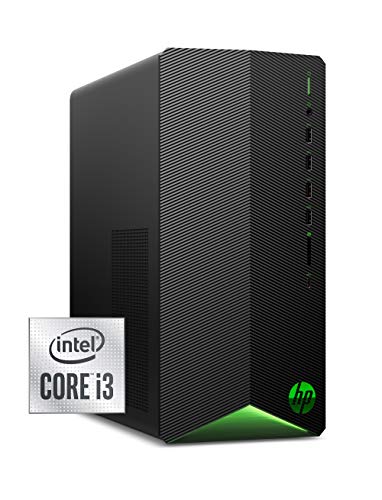
HP Pavilion Gaming Desktop GTX 1650 SUPER

Skytech Crystal Gaming PC Ryzen 7 RTX 5060 Ti
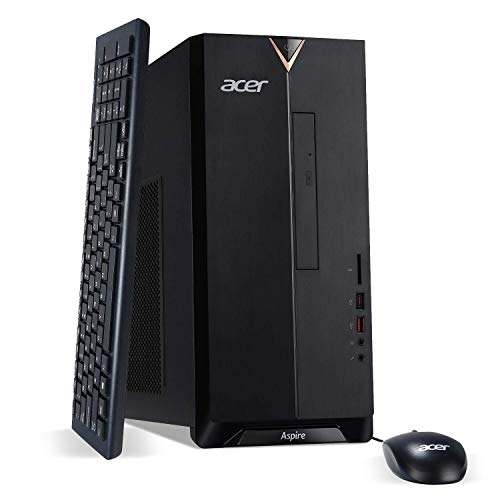
acer Aspire TC-885-UA92 Desktop PC
HP Pro Tower 290 G9 Desktop Computer

Skytech Archangel Gaming PC Ryzen 5 3600

Skytech O11 Vision Gaming PC Ryzen 7 RTX 5070 Ti
HP ProDesk 600 G6 SFF Desktop PC

Dell Slim Desktop ECS1250 Core Ultra 5

HP 2026 Desktop Computer Intel i5-12500
A Deeper Look At The Lineup
The Azure 3 sits at the top of this list because it pairs a current-generation Intel Ultra 7 processor with an RTX 5060 graphics card, and that combination matters more for video editing than raw clock speed alone. The GPU handles timeline scrubbing and effects rendering, while the CPU keeps exports moving through codecs. With 32GB of DDR5 RAM and a 1TB NVMe SSD (a solid-state drive that loads files dramatically faster than older spinning hard drives), it handles 4K timelines without the stutter that smaller memory pools create.
In real-world use, this is the kind of tower where you can stack multiple 4K clips on the timeline, run color grading in DaVinci Resolve, and still have headroom for background tasks like streaming playback. The 360mm AIO liquid cooler (an all-in-one liquid cooling unit that mounts like a fan but moves heat through a closed loop of coolant) keeps thermals steady under long render sessions. For editors who want fewer compromises, this is the build to anchor the list around.
The Upside
- RTX 5060 GPU accelerates timeline playback and effects-heavy exports.
- 32GB DDR5 RAM keeps multiple clips and applications open without thrashing.
- 1TB NVMe SSD means fast project loads and short render queues.
- Liquid cooling supports sustained workloads without thermal throttling.
- Wi-Fi 6 built in, so no dongles needed for fast wireless transfer.
Trade Offs
- Higher cost than mid-range options, so the value math narrows for beginners.
- Full tower footprint demands real desk space and airflow around the case.
Feature Snapshot
Whose Workflow It Fits
Editors cutting 4K footage, applying effects, and rendering regularly who want a build that won’t feel slow in two years.
Skip It When
The Skytech Archangel Gaming PC Ryzen 5 3600 fits hobbyists editing 1080p clips who would rather save the difference for accessories.
HP’s Pavilion Gaming Desktop is one of those compact towers that feels more capable than its spec sheet suggests, mostly because the GTX 1650 SUPER still carries enough muscle for entry-level editing work. The Core i3-10100 handles 1080p timelines cleanly, and the 256GB SSD keeps boot and project files responsive. For someone cutting YouTube clips, vlogs, or short social videos, this is a sensible starting point.
The compact tower design also matters for smaller setups. Compared to the full-size Skytech Azure 3 above, the Pavilion leaves more desk space and runs cooler under light loads. Owners commonly mention the OMEN Command Center software for tweaking performance profiles, though I find the default settings fine for most editing tasks. Storage is the main constraint at 256GB, so external drives become essential once footage libraries grow.
Positive Takeaways
- GTX 1650 SUPER handles basic GPU-accelerated effects in Premiere and Resolve.
- Compact tower fits in tight desks and dorm rooms.
- NVMe SSD keeps the OS and project files snappy on boot and load.
- USB mouse and keyboard included, no extra accessory spend.
Things To Consider
- 8GB RAM limits how many layers and effects you can stack before slowdowns.
- 256GB storage fills quickly with raw video files.
- 10th-gen Intel CPU trails newer options for export speed.
Right Fit For
Students and beginners cutting short 1080p projects who want a reliable, space-saving tower without overspending.
Look Elsewhere When
The Skytech Crystal Gaming PC Ryzen 7 RTX 5060 Ti suits editors ready to work with longer projects and bigger files.
The Crystal lands in the sweet spot for editors who want current-gen performance without stepping into the highest tier. The Ryzen 7 7700 is an 8-core processor that chews through exports efficiently, while the RTX 5060 Ti gives you hardware encoding for H.264 and HEVC, two codecs (compression formats for video) that dominate modern workflows. With 32GB of DDR5 5600 RAM and a 1TB NVMe SSD, the build feels balanced for project files and active timelines.
In real terms, this is the kind of tower where dropping raw 4K footage into a timeline feels routine rather than painful. The 650W Gold PSU (a power supply unit with 80 Plus Gold efficiency certification, meaning it wastes less energy as heat) gives headroom for future GPU upgrades, which matters if you plan to keep the case for years. Compared to the budget Pavilion above, the Crystal costs more upfront but pays back in faster exports and fewer workflow bottlenecks.
Good Reasons To Consider
- Ryzen 7 7700 handles multi-track timelines and color grading smoothly.
- RTX 5060 Ti accelerates hardware encoding for shorter export times.
- 32GB DDR5 5600 memory supports larger project files.
- 650W Gold PSU leaves room for future GPU or storage upgrades.
- Air cooler keeps noise reasonable for office environments.
Worth Noting
- RTX 5060 Ti has 8GB VRAM (video memory on the graphics card), which limits very heavy 6K workflows.
- Air cooling is quieter than liquid but runs warmer during marathon renders.
Best Suited To
Mid-tier freelance editors and creators handling 4K timelines who want speed without flagship pricing.
Where Another Pick Suits Better
The Skytech O11 Vision Gaming PC Ryzen 7 RTX 5070 Ti fits editors pushing into higher resolution or longer compositions.
The Aspire TC-885 is the kind of desktop that has quietly lived on home office desks for years. The 9th-gen Intel Core i5-9400 is a 6-core chip that handles everyday editing tasks without drama, and 12GB of DDR4 RAM covers light timelines plus the browser tabs most of us keep open. The 512GB SSD is roomy enough for active projects before external drives become necessary.
This is a tower built for someone whose editing is part of a broader computing routine. The DVD writer, multiple USB ports including USB 3.1 Type-C, and straightforward chassis design mean it slots into a kitchen-adjacent home office without fuss. Compared to the gaming-flavored builds above, the Aspire trades GPU power for stability and simplicity, which works fine for cuts, transitions, and basic color adjustments on 1080p footage.
Practical Pluses
- Core i5-9400 covers standard editing tasks in Premiere and Resolve.
- 512GB SSD holds project files plus active software comfortably.
- USB 3.1 Type-C port supports fast external drive transfers.
- Compact tower footprint fits under most desks.
Points To Keep In Mind
- Integrated graphics (Intel UHD 630, meaning the CPU handles display output rather than a dedicated GPU) limits effects-heavy workflows.
- 9th-gen CPU trails newer chips on export speed.
- 12GB RAM caps how many layers and effects stay smooth.
Who Will Love This
Home editors cutting family videos, online course content, or simple social clips who want a stable, no-drama machine.
A Better Fit Elsewhere
The Dell Slim Desktop ECS1250 Core Ultra 5 suits anyone wanting a modern CPU with similar everyday focus but newer architecture.
The Pro Tower 290 G9 leans into business-class reliability with a 13th-gen Intel Core i3-13100, a quad-core chip with surprisingly modern single-thread performance. The 16GB of RAM is generous for the category and lets you keep editing software plus communication tools running side by side. The 512GB SSD covers the OS, software, and active projects without immediately pushing you toward cloud storage.
For a setup where the editing happens between meetings and message threads, this tower fits the rhythm. Dual monitor outputs via HDMI and VGA mean you can keep a preview window and timeline on separate displays, and the Windows 11 Pro install gives you the business-tier features some remote work setups require. Compared to the Aspire above, the 290 G9 brings a newer processor and more RAM, though the integrated graphics keep it in the light-editing lane.
Real Benefits
- 13th-gen Intel i3-13100 handles modern app loads with ease.
- 16GB RAM supports multitasking with editing software and browsers open.
- Dual monitor ports help split timeline and preview workflows.
- 512GB SSD balances speed and storage for active projects.
Some Limits To Know
- Integrated graphics cap real GPU-accelerated effects work.
- i3 CPU trails i5 and i7 options for export times on heavy timelines.
Who Should Grab It
Remote workers and hybrid professionals who edit clips as part of broader daily computing rather than as a primary task.
Swap It Out When
The HP Pavilion Gaming Desktop GTX 1650 SUPER fits editors who want GPU acceleration without stepping up to a flagship tower.
The Archangel is the older sibling in this lineup, and it leans into value by using last-generation parts that still handle 1080p editing well. The Ryzen 5 3600 is a 6-core chip that punches above its class on multi-threaded exports, and the GTX 1660 Super brings 6GB of VRAM, more video memory than the Pavilion’s GPU, which helps with effects and transitions. The 16GB of DDR4 3000 RAM is a reasonable middle ground for hobbyist workflows.
Where the Archangel shines is the price-to-capability ratio for entry-level editors. The 500GB SSD holds a respectable amount of footage, and RGB fans add a bit of personality without affecting performance. Owners commonly report this build as a stepping stone that they later upgrade with more storage or a stronger GPU, which is a reasonable plan given the standard tower form factor.
Noteworthy Benefits
- Ryzen 5 3600 handles 1080p exports efficiently for its tier.
- GTX 1660 Super 6GB VRAM supports more effects than budget cards.
- 500GB SSD keeps project files and software responsive.
- RGB fans and a gaming aesthetic feel familiar to enthusiast setups.
Possible Compromises
- Older-gen CPU and GPU trail current parts on 4K workflows.
- 500GB storage can run out quickly with raw footage libraries.
- Wi-Fi 5 is fine but slower than newer wireless standards.
Who It Suits Best
Hobbyist editors and students working on 1080p YouTube content who want more GPU headroom than the absolute cheapest options.
Consider Something Else When
The Skytech Crystal Gaming PC Ryzen 7 RTX 5060 Ti fits editors ready to commit to current-gen parts for longer projects.
The O11 Vision is the build I point people toward when they’re serious about pushing into higher resolutions or longer compositions. The Ryzen 7 9850X3D uses 3D V-Cache technology, which stacks extra cache memory directly on the processor die to speed up data access. Paired with an RTX 5070 Ti carrying 16GB of VRAM, this tower handles 6K timelines and complex compositing with room to spare. The 2TB Gen4 NVMe SSD means even large project libraries load fast.
For working professionals, the build earns its keep in the time it saves. An 850W Gold ATX 3 PSU gives long-term headroom for GPU upgrades, and the 360mm AIO liquid cooler keeps thermals under control during marathon renders. Compared to the Crystal above, this is a noticeable step up in both CPU and GPU, which matters when timelines stretch past 10 minutes or effects layers stack deep.
Standout Benefits
- Ryzen 7 9850X3D delivers strong single-thread and multi-thread performance.
- RTX 5070 Ti 16GB VRAM handles high-res timelines and effects layers.
- 2TB Gen4 NVMe SSD loads massive projects quickly.
- 850W PSU supports future component upgrades.
- 360mm AIO liquid cooling sustains heavy render sessions.
Things To Weigh
- Higher cost makes it overkill for casual editing work.
- Full tower case demands generous desk space and airflow clearance.
Made For
Professional editors and advanced creators working with 4K to 6K footage, complex compositions, or daily render-heavy output.
Another Choice May Suit
The Skytech Crystal Gaming PC Ryzen 7 RTX 5060 Ti suits mid-tier editors who would rather not pay for headroom they won’t fully use.
The ProDesk 600 G6 SFF is a small form factor desktop, meaning it’s built into a compact case roughly the size of a small book, designed for offices where space matters. The Intel i5-10400F is a 6-core chip without integrated graphics, which keeps costs down when paired with a discrete GPU, though this particular config ships without one. With 16GB of DDR4 RAM and a 256GB SSD, it covers basic editing workflows when paired with a budget graphics card.
This tower makes sense for a setup where the desk is shared with other work, like a writing station or shared family office. The small case tucks behind a monitor or under a riser, and the business-class chassis tends to run quietly. Compared to the larger Skytech builds above, you’re trading GPU power and storage capacity for a footprint that disappears into the workspace.
Why It Works Well
- Compact SFF case fits tight desks and shared spaces.
- i5-10400F 6-core CPU handles editing software competently.
- 16GB RAM supports multitasking without immediate slowdowns.
Trade-Offs To Consider
- 256GB SSD fills fast with video project files.
- Discrete GPU likely required for meaningful editing acceleration.
- Smaller case limits future expansion compared to full towers.
The Right Fit
Editors working in shared or compact spaces who plan to add a dedicated GPU and external storage for the full editing workflow.
Not Your Match When
The Dell Slim Desktop ECS1250 Core Ultra 5 suits anyone wanting a compact PC with a modern CPU out of the box.
Dell’s Slim Desktop brings the Core Ultra 5-225 into a compact case, and that processor matters more than people expect. The Ultra 5 line includes a neural processing unit (NPU), a dedicated chip that handles AI-accelerated tasks like scene detection in editing software. With 16GB of DDR5 RAM and a 512GB SSD, it covers the basics plus newer AI features in apps like Adobe Premiere.
The slim chassis fits beside a monitor without dominating the desk, and Wi-Fi 6 plus Bluetooth cover modern wireless needs. Owners commonly use this tower for clean home studio setups where appearance and quiet operation matter as much as raw power. Compared to the ProDesk above, the Slim Desktop uses newer architecture but a smaller SSD, so the trade comes down to CPU generation versus storage capacity.
Practical Advantages
- Core Ultra 5-225 includes NPU for AI-accelerated editing tasks.
- 16GB DDR5 memory supports modern software demands.
- 512GB SSD balances storage with speed for active projects.
- Wi-Fi 6 enables fast wireless transfers and stable streaming.
Honest Caveats
- Integrated graphics limit GPU-accelerated effects work.
- Slim case restricts internal expansion options.
Perfect Match For
Home studio editors who want a tidy, modern desktop with AI-ready hardware for current and upcoming editing features.
Reach For A Different Pick When
The HP 2026 Desktop Computer Intel i5-12500 suits editors who want similar everyday focus with more SSD storage out of the box.
The HP 2026 Desktop wraps a 12th-gen Intel i5-12500 with 16GB of RAM and a generous 1TB SSD, and that storage size is the headline feature. For editors who keep footage libraries locally rather than pushing everything to external drives, this kind of built-in capacity removes a daily annoyance. The i5-12500 is a 6-core chip with boost speeds up to 4.6GHz, which keeps exports moving at a reasonable pace for 1080p and light 4K work.
In real terms, this tower makes sense for someone whose editing workflow lives alongside other daily computing. The 1TB SSD means you can hold multiple active projects without constantly juggling storage. Compared to the Slim Desktop above, the HP 2026 gives up some modern CPU features for more storage and a slightly older but still capable processor.
Useful Highlights
- 1TB SSD holds large local footage libraries without external drives.
- i5-12500 with 4.6GHz boost handles standard editing exports well.
- 16GB RAM supports multitasking across editing and office software.
- Standard tower form factor allows straightforward internal upgrades.
Factors To Consider
- 12th-gen CPU trails newer options on heavy export work.
- Integrated graphics limit GPU-accelerated editing features.
Who Should Grab It
Editors who prefer keeping footage on the local drive and want a straightforward, no-drama machine for everyday cutting.
A Better Fit Elsewhere
The Skytech Archangel Gaming PC Ryzen 5 3600 suits editors ready to add GPU acceleration without stepping up to current-gen pricing.
What To Match Against Before You Pick
Choosing a desktop for video editing on a budget means balancing the components that actually affect render time against the ones that just look impressive on a spec sheet. The GPU handles timeline scrubbing, effects acceleration, and encoding. The CPU keeps exports moving through codecs. RAM determines how many layers and clips stay smooth at once. Storage decides how fast projects load and how much footage you can keep locally.
For most editors working in 1080p, a current-generation quad-core CPU and a discrete GPU with at least 6GB of VRAM will feel responsive. Moving to 4K timelines means looking at least 32GB of RAM and a GPU with hardware encoding support. Storage matters more than people expect. A 1TB SSD sounds large until raw 4K footage fills it within a few projects. Plan for external storage or larger internal drives if your library grows fast.
The honest read is that budget editing desktops fall into two camps: business-class towers with newer CPUs but integrated graphics, and gaming-flavored builds with stronger GPUs and older or mid-range processors. Your editing style decides which tradeoff makes sense.
How GPU Acceleration Changes The Workflow
Modern editing software leans on the GPU for playback, effects, and exports. A discrete graphics card with dedicated VRAM will make timeline scrubbing smoother and cut export times noticeably. Integrated graphics work for cuts and basic transitions but struggle with color grading and motion-heavy effects.
Why Memory Capacity Shows Up First
When a timeline stutters, RAM is usually the bottleneck before the CPU or GPU. 16GB covers casual editing. 32GB is the realistic minimum for comfortable 4K work. Anything below 16GB will feel tight once you stack multiple clips and effects.
Storage Speed Versus Capacity
NVMe SSDs load projects dramatically faster than older SATA SSDs (a slightly slower SSD interface that connects through the motherboard’s storage controller) or spinning hard drives. For active project files, NVMe is worth prioritizing. Long-term archives can live on slower, cheaper storage without affecting editing performance.
Key Considerations Across These Picks
Where Shoppers Go Wrong
The most common slip is buying a tower with a strong CPU but integrated graphics, then expecting smooth editing performance. Editing software leans on the GPU more than casual users realize. Another trap is underestimating storage needs; raw footage fills SSDs quickly, and a machine that feels fast on day one can feel cramped by month three. Skimping on RAM also backfires when timelines get busy.
When Paying More Pays Off
Higher-tier models in this list bring dedicated GPUs with hardware encoding, which directly shortens export times. The jump from integrated graphics to an RTX card can cut render waits by half or more on the same project. For editors exporting daily, that time savings adds up quickly. The extra cost also tends to buy better cooling, more RAM headroom, and PSUs with room to grow, which makes the tower a longer-lived investment.
Frequently Asked Questions
How much RAM do I need for video editing on a budget?
16GB handles 1080p timelines comfortably and basic 4K work, but 32GB is the realistic sweet spot for smooth 4K editing. Below 16GB, you’ll feel slowdowns once you stack multiple clips.
Do I need a dedicated GPU for video editing?
Yes, for any meaningful editing work. Integrated graphics handle cuts and simple transitions, but a discrete GPU with at least 6GB of VRAM accelerates timeline playback, effects, and exports in a way that’s hard to live without once you’ve experienced it.
Is an SSD important for video editing?
An NVMe SSD matters more than people expect. It loads project files faster, keeps the editing software responsive, and reduces the stutter you feel when scrubbing through high-bitrate footage. Hard drives work for archive storage but slow down active projects.
Can budget desktops handle 4K video editing?
Some can, with caveats. Towers with RTX-class GPUs and 32GB of RAM handle 4K timelines well. Budget builds with integrated graphics will struggle past short 4K clips and basic effects.
How long will a budget editing desktop last?
Expect three to five years of solid service from a well-configured budget tower. The components that age fastest are GPUs and storage, so picking a case with a quality PSU and room for upgrades extends the useful life.
Bottom Line
A budget editing desktop comes down to matching the build to your footage. Hobbyists cutting 1080p clips will find solid ground in the Pavilion or Archangel. Mid-tier editors handling 4K timelines will appreciate the Crystal or HP 2026 Desktop. Editors pushing into heavier work should anchor on the Azure 3 or O11 Vision. The honest read is that any of these will keep you editing, as long as the components match the resolution you work in.