A desktop used to be a fixed object on a desk, but the category has sprawled in every direction. Tower gaming rigs, all-in-one screens, palm-sized mini PCs, and quiet office boxes all share shelf space, and the right pick depends on how I actually plan to use it. I spend my days bouncing between writing, photo edits, and the occasional evening game, so I treat each computer here as a tool tied to a specific routine. The ten options below cover gaming muscle, all-in-one simplicity, compact desks, and honest everyday work, with notes on who each one genuinely suits.
The Lineup, Simplified

STORMCRAFT Sirius AI Gaming Desktop, Intel i5 14400F, Arc B570 10GB

Apple 2024 iMac All-in-One Desktop Computer with M4 chip (Pink)

HP 24-inch All-in-One Desktop Computer, Athlon Silver 3050U, 8GB RAM (White)
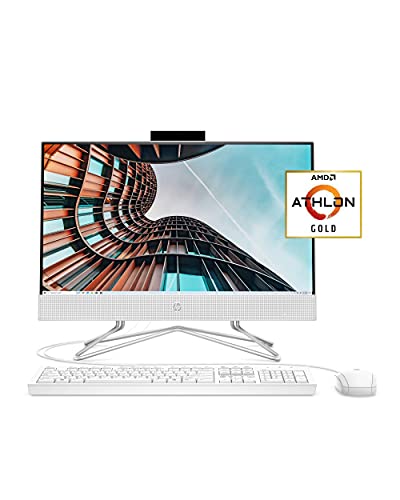
HP 22 All-in-One PC, Athlon Gold 3150U, 4GB RAM, 21.5-inch FHD

GMKtec G3S Mini PC, Intel N95, 8GB DDR4, 256GB SSD

GMKtec G10 Mini PC, Ryzen 5 3500U, 16GB DDR4, 1TB SSD, Triple 4K

GMKtec G11 Mini PC, AMD Ryzen Embedded R2514
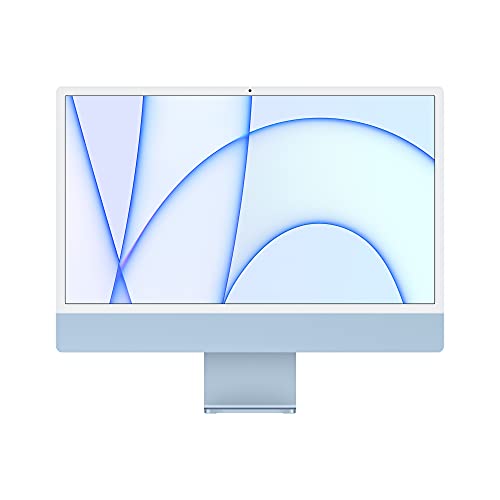
Apple 2021 iMac All-in-One Desktop Computer with M1 chip (Blue)

HP OmniDesk Desktop Computer PC, Ryzen 5, Radeon 740M, 32GB DDR5

GMKtec G10 Mini PC, Ryzen 5 3500U, 16GB DDR4, 1TB SSD
What Each Pick Brings To The Table
The STORMCRAFT Sirius is a traditional mid-tower with the kind of internals that make sense for someone who games at 1440p rather than chasing 4K. The Intel Core i5 14400F is a 10-core, 16-thread chip with boost speeds up to 4.7 GHz, paired with an Intel Arc B570 GPU carrying 10 GB of GDDR6 memory. VR support is baked in, and the chassis leaves room for future upgrades, which is why this slot exists for hobbyists rather than casual users.
The 16 GB of DDR4 RGB memory handles modern game titles and a Discord stream without choking, and the 1 TB NVMe SSD cuts load times down to a few seconds in most AAA games. I like that the build leans into cooling and case airflow, two things tower buyers notice within a week. For anyone upgrading from an older gaming laptop, this feels like a clear step up in thermals and longevity.
Benefits That Matter
- The 14400F chip pairs well with the Arc B570 for smooth 1440p in demanding titles without constant frame drops.
- 16 GB of DDR4 keeps streaming software and the game running side by side without heavy stutter.
- The 1 TB NVMe SSD is generous for a game library, so installs stop being a juggling act.
- VR-ready hardware covers headsets like the Meta Quest line when connected over Link.
- Tower airflow and case design tend to run cooler than cramped prebuilt alternatives.
Trade Offs To Weigh
- The Arc B570 is solid for 1440p but falls behind higher-tier GPUs in raw ray tracing.
- Towers eat more desk and floor space than any of the all-in-ones in this lineup.
- Power consumption runs higher than the mini PCs and AiO models, so a good outlet matters.
Key Attributes
Built With In Mind
Mid-range PC gamers who want 1440p performance without stepping into flagship GPU pricing.
Look Elsewhere When
HP OmniDesk suits shoppers who need quad-monitor productivity more than they need gaming throughput.
The 2024 iMac is the rare computer that genuinely earns the word “furniture,” and the pink finish lands beautifully in a living room or a design studio. Apple’s M4 chip pairs a 10-core CPU with a 10-core GPU, and 16 GB of unified memory, memory the CPU and GPU share for smoother multitasking, keeps the system responsive even with a dozen creative apps open. The 24-inch Retina display runs at a sharp 4.5K resolution, plenty of pixels for photo edits or split-screen work.
The 512 GB SSD is enough for everyday documents and project files, though heavy video libraries may push toward external storage. Compared to the GMKtec G10 Mini PC, this is a quieter, simpler setup that trades raw expandability for instant-on polish. For households already wired into the Apple ecosystem, the integration with iPhone and iPad feels almost seamless.
Well-Handled Touches
- The M4 chip delivers strong single-core and graphics performance for creative software.
- Unified memory architecture reduces the bottleneck between CPU and GPU workloads.
- The 24-inch Retina screen shows color accurately for photo and video tasks.
- The all-in-one form factor keeps cabling to a single power cord plus accessories.
Honest Caveats
- Port selection is limited compared to traditional towers, so hubs are common.
- Internal upgrades are essentially nonexistent after purchase.
- The pink finish looks great but limits resale appeal to a narrower audience.
Right Fit For
Creative professionals and families who value display quality, low noise, and a clean desk over raw expandability.
Reach For A Different Pick When
The HP 24-inch All-in-One fits shoppers who want a similar clean look with Windows software at a lower cost.
HP’s 24-inch all-in-one slots into a family kitchen or study with minimal fuss. The AMD Athlon Silver 3050U is a dual-core chip aimed at everyday tasks, and the 8 GB of RAM is a comfortable fit for browser tabs, video calls, and school software running together. The thin white chassis keeps the desk looking tidy, and the three-sided micro-edge display gives a modern feel that hides the budget nature of the components.
The 256 GB SSD is small for a family computer with photos and homework files, so cloud storage or an external drive becomes almost mandatory over time. The wired keyboard and mouse that ship in the box keep initial setup costs low. Where the STORMCRAFT tower targets gamers, this HP makes more sense as a homework hub.
The Helpful Details
- The 24-inch micro-edge display makes shared viewing comfortable for two people.
- 8 GB of RAM handles common school and office apps without major slowdown.
- The all-in-one design hides cables behind a single stand, which helps in shared spaces.
- The 256 GB SSD boots Windows noticeably faster than older spinning drives.
Soft Spots
- The Athlon Silver chip struggles with heavier multitasking, so keep browser tabs in check.
- 256 GB of storage fills up quickly with family photos and videos.
- Windows 10 Home means a future OS migration is likely on the horizon.
Feature Snapshot
Made For
Families and students who want a clean all-in-one for homework, browsing, and video calls.
Consider Something Else When
The HP 22 All-in-One is a smarter match for shoppers on the tightest budgets and smaller desks.
The HP 22 is the entry point on this list, and it makes its case by trimming down to what actually matters. The 21.5-inch Full HD IPS anti-glare display is the standout feature at this tier, because color and viewing angles stay consistent across a small room. The Athlon Gold 3150U is a modest dual-core chip that targets light office work rather than any kind of creative load.
4 GB of RAM is the binding constraint, and shoppers who keep more than a handful of browser tabs open will feel the squeeze within minutes. The wired USB keyboard and mouse are basic but functional, keeping extras out of the cart. Compared to the GMKtec G3S Mini PC, this HP is a more visible piece of furniture with a bigger screen and fewer ports.
Features That Help
- The Full HD IPS panel holds up better than TN screens for color and side viewing.
- The anti-glare coating helps in bright rooms with windows behind the user.
- 256 GB of SSD storage keeps the system responsive for the basics.
- Included keyboard and mouse lower the upfront cost for first-time setups.
Points To Note
- 4 GB of RAM caps multitasking and may bottleneck modern browsers.
- The Athlon Gold chip is fine for documents, weak for anything heavier.
- Windows 10 Home will eventually need an upgrade path.
Best Suited To
Budget-focused shoppers furnishing a dorm, guest room, or secondary office computer.
Swap It Out When
GMKtec G3S Mini PC fits better in a tighter workspace where the screen is already in place.
The GMKtec G3S is the kind of computer I tuck behind a monitor and forget about. The Intel N95 is a 12th-gen Alder Lake chip with four cores and a turbo speed up to 3.4 GHz, well suited to 4K video output, browser-based work, and light multitasking. With 8 GB of DDR4 and a 256 GB SSD, it covers the basics without generating noticeable heat or noise.
Dual HDMI outputs support two 4K displays at once, which is rare at this size and price. Three USB 3.2 ports, Wi-Fi 5, and Bluetooth 5.0 round out a connectivity suite that handles most home-office setups. The honest read is that this is a streaming and productivity box, not a gaming rig, and shoppers expecting heavy creative work should look at the G10 instead.
Everyday Advantages
- Dual HDMI outputs drive two 4K monitors for serious screen real estate.
- The compact size fits behind a monitor or on a small shelf.
- 8 GB of DDR4 is a comfortable floor for office apps and streaming.
- Wi-Fi 5 and Bluetooth 5.0 keep wireless peripherals happy without dongles.
Small Caveats
- The N95 chip is not designed for gaming or sustained creative loads.
- 256 GB of storage requires external drives for media-heavy users.
- No dedicated GPU means 3D work falls back to integrated graphics.
Quick Facts
Who Should Grab It
Shoppers with small desks who want a quiet, affordable computer for streaming and office work.
Skip It When
GMKtec G10 Mini PC is a better fit for users who need triple-display output and heavier multitasking.
The GMKtec G10 takes the mini PC concept and stretches it into a real productivity machine. The AMD Ryzen 5 3500U is a quad-core chip from the Zen+ family with a 3.7 GHz boost, drawing only 15 watts, which keeps the chassis cool under sustained office work. The 16 GB of DDR4 and 1 TB SSD are generous for a small form factor, and triple 4K display support is the standout feature for anyone running a multi-monitor trading or editing setup.
HDMI 2.1, USB-C, and 2.5G LAN round out a connectivity suite that outpaces most towers at this price. Compared to the smaller G3S, this one trades pocket-sized convenience for genuine workstation behavior. For someone running spreadsheets, code editors, and a video call on three panels, the G10 quietly handles it all without breaking a sweat.
Standout Benefits
- Triple 4K display support is rare at this size and useful for productivity.
- 16 GB of DDR4 handles dozens of browser tabs and editor sessions.
- The 1 TB SSD swallows project files without leaning on external drives.
- 2.5G LAN delivers fast wired networking for large file transfers.
Some Limits To Know
- Integrated Radeon graphics limit serious 3D or gaming use.
- The Ryzen 5 3500U is a generation behind, so newer chips are faster.
- Compact cases can run warm under heavy sustained loads.
Feature Rundown
Who It Suits Best
Home-office workers and creators who run multiple monitors and need quiet, compact power.
Another Choice May Suit
HP OmniDesk fits shoppers who want quad-monitor support with a traditional tower footprint.
The GMKtec G11 steps away from the consumer-grade chips and into embedded territory. The AMD Ryzen Embedded R2514 is built around the Zen+ architecture and is rated for 24/7 continuous operation, which is why this slot is framed around commercial, industrial, and signage workloads. The 1.2 GHz Radeon GPU integrated on-die handles display and light graphics duties well.
The headline trade-off is clock speed versus endurance. Where the Ryzen 5 3500U in the G10 pushes higher boost clocks, the R2514 prioritizes thermal stability for always-on environments. For digital signage, kiosks, and small server duties, that is exactly the right balance. Consumer shoppers may prefer the G10 for everyday multitasking.
Practical Pluses
- Rated for 24/7 continuous operation in commercial environments.
- Low thermal output suits enclosed or vent-restricted installations.
- The embedded R2514 emphasizes longevity over raw benchmark numbers.
- Compact size fits inside kiosks, signage mounts, and tight racks.
Less-Strong Areas
- Lower boost speeds make it a poor fit for gaming or content creation.
- Embedded-class parts can be harder to source replacements for.
- Consumer users may find the G10 better tuned for everyday tasks.
Perfect Match For
IT managers and small-business owners running signage, kiosks, or always-on workloads.
Where A Sibling Pick Shines
GMKtec G10 Mini PC is the right call for traditional home and office users.
The 2021 iMac with M1 still earns a place on this list, especially for shoppers who want Apple quality without the M4 price tag. The 24-inch Retina display is the same panel format as the newer iMac, and the M1 chip handles everyday creative work with surprising headroom. The blue finish gives the room a calm, focused feel, and the matching accessories pull the setup together visually.
The 8 GB of unified memory and 256 GB SSD are tighter than the 2024 model, so heavy creative workflows may need external storage. Compared to the 2024 iMac, this older machine is slower but considerably more affordable, and macOS updates continue to support it well. For studio work and shared spaces, this is a refined pick that does not feel dated.
Real-World Strengths
- The M1 chip delivers strong performance for its class and age.
- Unified memory keeps multitasking responsive across apps.
- The 24-inch Retina display remains one of the best in this size class.
- Color-matched accessories keep the desk visually coherent.
Things To Consider
- 256 GB SSD fills up quickly with modern project files.
- 8 GB of unified memory is fine today but aging fast.
- Older M1 models will lose macOS support sooner than the M4 iMac.
Who Will Love This
Studio owners and households who want a polished all-in-one at a more approachable price point.
A Better Fit Elsewhere
Apple 2024 iMac suits shoppers who want more memory and storage from the start.
The HP OmniDesk is the heavyweight in this lineup, a traditional tower built around the AMD Ryzen 5 8500G with six cores, twelve threads, and a 5 GHz boost ceiling. The Radeon 740M graphics, integrated on the chip, keep thermals reasonable for productivity and light creative work. The 32 GB of DDR5 memory is the kind of spec usually reserved for much pricier workstations, and the 3 TB of combined storage across a 2 TB SSD and 1 TB HDD removes the usual juggling act.
Quad-monitor support, Wi-Fi 6, and Bluetooth 5.4 make this a confident pick for traders, editors, and creators who spread their work across panels. The included wireless keyboard and mouse cut setup time. Where the STORMCRAFT Sirius targets gamers, this OmniDesk targets productivity users who refuse to compromise on memory or storage.
A Strong Showing
- 32 GB of DDR5 is generous for any office workload today.
- Quad-monitor support handles complex multi-panel trading or editing setups.
- 3 TB of combined storage covers media libraries without external drives.
- Wi-Fi 6 keeps wireless networking fast and stable.
Potential Compromises
- Tower footprint eats more floor space than any mini PC or AiO here.
- The Radeon 740M is integrated, so serious gaming still trails discrete GPUs.
- Higher component count means more potential failure points over time.
Product Snapshot
Made For
Creators, analysts, and multitaskers running quad-monitor setups with heavy software loads.
Where Another Pick Suits Better
GMKtec G10 Mini PC fits shoppers who want triple-display power in a much smaller case.
This GMKtec G10 variant leans into the media-library lifestyle with the same Ryzen 5 3500U silicon but a focus on storage-heavy use cases. The 1 TB SSD is the headline here, big enough to swallow a serious collection of films, photos, and project files. The 16 GB of DDR4 keeps everything responsive, and the small chassis slips behind a TV or monitor without drawing attention.
Triple 4K display support makes this a flexible home theater PC and a credible light workstation in the same breath. Compared to the GMKtec G3S, the jump in RAM and storage is meaningful for households using one box for everything. Most shoppers in this category will find the balance right.
A Favorable Mix
- 1 TB SSD holds large media libraries without external drives.
- 16 GB of DDR4 is comfortable for multitasking and HTPC use.
- Triple 4K display output supports ambitious home-office or media setups.
- Low power draw keeps the box cool and quiet in living rooms.
Where It Is Less Suited
- Integrated Radeon graphics limit modern gaming ambitions.
- The Ryzen 5 3500U is a generation behind current AMD chips.
- Compact size means limited internal expansion options.
Whose Shelf It Belongs On
Media-focused households and home-office users who want storage and quiet operation in one box.
Not Your Match When
HP OmniDesk suits shoppers who need quad-monitor support and higher memory ceilings.
Choosing A Desktop Computer That Actually Fits Your Routine
Match Form Factor To The Room
The shape of the computer matters as much as the silicon inside it. All-in-one systems like the Apple iMac or HP 22 combine the screen and the tower, which keeps a small desk tidy but limits future upgrades. Traditional towers like the HP OmniDesk or STORMCRAFT Sirius offer easy access to RAM, storage, and graphics cards, but they need a real footprint. Mini PCs such as the GMKtec G3S, G10, and G11 sit behind a monitor or on a shelf, which is great for clutter-free spaces but caps performance ceiling. I usually pick the form factor first and only then worry about specs, because reversing that order often leads to a powerful box that does not fit the room.
Look At The Chip Generation, Not Just The Name
A processor model number tells you less than the generation behind it. The Ryzen 5 3500U is a Zen+ chip that still handles everyday work, while the Ryzen 5 8500G in the HP OmniDesk is a much newer architecture with stronger single-core and multi-threaded performance. Apple’s M1 and M4 chips are different generations too, and the gap shows up in heavier creative workloads. Reading the architecture name rather than the marketing label helps avoid overpaying for older silicon.
RAM And Storage Decide Daily Comfort
Specs like 8 GB versus 32 GB of RAM change how a computer feels over months more than benchmarks suggest. 4 GB is workable for single-task browsing, 8 GB handles office multitasking, and 16 GB covers editors and large browser sessions comfortably. Storage matters similarly: a 256 GB SSD fills up fast in a family computer, but a 1 TB SSD in the GMKtec G10 or HP OmniDesk lets a household forget about storage for years. For most shoppers, paying for the storage upgrade upfront is a smarter move than chasing a slightly faster chip.
Plan For Real Ports And Displays
Port selection often gets ignored until the day someone tries to plug in a second monitor. Mini PCs like the GMKtec G10 support triple 4K output, while the HP OmniDesk stretches to quad monitors. All-in-ones tend to be stingier on ports, so anyone planning extra displays should check that count before checking out. Wi-Fi 6, Bluetooth 5.4, and 2.5G LAN are quietly useful in 2026, since most modern routers and mesh systems take advantage of them.
Key Considerations Across These Picks
Mistakes Worth Dodging
A common slip is picking a computer by raw clock speed without considering the use case. The STORMCRAFT Sirius looks impressive on a spec sheet, but a shopper who only writes and streams will get more from a quiet all-in-one. Another trap is underestimating storage needs, since cloud-only assumptions often collide with slow uploads and subscription fatigue. Always check the port layout before assuming your old monitor cable will fit, because HDMI 2.1, USB-C, and older HDMI standards all show up in this list.
What The Higher Tier Buys
The jump from a budget Athlon-based HP to the Ryzen 5 8500G in the HP OmniDesk shows up in sustained multitasking and future software demands. Higher memory tiers like 32 GB of DDR5 pay off when running editors, virtual machines, or large spreadsheets. Integrated graphics in modern Ryzen chips handle most work, but discrete GPUs like the Arc B570 in the STORMCRAFT open up gaming and GPU-accelerated tasks. The honest read is that spending up makes sense when workloads stretch beyond basic office apps, and the upgrade tends to age better over five years.
Frequently Asked Questions
How Much RAM Do I Really Need In 2026?
For most office work, 8 GB is the minimum and 16 GB is the comfortable target. Editors, traders, and heavy multitaskers benefit from 32 GB, which is what the HP OmniDesk ships with.
Are Mini PCs Powerful Enough For Daily Work?
Yes, for office apps, browsing, streaming, and light editing. The GMKtec G10 with a Ryzen 5 3500U and 16 GB of RAM handles triple-display productivity smoothly, though serious gaming or 3D work still wants a tower.
What Is The Difference Between An All-In-One And A Traditional Desktop?
An all-in-one combines the monitor and computer in one unit, which keeps cabling simple. A traditional desktop separates the tower from the display, which makes upgrades and repairs easier over time.
Is An SSD Really That Important?
Yes. SSDs make a noticeable difference in boot times, app launches, and file transfers compared to older hard drives. Every computer in this list uses solid-state storage, so the baseline is already strong.
Should I Buy Protection Plans For A Desktop?
Protection plans can make sense for households with kids or pets, where accidental drops or spills are realistic. For an office setup that stays put, the manufacturer warranty usually covers the core risks.
Bottom Line
A desktop is the kind of purchase that should match the room, the workload, and the patience level for cables. I lean toward the GMKtec G10 for most home offices, the STORMCRAFT Sirius for gamers, and the Apple iMac for design-led spaces. Pick the form factor first, then the chip, then the storage, and most of the choices here will line up naturally.